Microsoft has just released its earnings report for its second fiscal quarter ending December 2018 and as many predicted, the company’s numbers are up on the whole.
As for the actual earnings details, once again Microsoft’s Azure cloud is the tide that is figuratively lifting all of the company’s other boats this quarter.
Intelligent Cloud
Microsoft’s Intelligent Cloud division which houses its server products and cloud services including Azure saw 20% revenue growth in year over year comparisons for the quarter. More specifically, Azure revenue saw a 76% revenue spike this year while other server products and cloud servers saw a modest 24% increase.
Another underreported area of growth for Microsoft’s Intelligent Cloud business is its Enterprise Mobility install base which also saw significant growth to the tune of 94 million seats in total or 57% growth.
Productivity and Business Processes
The move to a subscription-based Office offering in Office 365 continues to pay off with the Office Commerical still growing revenue by 11% for the quarter as well as Microsoft Dynamics growing its revenue stream by 17%.
However, the consumer side of Office was hit by a softening PC market and only manage to grow its revenue by a modest 1%. On the flip side, Office 365 consumer base has risen to 33.3 million users which is an increase from its 32.5 million last quarter.
More Personal Computing
Perhaps the more volatile of Microsoft’s business divisions and subsequently the most entertaining to report on saw an overall 7% growth in revenue from its Surface and Gaming efforts. Weighing down the division’s numbers is its Windows OEM Pro revenue that saw a 5% decline for the quarter which matches the decline PC manufacturers are also seeing in the market. Complicating things even further are the numbers for Windows OEM non-Pro revenue which tumbled 11% in revenue earnings and Microsoft was forced to admit that entry-level category devices (presumably Chromebooks) are sapping the businesses momentum.
On a brighter note, Microsoft’s Surface line is no threat of being canned anytime soon, as some writers have alluded to over time. The Surface brand and division post close to $2 billion in revenue earned for the quarter. A successful holiday line that included an updated Surface Pro 6, Surface Laptop, Surface Headphones, Surface Studio and Surface Laptop 2 made for a profitable quarter for Microsoft proving that demand for the brand continues to be strong.
On the gaming side of things, Xbox Live monthly active users have increased from 57 million in the previous quarter to 64 million in Q2. The increase in Live subscriptions helps lead the division to a 31% increase in gaming revenue for Xbox software and services.
Honorable mentions go out to Microsoft Search advertising with revenue growth of 14% with an asterisk, excluding traffic acquisition costs. The other notable Microsoft business earning highlight comes from the recent acquisition of LinkedIn which grew its revenue by 29% and has shown record levels of engagement, according to Microsoft’s report.
Xbox Live outages are an unfortunate reality of the gaming community, to the Xbox servers credit, they are an infrequent occurrence for the most part and have relatively minimal impact on most gamers days.
However, the latest Xbox Live outage has been a bit more crippling for owners of Xbox One consoles. Rather than simply negating the use of some online aspects of the platform such as multiplayer games or game broadcasting and streaming, the latest outage has effectively render consoles unusable from a navigation standpoint.
xbox servers is down on the coldest day in history.
According to an Xbox One subreddit that’s growing with complaints, users of the Xbox One console hardware are experiencing issues that range from issues signing into accounts to complete black screens immediately after boot up.
Fortunately, the issues appear to be tied to the Xbox Live software and not hardware related. Some people in the Xbox One Reddit thread have come up with homespun solutions such as disconnecting ethernet cords or doing a series of settings adjustments to reestablish normal Xbox One behavior.
Over the past hour or so, the Xbox team has officially addressed the outage and offered their own rather simple workaround.
If you reboot you should be ok, or will be in a few minutes. Sorry for the issue – deployment error. https://t.co/JnBcOP4QUs
The support team is still looking into the matter and we expect Microsoft to offer reasoning to this rather severe outage today.
We are aware of reports of Xbox One console startup, title update and sign-in errors. We will keep everyone informed once we have more information to share. Thank you all for your patience.
Microsoft CEO Satya Nadella is once again ringing the bell of platform cultivation for the company’s many software services and his new highlight is the “Power Platform.”
Unfortunately for comic book fans, Nadella isn’t talking about some collection of superheroes, but instead about how Microsoft’s Power BI, PowerApps and Flow all come together to help build a platform atop the company’s Azure cloud services.
Fortunately, other Microsoft executives have taken up the mantle of further pitching the virtues of the company’s Power Platform and corporate vice president of business applications group James Phillips helps lay out Microsoft’s vision for the platform as well as the specifics of how each individual application can be applied to strengthen the whole.
Our vision for the Power Platform started from the recognition that data is increasingly flowing from everything, and a belief that organizations that harness their data – to gain insights then used to drive intelligent business processes – will outperform those that don’t.
Of the three applications, PowerBI may be the most well known and used as it has become a self-service businesses intelligence visualization solutions for tens of thousands of companies. Supporting 43 languages in over 18,000 cities across the world, PowerBI holds nearly 10 petabytes of data from various sources that include tried and true Excel docs, Oracle databases, SAP or Salesforce applications and hundreds of proprietary technologies.
Next up are PowerApps which is best described as a ‘citizen application development platform.’ PowerApps tie into PowerBI data to help produce web and mobile apps catered to the specific data collected and processed. With a closed-loop development cycle between PowerApps and PowerBI, businesses can continually analyze and redistribute data from the cloud to apps.
Last but not least is Flow which a product that was developed to cater to the growing interest of Robotic Process Automation (RPA) which allows employers to automate workloads. Simple automation has a growing an interest in businesses as they look to optimize simple tasks to lower expense costs.
When combined, the Power Platform will allow businesses to unlock insights and intelligence that many can then convert to intelligible action plans across the web and mobile applications while simultaneously identifying areas of streamlined opportunity through automation, creating what Philips refers to as a “powerful system of continuous improvement.”
Microsoft is planning a Virtual Launch Even that is open to whoever is interested in the company’s developing Power Platform. The Power Platform launch event is scheduled for April 2, 2019, with more details to be announced over the coming months.
As the United States and China enter their 9 straight months of trade warfare that include tariff disputes, some US-based tech companies are begin forced to confront the realities of stalled negotiations as they report earnings to investors each quarter.
A primary example has been the readjusted earnings outlook Apple was forced to inform investors about in late 2018, and as Microsoft steps to the earnings stage, it’ll be interesting to see how their fiscal quarter has been affected, if at all.
Putting things in perspective, a quarter for quarter comparison puts Microsoft’s assessed share price at an increased $.013 a share as well as an increased $5.57 billion in revenue for the quarter. Microsoft’s 2nd quarter earnings call, coming this afternoon, is shaping up to be another great one.
Unlike Apple, Microsoft has effectively ousted out China through Windows copyright infringements and hasn’t been as reliant on the country as a growth sector for its pivot to the cloud. Reflecting that regional independence has been the three-week-long 13% share price increase from bullish Wall Street investors.
As noted by the NASDAQ assessment, part of the long term confidence from investors comes from the clear, diversified and growth portfolio of businesses Microsoft undertakes.
Microsoft is now more balanced and diversified than ever before, especially when factoring LinkedIn revenue, which is now tied to CEO Satya Nadella’s compensation.
All told, having expanded its reach over the years beyond software and personal computing, Microsoft is posting strong revenue and profit growth and seemingly operating on all cylinders. The company has fully transitioned towards faster-growing businesses
While Microsoft may continue to see growth on its current path, on the horizon competition and a saturated market may squeeze the company’s portfolio.
With the company’s cloud business growth marked at a 24% growth from year over year quarterly comparison in 2017 and 2018, competitors such as Amazon, IBM, Google and Alibaba will be sure to cut into that level of growth as more data points from Intel’s recent earnings reports indicate a leveling off of data center sales demand.
Microsoft is still set to accelerate its cloud growth throughout the rest of 2019 as it continues to sign big name retail brands, government contracts and scientific partnerships around the world.
Microsoft is preparing to premier its second season of Inside Xbox show next week. As noted by the Xbox team, the new episodic series will feature “exclusive news, content, reveals, interviews and footage,” for fans of the company’s gaming systems.
You must be at least this hype to watch the newest episode of #InsideXbox:
The series will air live on Twitch, YouTube, Facebook, Twitter, and of course, Microsoft’s own Mixer streaming service. In fact, for those who use the tech giant’s streaming service over Amazon’s (that’s Twitch, for those of you who might not know), the company will be giving away free goodies via their “MixPot” reward system, plus additional behind-the-scenes video not found anywhere else for those who log into the streaming service.
As far as what will be on the main show, the creative director of Crackdown 3, Joseph Staten will be on the show to discuss details of the new game mode landing on the game, which has yet to be released on February 15 on Xbox Game Pass. Plus additional details of what’s to come on other titles such as Mortal Kombat 11, Sea of Thieves, and Metro Exodus will me mentioned in the livestreams, as well.
The show will begin live at 2 P.M. Redmond-time next Tuesday for those interested, and Microsoft encourages those who don’t yet have a Mixer account to create one now if they want the free goodies from their giveaway. In the mean time, you can always watch the teaser trailer above, and let us know your thoughts below.
After browsers like Firefox and Internet Explorer blocked drive-by-downloads, Chrome 73 is going to do the same.
Google Chrome is a gigantic browsing platform that offers unlimited browsing worldwide. Since it operates millions of users across the globe, Google takes every step necessary to ensure secure browsing with maximum productivity.
Google already introduced other safe features such as Safe Browsing, Sandboxing and site isolation. The company took this safety strategy one step further and introduced a new Chrome security update that will block down drive-by-downloads for safe browsing.
Drive-by-downloads are unintended downloads. In other words, the downloads that occur without the consent of the user. These downloads, mostly those originating from iFrames, contain malicious code which can threaten the personal information of the user.
In a public document, Google imparts to block only those drive-by-downloads that originate from iFrames and lack user gesture. According to the officials, “We plan to prevent downloads in sandboxed iframes that lack a user gesture, and this restriction could be lifted via an ‘allow-downloads-without-user-activation’ keyword if present in the sandbox attribute list.”
The new security update puts an end to those drive-by-downloads which satisfy the following conditions:
The download is triggered via or navigations.
Those are the only types of download that could happen without user gesture.
The click or the navigation occurs in a sandboxed iframe unless the tokens contain the “allow-downloads-without-user-activation” keyword.
The frame does not have a transient user gesture at the moment of click or navigation.
In case you want to be secure while surfing the internet, you will need to get a full-dedicated tool to secure your network. Install now Cyberghost VPN and secure yourself. It protects your PC from attacks while browsing, masks your IP address and blocks all unwanted access.
The document issues by Google also communicates that the security update will fail the drive-by-downloads without making any notable change. However, developers will receive a console-error.
For the non-technical visitors of WindowsReport, iFrame is an HTML element that is used to embed another webpage inside one webpage. These iFrames are hidden within the layout of the webpage and can install malware without your authorization.
This new update would be available on all platforms by March or April excluding iOS. This is because this kind of security is not supported on WebKit(iOS is based on WebKit engine).
The wmpnetwk.exe is a process that connects Windows Media Player with external networks. It is a process for a service needed for WMP streaming. However, some Windows 7 users have stated that wmpnetwk.exe can hog more than 50 percent RAM. In which case, those users need to fix that process wasting system resources. These are a few fixes for wmpnetwk.exe wasting system resources.
Solutions to fix Wmpnetwok.exe high RAM/CPU usage
1. Adjust the Media Player Network Sharing Startup Settings
Wmpnetwk.exe is the process for the Windows Media Player Network Sharing Service in Win 7. Thus, users can configure that service’s startup to fix its system resource wastage. Follow the guidelines below to adjust the Windows Media Player Network Sharing Service’s startup.
Open the Run accessory with the Windows key + R keyboard shortcut.
Input ‘services.msc’ in the Open text and click OK to open the window in the snapshot directly below.
Double-click the Windows Media Player Network Sharing Service to open the options shown directly below.
Select Manual on the Startup type drop-down menu. That will ensure the service only starts when users utilize Windows Media Player for streaming.
Alternatively, users can turn off the service by selecting Disabled on the Startup type drop-down menu.
Users who never utilize WMP can also uninstall Windows Media Player to fix wmpnetwk.exe wasting system resources. However, users can’t uninstall Windows Media Player in the same way as third-party software. Follow the guidelines below to turn WMP off.
Open the Run accessory.
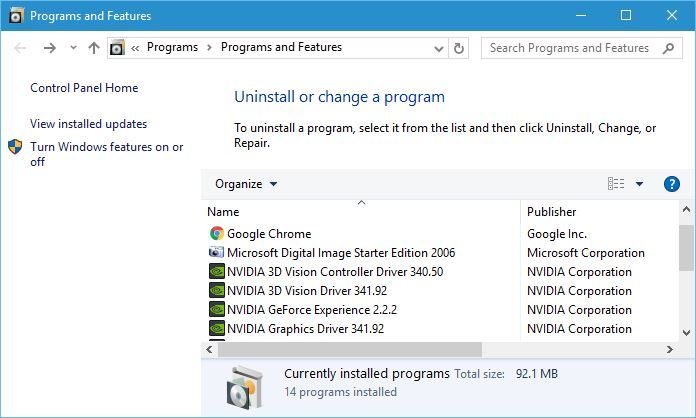
Input ‘appwiz.cpl’ in Run’s text box, and press the OK button. That will open the Programs and Features Control Panel applet below.
Click Turn Windows features on or off on the left of the window.
Double-click Media Features to expand that category.
Then users can deselect Windows Media Player to uninstall it.
3. Scan for Malware
Note that malware also disguises itself as the wmpnetwk.exe process. As such, it might be the case that the wmpnetwk.exe process with excessively high system resource utilization is malware.
Users can scan for and eradicate malware with the freeware version of Malwarebytes. Click Free on the Malwarebytes page to download the freeware version, which is also includes a 14-day trial for the premium package. Open the software’s installer to add it to Windows. Then click the Scan Now button when you’ve opened the software.
So that’s how users can fix wmpnetwk.exe wasting system resources in Windows 7 and 10. The fixes above will free up RAM for other software.
Microsoft’s Bing Search engine has always been especially useful for Windows 10 users. It’s integrated in the tech giant’s Cortana virtual assistant as well as Microsoft Edge, so it’s no secret that anyone with Windows 10 has likely used it at least a couple of times to perform quick searches.
However, what might not be common knowledge is that Bing can be used as a way to get a quick answer if a user needs to perform an action in Windows 10 and might not know how. The results are a combination of hand written results provided by the Windows content team as well as other results obtained through machine learning, Microsoft told us. There are two easy ways to access Bing when a users has a question about their system.
The first method is though Windows search, located on the bottom left of the taskbar between the Windows and Timeline buttons. From there, just click or tap and type in your question. In our example, we asked “how to change the desktop colors” in Windows 10. The result is a quick, step by step guide on the Microsoft Help website on how to do just that.
A user who wants to change system colors, for example, can find the instructions quickly with Bing though Windows search.
Another way to get answers is by using Bing on Microsoft Edge. You can simple find an answer by opening Edge and typing your question in the URL form. This is especially useful when you have a more complicated answer, because sometimes the answer at the top isn’t always the most relevant. In our case, we asked it “how to delete user account in Windows 10” and instead got a result for how to close an entire Microsoft account. Luckily for you we here at On MSFT already have you covered as you can see our more relevant how to right below.
The first seach result isn’t always the most relevant, so its good there are always others down below.
Microsoft’s Bing is always improving, though. So what might not be the best result now might be so tomorrow. For now, its best for quick answers to simple questions, such as how to make a quick system change or perform a simple action. For more complex tasks, you might have to click the full article or find a more relevant third-party article.
It’s worth noting that these features are not entirely new, and have been a feature in Bing for a couple years now. However as Microsoft has spent this time refining the feature, it has come to our attention that its good enough for most basic tasks for users who need quick info about Windows 10.
What do you think about Microsoft Bing as a quick lookup tool for Windows 10? Feel free to share in the comment area below.
Microsoft is getting ready to officially end support for Internet Explorer 10, which will no longer receive security updates after next year. To speed up the process of moving all users to the newer Internet Explorer 11, the company will be providing users of Windows Server 2012 and Windows Embedded 8 systems with the option to run IE11 in either test environments or pilot rings, so they can make sure everything works in the new and more secure web browser.
Microsoft has stated that Internet Explorer 11 will be the last version of the company’s older web browser. As such, any version before that will stop receiving updates, and the company will push users to use either IE11 or the newer Edge web browser.
Users will have until January 2020 to make the change to IE11 if they wish to keep receiving free security updates. Additionally, with Microsoft bringing Chromium’s Blink browser engine over to Edge, it seems it won’t be long until the total desolation of the company’s legacy web browser.
According to Microsoft, anyone who wishes to upgrade to the newer browser can do so via the Microsoft Update Catalog or in Windows Update, and will later also be able to do so via Windows Update and WSUS as well. Additionally, companies will be able to use Enterprise Mode in IE11, which will allow IE10 dependent web apps to run in the newer version of Internet Explorer until they are updated to support IE11 or another browser.
Nearly two weeks ago, Microsoft finally kicked off the “phased rollout” of the Windows 10 October 2018 Update. This means that the major release should be available to download for all users who manually check for updates in Windows Update, assuming there are no hardware of software incompatibilities.
After a slow start, the propagation of the Windows 10 October 2018 should finally accelerate, but it’s not that obvious when you take a look at AdDuplex’s latest data. The ad network for Windows Store apps and games has just published new data for the month of January, and this time only 12.4% of more than 100,000 surveyed PCs are running the October 2018 Update (up 5,8% points).
“While this number is almost double of what we’ve seen last month, it’s still far away from the dominating April 2018 Update (80.2%), noted AdDuplex. “With only a few months to go until the next Windows 10 update is supposed to go mainstream, it is unclear if some PCs may have to install two major updates within a short period of time or go straight from A18U to 19H1.”
Considering that AdDuplex’s pool of surveyed PCs only represents a blip in the sea of 700 million Windows 10 PCs, we always prefer to take the company’s data with some extra caution. Still, the company did insist this month on the fact that the rollout of the October 2018 Update “needs to accelerate in February or be scrapped altogether in favor of going straight to 19H1.” And as you can see in the image below, what the company has been seeing with the October 2018 update is pretty unique in the history of Windows 10 updates.
Unfortunately, Microsoft doesn’t share hard data about the different versions of Windows 10 still in use, so there’s no way to tell if the October 2018 Update really crossed a double digit market share. We really wish Microsoft took a page from Google’s playbook, as the latter regularly shares information about the relative number of devices running a given version of Android. In the meantime, we’re going to ask you directly if you have already received the Windows 10 October 2018 Update, please tell us in the Twitter poll below and feel free to share more details in the comments section.
Poll: Have you been upgraded to Windows 10 October 2018 Update (1809)?
Shortly after its bungled Xbox One announcement, Microsoft’s Xbox division quickly course corrected and began putting an emphasis on its more gamer-centric decisions within the company.
From enabling backward compatibility with older Xbox 360 titles and platform flexibility with Play Anywhere to the introduction of its relatively successful Game Pass subscription service, the Xbox One team has been making its games and its gaming experience a priority.
While the aforementioned feats have all laid a solid foundational starting point for next-generation gaming experiences, actual coveted game titles are still something the Xbox One team is struggling with, but they may be getting some veteran help with that soon.
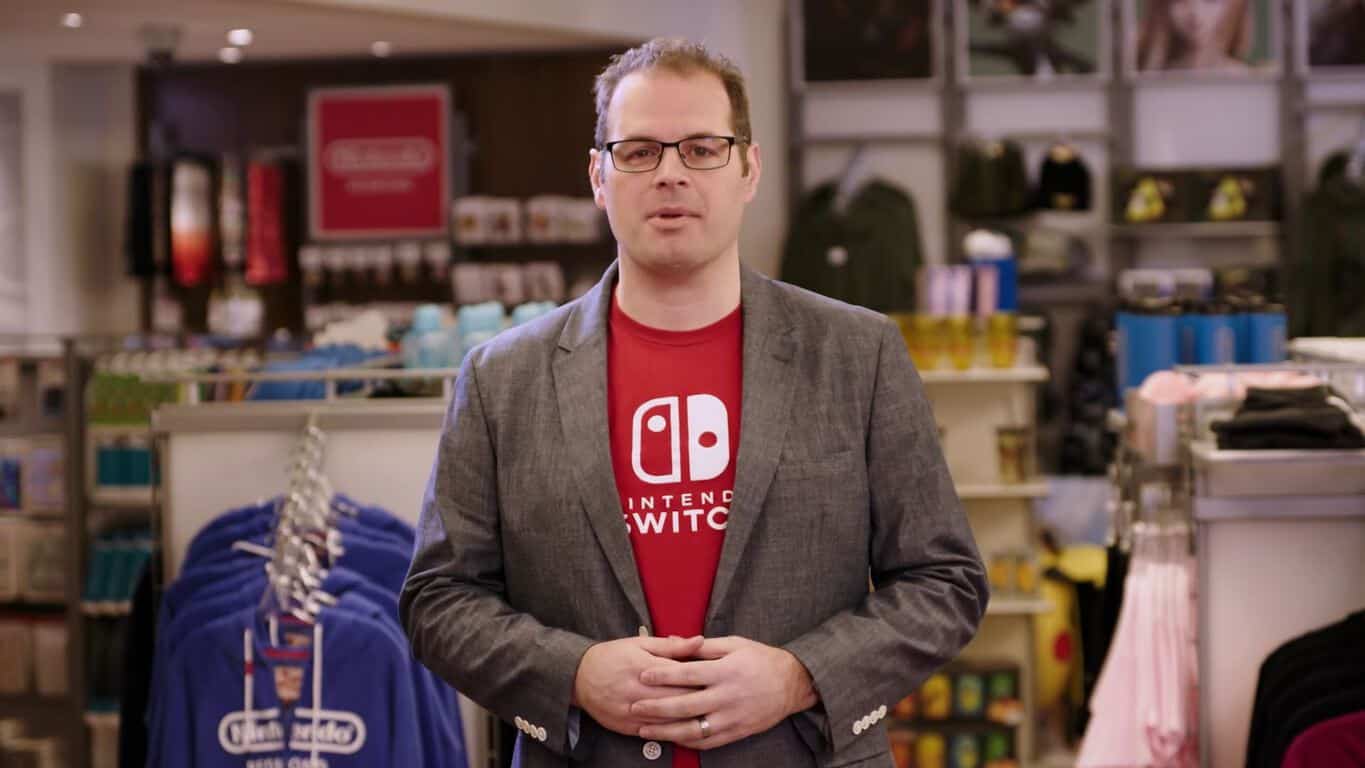
Damon Baker, the former head of partner management at Nintendo America announced his departure from the business and is now the head of portfolio for Xbox.
According to a recent Twitter post, Baker will be overseeing 2nd and 3rd party content for the Xbox One platform.
Hey all, overdue news to share. Been soaking up knowledge this last month as the new Head of Portfolio for #Xbox! Honored and excited to help evaluate all 2nd/3rd party content towards our strategy. Big thanks to @iocat@aarongreenberg@XboxP3 and team. The future looks amazing! pic.twitter.com/isqylqnBGk
While acquisitions such as these are never a 1:1 exchange of impact, Bakers expertise and vision should help foster and cultivate a Nintendo like-community of 2nd and 3rd party gaming experiences possibly coming from the Xbox divisions newly acquired Obsidian Entertainment and Ninja Theory studios among others.
Taco Bell may no longer be giving away their exclusive platinum Xbox One X consoles anymore, but that doesn’t mean you’re completely out of luck. If you enjoy Oreo cookies, than Nabisco has a sweet deal for you. The company will be giving away 10 custom-designed Oreo Xbox One X consoles to lucky customers who buy a pack of their iconic sandwich cookies, plus they’re also giving away plenty of free trials of Xbox Game Pass as well, so you’re odds of getting at lease something is pretty decent.
The giveaway is part of their “Stuf Inside” promotion, which is also offering other prices as well including a new Jeep vehicle or some Oreo-branded headphones, with a different prize being given out each day. However as Xbox fans ourselves, we thought this particular one was the most interesting.
To participate in the giveaway, you must scan the code provided on your eligible Oreo package at their promotional website, or you can head over there to see how you can enter for free (and to read the fine print). It starts on February 4th and runs for just 30 days, which puts March 6 as the last day to enter. However, only one of those 30 days will be offering the limited Xbox console, and the company wasn’t ready to reveal the exact date.
It’s certainly a worthwhile promotion for people who are fans of the cookies and Xbox gaming. Is this something you’re interested in? Let us know in the comment area below.
Now if you’ll excuse me, I am going to head to the nearest convenience store a purchase a pack or Oreos.
The Department of Governance Reform of Punjab, a state in northern India, has entered in agreements for offering cloud services in the state. Microsoft is the first global cloud service provider to get empaneled for offering cloud services in the state for a period of three years.
The department has empaneled four Microsoft partners in its Cloud Services Directory, allowing government departments and agencies in Punjab to choose Microsoft Cloud to advance their digital transformation and optimize IT operations.
The state’s Land Records Information System and E-Sewa (previously called SUWIDHA – Single User-Friendly Windows Disposal & Helpline for applicants) will soon migrate onto the Microsoft Azure platform.
Microsoft played a key role in the enhancement and efficient delivery of citizenship services in the state and also supports the State Data Center of Punjab.
Microsoft, the only provider of services across all three clouds in the country – private, public, and hybrid cloud, was the first global public cloud service provider to be accredited by the Ministry of Electronics and Information Technology (MEITY) and has three datacenters within the country – in Pune, Mumbai, and Chennai.
According to Parminder Pal Singh, PCS, Director of Governance Reforms, Punjab, the next step of growth will be to move beyond just the Internet and leverage the power of the cloud and hopes Microsoft’s cloud technology will provide transformational e-governance services and financial inclusion opportunities to lakhs of people across Punjab.
The week’s update to the beta versions of the iOS and Android Xbox apps added two new features relating to Xbox One video game screenshots and video clips; the ability to share directly to social media from within the app and the ability to download media locally to an iOS or Android smart device.
Currently, clips can only be shared to the Xbox activity feed or sent as an Xbox Live message to other users and the ability to actually download clips with the app has never been a possibility even though it has frequently been one of the most-requested features.
Share game captures with friends. In response to your feedback, we’ve added the ability to share game captures with friends and across social media
Easily save to phone. Save your game clips and screenshots to your phone
From your Captures page, click the existing share button to view these new options
The Xbox beta apps are used to test new features for bugs and glitches with a smaller audience before rolling them out to the general userbase with the regular iOS and Android Xbox apps. With testing of these features having now begun, it’s likely they’ll come to the public apps sometime over the next few months.
The ability to download apps is already possible within the Windows 10 Xbox app. As is social sharing, though only to Twitter.
Kingdom Hearts III is the first game in the franchise to launch on the current generation of consoles and as a result features a significant graphical upgrade compared to previous entries. The game is enhanced for Xbox One X consoles and will feature two options that can prioritize either visuals or framerate while playing.
Here’s the official game description and gameplay trailer:
The latest entry in the KINGDOM HEARTS series. Having learned that all their struggles thus far were engineered by Master Xehanort in his plot to start another Keyblade War, Sora and his friends continue their search for seven guardians of light capable of standing against the coming darkness. King Mickey and Riku seek out Keyblade veterans from the past, while Sora, Donald, and Goofy begin a new odyssey across Disney worlds to claim the “power of waking.”
Wiser from his many adventures, Sora is about to face his greatest challenge yet. For the first time in KINGDOM HEARTS III, Sora will travel across Pixar and other exciting new Disney worlds that lend the story a grander scale than ever before seen in the series. The battle system reaches new heights as well with thrilling action, rideable theme park attractions, and spectacular team-up moves with Disney’s beloved characters. KINGDOM HEARTS inspires and entertains unlike anything else out there. Don’t miss this brand new installment.
Microsoft Security Essentials (MSE) is an antivirus utility primarily for Windows 7. However, an MSE OOBE error arises for some users. The error message’s Event Viewer log states, Microsoft Security Essentials OOBE stopped due to the following error: 0xC000000D. That can even be a BSOD error for some users. These are a few resolutions that can fix the OOBE error.
What can I do to fix the Microsoft Security Essentials OOBE error?
1. Run a System File Checker Scan
The OOBE error might be due to corrupted system files, which the System File Checker utility can fix. To run an SFC scan, open the Command Prompt with Run by pressing the Windows key + R hotkey.
Enter ‘cmd’ in the Open text box, then press the Ctrl + Shift + Enter hotkey.
Enter ‘DISM.exe /Online /Cleanup-image /Restorehealth’ in the Command Prompt, and press the Return key.
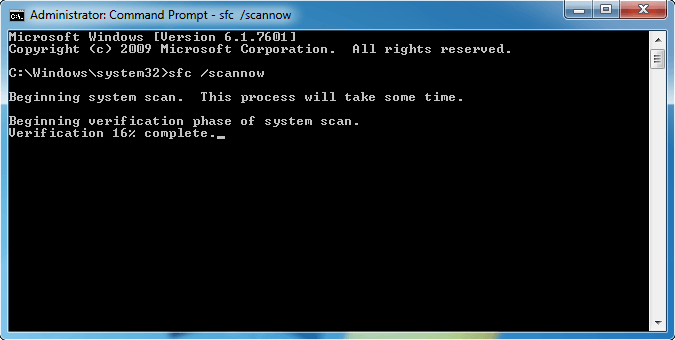
Then input ‘sfc /scannow’ and press Enter to initiate a System File Checker scan that might take about half an hour.
The Command Prompt might tell you that Windows Resource Protection fixed system files when the scan is finished. Restart Windows if that’s the case.
If you want to try an automatic alternative, I recommend a specialized repair tool that can detect all malfunctioning system files and find the new files as replacements.
2. Erase the EppOObe.etl File
Some users have fixed the OOBE error by deleting MSE’s EppOObe.el file. So, erasing the EppOObe.el file might be one of the best resolutions for the OOBE error. Follow the guidelines below to delete that file.
Press the Windows key + E hotkey to open File (or Windows) Explorer.
First, users need to select the Show hidden files, folders, and drives option. To select that setting in Windows 7, click the Organize button in Explorer and select Folder and search options.
Then click the View tab.
Select the Show hidden files, folders, and drives option on the View tab.
Press the Apply > OK buttons.
Users can select the same option in Windows 10 by clicking the Hidden items check box on Explorer’s View tab.
Next, open this folder path in Explorer: C:ProgramDataMicrosoftMicrosoft Security ClientSupport.
Select the EppOove.etl file, and press the Delete button.
3. Turn Off the Program Compatibility Assistant Service
The OOBE error can also be caused by incompatibility with the Program Compatibility Assistant Service. Turning that service off might fix the OOBE error. This is how users can disable the Program Compatibility Assistant.
Open Run in Windows.
Input ‘services.msc’ and click OK to open the window shown directly below.
Double-click Program Compatibility Assistant Service to open the window below.
Press the Stop button if the service is running.
Then select Disabled on the Startup type drop-down menu.
Press the Apply button to confirm the new settings.
Click OK to close the window.
4. Turn Off the OOBE
OOBE item settings can also be responsible for the OOBE error. So disabling the OOBE (Out-of-box experience) for Microsoft Security Essentials can also fix the issue. Follow the guidelines below to turn off the OOBE.
Enter ‘compmgmt.msc’ in Run, and select the OK option.
Then click System Tools > Performance > Data Collector Sets > Startup Event Traces Session on the left of the Computer Management window.
Right-click Microsoft Security Client OOBE and select Properties.
Select the Trace Session tab on the window that opens.
Deselect the Enabled check box.
Press the Apply button to save the settings.
Then select the OK option.
Restart Windows after adjusting the Enabled OOBE setting.
5. Uninstall Microsoft Security Essentials
Microsoft stopped supporting MSE when Windows 7 reached its end-of-support date in January 2020. So, the antivirus utility wasn’t very good after Microsoft stopped supporting Windows 7.
As such, now might be a good time to uninstall MSE and replace it with a third-party antivirus utility still supported on Windows 7. Thoroughly removing MSE will also probably resolve the OOBE error. Follow the guidelines below to uninstall Microsoft Security Essentials thoroughly.
Open the Run accessory.
Input ‘appwiz.cpl’ in Run’s text box and click OK to open the uninstaller window shown below.
Select Microsoft Security Essentials on the program list.
Click Uninstall > Yes to remove the software.
Thereafter, restart the laptop or desktop.
Users will then need to erase some leftovers to remove the software thoroughly. Enter this path in Windows Explorer: C:ProgramDataMicrosoftMicrosoft Security ClientSupport.
Erase any files and folders remaining at the path by selecting them and clicking the Delete button.
Users will also need to erase MSE’s leftover registry entries with a registry cleaner utility. Click Download on CCleaner’s website to download the freeware version of that utility.
Then open the software’s installer to add the freeware CCleaner to Windows.
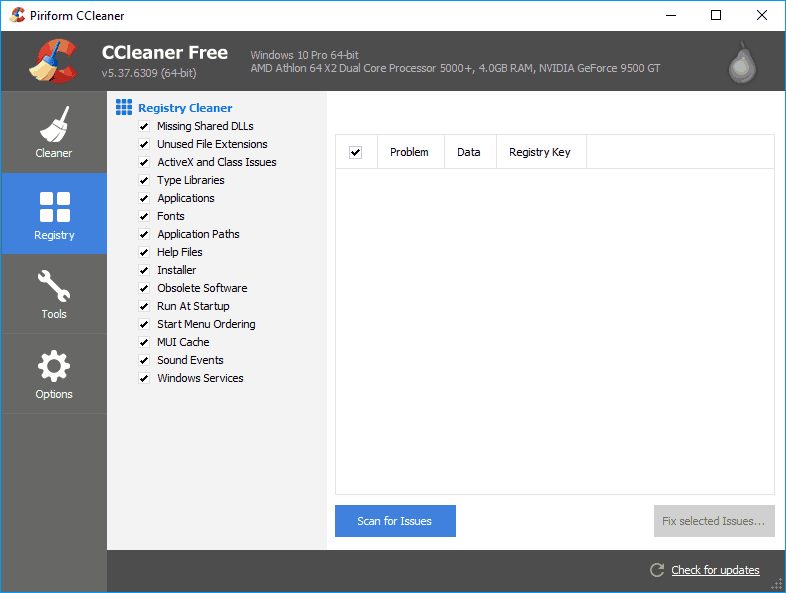
Click Registry on CCleaner’s window.
Then select all the registry check boxes, and press the Scan for Issues button.
Select the Fix selected Issues option.
Click the Yes button to back up the registry if you prefer. Then press the Save button.
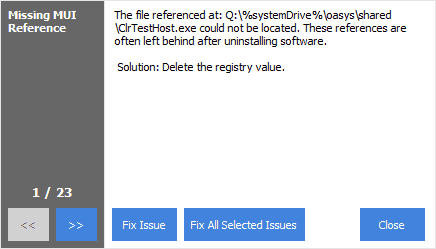
Press the Fix All Selected Issues button to clean the registry.
Then close CCleaner, and restart the desktop or laptop.
So that’s how users can resolve the Microsoft Security Essentials OOBE error in Windows. With MSE in obsolescence, the best resolution might be to uninstall the utility. This page provides details on how MSE stacks up with the best third-party antivirus software.
You can get rid of the OOBEEULA error on Windows 11 with these expert tips and tricks from our dedicated guide, so don’t hesitate to try it out.
Microsoft introduced a new Sysmon update. More specifically, Sysmon 8.o.4 fixes all the memory leak issues that existed in the previous version.
Sysmon is one of the many SysInternals components by Microsoft. It is a troubleshooting utility that monitors and troubleshoots the operating system and writes events to the event log.
The previous version of the program brought some annoying memory leak problems. It was recorded that memory leakage could lead to system crashes after update.
Computer geek Ionstorm talked about this issue on Twitter, saying:
Heads up admins if you still run sysmon 8.0.0 and you run a scheduled task to update the sysmon config each reload will use approximately 15mb of ram, after 30 days it will max out memory on your servers if they dont reboot. Memory is locked in non-paged pool. 8.0.4 resolves
Memory leak issues were also highlighted on the Microsoft SysInternals Forum. The same issue was reported by a user who reported the consumption of memory in Nonpaged pools after each time configuration reloads. He commented:
I faced a bug in Sysmon (ver. 7.01 and 7.03) – Symon’s driver (SysmonDrv.sys) consumes new area in Nonpaged pool memory every time configuration reloads, but driver does not free old area in Nonpaged pool memory. As a result, we can see memory leak. I found this problem on my VM, which had only 4GB RAM and more than 180 uptime days.
However, Microsoft responded that the issue has been fixed in the new update 8.o.4. Sysmon 8.o.o and 8.o.2 users can jump to 8.o.4 version to get this problem fixed.
Microsoft is already working on the very first Windows 10 v1909 build. Windows 10 19H2 is expected to be launched in October 2019.
The Redmond giant has a lot of work to do. The company is now working on two different projects: completing the Windows 10 19H1 build that will be launched in April 2019 and developing the next OS version slated for release in mid-October 2019. As you can see, Microsoft is indeed planning ahead.
The Windows 10 version 1909 or 19H2 has already been built and compiled according to WZor. This Microsoft enthusiast who tracks Windows news is now the successor of BuildFeed keeping an eye on the new builds launched by the Windows team.
Details about the next OS features are not available yet. Still, judging by the usual release schedule of Microsoft, we dare predict that it will reach users in mid-October. Most likely, the rollout will take place in stages.
Windows 10 19H2(Vanadium) is expected to be launched as version 1909 in reference to the month when the RTM build was compiled.
The development of Windows 10 19H1 will be finalized in March. Preview builds are already available online for Fast ring Insiders. As such, the development of Windows 10 19H2 will be completed in September and the final version will be launched in October.
Meet Vanadium and Vibranium
Microsoft started using elements names as codenames for developments of Windows 10, and the first two names are: Vanadium and Vibranium
However, according to the new report, after Windows 10 19H1, instead of using the 19H2 codename, Microsoft will use the element name “Vanadium”.
If the company goes forward with the new scheme, after “Windows 10 Vanadium,” the next feature update releasing in 2020 would carry the Chromium codename. However, Microsoft will most likely use a made-up element name, such as Vibranium since Chromium is already used by Google.
We’ll just wait and see what this new release build brings to the table.
With the evolution of the Windows OS, we know that technology is making progress on a daily basis. Despite the plethora of recent updates, the live tiles view of Start menu hasn’t been updated in a long time. Has Microsoft forgotten about this feature? Or is it working on revamping live tiles? Is the company planning to drop live tiles altogether?
Recent rumors suggest the third variant is the correct one. Reportedly, the big M will add a static menu to Windows Lite and some design elements will be inspired by Windows 7. The surprise is that there will be no live tiles.
Are live tiles useless for users?
Different and consistent tests were conducted according to which people aren’t attentive to the live tile view in the Start menu. This feature allows users to be actively involved in pinning up software according to their needs.
Nevertheless, it is yet to see if the same Start menu makes it to other versions of Windows 10, but for now, it just seems like live tiles aren’t part of Microsoft’s plan. People aren’t really opening the Start menu to look at or customize live tiles. Users prefer pinning everything to the taskbar because it’s easier to open your programs from there rather than from the start menu.
Windows Lite is Microsoft’s Chrome OS rival, which is anticipated to run a user interface known as Webshell which will not be like Windows 10. It will still be able to track Windows apps, but only those downloaded from the Store.
Live Tiles were a way for Microsoft to try to divert tablet owners to go towards Windows 8 and 8.1. Meanwhile, Windows 10 dropped most of the touchscreen-centric design decisions, apart from live tiles.
It’s still unclear whether Microsoft will drop live tiles on all future OS versions or just on the Lite version.
Are live tiles in Start menu really dead? Tell us what you think about this feature in the comments below.
Accurate and speedy news is important if you want to always be up-to-date. Getting accurate online news is a problem and we still don’t know the solution as to how to cope with it.
Nowadays, this issue is even more severe as online news misinformation seems to run as rampant as ever. In other words, without some technical solutions, the fake news dilemma won’t be solving itself any time soon.
In 2019, Microsoft found a solution to this tricky problem. In order to fight the fake news problem, Microsoft has made NewsGuard available.
This is an extension for its Microsoft Edge web browser for mobile as well as desktop versions, which is included by default, though users must enable it.
Microsoft uses NewsGuard to fight against fake news
The extension is out of beta testing now which was a continuous effort from the company’s engineers. NewsGuard uses journalism to fight unreliable news sources.
Experienced analysts and journalists research online news brands to help readers and viewers identify which ones are trustworthy and which ones aren’t.
Microsoft Edge isn’t a very popular browser, but it still makes an interesting case study in the uncontrollable war against low-quality information online.
NewsGuard is the child brain of Gordon Crovitz and Steven Brill. The extension depends on the human team instead of algorithms.
How NewsGuard works
After you enable the extension, the NewsGuard shield icon appears on your address bar, indicating the reliability of news websites. If you select the icon, you’ll see a definition of the icon’s meaning, and a link to see the full details, including whether the info uses credible sources, regularly updates itself, accurately differentiates news and opinion, as well as financing and ownership details.
Our Green-Red ratings signal if a website is trying to get it right or instead has a hidden agenda or knowingly publishes falsehoods or propaganda, giving readers more context about their news online.
An example is that FoxNews.com is marked as commonly credible, presenting users information responsibly and without using misleading headlines. However, the channel fails to regularly correct errors and does not fully provide ownership and financial details (report by NewsGuard).
The good news is that the company seems to be open to criticism. Their co-founder says they are “happy to be blamed,” and that “they are happy to be responsible for.”
As the service continues to improve by the passage of time, we’ll just have to wait and see how well it deals with the false information that comes out of fake news.
How about a browser with a built-in fake news detector?
UR Browser, similar to Microsoft Edge, offers a variety of news portal links on its standard home page. The important thing is that provided articles and news coverage are, firstly, authentic, and secondly, they come from trusted sources.
So there’s no fear of being served a pile of underwhelming pseudo-journalistic rubbish. No need for extensions whatsoever.
You can select and curate news UR Browser to your liking and select topics you deem worthy reading and following. Additionally, this browser is privacy-oriented and focused on the safety of its users. Download it today and learn about the details on your own in the simplest way: by testing it.
A shocking revelation has just been made by Avast: over half of the applications installed on Windows PC as out-dated. The software vulnerabilities can potentially put the users and their private data at a higher risk.
Revelations Made By Avast PC Trends Report 2019
Around 163 million devices participated in collecting the aggregated and anonymized data all over the world. The PC Trends Report 2019 eventually found out that approximately one in six Windows 7users and one in ten Windows 10users are using an outdated OS version. Hence, these systems are easily available to hackers so that they can exploit the system-level security vulnerabilities.
PC users don’t upgrade their apps and software
The updates for most of the applications are usually neglected by most of the users. The report published by the digital security company Avast suggests the percentage to be: VLC Media Player (94%), Adobe Shockwave (96%) and Skype (94%).
The report further stated that right now around 40% of all PCs are using Windows 10 all over the world. While Windows 7 has been able to grab the 43% share globally.
In case you want to be secure while surfing the internet, you will need to get a full-dedicated tool to secure your network. Install now Cyberghost VPN and secure yourself. It protects your PC from attacks while browsing, masks your IP address and blocks all unwanted access.
Hybrid devices are becoming more popular
As compared to the past, tablets, laptops, and 2-in-1 PCs are being used by most of the people these days. One of the main advantages of using laptops and tablets is that they allow users to browse, stream and work on the go.
Around 67% of users are opting for these devices due to these amazing features and it is expected that we will remain the same during this year as well.
Most popular apps on PC
The statistics regarding the most installed applications also represents the same shift to mobile devices. We can see from the latest trends that the installation rate for Google Chrome increased from 79% to 91% during the last 12 months. Adobe Acrobat Reader grabbed the second position with an installation rate of 60%. Moreover, WinRAR, Microsoft Office and Mozilla Firefox have 48%, 45% and 42% installs respectively.
The average PC is 6 years old
An increase in the average age of a PC has been reported to be 6 years during this year. Around 62% of users who have older machines are now running Windows 10. As of now, 63% of notebooks are being used globally. Furthermore, HP, Acer, Asus, Lenovo, and Dell, are known to be the top five PC brands this year.
Currently, the market is being dominated by the PCs having dual-core processors. Around 20% of the machines have been using a quad-core processor. It is worth mentioning that the SSD as a sole storage solution is available to 15 percent of the users these days. Finally, avast reported the most used RAM size to be 4GB.
Today hackers have so many ways to attack your PC, and you have to take a series of steps for the protection of your system. Keeping in mind the PC Trends Report 2019 you just have to ensure that systems and software are patched and up to date to protect your system from potential cyber attacks.
How often do you update your PC? Let us know in the comments section below.
Microsoft has just announced a new “Multiplan” feature for Planner, its Trello competitor for Office 365 customers. With Multiplan, it’s finally possible to create multiple Plans inside the same Office 365 Group (previously, creating a new plan created a new Office 365 Group).
To get started, you’ll just have to create a new Plan from Planner and then click the “Add to an existing Office 365 group” button, right below the field for the Plan name. You can see how it works in the video below:
The “Multiplan” name for the feature may well be some sort of an inside joke, as “Multiplan” was the name of a pre-Excel spreadsheet that Microsoft developed in the eighties. Anyway, creating multiple plans per group was one of the top requested features from Planner users, and it should definitely help preventing the multiplication of Planner-related Office 365 groups.
There are many more new features in the pipeline for Planner, including Plan Templates, integrations with Outlook Tasks/Microsoft To-Do, and much more. You can learn more about upcoming new features and share your feedback with the team on the dedicated Uservoice website.
The Windows Insider team has taken a liking to its interactive Mixer webcasts over the past year and are looking to continue the tradition for this year’s #bugbash event.
Starting From 10 a.m. PST/ 6 p.m. UTC fans can watch a live stream of unadulterated Windows 10 Insider madness, covering all things past, present and future about the company’s latest OS offering while addressing bugs in real-time.
Hello #WindowsInsiders! If you haven't marked your calendar, now's a good time to do it! Our #BugBash webcast will be live tomorrow at 10am PST / 6pm UTC on https://t.co/gKWNaQ5FcM! We'll talk BugBash and our guests will talk about some changes we've made in Windows! pic.twitter.com/cqSfD8BWGm
Tomorrow, January 29, 2019, may be a good time to tune as the Windows team is set to make its leap from the current development branch of Windows 10 Insider development to the next big one that’s rumored to include a more modular approach to Windows 10 and introduce testing of new features planned to accompany folding devices later this year.
As presumed, Microsoft will be taking advantage of Sony’s decision to pull out of E3 2019 and leverage the company’s lack of presence by going “big” this year.
“This is going to be a fun E3 for us … we had a discussion internally. Should we go big? Should we save some money? No, we’re going to do our thing and we’re going to go and be as big at E3 as we’ve ever been.”
While Hryb and Spencer do not discuss the details of Xbox’s ‘big’ and ‘fun’ presence at E3 2019, the mere fact that its largest competition in the sector will not be in attendance will afford Microsoft a chance to dictate its own narrative rather than losing its messaging through comparison. You can listen to the interview here:
With Sony volunteering the stage, Microsoft will be free to possibly introduce its gaming vision that could include new hardware and a bevy of gaming titles under the Xbox brand such as a new Fables game, Gears 5 news, the next installment of Forza, and demos of Halo Infinite.
Beyond the tried and true games and hardware schtick, Microsoft can also take this opportunity to push its cross-platform pitch as well as an unadulterated message of its software and services ambitions for gamers utilizing Xbox One consoles as well as PCs.
With Sony abdicating its traditional follow-up presence at this years E3, the messaging for the rest of 2019 and into 2020 is Microsoft’s to lose.
Microsoft kicked off yesterday a limited-time sale on select Xbox One bundles, and you have until February 2 to save $50 on seven Xbox One X bundles and five Xbox One S bundles. If you’re looking to upgrade to the Xbox One X, the brand new Metro Saga bundle including the upcoming Metro: Exodus game is included in the list, and you can get it for just $449.
The Xbox One X Robot White Special Edition looks pretty great.
Even though it’s getting hard to recommend purchasing an Xbox One S at the end of this console generation, the console remains great value at just $249. The different Xbox One S 1TB bundles on sale include the Fortnite bundle, the Forza Horizon 4 bundle, or the Starter bundle which comes with no games but 3 months of Game Pass and Xbox Live Gold. You can check out all the discounted Xbox One bundles on this page.
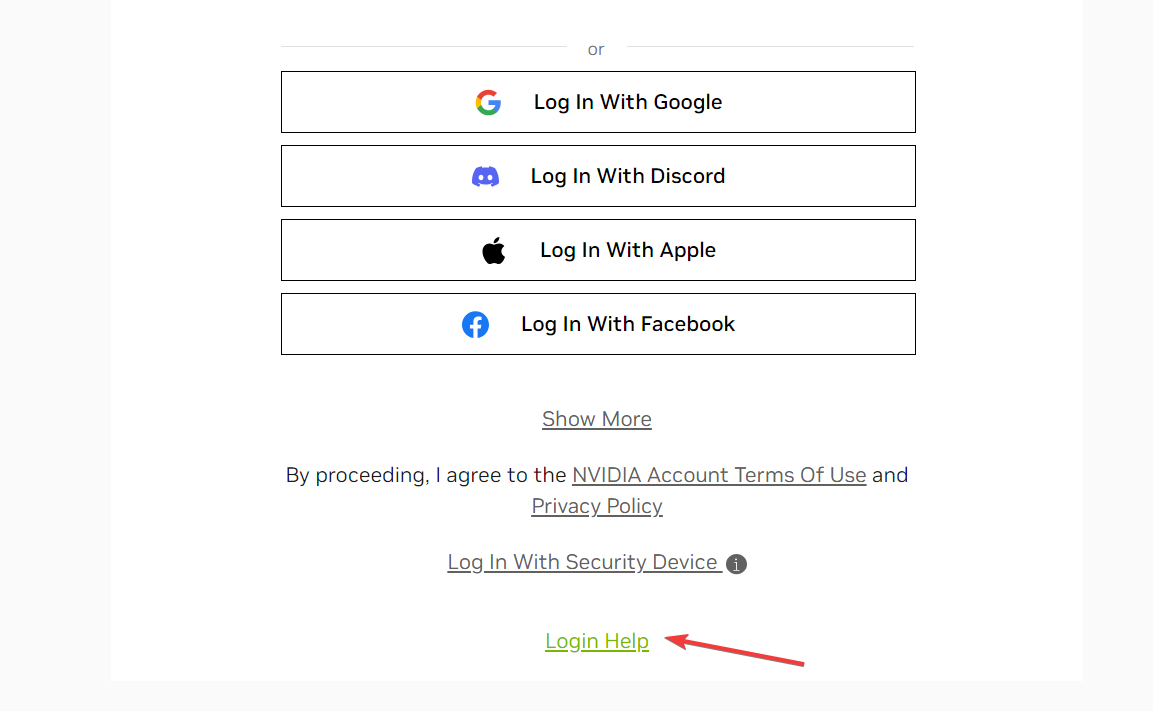
The Nvidia community is quite large, with all kinds of interest points regarding the leader in computing technology. Whether you’re a developer or a user keen on purchasing some hardware, this is the place to be. But many users reported that their Nvidia account is locked.
Signing in with your account isn’t usually something one should worry about. However, some users from the Nvidia community couldn’t sign in with their email and password. Of course, there’s a hefty number of sign-in options, which seemingly work.
You can use Facebook, Google Account, WeChat, or QQ to log in. This, of course, doesn’t mean you should. Using a specific account has its traits, which is why this exists in the first place. Keep reading to find out the ways to recover your Nvidia account!
What can I do if the Nvidia account is locked?
1. Clear the browser cache
NOTE
The steps listed here are for Google Chrome, the most used browser. In case you are using another one, the steps should be similar. For the exact process, search the web or check the official website.
Launch Chrome, and hit Ctrl + Shift + Delete.
Go to the Advanced tab, select the Passwords and other sign-in data option, and click on Clear data.
Once done, restart the browser.
We recommend clearing the browser cache and removing the saved password for the Nvidia account when it’s locked.
Follow the on-screen instructions to complete the process.
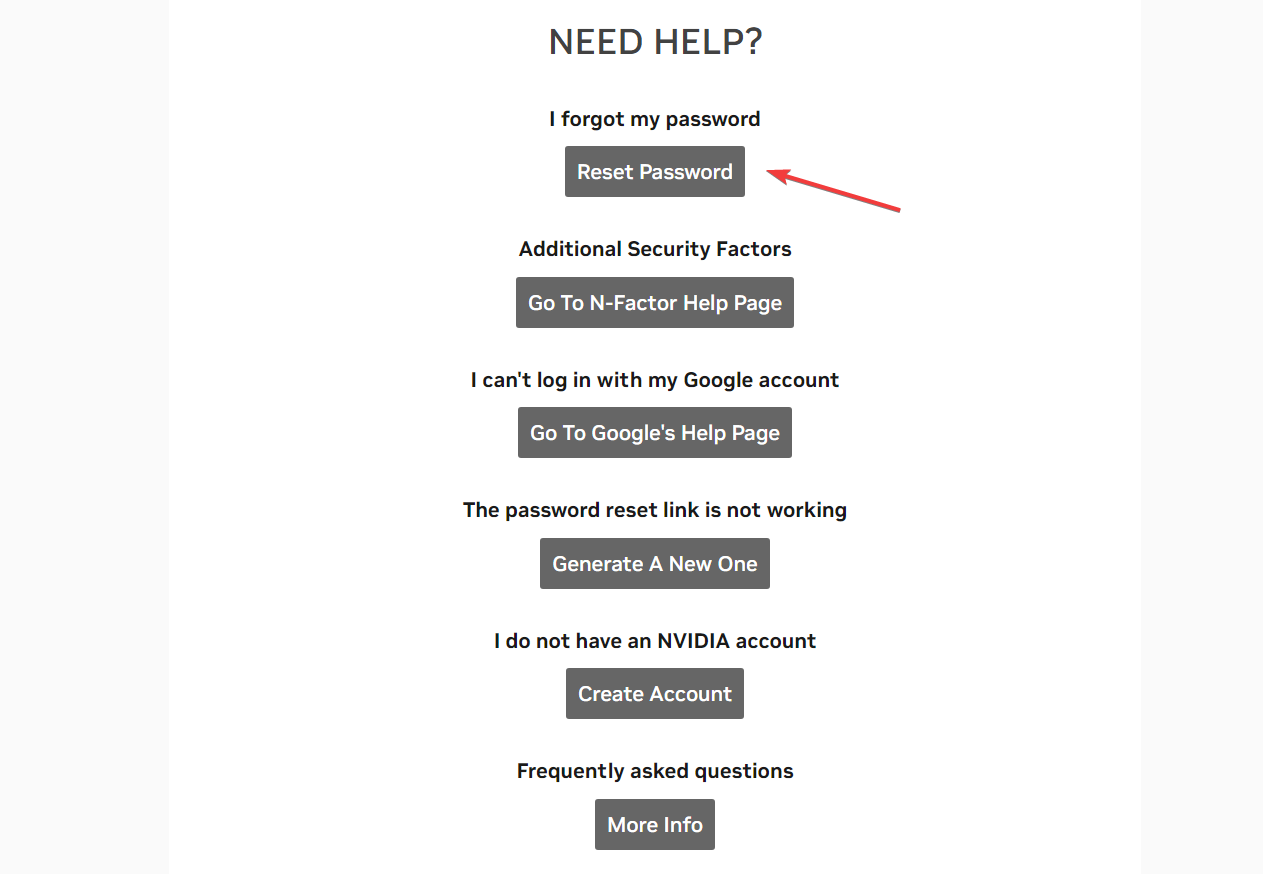
Another reason you cannot access the Nvidia account, which appears locked, is that you are entering the incorrect password. In this case, you should reset the password.
If things still remain unresolved and the Nvidia account is locked, the last option is to contact Nvidia Support. They will revert with information on what triggered the blocking and share any other information that might be useful in the recovery process.
Microsoft may have waved the proverbial flag of surrender when it announced its new direction for its web browsing development, but one of the last remaining Chromium-adoption holdouts, Mozilla, just got some help from staunch advocates of competition, when faced by offbeat pressure from Microsoft engineers to convert.
Kenneth Auchenberg, a program manager on the Code team at Microsoft responded via Twitter to a post that recently went up on the blog.mozilla.org site about the company’s decision to forego EdgeHTML development in favor of future Chromium development for its upcoming browser efforts.
Thought: It's time for @mozilla to get down from their philosophical ivory tower. The web is dominated by Chromium, if they really *cared* about the web they would be contributing instead of building a parallel universe that's used by less than 5%?https://t.co/0zi2NCtzb4
Auchenberg’s seemingly flippant response was counter by both the open web crowd as well as a Mozilla engineer himself, all advocating for the persistence demand in companies offering competition in the form of web standards.
Hey, Mozilla engineer and Chromium committer too here… Not having multiple implementations of the web means that the web stops being an open platform… People start relying on Chromium bugs, and standards / specs become useless, making innovating impossible.
Auchenberg addresses Emilio’s concerns with a solid argument that at this point, the market has spoken and development focus for companies should be on the contribution of open source code rather than pandering to the notion of a separate rendering engine. Theoretically, focus on a single open source code should expedite innovation rather than stifle it, as every participating party is bringing new implementations constantly.
2) This complexity it's incredibly expensive to implement a web runtime. Even for Google/Microsoft it's hard to justify such investment that would take thousands of engineers in multiple years.
The web has become too capable for multi engines, just like many frameworks.
The entire exchange between web advocates, Mozilla, and Microsoft engineers are punctuated with a single ominous tweet from former Mozilla CTO Andreas Gal who chimes in with “I’m afraid this will not end well,” as another Mozilla engineer levies the quitter card at Microsoft for its decision to adopt Chromium.
Gal now works Apple on undisclosed projects, but with Mozilla struggling to keep market share and as user behavior settles into a natural dichotomy of selection, the argument held by open web advocates and Mozilla engineers may become moot sooner rather than later by order of the ‘free market.’
One of the leading software solutions for video editing and presentation making is Camtasia Studio by TechSmith. You can always try it free for 30 days. However, after the trial period is over, chances are you would want to activate your copy of Camtasia.
That seemingly wasn’t possible for some users. They were met by the error as Camtasia Studio couldn’t connect to the activation server. We have two solutions for the issue at hand, so give them a try and tell us whether you’ve succeeded.
What to do if Camtasia Studio can’t connect to the activation server
The activation process requires a stable connection in order to work. Your PC needs to be connected to the internet so you can reach the activation server successfully. Now, most of the time, this is hardly the reason for the error at hand. Nonetheless, we still suggest double-checking your network before we can move to the second step.
If you’re certain that your network is working as it’s supposed to, move to the solution which should almost certainly address the issue.
Solution 2 – Activate Camtasia manually
The good folks at the TechSmith support are aware of this problem and they provided the solution. For some reason, the host files stored locally get modified and thus the software is unable to reach the activation server.
Luckily, there’s a workaround which, with some effort, will allow you to activate Camtasia Studio with the pre-acquired license key.
You’re going to need the administrative permission in order to perform the steps below.
Here’s what you need to do:
Navigate to C:WindowsSystem32driversetc.
Open the “etc” folder, right-click on the “hosts” file and open Properties.
Right-click on the CamtasiaUtl.exe file and run it as an administrator.
Wait for some time and start Camtasia Studio again.
Enter your license key and you’re good to go.
With that said, we can conclude this article. In case you have some questions or suggestions, post them below. In addition, if the issue persists, don’t forget to send your ticket to TechSmith Support.
Microsoft news recap is a weekly feature highlighting the top Microsoft news stories of the past week. Sit back, grab some coffee, and enjoy the read!
OneDrive file sharing is now generally available in Skype
Skype is being more tightly integrated with OneDrive. Users can now share OneDrive files amongst themselves directly from within conversations, making it easier than ever to share files with those you communicate with regularly.
4 Xbox 360 Command and Conquer video games go Xbox One back compat
Google has been expanding Chrome support for native Windows features. The search engine giant added Windows 10 notification support to Chrome last year. Now Google has confirmed that it will enable Media Session API for Chrome.
A Chrome engineer confirmed in a Google forum post that the browser will support Media Session API. The engineer stated:
We are intending to enable Media Session API on desktop from M73 onwards. We are enabling it as we are building new features in Chromium that will use the API (e.g. hardware media keys). This was previously enabled on Chrome Android and the API has not changed.
Chrome supports Media Session API
Chrome’s support for the Media Session API means that users can utilize the keyboard media controls for media playback. Some keyboards include play, stop, and pause keys for media playback. Thus, Chrome’s support for the Media Session API will enable users to play, stop, and pause videos on YouTube, and other sites, with those keyboard keys.
Google has also confirmed Chrome Media Session API support on all platforms. Google Git now includes a repository that states:
Enable Media Session API on desktop for all platforms since we have features in M73 using this API. This was previously enable for CrOS and Windows only but we would like to enable it for consistency on all desktop platforms.
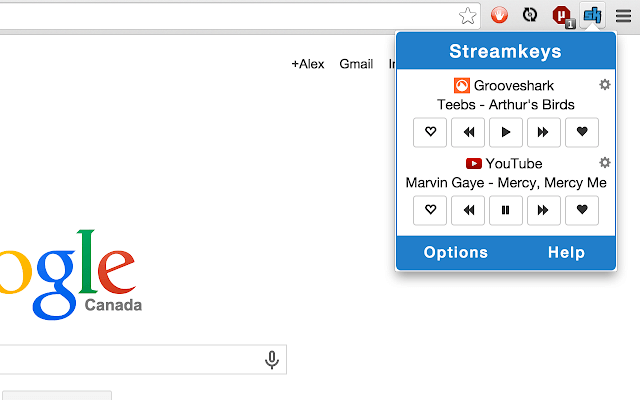
A few browser extensions already enable Google Chrome users to control web-based music players with media keys. Key Socket Media Keys and Streamkeys are two extensions for Chrome with which users can play, stop, and pause web-based media player playback via keyboard. Streamkeys users can also customize the hotkeys.
The Chrome 73 Canary browser already supports the Media Session API. Thus, Google Chrome 73, which is due for a March 12 release, will probably support Media Session API.
Windows OS is not yet dead on smartphones! Although Windows 10 Mobile is going to die by the end of 2019, it is interesting to see that Windows Phone enthusiasts are not yet ready to give up on their smartphones just yet. Their obsession is visible from the fact that they have already started looking for alternative ways to use different Windows 10 versions on smartphones.
We’re sure that multiple projects are still in the pipeline and they won’t allow the Windows Phone to die yet. Speaking of which, there’s a new video on YouTube showing Windows 10 ARM runnin on Lumia 950 XL. While this is not the first video of the kind, watching it is quite an interesting experience.
Can Windows 10 ARM Run Perfectly on Lumia 950 XL?
As you can see in the video below, the user was able to open different apps and games quite easily.
Lumia 950 XL has done a pretty good job at running a desktop operating system, despite being an old device. Well, minor glitches were indeed recorded but that was to be expected, wasn’t it?
You need to understand that the end of support is not going to jam your Nokia and Microsoft Lumia devices, rather you should expect them to be more unstable than ever before. It is worth mentioning that the tech giant is itself recommending its users to switch to iOS or Android phones.
Comment down below your plans regarding switching to iOS or Android phones soon after the death of Windows Phone.
Microsoft recently announced that Windows 10 v19H1 will feature improved RAW image format support. This is a piece of great news for those who love taking pictures in RAW image formats and had always wanted the RAW files from their camera to be natively supported by Windows.
This new Build 18323 also comes with many bug fixes, and enhanced support for the RAW images is one of the major features. To make proper use of this improvement, Microsoft has created an updated store-delivered RAW codec package that can better improve native RAWfile format support in Windows.
Just as soon as the package (RAWImage Extension, Beta Version) is downloaded from the Microsoft Store, you will be able to view the image thumbnails, camera metadata, and previews of all recent unsupported RAW files in the File Explorer.
Also, all your RAW images can now be viewed in full resolution through any app that utilizes Window Imaging Component outline to decode raw images like Photos or Window app.
Keep in mind that some camera models and raw formats may not be supported. While the beta version of the Raw format supports most cameras, there are some exceptions, as Microsoft informs its users.
The current version of the extension supports a long list of cameras, however some Raw formats like .CR3, and .GPR are not currently supported at this time.
Raw Image Extension issues
There are some issues that are connected with this new feature. We’ll list them below:
In Photos app, opening some RAW images with the newly released store-delivered raw codec pack get stuck at a low-resolution thumbnail image
When view state is switched to “Details Pane” and the new raw codec package is activated, File Explorer hangs almost immediately.
For some raw imageformats, camera properties that are stored as EXIF/XMP metadata are not functioning. These are some of the issues connected with this new feature and so many others.
The Windows 10 Build 18323 has brought many useful general changes, lots of improvements, and fixes for PCs.
Speaking of fixes, we already wrote an article where we listed the main bug fixes and improvements packed in this build. Feel free to check it out.
Keeping your system up to date is important, but some users tend to disable this feature. However, the issue arises when the Windows Update service keeps turning back on.
This can be a problem, especially if you want to disable automatic updates on your PC for any reason.
In today’s guide, we will show you how to fix this issue and keep your updates disabled.
Why does the Windows Update service keep starting?
Windows Update Assistant software is running on your PC.
Services are configured to run Windows Update on your account.
There’s a scheduled event that keeps starting the service.
The registry is configured to run Windows Update.
How can I fix Windows Update service if it keeps turning back on?
1. Uninstall Windows Update Assistant
Simultaneously press the Windows key + R on your keyboard. This opens the Run dialog box (ensure you are logged in as an administrator).
Now, type appwiz.cpl in the provided Run dialog box then click OK.
Locate the Windows Update Assistant and select Uninstall.
Next, you should check whether your PC has a folder named Windows10Upgrade in the local disk C and delete it. For Windows 10 click This PC, then Local Disk(C 🙂
The Windows10Upgrade folder is found in the Windows folder, so go there and delete it- if present.
Next, you need to disable Windows Update service. Follow these steps:
Simultaneously press the Windows key + R on your keyboard. This opens the Run dialog box (be logged in as an administrator).
Now type services.msc in the provided Run dialog box then click OK.
Look around for the service named Windows Update, then right-click it and select stop– if marked as running.
From there you right-click it again then choose Properties.
Now, under Startup type, click on the drop-down arrow and choose Disabled.
Proceed to the Recovery option (in the same Window). Locate the First failure tab and click on the dropdown arrow right against it.
Click Take no Action.
Press Apply and then OK.
This should help if Windows Update service keeps turning back on on your PC.
2. Tweak the user account credentials
Simultaneously press the Windows key + R on your keyboard. This opens the Run dialog box (be logged in as an administrator).
Now type services.msc in the provided Run dialog box then click OK.
Right-click on the Windows Update service then click on properties.
Click Stop to first discontinue the service.
Now Click on the Log On
Under the This account section: type .Guest leaving the password blank.
Click on OK. You will receive this notification.
Now the system will generate an error (to the effect that the account specified is different from the usual account for running the same process) each time your Windows attempts to restart the service and the trial to reenable is halted.
Simultaneously press the Windows key + R on the keyboard. This takes you to the Run dialog box.
Now type services.msc in the Run dialog box. Click OK.
As we have been seeing, search for the Windows Update service and stop it under its properties tab. Also, disable it (Under Startup type, pick Disabled).
Again press the Windows key +R.
Now type taskschd.msc in the dialog box.
Under Task Scheduler Library, find the Microsoft folder.
Then locate the Windows subfolder inside Microsoft. Now identify and first click the UpdateOrchestrator folder.
You will note its numerous triggers on the right pane. Right-click each of these and ensure they are set to disable.
Similarly, locate the WindowsUpdate folder and again disable all its triggers.
Exit the task scheduler window.
Please note that some users might need to additionally disable all the triggers under the Microsoft>Windows>rempl folder for this solution to succeed.
Google has revealed a Manifest V3 document that highlights the company’s plan to replace Chromium’s webRequest API. The changes outlined within Manifest V3 could have a profound impact on some Chrome extensions that utilize the webRequest API to filter traffic from ad sources. Some developers have even warned that the API changes could render ad-blocking extensions for Chrome obsolete.
A Google engineer provided a hyperlink for a draft Manifest V3 document in a post on The Chromium Projects website. That document outlines how Google intends to greatly restrict the webRequest API blocking. The company plans to introduce a new declarative NetRequest API that has more limited rules for ad filtering.
As Chromium is an open-source browser that underpins Chrome, such changes would almost certainly be implemented within Chrome. Google explains that these changes will speed up page loads for its browsers. The new declarativeNetRequest API will speed up page loading as it will enable Chrome to modify network requests. However, ad blockers also speed up browsing by removing ad content from pages.
Some extension developers expressed concerns about the proposed changes on the Chromium website. A uBlock Origin developer, Mr. Hill, stated that the proposed API changes would render some ad-blocking extensions obsolete. Mr. Hill stated in a forum thread:
If this (quite limited) declarativeNetRequest API ends up being the only way content blockers can accomplish their duty, this essentially means that two content blockers I have maintained for years, uBlock Origin (“uBO”) and uMatrix, can no longer exist. Beside causing uBO and uMatrix to no longer be able to exist, it’s really concerning that the proposed declarativeNetRequest API will make it impossible to come up with new and novel filtering engine designs, as the declarativeNetRequest API is no more than the implementation of one specific filtering engine, and a rather limited one (the 30,000 limit is not sufficient to enforce the famous EasyList alone).
As such, Manifest V3 has convinced some developers that Google is trying to kill off ad-blocking extensions with the API changes. Google probably won’t be bothered about the impact such API changes could have on ad-blocking extensions considering the significance of ads to the company. Restricting ad blockers might also boost the web’s economy.
BlueStacks is one of the best Android emulators currently available. The developers sometimes release updates to improve the software, but some users complain that the latest version of BlueStacks is already installed error while trying to apply them.
This can be frustrating, as it makes you miss out on the app’s latest features. Thankfully, this error can be easily eliminated, and we will show you how to go about it in this guide.
Below are some of the potential causes of the BlueStacks already installed error message on your PC:
Accumulation of leftover files: Sometimes, this problem can be due to the collection of corrupt leftover BlueStacks files. You need to clear these files manually or with the help of PC cleaner software.
Present versions not supporting updates: if you have the BlueStacks 5 Beta version, you might not be able to update it directly. You need to uninstall the app and download the latest version on your PC.
How can I fix BlueStacks already installed error?
1. Delete BlueStacks Registry Keys
Press the Windows key + R, type regedit, and click the OK button.
Navigate to the path below in the left pane: Computer\HKEY_LOCAL_MACHINE\SOFTWARE
Now, right-click the BlueStacks key in the left pane and select Delete.
Next, click the Yes button to confirm.
Finally, delete the BlueStacksGP key too.
BlueStacks is already installed error messages can often be due to leftover registry entries. Users have confirmed that erasing leftover registry entries solves the problem.
2. Delete Leftover BlueStacks Folders
Press the Windows key + E to open File Explorer.
Navigate to the following paths and delete their content: C:\Program Files (x86)\BlueStacksC:\ProgramData\BlueStacksC:\ProgramData\BlueStacks\Setup
Finally, restart your PC and try updating the app.
There might also be some leftover folders for BlueStacks in File Explorer, causing the latest version already installed error. As such, you must delete the BlueStacks folders in the paths above.
Alternatively, you can use a dedicated PC cleaner in CCleaner to remove the leftover files. This tool eliminates unwanted files in your PC registry and hard drive with just a few mouse clicks.
Also, it can work as an uninstaller software to remove any app on your PC. It is just the perfect tool to keep your PC clean and create valuable space.
3. Uninstall the app on your PC
Press the Windows key + R, type %Temp%, and click OK.
Press the Ctrl + A hotkey to select all the files in the opened folder and click the Delete icon at the top.
Click the Yes button when prompted to start the BlueStacks removal process.
Next, click OK after the process is complete to close the cleaner.
Finally, go to the official website to download and install the latest version of BlueStacks.
Sometimes, the BlueStacks is already installed error is caused by issues with the current version of the app on your PC. To fix this, you need to clear the content of the Temp folder and use the official BlueStacks uninstaller to remove the app.
Reinstalling the app can help you fix issues like error code 2004 on BlueStacks. To learn more about the error and what causes it, read this guide.
4. Open the Program Install and Uninstall Troubleshooter
Click Download troubleshooter on the troubleshooter’s Windows Support page to download it.
Now, double-click the downloaded file to run it.
Click the Advanced link.
Select the Apply repairs automatically option and click the Next button to initiate the troubleshooting.
Now, select the Installing option.
Choose BlueStacks as the program you’re trying to install if it’s listed. Select the Not Listed option if BlueStacks isn’t listed.
Finally, click Next to go through the troubleshooter’s resolutions.
If you still can’t fix the BlueStacks’ installation error, check out the Program Install and Uninstall troubleshooter for Windows 10. That troubleshooter repairs system errors that block software installation.
Those resolutions should fix the BlueStack’s already installed error. You should now be able to upgrade the app quickly, provided you follow the steps above carefully.
Editing videos isn’t an easy task, especially if you don’t have a proper tool to do that. There are many great video editing applications on the market, but few of them offer the combination of simplicity and power that Wondershare Filmora offers.
Today we have the latest entry from the Wondershare’s Filmora family, so let’s see what does this video editor have to offer to its users.
Wondershare Filmora9, simple but powerful video editing tool
Wondershare Filmora has been a member of Wondershare family since 2014, and it’s a video editor of choice for many users. In late 2018, this video editing software is re-branded as Filmora9. What makes this new tool stand out from the rest is its sleek, straightforward design and simplicity of use, so even the first-time users won’t have any issues using Filmora9.
Friendly and sleek design
The first thing that you’ll notice when you start Wondershare Filmora9 is its friendly and simple user interface. The interface has a sleek dark theme, and it’s incredibly simple to use, even if you’re a first-time user.
Most of the interface is occupied by a timeline on the bottom, and this is the element that you’ll be using the most. Here you can combine different video clips and add various effects simply by dragging and dropping. Each element on the timeline can be moved freely, and you can simply change the duration of any clip by resizing it.
On the right side there’s a real-time preview pane, and you’ll be using it to preview clips and visual effects. It’s worth mentioning that you can adjust the playback quality or the zoom level of the preview pane in order to ensure that your video is always previewing smoothly.
The left pane works as a library and you can use it to easily add clips or effects. You can organize your clips into folders, and thanks to the built-in search, you should be able to find any clip in a matter of moments. It’s worth mentioning that you can add various text, transitions, effects and elements right from this pane. Filmora9 comes with a wide array of effects, and you can always download more from the Effects Store.
Video editing and timeline
In order to start video editing, first you need to import videos from your PC. The Filmora9 video editor now supports truly 4k videos (both 3840*2160 and 4096*2160), and it also allows you to create proxy files for a smoother video editing experience. You can edit with proxy video files in Filmora9 and then export with the full-sized resolution.
Speaking of video importing, it’s worth mentioning that you can record your webcam video right from Filmora9 so you won’t have to rely on third-party applications. Bear in mind that you’re not limited just to your webcam, and you can also record your desktop. You can set Filmora9 to record an entire screen, a specific window or a segment of your screen.
As for video editing, you can easily cut, split or crop your audio and video clips right from the timeline. If needed, you can adjust the zoom level or change the speed of your clips or set them to play in reverse. You can also adjust the color of your clips, and choose one of many available presets.
If you want, you can fine-tune each color setting individually in order to achieve unique results. As for available color settings, you can change temperature, tint, exposure, brightness, contrast, vibrance, saturation, highlights, shadows and various other color settings. Once you’re satisfied with the results, you can save the current color adjustment as a preset.
As for editing, you’ll be pleased to know that you can easily rotate, scale or flip your videos. You can also choose between several blending modes and change the opacity of the videos in order to achieve some impressive results.
Video stabilization feature is available as well, and this feature can be incredibly useful if you’re recording videos without a tripod. Another feature that you might find useful is Lens Correction, and this feature will help you optimize videos recorded by GoPro or similar headsets.
If you’re using a green screen while creating videos, you’ll be pleased to know that Filmora9 can work with greenscreen videos thanks to the Chroma Key feature. The application also allows you to add shadows to your clips, and you can easily change their distance, blur, opacity or color. Lastly, you can add various motion effects to your clips in order to make some impressive transitions.
The timeline can be easily zoomed in or out, so you’ll be able to see the smallest details with ease. If you want, you can also add various markers to your timeline in order to focus on specific areas. It’s worth mentioning that Filmora9 supports up to 100 audio and video channels, which should be more than enough for most users.
Audio editing
Just like with video clips, you can add music and audio clips to your creations. Filmora9 comes with 50 different audio clips in the Audio Library, but you can add your own clips from your PC or you can download more from the Effects Store.
As for audio editing, you can easily adjust the volume from the timeline, and add fade in and fade out effects. If needed, you can also change the speed and duration of your audio clips in order to combine them with the video.
There’s a useful Denoise feature, so you can easily remove background noise from your audio clips, and thanks to the built-in equalizer, you should be able to fine-tune each audio clip. Filmora9 also has the ability to create audio voiceovers, so you won’t have to use a third-party application in order to record your audio.
Lastly, there’s an audio mixer available, so you’ll be able to adjust the volume level of each audio and video channel and ensure that your video sounds perfect.
Effects, elements, and transitions
In order to create some impressive creations, Filmora9 comes with a wide arrange of effects that you can add. The application allows you to add text to your videos, so you can easily create openers, credits or subtitles. There are over 130 text effects available, but more are available for download from the Effects Store.
It’s worth mentioning that text can be highly customized, and you can choose between many available presets. Of course, you can create your unique styles by changing the font, color, and text opacity.
You can also blur your text, add a border or shadow to it. If you want to create some unique effects, you can add shapes or even images from your PC and combine them with text. To top it off, the text supports various animations, and you can set the duration for each animation.
To combine two or more clips, Filmora9 has about 170 different transitions, and you can adjust the duration of any transition right from the timeline. There are also various filters and overlays available, and each of these filters can be fine-tuned in order to achieve the desired results.
Of course, you can always download more transitions and effects from the Effects Store. The application also has about 190 available animated graphics elements that you can add to your videos.
File export and supported formats
Once you’re done editing your videos, you’ll need to export them in order to share them. Filmora9 supports 12 different output formats including MP4, WMV, AVI, MOV, F4V, MKV, TS, 3GP, MPEG-2, WEBM, GIF, and MP3.
Each output format can be customized and you can adjust settings such as encoder, resolution, frame rate, sample rate, and bit rate. If you don’t want to fine-tune your output settings, you can also choose between three available quality presets.
You can also optimize your video for various devices including iPad, Apple TV, Samsung Galaxy, Xbox One, PlayStation 4 and several others. Another great feature is the ability to upload your videos directly to YouTube or Vimeo right from Filmora9.
All that you have to do is to sign in with your YouTube or Vimeo account, enter the required information such as title, description, tags, etc. After doing that, you just have to click the Export button and your video will be uploaded directly to the selected service. If you want, you can also burn your video directly to a DVD right from Filmora9.
Conclusion
Filmora9 offers a simple user interface that should allow even the most basic users to create impressive videos. However, due to the extensive customization options, this tool will be perfect for advanced users as well.
If you’re looking for a sleek and powerful video editing software, we strongly recommend to check out Filmora9.