Most birders like to keep lists, or world life lists, of all bird species they’ve come across or seen wherever they go. Some even keep bird listing of their own home countries, with separate ones for each country they visited.
There are also birders who keep year lists of bird species they saw in any one year, while others indulge in bizarre ways of bird listing, probably as a way of competing with other birders, but it is still a form of collecting.
One of the most exciting parts of a birder’s life or an aspiring birder, is starting their own life list, and finding out how many birds they know or are familiar with. However, knowing which birds to add, what counts for the list, and what doesn’t, as well as prerequisites for a bird to be added to a list is important to consider.
Bird listing is a record of the bird species identified by an individual birder, and keeping one is the easiest way to track the birds sighted. But to do this, you need to ensure that you properly and positively identify the bird, observe birding ethics, ensure the birds must be alive and observed in the wild, ensure the bird is free and not in rehabilitation, and that it has an established viable breeding population of several generations at the least.
Keeping a comprehensive and cumulative list of birds can be tedious if using Excel spreadsheets, but listed below are the best bird listing sSoftware that will help you organize yours better.
Best bird listing tools for your PC
eBird
This bird listing software lets you find more birds, keep track of your own bird lists, photos and sounds, explore the most recent sightings from all over the world, and contribute to science and conservation.
It started by the idea that every birder has special knowledge and experience, so the goal is to collect the information in form of bird checklists, archive and share it to contribute to and power science and conservation, as well as education, while making birding rewarding.
Birders can see lists, photos, real-time maps of how bird species are distributed, audio recordings, and alerts that inform birders when species have been sighted, with the most current and useful information to the community.
It is the largest bio-diversity related citizen science project, with more than 100 million sightings added annually by birders worldwide. It also partners with organizations, regional experts and thousands of birders.
Among the things you can do with this bird listing software include:
Document bird distribution, abundance, habitat use and trends via checklist data
Enter when/where/how you went birding
Fill a checklist of the birds sighted
Use the mobile app for offline data collection in any location in the world
Explore and summarize your data and other observations
View a list of likely birds for your region and date
Explore birds and hotspots near you and where you go based on global sightings
Engage with other birders in the world’s largest birding community
With this bird listing software, you can record experiences for birds smoothly on an intuitive interface, which is available on all devices you use, including those with Windows operating system.
Among the tasks you can fulfil with Bird Journal for bird listing include:
Recording bird observations, photos, habitats with the software’s library that has hundreds of checklists and taxonomies of over 100,000 species and subspecies all over the globe
Explore your data with reports, lists, graphs, maps and photos
Search instantly by date, species or location among other variables
Share records by exporting or printing them, as well as your species lists to be used anywhere
Support for eBird and BirdTrack systems to contribute to science and conservation
Access and enter your bird list records from all devices you use
Safely and securely store your data
Bring your data by quickly importing your existing ones from any other app or system, like directly from eBird, BirdTrack and Wildlife Recorder
This is much more than a field guide, but one of the best bird listing software that is easy to use, with clear instructions for installing and extensive help that shows you how to use it with guides from YouTube videos, help manual, FAQs, newsletter to keep you updated, and a Facebook page for its users.
With Thayer, you can do the following:
Compare any birds side by side
Learn birds and their songs
Use the 700 quizzes included or create your own
Use the Sightings feature to track your bird sightings
Print life lists
Use Identification Wizard to identify mystery birds sighted and learn the parts of the bird for easy identification
Use Filter to see birds in a specific area like your own home region
Display a bird’s name in 10 ways and 4 different languages
Use The Birder’s Handbook to learn more on bird listing and become a local expert
Use detailed range maps beside individual bird descriptions
Thayer bird listing software can be used by anyone interested in bird watching from yourself, to your family, friends, and other birdwatching groups or clubs – anyone interested in birds.
If you want a lifetime of birding data freely available, then this is the best bird listing software to use.
Scythebill lets you access a lifetime of sightings anywhere in the world, plus it is easy to use, lets you enter data fast, import from other areas like eBird, BirdBase and Avisys among others, with hundreds of built-in country and state checklists.
It is a desktop app for birders who can track their life lists and birding records, plus it is free of charge, powerful with loads of features, cross-platform, open source so anyone can contribute to its development, with extended taxonomies for tracking butterflies, mammals, reptiles and other wildlife.
Other features that make it powerful for bird listing include:
A full eBird/Clements checklist with subspecies and groups
IOC World Bird list support
Subspecies and names in 20 languages
You can flip between taxonomies fast, not just one
Fast entry of species with more than 7000 alternate names
Fast reports and instant processing of thousands of records
Hundreds of checklists in nearly all world countries
Built-in geocoding to find latitude and longitude details around the world for you
This bird listing software lets you maintain detailed records of your bird sightings by capturing unlimited data about each, and reporting it in various ways.
With Birder’s diary, you can print checklists, maintain list counts automatically for any region in the world, recall and report on trends, and enjoy the extended taxonomies feature.
Having been on the scene since 1995, this tool provides the world’s birding community with the latest in software technology, products and services, plus you can try it for free before paying to use the service, as it is available for immediate download in one click, and for one month.
Some of its great features include:
All the data needed at your fingertips including latest photos, outings, checklists, charts and graphs etc
Import/export from other sources such as eBird and mobile apps
Best customer support in the world
SmartSearch keyboard entry, Voice recognition, and simple checklist entry
Easy attaching of unlimited number of any types of files with a photo viewer to see your photos and files
Define unlimited data fields such as numerical, date, time, lists etc. to record any data you want for each sighting
Predefined political and standard geographical entities
Flexible report builder
Support for multi-lingual bird names
Modern software app for conversion from other listing software programs, and much more
This is perhaps one of the most comprehensive bird listing software you can use, and you can test run it for one month using the free trial.
Data anonymization is a data protection process focused on privacy protection. The role of data anonymization is to encrypt or remove personally identifiable information from data sets.
In this manner, the people from whom the data was collected remain anonymous and you can run your study without any legal complaints.
You can find yourself in need of such tools, especially in study environments or research contexts where you have to cover sensitive data about individuals.
Moreover, it’s possible to perform statistical operations with the gathered data, thus measuring your indicators and objectives with the help of automatic support.
Data anonymization is often used in the medical field, as well as in data-sensitive statistics analysis. If you need to render the data you’re working on anonymous, you can use one of the tools listed below.
When talking about data protection when using a PC, the word Anonymity has become almost synonymous with the use of a VPN.
That being the case, there is no better way to secure your digital life than the best VPN that is currently on the market: NordVPN.
NordVPN gives you peace of mind each time you use public Wi-Fi, access personal and work accounts on the road, or want to keep your browsing history to yourself.
Nothing gets saved, and it doesn’t matter who is monitoring your activity, be it government officials, hackers, or the ISP itself, your data will be completely secure.
This VPN is incredibly versatile since regardless of which subscription plan you choose, you will get complete protection across all of your devices, be it Windows, macOS, Android, or iOS.
In fact, one subscription will get you simultaneous protection for up to 6 different devices at a time.
Those of you that are fans of good old-fashioned browsing will also love the encrypted proxy extensions for Chrome and Firefox.
NordVPN
Hide all your digital traces by using this 1st in class VPN privacy suited for any device.
ARX is open-source software for anonymizing sensitive personal data. The tool transforms datasets into syntactic privacy models that mitigate attacks leading to privacy breaches.
ARX removes direct identifiers such as names from datasets and adds further constraints on indirect identifiers, such as email addresses or phone numbers.
The tools also provide built-in data import facilities for relational databases (MS SQL, DB2, SQLite, MySQL), MS Excel, and CSV files.
It can be used in a wide range of contexts, such as commercial big data analytics networks, research projects, which means it can easily handle massive datasets.
Data can also come in the form of images. If you need a tool to blur images, we recommend Anonymizer.
The software detects faces, car number plates, and other image information in various scales and orientations and applies to blur filters to make the information unreadable.
The Anonymizer SDK is a standalone C/C++ library for Windows and Linux. You can use it to anonymize street-view photos, webcam photos, or any other photos for which privacy is a major concern.
It uses detectors fixed on sequential classifications constructed with automated learning technique based on the WaldBoost algorithm that grants a lightning-fast data evaluation.
Next on the list is CloverDX Data Anonymization which is a specialized tool that turns sensitive data into anonymized information.
It has a peak original data resemblance and it can track relationships between numerous systems, obscuring the sensitive parts.
With this specialized software, not only you can reserve statistical distribution and real values including bad data but retain business logic in data as well.
Furthermore, it authorizes you to apply rules and anonymization policies and take control of the level of the use required.
Imperva Camouflage’s data-making tool removes the sensitive data hindering tests, outsourcing, and analytics. The tool de-identifies sensitive data and retains the realism and functionality of the original data set.
The data categories these tools can work with include names, addresses, credit cards, SSN/SIN, phones, and more.
You can also try out this data masking tool for free or ask Imperva Camouflage for a quote by visiting the company’s official website.
Imperva Camouflage changes the values of the data while using the exact format to create a version that is impossible to decrypt or reverse-engineered.
We’ll end our list here. As you can see, the tools mentioned in this article can be used for the same purpose in various fields. They help you to de-identify sensitive data, whether it’s coded in images or letters.
Have you used other data anonymization software that we didn’t mention in this article?
If so, tell us more about your experience in the comment section below.
The best medical billing software for home based businesses should come tops for work from home medical billing professionals. According to the Bureau of Labor Statistics, the need for medical billing and coding experts is on the sharp increase. A rise of 15% from 2014 to 2024 clearly shows the relevance of health and medical technicians today.
Thus medical billing services have created vast opportunities for medical coding and billing professionals to work for healthcare firms from home. A medical records expert can earn on the average $35,000 to $45,000 per annum which is a relatively good pay.
Medical billing experts can also earn huge sums working for even insurance firms, an independent physician, pharmacies, government agencies, etc. It does not require so much educational training except for understanding how to use the best medical billing software for home based businesses. This article, therefore, explores 5 top medical billing software for work from home jobs.
Who can use these medical billing software solution?
Medical and healthcare professionals
Front desk officer or managers
Work from Home medical billing professionals
Insurance companies
Patients with medical invoices
Top 5 medical billing software for work-from-home jobs
NexGen Medical Billing Software
Nexgen billing software platform offers a comprehensive and integrated technology tool for the best medical billing software for home based business services. Nexgen healthcare is designed to fit the needs of ambulatory practices. This is used in identifying claims and eliminates denials or rejections.
Its Revenue Cycle Management system ensures easy billing and collection with the choice of automated billing generation.
The software helps manage cash flow through processing of due payment reminders and post online payments.
Key features include:
An advanced tool for C.A.C.H.E rejections.
Easy to track and process claim features.
Automated billing generation
Multiple billing options via e-statements, hardcopy prints, call or text
Fast and efficient claim processing
Offers 835s and electronic remittance
Web-based cloud solutions.
Clinical solutions such as mobile solutions, consulting services, population health, EHR and so on.
The Drchrono medical billing software has a robust feature for claims management. Some of the key innovative functions allow the Drchrono software to carry out multi-location functions. These functions include customization of EHR, revenue recycling, etc.
The billing software contains innovative functions that make inputting, processing, tracking and retrieving of claim history simple.
Key features:
Filing of electronic claims by users with the insurance payers list for solution directory.
Cloud-based electronic claim solutions.
Secure messaging and e-payment solutions.
Demographic centralization for charting of patient’s records.
Multiple insurance claims plus batch payment functionalities.
Billing engine makes updating and correction of claim error possible.
Categorization of claims based on appointments, ERA denied and billing status.
Accurate claims submission- claim errors can be identified and corrected before being processed.
Billing rule engine which assists in correcting errors of denied claims of payers.
Allows for user notification on rejected claims.
Easy to manage payment collection systems with high collection volumes.
Kareo billing software makes your independent medical practice very rewarding. It is a cloud-based clinical management technology tool with not so simple graphics interface but offers mobile and web application to users.
It allows medical technicians locate, manage patients and issue insurance bills for clients. It uses advanced tracking, claim processing, and payment solutions to ensure client’s medical records and processed successfully.
The process Kareo medical billing software operates on includes, the scheduling of patients, verify insurance, manage accounts and process collections. It can also handle complex medical records, store patients details, evolve customizable reports, etc.
Key features
Best medical billing software solutions for small and medium billing and practices companies.
In-built text message functionality between patient, billers and their employees.
ICD-10 compliant software makes coding a walk over. As part of the catch, Kareo medical billing software enters patient data easily, uploads and verify the eligibility of each document. It manages patient alerts, customizes schedule and sends reminders.
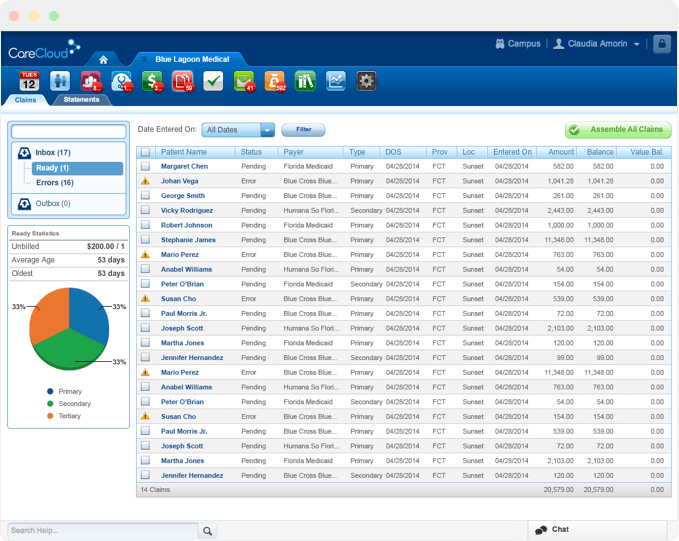
This modern revenue cycle management software is designed to meet all medical practice needs, particularly in four core areas. As an RCM, Carecloud concierge guarantees specialized medical billing, appointment scheduling, billing collections and remittance of every payment cycle. It is considered the best medical billing software for home based business due to the CareCloud easy to use interface and efficient servicing.
Carecloud concierge fully integrates the Central PM, Breeze PXM and Charts EHR making concentration on patients a better priority. This is the right choice for a comprehensive billing program. Its combination of practice management software and revenue cycle management service is a combo package.
Powered by a groundbreaking web-based platform, it enhances efficiency and productivity. It’s a one-stop shop for the best medical billing software for work from home medical experts.
Key features:
Cloud-based medical scheduling and billing solutions.
Exceptional rules management and data mining functionality.
Medical analytics function.
Effective for NPIs and multiple corporate medical firms
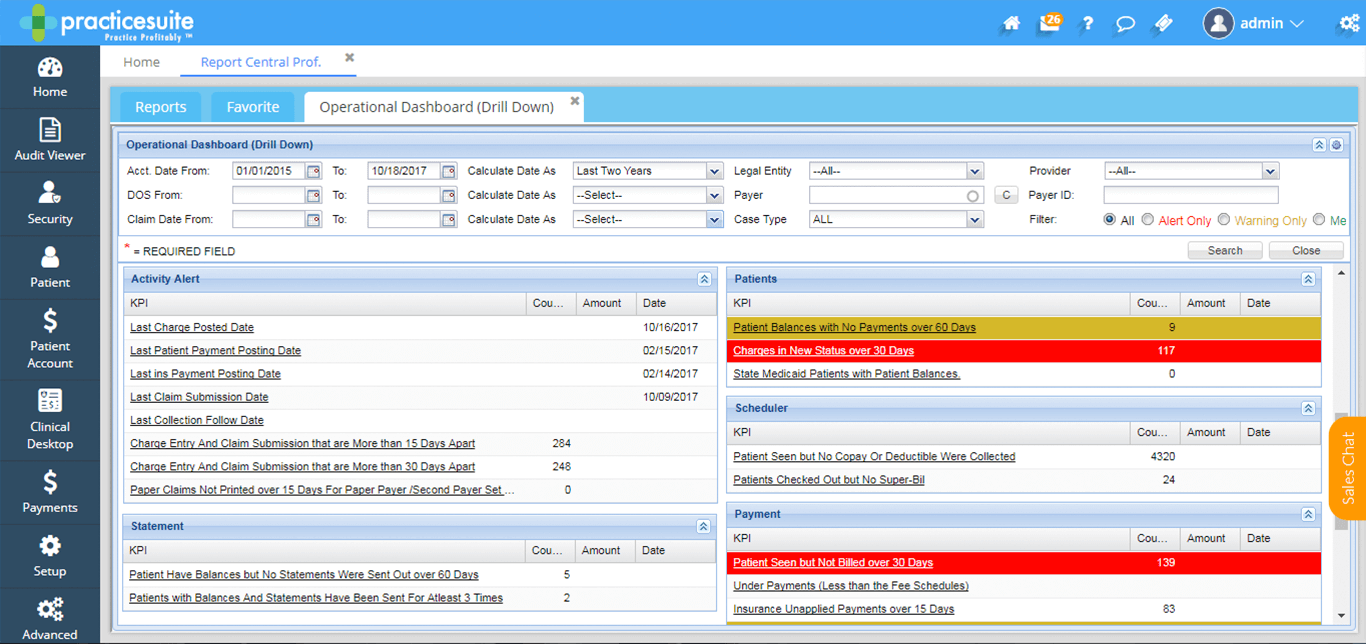
Practice suite is a comprehensive cloud-based medical office platform. It is a complete end-to-end platform that supports 61 EHR and 150 medical billing software specialties.
As one of the best medical billing software for home based businesses, it incorporates advanced web-based Revenue Cycle Management systems. Practice suite allows a Single-sign-on to all practices making it easy to sign in from anywhere and not compulsorily from an office workstation.
Practice suite can be adopted by any group, from solo practice to third-party billing or a wide staff base. It organizes all activities into one location for the patient- CRM, engagements, workflow, etc.
Key features
Interactive dashboard
Monitor claims, denials, ERAs, and KPIs.
Extended connectivity of EHR to labs, HIE networks, pharmacies, etc.
Easy to install and use application
Configuration Key Performance Indicator (KPI) that reports a customized dashboard
A CRM patient engagement portal and
Complex scheduling scenarios
Centralized screen for patient records
Fixed scheduling systems (reminders)
Multiple account capabilities
User training/coaching guide included
Conclusion
Apart from medical billing software, here are other tools needed for successful home based medical billing service, including:
Medical bills clearinghouse
Internet-enabled computer systems
Telephony services
Medical billing software
Reference tools such as CPT, HCPCS Expert 2000 coding books, ICD-10, etc.
The use of the best medical billing software for home based businesses will both enhance performance and give a competitive advantage.
Each one of the above top 5 medical billing and coding software offers excellent solutions for medical billing experts. However, not all would be applicable to each user needs. Users can also take advantage of online courses to learn about medical billing before delving into practice.
The reception desk is the face and voice of any organization. An automated receptionist software simplifies the entire process of visitor management. Whether it’s the customer, candidate, or client, for them, the receptionist is the first point of contact with the organization. That’s the whole reason why they are equally important for a company just like the HR, or the marketing department.
Therefore, a receptionist is majorly responsible for a pleasant experience from the time the customer calls or enters the organization. But, managing communication face to face, online, and on calls, all at the same time can be stressful.
Miscellaneous office duties like calling clients, billing, scheduling appointments, etc. can add to their already challenging job. That’s when an automated receptionist software comes to rescue.
Here’s a quick list of some of the leading front office management software systems for increased efficiency.
What are the best automated receptionist tools for PC?
Vonage Business Solutions
Vonage Business Solutions, available as apps and downloads helps improve business communications. This cloud-based automated receptionist software blends effortlessly with web browsers, smartphones, and business products.
The Vonage business phone systems are perfect for midsize business that fine tunes their VoIP phone system with devices that work on the internet.
It also helps the enterprises to connect over the phone, via text messages, or through video conferencing saving a lot of time for the receptionists.
Call announcing, do not disturb option, or screening to the option to connect different devices on one extension, are among its major features. Account managers can manage calls via the admin portal and evaluate call recordings, change dashboard visibility, and more.
They can also see billing details, and fix dial-up limitations on the portal. Apart from desktop solutions, users can also download its mobile app for easy access. It can also be synced with Google, Outlook or CRM.
Data entry and contact management are one of the crucial aspects of the front desk staff. GoCanvas is one of the best front office management software that helps users finish their work in minutes.
It comes with powerful features for organizations by helping users create and fill up unlimited forms. As a bonus – users can also save unlimited data.
It offers a drag and drop tool that enables users to create their own mobile apps without any coding or programming. It also allows users to capture images for checking tools or monitoring rhinos in just one click.
In addition, it can help confirm a sales order by simply getting a signature on your smartphone.
Canvas also helps with calculations to correctly estimated the order price. What’s more? It keeps users informed about the equipment or team member location with GPS tracking.
Barcode scanning in one click, seamless assimilation of mobile payments, and uploading customer database in its other apps are some of its other notable features.
Price: free trial available; enterprise level version starts from $45.
Greetly Digital Receptionist is an app for visitor check-in that helps users get more done. The administration is a critical and complex part of any organization and Greetly simplifies the workflow with automation.
From managing the front desk to fixing meetings, or travel schedule, this software helps simplify all the multi-tasking and save time.
This front office management software intends to save money, and increase efficiency while offering a high level of customization. It works on a cloud-based visitor log and is always available for added convenience.
Moreover, it sends instant alerts through a voice message, emails, text messages, or using Slack.
Price: 14-day free trial available; starts from $99/month.
Jive voice is another cloud-based and integrated automated recThis receptionist software is suitable to various companies of all sizes. From voicemail boxes to virtual receptionist software, it offers a range of hosted VoIP suites. This auto attendant system manages and updates the phone system in real-time. It can do so from an internet-supported device using Jive’s website.
The visual dial plan editor by the app helps the phone system set up in an amazing way. It helps create advance schedules using a custom dial plan that gets automatically enabled once the user has left. Users can also add custom greetings while helping them add the schedule for the whole day at once.
One of its other major features is Find Me/Follow Me that enables users to direct the incoming calls to several phones in a certain arrangement. This helps individual users to build an exclusive call flow while switching over to their extension.
Managing front desk is not just about attending calls, or managing visitors. But, it’s also about finding and creating a customer database and one of the best ways to do today is through Social Media.
Hootsuite is undoubtedly one of the leading software that helps users manage their social media in one place. This way it doubles up as a competitive front office management software helping receptionists get hold of the social media.
The software is designed to save time by helping users schedule their social posts. It helps them stay active on social media platforms at all times by automatically scheduling several of the posts on all the social accounts, at once.
It also keeps users updated with pre-authorized content that the team can post. The data is saved in the user’s preferred cloud file.
What’s more? It also allows users to estimate the effect of social media promotions with detailed reporting. Moreover, users can also look for and filter social media chats using hashtags, keywords, and also location.
Users can find conversations in several languages. This helps them get an insight into what others are talking about their brand, etc.
Price: 30-day free trial available; thereafter priced at $5.99/month.
Contrary to the popular belief, a receptionist at the front desk has a lot of things to manage. From visitor management, attending client calls, scheduling meetings, lunches, or travel itinerary, to managing client database, there’s a lot that needs to be done.
These are some of the best-automated receptionist software that helps them save on time and get things simplified. So, start implementing them in your business for increased productivity.
Sound logging programs are essential for any broadcaster out there. The market is filled with lots of sound logging kits that come with various features more or less unique.
We gathered five of the best sound logging programs that you can currently find, and we recommend that you analyze their best functionalities and features and then decide which one is the best for your personal needs.
Best sound logging software to buy right now
NI Sound and Vibration Software
Log4OM
PlayIt Recorder
SkimmerPlus
Abyssmedia Audio Logger
1. NI Sound and Vibration Software
The National Instruments sound and vibration program offers users a sophisticated software solution for all kinds of audio, vibration, noise and Machine Condition Monitoring apps.
The NI Sound and Vibration Measurement Suite and the NI Sound and Vibration Toolkit are based on an open analysis capability and also on a flexible measurement library.
Check out the most impressive features packed in this extremely useful app for sound logging:
The app includes two software packages: the NI Sound and Vibration Measurement Suite and the NI Sound and Vibration Toolkit.
Both packages come with the NI Sound and Vibration Assistant.
The NI Sound and Vibration assistant is an interactive piece of software that allows quick acquiring, analyzing, and logging acoustic and vibration measurements.
The Sound and Vibration assistant is based on an innovative approach that lets you configure the measurements using a few drag-and-drop steps.
The software is able to mix the amazing functionality of traditional noise and vibration analysis software with the flexibility of customization. The Sound and Vibration assistant will definitely help you streamline your app. You can find out more detailed information and take advantage of this terrific software on the NI Sound and Vibration Software official webpage.
Log4OM is another fascinating audio logging program that comes with a bunch of impressive features.
Check the most important ones below:
The software is really lightweight, and it comes with a modern interface that runs on PC and Windows tablets.
The software can be started from a USB key as well with some limited resources.
The program is totally customizable, and you will get more than 100 options that will make the program you BFF, and that will easily follow your audio logging needs.
You log will always be available and automatically uploaded to external devices.
The log will also be exported in ADIF every time you will be using this program.
Because of the high amount of requests to manage the Data mode in the LOTW download, the company released a brand new version of Log4OM that comes with even more amazing features on board.
You can check out the latest features that are included in the program by heading to the Log4OM official website where you can also download this extremely well-designed software.
3. PlayIt Recorder
PlayIt Recorder is able to automate and schedule audio recordings. This piece of great software is ideal for radio station audio logging.
Check out the most important features that come together with PlayIt Recorder:
This is a program that allows you to schedule audio recordings with a really easy-to-use interface schedule.
You can start your recordings manually by using the Quick Record Button that you have available.
You will be able to record to WAVE or MP3.
The software also allows you to clean up your recordings after a specified amount of days and also when your disk space is running too low.
In order to be able to use any PlayIt Software product, you will first need to create a free account on their website. When you run the software product for the very first time, you will be asked to register your computer by using the account credentials.
You will also obviously need an Internet connection. But, in case the computer that you are using does not have a connection to the Internet, you will be able to generate a license key via the My Account section.
For more information, head to the official website of PlayIt Recorder.
4. SkimmerPlus
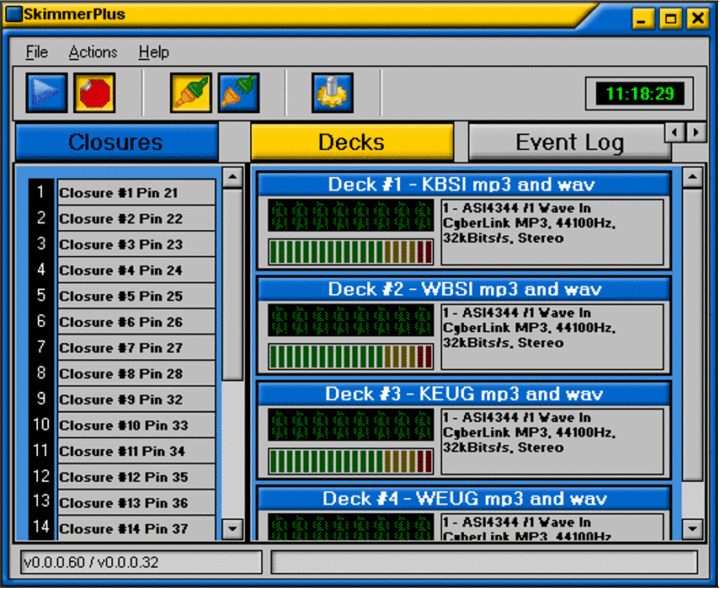
SkimmerPlus is a professional skimming and audio logging program that will turn out extremely useful. This is an impressive tool that is ideal for all broadcasters. It’s effortless to set up, and it provides a compelling audio experience.
Just take a look at some of the most important features that are packed in this software:
SkimmerPlus is a really versatile tool for professional audio skimming and/or long-form audio logging of up to eight stereo audio sources.
The software can also be used together with the ASI range of multiple tuner cards.
SkimmerPlus comes with its very own web server, and this means that you will be able to listen to airchecks or any other recorded audio by just using a standard web page and Internet connection.
A password protects the access to SkimmerPlus in order to keep the audio content as safe as possible.
SkimmerPlus is ideal for distributed organizations as well.
The web interface that this software comes with allows you to email files to anyone you want to.
SkimmerPlus can start and stop the recordings depending on scheduled times or by using contact closures via the effortless to install trigger kit.
The trigger kit will be available as an add-on to your purchase.
You can install SkimmerPlus with or without the optional hardware key. If you want to have SkimmerPlus sent to your location, the company states that it can also include a hardware with your trigger device. More than that, if you will ever decide to move the SkimmerPlus to another system, all you have to do is to take the key and the code, and you will be ready to get started. You can also download SkimmerPlus from the official website as well and keep things simple.
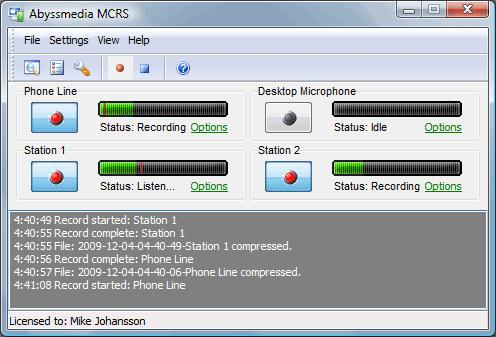
Abyssmedia Audio Logger uses a standard Windows system to log up to 32 audio channels for a whole year on a regular drive from a hard disk. After starting Audio Logger, this program will continue to log audio in predefined segments in order to automatically achieve the audio into MP3 or WAV files as well. You will get to choose the compression setting and the recording quality.
Take a look at more impressive feature of this program below:
At the end of the archive period, your older recordings will be automatically deleted to free up space on your disk.
Abyssmedia Audio Logger is not an old school logger, and it is able to make it easy to locate any days or channels instantly with the help of its built-in recordings browser.
The access to audio logs and settings as well can be protected with a password for enhanced security.
It supports multi-channel and stereo sound cards for simultaneous recording and playback.
The software comes with flexible compression settings that will enhance the quality of the recordings.
The software also includes the Voice Activation Recording and Automatic Gain Control features.
The Scheduler can manage the recording channels. Abyssmedia Audio Logger is currently used by broadcasters from all over the globe. You can go to Abyssmedia Audio Logger official page and download a free trial just to check out how this software works.
These are the best audio loggers on the market, and they all come with a robust set of features. We recommend that you visit their home pages to be able to check out their functionalities for more in-depth details. After analyzing them all, you can eventually make up your mind and device which one of these five programs is the best for your own audio logging needs.
Quantizing audio involves tightening up the feel of an audio track. Generally, there are two different approaches to audio quantize, and you can also find a combination of the two: with or without time stretching.
The best results depend according to the material that you are modifying. Time stretching involves cutting a piece of audio and putting it somewhere else.
Quantizing without time stretching will usually work better with percussion and with time stretching, it works the best with sounds with more substantial decay. There are a lot of programs that quantize audio, and we chose four of the best so make sure you check out their sets of features before you make your final decision.
Quantize audio software for Windows 10
Cakewalk AudioSnap
AudioSnap provides a few ways to quantize audio, and this program is quite easy to use even for beginners.
Take a look at the extended set of features that are included in this software below:
You will be able to quantize audio to the project’s Time Rules, and this is great for tightening up a performance inside a project that already comes with a fixed tempo or a varying tempo.
You will also be able to copy the feel of one track and apply it to another tune, and there are more ways in which you can accomplish this using the software.
It’s important to note that you can only quantize to one rhythmic value at a time.
If you don’t want to quantize all the beats from a song, you can temporarily disable any transient markers that you don’t want to quantize.
There is also the Groove Quantize command included in the software, and this aligns transients with a groove that is on the Clipboard or a previously created groove file.
You have the option of extracting the groove from one clip and apply it to another one, and you can follow the steps described on AudioSnap’s official website.
There’s the option of quantizing multi-tracked drums without stretching audio, and all the necessary steps are described on the software’s website as well.
On Cakewalk’s official website you will find a lot more information about the program’s features, and there are also all the steps necessary for running AudioSnap as efficiently as possible. Get the software and starting testing how it works.
Steinberg Cubase is another software that allows users to quantize audio tracks and everything you need to know on how to use this software is explained in-depth on the product’s official website.
Quantization is usually used in audio production, and it allows you to align notes and beats to obtain a more accurate timing, and it’s interesting to find out that this is mostly used on Midi applications besides audio files.
For instance, if you have a bunch of audio files that you recorded at a drum session and you want to mix them in your studio, you may notice that some drum parts are out of beat and you will have to apply quantization to that drum part. Of course, you will be able to do that using Cubase.
Check out other amazing features and functionalities that are included in this software:
This program is placed at the cutting-edge of the professional market.
You have to open a new project and import the audio files and then select the folder where the audio files are located and open it.
After the Import Options Window pops up, you have to choose Different Tracks, and the tracks will open in the project.
You can apply quantization to your audio files, and everything you need to know about how to do this is described on the website. Try Steinberg Cubase and quantize your audio files to see how great the results will be.
This is another great software that allows you to quantize audio tracks and more. Using this software, you can create bolder sounds, and you will be able to stay in the flow with various workflow improved features.
You will get the opportunity to perform all kinds of actions while you are away from your computer using the Push functionality. You will also be able to build your own sound with a curated library and get the fantastic potential of Max for Live which is built-in the software.
Check out the best features that are packed in Live 10:
Live 10 is a flexible program for music creation and enhanced performance.
This software packs a lot of effects, instruments and creative features as well for making all kinds of music.
You will be able to create in a traditional linear arrangement, but you will also get the chance to improvise without being constrained by a timeline.
Live’s Session View allows you to move freely between musical ideas and keep your flow.
Live’s Session View allows you to mix and match all kinds of musical ideas and you can play MIDI and audio loops of various lengths.
In The Arrangement View, you will be able to organize music along a timeline.
You can also capture MIDI notes after you have played them and Live’s audio to MIDI features will allow you to turn drum breaks and harmony parts into MIDI.
You will be able to change the tempo and timing of any audio in real-time, and you won’t even have to stop the music while you are doing it.
The software lets you mix and match loops from various tempos, to fix errors and reshape any audio.
Another great tool that can help you quantize audio is Avid Pro Tools. This is a powerful music production tool that can work with up to 128 audio tracks and up to 512 instruments and MIDI tracks. This tool offers amazing sound quality, so you should be able to create high-quality recordings with ease.
The application also supports various plugins, so you can enhance your creations and achieve some impressive results with ease. The application supports cloud collaboration, so you can easily work with multiple users on the same project. Speaking of collaboration, this tool allows you to connect to Avid Artist Community and find collaborators or promote your work with others.
As for audio editing, Avid Pro Tools allows you to easily trim or add fading effects to your clips. In addition, you can change the tempo or timing thanks to the Elastic Time feature. There’s also an ability to customize your pitch with Elastic Pitch feature.
The application also has a wide array of virtual instruments that you can use to create sounds with ease. It’s worth mentioning that Pro Tools also works with various MIDI controllers, which is incredibly useful for all professional users.
Another feature that we have to mention is the HD video support, so you can play video next to your audio timeline in order to better mix audio and video. Overall, Avid Pro Tools is a great music production tool, so if you’re looking for software that can quantize audio, we suggest to try out Avid Pro Tools.
Overview:
Ability to work with 128 audio, 512 instruments and 512 audio tracks
Support for a wide array of plugins
Cloud collaboration
Standard audio editing features
Support for virtual instruments and MIDI controllers
StudioOne 3 comes packed with all the features and functionalities that you would expect from a modern digital audio powerhouse. This software was built for creative music enthusiasts, and it’s targeted at music production.
Check out the best features that are included in this tool below:
It comes with a user-friendly interface that will allow you to create music effortlessly instead of having to struggle to make your way in a bloated interface.
You will notice that the sound quality is unparalleled and the most common comments that come from musicians and producers back this up.
On the program’s Start page, you will be able to access recent Songs and Projects, and you can also start new ones.
You can adjust hardware settings and check your online progress and stay in touch with the latest news.
This program will help you develop new skills via tutorials and demos.
Everything that you could possibly need is located on the Song page, and this means that you won’t have to juggle various windows.
You can create backing tracks that will automatically sync to your song tempo.
StudioOne’s updated browser provides keyboard-based musical search, and almost 10,000 audio and music loops.
There are more exciting features and functionalities packed in this software, and you can check them all out on StudioOne’s official website, or in the online store where you can buy this great tool.
These are four of the best programs for quantizing audio tracks, and they all come with their amazing sets of features, so make sure to analyze them before you pick the best software for your musical needs.
If you were looking to purchase Microsoft’s new Surface Earbuds during the holidays, you’re out of luck. Panos Panay, the company’s Chief Hardware Officer, has just announced on Twitter that the Earbuds have now been pushed back to Spring 2020, as Microsoft apparently needs more time to iron out the kinks.
The face of Microsoft’s Surface business didn’t go into details about what’s causing the delay, so we don’t know if Microsoft has been encountering software or manufacturing issues. Anyway, the Surface Earbuds will now launch worldwide in the Spring, and we hope this delay will result in a better product.
Product-making is about the relentless pursuit to get all the details right, which takes time…sometimes more than we planned on. To ensure we deliver the best possible experience for you, our fans & customers, Surface Earbuds will now launch worldwide in Spring 2020 #Surface
Priced at $249, the Surface Earbuds will feature touch and voice controls, and Microsoft promised up to 24h of battery life. One of the killer features is support for all digital assistants, and that means Cortana, Alexa, Google Assistant, and even Siri.
The Surface Earbuds’ circular design looks quite odd next to Apple’s AirPods, which are the most popular wireless headphones on the market. The Earbuds are also more expensive than the AirPods, and they also lack the noise-cancellation technology found on the new AirPods Pro or Microsoft’s own Surface headphones. The Surface Earbuds still made a good first impression on our own Arif when he tried them at Microsoft’s Surface event last month, and we hope the product will end up even better thanks to this unexpected delay.
The Microsoft Surface series is a line of touchscreen-based personal computers and interactive whiteboards running the Microsoft Windows operating system designed and developed by Microsoft.
They are known for their sleek design and surprisingly good performance, but also for their price tags. If you too are looking to buy yourself a Microsoft Surface laptop, then you better take a look at which are the best and most popular models out there.
To make things easier for you, we’ve already compiled a list of our own top picks.
Note: Deals are subject to change. Keep in mind that the price tag often varies. We recommend going on the vendor’s website to check the price. Some of the products may be out of stock by the time you’ve made your purchasing decision. So, hurry up and hit the buy button.
What are the best Microsoft Surface devices that I can buy?
Microsoft Surface Laptop DAG-00001
If you’re looking for a mix of both form and function, then the Microsoft Surface Laptop DAG-00001 is the model that you need.
It features the signature ultra-slim design that Microsoft Surface laptops are known for, but the model can be upgraded to have up to an i7 processor that will easily handle any job-related task you throw at it.
If you value elegance and availability above all else, then the Microsoft Surface Go is the right model for you, thanks to the slim design and lightweight frame.
The touch is well-designed to be viewed, touched and written on, and it will automatically adjust to your surroundings thanks to the ambient light sensor for a better viewing experience.
Pros:
High-res 10-inch PixelSense Display designed to be viewed, touched, and written on
Lightest Surface yet, starting at 1.15 pounds
Touch: 10 point multi-touch
All-day battery life, with up to 9 hours of unplugged power
Ambient light sensor
Runs Windows 10 Home in S Mode, streamlined for security and superior performance
Versatility is the key selling point of the entire Microsoft Surface line of laptops, as the main idea was to have devices that could easily switch between laptop and tablet mode in just a few steps.
If that is the case, then the Microsoft Surface Pro 6 is the poster model for the entire line, as it boasts the great ultra-slim design of a tablet with the power of a laptop.
Pros:
A best in class laptop with the versatility of a studio and tablet
If you’re looking for a gadget that will get the work done fast and efficiently and look good while doing it, then you should probably shift your gaze towards the Microsoft Surface Laptop 2.
This laptop boots up in mere seconds, and it is powered by the latest generation of Intel processors, all while being slim and beautiful, making it a great travel accessory for those that are on the go.
Pros:
Clean, elegant design thin and light, starting at just 2.76 pounds
Rich tone on tone color combinations: Platinum, Burgundy, and Cobalt Blue
Improved speed and performance with the latest 8th Generation Intel Core processor
All-day battery life, with up to 14.5 hours of video playback
Vibrant 13.5 inches Pixel Sense Display with interactive touchscreen and razor-sharp resolution
There is always room for improvement, and from a design point of view, the Microsoft Surface Pro 7 is the successor of the Microsoft Surface Pro 6 in every way.
However, while it may be lighter, more powerful, and does have way more connectivity options, the price tag will make you reconsider whether or not the extra bit of power is actually worth it.
Pros:
Next-gen, best-in-class laptop with the versatility of a studio and tablet
Type, touch, draw, write, work, and play more naturally
Has a laptop-class Intel Core processor and improved graphics
USB-C and USB-A ports for connecting to displays, docking stations and more
Ultra-slim and light Surface Pro 7 starts at just 1.70 pounds
All-day battery life up to 10.5 hours, plus the ability to go from empty to full faster
Nowadays, working from home or while on the road is extremely common, and if you have the right tools for the job, it is also extremely easy.
Admittedly, Microsoft’s line of Surface laptops may not score high in the performance department compared to other laptops in the same price range, but they overcompensate with the ability to be more portable than any other model.
So, if you only need to do some text writing or editing, or are looking for a casual way for browsing the Internet but with a bit more power than what a tablet can offer, then go ahead and get yourself a Microsoft Surface laptop.
If you’re more into presentations for large teams, the Surface Hub 3 should suffice.
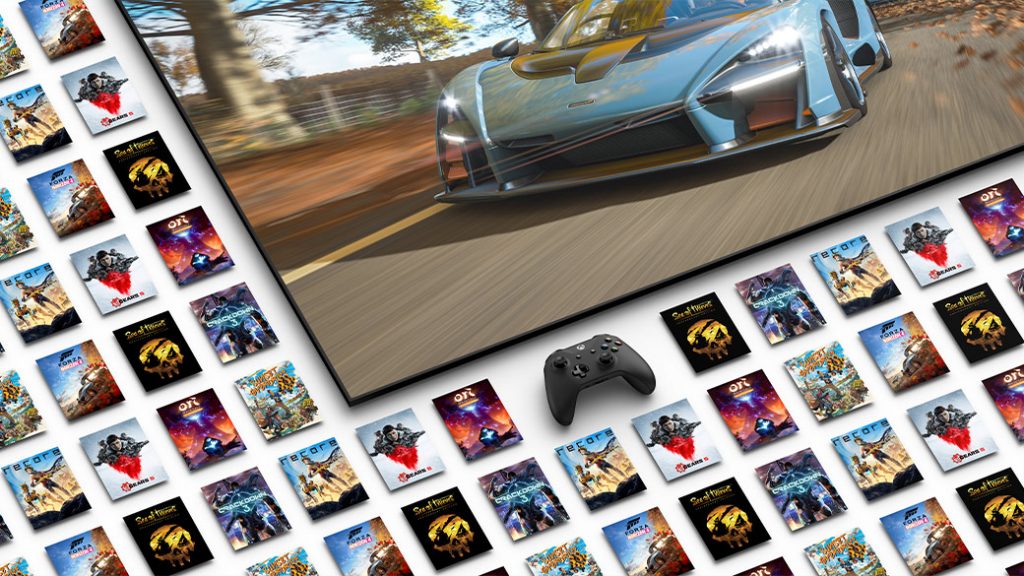
Microsoft is opening up the gaming floodgates to its weekly Deals with Gold subscription adding additional access to near 500 games.
The expansion of this week’s Deals with Gold is a special one that lands right before the infamous Black Friday shopping weekend and the Xbox team is gearing up to give gamers upwards of 80% off select titles until December 2, 2019.
Those who are interested, have roughly four days to cash in on the normal Spotlight titles where Microsoft set the expiration date on Tuesday, November 26, 2019.
NOTE: Black Friday Deals are valid 24 November through 02 December 2019. Black Friday kicks off even earlier for Xbox Game Pass Ultimate and Xbox Live Gold members, with Early Access beginning on 21 November.
REMINDER: Actual discounts are subject to change and may vary by region.
With 500 titles up for grabs, the list of games is far too long to read here but here are just some of the experiences gamers can look forward to snagging this week:
We’ve previously explained how you could add contacts to Outlook in Windows 10, but what if you want to manage them? You might have a group of people and contacts you’d like to put together under one folder, or you might want to create a list so you can send emails out in bulk. In this latest Office 365 guide, we’ll explain how you can do just that, and some more.
Create a contact list to make contacts easier to find
One of the easiest ways to manage contacts in Outlook is to create a contact list. With a contact list, you can logically organize your contacts, and find them more easily. Here’s how you can do this.
Click the People icon in the navigation bar on the bottom left side of the screen
Click on Folder, and then the New Folder option on the top right corner of the screen
Fill out the fields, and enter a name for your contact list. You’ll also want to select contact items from the menu that says folder contains.
You can then press OK to save the list
If you want to add an existing contact to the list, the process is really easy. Simply select it from the contact list and drag it over to the My Contacts bar on the left side of the screen. You can also create a new contact in the contact list, click the Home tab and select the contact folder in the navigation bar.
Create folder groups to send emails out in bulk
A second cool way to manage contacts in Outlook is to create what’s called a contact group. With this feature, you can create a set of contacts that you can use to send out emails in bulk. This is what was once known as distribution lists in older versions of Office. Here’s how you can set it up.
Right-click My Contacts after clicking the people icon on the bottom left side of the screen
Select New Folder Group and enter in a name for the group
Drag and select the contact list you created via the steps above into the new group
Once you do this, you can send out an email in bulk to someone by clicking Mail in the navigation bar. Then click Home and New Mail. Then you can select the contact list in the Address Book drop-down box.
Last month, I got a chance to sit down with Microsoft’s director of ID@Xbox, Chris Charla, who was in town for PAX AUS and Melbourne International Games Week.
We talked about Microsoft’s independent developer self-publishing program, what benefits the Xbox Game Pass subscription service offers both devs and gamers, his experience with working with studios in different regions, and how video game consumption habits have changed in recent years with the shift to digital downloads and online services.
With Xbox 360, you had Xbox Live Arcade, which you were a big part of, and with Xbox One, Microsoft changed it with the “Games are games” approach.
Yeah, exactly.
So all the games are in one catalogue. And for me, coming into the Xbox ecosystem for the first time with Xbox One, I remember thinking “Oh that’s such a natural thing. I don’t know why they didn’t do that before” but ID@Xbox is now a similar, very distinctive, brand both on the console and the online storefront. Can you explain how it’s different from Xbox Live Arcade?
Yeah, so Xbox Live Arcade, at the time, you couldn’t really buy full Xbox games when we launched Xbox Live Arcade. If you wanted to buy a full game, you had to buy a disk. And then on 360, you could buy full games but they sold them in a different store, Games On Demand. All of these decisions made tons of sense at the time.
And the platform was evolving.
Yeah, so rapidly during the 360 generation so that by the time we got to Xbox One, it’s always an opportunity with a new console cycle to take a step back and say, “Is this the way everything should be going?” We knew on Xbox One that games were going to be sold digitally as well as physically and that there would be digital-first games with ID@Xbox games so it just made sense to put them all in the same store. Consumers are pretty sophisticated and in 2004 and 2005, just purchasing digital content was kind of new. The iPhone hadn’t even come out yet.
Oh for sure.
And by 2013/2014, everyone was kind of okay buying digital content. It was easy for the consumers to understand.
And ID@Xbox is more than just a category for indie titles. It’s an actual program.
Yeah, it’s kind of interesting because it is a program and then the brand is kind of developer-facing, because it’s the name of the program, but also a little bit consumer-facing because we want to highlight these great games that developers are making. So, for developers, the core of the program is that we provide platform access to Xbox One for independent publishers who want to self-publish. They tell us the game they want to make, we send them two dev kits at no charge. We provide dev support for getting certification or if they run into trouble during development.
And then we also provide, and this is where the consumer-facing comes in, we try to provide promotional amplification for the promotion that the developers are doing. You know, a developer might be here at PAX showing in the PAX Rising area and, meanwhile on the ID@Xbox Twitter, we’re tweeting about all of those games. On the store now, there’s even a category sometimes for ID@Xbox games that you should check out, that sort of thing.
But it’s important to us that the games are the heroes. There’s no ID@Xbox splash screen. We’re not the publisher or the developers. And, even at things like E3 which is the biggest tradeshow of the year where we do our big media briefing, we use to put the games that were coming through the ID@Xbox program all together in one section to kind of contextualise all of the cool indie games that are coming to Xbox and, in the last few years, we haven’t done that at all.
Yeah, they’ve been sprinkled throughout.
The reason is because the evolution of these games has been on such a rocket ship that we don’t need to contextualize them for anyone anymore. They just stand really well on their own. We still do a montage of ID@Xbox games because that’s a great way to show quick hits of a lot of games and you can then go online and watch the full trailer for all of those games.
But for games that have their 60, 90, or 120 seconds in the briefing, we just put them where they feel right and this year, in the most delightful contrast ever, we have Cyberpunk 2077 which is this major, AAA, huge, amazing RPG and then we had Keanu Reeves come out on stage to talk about his involvement in it.
It was breathtaking.
Yeah it was the most breathtaking and amazing thing and how do you follow that? And we followed that by totally changing the tempo of the show and going to Spiritfarer, which is this cosy management sim about death.
Yeah, that was quite funny because you guys were like, “Hey, Keanu Reeves!” and then “Now let’s pull it back.”
I thought it was brilliant. They work on scheduling the show and pacing the show really carefully and I thought that was such a brilliant decision to do that. And Spiritfarer could do it. Spiritfarer could follow Keanu Reeves and that’s amazing and speaks to the power of independent games where people can be all in on Keanu and then all of a sudden it’s like, “Oh, what’s this?”
Is there a limitation on what devs can join the ID@Xbox program?
No. Not at all. We have over 3,500 developers who are in the program. More than 1,400 games have shipped and we invite everybody to join. We have everybody from Anthony Tan, who may have joined ID@Xbox back when he was still in high school, he’s a Melbourne-based developer doing Way to the Woods which we showed on stage at E3 last year.
The only thing we look at is the games. We look at every game whether it’s from a third-party publisher or an ID@Xbox developer just to make sure that it hits this minimum bar of console quality. No so much “Is it good or is it bad?” more just if it hits this console bar and, if it does, then we invite you into the program and send you the dev kits and off you go.
So, if like, CD Project Red was all “Hey, can Cyberpunk join ID@Xbox?” you’d say yes? (Laughs)
Actually, yeah. (Laughs) It’s kinda interesting. If they wanted to come through ID, they could. We do have different programs but we try not to get stressed out about it as our goal is for every developer, whether it’s a hobbyist who’s shipping through the Xbox Live Creators program, through to the ID@Xbox program and through to our AAA developers… We just want them all on Xbox and we won’t get stressed about what program they’re in.
Is there any type of exclusivity agreement if someone’s in ID@Xbox?
No. We do ask that games ship at the same time that they ship on other consoles just to make sure that Xbox players are getting the same content as everyone else but we also understand that sometimes a small developer can’t ship on three consoles at once. We’re not uptight about that.
Have many ID@Xbox developers decided to make their games Xbox Exclusive?
Yeah, absolutely. We’ve got many games on Xbox from independent developers and it’s super cool.
How has it been working with the indie scene in Australia?
Amazing.
We’re pretty big. A lot of people don’t seem to know this.
I think the Goose Game is changing this. I think it’s interesting. After the economic downturn of 2008, just over 10 years ago, the AAA industry in Australia collapsed. There were a lot of US companies with Australian subsidiaries when the economy turned and it was awful.
I remember. It felt like every week a studio was closing.
It was really bad in one respect but, in another, it kind of kickstarted Australia into the independent development scene and now, you know, we’ve seen the flowers of it for a while but now we’re really starting to see the flowers of it with studios such as League of Geeks, House House, and Witch Beam. There’s this spirit of independent development now in Australia that’s amazing. We’ve brought to Game Pass and shown at E3 a bunch of games from Australian developers. Games like Totem Teller, Dead Static Drive, and Way to the Woods most recently.
And also games from New Zealand like Ashen and Room 44. For us, it’s been great to come down here and see how much talent there is. Melbourne especially with the arcade culture, there’s tons and tons of talent. I might have a slightly biased view coming from Melbourne Games Week where every single developer in Australia is here. Probably a lot of them work in Sydney, Brisbane, Adelaide, and Perth but I just see them in Melbourne and there’s a lot of great developers in Melbourne.
Have you noticed any differences within the different regions?
Absolutely. Something that I love about the independent development scene all up is that you start to see scenes develop. You know, the games aren’t all the same but they start to have… You can see that this is an LA game or this an Australian game or a Stockholm game.
Really?
Yeah. It’s really cool.
What kind of aspects?
It’s hard to explain. It’s easier if you see them all next to each other. A lot of it’s visual versus gameplay. A lot of the games in Australia, they don’t look the same but they’ve been influenced by the visual stylings of other games they’ve seen in development. It’s kind of like a music scene.
Interesting. Have you noticed any similar themes being covered in the Australian games at all?
It’s hard to say. I don’t think it’s as hard as a genre thing. It’s more like a little bit of a style thing.
With Xbox One video games right now, there’s been a lot of focus on titles being Xbox One X Enhanced with HDR and 4K resolution. Is that something that you actively encourage developers to add to their games?
Absolutely. The consoles that we send developers today are Xbox One X consoles and we always encourage them to try HDR or 4K or one of the other enhanced features of Xbox One X and lots and lots of devs take advantage of it. It’s really easy to do, especially if you’re using an engine like Unreal or Unity. It’s straightforward to take advantage of that power.
Xbox Play Anywhere is another feature and there are some ID@Xbox games on Windows 10. Is this functionality also something that you’re trying to push?
Yeah, it’s totally up to them. In fact, one of the things that we’ve seen when we expanded our Xbox Game Pass program to PC is that we have a lot of ID@Xbox developers now also bringing their games to PC.
Do you think you’d ever encourage developers to develop games specifically for PC and then after the fact come to Xbox One?
Well that’s what most of our developers already do to be honest. Most developers ship their games to Steam first and then try to bring it to consoles. Slightly larger devs will try to do all platforms at once so that they can get the marketing benefit and then you’ll see some devs do one console and PC at a time.
Right.
Our view is that we want to get the games to Xbox as that’s what makes our players happy but we also want our developers to be successful because that’s central for the game industry to keep going. Our first order of business is developer success and things like Game Pass have really been able to help developers be successful and it just makes the world great for our players.
What does Xbox Game Pass offer developers besides more exposure? Would you say it’s a financially smart decision for developers to make?
We can’t go into the business side of things but, yeah, we make sure that it’s a smart decision for them and we make sure that we have all sorts of games on Xbox Game Pass such as big multiplayer games that you can play for a long time, shorter single-player experiences that are more narrative. We make sure that the business deals that we do with developers are really fair.
We need both types of games and we don’t want a financial model that only rewards one type. We’ve spent a lot of time on it and worked out a great financial situation for developers. The fact that we see so many devs signing second, third, fourth, fifth games with us, to me, tells me that they’re very happy. And also what they tell the media tells me that they’re very happy.
Do you find that those gamers who play titles on Xbox Game Pass are those that wouldn’t have played the games otherwise?
Yeah, we see a lot of that. What we see is that people are using Xbox Game Pass as a way to discover lots of games that they never would have tried otherwise. With Human Fall Flat, which is an action-puzzle game, something like 40% of people who downloaded that game in Game Pass had never downloaded a puzzle game before on Xbox. And of that cohort, like 40% of them went on to buy a puzzle game within the next 60 days.
One that was outside of Xbox Game Pass?
Yeah, outside of Game Pass. So it’s interesting that we turn these people onto a whole new type of game that they have never tried before.
That’s amazing.
We see that happen over and over again in Game Pass where people are trying games that they probably wouldn’t have tried otherwise. For players, it’s great because they can sample a lot of games without taking a lot of risk, just the time to download. And they get to find all sorts of new interesting things to play for themselves or their family.
For developers, they get to find an audience because there’s so many more people just downloading the game. And, if the game’s good, and we work really hard to curate the games in Game Pass to make sure that they are good, these games suddenly have fans and the developer suddenly has fans waiting for their next game. In Game Pass you can buy the game in Game Pass at a pretty good discount and, if the game’s good, it’s amazing. You just see people buying the game even if it’s going to be available to them within the membership program for another year. They just want to make sure that they have it.
On the financial side of Xbox Game Pass, do the developers get reimbursed per game download, for the amount of time played, or via some other metric?
I can’t say but I can tell you this. We make sure that it’s really fair regardless of the games played.
And you clearly have developers returning to the program so the system seems to be working.
Yeah, exactly.
Do you find that games get a different reaction if they jump to Game Pass on launch day or come several months afterwards?
That’s a good question but it’s a hard one to answer, right? Because we can’t AB test but we haven’t seen any negative effects from games coming on Day One and I think what it’s done, having heard what some of the devs have said after having done it, is that it really just increases awareness of the game everywhere. Even on other platforms.
I guess it’s also changing the way a game’s popularity is calculated too. Up until a few years ago, popularity was gauged on where a game ranked on sales charts but now you can’t really use that ranking method because we have subscription programs like Xbox Game Pass.
Yeah and I think people play games in a different way than they used to. In the olden days, which I guess is only three or five years ago, if people were going to buy a game, they would buy it Week One and play it right away. And we used to see, now this is maybe more like 10 years ago on Xbox 360, sometimes 50% of a game’s lifetime sales would be within the first month digitally. Sometimes in the first two weeks. And now that is not the trend we see anymore.
We see that people buy games and play games much later after the release than they used to on a percentage basis. And it’s really interesting and I think it mirrors what we’re seeing in linear media where, in the days before DVRs, if you wanted to watch a show you’d have to watch every week when it happened or you were just out of luck.
That’s true.
Now there are people who don’t even start whole series until they’re already over. There’s somebody now who’s going to watch the first episode of The Sopranos tonight and that’s totally okay. You know, that’s not weird. It’s like, “Oh, hey. You’re finally getting to The Sopranos.” And I think we’re seeing a little bit of the same with games where being late to the party for a game is no longer weird or a big deal. You know, I play on Switch and I’ve got Octopath Traveler. I think I got it months and months after release and, like, nobody cares.
And with Xbox Backwards Compatibility too, you’ve got Xbox 360 and original Xbox games, which is great for me because I didn’t get an Xbox until the Xbox One so it’s my first time playing 360 and OG Xbox games.
Oh, awesome.
What can we expect from ID@Xbox this year and going on next year?
I think for this year, there’s still going to be a bunch of games coming out. After Party is one which we’re excited about. Next year, there’s going to be tons and tons of games.
Do you expect the ID@Xbox program to transition into the next Xbox console?
Absolutely.
So it should be a very smooth transition with no major revamping at all?
No. Not at all.
Is there anything you’d like to tell everyone about ID@Xbox that they don’t already know?
Just check out the games. We have amazing creators. Like I said, there’s more than 3,000 studios, more than 1,400 games that have already come out. Check them out on Game Pass and find some amazing games on there.
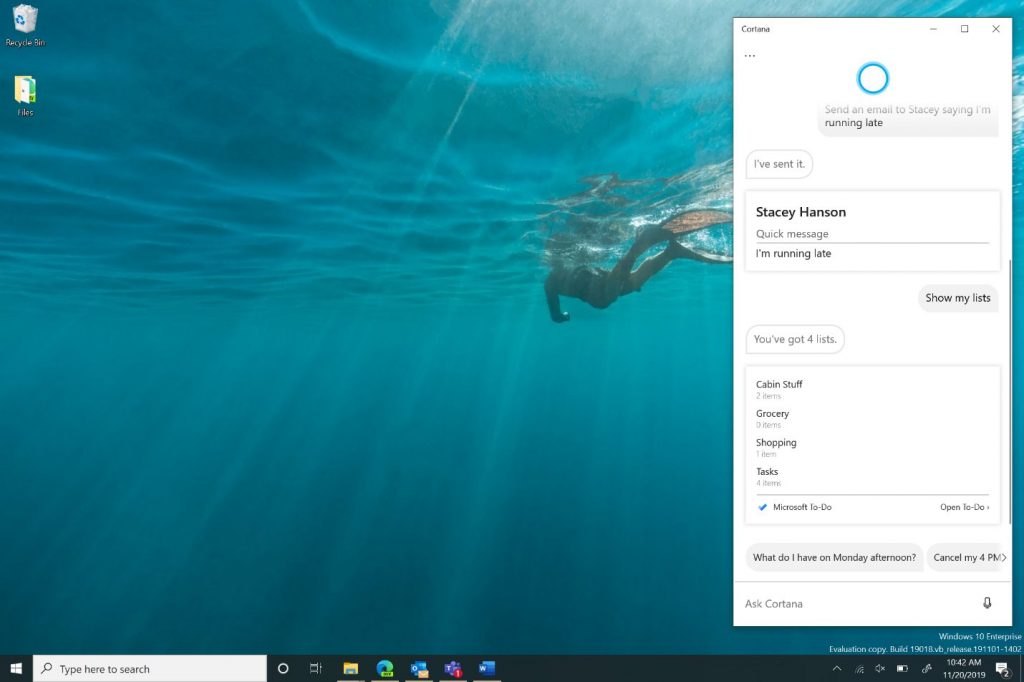
First of all, it is important to note that all these Cortana changes will be rolling out to Windows Insiders in the Fast Ring first. It also comes as part of what Microsoft is calling a shift to make Cortana from a “general digital assistant to a personal productivity assistant that helps you in the Microsoft 365 apps you use to get things done every day.”
As previously announced, one of the key changes is undocking the Cortana app from the taskbar, allowing you to resize or move it around. You’ll also be able to more easily configure your default input to Cortana. Other key changes include improved email skills, Calendar skills, and Windows skills. This means you’ll be able to use Cortana to open Windows apps and adjust settings, and even join Microsoft Teams meetings. According to Microsoft:
The improved email skill lets you use Cortana to create and query emails:
“Send an email to <name> letting them know I’m running late”
“Show me emails from <name>”
The improved calendar skill lets you create and query meetings:
“Set up a 1:1 with <name> at <time>”
“What’s my next meeting?”
“Join my meeting” (Note: This only works for Teams meetings at this time.)”
Importantly, Microsoft has also removed some functionality of Cortana accordingly. The company has removed Cortana support for connected accounts, which means work and personal accounts are now two separate experiences based on which account you’ve signed in with. Cortana Chat history will also remain on the device locally. Other features removed include the following, but be aware that they will be coming back soon.
Bing Instant Answers
Jokes and other assistant conversations.
Timers
Once beta testing with Windows Insiders is complete, you can expect these Cortana features to roll out to a wider audience with the Windows 10 20H1 update. There’s still no timing for that as of yet, but rumor has it that the update could RTM by the end of December.
Both online stores and retailers are often flooded with customers hunting for the best available price they can get for the product they want to buy.
If you decide to buy a Windows 10 product, we’ve made you a shortlist of the best deals for Windows 10-powered devices you can get.
NOTE
Deals are subject to change. Sometimes, some deals listed in our guides may no longer be available when you hit the buy button. So, please hurry up and grab them while they’re hot.
Windows 10 laptop
Microsoft is offering a plethora of hot laptop deals this year. We already compiled a buying guide for Windows 10 laptop deals available in the Store. Do check it out to learn more about the current deals.
Of course, you can also check out the list of laptop deals directly on Microsoft’s website.
Speaking of laptop deals, here are other laptop deals to grab:
If you want to buy a slimmer ultra-portable device, then a Windows 10 tablet is the right choice for you. It’s a good idea to buy a Surface tablet now since Microsoft is now offering huge Surface device deals.
Windows 10 monitor deals
Microsoft offers three interesting monitor deals this year:
Here, you can see the list of the best laptops, tablets, smartphones, and accessories. You can find some great discounts, even up to $500 dollars for some premium Windows 10 laptops. So, check out the list:
We hope that, by showing you these deals, we have helped you to decide the best. You can tell us in the comments which Windows 10 ‘toy’ you plan to buy.
It’s now been three years since Microsoft announced Xbox Play Anywhere, a gamer-friendly initiative allowing consumers to pay once for a title on the Microsoft Store, and play it on both Xbox One and Windows 10 at no additional cost. Xbox Play Anywhere is a great incentive for gamers to stay in the Xbox/Windows 10 ecosystem to keep, though it’s still up to game developers to support it.
As of today, pretty much all of Microsoft’s new first-party games now support Xbox Play Anywhere, though there are some exceptions: As an example, the upcoming PC version of Halo: The Master Chief Collection will have to be purchased separately from the Xbox One game, and it won’t support cross-play with Xbox One at launch. However, both the PC and Xbox One versions of the Halo anthology will share cloud saves and achievements, which is better than nothing.
This kind of exception to the rule makes Xbox Play Anywhere a bit confusing, but Microsoft plans to keep supporting the program once the next-gen Xbox console, Project Scarlett, starts shipping in holiday 2020. In a recent interview with Stevivor, Xbox head Phil Spencer explained that a game like Halo: Infinite, which will be released on Xbox One, Project Scarlett, and Windows 10, will support Xbox Play Anywhere.
“Our goal for our first-party games is that your entitlements will be cross-generation and your Achievements will move effectively with your save game because that’s where they stand,” explained Spencer. The Xbox head added that he would like third-party developers support cross-gen experiences in the future, but that will really be up to them. “I think for all of us the more a game can be the game and your players can play that game in the different places they want to play it and remain that their [save] state and everything is with them is a good thing,” Spencer said.
Along with Microsoft, Ubisoft was one of the first game publishers to confirm that they’re working on cross-gen games, with Watch Dogs: Legion, Gods & Monsters, and Rainbow Six: Quarantine to be released on both Xbox One and Project Scarlett. However, we don’t know yet if these games will support cross-play, cross-save and cross-buy scenarios, as Microsoft aims to do with Xbox Play Anywhere.
Microsoft recently released the numbers behind its active daily user count for its relatively new office communication tool, Teams, and in a turn of events, its closest competitor is using a page from the company’s Xbox media strategy to counter by pointing to engagement numbers versus active daily users.
Pivoting away from a head to head in active daily user numbers that has Slack coming up short in its 12 million count versus Microsoft’s newly minted 20 million stats, Slack is now moving towards highlighting its “unmatched engagement” metric.
Speaking with journalist Paul Thurrott, a Slack spokesperson points to over 5 billion weekly actions as a measure to counter Microsoft’s growing presence in the enterprise short-response communications arena.
As we’ve said before, you can’t transform a workplace if people aren’t actually using your product. Slack continues to see unmatched engagement on our platform with 5+ billion weekly actions, including 1+ billion mobile actions. Among our paid customers, users spend more than 9 hours per workday connected to our service, including spending about 90 minutes per workday actively using Slack.
Slack’s numbers are impressive and indicative of its three-year lead over Microsoft Teams and bodes well for a company that lacks the benefit of synergistic upsell from a corporate staple in Microsoft Office but rather presents a “stand-alone” product with great adoption.
Unfortunately, some Slack investors aren’t sold as much on the metric of engagement as much as they are of future adoption and revenue. Shortly after Microsoft made its active daily user numbers public, Slack’s stock took a 10% hit and was down 8.4% by the close of day.
While Slack VP Brian Elliot has championed before the idea that “you cant transform a workplace if people aren’t actually using the product,” it may also be true that some workplaces are looking less into fundamental transformations as much as they are into efficiencies.
Slack may be trying to highlight the seemingly buffered adoption numbers of Microsoft Teams by its native integration in Office 365, the reality is that Microsoft is filling more seats and perhaps going down this rabbit hole could bring up more questions than answers for Slack and its investors.
By lowering the barrier to initiate communication, the hidden side effect is that Slack has the quiet capacity to exponentially increase communication overhead. Resulting in much more voluminous, lower quality communication.
There are more Slack channels than there are employees at each of the 10 large companies — 500 workers and up — with which Time Is Ltd. is currently working. The firm estimates that it would be physically impossible for any employee at these companies to read all their Slack messages and channels.
And every wasted minute of an employee’s time is wasted money.
Slack’s engagement response is warranted and necessary to assuage investors at the moment, but according to Wedbush analysts Daniel Ives and Strecker Bake, “our checks in the field indicates Slack will have significant difficulty further penetrating the enterprise given the significant competitive offering from Microsoft’s [Teams] product that could slow growth going forward quicker than the Street is anticipating.”
While Slack’s engagement number is impressive, the reality is that the company still needs to keep pace with Teams adoption in the enterprise and as Microsoft continues to sign large contracts with the likes of the DoD and Salesforce, it may get harder for Slack to maintain the same engagement margins over Teams.
Epic Games announced that they added Microsoft DirectX 12 for better performance when playing Fortnite on Windows PC. As noted in a blog post, Fortnite will get DirectX 12 support to allow PC players with higher-end GPUs to possibly experience a higher and more consistent frame rate.
At the moment, playing Fortnite on Windows PC requires a GPU capable of running Microsoft DirectX 11. Fortnite Battle Royale update v11.20 will add the capability to run DirectX 12 on Windows PC.
“By using DX12, PC players with high-end GPUs may experience a higher and steadier frame rate. This is because DX12 delivers better CPU performance and allows for the distribution of rendering jobs across multiple cores.
In the future, we plan on adding features to Fortnite that are made possible by DX12. Allowing players to opt into DX12 before these features are added will give us valuable information in our development efforts and help us shake out any bugs.”
In order to use DirectX 12, you need to change your Advanced Graphics settings, which can be found in the Video settings.
Daily Challenges are back and can be completed for XP!
Up to three at a time are available, and once a day you can replace a Challenge for another.
In the Locker, you can now filter your items by the Season they were introduced in. To filter your items by Season, enter the Season name in the search bar. Use terms like “season 5,” “season x,” “chapter 2 season 1,” etc.
You can now adjust the UI contrast, by using the User Interface Contrast setting in the Graphics section of the Video settings.
Added a Tutorial playlist for the mobile version of Fortnite.
Adjusted the headshot multiplier of the Tactical Shotgun so it’s now in line with the headshot multiplier of the Pump Shotgun.
Increased the Effective Health (sum of Health + Shield) given from Slurp Tankers.
The new Fortnite update v11.20 also includes bug fixes and performance updates. Are you a Fortnite player on Windows? Let us know how your experience is in the comments below.
Those who have signed up to try beta versions of Microsoft Launcher have another update to try. The company has released the 5.11 to beta testers on the Google Play Store, improving upon both its functionality as well as its overall aesthetics.
First off, Microsoft has made slight polishes to the user interface. The company has made changes to the folders and app drawer to better help it match the rest of the launcher theme. Additionally, the app drawer now has a setting to allow users to hide the new apps row for a much cleaner look. Here’s the changelog, for those interested:
Folder and app drawer are more consistent with Launcher theme
Something interesting is currently happening on Microsoft’s Outlook.com webmail. The company has apparently started rolling out new integrations with Gmail, Google Calendar, and Google Drive, allowing users to access these Google services right from their Outlook.com inbox.
Outlook.com user Florian B noticed the new Google integration on the webmail this morning. We’re not seeing this on our Outlook.com emails accounts yet, so this could be a gradual rollout. Microsoft also appears to have redesigned the webmail again to add an account picker on the left sidebar, similar to what we currently have on Outlook for iOS and Android. However, moving between accounts isn’t exactly seamless as the page will reload every time you switch.
The Gmail-Outlook integration is a good start but it still feels early. You cna't easily move from one to the other, it reload the WHOLE page from scratch each time. pic.twitter.com/H3lWrZdh6S
The Google Drive integration (Image credit: Florian B.)
This is still an exciting development for Outlook.com, which could be about to lose its Microsoft focus to become to true web version of Outlook. Gmail is one of the most popular email services out there, and it will be interesting to see if Microsoft could add integrations with other email and cloud storage services going forward.
We’ve reached out to Microsoft to learn more about this Gmail integration, and we’ll update this post if we learn anything new. In the meantime, let us know in the comments if you’re also seeing this new Gmail integration in your Outlook.com inbox.
Update 11/21 8:10AM PT: We’ve just received the following message from a Microsoft spokesperson confirming the experiment: “We are always looking for new ways to extend the best email experience to our customers and can confirm that we’re experimenting with a small set of Outlook.com users to learn and gather feedback.”
Users have complained about Microsoft Surface device battery issues for years. It does not seem that things are getting much better despite recent firmware updates that were supposed to enhance Surface Pro 6 and 7 battery performance. Numerous users have stated on the Microsoft forum that Surface battery drain has actually got worse since those updates.
Before the updates, some users found Surface Pro 6 battery life to be somewhat shorter than the advertised. However, the most notable complaints pertain to Surface Pro 7 batteries draining with the devices switched off.
I have the sp7 i5 128gb 8gb and i average around 5 hours when using the default recommended power plan and 60% brightness. No games, just onenote, word, and edge. I’ve been to the store, they’ve reviewed my cfg battery report and say it’s what’s expected. It’s roughly 50% of the suggested time, but there ain’t no way any sp is getting 10 hours.
Microsoft rolled out firmware updates that were expected to enhance Surface device battery performance. However, some Surface users have said their batteries drained more quickly after those firmware updates.
Microsoft has not provided any kind of official response. In fact, the big M has not even acknowledged there is a Surface battery drain issue.
This is not the first time Surface devices have had battery woes. In 2016, Microsoft released a firmware update to fix Surface Pro 3 batteries draining quickly. That time, however, a firmware update actually resolved the issue. Microsoft cited that the SP 3 battery drain issue was due to its driver not reporting the correct battery status.
How to fix Microsoft Surface battery drain issues
While there is no specific fix for this issue, we recommend checking out the guides below:
So, does lightning strike twice? At the moment, it remains unclear why more recent Surface devices now have battery woes. For now, users are still waiting for Microsoft to give the matter greater attention.
Since not long ago, CGI has crept so far into movie production that it silently became the unofficial backbone of the industry, with titles such as Autodesk Maya, Autodesk 3DS Max and DAZ Studio to back it up.
Black Friday 2019 has brought along some pretty amazing deals that you can’t miss if you’re into CGI, 3D modeling and special effects asset generating.
Autodesk Maya is rightfully considered one of the best (if not the greatest) tools for CGI (Computer-Generated Imagery), 3D modeling and asset creation, thanks to its outstanding library of tools, effects, and controls.
It’s not a tool for the faint of heart, that’s for sure, as the abundance of features might be a bit off-putting, especially for first-time users. However, Autodesk made sure that this tool can steadily become highly-accessible for virtually anyone interested in CGI or 3D modeling by offering free licenses to students and educators. Not only is it a powerful utility in this business, but it can be used as a learning/teaching tool, as well.
The learning curve might be steep, which makes it not an ideal utility for impatient 3D modelers and CGI artists, but when used to its full capacity, the results that Autodesk Maya can yield will always be outstanding.
Currently, Autodesk Maya, or simply Maya, can be downloaded and taken for a test-drive as a thirty (30) day trial from the official website, but after the trial period is over, one must purchase a subscription plan.
Autodesk 3DS Max is maybe the most used 3D modeling software for professionals in the entire world, but it also holds a dear place in the hearts of CGI artists and graphic designers.
This tool brings an awe-inspiring set of tools to the table that could benefit a wide range of computer users, whether it’s architects, engineers, game designers, CGI artists, or 3D modeling artists we’re talking about.
Among the full library of features, the most impressive ones by far must be the hair and fur manipulation tool, the OSL (Open Shading Language) map creator, the mesh and surface modeling tools, its procedural animation kit, the realistic fluid creation feature, the real-life camera simulation setting and (saved the best for last), the possibility to edit scenes directly in VR (Virtual Reality) mode.
Like many of its Autodesk counterparts, 3DS Max can also be downloaded for free by students or teachers, making it not only a powerful, capable 3D modeling utility but also an effective learning tool that, once mastered, could bring amazing projects to be.
Autodesk 3DS Max can be downloaded and used for free from the official Autodesk website, but only for 30 days before the trial expires and the reality of having to purchase a subscription plan slowly starts to sink in.
DAZ Studio is one of the most popular tools to be used in 3D modeling and CGI creation, thanks to all its models, accessories and customization capabilities that are handed out to its users.
However, there’s a catch: DAZ Studio is not really capable (not at all) to create new models, as these have to come from an external source in order to be manipulated within the program. On the bright side, the scenes that can be generated if this software solution is used properly can be nothing short of outstanding, given that there is a lot of elbow room when it comes to the actual modeling part.
Users are able to load a blank model that they can customize by shifting its position, adjusting parts of its body to one’s own liking and even changing the model’s pose, so it appears like it’s sitting, jumping or running. DAZ Studio also has something in store for users who never experienced the joy of playing with a manikin: a library of pose presets, so it’s easier than never to create fantasy scenarios.
After users are satisfied with the result, the utility enables them to play the role of a professional photographer by granting them full camera control.
DAZ Studio can be downloaded as either a standalone version of itself or as part of a bundle, along with a download manager. The bundle also encompasses a handy collection of models, assets and other tools that can aid greatly in 3D modeling or CGI production.
Conclusion
Whether you’re just beginning to appreciate the wonders of CGI or are just an amateur 3D modeling artist that would like to tinker with bigger toys, these Black Friday deals are not to be missed or ignored.
Autodesk Maya and Autodesk 3DS Max are to be taken into consideration by serious, professional users, students or teachers, while DAZ Studio gives a more relaxed vibe when it comes to the number of features one can work with.
Blurry photos are always an eye sore. Just when you think you have the perfect shot, then you go back to your camera roll and find the same photo isn’t clear.
At this point you can do either of two things: delete the photo, or keep it on your storage until you’re convinced to let it go.
The good news is you don’t have to take either of those actions. There’s a way to fix blurry photos and we’ll share with you 8 amazing tools to help you deblur the photos.
Fix blurry pictures with these tools for Windows PC
This is a free tool that you can use to fix blurry photos using it’s sharpen feature.
With Fotor Photo Blur tool, you can edit and fix your images online, using advanced editing options, including sharpening or deblurring images.
How to fix blurry photos using Fotor Photo Blur
Follow these steps to fix your blurry photos using Fotor:
Open Fotor Photo Blur
Click on Edit
The Editor dashboard will open, then you’ll be prompted to upload a photo
Click Add Photo First, then click on the four options: Computer, Dropbox, Facebook or Web, to open your file and upload it
The Editor will open a few hints as to how to work on your image based on the options available (you can go through the tutorial, or skip them altogether)
Go to the left pane of the dashboard and click on Basic
Locate the Basic tab then click on the drop down arrow
Select Sharpness
Adjust accordingly using the sliding scale as you check on the effects on your image
On the top right part of the dashboard, click Save
Choose the save options for your image, then also the save resolution
BeFunky is a fantastic tool to use to fix blurry photos. The tool has three main features namely: Photo Editor, Collage Maker, and Designer.
If you have any blurry photos, BeFunky’s Photo Editor will fix them for you.
The Sharpen tool in BeFunky’s Photo Editor crystallizes images by enhancing contrast and undoing any blurry lines in the image, thus removing the cloudiness, and bringing your photos back into focus.
How to fix blurry photos using BeFunky
In order to fix blurry photos, follow these steps:
Open BeFunky
Click on the Photo Editor tab
Once you have the Photo Editor dashboard on your screen, upload the photo you want to sharpen
Go to the Edit option on the left pane of the Photo Editor, then click Edit
Locate ‘Sharpen’ on the list of editing features
Adjust the clarity of your image using the sliding scale till you’re satisfied it is crystal clear
Click Apply, BeFunky will respond with ‘Sharpen applied’
View your photo at 100% so you can see the effects of the crystallization
Save your image
With BeFunky, you can always undo or erase all your edits before saving the final image for download to your computer.
You can also use the Paint tool to sharpen only the areas you need to. To do this, adjust the Brush Size to change the area you want to sharpen, then adjust Brush Hardness to define your tool, and thirdly, use Brush Strength to control the intensity. Use your mouse to apply the brush strokes, then view your edits.
BeFunky is also available for download as a mobile app.
Why we like BeFunky:
It also comes with a mobile app version
Easy to use
User friendly interface
Free to use
Instant photo sharing to your social media channels
No registration required
No ads
No watermarks
It doesn’t have any limitations
You aren’t forced to share the app
You have full control over your photo editing experience
Photo Sharpen is a web-based, photo sharpening software that helps you fix blurry photos automatically, within seconds.
With this tool, you need not download any other editing software to complement it. However, Photo Sharpen doesn’t work for low resolution or small blurry photos.
Why we like Photo Sharpen<
Works with all versions of Windows
Works with any browser
User friendly
Fixes blurry photos in seconds
No need to download or install on your computer as it is web-based (online)
You can fix blurry photos in different formats such as Jpeg, Gif, BMP or even PNG.
The sharpened image is displayed along with your original blurry photo for reference
You can download the sharpened image in different sizes.
Editor’s Note: This article continues on the next page. If you’re interested in other photo editing software, check out our wide collection of guides.
Xbox’s Major Nelson has just announced a new feature coming to the Xbox Guide on Xbox One. When you open your Friends List from the Guide and select one of your friends currently playing a game, you’ll soon be able to either launch the same game if you already have it installed on your console, or go the Microsoft Store to install it (or buy it).
Look for it soon when you are in the Guide and you click on a friends profile.
According to Major Nelson, this new feature is currently rolling out to all Xbox One users, so you may want to check out the Xbox Guide the next time you turn on your console to see if you already have it. This looks to be a neat time-saving feature, especially when you want to join a friend playing a multiplayer game.
In other Xbox-related news, Microsoft also released the November 2019 Update for the Xbox One last week, which brought the support for the Xbox Action for the Google Assistant, new text filters for preventing harassment, and more. You can get more details about this update in our previous post.
While we can’t say the Surface Pro 4 from Microsoft can only be purchased by the rich and powerful, it’s clear that prospect of buying it can be a tall order for most. This is exactly why most people prefer to use cases to protect their device, whether they be tablets, smartphones or hybrids. In this regard, there is a vast array of cases out there that fit every pocket and every preference in terms of design and such.
When it comes to the Surface Pro 4 specifically, users have the option of getting the UAG Feather-Light aluminum case, a feature-packed military grade case. If you’re the type of person that’s always on the road or finds themselves in situations in which there’s a high risk of dropping or smashing your Surface Pro, you might consider this one.
Let’s take a look and see what kind of features you can expect from this case and how it can help you keep your Surface Pro safe.
This UAG case takes care of your Surface Pro 4
Resistance
This is the bread and butter of the case and its main selling point: its great resistance and soft core. This allows for the case the right amount of protection for the device without being too heavy or overbearing on the user. After all, some cases do tend to drag you down since they add quite a bit of weight.
Tactile grip
The case also comes with a material specially designed for tactile grip. It’s great to have something like this because it further ensures the safety of the Microsoft tablet by reducing the risks of dropping or slipping out of your fingers. Countless accidents happen because of that and the tactile grips helps you prevent it.
The Microsoft keyboard
The Surface Pro 4 is complete when you add the Microsoft Type Cover keyboard into the mix. Many are afraid of that accessory becoming null due to incompatibility when they buy a new case. The UAG Feather-Light case is completely safe from that point of view and is compatible with the Microsoft keyboard. With it, you won’t have to choose between protection and writing convenience.
Keyboard positions
The case also allows for multiple keyboard positions. Versatility is a key feature that not all cases posses, but this one is more than happy to allow you to position your keyboard any way you see fit. Even though this isn’t its main selling point, it’s definitely a nice little thing to have.
Aluminum stand
This UAG case comes with a rugged, high-quality design combining a hard case with aluminum components to adds a significant touch of style. However, this aluminum element also doubles as a trusty kickstand which can be used to keep the device on a flat surface. Having a kickstand is a great addition as it allows you to view content more efficiently and even lay back and relax while you watch a video.
Portrait view and angular positions
The UAG case kickstand can do more than just keep the device from falling over. It allows for multiple positions so that you can view videos or use the Surface Pro more easily from a multitude of positions. The angular position feature allows users to take full advantage of its maneuverability. Furthermore, there is also the option of having the case sit in portrait view, not just landscape mode.
Editor’s Note: If you’re interested in other laptop bags, cases and backpacks to protect your devices, check out our wide collection of guides.
Access to all ports
This is a really important one because no one likes having to choose between keeping the Surface Pro safe and being able to use its functions. This case allows users complete and unhindered access to all of its ports. Needless to say, there is no element keeping users from fully taking advantage of the great touchscreen display implemented into the device by Microsoft.
Audio authenticity
Some cases have the nasty habit of covering the audio speakers or otherwise inhibiting their ability to replay the true tones of any piece of audio content. That’s a huge letdown but it’s not something that users of the Feather-Light case will have to worry about. The Audio is as crisp as ever and the case won’t do anything to prevent that.
Military grade standards from drops
When a device meets the military drop-test standards (MIL STD 810G 516.6), you pretty much know that it’s in good hands. Granted, the point of the case is not to see from how high you can drop it before it cracks and wrecks the device, but it’s good to know that it’s prepared for some of the worst drops and smashes you can possibly encounter.
No restriction from the Microsoft Type Cover keyboard
You might think that adding the keyboard to the mix will lower the case’s drop protection, but think again. The authenticity of the case’s resilience persists even if the keyboard is equipped, which is great news because it means that the device can be used at full capacity at all times while benefiting from the same level of protection.
Colors
The case is available in multiple colors, which means that some customization is available for those that really want to make it their own. Granted, there isn’t a huge catalog of colors to choose from, but the fact that there are options at all is good enough for some.
Along with its standard black color, one of its variations is an intense red appropriately named Magma while the second one is a classy bluedubbed Cobalt.
Price and availability
The price isn’t higher than what you would pay for a case in general. On average, you can find and buy cases for a price somewhere between $50 and $60. It may seem expensive, but it’s important to keep in mind that this case really does provide a lot of protection and matches the device perfectly, so the investment is definitely worth it.
As far as availability goes, interested users shouldn’t have a problem in finding the case for sale. It’s not a rare item by any means and all three color variations can be found on the most popular specialty websites as well as some general commerce ones like Amazon and eBay. It might even be available in some stores that also sell the Surface Pro, so it’s definitely worth asking if buying online isn’t an option.
Norway is the latest market to gain the availability of new Azure datacenters, allowing businesses and organizations the full advantage of data residency for their home country. The company has been rapidly expanding its Azure datacenter footprint, having recently expanded in Switzerland in August.
Giving customers data residency allows businesses and organizations more control over the security of their information and allows them to take advantage of Microsoft’s services while still maintaining data compliance. The company knows this well, with its president Brad Smith explaining during a trip to Norway:
Our customers have entrusted us to protect, operate, and develop our platform in a way that keeps their data private and secure. This is an immense responsibility that we can’t just claim, but a responsibility that we must earn every single day.
With the launch of the new Norwegian datacenter, multiple organizations have already signed on to power their infrastructure thought Azure. These include DNB Group, Equinor, Lånekassen, and Posten Norge AS.
Microsoft says it will eventually expand its cloud regions in Norway with Office 365 sometime in next year along with Dynamics 365 and Power Platform.
Can your organization benefit from data residency? Feel free to share your thoughts in the comments area below.
If you work as an engineer or you’re taking engineering classes, then knowing how to make graphs can be extremely handy. Of course, nobody does them by hand anymore, so having a calculator that can do them for you can be extremely useful.
So, if you are looking to buy a graphing calculator, then you need to buy the best models available. That is why we’ve compiled a list of what we consider to be the best calculators of this type available.
Note: Deals are subject to change. Keep in mind that the price tag often varies. We recommend going on the vendor’s website to check the price. Some of the products may be out of stock by the time you’ve made your purchasing decision. So, hurry up and hit the buy button.
What are the best graphing calculators for engineers?
The Texas Instruments TI-84 Plus CE is a great graphing calculator for those that want to visualize concepts, allowing you to make connections between equations and a visual representation far easier.
More so, the colored screen makes it so that visualizing the various variables in a graph is far easier to tell apart.
The Texas Instruments TI-83 Plus is a lightweight graphing calculator that features a host of tools that make it easier for you to visualize the graphical representation of an equation.
While it does have a lot of tools, it is still compliant with international regulations, offering just enough to still be legal during exams.
The Texas Ti-Nspire CX II-T Case handheld features a full-color, backlit screen, thin sleek design and includes a rechargeable battery so that you will always be able to take advantage of its features, regardless of where you are going.
Thanks to the high-resolution color display, it is great for real-world applications.
If you’re looking for a graphing calculator that also features 3D modeling and projections, then the Casio fx-9860GII is the calculator for you.
The color LCD display also makes it easy for you to create graphs that are easy to distinguish and tell apart, and you can also zoom in the image to better see the finer details.
It doesn’t matter if you have been working in the engineering field for years, or are just a student aspiring to become one, having a good graphing calculator can be really handy.
This is mostly because they work faster than any human can do on paper, no matter how good at math they are, and as we know, time is of the essence.
Microsoft’s Xbox All Access initiative is now live in the United States for gamers looking to get into the Xbox One generation of gaming without paying a large payment all at once.
Xbox All Access was recently announced by Microsoft and is essentially a payment plan that gives customers an Xbox One console, a subscription to the Xbox Game Pass Ultimate service (which unlocks full access to around 100 games), and an Xbox Wireless Controller.
Customers get to choose between an Xbox One S or Xbox One X console and some select bundles allow for a free upgrade to the next Xbox console (currently going by the temporary codename of Xbox Project Scarlett) after 12 months of payments.
Disney’s new streaming service, Disney+, launched in Australia, New Zealand, and Puerto Rico last night and its official apps are now available on iOS, Android, and Microsoft’s family of Xbox One consoles in those regions.
There is no Disney+ app for Windows 10 devices in the Microsoft Store app store but subscribers can still watch content from the service by logging into the DisneyPlus.com website from any web browser such as Microsoft Edge.
Disney+ works in much the same way as other streaming services, such as Netflix, but differentiates itself from its rivals by offering a large amount of content from the Disney, Marvel, Star Wars, and National Geographic brands. Almost all of the seasons of The Simpsons are also viewable on Disney+ due to Disney’s recent purchase of 20th Century Fox movies and TV series.
The available content on Disney+ (in Australia anyway) does seem to be slightly different than in the USA though most of the major products, such as the Star Wars and Marvel movies, are still present. One example of differing content is the critically acclaimed Marvel TV series, Runaways, whose first season is available on Disney+ in the USA but doesn’t even show up in search results Down Under.
Disney+ is relatively cheap and costs just AU$8.99 a month or AU$89.99 a year for full access. The streaming service launched in the USA, Canada, and Netherlands last week. The next rollout of Disney+ is expected to happen several months from now on March 31st 2020 when it will finally be made available in the UK, France, Spain, Italy, Germany, and Ireland.
Microsoft rolled out Windows 10 v1909 a few days ago. This is a minor update that boosted some performance elements and fixed different issues in the OS.
As always, Microsoft’s engineers spent an entire summer and went the extra mile to test the feature update. In this manner, they made sure the Windows 10 November Update is not plagued by bugs. However, some major problems still went under the radar.
Windows 10 users already reported numerous issues that affected their machines. As a quick reminder, Microsoft rolled out the first Security Patch for Office on November 12. Unfortunately, the update didn’t go well and it broke Access UPDATE query with WHERE Clause.
However, Office users confirmed that they can still execute the queries without the WHERE clause. The query fails with the following error message:
Additionally, the query to update a value in the table still works fine on systems where November 2019 Update is not installed.
How to fix Microsoft Access error “Query is corrupt”
Many Windows 10 users managed to resolve the problem by uninstalling the problematic update. However, people are of the opinion that it is not a feasible solution for large organizations with thousands of machines. Microsoft has already issued an update that a fix is currently scheduled on December 10.
If you encounter this issue before the fix is available, the recommended workaround is to update the query so that it updates the results of another query, rather than updating a table directly.
Microsoft recommends its users that they should try the following workaround:
If you want to execute a query like: UPDATE Table1 SET Table1.Field1 = “x” WHERE ([Table1].[Field2]=1);
Create a new query named Query1 as follows: SELECT * from Table1;
Finally, replace all references to Table1 with Query1 in the following manner: UPDATE Query1 SET Query1.Field1 = “x” WHERE ([Query1].[Field2]=1);
Considering the large impact of the problem, affected users want Microsoft to release an update as soon as possible.
It seems like Microsoft is already working on a fix. Microsoft’s MVP Gustav Brock confirmed that the company plans to release an “out-of-band” non-security update very soon. Furthermore, the fix is coming for all affected builds.
Android is undeniably one of the most popular mobile operating systems available right now. Mobile manufacturers from Samsung to Sony use Android as their operating system of choice. However, for Windows 10 users, the mobile operating system can feel a little bit too far from home.
Thankfully, a wide range of Android launchers are available, designed to bring the full Windows 10 experience to your Androidmobile device and we’ve taken a look at the best of them.
If you’re an Android user but looking to bring a splash of Microsoft’s operating system to your mobile device, you can’t go far wrong with the below options.
If you’re looking to bring the visual appearance of Windows 10 to your Androidsmartphone, Win 10 Launcher is undeniably one of your best options. The Android launcher is built from the ground up to look and feel like Microsoft’s Windows 10 operating system. With that in mind, you can expect the same levels of customisation that you know and love from Microsoft’s operating system on your Android device, including a variety of Windows inspired colour options.
Whilst Win 10 Launcher is designed to look and feel like Microsoft’s operating system, it still integrates perfectly with Android. Incredibly easy to set-up, Win 10 Launcher imports all of your current Android apps and gives them a Windows 10 shortcut on your home screen.
This is another Android launcher designed to visually echo Microsoft’s Windows 10, especially in its Windows 10 Style variant. Available to download for free from the Google Play Store, SquareHome 2 – Windows 10 Style mimics the tiled design of Windows 10, whilst maintaining the features of Android.
One of the great things about SquareHome 2 is the fact that it’s also fully compatible with Android devices. Whilst most Windows 10 Android launchers are designed primarily for use with smartphones, the developers of SquareHome 2 have gone one step further by integrating tablet compatibility here. Essentially allowing you to turn your Android tablet into a Surface!
Taking something more of a simplistic approach to Microsoft’s Metro design ethos, Launcher Metro 10 still does an incredibly good job at bringing the Windows-style to Android. That’s largely thanks to its vibrant use of tiles and easy customization, much like that found on Microsoft’s own mobile operating system. In fact, the launcher even includes its own icon pack, meaning Android users can ditch Google’s choice of icon design and use the Internet Explorer icon to signify their mobile browser. Clearly designed to bring the full mobile Windows experience to Google’s mobile operating system, Launcher Metro 10 definitely does a good job, even if it is a little rough around the edges.
Whilst not as visually similar to Windows 10 as other launchers on our list, Arrow Launcher earns an honorary spot because it’s designed by Microsoft for Android. Looking to give users of Android a splash of Microsoft love, the company has released their own launcher for the platform. Designed to be light and efficient, Arrow seamlessly integrates with many of Microsoft’s services on Android, which is perfect if you’re a user of their Office suite of applications of their Skype video calling service.
We’re not overly sure why Microsoft would spend their precious time making a launcher of Google’s mobile operating system when they have their own. However, the result of Arrow Launcher is an incredibly sleek user interface for Android that brings with it fantastic compatibility for Microsoft users.
Over the course of this article, we’ve discussed both launchers for Android that provide the functionality of Windows 10 and the operating system’s visual style. However, Win 10 Smart Launcher manages to combine both of those aspects. The launcher is designed to look and feel like Windows 10, much like SquareHome 2 and Metro 10 do, however, it also brings with it some of the functionality from Microsoft’s own Arrow Launcher, which is especially prevalent through the launcher’s contacts menu.
That being said, having both the visual style and functionality of Microsoft’s Windows 10 does come at a price, with this launcher being the most unstable on the list.
If you don’t mind stepping back a couple of years, undeniably the best Windows theme Android launcher is Launcher 8 WP Style. It’s been around for a few years now but brings with it Microsoft’s classic Metro style, which is largely what many users look for in a launcher. That’s coupled with fantastic levels of customization, rivaling Microsoft’s own mobile platform.
In fact, the launcher comes prepared with a range of built-in styles, meaning there’s little work to do in order to produce your ideal launcher environment.
The final launcher on our list is something a little bit different and that’s because it isn’t designed to be a Windows-themed launcher for Android. However, Nova Launcher definitely deserves a mention if you’re looking to create a customizable Windows-like experience on your phone. That’s largely helped by the fact that Nova Launcher is one of the most flexible, not to mention most popular, launchers on Android. This means you can tweak the launcher to create your own Windows experience.
Nova Launcher supports custom icon packs and widgets, meaning you can tweak your home screen to look and feel like Windows 10. However, it’s worth mentioning that many of Nova Launcher’s features are locked behind their premium version, meaning that users serious about creating their own Android launcher experience will have to shell out some cash.
There’s so many fantastic Android launchers out there that can help you bring the full Windows 10 experience to your smartphone or tablet. In fact, the list is only likely to grow as Microsoft’s own mobile platform grows in popularity. Do you use a Windows-themed launcher for Android? Which is your favourite?
Microsoft’s VP Panos Panay stated that the Surface Pro 3 is able to compete and also overcome the highly appreciated MacBook Air. So, can this be true? We know that Microsoft has been trying to come with an alternative for the MacBook Air since Surface Pro 2, though unfortunately since now the company only succeeded in providing a high end Windows powered tablet and not the promised tablet / laptop hybrid.
But, things are about to get changed, as with Microsoft Surface 3 you can now have an interesting MacBook Air alternative. But, should you buy the Surface 3 instead of MacBook Air?
Well, in order to decide in which device to buy, first you should check our versus debate, where we will detail some relevant aspects that can clarify things up for good. In that matter we will talk about design, performances, user usability and of course about pricing offers.
But first, you should take a look over the table from below where we have placed together the main specs and features that are included on the Microsoft Surface 3 and MacBook Air. As you will see, both devices comes with similar performances and also with similar price tags, though maybe the main difference between these handsets is made by the accessories that you can buy in order to improve your user experience.
At this point, Microsoft is our winner even though, equipping your Surface Pro 3 for the best laptop-like experience will be quite expensive while MacBook Air offers the same out of the box.
Now, if we are to talk about design, the Surface 3 is a classic tablet that is equipped with its docking station, kickstand and with the redesigned type cover keyboard. All these are Microsoft accessories that aren’t offered along with the Surface 3 so you will have to pay extra money in order to ensure that you can anytime use your tablet as a laptop. As for the MacBook Air, we don’t have to deal with such aspects as the device is already a smooth and thin laptop, which is easy to carry and to use in any conditions.
Thus, in matter of design and user usability I think the MacBook Air is own winner – of course, if you prefer the laptop-side of this field, as Surface 3 will be perfect for those who wants a tablet with a large display that can also be used for desktop-like operations.
As you were able to notice, both the Surface 3 and MacBook Air come with similar performances, which of course depend on the model you prefer or on the budget you have. So, as far as specs concerns, we have a tie, with a small plus on the Microsoft side.
The Surface 3 is featuring Windows 8.1 OS while the MacBook Air comes with OS X 10.9 Mavericks pre installed along with built in programs like iWork (Pages, Numbers, Keynote) and iLife (iPhoto, iMovie, Garageband). On the opposite side, the Surface is featuring a dedicated Pen, which as you know can be used only on supported apps – you can get the same through Windows Store anytime you want.
Bottom line, the Microsoft Surface 3 will cost you more money than the MacBook Air especially if you choose to buy additional accessories. Also, with Surface 3 you will get the latest version of Windows 8 OS and lots of business and entertainment apps that can anytime help you manage your work schedule or your free time.
So, considering the Surface 3 can be easily used as a regular tablet and as a high end laptop, or ultrabook, we must conclude our debate with the following statement: in case you want a device that can be used for various activities, then Microsoft Surface 3 should be your choice while on the other hand if you want a laptop experience out of the box, go ahead and pick the MacBook Air as you won’t regret it.
This holiday season, there’s not one new Surface device to choose from, but three. You can either buy a Surface Laptop 3, Surface Pro X, or a Surface Pro 7. While I already reviewed the Surface Pro X, the second hottest device in Microsoft’s Surface lineup this year is the Surface Laptop 3.
The new Surface Laptop 3 is unlike any other Surface Laptop released before. Now coming in a 15-inch size, as well as in a “business” flavor with Intel 10th-gen processors inside, this device packs almost everything needed to be the ultimate productivity machine. Today we’ll be giving you a quick look at the new device, and sharing some initial impressions ahead of a full review in the coming weeks.
Build & design
A highlight feature of the Surface Laptop 3 is its all-aluminum casing. This is new for the lineup this year, as previously, the Surface Laptop only came in with options where the keyboard deck would have an Alcantara fabric finish. While you could still buy a 13-inch version with the Alcantara, the 15-inch model (and some of the 13-inch models too) which I purchased for review is only available in this new aluminum finish.
Anyway, thanks to that aluminum casing, the Surface Laptop 3 feels almost similar to a MacBook. It is stunning to look at, and there’s no bending in the chassis when typing, or when pressing on the areas above the vent under the display. Simply put, this thing is built like a brick.
It’s also important to note that unlike a MacBook, there’s no notch on the front section of the Surface Laptop 3. This not only makes the finish on the device look clean and complete but also helps make it easier to open with just one hand. Unlike the previous Surface Laptops, lifting the lid open doesn’t cause the device to rattle or move. It’s a small touch that I really love.
Specs & Processors
Another point of note here worth mentioning is that I’m reviewing the Surface Laptop 3 for Business. Unlike the consumer version, this model comes with options for Intel’s 10th generation processors inside and not AMD’s Ryzen processors. Many other reviewers have pointed out potential performance flaws with this consumer version of the Surface Laptop 3, and this is the main reason I opted for the Intel version. I didn’t want to deal with things like the poor battery life or bad gaming performance.
Anyway, I have a unit with the quad-core 10th Gen Intel Core i5-1035G7 Processor, and 8GB of RAM with a 128GB SSD. While I haven’t quite run any advanced testing software as of yet, the Surface Laptop 3 feels good enough for productivity. It’s buttery smooth for transferring photos, web browsing, and even some light gaming. I was even able to download Steam to play and enjoy Counterstrike: Global Offensive on low settings. Battery life is decent for a device of this size, lasting me around 7 or 8 hours so far.
Ports & Connectivity
Ports and connectivity are one of the most important aspects of any device, and the Surface Laptop 3 doesn’t fail in this department. It’s got a USB-A port, USB-C port, as well as a headphone jack and Surface Connect port. A change from last year, the Surface Connect port actually now supports fast-charging. You’ll now be able to get an 80% charge with just an hour.
The inclusion of USB-C is a first for the Surface Laptop family. However, it’s nice to see USB-A as well, as you won’t really need to use dongles with the Surface Laptop 3, unlike the all USB-C Surface Pro X. There’s still no Thunderbolt 3 support, though.
Also, there’s no MicroSD card slot on this device, but the SSD is upgradeable. You can do this by unscrewing some screws on the bottom of the device, and removing the keyboard deck. This isn’t exactly something that is user-friendly. Microsoft recommends that you do it through authorized service centers only, so, be sure to settle on a storage amount that you know will last.
Display
Another big feature on the Surface Laptop 3 is the new 15-inch display. It comes in with Microsoft’s signature 3:2 aspect ratio, and with a resolution of 2,256 x 1,504. The display also gets up to around 400 nits of brightness, and it’s especially vibrant when used in dim rooms. Oh, and, like all Surface devices, it’s touch screen too. This is pretty cool, as it’s really nice to just reach up and touch the screen when navigating the web.
For productivity, the display on the Surface Laptop 3 is great for multi-tasking. I could stack windows side by side, and get a lot of work done when compared to my Surface Pro. The display is very tall, and it allows you to pull up a lot of things on your screen when working.
Keyboard & Trackpad
Finally, there’s the need to address the keyboard and touchpad. This has always been an area where Microsoft excels at, and I’m glad. The keyboard on the Surface laptop is very comfortable, with lots of key spacing and nice feedback. I was easily able to jam my way through articles when working here at OnMSFT.
The glass trackpad too is great. It’s very large and has a nice smooth finish. It’s especially solid when clicked, unlike the hollow-felling trackpad on the Surface Pro X Type Cover. It’s something I found myself using all-day-long, without the need for an external mouse.
A Surface device that I’m definitely keeping
Unlike with the Surface Pro X, the Surface Laptop 3 is something I’m quite impressed with so far. I love the overall design quality, as well as its super-efficient display. The Intel processors inside the device are also great for me so far, and I’m looking forward to testing it more. This is a Surface that I think I’ll keep, and I look forward to finishing my full review in the coming weeks.
GitHub mobile app launches on iOS and Android in beta
Microsoft has begun work on a mobile app for GitHub. The app, for iOS and Android, is now in beta.
Introducing GitHub for mobile.
Review lines of code, chime in on a design discussion, merge changes, and more. GitHub for mobile gives you the flexibility to keep work moving and stay in touch with your team from wherever you are. https://t.co/vQBkyYXm39#GitHubUniversepic.twitter.com/HsBKOpeKPr
Microsoft has just announced the release of the 20H1 build 19025 for Windows Insiders in the Fast Ring, which is the second 20H1 build to be released this week. This build 19025 is another minor update with various bug fixes, though the Windows Insider team highlighted today their ongoing work on the Windows Search indexer.
As it turns out, Microsoft heard from Windows Insiders that they were not happy about the performance and efficiency of Windows Search when search Enhanced Search is turned on. For those unfamiliar, Enhanced search is a new 19H1 feature that will make Windows Search search your entire PC, including your libraries and desktop.
Microsoft wants to address these complaints in the 20H1 update, and that’s why the company introducing a new algorithm in the 20H1 build 18945 that should make Windows Search more solid. This is still a work in progress, as the Windows Insider team explained in a blog post (https://insider.windows.com/en-us/community-news/desktop-search/) earlier this week.
In addition to these Windows Search Updates, the 20H1 build 19025 addresses various issues related to fingerprint readers, VPN settings, the touch keyboard, and the Microsoft Store. You can learn more details below:
Improving Windows Search
As Insiders know, over the releases, we’ve been continuing to work on improving search results based on your feedback. Including adding Enhanced search mode (adding an easy option to expand search across all folders and drivers) in 19H1, as well integrating Windows Search into File Explorer, to ensure more consistent results regardless of where you start your search.
In 19H1, we asked Insiders why they were turning off the search indexer. Your feedback helped us make improvements then and helped us focus on three key areas of improvement in 20H1: excessive disk and CPU usage, general performance issues, and low perceived value of the indexer.
Based on this, we’re introducing an algorithm that detects high disk usage and activity, so it can better identify peak usage times and manage the indexer accordingly. We’re also making changes for developers to prevent searches of certain repositories and project folders to improve disk usage.
Learn more about these features that we’ve been working on throughout 20H1 and get helpful tips and troubleshooting info to help you make the most of Windows Search in our Supercharging Windows Search article.
General changes, improvements, and fixes for PC
We fixed an issue from the previous flight preventing Sandbox and WDAG from working.
We fixed an issue resulting in certain fingerprint readers no longer working as of Build 19013.
We fixed an issue that could result in VPN Settings hanging after upgrade.
We’ve done some work to help address an issue that could result in certain modern UI components (including notifications and the network flyout), scaling either too large or too small after attaching an external monitor or remoting into the machine from a monitor with a different DPI.
We fixed an issue impacted login performance for some users in recent builds.
We fixed an issue resulting in Windows Hello authentication not working with certain apps in recent builds.
We fixed an issue that could result in the mouse pointer not displaying when logging in to a PC locally after remoting in.
We fixed an issue where, when using the touch keyboard docked on a large screen, the keys would stretch out to span the width of the monitor, rather than staying an optimal width for touch interaction.
We fixed an issue that could result in ctfmon.exe crashing when using reconversion with the Japanese IME in certain text fields.
We fixed an issue that could result in web activities in Timeline not opening if you had new Edge installed.
We fixed an issue where a high number of app deployment failures in a short period of time could result in an unexpectedly large volume of disk space being used by evtx files saved under %windir%\temp.
We fixed an issue resulting in some apps failing to update with error 0x8007000A.
We fixed an issue resulting in jitters when using Magnifier in certain multi-monitor configurations.
We fixed an issue where the mouse pointer did not start from where the Magnifier viewport was if it had moved from typing.
We fixed an issue impacting Narrator performance reading aloud in Outlook after switching focus from an email back to the list of emails in your inbox.
We fixed a memory leak in EoAExperiences.exe after using the text cursor indicator for prolonged periods of time.
Knowns issues
BattlEye and Microsoft have found incompatibility issues due to changes in the operating system between some Insider Preview builds and certain versions of BattlEye anti-cheat software. To safeguard Insiders who might have these versions installed on their PC, we have applied a compatibility hold on these devices from being offered affected builds of Windows Insider Preview. See this article for details.
We’ve heard that Settings still isn’t available outside of launching via the URI (ms-settings:) for some Insiders and are investigating.
Some Insiders are reporting that after successfully installing printer drivers from the Optional Updates section, the same driver is still showing as available for install. We’re looking into the issue.
We’re looking into reports where, when certain external USB 3.0 drives are attached, they stop responding with Start Code 10 or 38.
According to a recent report, the Windows 10 20H1 update may go RTM as soon as next month, though Microsoft could continue to test it with Insiders for a couple of months before making it generally available. Slow Ring Insiders also received their first 20H1 build on Monday, and we don’t expect future flights to introduce major changes.
The original Xbox debuted 18 years ago today on November 15, 2001. Going up against the Sony Playstation 2, no one could have predicted that we would be on the 3rd/4th iteration of Xbox with Xbox One, Xbox One S, and Xbox One X. Looking forward to Project Scarlett, we will have to wait and see if Xbox can once again be the king of consoles.
Back then, Xbox gave you four menu options; Memory, Music, Xbox Live, and Settings. The one thing I remember being excited about with the original Xbox was the ability to play online and playing Halo. I also managed to copy 200+ CDs to my Xbox with no low memory warning. Before the days of streaming everything, the 8GB storage capacity of the original Xbox was the best way for me to store music.
On the original Xbox, the game lineup of Panzer Dragoon Orta and Ninja Gaiden really solidified my loyalty to the Xbox console and brand. In the beginning, it appeared that Microsoft had a way to compete with the sometimes dull Sony Playstation consoles.
Xbox 360
I thought the Xbox 360 was the turning point for Microsoft. The Xbox 360 beat out the Sony Playstation 3 and Xbox exploded into the place to play online with Xbox Live. Call of Duty Modern Warfare and Modern Warfare 2 provided more than enough reasons to play online with Xbox Live. More people communicated online than ever before. Microsoft started pushing unnecessary accessories with the Kinect, instead of focusing on the most important thing about Xbox; gaming. Microsoft tried to make Xbox 360 as a 360-degree experience for your home, handling all your multimedia, but Microsoft was trying to do too much, too soon.
Xbox One
The Xbox One was a highly-anticipated console. I thought Microsoft was going to really nail the delivery this time and outperform Sony and its Playstation consoles. Unfortunately, Microsoft blew it. The original Xbox One was a huge departure from what fans and people wanted and the Xbox One launch suffered as a result. Kinect was a mandatory accessory that you needed to buy with the Xbox One console. By the time Microsoft fixed the requirement of the Kinect, it was too late, Xbox fans went back to Sony and the more game-centric Playstation 4.
Xbox One S and Xbox One X
Microsoft fixed some of the mistakes of the original Xbox One with a more compact and improved version, introducing the Xbox One S and the “most powerful console on the planet,” Xbox One X. Both consoles are enticing, but with the next generation of consoles likely coming in 2020, There is no point for me to upgrade to a newer Xbox One if my OG Xbox One is still functioning.
A Look Ahead…
Project Scarlett may be the next generation for Xbox and may claim to be the best console experience ever, but there is plenty of competition. Google, Apple, Sony, and Nintendo all have their pros and cons, but Nintendo has been the one console maker that has continued to evolve with their console offerings with the Wii and Switch. Sony has stayed the course with just producing Playstation gaming consoles without much need to think “outside the box.” However, I am confident that Microsoft is finally making Xbox a better brand to compete in an increasingly saturated gaming market.
You can now play games using an Xbox Game Pass Ultimate subscription on your Windows 10 PC and Xbox One console. Game streaming is currently only available on Android phones and tablets by using the Xbox Game Streaming app. Of course, you still need to be connected directly to your console via a local Wi-Fi connection. However, I imagine that Microsoft will continue to refine and improve game streaming on any device moving forward.
What’s your fondest Xbox memory? Where is Xbox lacking? Let us know in the comments!
Star Wars Jedi: Fallen Order is the first major single-player story-focused Star Wars title released in a long time and is also the first single-player video game set within the new Star Wars canon established by Disney.
The game takes place between the events of Star Wars Episode III: Revenge of the Sith and Episode IV: A New Hope and follows the journey of a young Jedi who survived Order 66 which wiped out the majority of the Jedi around the galaxy. Players will get to explore new and classic locations within the Star Wars universe in addition to experimenting with a number of Force powers.
To celebrate the launch of Star Wars Jedi: Fallen Order, a rather special launch trailer was released that shows a young girl connecting with her father (and his co-workers) by imaging herself as a Jedi. It’s really well done and is worth checking out below.
It’s a good time to be a Star Wars fan. In addition to the launch of Star Wars Jedi: Fallen Order on Xbox One, earlier this week saw the debut of the new Star Wars live-action TV series, The Mandalorian, on the new Disney+ streaming service.
Have you been enjoying Star Wars Jedi: Fallen Order and The Mandalorian? Let us know in the comments below (no spoilers!) and then follow us on Pinterest for more geek content.
This Xbox One release won’t be just a copy-and-paste of the original PS4 version, though, and will have new music, new worlds, and a variety of unannounced UI and gameplay improvements. AVICII Invector was conceived and worked on by the late DJ himself before his passing and a portion of its profits will go to the Tim Bergling Foundation.
The Tim Bergling Foundation was established by Bergling’s family after his death and is dedicated to raising awareness about mental health issues and suicide prevention. You can read more about the foundation on its official website here.
Here’s the official game description and announcement trailer for AVICII Invector:
AVICII Then | AVICII Now | AVICII Forever
Belt up and blast into the rhythmic regions of unexplored space in AVICII Invector. Created in collaboration with the late superstar DJ, AVICII Invector is a pulse-pounding, frenetic rhythm-action experience. Soar through vocal melodies, sweep each fade and attack every beat in 25 of AVICII’s biggest hits, including global chart toppers: Without You, Wake Me Up and Lay Me Down. Fly solo or recreate the party feeling of an AVICII concert with heart-thumping, competitive gameplay. Each track is built to perfectly match the on-screen visuals taking you through a musical odyssey of serene exploration. Find your rhythm, feel the beat and keep the musical journey flowing.
Master 25 hit anthems from the phenomenal talent of late superstar AVICII.
Flow-through SIX mesmerising worlds wrapped in a magnificent musical experience.
Turn up the volume and set yourself a challenge across THREE complexity levels.
Play solo or with up to 4 friends in split-screen multiplayer action.
Lay down your high score and rise up the Global Leaderboards.
Explore a pure-hearted narrative journey set against the globally celebrated works of AVICII.