The Division to support DirectX 12 soon

Tom Clancy’s The Division is a  popular game that was released by Ubisoft on March 8, 2016 for Windows PC, Xbox One and PlayStation 4. And according to reports, DX12 support is coming soon to the the PC version of this title.

DX12 support for “Tom Clancy’s The Division PC” was first spotted while Update 1.5 was still under testing. Unfortunately, the game’s developers decided to delay the release of DX12 support for this game.

During its State of the Game report, Ubisoft confirmed that DirectX 12 will be added once a bigger PC patch is released next week. The developer claims that once this patch will be released, the game will be better optimized at a higher resolution. Currently, there is a bug that doesn’t allow players to change brightness when DX12 is activated, but it seems that this issue will be solved at a later date. In addition, the upcoming patch will fix the performance impact caused by the high CPU usage.

During the State of the Game live stream, Ubisoft Massive claimed that it is looking into FPS drops/shuttering on consoles, so we might see the FPS issues being fixed on both Xbox One and PlayStation 4.

Uncomplicated and AlphaBridge

Some players were quite confused around the Uncomplicated talent on the FAMAS and how it actually works with AlphaBridge. So, if you are using a FAMAS with Uncomplicated together with an AlphaBridge set, the Uncomplicated talent will be impacted by Accuracy and Stability mods equipped on both secondary and primary weapons (it doesn’t matter which weapon you’re currently using).

However, this bug will be solved in an upcoming update, as Uncomplicated in combination with AlphaBridge should only take into account the mods that are currently equipped on the weapon that are you using at that time.

RELATED STORIES TO CHECK OUT:

Massive changes coming to Windows 7 and Windows 8

If you have a computer that runs Windows 7, Windows 8 or Windows 8.1, then you’ve probably already noticed that things are getting better for these operating systems.

Scott Breen, Microsoft field engineer, claims that the “patchocalypse” that created big Windows 7 and Windows 8 update sizes is no more. Breen said that “based on user feedback, the team has updated the supersedence relationship of updates so that Security Only updates are not superseded. In addition, the logic of the updates has been modified so that if the Monthly Quality update is installed (which contains the security updates), the security update will not be applicable.”

According to Breen, Windows 7 and Windows 8 users are now able to:

  • Selectively install Security Only updates at any time;
  • Periodically deploy the Security Monthly Quality Rollup and only deploy the Security Only updates since then, and…;
  • … More easily monitor software update compliance using Configuration Manager or WSUS.

From now on, users are able to accept the latest security updates without being forced to download and install them on their computers. For an inexperienced user, this might not be the best solution as they might not install important security updates and compromise their computer.

Microsoft divided its Windows 7 and Windows 8 Monthly Rollup patches into security patches and everything else. The Windows 10 free upgrade window has ended, so this might be another reason why Microsoft decided to bring these massive upgrade changes.

We think that Microsoft made a good choice by allowing users to be able to select the updates they want to install on their computers. After all, what’s the point of downloading a big patch if you don’t want it installed on your computer?

RELATED STORIES TO CHECK OUT:

Windows 10 is ruining Valve’s dream of a widespread SteamOS

There is no doubt that gaming is an important part of the computer ecosystem. A considerable number of computer users dedicate chunks of their day playing video games and Valve sought to take advantage of that by introducing a new platform. While Microsoft Windows has been the go-to in gaming for a long time, it has gone through different phases that might have been more or less indifferent to it.

SteamOS was developed by Valve back when Microsoft was heavily invested into the Windows 8 project. Windows 8 turned out to not be the most supportive platform for video game enthusiasts and SteamOS was designed as the perfect response for the lack of a competent gaming OS on the market.

It is easy to observe how Microsoft’s plans have changed since Windows 8. In the meantime, Windows 10 has arrived with a whole new identity for the developer and a new set of goals. With a refreshed perspective and plan, Microsoft seems to have reclaimed dominant control over the gaming sector of Windows users, something that is interfering with Valve’s SteamOS operations.

According to trustworthy sources, Valve had spoken with various high end manufacturers about producing lines of computers which would operate solely on SteamOS software. More recent reports, however, claim that Valve’s Alpha computers running Windows 10 are doing most of the work in terms of sales.

When SteamOS was conceptualized, it seemed like a sturdy plan but the unexpected happened when Microsoft shifted its priorities to where we can expect the tech giant to monopolize the computer market through its superior catalogue of supported games. Steam OS is still relatively new and does not possess compatibility with all the titles supported on Windows.

RELATED STORIES TO CHECK OUT:

How to fix the NBA 2K17 EFEAB30C error message

The error message “EFEAB30C” is a common error among NBA 2K16 and NBA 2K17 players. The good news is that you can now quickly fix this issue. 2K recently published a post on its forum explaining why this error occurs and how to fix it.

First things first, let’s see why the EFEAB30C error message affects NBA 2K16 and NBA 2K17. In the majority of cases, this error occurs because you don’t have the latest game data downloaded on your computer. For this reason, you can’t continue to play until you’ve installed the latest game updates.

I have the error code efeab30c after I reinstall steam and nba2k17. I try to find some solutions.Maybe reinstall your operation system is one of the solutions,but not the best.
I think the reason it says efeab30c is the nba2k17 don’t delete its cahces when uninstalling.

Fix: NBA 2K16/NBA 2K17 EFEAB30C error message

You need to download the latest NBA 2K17 on your console or PC. For some players this may take longer, depending on the size of the download and the speed of your internet connection.

When the download is complete, you’ll be asked to return to the game’s main menu so the update can go into effect. You can play a series of games in “Play Now” mode to trigger the download process faster.

Other NBA 2K16 and NBA 2K17 confirm that simply restarting their Xbox One console fixed this issue. If you prefer this solution and you use a NBA 2K17 disc, first remove the disc, wait for a couple of minutes and then go back online.

RELATED STORIES YOU NEED TO CHECK OUT:

How to fix frequent XCOM 2 issues on Windows PC

XCOM 2 takes you to a time when humanity lost the war against the alien invaders. A new world order now rules Earth. Time has come for the XCOM forces to rise and eliminate the alien occupation once and for all.

Although XCOM 2 was launched almost a year go, it’s still affected by many technical issues. In this article, we’re going to list the most frequent XCOM 2 bugs on Steam, as well as their corresponding workarounds.

Common XCOM 2 bugs and how to fix them


1. “Servers too busy” – error 41
1. Verify your files on Steam
2. Right click on the game in your Steam library > select Properties
3. In the new dialog box > select the local files tab > click on the Verify integrity of local game cache button in the bottom left of the tab.


2. “Servers too busy” – error 53
1. Temporarily disable any live scanning antivirus while you start the game, and turn it back on afterwards. You need to disable the antivirus only once, until the game is updated.
2. Also, try installing the game on a NTFS partition, not on a FAT partition.


3. XCOM 2 startup bugs
1. Verify Steam cache as described above
2. Run steam://flushconfig from your run dialog.
3. Rename the XCOM 2 folder under My Games > let it create a new set of files when it starts up.


4. XCOM 2 crashes
1. Make sure that the game and your Steam installation are on the same partition

2. Reinstall DirectX > go to your XCOM 2 Steam folder > locate the DirectX setup package > run DXSETUP.exe > reboot the computer
3. Reinstall Vcredist > go to your game’s steam folder > locate the two Vcredist folders > run the Vcredist.exe file in both folders > reboot the computer
4. Reinstall Microsoft .NET > locate the DotNet folder in your game’s Steam folder > repair it > restart your computer.


5. XCOM 2 gets stuck on soldier customization
1. Try changing something > attempt to exit the game again
2. Use the soldier selection buttons to move to a different soldier before exiting.


6. Gamepads and controller issues
Simply disconnect the peripheral and you should be able to eliminate most bugs affecting your gamepad or controller.


If you’ve e encountered other issues than the ones listed above, you can submit a support request to 2K, describing the exact bug that you’re experiencing.

RELATED STORIES YOU NEED TO CHECK OUT:

Posted in Fix

Microsoft Translator is now the world’s first personal universal translator

Communicating through a multitude of language barriers has been an issue for a long time schools, businesses, family, and friends. Until now, if you wanted to speak to a monolingual person on the other side of the planet, chances are you would have to learn a few words of their language. While it’s still, of course, preferable to go out and become fluent in other languages, Microsoft has developed the software necessary to bring down the language barrier – at least for some people.

Microsoft’s new universal translator is the sort of technology science fiction writers have been dreaming about for a long time. Now, you can speak face-to-face with people using one of 9 languages – and you can type in 100 different languages – all with real-time translations. The technology just requires you to have a tablet, computer, or phone on you and can open up an entirely new world of communication for a generation that’s more globally intermingled than any other before it.

Translator
Translator
Price:
Free


Microsoft Translator


‎Microsoft Translator

Microsoft continues blockchain push with AMIS partnership in Taiwan

Microsoft’s announcement of Asia’s first blockchain consortium may seem like gibberish to some, but to others, particularly in the banking sector, this news may be very intriguing.

Today, Microsoft made news in Asia by announcing the company has recently entered into a partnership with AMIS and the Industrial Technology Research Institute of Taiwan (ITRI) to establish the region’s first blockchain network via a new consortium.

The consortium thus far is made up of the following financial institutions:

  • Ubon Financial
  • Cathy Financial Holdings
  • MegaBank
  • KGI
  • Taishin
  • CTBC Bank

Following today’s announcement, Microsoft highlighted what it believes to be Four unique advantages to why AMIS chose the Microsoft Azure platform to utilize its Blockchain-as-a-Service (BaaS).

AMIS’s blockchain solutions utilize distributed ledger technology and cryptographic authentication, which aims to streamline financial business operations and reduce money laundering risks and other cyber-attacks. This solution can also be extended to other implementations such as Internet of Things (IoT) to further expand business opportunities.

Azure is the cloud platform of choice for enterprises. Not only is it compliant with various international standards and certifications, but it also has security and privacy features built-in, and is the only platform with BaaS.

Azure is therefore AMIS’s preferred platform for its blockchain offering, with the following unique features:

  1.  Highly secure and controllable platform that complies with international and industry regulations and standards
  2. Open, interoperable, flexible and scalable platform
  3. Availability of public, private and hybrid cloud models
  4. Business and technical support from local team based in Taiwan

Today’s new comes on the heels of a growing adoption of blockchain technology. Shortly before becoming embroiled with AIMS Microsoft also became the strategic partner of the R3 Consortium and servicing member to 40 different banks.

It seems the overall goal of establishing these blockchain investments are to bring more efficiency and cost-savings for companies while also providing two-way payment, cross-field integration and speed up cash flow. The other benefit of blockchain technology includes the support of a burgeoning bank app and payment ecosystem.

It’ll be interesting to see Microsoft continue developing its blockchain technologies and what, if anything comes of this effort to the broader Windows 10 ecosystem of devices and software.

Fans hate the new Dota 2 Update 7.00, say the game is losing its identity

The new Dota 2 Patch 7.00 brings many changes to the game. For this reason, many fans criticize the update content and say the game is losing its identity.

Just as it happens when change arrives, the Dota 2 Patch 7.00 has divided gamers into two camps. While there are many players who can’t wait to get their hands on the update and try it out, there are also gamers who really don’t like the patch’s official description: “Your clash for the Ancients will never be the same.”

Fans criticize the new Dota 2 Patch 7.00

Dota 2 fans don’t like the new map and terrain changes. They believe that the current terrain represented Dota the best. Players also say that the stat benefits were also a good incentive for players to enhance their hero’s capabilities over time.

Players go as far as to say that the latest Dota 2 changes turn the game into a copy of League of Legends. Fans also criticize Valve for not giving them more time to test the update and have more feedback on the matter.

I also feel that the current CM and Zeus scepter upgrades were much better than the new ones since they increase the ultimate ability damage, something both need very badly, especially late game. Many of the planned changes, like the new terrain and hud system, as well as the talent trees and removing and replacing of various things that used to be core to Dota is making the game feel more like it’s being turned into a copy of League of Legends sadly. I feel that all those changes that do that isn’t such a good idea honestly, especially if you only allow one day of testing for people to see how they feel about it. The Techies changes is another change I don’t think is a good idea at all since he was already a great hero as he is, but these changes completely change what he is. […]

There’s just so much being done, but so little time given to work everything out now, I think there needs to be more feedback and reviews before it can make it fully live.

Dota 2 gamers also hate the update because it makes the game much easier, making it less challenging to play. It appears that Valve’s idea of evolution is not what players had expected. The company describes the Dota story as one of constant evolution, but fans think otherwise.

What do you think about the new Dota 2 Update 7.00? Do you think it adds value to the game?

RELATED STORIES YOU NEED TO CHECK OUT:

10 best survival games on Steam to play

Humanity’s hardwired nature to survive partly makes survival games a popular item in the gaming world. A player’s perseverance not to die is constantly challenged virtually, and that cranks up the excitement. The cardinal rule is to stay alive, but you eventually lose the game by dying. However, if you’re really in the mood to survive the toughest game plots, Steam is offering some of the best titles.

Terraria

The world of Terraria is all about digging, exploring, fighting, and building. Players have a complete control of their journey and destination, which means it’s really up to them how the game unfolds. Terraria combines classic action and sandbox-style creativity into an adventure gaming experience. Terraria

Players can choose to explore the wide and hollow corners of the Terraria world in search of resources and treasures. They can also go out and test their skills in combat with the toughest enemies. Terraria is available for $6.00 while the Four-Pack can be had for $15.00 from Steam.

The Long Dark

Released in September 2014, The Long Dark has grown to be one of the best single-player survival games on Steam. The game challenges players to explore a wide frozen forest that’s been recently devastated by a geomagnetic catastrophe. The challenge lies in surviving nature’s wrath. Players need to provide information without revealing the answers.The Long Dark

The Long Dark stands out in the saturated genre of survival games for its core focus on environmental survival, breaking away from the crowded zombie apocalypse. It’s available to download on Steam for $10.00.

Don’t Starve

Don’t Starve is another survival game set in the wilderness, complete with all the elements of science and magic. The game tells the story of how Wilson, a scientist trapped by a demon in a mysterious world, learns to survive the odds. Dont Starve

Playing as Wilson, you must do all you can to return home safe and sound and escape from the dangers and eerie creatures. Create items and structures using various resources according to your survival style. You also need to solve the mysteries of the strange wilderness if you are to survive. Snag the game from Steam for $8.00.

Rust Alpha

RustLearn how to overcome hunger, thirst, and cold in the harsh world of Rust. Players need to build a shelter, create fire, hunt for animals to eat, fight other hostile players, and tie up with other players all in the name of survival. Rust Alpha is available on Steam for $10.00 while the Rust Alpha – Four Pack is now going for $29.

ARK: Survival Evolved

Survival Evolved opens with the player naked and with no possession of any sort in a mysterious and primitive island, where the only way to survive is by hunting, crafting items, building shelters and growing crops. Tame and ride dinosaurs and other primeval creatures that reside on ARK. ARK

In order to survive, players need to either form alliances with other players or prey on them. Survival Evolved is available to purchase for $15.00 and you can buy ARK Survivor’s Pack for $21.00.

The Forest

In this survival horror simulator, players find themselves in a mysterious forest following a passenger jet crash. In order to stay alive, they need to wade through a world of cannibalistic mutants by building shelters and exploring a vast network of caves and underground lakes. The Forest

Players can also create weapons, tools, and traps to maintain a safe zone. But this is a survival game, which means it’s calling on players to bring the battle to the enemies. Buy The Forest from Steam for $8.00.

Rogue Warrior

Rogue Warrior is a shooter game that features the badass character Richard ‘Demo Dick’ Marcinko. Players can engage in an action-packed multiplayer combat to destroy a ballistic missile program run by North Korea. Set in USSR, the game plot presents a conspiracy engineered by communists during a Cold War era.Rogue Warrior

The game also features more than 25 different kill moves to destroy the enemies. Players can also develop tactical advantages to prevent the adversaries from gaining an edge in the game. The game features the voice of Golden Globe winner and Oscar nominee Mickey Rourke as Dick Marcinko. Rogue Warrior is available for roughly $6.00 on Steam.

 RimWorld

If you’re a fan of Dwarf Fortress or Firefly, you might also get hooked to RimWorld. A sci-fi colony simulator with an intelligent AI narrator, the game opens with three shipwreck survivors. The game simulates psychology, ecology, gunplay, melee combat, climate, biomes, diplomacy, and relationships to create stories. RimWorld

The game controls the events thrown at the players. There are colonists who come from all occupations – nobleman, farmer, accountant, a housewife, etc. – who survived the crash as well. Players must capture more colonists in combat and build a colony with them. RimWorld is a whole new world of gaming experience rich in stories told by a narrator of your own choosing: Randy Random, Cassandra Classic, and Phoebe Friendly. Buy the game now for $15.00, with other game packs available on Steam.

Left 4 Dead 2

Left 4 Dead 2 is the sequel to the award-winning Left 4 Dead set in an apocalyptic world of zombies. The first-person shooter action horror takes multiple players, usually a band of four new survivors, across five campaigns. The players go through cities and cemeteries armed with various classic and upgraded weapons to take on three new Special Infected and five new uncommon common infected.Left 4 Dead 2

AI Director 2.0 serves to help players navigate the expansive campaigns by changing the weather and the pathways, controlling the number of enemies, and customizing the effects based on the players’ performance. You can check out the action horror game by snagging it from Steam for $10.00.

Factorio

In the 2D world of Factorio, players design and build automated factories to manufacture items using resources mined from a locality. But as you develop your factory into an industrial powerhouse, locals will try to destroy your infrastructure for exploiting their resources. You can protect your structures by forging alliances with other players in a cooperative multiplayer mode.Factorio

The game is played mostly in a freeplay scenario, but players can choose to take on challenges with the Scenario pack that’s available as free DLC. You can even make your own maps or scenarios using the in-game Map Editor. Grab Factorio from Steam now for $10.00.

If we missed any of the best survival games you can find on Steam, share them in the comments below.

Latest Skype Preview makes its way to the Windows Insider Slow and Release Rings

Last week, Microsoft pushed a new update to the Skype Preview UWP app for Windows Insiders on the Fast Ring, bringing new features such as support for Skype Translator for calls to phone numbers and more. Today, Microsoft has released another incremental update which bumps the version to 11.10.145.0, and this latest version is now rolling out to the Fast, Slow and Release Preview rings (via Neowin).

While there is no new changelog this time, here are all the new features that have been enabled in the previous version:

  • Introduce friends and family on Skype by sharing their Skype contact details
  • Capture and share video messages with friends and family on Skype—even if they’re not online
  • Manage your conversations and save time by marking conversations as read or unread
  • Don’t miss another call by forwarding them to a mobile or landline

All these features should be available pretty soon for users on the production ring. In the meantime, Windows Insiders can get this new update from the Windows Store or the download link below.

Skype
Skype
Developer:
Skype
Price:
Free

How to fix Strategy & Tactics: Dark Ages crashes on startup

Strategy & Tactics: Dark Ages is a turn-based strategy game set in the Middle Ages. That time period was haunted by violence and fierce battles and the game perfectly reflects that. You can send your Vikings to wage war against musketeers, or make the Mongol cavalry attack crusaders. The deadliest armies in history are at your order and they’re ready to clash in bloody wars.

The first obstacle to overcome are the annoying technical issues affecting the game. Perhaps one of the most annoying issues are the frequent Strategy & Tactics: Dark Ages crashes, as gamers report.

Strategy & Tactics: Dark Ages crashes on startup

Crash Information: App caused an exception (0) at 76CBC42D which is 0xa4cbd550 bytes from its load address 5B342AB0 (current s3e function address is 00000000) [ip=76CBC42D]
The game also launches with a very high resolution.

Here’s how to fix Strategy & Tactics: Dark Ages crashes

  1. Locate the dms, profile_player and profiles_manager files
  2. Put them into the rms folder
  3. Restart the game.

For more information about this fix, you can check out the game’s official Steam page.

Strategy & Tactics: Dark Ages other bugs

Players report that the startup crash is not the only bug affecting Strategy & Tactics: Dark Ages. Other bugs include install problems due to Disk Write error messages.

I have just downloaded the game and I cannot complete the install due to a Disk Write Error message.
I have checked the hard drive and there is 4.7 TB free, so I don’t think storage capacity is a problem.

Several players also complain about mouse button issues.

I have to left click and hold for the cersor to move on-screen is there a way to fix this problem?

Have you played Strategy & Tactics: Dark Ages? Is the game running properly on your machine?

RELATED STORIES YOU NEED TO CHECK OUT:

Microsoft defies “Trump tech slump,” stock reaches all time high

Quite a few tech stocks have dropped since the conclusion of the Presidential Election 2016 where Donald Trump won the electoral vote. In fact, popular market stocks such Amazon, Google, and Facebook fell during the first few days of the President Elect’s victory. Even though they have bumped back up since then, each still remains lower than pre-election.

That is, except for Microsoft (MSFT) which is at an all-time high! In fact, MSFT has risen nearly 5% in lieu of Trump’s effect on stocks. CNN Money reports that speculation is rising among investors and fund managers about the reason that Microsoft could be pulling ahead compared to its competitors.

“One possible reason?  The likelihood of lower taxes thanks to a Trump administration and Republican-controlled Congress,” CNN theorized today stating that repatriating the $111.1 billion dollars held in the tech giant overseas could be brought to invest in U.S. infrastructure.

However, a simpler speculation is that Microsoft CEO Satya Nadella has been more cordial than many other tech companies towards the President Elect Donald Trump. Nadella even congratulated the victory over Hillary Clinton and agreed to meet with the administration this Wednesday with other tech leaders.

Of course, on an unrelated note to election’s effect on the economy, Microsoft’s growth towards cloud computing could have just come at a more convenient time.

Why do you think the MSFT stock has risen as of late? Be sure to let us know what your thoughts are in the comments below.

Windows 10 KB3201845: Users wish Microsoft ended its experiments

Oops, Microsoft did it again: The Redmond giant rolled out Windows 10 KB3201845 to the general public a few days ago, but many users complain the company didn’t thoroughly test the update. As a result, KB3201845 introduces more issues than it fixes.

As a quick reminder, the latest Windows 10 update makes computers unusable and kills various Microsoft and third-party apps. Moreover, uninstalling the update doesn’t solve this problem. Users report they are experiencing the same bugs even after removing KB3201845.

Unfortunately, it appears that KB3201845 clings to Windows 10 computers like a leech. Since this update is downloaded and installed automatically, it oftentimes comes back after users remove it.

We noticed another interesting trend related to KB3201845’s deployment: Windows 10 users are simply tired of Microsoft’s update experiments. This is not the first time that a Windows 10 update breaks computers. However, we hardly recall another time users have been so angry with Microsoft.

Users beg Microsoft to end its Windows 10 update experiments

In a nutshell, regular Windows 10 users feel that Microsoft is conducting experiments on their computers. Many users complain that the company is pushing too many unpolished updates lately: “What is Microsoft doing? Do they release updates without testing?”

Users also feel that Microsoft is forcing these updates on them by removing all options to block updates. It’s worth mentioning that many users who installed KB3201845 report the update keeps coming back, even after they uninstalled it.

Someone should put together a class action law suit. If I bought a car then the company sent out a mechanic to “fix” an issue but made it unusable everyone would sue. Now in example, you have your computer, which is more important than transport. It has more than your business or personnel life organised in minute detail it doesn’t connect you to the rest of the world.
Now completely unusable for a minute, an hour, a day, or a week and not get compensated for the time? I guess its not your computer and its not your time and not Microsoft’s problem.

As grim as this update nightmare may seem, there are also users who haven’t encountered any problems after installing KB3201845.

Microsoft has yet to issue any comments on this situation. Actually, the company’s silence is one of the most annoying things for users. Microsoft’s forum has been flooded with KB3201845-related threads, yet there are no official answers.

Microsoft’s engineers are definitely aware of this problem due to the number of users who’ve already reported these bugs. The recent update bug wave took Microsoft by surprise, but the company should at least inform users that it’s investigating the issue — even if it doesn’t have a permanent fix to offer.

So what should we do? Those of us that are having problems? Should we wait for a fix? I’ve tried everything I can think of.

Unfortunately, the recent KB3201845 update is the straw that broke the camel’s back for many Windows 10 users. As a result, they chose to vote with their feet: “Very angry. Had a perfectly usable PC yesterday. Now not even able to reinstall Windows. MS just gave me a £800 ornament for Christmas. Linux I think!!”

What’s your stance on this situation? Share your thoughts in the comment section below.

RELATED STORIES YOU NEED TO CHECK OUT:

3 BioShock titles make it to Xbox One Backward Compatibility

It’s been a little more than a year since Microsoft introduced backward compatibility on the Xbox One, allowing consumers to play a growing number of Xbox 360 games on the next gen console. Last week, Xbox’s Major Nelson announced that the list of backward compatible games had reached 300, a new milestone for Microsoft, but today three great additions make this collection even more interesting for Xbox One owners. Indeed, the critically-acclaimed BioShock trilogy is now available to play on the gaming console:

For those unfamiliar with the franchise, the three BioShock games are first-person shooters set in the dystopian cities of Rapture and Columbia. The first episode was released back in 2007 while the third installment Bioshock Infinite was released in March 2013, just a couple months before the release of the Xbox One.

Back in September, Publisher 2K Games released Bioshock: The Collection, a $60 bundle featuring remastered versions of the three BioShock games on next gen consoles and Windows. However, those of you who already own the original trilogy on the Xbox 360 will be happy to learn that your investment is still paying off.

Microsoft’s educational app Whiteboard hits the Windows Store

Microsoft is no stranger to the education sector. Besides powering hundreds of millions of computers worldwide, the software giant also invests in technologies that help improve the learning experience of students in the United States and abroad. The company has quite a number of initiatives in its Microsoft Education program meant to help teachers guide the students. Now, Microsoft adds a tnew application to that portfolio with Whiteboard, an educational app finally hitting the Windows Store.

Whiteboard features touch-based handwriting and shape recognition for natural drawing and sketching. The application also supports both fingers and digital pens for simultaneous writing. Users can also extract web content, videos and other media files from local and online sources.

The app also works in real time with a Collaboration space in OneNote Class Notebook. This lets teachers and students integrate Whiteboard into an existing Microsoft learning management system. Most schools and universities supported by Microsoft already run the LMS, which will enable a seamless flow of data in the classroom. Additionally, the integration will support the School Data Sync and the Microsoft Classroom web and mobile apps for students to manage their assignments, for instance.

Microsoft first introduced Whiteboard to students and teachers in June 2016. The app is designed to let educators and students develop and collaborate on ideas together on a large screen. The interactive platform combines a whiteboard experience with multiple Windows machines. It’s compatible with any Windows 10 PC since the application uses the x86 architecture.

Microsoft’s Ink Workspace already offers a built-in whiteboard app and it’s unclear how the new Microsoft Whiteboard is any different. Microsoft Whiteboard is available to download in select territories at the moment. Some users are also reporting that the app is not working on their PC, though it seems to be running on Windows 10 Build 14393.479.

Read also:

90% of UK hospitals still use Windows XP-based machines

Windows XP may have long been ditched in a vast number of computers, but Microsoft’s antique desktop operating system currently remains in use in most UK hospitals. According to software company Citrix, 9 out of 10 hospital trusts under the National Health Service are still clinging to Windows XP.

That’s after more than two years since Microsoft ended life support for the OS. Citrix revealed the findings based on information from 42 NHS trusts that responded to the company’s Freedom of Information requests. A total of 63 hospital trusts received the FOI request.

The NHS trusts cited old applications and devices that are not capable of supporting the newer versions of Windows as the main reason for retaining Windows XP. According to Citrix, 14% of the respondents said they are on track to transition to a new operating system by the end of 2016 while 29% said they would do the same some time in 2017. The rest of the trusts remain unsure about when their organization will replace Windows XP.

Security woes

In 2014, Citrix also sent FOI requests to NHS trusts who were still using Windows XP back then. Three-fourth of the 35 respondents said they would relinquish Windows XP by March 2015. Citrix believes now is the time to make the switch to a new operating system as a matter of course, especially as the health care sector accounts for the majority of data security breaches across public services. Along with the end of support for Windows XP, Microsoft also stopped pushing out free security updates to the OS, unless organizations are willing to pay for custom support.

In October of this year, an NHS trust in England halted all of its IT systems after a virus compromised its electronic systems. Last January, one of Melbourne’s largest hospital networks suffered from a major cyber attack on its machines running Windows XP, compromising the delivery of meals and pathology results.

Health care data remain the favorite target of cyber criminals as personal identities and medical histories of patients can last for a long period. As a result of medical data breach, many patients will suffer personal financial loss.

Read more:

Microsoft is bringing Windows 10 to ARM-based devices

Qualcomm has announced they will be teaming up with Microsoft to develop Windows 10 PCs powered by its Snapdragon processors. This sets the stage for the possibility of cellular-connected, Windows 10 mobile PCs. The next generation ARM-based chips would be able to run legacy Win32 programs, adding a cherry on top.

Microsoft broke the news to the PC manufacturer partner at WinHEC in Shenzhen, China, on December 8. It was at the conference that Microsoft first demonstrated a version of Windows 10 running Qualcomm’s Snapdragon 820 processor.

This initiative could mean a lot of things. It is universally accepted that ARM processors are superior to Intel chips in a number of way, from their lesser power consumption, lower heat generation and more modern architecture. If the collaboration between the two powerful firms proves to be fruitful, then the Qualcomm and ARM chip makers could pose a viable threat to Intel’s cartel. Of course, they do lack aspects that Intel chips bring to the table, but these are just the the first steps.

What does it mean for future of ARM chips?

ARM processors will enable OEM’s to build fanless, slimmer architecture. To be clear, it does not at all affect the underlying performance of the machine but does offer a superb battery life.

Gigabit LTE, Quick Charge and Grade A Wi-Fi are only a few of the substantial features offered by the Qualcomm’s processors. That makes things a lot easier for OEM’s as it saves them the trouble of separately integrating all of them into devices. Microsoft has already named these devices “Cellular PCs.”

The ARM and Windows RT venture:

Let’s not forget Microsoft’s failed attempts at making Windows Phone/Mobile and Windows RT compatible with ARM and x86 architectures. It was then that they explicitly instructed developers to code new applications through its Universal Windows Platform. Its ability to run apps other than Universal Windows Platform applications prevented the platform from gaining a sizable position rather than pushing it forward. On another note, Windows RT only included a subset of the features that were part of Windows 8.

Before you start wondering, Windows RT was the operating system that powered the first Microsoft Surface tablet which was known as Surface RT.

It was due to some of Windows RT’s limitations that it didn’t acquire a strong consumer base. For instance, the lack of desktop applications didn’t really help. To address these limitations, Microsoft is bringing x86 emulation to ARM devices. It is all due to this technology that users will be able to run powerful desktop apps such as Adobe Photoshop or Microsoft Office. Microsoft has already demonstrated Photoshop running on devices with the Qualcomm Snapdragon 820 processor and 4GB of RAM. Needless to say, performance seems exemplary:

https://youtu.be/A_GlGglbu1U

Thankfully, the upcoming version of Windows 10 for Qualcomm is not Windows RT. Instead, it is a Windows 10 desktop version that is compiled natively to run on the Qualcomm CPU. But that doesn’t mean that it can not run Universal Windows Platform apps.

The eSIM Technology:

With a bunch of other aspects, Microsoft has also announced support for eSIM technology on Windows 10. That lets consumers purchase and manage their Wi-Fi and cellular data from the Windows Store.

What Qualcomm has to say:

Making further claims, Qualcomm asserts that its upcoming, next generation processors will give users the “full Windows experience”. It then specifically mentioned that their chips have embedded support for both UWP apps and Win32 legacy programs through emulation.

Qualcomm also lauded their Snapdragon processors in that they offer one of the world’s most advanced mobile computing features including Gigabit LTE connectivity, advanced multimedia support, and machine learning along with fan-less designs and long battery life.

It is hardly likely that Microsoft will be able to support x86 emulation on all ARM chips at first, widely because the ARM ecosystem isn’t nearly as consistent as the x86 ecosystem is. As it is such a competitive market also, ARM wants to allow its manufacturers a little flexibility in customization of ARM-based chips.

So, when will Windows 10 for Qualcomm be available? Microsoft representatives only mention ‘next year’, but some speculation is pointing towards the fall of 2017.

We Happy Few’s Clockwork Update adds tons of new features

We Happy Few made its debut on Steam Early Access during the summer. The game received massive applaud for its excellent graphics and for being an overall polished product. But there were some aspects, however, that hurt its gaming experience. The plot of the game seemed a bit dull and was quite short to play through, accompanied with a lot of repetition. Then there was the lack of NPC behavior that further contributed to gamer’s frustration and outrage.

To overcome these limitations, the developers of We Happy Few have announced the new Clockwork Update. Though it does not address all of the issues we mentioned, it does bring some much-needed features to the table.

Clockwork Update Features

The game begins with a new starting area that should fix a plot hole left by the gap between the introduction and beginning of the game. As the developers mentioned stated at the end of the prologue, the game’s protagonist Arthur is left for dead. After that, it was up to gamer’s imagination as to what happens next. So, to fix this plot break they have added a new tutorial that will also introduce you to crafting and combat.

The update adds a new shelter for the leading character Arthur along with a new conversation mode. So, now when you are conversing with an encounter NPC, you’ll be put into a conversation mode. It will make your conversation more isolated without the outside environment interference. That eliminates the fear of accidentally killing or walking away from the NPC while engaged.

Existing encounters have also been overhauled. Developers have refactored the majority of the side quests by “re-implementing them with the new puppet, conversation and quest state systems”.

My personal favorite aspect of the game is the eye-catching and smoothly navigating animations. Though it doesn’t need much work, the developers have still added a number of visual improvements to make the game feel more life-like.

NOTE: To receive all the Clockwork Update changes, you’ll have to start a new game and lose all your progress as the previous quest state system isn’t compatible with the new one at all.

There are several other minor bug fixes and small refractors that you can read about in the full patch notes here.

Get We Happy Few for Xbox One here.

Dota 2 update 7.0 rolls out with huge upgrades

Valve’s $3m Boston Major Dota 2 tournament ended on a high note: With a teaser pointing towards the possible release of the next update. And the update version isn’t 6.89, but rather 7.00. This is a major step in the right direction. Every update is bound to bring some major changes, but since we are making a big leap here, there must be something out of the ordinary on its way. Needless to say, the update has been something Dota lovers were clamoring for for over a decade.

The 7.00 patch went live on the test client at 5pm GMT/12pm EST/9am PST yesterday. You can read about it on the patch notes here. The patch is expected to go live on a normal client today.

“THE NEXT CHAPTER IS ABOUT TO BEGIN COMING DECEMBER 12TH

The story of Dota is one of constant evolution, a history of growth immortalized in the battles waged by millions of players around the world. Now, the time for the next entry in this epic tale has come. Today we begin: The New Journey”

But what will the update actually include? Well, at this point things are pretty hazy, as Valve has been very tight-lipped about Dota 2 Version 7.00. Nonetheless, the first brand new Dota 2 hero, Monkey King, will be in there. Monkey King was first leaked around six years ago — before the 6.80 beta.  Monkey King will more or less work like its leaked version. As for “what more should we expect from Monkey King” this time? It can include four special moves: Echo Sweep, Flicker, Nimble Nimbus, and Cloud Dance.

Some pro players have reached out to developers and they have stated that the update is going to be groundbreaking, so stay tuned.

Round up: list of apps and programs killed by KB3201845

If you can’t install the latest Windows 10 update, KB3201845, you should consider yourself lucky. What may first seem to be an annoying technical issue, is actually a blessing in disguise.

Tens of thousands of Windows 10 users who installed KB3201845 wish they hadn’t. Judging by their reports, this update is causing way more issues than it fixes. The 11 bug fixes listed by Microsoft on its support page are no match for the bevy of bugs triggered by the update itself.

The most severe bugs actually make the Windows 10 OS unusable. KB3201845 breaks many apps and programs, leaving users unable to access them. And the worst part is that the majority of Windows 10 users who uninstalled the update are still experiencing these bugs. In other words, simply uninstalling the update is not a solution.

KB3201845 breaks many apps and programs

If you can’t use your Google Chrome browser or Outlook Mail, don’t worry. There’s nothing wrong with these programs themselves. It’s KB3201845 that’s breaking them. As you can see, the update doesn’t just break Windows-related apps and programs, third-party programs are also affected.

After publishing an initial list of bugs caused by KB3201845, many readers used our comment section and offered us more information about the bugs they are experiencing. We’ll use this information to create a list of the apps and programs killed by KB3201845.

1. The Settings app won’t open

Is there a way to fix this problem??? I can’t even check for updates because my settings app won’t open.
I tried to uninstall the update but the problem is still there. Please help

2. KB3201845 breaks DirectX12

This update breaks DirectX 12 at least for Rise Of The Tomb Raider and 3DMark Time Spy benchmark […] Uninstalling the update fixes this problem but the update keeps being reinstalled.

3. Edge crashes

Edge when opening page will show no response, load the page and than crash. Windows Update just found updates and is trying to download update KB3201845 again but stuck at 0%,although it is showing it has successfully installed it on 11.12.2016.

4. VLC is unresponsive

VLC when starting playback just crashes, all ASUS apps like Smart Gesture,Sonic Studio are opening like an hour or more and then are completly unresponsive.

5. KB3201845 kills Google Chrome and Steam

The update killed Google Chrome, Steam, can’t access settings tab, Internet Explorer won’t open, can’t deleate the update. I get an error saying not all of the update deleted. When is a fix to this going to be rolled out?

6. The Start Menu, OneNote and Edge won’t open

After installing KB320145 I cannot open the Start menu anymore. It appears that all standard Windows apps like OneNote, Edge, System settings, that I had pinned at the taskbar will not launch too.  Fortunately all other apps and programs still work fine.

7. Bluetooth controls are missing, making Bluetooth nonfunctional

Microsoft has yet to issue any comments about this situation. Taking into account the severety of these bugs, the Redmond giant should really hurry up and push a hotfix as soon as possible.

RELATED STORIES YOU NEED TO CHECK OUT:

Killer Instinct: Definitive Edition now playable on Windows 10

Jolly news for the holidays! The Xbox title Killer Instinct: Definitive Edition is out now for Windows 10 via the Xbox Play Anywhere program. The newly released version features all the major content of the title since its vanilla release in 2013. The game was released a few months ago as a cross-play title between Xbox One and Windows 10.

Announced by Microsoft and Iron Galaxy, the package will include a number of major aspects including all the characters, stages, behind-the-scenes videos (that contribute to the history of the game), artworks, costumes and more. The package will also include concept art, tracks and a full universe map bundled with the deal, in addition to the classic Killer Instinct Classic 1 & 2 — “the faithful recreation of the arcade originals” — as stated in a blog post on Xbox Wire.

Another interesting addition is the overhaul of the Thunder costume. The development team reportedly collaborated with the Nez Perce tribe living in Lapwai, Idaho to help redesign the Thunder costume. The final outcome is claimed to be 100% authentic to the Nez Perce cultural traditions and dress. It will be available starting Wednesday, December 21 for all Killer Instinct players who own the Thunder character for free.

See below for the full list of benefits:

Definitive Edition Contents:

  • All Killer Instinct Fighters”. That means 26 characters which of course, includes the remastered casting and   original fighters like Hisako and ARIA are left out. Then there are Shadow Jago, Rash from Battletoads, Arbiter from Halo and General RAAM from Gears of War. That sums up to all characters from Season 1 to Season 3.
  • All 20 stages of the game are refracted in terms of visuals. Of course, in a good way.  The gaming experience just went through the roof.
  • A Monthly Ranked Leagues section will allow you to test and perfect your game play.
  • The gaming modules are transformed to give a movie-like feel.
  • An exclusive Dojo tutorial. For those who don’t have up-to-par skills when it comes to gaming mechanics.
  • Special features like every song in the KI archives and every character trailer.

To get an even closer look at the game, check out this trailer below:

https://youtu.be/5uGY9y0w2c8

Don’t have Killer Instinct: Definitive Edition on your Xbox One? No sweat. Get it here from Microsoft Store for just $39.99 — though the former can download and play the game on PC at no additional cost.

Related Stuff you should read:

How to fix Windows 10 KB3201845 mouse and keyboard issues

The latest Windows 10 update is causing more issues than it fixes. Update KB3201845 is causing a bevy of severe issues that literally make Windows 10 computers unusable.

The unlucky users who installed KB3201845 on their machines report that the update sends their computers into endless reboot loops, the System Restore option won’t work, computers won’t start up, peripherals are unresponsive and more.

Speaking of peripherals, thousands of users complain that KB3201845 breaks mouse and keyboard. Moreover, gamers are also affected since this update breaks joysticks as well.

Windows 10 KB3201845 kills mouse and keyboard

I have just rebooted from a windows update not sure but I think it was KB3201845.
The computer tries to restart but come to a screen  preparing Automatic Repair after this come a screen asking you to choose a keyboard layout .. problem is the keyboard and the mouse will not work, so I can’t go any further. Anyone have a way to get past this ?

Other users report that KB3201845  is limiting their keyboard and touchpad usage. More specifically, features such as scrolling with two fingers or using three finger options are now unavailable:

After the last windows 10 update […] KB3201845) now I can only use it with one finger. I can no longer scroll with two fingers or use Three fingers. As you can understand this is really frustrating.

Fix: mouse and keyboard issues after updating Windows 10

  1. Go to Power Options
  2. Select Choose what the power buttons do
  3. Click Change settings that are currently unavailable
  4. Uncheck Turn on fast startup

From now on, Windows 10 will initialize all drivers on startup. This will take longer, but at least you’ll be able to use your mouse and keyboad.

If your keyboard is completely unresponsive, use a USB keyboard to perform the troubleshooting steps listed above. For more information on how to fix keyboard and mouse issues on Windows 10, check out the links below:

Also, if you’ve come across other workarounds, you can help the Windows 10 community by listing the troubleshooting steps in the comment section below.

READ ALSO: Windows 10 KB3200970 issues: install fails, high CPU usage, battery drain and more

12 Days of Deals day 8: lots of savings on Xbox

Today is Day 8 of Microsoft’s 12 Days of Deals series of discounts, and you can now take advantage of several cool deals on Xbox One S bundles, AAA games, accessories and more. If you have yet to purchase Microsoft’s latest gaming console, you can now enjoy a $50 discount on select bundles and get 2 free games along your purchase including Including Forza Horizon 3, Gears of War 4, Recore, Mirror’s Edge Analyst and more. As usual, we’ve highlighted the most interesting deals below and we invite you to check the dedicated page to see the full list of deals.

Save $50 and get 2 free games with select Xbox One consoles

Save up to 50% of on select Xbox games, starting at $19.99

Buy select Xbox One controllers and get a $25 Microsoft Store gift code

Lastly, Microsoft Stores in the US are also offering today an exclusive in-store doorbuster deal: those of you who will be one of the first customers in line will be offered a $25 Microsoft Store gift card, which is a pretty good reason to visit your local Microsoft Store today. Let us know what you think of these latest deals in the comments below.

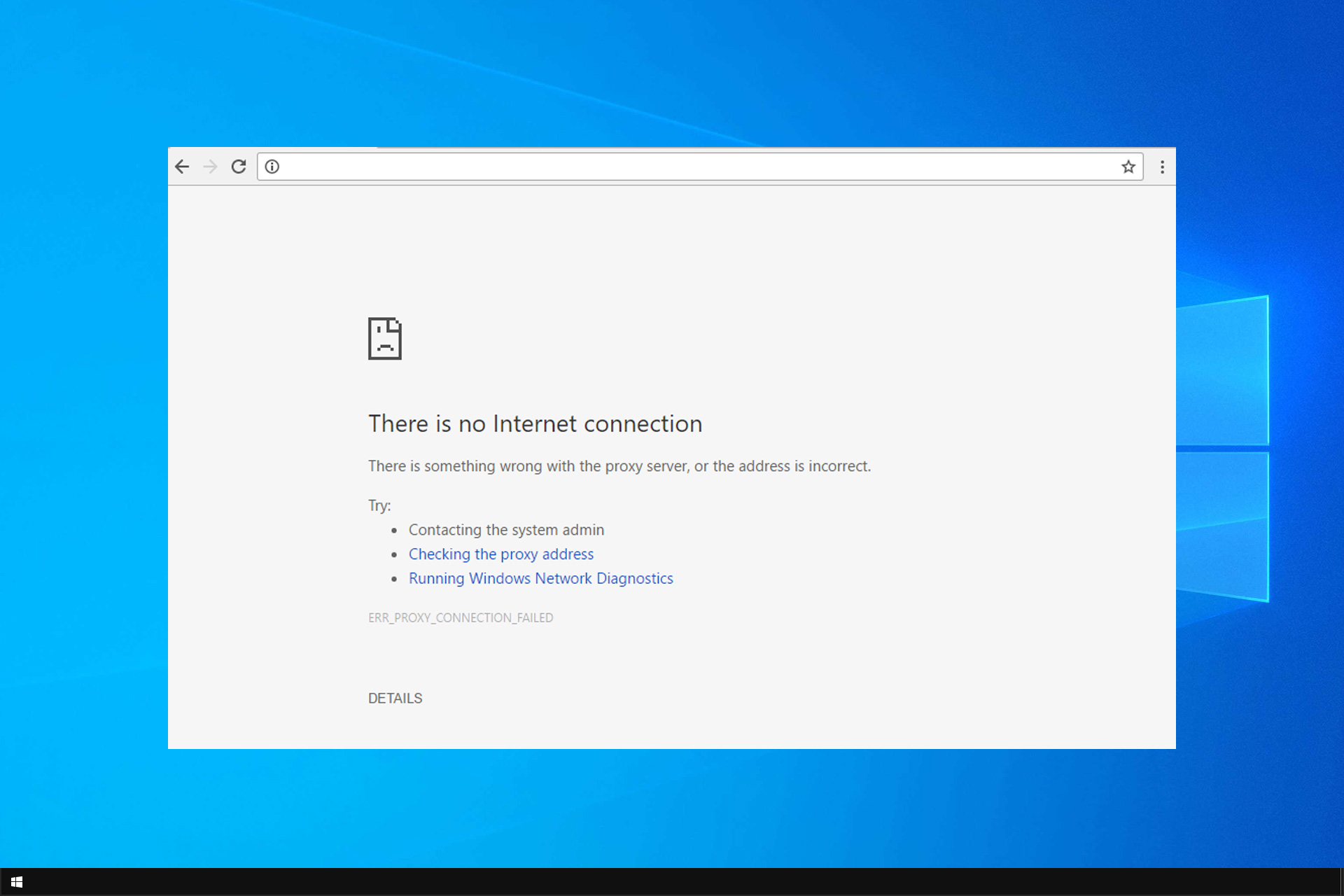
No Internet Connection in Windows 10: How to Fix it

Many Windows 10 users can’t connect to this network even after installing the latest. In addition, many are greeted by No Internet connection message on Windows 10.

This can be a problem and prevent you from accessing the Internet, so it’s crucial to fix it as soon as possible. If this error sounds familiar, it’s because it’s quite similar to No Internet, no connections are available message.

Before we fix this issue, let’s see what causes it.

Why does my computer say no Internet connection when I am connected?

  • Network issues – Your network hardware may be encountering some glitches, and that’s causing this issue.
  • DHCP – Sometimes, there are DHCP bugs that can prevent you from connecting to the Internet.

What can I do if there’s no Internet connection in Windows 10?

Use netsh command

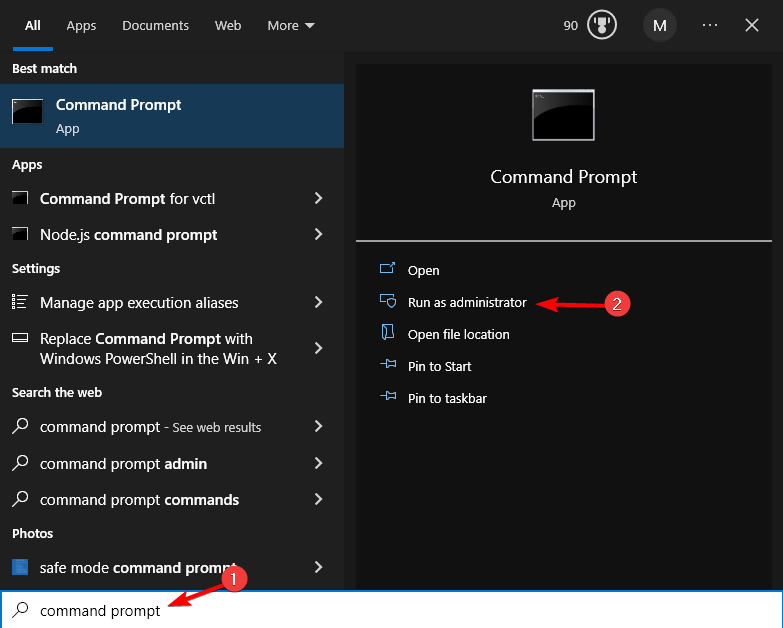
  1. Go to the Search menu, type cmd and choose Run as administrator.
  2. Type the following commands and trigger them one after another:
    netsh winsock reset catalog
    netsh int ipv4 reset reset.log
    ipconfig /renew

  3. Test your Internet connection.

This simple solution will help if you’re connected but have no Internet access in Windows 10.

In case you’re having issues with Wi-Fi, our WiFi doesn’t have a valid IP configuration article should be able to help you.

If your Wi-Fi can’t access the Internet, then be sure to check one of our other guides for additional solutions.

What method did you use to fix this problem? Let us know in the comments below.

Skype to get integrated translation support

While various voice chat apps and instant communications solutions are emerging and making waves, Microsoft’s trusty Skype service remains one of the most utilized and appreciated voice communication tools available. In many enterprise level scenarios, Skype remains the industry standard and is used for efficiency demanding tasks. That doesn’t stop Microsoft for looking at new ways in which Skype could be improved, though. The recent Skype Preview stands proof of that, bringing some new features to the software.

One of the upcoming features coming to Microsoft’s Skype is represented by a very promising tool. We’re talking about integrated translation support for Skype voice calls. This feature will supposedly be available for both mobile calls as well as landline connections. Versatility is key and with this feature, more people will be able to connect through Skype’s services.

Socially active people often find themselves having loads of conversations open and it can get a bit confusing. A new Skype function will allow users to manage their conversations with marks such as “read/unread” making it way easier to keep track of everyone.

A reoccurring issue with Skype a technology is that it is harder to include older generations into the equation, especially when talking about a communication app where people interact with each other digitally.

That being said, it is not unheard of entire families gathering around a laptop to stay in touch with a relative studying abroad or similar scenarios where parents and grandparents are introduced to the benefits of modern day technology. For this reason, Skype is coming with new and improved ways to keep the family connected regardless of age gaps, such as more connectivity between Skype users and carrier users.

Windows 10 KB3201845 brings a lot of issues, makes computers unusable

It appears that the latest Windows 10 update, KB3201845 causes more issues than it fixes. This update includes quality improvements for Windows 10 Version 1607, but doesn’t bring any new operating system features.

More specifically, KB3201845 brings 11 bug fixes, ranging from excessive battery drain issues to Windows Explorer bugs. However, judging by the users’ reports, this update is causing a bevy of issues.

Windows 10 KB3201845 reported bugs

1. First of all, many users can’t install KB3201845 on their computers. Taking into account all the issues caused by this update, this may actually be a blessing in disguise.

I have tried to install the Cumulative Update KB3201845 (Windows 10 – 64Bit), three times now because after each successive Restart, it starts to install the updates but then fails with a message about not being able to complete and is undoing (probably what it did manage to install), before booting into Windows as normal.

2.  Users also report that KB3201845 causes unending restarts loops, preventing them from actually using their computers. Users tried to solve this problem using Windows 10 USB boot drives, but to no avail. The System Restore option won’t work.

After the update, which downloaded and apparently installed, and the computer was restarted, it did not restart correctly at all. It has gone into a seemingly unending loop, with alternating BSOD screens of INACCESSIBLE BOOT DEVICE and WDF VIOLATION. Before the update, my computer was working normally, with no problems.

3. Apparently, KB3201845 also breaks all the Google products installed on users’ computers. Google Chrome won’t work, Google Calendar is unresponsive and uninstalling the update doesn’t help.

Installed KB3201845.  Now nothing “Google” works.  Not Chrome. Not Google Calendar. I uninstalled the update, but still have the same problem. HELP!

Moreover, some Windows 10 apps and programs are also affected by these issues. Microsoft Edge and the Settings page cannot be opened. Also, the process “Service Host: DCOM Server Process Launcher” causes high CPU usage.

4. Unfortunately, the list of KB3201845-caused issues doesn’t end here. Windows 10 users also report that the Bluetooth controls are missing and Bluetooth stopped working, there is no Bluetooth adaptor in Device Manager, and they can no longer turn Airplane Mode on or off.

Some voices say that KB3201845 is the culprit for all the recent Internet connection problems in Windows 10. Actually, users started complaining about Internet connection bugs a couple of days before Microsoft pushed KB3201845 to all Windows 10 users.

As you can see, KB3201845 is causing quite a significant number of issues, and uninstalling the update doesn’t solve the problem. If you’ve encountered other issues than the ones listed above, use the comments section below to tell us more about your experience.

RELATED STORIES YOU NEED TO CHECK OUT:

Delicious: Emily’s Christmas Carol is a fun cooking game for Windows PCs

What is the best part of Christmas? It’s most definitely, the presents and delicious treats. Although it is a little too early to get cooking, you can always have a little fun. Developed by Blue Giraffe and Gamehouse, Delicious – Emily’s Christmas Carol is a time management game in which you prepare food and serve it to customers.

There is an elaborate tutorial at the beginning of the very first level to get you a acquainted with its gameplay. If you are a pro player of Delicious’ games, you can always choose to skip it. To keep players on track, the game also frequently offers hints  and tips. You can always turn them off from the settings pane if they break your rhythm by popping up.

The plot of Delicious: Emily’s Christmas Carol

The core plot of the game doesn’t stray far from the previous games in the series: Emily is a young entrepreneur who wants to make the festive occasion even jollier. With the assistance of her friends and family, she sets up a small business to sell all sorts of winter goodies.

Everything else is pretty basic: there are paying customers who place orders. The better the customer service, the greater the tip. Satisfaction level can be determined by their facial expressions and number of hearts shown next to them. So, the flow is quite natural.

The game is divided into chapters and levels. There are 7 chapters and a total of 61 levels in the game – at least for now.

There are several rewards and trophies that gamers can earn throughout the game, either by completing challenges or scoring points.

Find the game interesting? Grab it from Steam now for $13.00. If you purchase the bundle with the Christmas Carol soundtrack, you’ll get 10% off. Don’t forget to check for the minimum system requirements before purchasing the game.

Delicious: Emily’s Christmas Carol system requirements

  • OS: Windows 7, 8, 10
  • Processor: 1.6 GHZ
  • Memory: 512 MB RAM
  • DirectX: Version 9.0
  • Storage: 541 MB available space

RELATED STORIES YOU NEED TO CHECK OUT:

Windows 10 users can’t connect to the Internet, Microsoft is investigating the issue

Tens of thousands of Windows 10 users haven’t been able to connect to the Internet for the past three days. Microsoft has officially acknowledged this issue and is working on a fix.

The Redmond giant hasn’t offered too many details about this problem. The company’s forum moderators offered only general workarounds, leaving the impression that they don’t actually know what the root-cause of this problem is, let alone the solution.

Windows 10 Internet connection issues

We are looking into reports that some customers are experiencing difficulty connecting to the Internet. We recommend customers restart their PCs, and if needed, visit [this support page]. To restart, select the Start button from the taskbar, click the Power button and choose Restart (not Shut down).

Many people believe that the culprit for these issues is the latest Windows 10 update, KB3201845. However, users began reporting these bugs before Microsoft rolled out the recent update. For example, this user complained about Wi-Fi issues on December 8, one day before Microsoft pushed KB3201845: “I have a new computer and after working perfectly for 2 months it is now telling me I do not have a valid IP configuration“.

Moreover, these annoying Wi-Fi connection issues are also affecting Windows 7 and 8.1 users. However, the latest Windows 7 update was released on November 15. For the time being, there is no clear information as to what exactly is causing these Internet connectivity problems.

Some users suggest that their computers are unable to retrieve IP addresses and DNS servers from their routers.

How to fix Windows 10 IP configuration issues

The good news is that you can quickly fix these Internet connection issues. For more information, check out our dedicated article on how to fix the “Wi-Fi doesn’t have valid IP configuration” error message.

This was so very useful after 2 hour struggling with a non- valid IP address, and a mobile phone for internet access, following a million rabbit warrens. Thank you so very much.

Follow the troubleshooting steps listed in that article and tell us which solution worked for you.

RELATED STORIES YOU NEED TO CHECK OUT:

Gears of War 4 removes the Relic and Gridlock maps on December 13

The Coalition just released the long-awaited Gears of War 4 Title Update 2. The new update brings some fresh content to the game but also raises a few questions among gamers not so satisfied by some of the company’s decisions.

Along with other changes, the Title Update 2 brings two new maps: Glory and Speyer. The introduction of the new maps also means that two older maps — Relic and Gridlock — will be removed. Glory and Spreyer are now available in the Versus and Horde Developer Playlist for Season Pass owners and will be available to everyone else starting from December 13th.

As for Relic and Gridlock, these maps will be only available as individual purchases after December 13th. This means players will have to pay if they want to play these maps again.

While this is a standard procedure for maps in Gears of War 4, the community feels like this system is wrong and doesn’t want The Coalition to constantly remove maps from the public playlist. In a thread on the Gears of War forums, a few unsatisfied users have a few words to say to the company.

Fans criticize the Gears of War 4 map removal strategy

What is the purpose of removing maps from the rotation? So we don’t get to play on gridlock or relic again. So dumb.

I saw that their explanation for this was because it would be too “overwhelming” for players. What does that even mean? How on earth are more maps overwhelming to players. I don’t understand that. I don’t know if any game that has done this type of map rotation. I’ve seen it for different game modes, but this in gears doesn’t make sense as different maps aren’t designed for different game modes. So why? To make money off the season pass? That’s the only real true reason I can think of. So they can have the whole player base have access to the maps and still make money off a season pass.

Removing maps is a another terrible idea from TC. I swear they aim to kill their own game with their nonsensical ideas in an effort to make as much money as possible. Season pass owners should atleast have some sort of playlist where all maps in the game or ever will be in the game are present and available to play.

The Relic hasn’t addressed these complaints yet and it seems unlikely it will do it at all. So basically, all that unsatisfied players can do is accept the situation or abandon the game.

What do you think about the constant removal of Gears of War 4 maps from the public playlist? Do you think it’s unfair or a good move? Let us know in the comments below.
RELATED STORIES YOU NEED TO CHECK OUT:

Windows 10 VR minimum system requirements revealed

Microsoft wouldn’t be the tech giant that it is if it didn’t jump at the opportunity of seizing a newly emerged market. Virtual reality is becoming more and more mainstream and VR headset manufacturers are competing to bring the best possible experience to users. With a handful of competent options already available, Microsoft is also jumping into the ring to brings users Windows 10 VR.

Microsoft is betting on their VR technology, Windows Holographic, to propel them into a new age of technological innovation. By partnering with different OEMs, Microsoft will be able to come up with competent VR solutions designed to run on their proprietary operating system, Windows 10. With the help of high-end brands such as Lenovo, Dell, HP, Acer or ASUS, Microsoft will provide top notch VR solutions.

This isn’t exactly news as Microsoft came out with information about their Windows 10 VR initiative some time ago. But up until now, there was a lack of important details about the project. Now, thanks to the unveiling from WinHEC 2016, we are able to bring you the minimum system requirements for Windows 10 VR. If you want to experience VR through Microsoft’s upcoming platform, you will need a decent setup but nothing too pretentious. As the VR industry evolves, the specifications required to run certain applications will likely increase but for the time being, the specifications below should allow you to experience VR in its current state.

 Will your rig handle Windows 10 VR? Here’s what you need

  • Core i5 processor (Intel Mobile) or other hyperthreading capable CPU;
  • DX12 capable Intel HD Graphics 620;
  • 8 GB RAM;
  • HDMI compatibility and USB 3.0;
  • At least 100 GB of free space.

RELATED STORIES TO CHECK OUT:

Cortana now controls music playback in Windows 10

Microsoft’s virtual assistant, Cortana, is already compatible with many built-in and third-party apps for Windows 10. Even though Cortana boasts a respectable number of possibilities, there’s always more that can be added.

The latest Windows 10 Preview build introduces a lot of new features for Cortana. But it looks like the biggest focus has been put on Cortana‘s integration with music apps and the way Cortana controls playback in Windows 10.

For example, Cortana now features full natural language compatibility with iHeartRadio and TuneIn Radio. This means you can control playback in these apps with Cortana using your voice. More precisely, you can give Cortana instructions which song or radio station to play via which app.

Here are some examples:

“Play <Artist/Track/Title/Genre> on <AppName>
Play Drake on iHeartRadio
Play Christmas music on iHeartRadio
Play NPR Hourly News on TuneIn
Play jazz music on TuneIn

Play <Frequency/Call Letters> on <AppName>
Play 90.3 on iHeartRadio
Play KUOW on TuneIn”

Cortana plays music playback

There are also some additional options for even more advanced playback control. Cortana will remember the last used music app and will use it to play a song/radio station automatically next time. So, if you’ve last used iHeartRadio to play jazz music, all you’ll need to say next time is “Hey Cortana, play some smooth jazz” and it will open the iHeartRadio app.

And finally, Cortana now gives you the ability to control the music volume, both in-app or with Windows’ general volume. Just say “Hey Cortana, decrease/increase the volume” and she will automatically change it.

All these awesome music playback features are for now available only to Windows 10 Insiders running at least build 14986. Everyone else will get these additions with the Creators Update, scheduled for Spring 2017.

RELATED STORIES YOU NEED TO CHECK OUT:

Microsoft highlights Remix3D creations

Microsoft made a rather large pitch for the validity of 3D technologies and software in the future during its Windows event this past October. From 3D capturing of images using specialized software and smartphone camera tech to engineering 3D features directly into the Windows 10 core functionality of many the operating systems programs, Microsoft is gearing up for a 3-Dimensional creative landscape.

While the idea of 3D creation and manipulation may seem like a code-heavy endeavor, Microsoft is highlighting how easy the process can be for the casual Windows 10 user by showcasing some early Remix3D Preview designs.

“With just a few simple pieces and the drawing tool, our remixers can take to the skies, literally and figuratively. This easy-to-create little plane promises a safe and enjoyable trip, and is customized with drawn-on windows. The happy clouds and sun provide the right backdrop, with just a sky-blue square and stickers.

remix3d-plane

The 3D Remix plane model is just one of hundreds that have already been created and Microsoft is encouraging those interested, to join the Remix3D and Paint 3D preview communities now.

Let us know in the comments below as to whether or not you believe Microsoft can make 3D a thing in the next couple of years, and why?

You can now shut down your PC just by asking Cortana

Cortana is a powerful virtual assistant. With it, you can perform many actions in Windows 10, just by saying a few words. But Microsoft is never fully satisfied with its products, therefore the company keeps updating Cortana by introducing new features every now and then.

With the latest Preview build for Windows 10, Microsoft introduces a handful of new features and improvements for Cortana. One of the additions is a new option that allows you to turn off your computer simply by telling Cortana to do so.

So, in case you hands are busy at the moment, you don’t need to stop what you’re doing to turn off your computer. Instead, say “Hey Cortana, turn off my computer” and she’ll take care of everything. This command doesn’t only work for turning off a computer but for other power options, as well. You can use Cortana to restart your computer and put it to sleep, for example.

The ability to turn off and restart your computer with Cortana is only available for Windows Insiders running at least Preview build 14986 for now. Microsoft will make this command, along with other new features and improvements, available to the public with the Creators Update. According to the company, the Creators Update for Windows 10 should arrive in spring 2017.

Besides the ability to turn off your computer with Cortana, the latest build also introduces music playback with Cortana in Windows 10.

What do you think about the idea of turning off your computer with your voice? And what’s the next command you’d like Microsoft to introduce to Cortana soon? Let us know in the comments below.

RELATED STORIES YOU NEED TO CHECK OUT:

Today only in the US, get 5 albums free from the Windows Store

Just a week after Microsoft offered nine popular holiday albums on the Windows Store for a limited time, the company is doing it again today with five popular albums that you can get for free until 11:59 p.m. PT. This selection of popular pop, hip hop and rock albums from the last two years should hopefully please the musical tastes of the majority out there:

Additionally, Microsoft is also discounting today the following nine holiday albums that you can get for only 99 cents each on the Windows Store:

Microsoft says that this offer is only available to consumers in the US, though in our own it seems possible to get those free albums by simply browsing the US Windows Store. If you’re outside of the US, let us know in the comments if you also managed to grab these free albums.

Seven Microsoft Research researchers named ACM 2016 Fellows

Seven researchers from Microsoft Research are among the 53 computing professionals named 2016 Fellows of the Association for Computing Machinery (ACM). Initiated in 1993, the ACM Fellows Program celebrates the exceptional contributions of the leading members in the computing field.

As nearly 100,000 computing professionals are members of our association, to be selected to join the top one percent is truly an honor.

– Vicki L. Hanson, President, ACM

The award, from the world’s leading computing society, recognizes computing scientists for fueling advances that are transforming science and society. The awarded fellows are selected by their peers from leading universities, corporations, and research labs.

  • Ricardo Bianchini: For contributions to power, energy and thermal management of servers and datacenters
  • K. Rustan M. Leino: For contributions to making program verification accessible and practical
  • Abigail Sellen: For contributions to human-computer interaction and the design of human-centered technology
  • Sudipta Sengupta: For contributions to cloud networking, storage, and data management
  • Ravi Kannan: For contributions to the field of theoretical computer science
  • Venkata N. Padmanabhan: For research contributions and professional leadership in networked and mobile computing systems
  • Ganesan Ramalingam: For contributions to static program analysis

ACM, the Association for Computing Machinery, is the world’s largest educational and scientific computing society, uniting educators, researchers and professionals to inspire dialogue, share resources and address the field’s challenges.