Microsoft Teams now warns you before sharing sensitive info

Microsoft is giving Teams users an extra layer of peace of mind during meetings. A new feature, now generally available, quietly watches your screen and flags sensitive information before you accidentally share it.

It’s called sensitive content detection, and it works across desktop, web, and mobile versions of Teams, if you’re own Teams Premium license. Microsoft designed this tool to spot things like credit card numbers, bank details, passport data, and other personal identifiers while you’re sharing your screen in a meeting.

Here’s how it works: if Teams spots something sensitive, the app notifies both the presenter and the meeting organizer. It won’t interrupt the session or kick you out of screen sharing, but it does suggest you stop and check. Attendees won’t know anything’s happened. The alert stays private between you and the meeting host.

This feature lives under “Advanced protection” in the meeting options menu. Once enabled, it runs in the background during screen shares. Microsoft says it doesn’t want to be overly aggressive in blocking content, especially to avoid false alarms. Instead, it’s there as a safety net, a quiet nudge when something might slip through unnoticed.

For users handling financials, legal docs, or internal records on calls, this could be a major safeguard. It’s one of those features that feels overdue, and now that it’s live, it could help prevent some costly mistakes. Moreover, the feature is available starting today for all Teams Premium users.

Disciples: Domination is Coming to Xbox Series X|S, PS5 and PC in 2026

Kalypso Media has officially announced Disciples: Domination, a new dark fantasy strategy RPG set to launch in 2026. Developed by Artefacts Studio, the game picks up 15 years after the events of Disciples: Liberation and brings players back to the war-torn realm of Nevendaar. IGN posted an exclusive trailer for the upcoming title.

Here is what the studio defines this as:

Rule through the chaos! Fifteen years after Avyanna freed Nevendaar from the tyrannical grip of the gods, Disciples: Domination returns you to a realm hanging in the balance. In this dark fantasy strategy RPG with turn-based combat, take your place on Queen Avyanna’s throne, and attempt to hold together a crumbling kingdom.

The fire of doubt burns scorching within her, sparked by the crushing weight of the throne in Yllian and stoked by twisted dreams of becoming one of the very monsters she once defied, and destroyed. Paralyzed by fear and haunted by her own power, Avyanna’s rule begins to crack. Allies disappear and abandon her. An unknown force spreads strife and madness through her realm.

The choice is yours—shape the future, for salvation or ruin. As you chase the truths behind the ceaseless conflicts, dark magic and lurking conspiracies infecting your rotting empire, you’ll face betrayal, strife, and shadowy schemes. Uncover the long-lost Mountain Clans, witness the rise of an ancient cult and confront a corrupted seer whose visions have awoken bitter grudges, while old enemies are on the rise.

It will take all your courage to save Nevendaar. Are you brave enough to face—and embrace—its darkest truths?

The turn-based combat has been reworked with faster, grid-based tactics and faction-specific abilities. This time, you’ll build a squad of companions who each bring something different to the battlefield.

Managing your capital city of Yllian also plays a key role, as you balance diplomacy, war, and internal politics. You’ll be able to recruit units from five different factions, including the long-absent Mountain Clans (yes, the dwarves are back).

Exploration has moved to a real-time system, letting you roam across Nevendaar’s regions, uncover quests, face enemies, and experience a world that reacts to your choices. Kalypso says Disciples: Domination aims to preserve the spirit of the original games while introducing more modern gameplay.

Moreover, you can expect more details as development continues toward the 2026 release on PS5, Xbox Series X|S, and PC.

OpenAI finally launches GPT-5, its best AI model yet

OpenAI has officially launched GPT-5, but it’s not available to everyone just yet. Starting today, only ChatGPT Team users can access it. Enterprise and Education customers will get it next week. If you’re using ChatGPT as a free or Plus user, you’re still on GPT-4o.

GPT-5: All you need to know

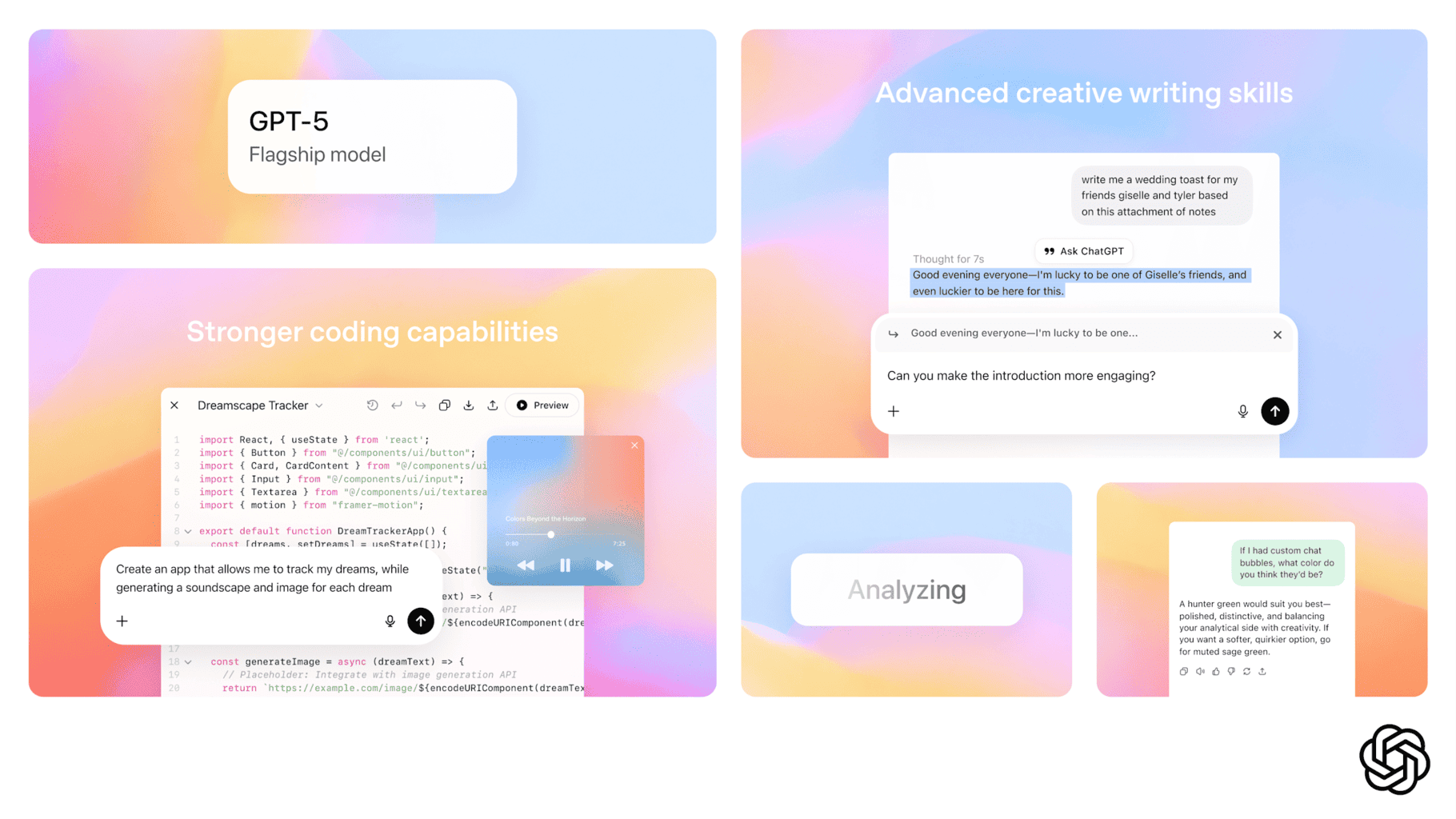
GPT-5 brings steadier reasoning, fewer hallucinations, and more reliable answers, especially in long or complex conversations. Sam Altman, CEO of OpenAI, described the model as “GPT-5 is the first time that it really feels like you’re talking to an expert in any topic.”

Remember, it’s not multimodal yet, no vision or voice, but it’s better at understanding nuance, doing multi-step logic, and staying on track over longer chats. According to OpenAI’s system card, GPT-5 hallucinates less often than previous models.

Researchers found that, even without web access, GPT-5 produced 26% fewer factual errors than GPT-4o. Compared to the older o3 model, hallucinations were cut down by 65%.

As far as availability for developers is concerned, they can also start using GPT-5 in the OpenAI API starting today. The company says it performs better on advanced tasks like summarization, agent flows, and technical writing.

GPT-5 new capabilities (2)
Image: OpenAI

Not to forget, there’s also GPT-5 Pro coming soon, a higher-tier version for Team, Enterprise, and Edu customers. It’s designed for “extended reasoning,” though OpenAI hasn’t shared details yet. All in all, GPT-5 addresses a lot of the pain points power users had with GPT-4. ChatGPT Team users can try GPT-5 today. Moreover, OpenAI says broader rollouts are on the way.

Microsoft Flags Exchange Server Vulnerability Tied to Hybrid Setups

Microsoft has issued a warning about a serious vulnerability in Exchange Server that could quietly trigger privilege escalation in hybrid environments.

The flaw, listed as CVE-2025-53786 with a CVSS score of 8.0, targets on-premises Exchange servers configured to work alongside Exchange Online. If an attacker already controls the on-prem server, they could potentially hack into the connected cloud environment, without leaving behind obvious traces.

That’s because both the cloud and on-prem Exchange services share the same service principal in hybrid setups. Dirk-jan Mollema of Outsider Security discovered the issue.

Microsoft recommends immediate action, including applying the April 2025 hotfix or later, reviewing your hybrid setup, and resetting credentials if you’re no longer using OAuth or Exchange hybrid features.

The U.S. Cybersecurity and Infrastructure Security Agency (CISA) has also noted that unpatched systems could risk the identity integrity of Exchange Online. It’s also pushing organizations to isolate or shut down old Exchange and SharePoint servers still exposed to the internet.

This advisory arrives as Microsoft is planning to temporarily block EWS traffic using the shared service principal. The company hopes to nudge more users toward a dedicated hybrid app for better protection.

CISA added context, revealing that recent SharePoint attacks involved ToolShell malware, capable of stealing machine keys and running PowerShell payloads for data theft.

ChatGPT-5: Download & Install on your PC [Windows 11, 10]

ChatGPT5 is the latest generation of OpenAI’s conversational AI model, built on GPT-5. While it’s not a standalone software you can download like a regular app, there are several ways to access and use ChatGPT5 on your Windows 11 or 10 PC. This guide shows you how to do it in just a few steps.


1. Is ChatGPT 5 Available for Download?

ChatGPT5 is not currently a standalone desktop download. It runs in the cloud and is accessible through:

  • ChatGPT Web App – via chat.openai.com
  • Official Windows App (Microsoft Store)
  • Third-party wrappers or APIs

You can’t directly download GPT-5.exe, but you can install the official ChatGPT app or use the web interface to access GPT-5.


2. How to Use ChatGPT 5 on Windows 11 or 10

Method 1: Via Official ChatGPT Windows App

  1. Open Microsoft Store
  2. Search for “ChatGPT”
    • Look for the official app by OpenAI.
  3. Click “Install”
    • Wait for installation to complete.
  4. Launch ChatGPT
    • Sign in with your OpenAI account and select GPT-4o/GPT-5 (if available via ChatGPT Plus).

Method 2: Use Web Version on Your Browser

  1. Go to chat.openai.com
  2. Sign in or create an account
  3. Select GPT-4o (ChatGPT-5) if you’re a Plus user
    • Free tier may only show GPT-3.5.

Method 3: Install as a PWA (Progressive Web App)

  1. Visit chat.openai.com in Chrome or Edge
  2. Click the three dots menu > Install ChatGPT
  3. The app will appear in your Start Menu like any other native app.

3. Do You Need ChatGPT Plus to Access GPT-5?

Yes, GPT-5 (also known as GPT-4o) is only accessible via ChatGPT Plus as of now. This subscription costs $20/month, and gives you access to the most advanced models and features.


4. System Requirements for ChatGPT 5 on Windows

Even though it’s cloud-based, here’s what you need for smooth usage:

  • OS: Windows 10 or 11
  • Browser: Latest version of Chrome, Edge, or Firefox
  • RAM: 4 GB minimum
  • Internet: Stable connection (5 Mbps+)

FAQs

Can I download GPT-5 as a .exe file?
No. GPT-5 (ChatGPT5) is not available as a standalone installable program. It runs in the cloud.

Is ChatGPT5 free to use?
The GPT-3.5 model is free. GPT-5 (GPT-4o) access requires a ChatGPT Plus subscription.

Can I use GPT-5 offline?
No. It requires an internet connection as it operates server-side.

Xbox’s next-gen console may run on AMD’s ‘Magnus’ chip to rival high-end PCs

It’s hard to believe, but the current Xbox and PlayStation consoles are already halfway through their lives. Both hit the market in 2020, and if history repeats, we’re likely looking at new hardware by 2027.

Rumors are already starting to build, and they’re hinting at what to expect, especially for the next Xbox. Microsoft might not be going after Sony this time. Instead, it could be aiming at the gaming PC crowd.

According to a report by TweakTown, Microsoft’s next console might feature AMD’s ‘Magnus’ APU. That’s a component you’d typically find in high-end prebuilt PCs, not your average living room console. If that’s true, the system could come packed with a Zen 6 CPU and RDNA 5 graphics.

That’s not all; leaker Moore’s Law is Dead claims Xbox may use an AT2 die with up to 64 compute units (CUs) of RDNA 5, 18GB of super-fast GDDR7 RAM, and memory speeds pushing 864GB per second. That’s an absurd amount of bandwidth, more than enough to keep up with what gaming PCs can do.

If all this holds up, Xbox may finally come up with something that doesn’t involve chasing PlayStation. Instead of playing the usual game of catch-up, Microsoft could be prepping a premium, almost modular console that targets PC performance in a box.

For now, don’t expect an official reveal anytime soon. Microsoft’s focus right now is on launching the handheld Xbox ROG Ally and Ally X later this year. Those devices still don’t have an official price tag just yet, but they are coming soon. All that said, we’ll probably start seeing details about the next-gen Xbox by mid-2026.

PlayStation reportedly led push to bring Helldivers 2 to Xbox, not Arrowhead

Turns out the decision to bring Helldivers 2 to Xbox wasn’t pushed by Arrowhead Studios, it came straight from PlayStation management. In a Discord chat, spotted by Windows Central, Arrowhead CEO Shams Jorjani told fans, “It was all PlayStation. Send them your thanks. We were all in support of course.”

When asked if he ever thought Sony would go for it, he added, “I think it’s one of the coolest things they’ve done. They’re killing it.” For the unitiated, Helldivers 2 lands on Xbox Series X|S on August 28, the same day Gears of War: Reloaded arrives on PS5.

Sony’s shift beyond PlayStation hardware has been slow but steady. First came PC ports, now, Helldivers 2 is headed to Xbox. A job listing earlier this year hinted at broader plans too. It mentioned a role that would help lead strategy for publishing PlayStation games “across all digital platforms,” including Steam, Epic, Xbox, Nintendo, and mobile.

Still, not everyone thinks this means a major multiplatform wave is coming. Industry insider Shinobi602 urged fans not to get “really carried away.” But leaker NateTheHate has since claimed more first-party PS5 titles will make their way to Xbox. However, there are no details on which ones yet.

Meanwhile, Microsoft is clearly all-in on multiplatform. The Outer Worlds 2 is launching on PS5 this October, with Hellblade 2 dropping next week. And yes, rumors are still swirling around Gears of War: E-Day and State of Decay 3 also making the jump.

The future of Windows is hands-free, personalized, and AI-native, says Microsoft exec

Microsoft has started laying the groundwork for how AI will reshape Windows over the next decade, and it’s not just about smarter tools. In the first of a new video series, the company dives into the first of three major pillars: security, quality, and AI transformation.

This opening video features David Weston, Microsoft’s VP of OS security, who says the traditional mouse and keyboard era will soon feel ancient. “The world of mousing around and typing will feel as alien to Gen Z as using MS-DOS,” Weston says. AI will handle more of the mundane, repetitive work, freeing people up for creativity, vision, and connection.

Most of the video stays grounded in current security goals rather than futuristic updates. Weston highlights the Windows Resiliency Initiative, post-quantum safety efforts, and the broader Secure Future Initiative. The message is clear: Microsoft wants Windows to feel like a secure appliance, something users don’t have to think twice about.

But Weston also teases some big user experience changes. He says the shift toward agent-based systems will bring personalization, automation, and smarter decision-making. Interactions will get more natural, too.

“We will do less with our eyes,” Weston says. “And more talking to our computers.” Future versions of Windows will see, hear, and respond more like a human. AI agents won’t just assist, they’ll amplify what users can do, especially in small teams or businesses.

ASUS Unveils ROG Astral RTX 5090 With 32 GB GDDR7 Power

ASUS isn’t holding back with its new GPU. The ROG Astral RTX 5090 BTF OC Edition is now official, and it’s here for those who can go all out for performance. To catch you up, ASUS first teased the GPU It at Computex 2025, and the final specs confirm what many expected.

The ROG Astral RTX 5090 BTF OC Edition comes loaded with 32GB of GDDR7 memory on a wide 512-bit bus, running at 28 Gbps. It’s built on NVIDIA’s new architecture, pushing 21,760 CUDA cores, and connects through PCIe 5.0. That’s not all; it also offers HDMI 2.1b and triple DisplayPort 2.1b support.

ASUS ROG Astral GeForce RTX 5090 32 GB GDDR7 BTF OC Edition (1)
Image: ASUS

What makes this model interesting isn’t just the performance, but the power setup. ASUS went ahead with a modular GC-HPWR connector, which pairs with its BTF motherboards for a cleaner build. But you can still hook it up to standard ATX systems using a 12V-2×6 pin connector, so you’re not stuck upgrading everything.

The cooling setup is chunky, bringing in four fans, a phase-change thermal pad, and MaxContact copper spreader to pull heat off the die. All that metal pushes the weight close to 3kg, and the length past 350mm, so yeah, you need check your case clearance.

As far as price is concerned, it’s set you back $3,850. So, if you are someone who is into ultra-high-end specs with clean cable routing and modular compatibility, this ASUS GPU is for you.

AMD revenue climbs 32% to $7.7 billion on strong chip sales

AMD has posted one of its strongest quarters yet. The company earned $872 million in profit on $7.7 billion in revenue for Q2 2025, up 23% and 32% year-over-year. A big chunk of that momentum came from exploding demand for its AI and PC chips.

AMD’s CEO, Dr. Lisa Su, pointed to record-breaking sales in both servers and PCs. “We are seeing robust demand across our computing and AI product portfolio,” she said, highlighting a bullish outlook for the second half of the year. The MI350 accelerator ramp-up and strong EPYC and Ryzen sales are key drivers.

AMD’s biggest business this quarter wasn’t datacenter chips, it was client and gaming. The segment pulled in $3.6 billion, a massive 69% jump from last year. Ryzen PC processors led the charge, racking up $2.5 billion in revenue alone, thanks to high demand for the new Zen 5 lineup.

Gaming section racked up $1.1 billion in revenue, up 73%, fueled by semi-custom sales tied to console partners and a rebound in Radeon GPU demand. Not to forget, AMD’s Data Center unit added $3.2 billion, up 14% year-over-year. Export limits to China did create some drag, but strong demand for AI-heavy workloads kept things moving.

AMD notes that the Embedded section dipped during the quarter, with revenue falling 4% YOY to $824 million. All in all, the strong financial results suggests that AMD’s bet on AI and next-gen silicon are paying off.

Microsoft launches Azure Storage Discovery in Public Preview, with Copilot integration

Microsoft has launched the public preview of Azure Storage Discovery. The tool helps Azure users find and track Blob Storage across large environments using the Azure Portal.

It gives teams a clear view of storage costs, usage patterns, and account activity. You can see how storage is growing, what’s using the most space, and which areas need cleanup. Everything shows up in one place without extra setup.

What’s interesting is that Storage Discovery works with Azure Copilot. You can ask things like “Which regions are adding the most storage?” or “Where is cost growing fastest?” and get answers directly in the dashboard.

The tool can scan and summarize data from hundreds of subscriptions and management groups. It supports over one million Blob Storage accounts. You’ll get stats on activity, capacity, error rates, and cost changes over time.

There’s support for up to 18 months of historical data. You can filter it by region, team, or account to find what matters. Microsoft also notes that Tesco and Willis Towers Watson are already using it. Tesco uses the data to understand cost spikes and reduce waste. Willis Towers Watson found unused storage accounts and cleared them out quickly.

Remember, both Basic and Standard versions are free to use during the preview. You can try it now through September 30, 2025. Moreover, the company says that pricing will apply after the preview ends.

How to Enable Secure Boot to Play Battlefield 2042 on Windows

A recent Battlefield 2042 update (v8.8.0) now requires Secure Boot to be enabled on your system. This is a mandatory anti-cheat measure, and if Secure Boot on your Windows PC is off, you may encounter errors when launching the game. Here’s how to check your system and enable Secure Boot in just a few steps even if you’re not a geek and know everything about a Windows 11 (or Windows 10) PC.

Check If Secure Boot Is Already Enabled

Before jumping into BIOS settings, it’s smart to verify your current Secure Boot status in Windows.

Steps to check Secure Boot in Windows:

  1. Press Windows + R, type msinfo32, and hit Enter.
  2. In the System Information window:
    • Look for BIOS Mode (must say UEFI).
    • Look for Secure Boot State (must say On).

If Secure Boot is already enabled and you’re still having trouble, your configuration may be incomplete. In that case, check this guide for when Secure Boot is enabled but not active.

How to Enable Secure Boot for Battlefield 2024?

Below are simplified instructions for enabling Secure Boot on most systems. The BIOS interface may vary slightly depending on your brand. We also recommend taking a look at the next section that helps you prepare for enabling secure boot, as it may require some preliminary actions to be taken.

This method should work universally for a lot of laptop and motherboard manufacturers, like ASUS, MSI, Gigabyte, Dell, HP, and Lenovo, but make sure you double-check what key to press to enter the BIOS mode for your machine.

Enable secure boot for Battlefield step-by-step:

Time needed: 6 minutes

  1. Enter BIOS/UEFI

    – Restart your PC and press the BIOS key repeatedly (usually DEL, F2, or F10) when your manufacturer’s logo appears.

  2. Switch to UEFI Mode

    – Find Boot Mode or CSM settings and change them to UEFI.
    – On some systems, this might be called “Windows UEFI Mode” or “UEFI Only”.

  3. Disable Legacy/CSM

    – Locate “Launch CSM” or “Legacy Boot” and set it to Disabled

  4. Enable Secure Boot

    – Go to the Security or Boot tab.
    – Find “Secure Boot Control” or “Secure Boot” and change it to Enabled.

  5. Load Factory Keys if Prompted

    – If Secure Boot is greyed out, find an option like Restore Factory Keys or Enroll All Factory Keys.
    – This switches Secure Boot from Setup Mode to Standard/User Mode.

  6. Save & Exit

    – Press F10 or go to the Exit tab and choose “Save Changes and Exit”.
    – Your PC will reboot with Secure Boot enabled.

On some systems like HP and Lenovo, Secure Boot may appear greyed out until you follow those exact steps. If that’s your case, refer to this quick fix for Secure Boot greyed out in Windows 11.


Prerequisites Before Enabling Secure Boot

Secure Boot only works under the right system conditions. Make sure you meet these requirements:

1.UEFI Boot Mode Must Be Enabled

  • Your BIOS Mode must be UEFI, not Legacy or CSM.
  • You can check your disk partition style in Disk Management → Disk Properties → Volumes tab.
  • If it’s MBR, you’ll need to convert it to GPT using the MBR2GPT tool or reinstall Windows in UEFI mode.

If you’re unsure about UEFI status or cannot access BIOS, follow this method to enable Secure Boot without BIOS access.

2. TPM 2.0 Recommended

  • Press Windows + R, type tpm.msc, and hit Enter.
  • If TPM is not active, enable fTPM (AMD) or PTT (Intel) in your BIOS under Security settings.

3. Disable Legacy/CSM Mode

  • In your BIOS, locate “CSM” or “Legacy Boot” and set it to Disabled.
  • This setting is often a blocker for Secure Boot on Gigabyte, ASUS, and MSI boards.

Final Check: Is Secure Boot Active?

After rebooting:

  1. Open the Run dialog (Windows + R), type msinfo32, and hit Enter.
  2. Verify that:
    • BIOS Mode = UEFI
    • Secure Boot State = On

If both are correct, you’re good to launch Battlefield 2042. The Secure Boot requirement will no longer block you from playing.

Troubleshooting Tips

  • Still Off? Go back to BIOS and check if the Secure Boot setting reverted or if the disk is still on MBR.
  • BitLocker Users: If you had drive encryption active, BIOS changes might prompt for a BitLocker recovery key. Make sure you have it ready.
  • Older PCs: If Secure Boot doesn’t appear at all, check if your BIOS is updated and the motherboard supports UEFI (post-2012).

Battlefield 2042’s latest anti-cheat system requires Secure Boot to be active on your system. Thankfully, enabling it is a one-time setup that only takes a few minutes. Once done, your PC becomes not just compliant for Battlefield, but more secure overall.

FAQs

Do I need to reinstall Windows to enable Secure Boot?

Only if your Windows is installed in Legacy/MBR mode. Otherwise, a quick BIOS change is enough.

Will Secure Boot affect game performance?

No. Secure Boot only runs at startup. It doesn’t affect gameplay, FPS, or app behavior.

Can I turn Secure Boot off later?

Yes, but Battlefield 2042 will likely fail to launch until it’s re-enabled.

What if my PC doesn’t support Secure Boot?

If it’s an older PC or BIOS, you may not have UEFI firmware. Check for BIOS updates or consider playing on a newer system.

Bing Image Creator adds free GPT-4o image generation alongside DALL-E 3

Microsoft now lets anyone use GPT-4o to create AI images for free through Bing Image Creator. That’s the same powerful model OpenAI baked directly into ChatGPT earlier this year.

GPT-4o isn’t just smarter with prompts, it’s better at placing text inside images, and it can even tweak or build new images from what you upload. It also adds context from your previous chats, so your results feel more personalized.

Image: Microsoft
Bing image creator dalle-3
Image: Microsoft

One thing to note is that GPT-4o is slower than DALL-E 3 when it comes to speed. That’s because the images are more detailed. So, if you’re just trying to whip up something fast, Microsoft is keeping DALL-E 3 available, too.

You’ll get 15 fast generations for free. After that, you can still use it, just expect a wait or pay 10 Microsoft Rewards points per image. If you aren’t in a rush, normal-speed generations are still unlimited and free.

Microsoft says the new setup gives you freedom to pick the model that fits your needs, without changing the overall look or interface. You can switch between GPT-4o and DALL-E 3 with a click. Not to forget, both the models live inside the same Image Creator experience.

That said, the easiest way to try it is at bing.com/create. Worth noting that it’s also built into Bing’s mobile apps, the Copilot sidebar in Edge, and even the Bing search bar.

If you’re using ChatGPT Free, Plus, Pro, or Team, you already have access to GPT-4o image creation. But for Bing users, this might be the most accessible way yet to explore OpenAI’s latest model.

OpenAI offers ChatGPT Enterprise to U.S. federal agencies for just $1

OpenAI is making its biggest government push yet by handing ChatGPT Enterprise to every U.S. federal executive branch agency for almost nothing.

As part of a year-long deal with the General Services Administration (GSA), each agency can access OpenAI’s top models through ChatGPT Enterprise for just $1.

With this move, OpenAI is looking to help agencies complete public service work faster, simpler, and less buried in forms. This is part of a broader effort tied to the federal AI Action Plan. The idea is to use AI to reduce busywork and give civil servants more time to focus on people, not paperwork.

During pilot runs in Pennsylvania and North Carolina, state employees said ChatGPT helped cut through repetitive tasks. Some saved over an hour and a half each day. Most said the AI tools improved their work.

Now, that support will be available nationwide. Alongside access, OpenAI is offering custom training, live sessions, and a private community for government users. The company is also partnering with Boston Consulting Group and Slalom to help roll things out smoothly.

As for security, the government version of ChatGPT won’t use agency data to train models. It’s already cleared by the GSA, which gave it an official Authority to Use. For the next 60 days, agencies also get unlimited access to premium tools, like Advanced Voice Mode and Deep Research.

COD: Black Ops 7 also enforces TPM 2.0 & Secure Boot requirements on PC players

If you’re planning to play Call of Duty: Black Ops 7 on PC later this year, your system better be up to date at the hardware level. Activision has confirmed that the game will mandatorily require both TPM 2.0 and Secure Boot to run.

For the initiated, TPM 2.0 is a hardware-backed security feature that protects your system from tampering. Secure Boot ensures only trusted software loads during startup. Together, they’re designed to shut down low-level cheats before the match even begins.

Both protections have been quietly active in the current Call of Duty titles since Season 5 launched earlier this August. But now, they’re moving from “recommended” to “required.”

Players with these settings turned off will get a warning when they try to launch the game. But with Black Ops 7, that warning becomes a wall.

Activision says that this decision it’s about fairness in gameplay. These features add a line of defense against exploits that traditional anti-cheat tools can’t catch.

Call of Duty isn’t the only one taking this route. Battlefield 6, its biggest rival this year, is also enforcing Secure Boot and TPM requirements on PC players. So if you’re playing shooters in 2025, you’ll need to meet the new security requirements. If you have any questions regarding these requirements, don’t forget to check out this support article.

Xbox Design Lab returns with more combos, slicker tools, and no returns/cancellations

Microsoft has quietly brought the Xbox Design Lab back online after nearly eight months of downtime. The site was taken down in December 2024 with a vague note about payment updates. Now, it’s back and ready for your wildest custom controller ideas.

The company announced the relaunch of Design Lab through the official Xbox account on X, with a banger teaser video alongside. You can check it out here.

If you’re unfamiliar, Xbox Design Lab lets players personalize their Xbox controllers with custom colors, textures, and components. You can mix and match parts for the Xbox Wireless Controller, the Elite Series 2, or even adaptive add-ons. Think of it like digital sneaker design, only it ends in plastic and rubber instead of leather and laces.

Microsoft says there are now more design combinations than ever. Most of the platform looks the same, but it gets the job done. There’s also a prompt to visit the Xbox Gear Shop, though oddly, that site’s currently down.

As for support, you’ll have to email [email protected] if something goes south. A small but important reminder: once you confirm a controller order, there’s no going back.

Since each piece is made to your specs, Microsoft doesn’t offer any returns or cancellations. Having said that, if you’ve been waiting to build your dream controller, now’s the time.

Article feature image source: Xbox Design Lab

Xbox Insiders can now try Gaming Copilot in Windows Game Bar

Microsoft has quietly launched a new Copilot assistant just for gamers. The company calls it Gaming Copilot, which is currently in testing for Xbox Insiders on Windows 11 handheld devices, and lives within the Windows Game Bar.

You can open it by pressing Win + G or tapping the Xbox button on your controller. Once it’s open, you’ll see a Copilot panel ready to assist you while playing your favorite games. Gaming Copilot knows what game you’re playing.

You can ask it things like how to beat a boss or what your current objective is. You don’t even need to explain what’s on screen, just say, “What am I looking at?” and Copilot will analyze your current view.

Gaming-Copliot-Image-1-5369c2a68ee713f95cc5
Image: Microsoft
Gaming-Copliot-Image-2-e7474184c38cbf8f4f41
Image: Microsoft

There’s also voice support, meaning you can talk instead of typing, which is great if you’re in the middle of a match. It pulls screenshots on its own and responds based on what it sees. In simple words, it’s built to reduce distraction while you play.

Right now, Gaming Copilot is in preview. Features are limited, and it only works in English. You’ll also need to be 18 or older and should enroll in the Xbox Insider Program on PC to try Gaming Copilot. If you live in the EU, sadly, Gaming Copilot isn’t available for you to try.

Microsoft says more updates are on the way as they refine the experience. To try Gaming Copilot, make sure your Xbox app is updated, and you’re signed into your Microsoft account before launching Game Bar. You’ll then find the Gaming Copilot option in the overlay. Moreover, you can check if Gaming Copilot is available in your region or not by checking the list attached below.

Game-Bar-Copilot-Preview-Regions-Grid-Only-528c8809ef27a28942bf
Image: Microsoft

GTA 6 may require you to verify age, but only in its online version

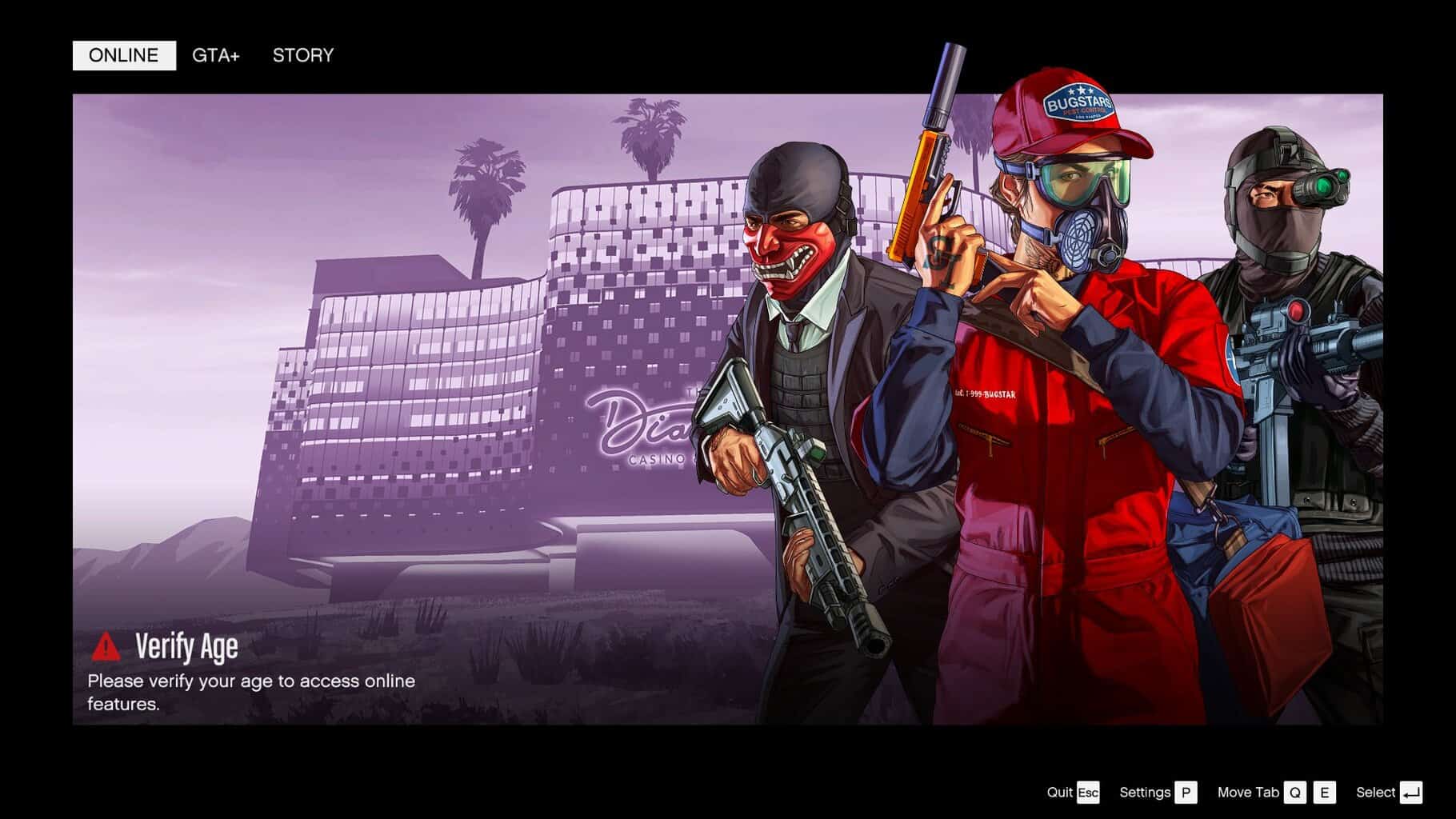
Rockstar Games appears to be tightening access to GTA Online. The studio plans to introduce age verification to comply with online safety laws. This won’t be just a pop-up asking your birth year. You’ll likely need to prove your age with real verification.

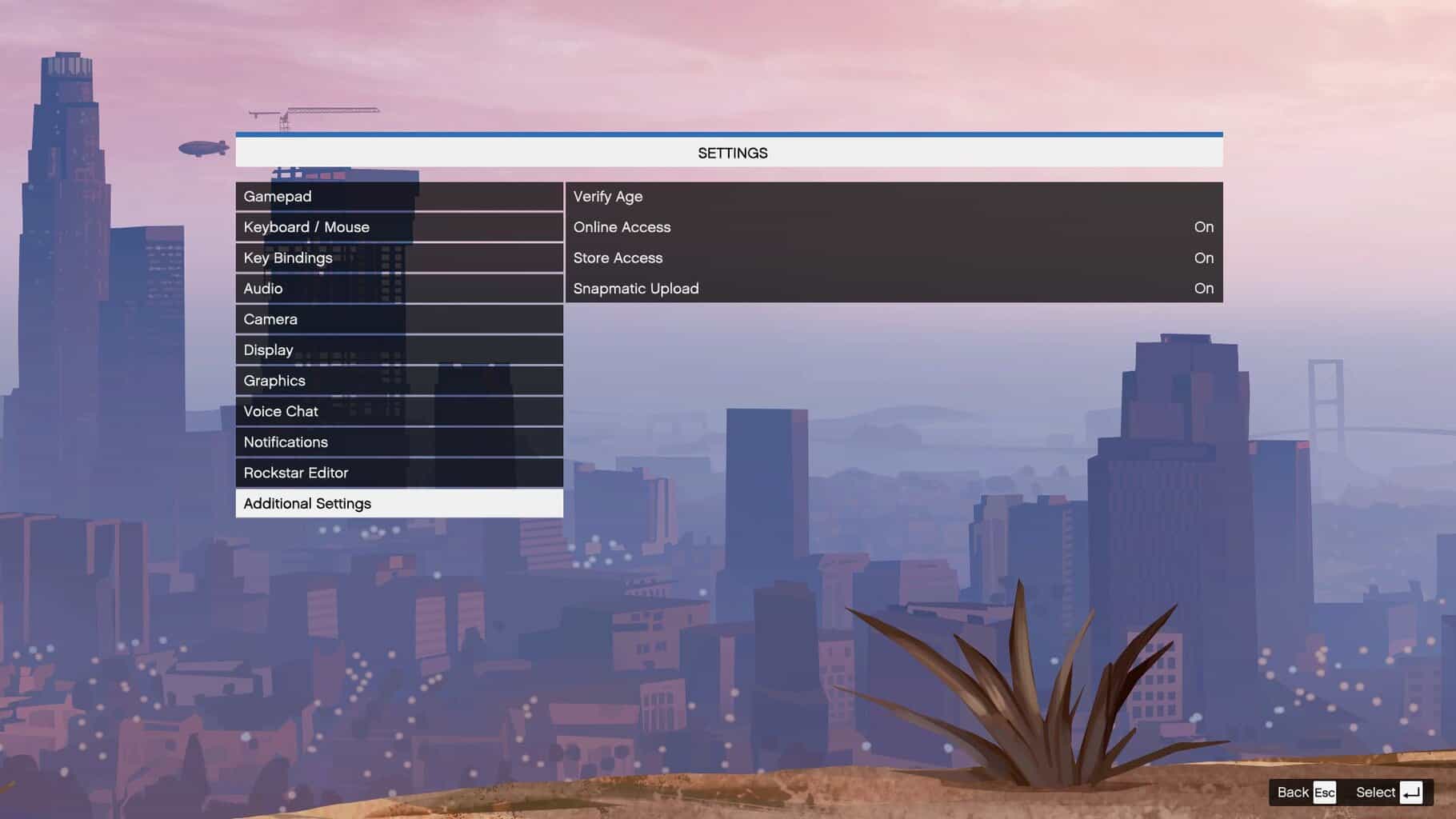
Renowned Rockstar insider Tez2 posted on X saying that the system could lock features, or the entire game, in certain regions, including the UK, if a player fails to verify their age. UK’s new online safety law may force Rockstar to block chat, Snapmatic, and even in-game messages

Verify age GTA online
Image: X/@TezFunz2
GTA online verify age
Image: X/@TezFunz2

Remember, it’s not a rumor. The age verification rules are introduced by the government of certain regions. We have already seen multiple apps and platforms rolling out age verification for users in the UK.

Not to mention, this move has been criticised by fans, with some even saying that it’s just to punish younger players unfairly. Some even fear invasive ID checks. But here’s the thing, Rockstar doesn’t have much choice.

For a global game like GTA 6, that’s a challenge. Rockstar can’t afford to break regional laws. If age verification in GTA 6’s online version goes live before May 26, 2026, some fans might face roadblocks on day one.

How to Download Epson ScanSmart for Windows 11 (Quick Guide)

Need Epson ScanSmart for Windows 11? This quick guide shows you how to download and install Epson’s smart scanning utility so you can start scanning, saving, and sharing documents with ease.


✅ Download Epson ScanSmart on Windows 11

  1. Go to Epson’s Official Support Website

    1. Visit the Epson support site: epson.com/Support
    2. In the search bar, type your scanner or printer model (e.g., Epson ES-500W, Epson WorkForce WF-4830).
    3. Select your product from the list.

  2. Choose Windows 11 as Your Operating System

    1. On your product’s support page, look for the Operating System dropdown.
    2. Make sure Windows 11 (64-bit) is selected.

  3. Download Epson ScanSmart

    1. Scroll to the Drivers and Utilities section.
    2. Look for “Epson ScanSmart” and click Download.
    3. The file will usually be labeled something like:
    ScanSmart_Setup.exe or epsonXXXX_ScanSmart_Installer.exe. Sometimes, it might be bundled inside the Drivers and Utilities Combo Package Installer.

  4. Install the Application

    1. Run the installer and follow the on-screen instructions.
    2. Once installed, open Epson ScanSmart from the Start menu.download epson smart scan windows 11

Why Use Epson ScanSmart?

  • 📄 One-click scanning to PDF, email, or cloud
  • 🔍 Built-in OCR for searchable PDFs
  • 🖥️ Clean, modern interface designed for productivity
  • 🔄 Supports auto document feeder (ADF) for multi-page scans

FAQs

Is Epson ScanSmart free?
Yes, Epson ScanSmart is free to download from Epson’s official website. Some advanced features may require compatible hardware.

What printers and scanners support ScanSmart?
Most Epson WorkForce, FastFoto, and ES-series models support ScanSmart. Check your product’s support page to confirm compatibility.

Can I use ScanSmart without Epson Scan 2?
Yes. ScanSmart is a standalone app, but for full driver functionality, Epson Scan 2 may be installed as well.


Final Tips

Make sure your Epson product supports ScanSmart and always download the utility directly from Epson’s official website. Avoid third-party driver sites to prevent installing outdated or unsafe software.

Microsoft to End Support for Visual Studio 2015 This October

Microsoft has announced that support for Visual Studio 2015 will officially end on October 14, 2025. That’s the same date when Microsoft will end support for Windows 10.

In a support update published yesterday, the company is encouraging users still relying on the legacy IDE to move to Visual Studio 2022. For the uninitiated, it offers new features like GitHub integration, AI-powered Copilot, and support for .NET 8 and 9.

For developers and organizations still holding on to 2015, this sunset means no more security updates, bug fixes, or technical support. This affects all editions, including Enterprise, Professional, Community, Build Tools, and more.

Microsoft says that it will also affect components like Visual C++ Redistributable, SDKs, Remote Tools, and Release Management tools. “Upgrading isn’t just about staying supported—it’s about improving productivity and building on a more secure, modern stack,” says Paul Chapman, Microsoft’s Principal Program Manager.

For those using even older versions of Visual Studio, Microsoft also outlined key support timelines:

More importantly, projects still built with MSVC Tools v140 (the compiler toolset used in VS 2015) will also need to be updated, even if opened in a newer IDE. All that said, Microsoft advises developers to migrate to the latest tools available in Visual Studio 2017 or newer.

Canon imageFORMULA R40 Driver for Windows 11, 10 (Download)

Looking for the Canon imageFORMULA R40 driver for Windows 11? You’re not alone. This guide shows how to download and install the official driver to get full scanning functionality on Windows 11.


✅ Canon imageFORMULA R40 Driver Windows 11

1. Driver Download

  • Canon released an official Software Installer v1.4.3024.1225 on 11 February 2025, still the most recent package. Compatible with Windows 11 and Windows 10 (64‑bit)
  • The package is about 558–572 MB and includes the TWAIN driver, Canon CaptureOnTouch, Readiris, Cardiris, and user manual. You can download it from here

2. Why You Need It

  • This v1.4 installer is built for Windows 11 compatibility, fixing earlier bugs and ensuring the scanner is recognized properly
  • Older versions caused “app not compatible” errors in Windows 11

3. Download & Install Steps

  • Visit the Canon support page for imageFORMULA R40 (e.g. Canon Europe or U.S.) and select Windows 11 OS
  • Download R40_Installer_V1.4.3024.1225_Windows.zip.
  • Extract and run the installer—driver, software, and manual install together.

4. Troubleshooting Tips

  • If the scanner isn’t recognized, run the Restoration Tool for Windows Registry found under the Utilities tab on the same download page
  • Also try restarting the Windows Image Acquisition (WIA) service: stop, wait 30 seconds, then restart it
  • Disable Windows Defender temporarily if it’s blocking device communication. That has helped some users post-installation

💡 Summary

StepAction
1. DownloadGet v1.4.3024.1225 from Canon support site, released Feb 11, 2025.
2. InstallRun the installer for driver + software on Windows 11.
3. TroubleshootUse the registry tool and restart WIA service if scanner isn’t found.

FAQs

Is the R40 driver compatible with Windows 11?
Yes. Canon’s v1.4.3024 installer, released Feb 11 2025, explicitly supports Windows 11

What if Windows says the app isn’t compatible?
Ensure you’re using the latest R40 installer (v1.4.3024) — older versions may cause compatibility errors on Windows 11

How do I fix detection issues post-install?
Use the Restoration Tool for Windows Registry and restart the WIA service. Some users also resolved issues by disabling Windows Defender temporarily


Final Tips

  • Always use the version marked v1.4.3024.1225 from February 2025.
  • Avoid using older installers that might trigger errors.
  • If issues persist despite installing the correct version, apply registry fixes and service restarts as outlined above.

Battlefield 6 Developers Confirm AI Bots Will Auto-fill Servers If Player Count Drops

EA and DICE are seemingly in no mood to take any chances with empty lobbies in Battlefield 6. In a recent interview with a Taiwanese outlet, GNN (via Insider Gaming), Development Director Anna Narrevik confirmed that bots will automatically fill multiplayer matches when servers aren’t full.

In other words, AI soldiers will step in anytime player numbers dip. Of course, real players can still join mid-match and replace bots instantly. While some longtime fans may find this frustrating, EA and DICE wants to keep the chaos going, no matter the time of day.

“Battlefield matches need to be filled at all times to feel truly epic,” Narrevik said, speaking with GNN. She added, “The way the game uses AI is that when the server is not full, AI will be added to fill the gap.”

Well, this isn’t the first time EA has taken the help of AI to maintain momentum in its online shooters. However, speaking in terms of Battlefield, which is heavily player-driven, makes this quite a bold move.

Narrevik also shared that Battlefield 6 will bring back older maps, starting with Firestorm. While it wasn’t part of the reveal event in Hong Kong, she hinted that fan-favorite maps will return based on community demand.

The team is aiming for quarterly updates and plans to keep updating the game after launch. For Narrevik, one feature that already stands out is tactical destruction. “If a building suddenly collapses, it gives you new ways to play and more control,” she explained.

Worth noting that Battlefield 6 enters open beta on August 9, with early access beginning tomorrow. The full game launches on October 10, with preload already live across all platforms. Meanwhile, EA has also confirmed the requirement of enabling Secure Boot to play Battlefield 6 on Windows 10 & 11 PCs.

EA Confirms Secure Boot Mandatory for Playing Battlefield 6 on PC

EA has announced that Secure Boot must be enabled to play Battlefield 6 on PC starting with its Open Beta (early access August 7, general beta August 9–10). EA, in its press release, mentioned that this requirement supports Positive Play and strengthens the game’s anti-cheat defenses.

For the uninitiated, Secure Boot is a feature in Windows 10 and 11 that ensures only trusted software runs during startup. As a result, it blocks advanced cheats, like rootkits, kernel-level cheats, memory injections, hardware spoofing, and VM manipulations.

This is all done by validating cryptographic signatures before the operating system loads. EA says Secure Boot powers its new Javelin Anticheat system and helps block sophisticated bypass methods.

EA_Javelin_Anticheat
Image: EA

If Secure Boot is disabled, players will be blocked from launching Battlefield 6. A notification will prompt them to enable it. TPM 2.0 must also be active, and the drive must use GPT format, not MBR. These prerequisites ensure the anti-cheat stack works as intended.

How to check and enable Secure Boot quickly

  1. First, press Windows Key + R, then type msinfo32, and hit Enter.
  2. In System Information, verify BIOS Mode is UEFI and Secure Boot State is on.
  3. To enable Secure Boot: go to Change Advanced Startup Options, restart, then enter UEFI firmware. In BIOS, set Secure Boot to Enabled.
  4. If Secure Boot is marked “Unsupported,” your PC may not support it. Therefore, you’ll need to check the motherboard’s manual.

For TPM check, make sure to run “tpm.msc“ to confirm TPM 2.0 is on. Finally, confirm that your system drive is GPT via Disk Management; otherwise, convert using the mbr2gpt tool before enabling Secure Boot.

As in-game cheating is evolving, EA is making sure to maintain stronger gameplay integrity with the help of Secure Boot. Javelin Anticheat was built specifically for Battlefield and works hand-in-hand with Positive Play to refine detection and improve fairness across multiplayer. Not to forget, Battlefield 6 developers have recently confirmed that AI bots will auto-fill servers in case player count drops.

Millions of Dell PCs hit by Broadcom chip vulnerabilities, urgent firmware update released

Dell is urging users to install critical firmware and driver updates after security researchers uncovered major vulnerabilities in Broadcom chips used across millions of its PCs.

As reported by The Register, five high-severity flaws were discovered in the Broadcom BCM5820X chips, which power Dell’s ControlVault3 security subsystem. For the uninitiated, these chips power Dell Latitude and Precision laptops, particularly in enterprise settings.

While Dell first warned its customers privately on June 13, the company has publicly made the advisory available just this month. Speaking to the news outlet, a Dell spokesperson said:

Working with our firmware provider, we addressed the issues quickly and transparently disclosed the reported vulnerabilities in accordance with our Vulnerability Response Policy. Customers can review the Dell Security Advisory DSA-2025-053 for information on affected products, versions, and more.

Dell has outlined five vulnerabilities, CVE-2025-24311, CVE-2025-25215, CVE-2025-24922, CVE-2025-25050, CVE-2025-24919, in an advisory updated on August 1. The company has confirmed that each vulnerability carries a CVSS score above 8.0, putting them in the “high” severity bracket.

In other words, attackers could exploit the aforementioned vulnerabilities to leak sensitive data, execute remote code, and more. Since ControlVault3 handles things like passwords, certificates, and biometrics, risks are high.

Fortunately, there are no reported cases of attackers exploiting these vulnerabilities yet. However, Dell has urged its customers to update their devices as soon as possible. The company has released firmware and driver updates for ControlVault3 through the official advisory, which we linked above.

If you use a Dell Latitude or Precision laptop, especially in an IT or enterprise setting, we recommend checking the advisory and installing the released updates.

Article feature image source: Unsplash

Microsoft’s new AI agent can spot malware without human help

Microsoft has announced a new AI-powered tool called Project Ire, and it’s built to spot malware on its own. While it’s still early days, the results already look promising.

In a real-world test, Microsoft used almost 4,000 suspicious files, and guess what, Ire correctly identified nearly 9 out of 10 malicious files. Well, it didn’t spot everything, though. According to Microsoft’s blog, the system flagged only about 25% of the total malicious files present.

That said, the files it did catch were mostly accurate, with very few false positives. The company calls this type of classification the “gold standard” in malware detection.

Typically, it takes skilled analysts hours to reverse-engineer questionable software. They have to dig into each file, figure out its intent, and decide if it poses a threat. But that process doesn’t scale, especially when threats number in the thousands.

Project Ire tries to solve this by breaking malware analysis into smaller steps. It reasons in layers, which helps prevent overload and boosts accuracy. The AI also pulls from a wide range of tools, including sandbox environments, decompilers, memory analysis, and even internal documentation.

Microsoft is planning to integrate it into Defender to speed up and scale threat detection. Meanwhile, Google is also moving in a similar direction. Its AI-powered bug-hunting agent, shown off earlier this year, recently spotted nearly 20 vulnerabilities.

Microsoft admits Project Ire still has a way to go, but it’s a glimpse into how defenders could get faster, smarter, and less dependent on manual work, especially when dealing with modern malware at scale.

Microsoft Brings OpenAI’s “gpt-oss-120b & 20b” Models to Azure and Windows AI Foundry

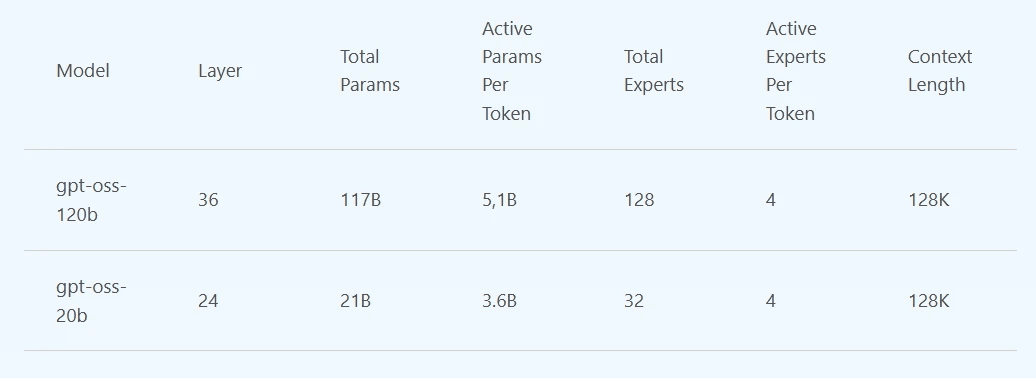
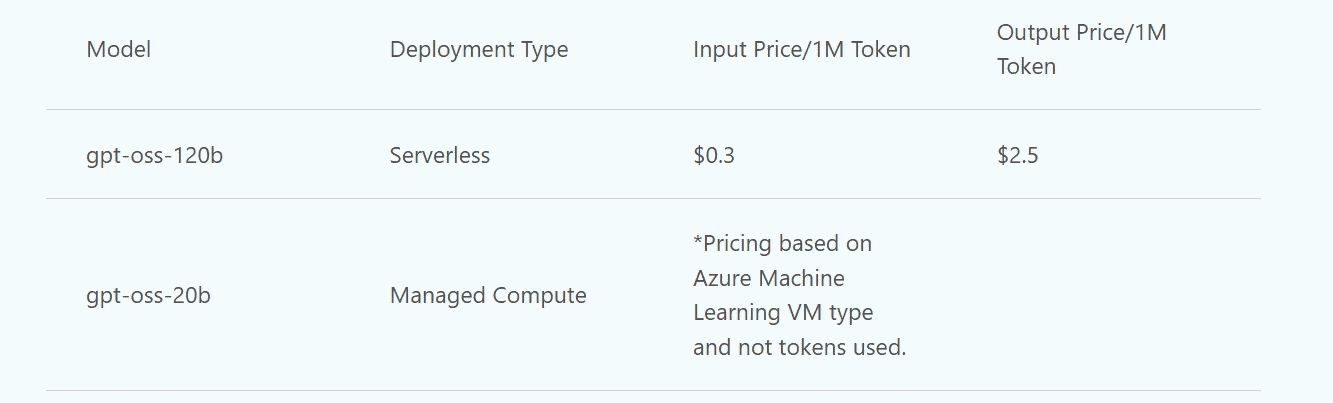
Microsoft has launched OpenAI’s new open-weight AI models, gpt-oss-120b and gpt-oss-20b, through its Azure and Windows AI Foundry platforms. These models are fully open and customizable, giving developers deep control over how and where they deploy them.

The bigger one, gpt-oss-120b, comes with 120 billion parameters. It comes close to o4-mini performance but stays efficient enough for single-GPU servers. The smaller gpt-oss-20b is even more flexible. It’s designed to run on local Windows machines with a decent discrete GPU, ideal for offline apps and fast-response tasks.

Screenshot-2025-08-05-131046
Image: Microsoft

This is the first time since GPT-2 that OpenAI has released open weights. It means no vendor lock-in; you can run these models locally, in your datacenter, or across the cloud.

Foundry makes the experience even more customizable. Developers can fine-tune models using LoRA, QLoRA, or PEFT. You can compress them, quantize for performance, edit attention layers, or integrate them into ONNX and Kubernetes stacks. There’s even an offline deployment option with Foundry Local.

image-9
Image: Microsoft

Microsoft says this is AI becoming part of the stack, not just an extra tool. “With gpt-oss, you can build with confidence and customize without compromise,” said Microsoft AI execs Asha Sharma and Logan Iyer.

It also gives Microsoft a serious edge in hybrid AI. Big models now work across cloud and edge, unlocking faster, cheaper, and more private use cases. It’s worth noting that the support is live on Windows and Azure, with support for Mac coming later down the line.

Microsoft May Tighten Return to Office Rules Starting January

Microsoft might be rethinking how flexible its hybrid work setup really is. According to a report by Business Insider, Microsoft is considering a stricter in-office policy for 2026, with some teams likely to be asked to return at least three days a week.

Well, if you are among those to be affected, the decision shouldn’t surprise you. That’s especially because Microsoft has had a rule since 2020 that lets employees work remotely up to 50% of the time. But in practice, many teams have reportedly operated with far more freedom. Some employees barely set foot in the office.

That flexibility could soon shrink. Let’s not forget that rivals like Meta and Google already require more in-office time. So, it seems Microsoft is also heading that way.

While nothing has been finalized, the updated RTO policy will reportedly start to take effect at the company’s main Redmond campus in January, with other locations following later. Worth noting that Microsoft’s legal division has already moved to a model that aligns with the proposed change.

If this new RTO policy applies company-wide, it would put Microsoft in line with others like Amazon and AT&T, who’ve gone even further with stricter five-day-a-week rules.

Microsoft’s spokespeople haven’t confirmed any concrete plans yet, only saying they’re reviewing their hybrid approach.

But internally, the company has already stepped up performance tracking, rolled out new improvement plans, and announced layoffs tied to productivity. If this goes forward, an official announcement could land by September.

Firefox Soon Can Reinstall Itself After Windows 11 Upgrades

While Chrome recently tested a tool to check Windows 11 upgrade eligibility, Mozilla has quietly developed a new tool designed to help Firefox survive OS upgrades and new device setups, a time when many users unknowingly lose the browser from their systems.

According to a bug report now marked as fixed, Mozilla is replacing the traditional Firefox desktop shortcut with a small executable called the Firefox desktop launcher. Unlike a regular shortcut, this launcher can detect whether Firefox is currently installed and take action accordingly.

Mozilla’s “Desktop Launcher” for Firefox on New Windows 11 Devices

How it works

When a user launches the new desktop app:

If Firefox is installed, the launcher reads the Windows Registry and opens the browser.

If Firefox is missing, it attempts to download and run the stub installer.

If the installer can’t be downloaded, it falls back to opening the Firefox download page in the system’s default browser.

Mozilla has also added support for a /Prompt command-line flag, allowing the launcher to ask for user permission before installation begins.

Why is Mozilla doing this?

As outlined in the bug report, a “substantial number of users” upgrade to Windows 11 in a way that removes Firefox from the system. However, personal folders like Desktop and Documents are often synced via OneDrive or other cloud services and automatically restored on new machines. By placing this new launcher in such folders, Mozilla gives Firefox a better chance of being reinstalled or reactivated after migration.

In simple terms, this launcher acts as an install entry point that travels with the user’s files, even if the browser itself doesn’t. Mozilla hopes this approach will result in a higher recovery rate for Firefox on freshly set up Windows 11 devices.

To implement this new behavior, Mozilla created the launcher executable, added a dedicated installer script, included it in default Firefox builds, and enabled support for non-release versions. A local testing server was also set up. The team has improved Registry handling, configured the Python environment, and added user prompts for install actions. The launcher is now built by default, adding just 206KB (roughly 0.2%) to the installer.

Status

The feature is expected to roll out with Firefox 143 and future versions. Mozilla has marked the bug as resolved and considers the work complete.

In short, Mozilla’s smart launcher ensures Firefox doesn’t disappear quietly during Windows 11 upgrades. By syncing with cloud-backed folders like Desktop, it gives the browser a second shot, reinstalling itself or pointing users to download it again, even if Firefox was never manually restored.

That’s not all. Mozilla is introducing the Mica design effect to the Firefox toolbar and context menus on Windows 11, and allows you to pin native web apps to the Windows 11 taskbar. Firefox is also testing IP Protection to promote its VPN and now offers a dedicated Firefox.com homepage for browser downloads

PS6 Tipped to Offer Major Ray Tracing Upgrade Over Base PS5

It seems PlayStation 6 will bring a serious upgrade in ray tracing performance, far beyond what the PlayStation 5 offers. According to Moore’s Law is Dead (via Wccftech), the next-gen console could feature up to 5-10x better ray tracing, alongside a 2–3x jump in rasterization performance.

The comments were shared in the latest episode of the Broken Silicon podcast. While some of the leaked specs might have changed internally since last week, the overall direction hasn’t. Sony is reportedly shifting its focus toward smarter visuals instead of just raw framerate boosts.

With the PS5 already handling many games at 4K and high frame rates, the PS6 is reportedly tuned to hit 4K at 120 FPS without overdoing raster power. Instead, the big jump will come from features like ray tracing and AI upscaling.

If Moore’s Law is Dead is right, the PS6 could land somewhere around RTX 4080–5080 levels when it comes to visual effects. That too at a lower price point than those GPUs.

With Xbox also taking a different route for its next console, the next-gen race might look very different this time. Sony is going all in on performance, and with reasonable pricing, it could be exactly what the console market needs.

Assassin’s Creed Mirage, Rain World, and More Join Xbox Game Pass This August

Xbox Game Pass is getting a fresh batch of games this August, and the lineup covers just about every mood. Whether you’re into stealth, strategy, roguelikes, or survival, there’s something coming your way.

Let’s start with the big one. Assassin’s Creed Mirage arrives August 7 for cloud, console, and PC players. You’ll step into Basim’s world as he rises from street thief to Master Assassin in ninth-century Baghdad. It’s one of the most anticipated additions this month, and yes, it’s available through Game Pass Ultimate and PC Game Pass.

Rain World is already available across all platforms, including Xbox. It is unique survival platformer where you’re a slugcat dodging predators and trying to survive in a broken ecosystem. On August 6, Citizen Sleeper 2: Starward Vector, MechWarrior 5: Clans, Lonely Mountains: Snow Riders, and Orcs Must Die! Deathtrap drop for Xbox Series X|S..

The same week, Aliens: Fireteam Elite returns to the library on August 12, and 9 Kings (Game Preview) hits PC on August 14. Let’s not forget that Descenders Next and He Is Coming are also available now in Game Preview.

A few updates are worth checking out, too. Senua’s Saga: Hellblade II is getting enhanced graphics and modes, and Sea of Thieves kicks off Season 17 on August 14 with new cargo runs and heists. Xbox Game Pass perks also include bonuses for Smite 2, Naraka: Bladepoint, War Thunder, and Call of Duty: Warzone. Moreover, Anthem, Persona 3 Reload, and Farming Simulator 22 are leaving on August 15.

This is what Microsoft’s ‘Windows XP Crocs’ looks like

Microsoft has found an unusual way to celebrate its 50th anniversary by turning one of its most iconic operating systems into a fashion statement. Earlier today, folks over at The Verge reported that the company has launched Windows XP-themed Crocs.

According to several employees, Microsoft designed the nostalgic footwear as a limited edition item, and they’re now up for preorder, internally, for now. Employees get first access before the shoes eventually make their way to a broader public release.

The design of the Crocs aligns all the way into early-2000s nostalgia. The shoes feature the unmistakable Bliss wallpaper, blue skies, fluffy clouds, and a green sole to mimic those rolling hills.

They also reportedly ship with six custom Microsoft Jibbitz charms. You can expect throwbacks like the MSN butterfly, Internet Explorer icon, the classic mouse pointer, and yes, Clippy.

At $80, they’re more than just quirky memorabilia. For many, they’re a wearable tribute to one of the most recognizable pieces of software history.

The Bliss image itself is considered the most viewed photo in the world, thanks to its years as the Windows XP default background. It’s worth noting that Microsoft hasn’t made an official announcement yet.

Feature Image Source: The Verge

Microsoft Bumps Up Zero Day Quest’s Prize Pool to $5 Million

Generally, tech companies offer bug bounty programs to crowdsource security research, and Microsoft is doubling down on that idea in a big way.

The company just announced a massive $5 million prize pool for its 2025 Zero Day Quest, a global hacking challenge aimed at uncovering security flaws in cloud and AI products.

Open from August 4 to October 4, the contest is calling on security researchers worldwide to dig deep into Microsoft platforms like Azure, Copilot, Dynamics 365, and M365. There’s even a 50% bounty bonus up for grabs for those who uncover critical, high-impact issues.

The top-performing participants will score an invite to a live, invite-only hacking showdown at Microsoft’s Redmond campus next spring. Along the way, the company plans to offer support and training from its internal AI Red Team and other security units.

This expanded initiative falls under Microsoft’s Secure Future Initiative (SFI), a push to overhaul the company’s security culture following federal criticism.

Microsoft says the findings from the contest will help inform its AI and cloud security strategies and will be disclosed transparently through the CVE program, whether or not customer action is needed.

As part of the update, Microsoft also boosted some .NET and ASP.NET Core bug rewards to $40,000 and widened its scope for the .NET bounty program.

Google’s NotebookLM now available for all Workspace for Education users

Google is making its AI-powered learning tool, NotebookLM, available to all Google Workspace for Education users, no matter their age group. NotebookLM acts as a personal tutor, helping students and teachers break down content with real-time summaries, quizzes, lesson plans, and even audio overviews.

Educators can upload materials like lecture notes or curriculum documents and let the AI generate helpful study tools based on them.

This tool is now covered under Google’s Workspace for Education Terms of Service, meaning user data won’t be used to train AI and remains private. It also meets privacy standards like FERPA and COPPA.

NotebookLM works in over 180 regions and supports 35+ languages. Users can control who accesses their notebooks and share them only within their organization. It’s live now under both Rapid and Scheduled Release, and comes built-in for all Education Fundamentals, Standard, and Plus users.

What makes NotebookLM stand out is how naturally it fits into classroom workflows. Teachers can turn their notes into guided lessons in seconds, and students can ask follow-up questions or replay audio overviews to reinforce learning.

It’s designed to support active, self-paced education across age levels, making it easier to understand even complex topics.

Mafia: The Old Country, Witch It, and More Xbox Games Launching This Week

A fresh batch of Xbox games is dropping throughout this week, between August 4 and August 8, covering a wide variety of genres. You can choose to play mob drama to multiplayer chaos, all this week.

Starting with Mafia: The Old Country launches August 8, bringing players back to the roots of organized crime in early 1900s Sicily. It’s a narrative-driven third-person action game optimized for Xbox Series X|S.

If you are an anime fan, you can deep dive into Demon Slayer -Kimetsu no Yaiba- The Hinokami Chronicles 2 on August 5. It follows the Entertainment District and Swordsmith Village arcs and lets you play through key moments from the hit series.

If you’re looking for fast-paced multiplayer fun, Witch It (August 5) offers a prop-hunt style hide-and-seek game with a magical twist. Meanwhile, Slopecrashers is launching on Xbox on August 7 with animal riders and party racing.

Other notable titles dropping this week include Gradius Origins, a massive retro shoot-em-up collection arriving August 7, and Dark Steel Legends, an action-packed medieval combat game launching August 5. You’ll also find quirky indies like Little Helper Café, Alien Breakout, and Hex Cats joining the lineup.

For puzzle lovers, Detail Hunter and Mystery Hotel: Hidden Objects will test your observation skills. If you’re in the mood for storytelling, Knowledge, or Know Lady mixes romance, sim chaos with live-action scenes.

All games will be available digitally, with some offering pre-order discounts. You can check the Microsoft Store or the Subscriptions tab on your Xbox console for full details and release timing.

How to Change Power and Sleep Settings in Windows 11

Want your PC to stop sleeping too soon or save more power? Windows 11 lets you customize power and sleep settings to match your usage style. Here’s how to do it step-by-step.


How to Change Power and Sleep Settings in Windows 11

Step by step for changing quickly Power and Sleep settings in Windows 11

  1. Open Settings

    -> Press Windows + I to launch the Settings app.

  2. Navigate to System > Power & Battery

    -> In the left panel, click System.
    -> Scroll down and select Power & battery

  3. Expand Screen and Sleep Settings

    -> Under the Power section, click the dropdown for Screen and sleep.

  4. Set Sleep and Screen Timers

    -> Choose how long your screen stays on when on battery or plugged in.
    -> Choose when your PC goes to sleep in both scenarios.

  5. Save and Exit

    -> Settings apply automatically.
    -> You can now close the Settings window.

Firefox 141.0.2 update targets NVIDIA crash, dev tools issue & more

Mozilla has released a small but important update for Firefox that addresses a handful of frustrating bugs, especially for Linux users running NVIDIA graphics. The update follows the Firefox 141 update, which introduced AI tab grouping, vertical tab tweaks, better Linux memory handling, and more.

Firefox version 141.0.2 is now rolling out and includes a fix for a crash that hit systems with older NVIDIA drivers. According to reports, the browser would fail to launch on Linux machines using outdated drivers like 560.35.03. Windows users weren’t affected by this issue.

Mozilla has also resolved another issue that made canvas objects behave weirdly on some websites. Firefox was incorrectly letting users drag canvas objects, which ended up breaking functionality on sites that rely on them.

The update also squashes a crash in the Web Developer Tools panel, which occurred when developers tried to inspect sites containing iframe elements. You can download Firefox 141.0.2 by checking for updates from the Help menu or by heading to the official download page. It’s also expected to show up on the Microsoft Store for Windows users shortly.

The update follows Firefox 141, which introduced AI tab grouping, vertical tab tweaks, better Linux memory handling, and more. If you haven’t explored those features yet, now might be a good time to revisit them.