Copilot Fall Update Brings Mico Avatar, Memory, and Collaboration Tools

Microsoft has just rolled out its Copilot Fall Update, with a vision to make a more “human-centered” AI experience. The release adds 12 new features designed to make Copilot more personal, social, and useful across Windows, Edge, and mobile apps.

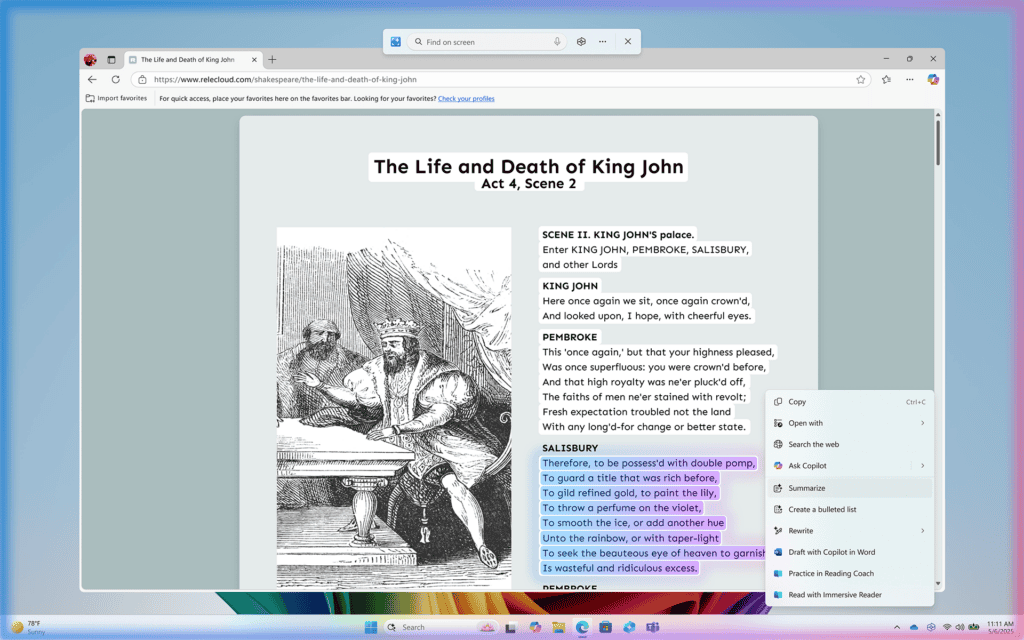
At the center of this update is Mico, Copilot’s first visual avatar. Short for Microsoft Copilot, Mico is expressive, customizable, and even reacts to voice conversations through animations and color changes. Its friendly, warm presence is meant to make interactions with AI feel more natural and emotional.

The update also adds Groups, a shared chat experience that lets up to 32 people collaborate in real time. Teams can brainstorm ideas, plan events, or study together while Copilot summarizes threads, splits tasks, and keeps everyone in sync. Microsoft calls this a step toward making AI “social, not isolating.”

Meanwhile, Memory & Personalization turns Copilot into something closer to a second brain. It can now remember important details, like anniversaries or ongoing projects, and bring them up when relevant. You can edit or delete memories anytime, giving full control over what Copilot retains.

There’s also deeper integration with services like OneDrive, Gmail, and Google Calendar, helping you search and organize content across accounts. And with Proactive Actions, Copilot can suggest next steps based on recent activity.

Other highlights include Copilot for Health, which uses trusted sources like Harvard Health for accurate medical guidance, and Learn Live, an education feature that acts as a Socratic tutor for interactive learning.

Lastly, Copilot Mode in Edge evolves the browser into a true AI companion and is now capable of summarizing tabs, comparing information, and even performing actions like bookings or form filling. Microsoft says that the update is rolling out now in the US, with global availability expected in the coming weeks.

Sarah Bond Teases a “Very Premium” Next-Gen Xbox Console Experience

If you’re an Xbox fan, you already know 2025 has been a turbulent year. From canceled titles to console price hikes and even a dev kit cost bump, Microsoft’s gaming division has faced no shortage of challenges. But recently, Xbox President, Sarah Bond, hinted at something big, and premium, for the platform’s future.

In a recent interview with Mashable on YouTube, Bond sat down to discuss the newly launched ROG Xbox Ally series, which Microsoft calls its first official Xbox handheld. While the discussion centered on the Ally, Bond also offered a rare glimpse into what lies ahead for Xbox hardware.

Bond described the upcoming console as a “very premium, very high-end curated experience.” That phrasing suggests Xbox is preparing to move further into the luxury tier of gaming hardware, leaving behind the affordability approach.

She also mentioned that some of the next-gen thinking is already visible in the Xbox Ally’s design. So, you can expect future Xbox hardware to come with deep Windows integrations, AI-powered features, and a more unified Xbox ecosystem.

While no technical details or launch timelines were shared, her comments hint that Microsoft’s next console might cater more to loyal fans than entry-level gamers.

In a related news, it has been reported that Microsoft is pushing the Xbox division to hit a massive 30% profit margin. This very decision appears to have contributed to games cancellations, job losses in Xbox division, and more.

Microsoft details risks of staying on unsupported Windows 10 systems

Microsoft recently killed Windows 10, and ended support for all its versions. However, still many businesses continue to use Windows 11. Now, addressing those businesses and individuals, Microsoft has warned that continuing to run unsupported systems following the end of Windows 10 support could expose them to serious cybersecurity threats and compliance failures.

In a new blog post, the company outlined how outdated infrastructure and legacy devices have become prime entry points for modern cyberattacks. According to Microsoft, attackers increasingly target unpatched systems to bypass strong defenses and access sensitive networks.

The company’s latest Digital Defense Report reveals that over 90% of ransomware attacks reaching the encryption stage begin with unmanaged or unsupported devices. These outdated systems, Microsoft says, weaken endpoint security, erode audit trails, and create blind spots that make compliance with regulations like GDPR and HIPAA harder to maintain.

“Unsupported systems aren’t just outdated — they’re unprotected,” Microsoft noted, adding that even one unpatched device can act as an open door for attackers. The report cites examples from finance, healthcare, and retail sectors, where aging infrastructure has already led to costly breaches and regulatory penalties.

So, what does Microsoft suggest? Well, it says that organizations should audit their environments and prioritize high-risk endpoints. More importantly, it subtly urges you to try Windows 11 Pro devices powered by Intel vPro and Copilot+ PCs. Moreover, Microsoft says that choosing these options will offer chip-to-cloud protection and built-in AI security.

Have you trasitioned to Windows 11? Will you do it? If not, what’s stopping you? Drop your thoughts in the comments below.

Perplexity Comet Browser’s Built‑In Dark Mode Shortcut Might Make You Ditch Chrome

After useful additions like Split View and a native ad blocker, Comet Browser now lets you turn any site dark with one shortcut: Alt+N. It’s a small but practical feature that Chrome still hides behind experimental flags. Perplexity’s Comet continues to include details like this that make browsing feel more natural.

Chrome offers a dark mode for its interface, but no quick shortcut to turn individual websites dark.

It solves a common issue where Chrome users rely on extensions or hidden settings to make websites dark. In Comet, it takes just one key press.

Comet Browser Dark Mode Shortcut for Websites

When a page still appears in light mode, pressing Alt + N switches the site to dark mode immediately. The shortcut appears in Comet’s own keyboard shortcuts list as “Toggle dark mode for websites.” It works on most pages, even when the browser theme itself is set to “Default” or “Dark.”

Screenshot showing Comet Browser’s keyboard shortcut entry labeled “Toggle dark mode for websites” with the built-in Alt + N key combination.
Comet Browser lists a built-in keyboard shortcut, Alt + N, to toggle dark mode for websites. Image Credit: Venkat | WindowsReport.

The shortcut applies only to the active tab. It gives users control to darken individual websites instead of forcing dark mode across the browser.

This feature is useful for night readers, web developers who test contrast, or anyone who wants consistent dark mode across sites without depending on individual website themes.

Comet Browser sets itself apart from Chrome and other Chromium-based browsers by offering a simple key command to change a site’s appearance manually.

Comet’s dark mode toggle works per tab and applies the change instantly. It feels like a small addition at first, but it soon proves valuable once discovered.

Most browsers, including Chrome, require hidden flags or extensions to toggle dark mode for websites, but Comet makes it available by default.

That’s not all. Comet Browser now supports automatic Picture-in-Picture mode and will soon include a built-in browser VPN.

Additionally, Comet Browser blocks New Tab Page extensions by default.

Microsoft Reportedly Pushes Xbox Division to Hit Massive 30% Profit Margins

Microsoft has reportedly asked its Xbox division to achieve 30% profit margins. The news comes via Bloomberg, which reported that this decision has already led to canceled projects, widespread layoffs, and strategic shifts across the gaming business.

Per the report, the company’s Chief Financial Officer (CFO), Amy Hood, introduced the new “accountability margin” policy over the last two years. According to people familiar with the matter, Xbox studios are now expected to align production budgets and creative priorities around this 30% benchmark.

For the uninitiated, that’s a figure that far exceeds the industry’s average of 17%–22%. Looking back at the trend, Xbox’s profit margins have been somewhere around 10% to 20%, and court filings from 2023 revealed that the division posted a modest 12% margin for the first nine months of fiscal 2022.

Even analysts say the new number is at the upper limit of what’s achievable even for top publishers. “A 30% or better margin is usually reserved for a publisher that is really nailing it,” said Neil Barbour of S&P Global.

Xbox has reportedly cut thousands of jobs and scrapped long-running titles like Everwild, Perfect Dark, and Project Blackbird, each in development for over seven years. At the same time, the division has increased game prices and shifted more titles to rival platforms, including PlayStation and Nintendo.

The restructuring suggests a fundamental shift in Microsoft’s gaming strategy. Under Phil Spencer’s leadership, the company had previously prioritized creative freedom and ecosystem growth over raw profitability. That approach now appears to be giving way to a stricter financial model.

That’s not all; Xbox’s recent acquisitions, including Activision Blizzard and ZeniMax Media, were intended to bolster its first-party catalog. However, they’ve also intensified scrutiny from Microsoft’s leadership as the company doubles down on its AI investments.

An Xbox spokesperson told Bloomberg that the company continues to take a long-term view of its business and balances “creativity, innovation, and sustainability” across its portfolio. What do you think of this move by Microsoft? Do let us know in the comments below.

Experts Warn of Security Risks in OpenAI’s New ChatGPT Atlas Browser

OpenAI recently launched its new AI-powered web browser, ChatGPT Atlas. The AI browser s currently available for macOS, with Android, iOS, and Windows versions on the way. Not to mention, the launch caught eyeballs of many, as Atlas looks to transform browsing by letting users search, plan, and even book services directly through ChatGPT.

However, cybersecurity experts are already raising red flags over potential vulnerabilities in Atlas (via Fortune). They warn that AI browsers like Atlas could be exposed to prompt injection attacks, where malicious webpages feed hidden instructions to the AI to extract data or perform harmful actions.

These hidden prompts could trick the AI into revealing personal information or accessing sensitive accounts without user intent. “There will always be some residual risks around prompt injections because that’s just the nature of systems that interpret natural language,” said George Chalhoub, assistant professor at the UCL Interaction Centre.

Responding to concerns, Dane Stuckey, OpenAI’s Chief Information Security Officer, said the company is “very thoughtfully researching and mitigating” these risks. “Our long-term goal is that you should be able to trust ChatGPT agent to use your browser, the same way you’d trust your most competent, trustworthy, and security-aware colleague or friend,” Stuckey added.

He added that OpenAI has introduced overlapping guardrails, red-teaming, and rapid response systems but acknowledged that “prompt injection remains a frontier, unsolved security problem.”

Have you tried the Atlas browser yet? If you haven’t and looking to download and learn how tio use it, check our guide.

Visual Studio is Gets Copilot-powered Planning Mode

Microsoft is taking Copilot in Visual Studio one notch up with the Planning Mode. The company is now rolling it out in public preview for Visual Studio 2022 version 17.14.

Unlike traditional Copilot prompts that respond line by line, Planning Mode lets Copilot create a structured, multi-step plan to tackle larger or more complex tasks. When triggered, it generates a markdown file outlining the task, research steps, and execution progress, all in real time.

As Copilot works through each phase, it revises and updates the plan dynamically, giving developers full visibility into what it’s doing and why. Microsoft says the new workflow makes Copilot far more predictable and transparent.

Rather than just guessing what the AI might do next, developers can now see every step it’s taking. The plan file is saved temporarily under %TEMP%\VisualStudio\copilot-vs\, though users can commit it to their repo for long-term tracking.

Early testing has already shown good results. Microsoft notes that in SWE-bench trials, GPT-5 and Claude Sonnet 4 achieved 15% higher success and 20% more tasks completed when using Planning Mode. Planning mode is now rolling out gradually, but users can enable it manually under Tools > Options > Copilot > Enable Planning.

Microsoft is Surveying Admins About Bringing Copilot to Exchange Server (On-Prem)

Microsoft appears to be integrating Copilot into Exchange Server. The company has published a new survey for IT adminis who still manage mailboxes on-premises or in hybrid setups, asking how they feel about integrating Copilot into their environments.

The survey, first spotted by Neowin, includes questions about how organizations deploy Exchange, which communication tools they rely on, and whether they’re already using Microsoft 365 Copilot. It even asks what kind of AI features they’d find most useful.

Whether it would be summarizing long email threads and drafting responses to monitoring server health and managing audit logs. Interestingly, Microsoft also wants to know how comfortable organizations would be with the idea of sending some Exchange Server data to the cloud while keeping mailboxes local.

That question alone suggests the company is exploring hybrid AI processing models rather than a fully cloud-bound system.While this doesn’t confirm that Copilot is officially coming to Exchange Server, the timing makes sense.

With Office Online Server being retired and Microsoft focusing more on AI-driven productivity, the company may be preparing to modernize its remaining on-prem tools.

Reddit Sues Perplexity for Scraping User Data to Train its AI

Ever since artificial intelligence became the tech industry’s favorite obsession, tech giants have been facing multiple lawsuits, ranging from news publishers to creative professionals. Everyone wants to know how their content is being used.

Now, Reddit has entered the courtroom again, this time suing Perplexity AI for allegedly scraping user-generated data to train its search engine without permission.

The lawsuit, filed in a New York federal court, claims that Perplexity, along with three data firms, Oxylabs (Lithuania), AWMProxy (Russia), and SerpApi (Texas), bypassed Reddit’s protections to harvest data that fuels its so-called “answer engine.”

Reddit alleges that Perplexity “desperately needs” human-written content to enhance the accuracy of its AI models. That’s why it is scraping Reddit’s massive library of discussions to give it that edge. Reddit is now seeking monetary damages and a court order to block further use of its data

The company says this isn’t just one case. In June, Reddit sued another AI startup, Anthropic, over similar claims. Reddit’s Chief Legal Officer, Ben Lee, described the issue as part of a “data laundering economy,” saying that AI firms are “locked in an arms race for quality human content.”

Perplexity, however, denies any wrongdoing. “Our approach remains principled and responsible as we provide factual answers with accurate AI, and we will not tolerate threats against openness and the public interest,” the company said in a statement, adding that it would defend itself in court.

Chrome Tests Catchy New Messages to Encourage Separate Profiles

After testing profile updates based on region detection, Google is experimenting with new welcome messages for Chrome’s Profile Picker in Canary. The Profile Picker is the screen that appears when you launch Chrome and helps you manage different browsing profiles. The experiment updates the text on this screen. It makes the message more direct and reminds users to keep their data separate across profiles.

The Profile Picker appears when you have more than one Chrome profile on your device. Each profile has its own bookmarks, passwords, extensions, and browsing history. It helps you switch between personal, work, and shared setups easily.

For example, you can have one profile signed in to your work Google account and another for personal use without mixing data or sync settings.

Chrome Profile Picker Text Variations

Currently, Chrome’s Profile Picker shows the following message:

“Welcome to Chrome profiles. With Chrome profiles, you can separate all your Chrome stuff. Create profiles for friends and family, or split between work and fun.”

In Chrome Canary, Google is testing new versions of this welcome text, including:

“Keep work and life separate.”

“Got another Google Account?”

“Keep school, side projects, and other tasks separate.”

“Sharing a computer?”

“Keep everything in Chrome.”

These short messages show how Chrome profiles keep data separate across accounts and uses.

The different text variations for the Profile Picker are tested behind a flag in Chrome Canary.

The new “Profile Picker Text Variations” flag spotted in Chrome Canary lets users see different welcome messages for Chrome’s profile picker. Image Credit: Venkat | WindowsReport.
The flag offers five selectable versions. Each version shows a different welcome message in Chrome’s profile picker. Image Credit: Venkat | WindowsReport.

Profile Picker may soon appear even for single-profile users

Google is also testing showing the Profile Picker even when users only have one profile. This may help make profile management more visible and remind users to create separate profiles for work, school, or shared devices.

That’s not all. Chrome may soon warn you when your search preferences change outside the browser.

Additionally, Google is testing an Immersive Reader mode for Chrome and rolling out AI Mode in the Side Panel.

Microsoft Shares New Wallpapers to Celebrate 11th Anniversary of Windows Insider Program

I remember exactly when I first joined the Windows Insider Program, and it feels like forever. Ever since I started writing about Microsoft-related news, I wanted to stay close to every release and see how Windows evolves build after build. And today, thanks to a blog post, I was reminded that Windows Insider Program has turned 11.

As Microsoft does for every milestone, it is celebrating this one in a fittingly personal way too. The tech giant has released wallpapers designed just for its loyal Insiders.

The wallpapers, available for both desktop and mobile, were designed in collaboration with the Windows Design Team to celebrate over a decade of community-driven innovation. They feature subtle gradients and a modern Windows aesthetic, and the number “11” to showcase how far both the OS and its community have come.

The wallpapers you see below are compressed ones (click to enlarge). You can download them in full resolution from here.

WIP_Light_Full_optimized_1000
Image: Microsoft
WIP_Dark_Full_optimized_1000
Image: Microsoft
WIP Light
Image: Microsoft
WIP Dark
Image: Microsoft

Amanda Langowski, Lead of the Windows Insider Program, talks about the milestone in the blog post and notes:

October is one of my favorite months of the year as we pause to reflect on the amazing community that is Windows Insiders as we hit what is our 11th anniversary of the program! Over the past 11 years, millions of Windows Insiders have previewed our developing experiences, shared invaluable feedback, and inspired us to meet what customers need today—and to keep evolving for what’s next. Looking ahead, we’re committed to driving innovation and growth that empowers people and organizations everywhere.

For long-time Insiders like me, this celebration feels more personal than promotional. We have already left Windows 10 behind, as Microsoft ended support for all of its versions on October 14, 2025. Now, Microsoft is purely focused on Windows 11, which it says will be AI-native.

Microsoft Paint’s Restyle Feature is Exclusive to Snapdragon-powered Copilot+ PCs

Microsoft just gave the Paint app another AI makeover. After adding background removal, layers, and more, the company is now rolling out Restyle. It’s an AI-powered feature that can instantly change the art style of any image you’re working on.

Paint_Restyle
Image: Microsoft

The feature is now available for Windows Insiders in the Canary, Dev, and Beta Channels, as part of Paint version 11.2509.441.0. Once updated, you’ll spot the new Restyle button inside the Copilot menu.

From there, you can choose from a set of artistic presets. You can think of Pop Art, Watercolor, or Sketch. Once you choose your style, hit Generate to watch your image transform in seconds.

Once you’re happy with the result, Paint lets you add the image to your canvas, copy it, or save it for later use. It’s yet another cool update by Microsoft, which is seemingly making Paint more than a nostalgic drawing tool and into a lightweight AI art studio.

There’s a small catch, though. Restyle is exclusive to Snapdragon-powered Copilot+ PCs, and you’ll need to sign in with your Microsoft account to use it.

Here’s Why File Explorer Doesn’t Show You Preview Pane for Downloaded Files

If you’ve been wondering why File Explorer suddenly stopped showing previews for files downloaded from the internet, we may finally have an answer, all thanks to Microsoft.

As part of the October 2025 Patch Tuesday rollout, Microsoft quietly changed how File Explorer handles files tagged with the Mark of the Web (MOTW). For the unitiated, MOTW is a security flag that marks content originating from the internet.

With this update, File Explorer now automatically disables the preview pane for such files by default. According to Microsoft, the update has been applied to block a critical vulnerability that could leak NTLM hashes (sensitive credentials used for authentication).

This could happen when you preview potentially unsafe files containing HTML tags that reference external resources. In simple words, just by previewing a malicious file, you could expose your system credentials.

With this update in place, you will see a warning message stating:

The file you are attempting to preview could harm your computer. If you trust the file and the source you received it from, open it to view its contents.

Remember, this restriction applies only to internet-downloaded files, while local or network files remain unaffected. For those who trust the source, it’s still possible to manually unblock a file. You can simply right-click it, select Properties, and check Unblock to restore normal access.

via: Neowin

KB5067112 Preview Update Releases With Key Fixes for Issues Reported in Windows 11 23H2

After releasing a massive update for Windows 11 versions 24H2 and 25H2 yesterday, Microsoft has now rolled out Build 22631.6132 (KB5067112) for version 23H2 in the Release Preview Channel. And, this one focuses mainly on fixes rather than adding new features.

The update includes a fix for a long-standing touch keyboard issue that prevented key presses from registering after a device resumed from sleep. While the keyboard animation appeared normal, characters weren’t being entered. The issue was especially noticeable when users tried to type passwords on the sign-in screen.

Microsoft has also resolved a networking problem affecting external virtual switches. These switches were losing their network interface card (NIC) bindings and converting into internal switches upon system restart, causing complete network disconnections. The issue was traced to incorrect handling of orphaned virtual switch objects during the Host Network Service startup process.

The build also enables a Personalized Offers feature during the Out-of-Box Experience (OOBE) and later within Settings once users reach the desktop. This feature aims to provide customized recommendations and promotions during initial setup.

Lastly, the update addresses a storage issue that caused disk communication failures during Azure Stack Hub or Azure Local cluster upgrades. For the unitiated, yesterday’s update for 25H2 and 24H2 introduced a redesigned Start Menu, Fluid Dictation in Voice Access, a color-coded battery indicator in the taskbar, and File Explorer upgrades.

Steam Launches Personalized Game Calendar to Help You Track New and Upcoming Releases

Valve has launched a new Personalized Game Calendar, a fresh experiment under Steam Labs, designed to help players keep up with upcoming and recently released titles that match their gaming tastes.

The feature uses a recommendation system built around your playtime habits. It compares your activity with other players who share similar profiles, then highlights the games they’ve been wishlisting or playing the most.

Unlike broad store lists, the new calendar focuses on games you’re more likely to enjoy, cutting through the noise of endless new releases. Steam says this system retrains daily, meaning recommendations evolve as you play more. You’ll see new titles appear as their release dates are announced, with an eight-week window showing what’s coming soon.

Image: Valve

The calendar view gives players a visual layout of upcoming launches, mapped by day, to make it easier to plan what to play next. It even integrates your wishlist games, ensuring you never miss their release dates. Since few games drop on weekends, Valve focuses on weekday releases for a clearer display.

Image: Valve

For recently launched titles, Steam offers weekly and monthly views instead of daily ones, based on how players typically browse new content.

Image: Valve

You always have the option to fine-tune what they see by filtering tags, adjusting the number of results, and automatically applying their content preferences. Steam is actively collecting feedback through this Labs experiment to refine the experience before a full rollout. Moreover, you can check the Personalized Calendar on the Steam store.

Xbox Game Pass October 2026 Wave 2 Adds The Outer Worlds 2, Football Manager 26 & More

Microsoft has unveiled a fresh lineup of new and returning games joining Xbox Game Pass between late October and early November 2025. You can get your hands on RPG hits to simulation classics. Take a look at some popular games and DLCs comibg to Game Pass soon.

New Games Coming to Game Pass in Late October & Early November

First, you’ve The Outer Worlds 2, which releases on October 29 for Cloud, PC, and Xbox Series X|S. The long-awaited sequel from Obsidian Entertainment offers sci-fi world with new colonies, weapons, and crew members. If you pre-order the Premium Upgrade Edition will also get five days of early access and two future DLC packs.

A day earlier, Halls of Torment brings survival action, on October 28. Meanwhile, PowerWash Simulator 2 launches on Xbox Game Pass on October 23. You can expect fresh tools, multiplayer modes, and soapy new maps. The same day, Bounty Star launches, giving you access to mech combat with base-building and farming systems.

If you are a PC player, keep an eye on Super Fantasy Kingdom, which drops on October 24. Whereas, Football Manager 26 and its Console Edition joins Game Pass Uktimate and PC Game Pass on November 4. Built on the Unity engine, this year’s management simulator boasts a redesigned interface and immersive matchday presentation.

On the same day, 1000xResist debuts with a narrative sci-fi adventure set in a world ruled by an alien disease.

DLCs and Ongoing Content

Microsoft is also keeping its existing titles fresh. Minecraft: SoulSteel adds a timed dungeon-crawling challenge, while Sea of Thieves: Season 17 Act 3 launches new raids and fort battles. In addition, Albion Online players can claim an exclusive Game Pass reward bundle starting October 30.

While many are joining, a few are also leaving Xbox Game Pass soon. Games like Jusant, Metal Slug Tactics, and Return to Monkey Island will leave the Game Pass library on October 31. So, if you’re playing one of these games, don’t forget to wrap them up soon.

Konami Revealed Three Silent Hill Titles to Prove the Series is Here to Stay

Konami officially revived its legendary horror series by revealing all three major Silent Hill projects simulatenously. Here we’re talking about Silent Hill 2 Remake, Silent Hill f, and Silent Hill: Townfall.

Producer Motoi Okamoto has now explained that the simultaneous reveal was a way to show commitment to fans about the series. He said, “We wanted fans to feel how serious we were about reviving the series.” He further added that this approach was chosen to prove Silent Hill’s future extends beyond one remake.

Silent Hill 2 Remake reimagines the 2001 classic with modern visuals and gameplay powered by Unreal Engine 5. Whereas, Silent Hill f introduces a new story set in 1960s Japan with an eerie botanical horror theme.

Meanwhile, Townfall, developed by No Code and Annapurna Interactive, offers a psychological, narrative-driven experience that expands the universe in unexpected ways.

Okamoto said Konami opted for multiple projects to show confidence in the franchise’s long-term roadmap. “Users won’t feel motivated to engage with an IP unless they can sense it has a future,” he noted.

All that said, the strategy appears to be working. Early reactions to the Silent Hill 2 Remake and Silent Hill f announcements have been overwhelmingly positive, bringing back excitement around the horror gaming series.

Satya Nadella’s Record $96.5 Million Pay Package Shows How Big Microsoft’s AI Bet Paid Off

If you were ever curious about how Microsoft’s AI push is reaping rewards, Satya Nadella’s recent salary figure has provided the answer. The CEO was paid a record $96.5 million in fiscal 2025, which is his largest payoff since becoming CEO in 2014.

According to a report by Bloomberg, the latest figures reflect a 22% rise from the $79 million in stock awards from last year. Most of it, $84.2 million, is based on Microsoft’s stock performance. Nadella also earned a $9.5 million cash bonus, a $2.5 million base salary, and an estimated $196,000 in other compensation.

Microsoft has been investing in AI more than ever, and Windows 11 is the proof. In the past few months, all of Microsoft’s apps and services have been deeply integrated with AI features. For example, recently, the company made “Hey Copilot” widely available, allowing users to naturally engage with AI throughout the system.

Copilot Vision and other AI features are also making Microsoft a presence felt in daily workloads, keeping the company relevant in the highly competitive AI race. Not to mention, the AI boom has also driven financial performance for the company.

Microsoft had a 15% revenue increase to $281.7 billion and a 16% rise in net income to $101.8 billion. The board hinted that over 95% of Nadella’s compensation is tied to performance, using growth numbers and shareholder returns.

Since 2014, Nadella’s pay has increased consistently, from $18 million in 2015 to $55 million in 2022, $79 million in 2024, and currently at $96.5 million. All that said, the AI strategy appears to be paying off for the Redmond Giant in 2025, a year that kept Microsoft in headlines due to frequent mass layoffs.

via: Business Insider

Microsoft & Verizon Team Up to Deliver Always-Connected Surface 5G Laptops for Business

Microsoft is moving its Surface for Business family to the next level with native 5G capability. And now the lineup has been optimized for Verizon’s robust mobile network. The joint effort from Microsoft and Verizon is designed to address one of hybrid work’s largest challenges, which is staying connected beyond the confines of conventional office spaces.

The Surface Copilot+ PCs are now equipped with 5G connectivity built in. As a result, it enables professionals to work remotely without dependence on Wi-Fi or phone tethering. Thanks to Verizon’s vast 5G network, these PCs have continuous access to Microsoft 365, Teams, and Copilot AI capabilities even under limited broadband availability.

Surface Copilot+ PCs are optimized for AI workloads, all thanks to built-in NPUs that can provide more than 40 TOPS of performance. Whether it’s summarizing lengthy email chains in Outlook or getting real-time project updates from SharePoint, users can now count on quick and secure Verizon 5G to keep their workflow going.

Security is another key area of this partnership. As you may know, Surface devices integrate Microsoft’s chip-to-cloud security features, such as TPM 2.0, BitLocker, and Windows Hello. Now, with Verizon’s encrypted network infrastructure and private network slicing, these PCs are even more secure.

With integration to Microsoft Intune, eSIM profiles, data usage, and roaming policies can be managed centrally by IT admins. This allows connectivity to be a managed enterprise resource instead of a user complication. Overall, by combining Verizon’s reliable network with Surface’s enterprise-class hardware and performance for AI-readiness, Microsoft is redefining mobile productivity.

KB5067036: Taskbar Get Colored Battery Icons & “Share with Copilot” Shortcut in Windows 11

Microsoft has released the KB5067036 update in the Release Preview channel that bumps 25H2 systems to Build 26200.7015 and 24H2 systems to Build 26100.7015. The update has brought a bunch of things to Windows 11. For example, you get a redesigned Start Menu, Click to Do upgrades, and Recommendations in File Explorer.

That’s not all; the latest Windows 11 preview update also adds minor changes to the Taskbar and Lock screen. For example, battery icons shown in the taskbar now feature color-coded indicators. You’ll see a green battery icon when there is sufficient power or when charging; a yellow icon is for a low battery (20% or less).

The update also brings simplified overlays that no longer block the percentage bar. Users can also toggle the battery percentage directly in Settings > Power & Battery, giving more control at a glance. Not to forget, the same colorful battery icons now appear on the Lock screen.

Besides the colored battery indicator, hovering over an app icon on the taskbar now reveals a thumbnail preview with a new “Share with Copilot” button. After selecting it, Copilot Vision analyzes that app’s content and offers insights or suggestions. You can turn it off from Settings > Personalization > Taskbar behaviors if you prefer privacy.

In addition to these design and behavior changes, Microsoft fixed a long-standing issue where app previews failed to bring windows forward. All in all, the entire taskbar experience feels smoother, cleaner, and more functional in daily use.

Windows 11’s File Explorer Gets Recommended Files and Copilot Integration with KB5067036 Update

Windows 11 Release Preview update KB5067036, which bumps 24H2 systems to Build 26100.7015 and 25H2 systems to Build 26200.7015, brings several improvements to File Explorer.

First, there’s a new Recommended Files section in File Explorer, which now works with both Microsoft accounts and local accounts. As the name suggests, it shows your most-used, recently downloaded, or frequently opened files directly on the Home page. If you prefer the old layout, you can easily disable recommendations under Folder Options.

After this update, hovering over a file now reveals quick commands, including “Open file location” and “Ask Copilot.” This allows you to get insights or summaries from your documents using AI without opening them first. This feature currently supports Microsoft accounts, with work and school accounts coming soon.

Microsoft has also opened new StorageProvider APIs for developers. This lets third-party cloud providers integrate more deeply with File Explorer Home, surfacing suggested files from their services. Alongside feature additions, the update fixes several bugs. Issues like File Explorer freezing, context menus flickering, and large archives failing to extract have been resolved.

Speaking of recent changes, Microsoft made dark mode consistent across File Explorer. You can read more about in our dedicated article here. Let’s not forget that with this Release Preview update, Start Menu is now more smarter, Fluid Dictation comes to Voice Access, and Click to Do gets bunch of new festures in systems running Windows 11 version 24H2 and 25H2.

Click to Do Gets Copilot Powers with Translation, Tables, and AI Prompts in Latest Windows 11 Builds

Microsoft is rapidly updating Click to Do experience in Windows 11 to make it one of the smartest tools. With the latest Build for 24H2 and 25H2 (26100.7015 and 26200.7015) under KB5067036, Click to Do now connects directly with Copilot, adding contextual AI prompts, translations, and new productivity actions.

Click to Do lets you take instant actions from text or content on-screen. You can now type custom prompts directly into a Copilot-powered box, sending both your input and selected content for analysis. The system even suggests AI-generated prompts below, powered by Microsoft’s local Phi Silica API.

You can also translate text instantly when Windows detects a different language. The translation result appears right inside the Copilot app, supporting English, Spanish, and French.

Click to Do also understands tables. Highlighting one table now shows a new “Convert to Excel” option. It can copy, share, or export tables to Microsoft Excel instantly, provided you have a Microsoft 365 subscription.

There’s support for unit conversions, freeform selections, and even Live Persona Cards from Microsoft 365. Tap Win + Click on an email address, and you’ll see that person’s profile card appear without switching apps.

All these changes are coming alongside improvements to Start Menu as well as support for Fluid Dictation in Voice Access. If you want to learn more about changes, check Microsoft’s announcement here.

Selected AI fraud prevention solutions – September 2026

iProov’s 2024 Threat Intelligence Report found that deepfakes producing “face swaps” that bypass identity verification surged by 704%. Another study by Feedzai found that over 50% of fraud involves the use of artificial intelligence (AI). It’s no surprise that the global fraud detection using AI market is projected to reach $31.69 billion by 2029, with a CAGR of 19.3%.

Countless brands are attempting to develop AI fraud prevention solutions, with each one seemingly more sophisticated than the previous, in an effort to protect businesses. 

Below, we’ll look at 8 of the best AI fraud prevention solutions as of 2025.

What Are AI Fraud Prevention Solutions?

AI fraud prevention services aim to address the growing global issue of fraudulent online activity facilitated by AI technology. AI fraud is a relatively new method of using AI tools for phishing attacks, account fraud, financial fraud, voice cloning, deepfake video scams, and more.

AI fraud prevention solutions also use sophisticated AI tools. Instead of for malicious use, generative AI and machine learning analyze massive datasets to identify suspicious transaction patterns and user behavior to detect fraudulent activities in real time.

What to Look For in AI Fraud Protection Solutions

Fraud protection solutions should protect you from the specific risks within your industry. Being more specific, you should look for the following features in your AI fraud prevention solutions:

  • Real-time detection and alerts
  • Advanced AI and machine learning software for accurate pattern detection
  • A protection solution that matches your risk strategy
  • Adaptive authentication that changes based on the risk
  • User activity monitoring across all your systems
  • A trust score for each interaction

The Top 8 AI Fraud Prevention Solutions

Here are our top 8 fraud prevention systems:

DatadomeDataDome has become a leader in AI-driven fraud prevention. Its Cyber Fraud Protection Platform blends behavioral analysis, device fingerprinting, and machine learning to block automated fraud attempts in real time. DataDome’s technology processes billions of signals every day, helping global brands stop fraud before it starts.

Standout feature: An AI engine analyzing over 5 trillion signals daily for precise and instant threat detection.

Kount

Kount is part of Equifax. It’s arguably one of the most established names in digital fraud prevention. The Kount platform uses adaptive AI to monitor transactions and behaviors instantly, assigning a dynamic “trust score” to every transaction. A higher score indicates the system is more confident that the user is legitimate.

Standout feature: Their Identity Trust Global Network analyzes billions of transactions from over 250 countries to detect anomalies instantly.

Riskified

Riskified is primarily concerned with protecting e-commerce. Merchants who want to approve more orders and lower fraud losses can benefit from the advanced AI-powered fraud prevention solution. It continuously enhances its capacity to differentiate between fraud and genuine clients by learning from each transaction.

Standout feature: A machine-learning engine improving approval rates by identifying genuine shoppers compared to suspicious-looking transactions.

ArkOwl

ArkOwl takes a slightly different approach, focusing on identity verification by gathering real-time, publicly available data from social networks and other sources. With that information, it can validate emails, names, and phone numbers. Instead of scoring transactions, ArkOwl provides instant background data to fraud teams.

Standout feature: Real-time identity verification powered by live data sources, not outdated databases.

Forter

Forter’s AI-powered platform helps global retailers prevent:

  • Payment fraud
  • Account takeovers
  • Return scams
  • Coupon manipulation

It runs on a massive fraud network that connects thousands of merchants and millions of consumers.

Standout feature: A global fraud prevention network that learns from over a billion transactions annually to prevent fraud.

iDenfy

iDenfy combines fraud detection with biometric identity verification. It’s popular with financial institutions, cryptocurrency exchanges, and e-commerce businesses. Within these industries, there’s more of a need to swiftly and securely verify identities. The system validates users almost instantly, using AI-based document analysis, liveness detection, and facial recognition.

Standout feature: Advanced facial recognition technology with built-in deepfake detection to prevent identity fraud.

KBY-AI

KBY-AI specializes in document and facial recognition to prevent ID-related fraud. Using deep learning models, it can detect subtle inconsistencies such as manipulated holograms or mismatched facial angles. One of KBY-AI’s main focuses is strengthening onboarding security.

Standout feature: Hybrid AI-powered verification combining document forgery detection with facial comparison for accuracy above 99%.

Memcyco

Memcyco is one of the newer names in AI fraud prevention. Despite that, it already stands out for tackling website impersonation fraud. It helps businesses prevent digital brand impersonation by monitoring and blocking lookalike websites and phishing attempts in real time. Its ‘Proof of Source Authenticity’ feature guarantees users that the site they’re visiting is genuine.

Standout feature: Real-time website impersonation detection powered by AI and digital watermarking for source authenticity.

NICE

NICE is the longest-standing prevention leader in our list. Focusing on financial institutions and large enterprises, NICE is popular for its Actimize platform. It’s an advanced system that uses AI and machine learning to analyze transactions, voice patterns, and customer behavior across multiple channels.

Standout feature: Cross-channel fraud prevention powered by behavioral analytics that identifies even the most subtle anomalies.

All of these are excellent AI-powered fraud prevention solutions. Each one is slightly unique, with some specializing in specific industries. Businesses should select a solution that best suits their risk profile and strategy.

KB5067036 Update Brings Fluid Dictation to Voice Access in Windows 11 24H2 & 25H2

The latest Windows 11 Release Preview update, KB5067036 (Builds 26100.7015 (24H2) and 26200.7015 (25H2)), gives Voice Access a powerful new boost. Microsoft has introduced Fluid Dictation, which it calls a next-gen voice input model that’s faster, more natural, and locally processed.

Fluid Dictation helps improve your spoken words in real time. It corrects grammar, punctuation, and even filler phrases as you talk, delivering more accurate results with less editing. It’s powered by on-device small language models (SLMs), ensuring everything happens securely and instantly.

The experience works across most text input apps, except in sensitive fields like passwords or PINs. You can activate it by saying “Turn on Fluid Dictation” or toggling it in Settings > Accessibility > Voice Access.

Microsoft has also expanded language support with full Japanese voice navigation. Japanese users can now open apps, dictate messages, and browse the desktop entirely through speech.

Another improvement lets users configure a wait time before a voice command executes. This helps prevent accidental triggers during dictation or multitasking.

These changes come alongside an important update to Start Menu, which make it more personal and smarter than ever. After updating your system with KB5067036 preview, you’ll also notice Phone Link integration button next to Search.

Windows 11 Start Menu Gets Smarter and More Personal With KB5067036 Preview

Microsoft has released Windows 11 Builds 26100.7015 (for version 24H2) and 26200.7015 (for version 25H2) under KB5067036, to the Release Preview Channel. The update brings a redesigned Start menu that feels more fluid, personal, and intelligent than before.

The refreshed design aims to simplify navigation and give users faster access to what matters. The new scrollable “All” section lets users explore apps more easily without switching screens. It’s now joined by two new viewing options, category view and grid view.

Category view groups apps by type, highlighting your most-used ones, while grid view lists everything alphabetically for quick scanning. That’s not all; the menu remembers your last view, making the experience feel more consistent across sessions. A responsive layout adapts to screen size, automatically adjusting pinned and recommended sections for a clean, balanced look.

Microsoft has also added a Phone Link integration button next to the search bar. It lets users expand or collapse content from their connected Android or iOS devices. This feature is live in most markets and coming to the EEA next year.

Speaking of changes, Microsoft has also added a bunch of new features reated to Click to Do with this update. Moreover, Voice Access in Windows 11 also get nore fluid after this uodate on 24H2 and 25H2 systems.

Microsoft Reportedly Hikes Xbox Dev Kit Prices by 33%

Microsoft has reportedly increased the price of its Xbox Development Kit (XDK) from $1,500 to $2,000. That’s a steep 33% rise for studios and developers joining the Xbox ecosystem. The price adjustment applies globally and is already rolling out to partners purchasing new kits.

According to The Verge, which first reported the news, Microsoft told developers that the updated pricing reflects “macroeconomic developments” but assured its commitment to supporting creators with powerful tools and resources.

The company says the change won’t impact the quality or availability of dev kits. For the uninitiated, these kits are essential hardwares used by studios to design, test, and optimize Xbox games before release.

Notably, it is yet another price hike in Microsoft’s gaming ecosystem. Earlier this year, Xbox Game Pass Ultimate became 50% more expensive, and the company raised Xbox Series X|S console prices twice in the U.S.

It is worth noting that Xbox dev kits remain a premium product, offering more memory, compute power, and diagnostic features than retail consoles.

However, with costs climbing across the board, Microsoft’s latest price adjustment hints that building for Xbox is becoming increasingly pricey. Not to mention, it will make life harder for smaller or indie developers, who already face growing costs across multiple platforms.

Microsoft to Retire Office Online Server in December 2026

Microsoft has retired several legacy services this year alone, including the Microsoft Lens app and older components of Skype for Business. Now, the company has confirmed that Office Online Server is also heading for the same fate.

In an announcement published today, Microsoft said it will end support and retire Office Online Server on December 31, 2026. After this date, Office Online Server will no longer receive security updates, bug fixes, or technical support, effectively leaving it unsafe and non-compliant for enterprise use.

Microsoft says the decision will help it achieve its goal to “modernize productivity experiences” and focus fully on cloud-first solutions like Microsoft 365. The company clarified that this announcement doesn’t affect other server products such as Exchange Server Subscription Edition, SharePoint Server Subscription Edition, or Skype for Business Server Subscription Edition.

The company recommends that organizations relying on Office Online Server should begin planning their migration to Microsoft 365 to ensure security and compliance. For businesses that depend on Office Online Server for collaborative document editing or browser-based Office access, Microsoft 365 offers a more advanced replacement.

Organizations using Power BI Report Server with Excel integrations will also need to prepare for change. That’s because hosting Excel workbooks through Office Online Server will no longer be supported after the retirement date. Microsoft suggests using the Excel desktop app or migrating workloads to the Power BI service instead.

Moreover, the company is encouraging customers to start transition planning early, with migration help available through Microsoft FastTrack for organizations with more than 150 licenses.

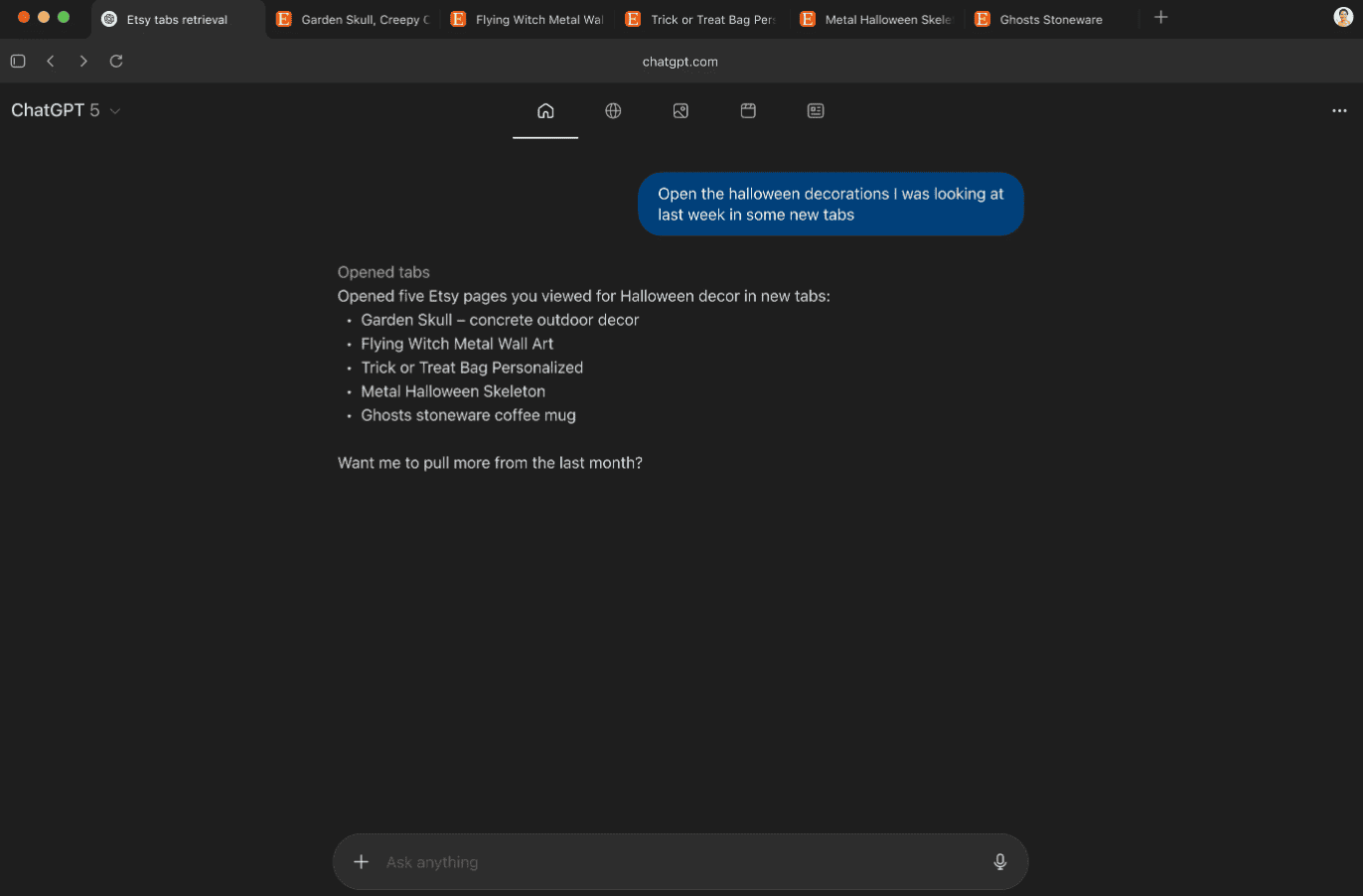
How to Download & Use ChatGPT Atlas AI Web Browser

OpenAI has officially launched ChatGPT Atlas, an AI-powered web browser designed to rethink how we use the internet. Atlas has ChatGPT deeply integrated at the core of your browsing experience. The AI can summarize pages, automate tasks, and even act on websites, all without switching tabs.

With its Agent Mode and browser memory, ChatGPT can understand context, assist with research, and remember your browsing preferences while giving you full control over what’s shared. Atlas is currently available on macOS for Free, Plus, Pro, and Go users, with Windows, iOS, and Android versions coming soon.

How to Download ChatGPT Atlas AI Web Browser

  1. Visit chat.openai.com/atlas.
  2. Download the Atlas installer for macOS.
  3. Launch the app and sign in to your ChatGPT account.
  4. Import your bookmarks, saved passwords, and browsing history from your current browser.
  5. Once setup is complete, you’ll be greeted with a clean new-tab interface powered by ChatGPT.

How to Use ChatGPT Atlas AI Web Browser

When you open a new tab in Atlas, you can either type a URL or ask ChatGPT a question directly from the search bar. You can switch between Search, Images, Videos, or News results, just like you do on Google. Additionally, ChatGPT also remembers what you’ve explored and offers suggestions, like revisiting pages, summarizing articles, or automating small tasks.

Image: OpenAI

How to Use ChatGPT Atlas Browser Memories

  1. Open Settings in Atlas.
  2. Go to the Browser Memories section.
  3. Enable or disable memory as you prefer.
  4. View, archive, or delete memories anytime.
  5. You can toggle page visibility from the address bar to control what ChatGPT can see.
Image: OpenAI

Browser memories are private and linked to your ChatGPT account. Deleting browsing history also removes all related memories.

How to Use Agent Mode in ChatGPT Atlas AI Web Browser

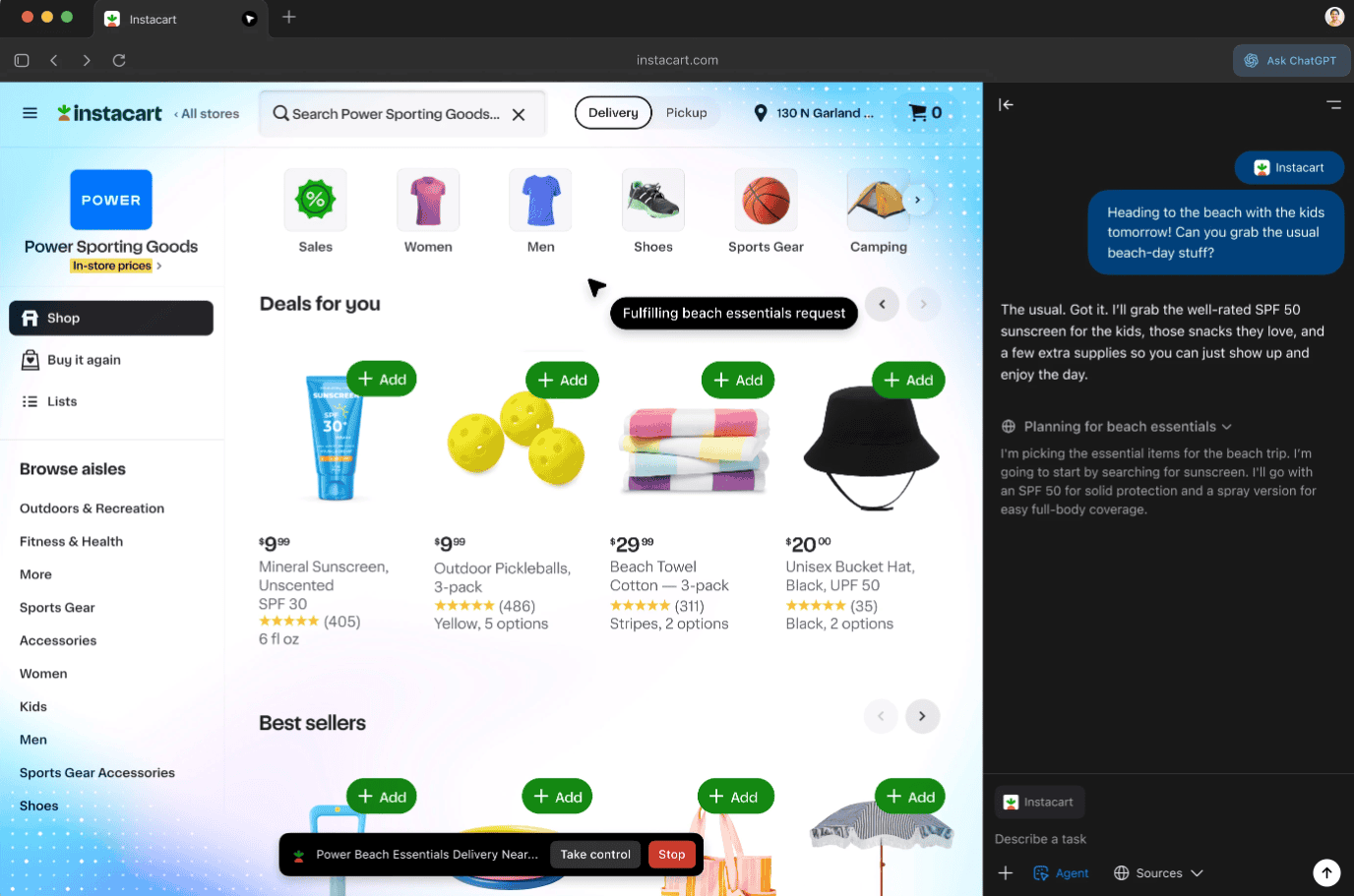
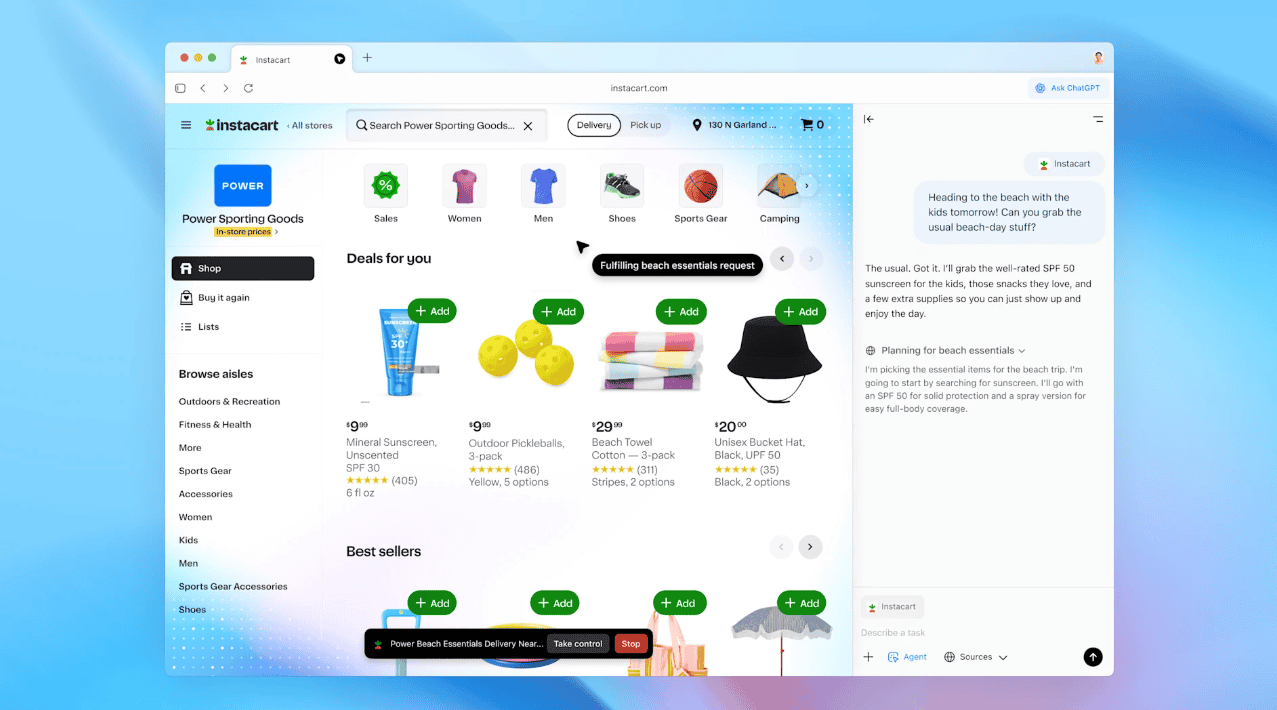
Agent Mode lets ChatGPT take actions for you on websites, like filling out forms, booking appointments, or creating summaries. You can enable it by following thge steps below:

  1. Click the Agent Mode icon in the toolbar.
  2. Approve the action when ChatGPT asks for permission.
  3. Monitor what the AI is doing in real time.
Image: OpenAI

Agent Mode runs in preview for Plus, Pro, and Business users. You can use it in logged-out mode to minimize access to sensitive data.

What Else You Can Do in ChatGPT Atlas

Atlas gives users control over privacy and training data. You can:

  • Clear browsing history anytime.
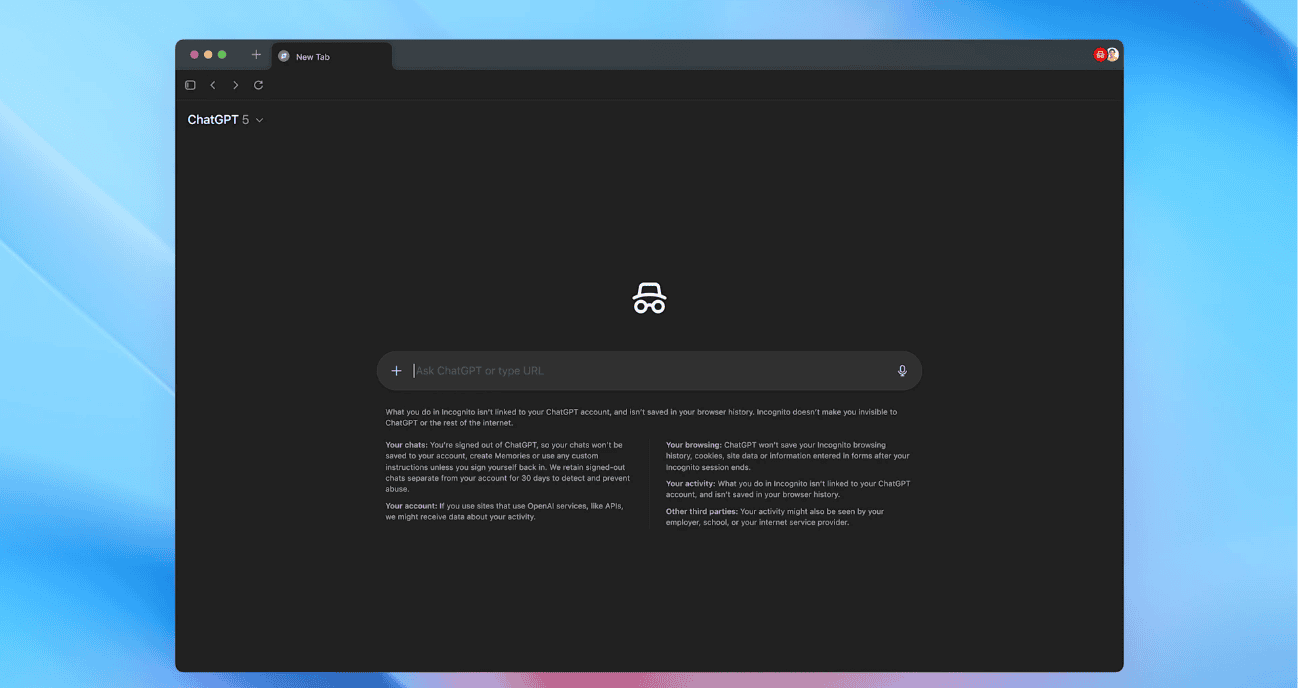
  • Use Incognito Mode to prevent memory creation.
  • Disable website visibility with one click.
  • Manage parental controls or disable Agent Mode for safety.

OpenAI says future updates will bring multi-profile support, developer tools, and improved discoverability for AI apps within Atlas. All in all, the company aims to make Atlas a one-stop workspace where AI, browsing, and productivity blend seamlessly.

Article feature image source: OpenAI

Microsoft Confirms Kerberos and NTLM login Issues in Windows 11 and Server 2026

Microsoft has confirmed a new login issue affecting Windows 11, version 24H2, 25H2 and Windows Server 2025 systems. The company says the issue, which triggers Kerberos and NTLM authentication failures, is linked to devices that share duplicate Security IDs (SIDs).

According to Microsoft’s update, the issue first surfaced after users installed recent cumulative updates, including:

  • August 29, 2025 (KB5064081) (OS Build 26100.5074) Preview
  • September 9, 2025 (KB5065426) (OS Build 26100.6584)

Microsoft says these updates introduced new security protections that strictly enforce SID uniqueness, leading to failed authentication handshakes on systems cloned or duplicated incorrectly.

Users across affected devices are encountering multiple login and access problems. These include:

  • Repeated credential prompts and failed logins
  • Inability to access shared network folders
  • Remote Desktop Protocol (RDP) session errors
  • Failover Clustering operations are failing with “access denied”
  • In Event Viewer, admins might spot related errors like SEC_E_NO_CREDENTIALS or Local Security Authority Server Service (lsasrv.dll) Event ID: 6167, which reads:
    “There is a partial mismatch in the machine ID. This indicates that the ticket has either been manipulated or it belongs to a different boot session.”

The root cause of the issue

The problem stems from duplicate SIDs, which can occur when administrators clone Windows installations without running Sysprep. For the uninitiated, that’s a tool required to ensure unique identifiers for each deployment.

With the latest security changes in Windows 11 24H2, 25H2, and Windows Server 2025, Microsoft now enforces stricter validation checks, blocking authentication entirely when duplicate SIDs are detected.

Microsoft noted that the change was intentional. However, it has inadvertently disrupted some enterprise environments that rely on duplicated images or virtual machines made through unsupported cloning methods.

How to fix the issue

Microsoft wants you to check this guide and advises rebuilding affected systems using supported methods that generate unique SIDs. For IT admins looking for a temporary workaround, Microsoft is offering a special Group Policy that can suppress the SID enforcement behavior. However, this policy is available only by contacting Microsoft Support for Business.

This issue adds to a growing list of post-update headaches for enterprise IT teams running the latest versions of Windows 11 and Server 2025.

via: Bleeping Computer

ChatGPT Atlas is OpenAI’s New AI Web Browser That Takes on Chrome, Edge & More

After months of speculation, OpenAI has finally lifted the curtain on ChatGPT Atlas, its first-ever AI-powered web browser designed to take on the likes of Google Chrome and Microsoft Edge. Atlas looks and feels like a modern browser, complete with tabs, favorites, and incognito mode.

But the difference is visible in its deep ChatGPT integration, which turns ordinary web browsing into a smart, conversational experience. As OpenAI describes, the built-in ChatGPT Agent can actively assist while you browse. You can summarize long articles, compare prices across multiple sites, or analyze data directly within the page you’re viewing.

Additionally, you can even bring up a ChatGPT sidebar in any tab, making it feel more like a co-pilot for the web than a traditional browser. The browser’s memory feature allows Atlas to recall relevant details you’ve shared or explored earlier, offering contextual help when needed.

However, privacy controls remain front and center. Users can choose which sites ChatGPT can access, clear browser memories, and toggle Agent Mode permissions. When enabled, Agent Mode lets ChatGPT interact with websites. However, OpenAI says it operates within strict limits.

It can’t run local code, access your file system, or read passwords, ensuring that Atlas doesn’t overstep into personal data territory. What’s interesting is that Atlas also reimagines search. For example, when you look something up, you can easily switch between text, image, video, and news results.

For now, ChatGPT Atlas is available globally on macOS, with OpenAI confirming that Windows, iOS, and Android versions are coming soon. Agent Mode will debut in preview for ChatGPT Plus, Business, and Pro users. Interestingly, users who set Atlas as their default browser on macOS will receive a temporary boost in ChatGPT rate limits for up to seven days.

Microsoft Teams to Automatically Update Your Work Location Using Wi-Fi

Microsoft is gearing up to add a new location-aware feature for Teams. The platform will soon use Wi-Fi networks to automatically detect and update a user’s work location, removing the need for manual check-ins or status edits.

As first spotted by TechRadar Pro, a Microsoft 365 Roadmap entry (Roadmap ID 488800) notes that when a user connects to their organization’s Wi-Fi, Teams will automatically set their location to the corresponding building or office.

From the initial details, we can tell that Microsoft is aiming to make collaboration more seamless by ensuring colleagues always know where team members are working from. Last year, Microsoft said that Teams’ work location will also include buildings.

But, this feature is currently listed as in development and is expected to begin rolling out in December 2025. Once released, it will be available for Teams users on both Windows and Mac worldwide.

While Microsoft detailed everything, it appears that the feature will rely on Wi-Fi SSID recognition. Once connected, Teams will automatically update the user’s work location within the app. This update builds on Microsoft’s ongoing effort to make Teams more context-aware and responsive to modern workplace needs.

More recently, Microsoft also launched Channel Agent in Teams simplify project tracking, automate channel updates, and improve group coordination. The company recently previewed Project Manager Agent skills, giving Teams users intelligent tools to manage deadlines, delegate tasks, and summarize progress without leaving the app.

Other upcoming additions include Forwarded Message Links, iPad multitasking support, and several new quality-of-life updates aimed at enhancing cross-device productivity. For those new to the platform, you can learn more in our detailed guide on how to use Microsoft Teams.

Samsung Brings Perplexity AI to TVs, Launches First-Ever Perplexity TV App

Samsung has launched the world’s first Perplexity AI-powered TV app to bring generative AI to your living room. Dubbed the Perplexity TV App, the feature is now available on all 2025 Samsung TVs and will soon roll out to 2023 and 2024 models via an OS update later this year.

The launch extends Samsung’s Vision AI Companion, a platform introduced at IFA 2025 that merges advanced AI features into one intuitive interface for TVs and smart monitors. With the Perplexity integration, you can now ask complex questions, get instant, sourced answers, and explore recommendations, all directly from your Samsung TV screens.

As first announced by Samsung Electronics, the Perplexity TV App acts as a standalone AI agent. It lets you perform quick searches, plan trips, find entertainment suggestions, or even check filmographies. For instance, yoy can ask “Which movies were directed by the Russo Brothers?” Next, Perplexity AI will do its magic.

Perplexity AI, known for its real-time, credible answer engine, enhances the Vision AI experience by offering visually rich results instead of plain text. When you ask a question, responses appear as high-quality, glanceable cards, designed specifically for large-screen readability.

Samsung Perplexity TV App
Image: Samsung

You can open the Perplexity TV App from the Apps tab or through the Vision AI Companion by pressing the AI Button. After accepting terms and enabling microphone access, you can start voice interactions instantly. For those who prefer typing, an on-screen or USB keyboard can also be used.

In the announcement post, Dan Glassman, Senior Director and Head of New Business Development at Samsung Electronics, notes, “This first-of-its-kind Perplexity AI-powered app broadens our Vision AI Platform offering for a more unique and personalized user experience.”

As part of the rollout, Samsung and Perplexity are offering a free 12-month Perplexity Pro subscription to all users. You can further scan the QR code displayed on the app to activate the bonus, unlocking advanced features and faster responses.

Microsoft 365’s Accessibility Assistant Gets Smarter at Detecting Tables and Shapes

Microsoft has rolled out an update for its Accessibility Assistant in Microsoft 365, and it brings smarter handling of tables and shapes across Word, Excel, and PowerPoint. The changes, now available to Microsoft 365 Insiders, make the assistant more accurate and less intrusive.

One of the key changes ensures that tables using valid row and column headers are no longer flagged as violations. Previously, the Accessibility Assistant often reported tables as non-compliant even when screen readers could interpret them correctly.

The latest change ensures that proper headers are treated as sufficient. Similarly, merged headers that span multiple columns or rows, such as year or category labels, are now correctly recognized in Word and PowerPoint, while Excel remains unchanged since it doesn’t support merged table cells.

Microsoft has also improved how the tool treats small tables, which screen readers typically handle without difficulty. Tables with fewer than four rows or columns will no longer trigger merge or split warnings, reducing unnecessary noise for document creators.

In addition, decorative or empty shapes and text boxes used for layout or spacing are no longer flagged as accessibility violations in Word and Excel, since they don’t impact navigation or comprehension. This update makes Accessibility Assistant more context-aware, ensuring that alerts reflect genuine accessibility concerns.

The new logic for table handling is rolling out to Word, Excel, and PowerPoint users running Version 2411 (Build 19412.20000) or later on Windows and Version 16.103 (Build 25101121) or later on Mac. Moreover, the changes to shape handling are available for Word and Excel users running Version 2411 (Build 19329.20000) or later on Windows and Version 16.103 (Build 25100813) or later on Mac.

Microsoft Clears Up Doubts About How Windows Installs and Manages Driver Updates

Microsoft has published a new support article that talks about how Windows handles driver updates. The article, listed under KB5070538, provides a detailed explanation of what driver updates are, how they’re delivered, and why users sometimes see older or duplicate updates in Windows Update.

According to Microsoft, drivers act as a bridge between Windows and the hardware it runs on. They enable communication between the operating system, applications, and devices like printers, graphics cards, and network adapters. Windows automatically downloads and installs new drivers when available to ensure that devices remain secure, stable, and compatible with the latest updates.

Most driver updates come directly from third-party hardware or software providers. These partners build the drivers and then work with Microsoft to certify that they meet Windows quality and compatibility standards.

Once approved, partners publish the drivers on Windows Update, allowing devices to receive them automatically. Microsoft notes that it also develops its own drivers, particularly for Surface and other Microsoft-branded devices.

If you’re curious about a particular driver update, Microsoft says the best thing you can do is to contact the hardware manufacturer directly, since details about driver releases vary between providers. Windows Update itself doesn’t display detailed changelogs or technical notes for third-party drivers.

Microsoft also addressed a few user concerns in the document. For example, if you notice a driver with an old date, it doesn’t necessarily mean the driver is outdated. Many vendors choose descriptive dates unrelated to the actual release. Similarly, if multiple updates appear to be the same, that’s because some devices use multiple interdependent drivers to handle different parts of their functionality.

To make updates easier to understand, Microsoft has also simplified how driver names are displayed in Windows Update. Newer updates now show the publisher’s name and version number provided by the manufacturer, replacing the older, more complicated naming format that combined publisher, device class, and version details.

via: Neowin

Opera Brings Deep Research Agent to Neon for Smarter AI-Powered Browsing

Opera is taking its AI-powered browser vision one notch up by introducing Opera Deep Research Agent (ODRA) in Opera Neon. The feature, coming soon to users, will ensure that Opera’s in-house AI engine provides more accurate answers to complex queries directly in the browser.

ODRA has been in development for more than two years and now joins the existing trio of agents, Chat, Do, and Make. In other words, ODRA is the fourth integrated AI agent in Opera Neon.

Unlike typical AI chat assistants, ODRA is designed for deep research. It runs through multiple sources, cross-checks data, and compiles structured, reference-backed reports tailored to your query. Opera explains that ODRA works like a team of digital researchers:

  • Researchers gather and summarize relevant data.
  • Supervisors oversee the process, refining the results and triggering more iterations if needed.

This academic-style workflow allows ODRA to produce in-depth and verifiable responses, which is always ideal for projects, reports, or topic exploration that demands more than quick answers.

How ODRA works inside Opera Neon

Opera has reengineered its backend to parallelize ODRA’s research process. Each query gets broken down into smaller subproblems that run simultaneously, much like how GPUs handle multiple operations at once.

This approach allows ODRA to analyze your question from multiple angles, delivering richer insights faster. However, because of the complexity of deep research, Opera says the process can take between 5 and 20 minutes. Once finished, users receive a comprehensive “research document” complete with citations and referenced sources.

Opera Neon Deep Research Agent
Image: Opera

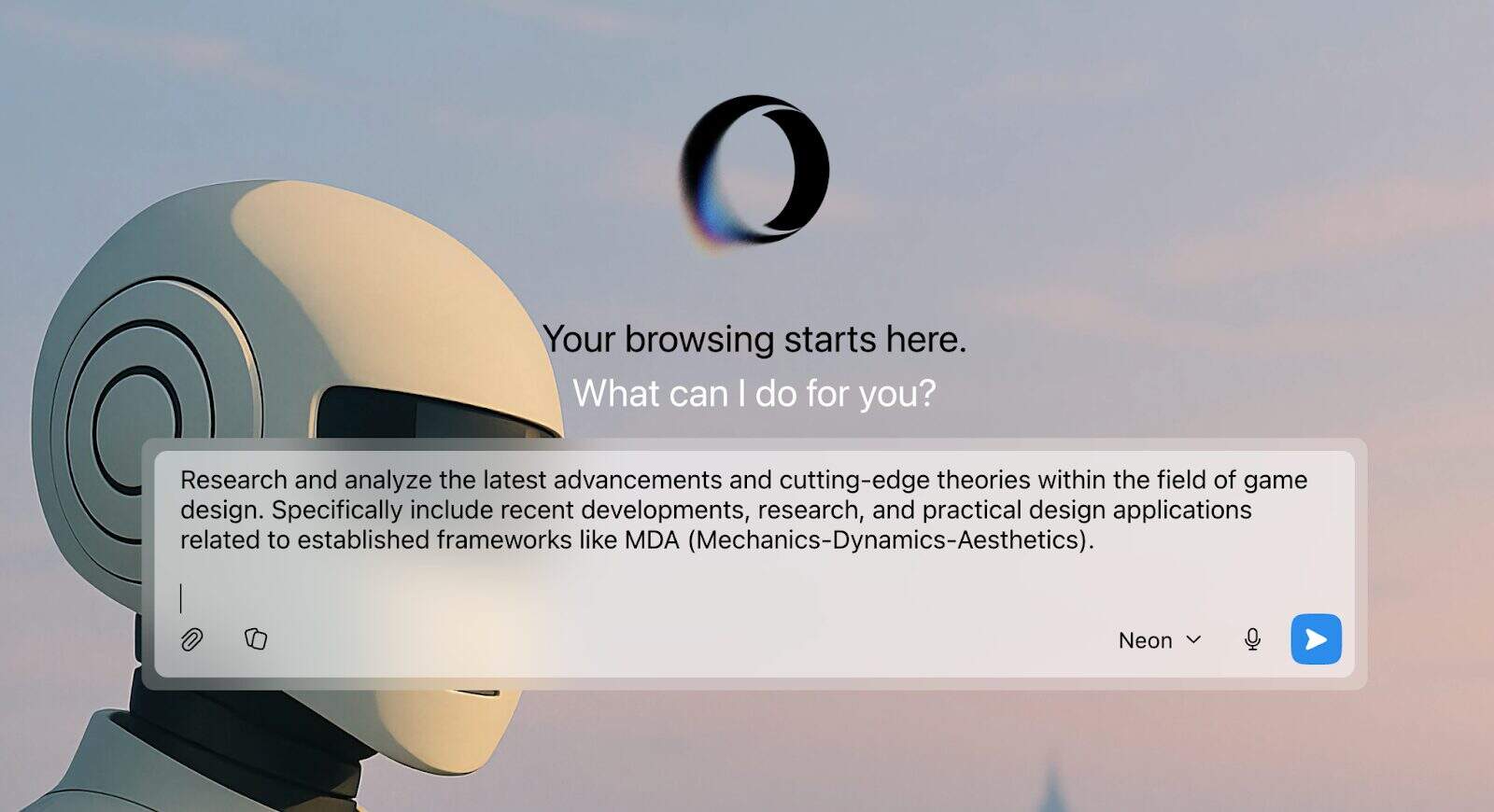
The new research agent will appear in Neon’s Omnibox, alongside the existing AI agents. Users can simply select ODRA, type a prompt, and let it begin analyzing. If clarification is needed, ODRA will ask follow-up questions before generating the report.

Built on an open, model-agnostic AI engine

Opera’s AI engine is model-agnostic, meaning it can combine technologies from various providers such as OpenAI’s Sora 2, Google’s Nano Banana, and Gemini models. This flexibility allows Opera to quickly deploy updates and new agents, and sometimes on a weekly basis.

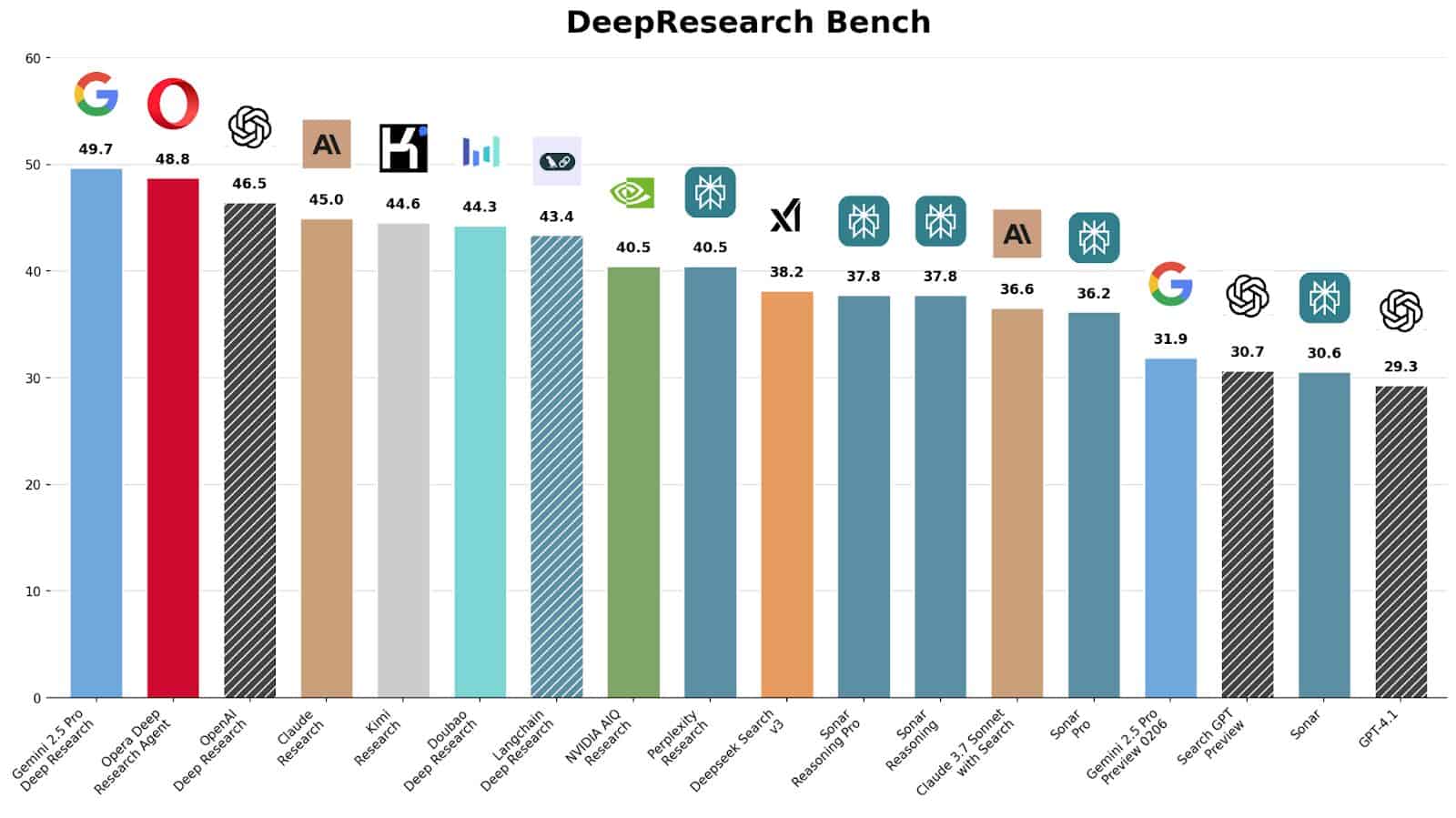
The company says ODRA’s benchmark performance already rivals deep research agents from OpenAI and Google, with internal testing showing steady improvement in accuracy and relevance.

DeepResearch Benchmark
Image: Opera

Opera Neon remains available to a limited number of users for now, but those already on the platform will get early access to ODRA soon. Users who joined the Neon waitlist should keep an eye on their inbox for invites. If you haven’t signed up yet, you can join the waitlist here.

Claude AI Now Integrates With Microsoft 365

Anthropic has rolled out a major update for Claude AI, as it introduced integration with Microsoft 365 and a powerful new enterprise search feature. The feature will help tap into your organization’s daily tools like Outlook, Teams, SharePoint, and OneDrive to streamline work and enhance collaboration.

The new integration means Claude can now understand and reference your company’s knowledge across Microsoft’s ecosystem. All thanks to this, it will help you find documents, summarize discussions, and surface relevant data without switching between apps.

Microsoft 365 connector for Claude

Anthropic’s new Microsoft 365 connector lets Claude securely connect to your company’s Microsoft environment using the Model Context Protocol (MCP). Once enabled, Claude gets access to organizational data from the tools you already use every day.

Here’s what it can do:

  • SharePoint and OneDrive: Search and analyze documents across company sites and libraries, from reports to plans, without uploading anything to Claude.
  • Outlook: Scan and summarize email threads, identify communication trends, and extract insights to help track progress and decisions.
  • Teams: Surface relevant chats, meeting notes, and project updates, so you can quickly find what your team has been discussing.

Enterprise search across connected tools

Anthropic has also launched Enterprise Search, which is designed to unify company-wide information into one intelligent workspace. Every organization now gets a dedicated shared project, personalized with its company name and optimized for collaboration.

Enterprise Search
Image: Anthropic

Once set up by an admin, the project connects your essential tools, giving every team member instant access to company knowledge. For example, you can ask: “What’s our hybrid work policy?” and Claude will pull details from HR files in SharePoint, email discussions in Outlook, and guidelines from Teams. This is just one example; there are many ways you can use the Enterprise Search feature.

The Microsoft 365 connector is now live for all Claude Team and Enterprise plan customers. Admins can enable the connector from the Anthropic dashboard, after which users can sign in with their Microsoft 365 accounts to start using Claude across connected apps.

Enterprise Search is automatically available once the integration is active. Moreover, admins can customize connected data sources, permissions, and prompts to customize the experience for their teams.