Fallout 76 B.E.T.A. to be an Xbox One timed exclusive, available for pre-order now

Fallout 76 was one of the most hotly anticipated games coming out of E3 2018 and perhaps among the top three well-received unveilings during the convention.

Hot off a successful fan tease at E3, developer studio Bethesda will be giving some eager fans a hands-on of things to come in Fallout 76 with its Break-it-Early test platform, aptly called B.E.T.A.

While it will offer some limited gameplay for fans the B.E.T.A is primarily designed for Bethesda to test server capacity issues that may arise as the game takes on a more open multiplayer format for this installment.

According to a report from ScreenRant, “considering Fallout has never been an MMO before, and the maps are promised to be four times bigger than Fallout 4, there’ss a lot that could go wrong in the early days of Fallout 76.”

Furthermore, Bethesda is granting Xbox One users who pre-ordered Fallout 76 early access to the B.E.T.A, ahead of its PS4 and PC counterpoints. The B.E.T.A exclusive grab is a big one for the Xbox division and with the Xbox One X and One S on steep discounts right now, it help the company rack up a handful of console sales prior to the holiday rush.

Unfortunately, there is no concrete timeframe for the B.E.T.A release on Xbox One, but fans who pre-order the game will be among the first to know exactly when they’ll be let into a part of the game prior to its release later this fall.

Twitter PWA now supports the Windows 10 Share dialogue

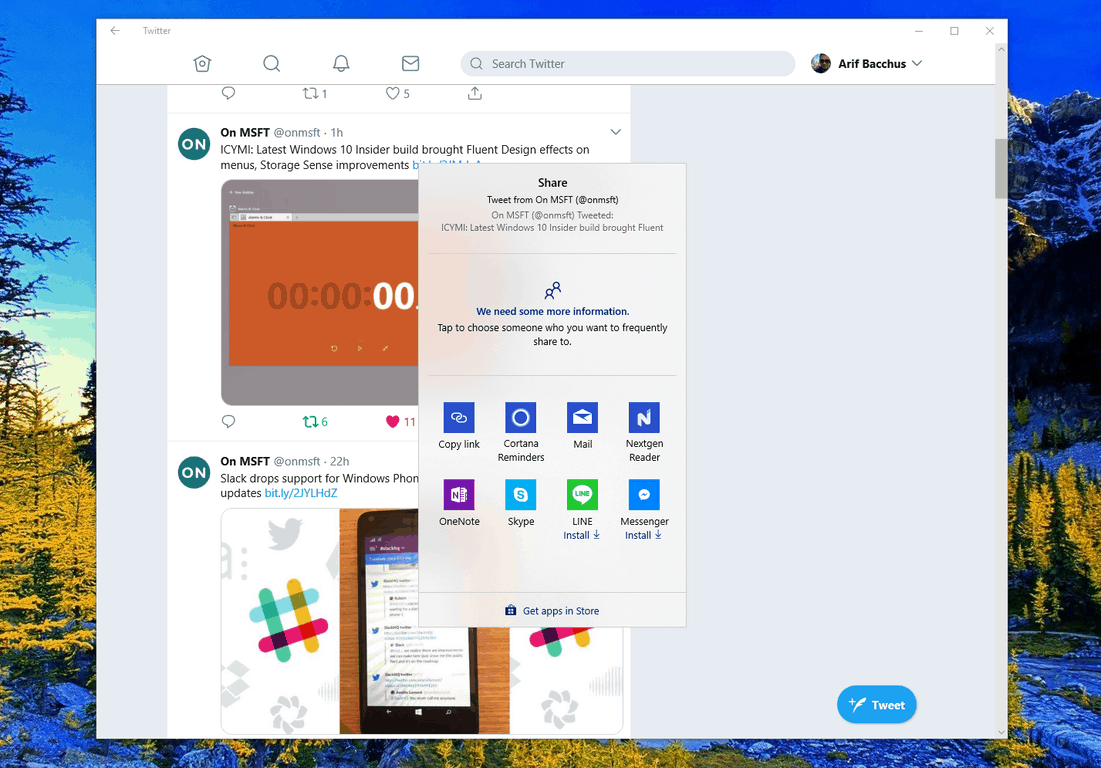
Twitter has steadily updated their Progressive Web app on Windows 10 over the past few months, and it is now picking up yet another feature. With the latest update, the app now supports the native share dialog in Windows 10 (via MSPoweruser.)

Seen in the featured image above, you can now summon the Windows 10 share dialog from the Twitter PWA and share links in more ways than one. You can choose to share to one of your contacts specifically, nearby devices, or just opt to share with other apps in the Store. Though a small touch, it is still a nice little feature that makes it easier for when you want to share that viral tweet with your family and friends.

This is just the latest addition to the Twitter PWA, which has gotten more updates in the last few months than the Twitter UWP ever received. Updates for all PWAs are automatic and previous Twitter PWA features include support for Live Tiles, Jump lists, and share dialog targeting.

You can head to the link below to download the Twitter PWA. Once you’ve downloaded, feel free to try out the share feature now and let us know your thoughts in the comments.

Twitter
Twitter
Developer:
Twitter Inc.
Price:
Free

Microsoft acquires video-based social learning platform Flipgrid

Microsoft announced this morning the acquisition of Flipgrid, a video-based social learning platform already used by more than 20 million students and educators worldwide, for an undisclosed amount. This is the company’s latest move to remain one of the top players in the education market, where it has been facing increased competition from Google and Apple in recent years

Flipgrid was created back in 2015 as video discussion platform for students, family and educators, and it currently has iOS and Android mobile apps, integrations with OneNote, Microsoft Teams and many other platforms. Now that Flipgrid is now part of Microsoft, the service has become free for all educators and students and Redmond will provide a prorated refund to every educator who upgraded in the past year.

“Equipping students with the skills they need to thrive in this future will require an engaged community made up of dedicated administrators, great teachers, motivated students and involved parents,” said Microsoft CEO Satya Nadella. “Technology is merely a tool to enable their creativity and ingenuity. Together with Flipgrid, we aim to democratise these tools to empower every indicators and student to create the world of tomorrow,” he added.

ICYMI: Latest Windows 10 Insider build brought Fluent Design effects on menus, Storage Sense improvements

Last week Microsoft released Windows 10 build 17692, and it came with new enhancements for the Game Bar and some other new features. As usual, these changes were documented the minute the build dropped, but Microsoft has since updated the build announcement post with two new features that were initially missed. Indeed, also new in Windows 10 build 17692 is Fluent Design in system flyout menus and some OneDrive Files On-Demand improvements.

Windows Insiders should now notice that light dismiss XAML controls and transient XAML services in this build now features Fluent Design’s Acrylic material. This is best seen in system context menus, flyouts, auto suggest box dropdowns, combo box dropdowns, date and time picker flyouts, and media transport control flyouts. Other apps which are using the SDK for this build or higher will also see this change by default.

Additionally, with the improvements to FIles on Demand, Microsoft is looking to help clean storage on your system when space is running low. With build 17692, users can now make any downloaded Files-On Demand from OneDrive online-only if they weren’t used in a certain period of time. The setting can be found in Settings > System > Storage > Storage Sense.

It’s nice to see that Microsoft is improving on Fluent Design and also helping users save space on their PCs. We’re looking forward to another new build this week and hope it comes with even more cool features and even the autoplay feature for Edge which was initially teased last week.

Windows 10 Insider build 17692: Known issues and bug fixes

Microsoft released Windows 10 Insider Preview Build 17692 (RS5) to Windows Insiders in the Skip Ahead ring and the Fast ring. The build brings lots of new features such as SwiftKey intelligence, WebDriver improvements, ease of access improvements, narrator improvements, game bar and game mode improvements, search improvements and more. Here are the known issues and bug fixes that are included in the build as well.

General changes, improvements, and fixes for PC

  • The issue that resulted in audio glitches on the system was fixed.
  • The issue involving the Eye Control’s fail was fixed.
  • The issue that made some games such as Counter Strike: Global Offensive to crash on launch was fixed.
  • The issue that triggered Settings’ crash when trying to open Data Usage Settings was fixed.
  • Delivery Optimization Settings is now directly listed as a category under Settings > Update & Security.
  • The issue that resulted in Windows Security app crashing when adding a process to the exclusion list got fixed as well.

Windows 10 build 17692 known issues

  • The login screen crashes in a loop when the active sign-in method is set to Picture Password, and you should remove Picture Password before you upgrade to this build.
  • DRM video playback in Microsoft Edge is broken, but you can use Netflix to play videos.
  • There are a few issues with the Narrator.
  • The build comes with known issues for developers as well, and you can read about them in Microsoft’s official notes.

Known issues for Game Bar

  • The Game Bar is likely to crash on x86 systems.
  • The framerate counter chart doesn’t show up correctly.
  • The CPU chart shows incorrect percentage.
  • Charts in the performance panel don’t update immediately.
  • The gamerpic does not display correctly even after you sign in.

How has your Windows 10 build 17692 experience been so far? Let us know in the comments below.

RELATED STORIES TO CHECK OUT:

Install MacOS Mojave Dynamic Desktop on Windows 10

Just recently Apple previewed macOS Mojave during its keynote event at the Worldwide Developers Conference in San Jose, California. The latest version of the Mac operating system introduced new features including Dynamic Desktop wallpapers and more. Now, an exciting announcement or Reddit says that a user managed to port the Mojave Dynamic Desktop feature to our favorite operating system — Windows 10.

Redditor ports Mojave Dynamic Desktop to Windows 10

I’ve written a small program that ports the new Dynamic Desktop feature in macOS Mojave to Windows 10. It uses your location to get the times of sunrise and sunset each day, and rotates through the 16 Mojave wallpaper images throughout the day and night.

He continues and says that Windows 10 natively supports cycling between multiple wallpapers, but the OS does not perform this based on a day and night schedule, so he decided to write an app that does this. He goes on and explains that all you have to do is run the app, enter your location and then close the app. Then the program will minimize to the system tray and change the wallpaper in the background.

I just released the first version, I’ve only gotten to test it for about a day, and it’s been working well so far but may still have bugs. If anyone is interested, I’d be glad to have more people test it and give feedback about what they think. P.S. I’m not an Apple fanboy, I just happen to like their Dynamic Desktop feature, says the Redditor.

Adding the app to the Microsoft Store

The user that created this small but useful app was asked by a Redditor whether he considered adding the application to the Microsoft Store. He answered that the idea is not bad, but there’s a fee of $20 to register to be able to submit apps, and he doesn’t know whether it’s worthwhile. Besides, the Redditor also said that this would make the app easier to find but if he were to make any changes to it, automatic updates could break it.

You can read the entire Reddit thread here. You can download the MacOS Mojave Dynamic Desktop for Windows 10 from Github.

RELATED STORIES TO CHECK OUT:

Microsoft Launcher brings family safety features, Microsoft Rewards integration to the public

Microsoft has released the latest major Microsoft Launcher update for Android users. Having been in beta testing for a few weeks, version 4.10 of Microsoft’s Android launcher bring a number of features out of beta and into the public release.

Here is the changelog for the update:

  • Stay up to date on your kids’ whereabouts and their app activities with the family card in the feed**
  • Search the web with a picture, snap a new pic from the search bar to visually search (US only)
  • Earn Microsoft Rewards points for using Bing Search (US only)
  • Wallpaper UX improvements

Users of the Microsoft Launcher can now keep a better eye on their kids’ whereabouts, thanks to the new family card that will show up in the feed. Additionally, Microsoft Rewards points can now be earned via the built-in Bing search.

The update is available now via the Google Play Store.

Microsoft Launcher
Microsoft Launcher
Price:
Free

Microsoft to launch 4 new Surface devices this year and the next

Recent reports detailed four new code names for devices that Microsoft has been working on and are set to be launched this year as well as next year. These new code names are Andromeda, Carmel, Capitola and Libra Surface. Here are more details on these mysterious devices.

Meet Carmel, Microsoft’s upcoming foldable Surface Pro

It seems that the Surface Pro 6th generation will be codenamed Carmel. The foldable device that will be running Windows 10 and was called the Surface Phone by some voices in the tech space will make its debut by the end of 2018. The much-awaited device will be probably launched as part of a brand new device ecosystem launch.

New details emerge about Andromeda

Microsoft Andromeda

Redmond is reportedly hoping to launch Andromeda with a little help coming from OEMs. This means that it won’t be an isolated launch, but instead, it will probably be a launch that involves a new form factor that will be supported by various OEMs.

Refreshing the Surface Pro and Surface Laptop

So. it seems that the Surface Pro 6 will be code-named Carmel and the new less expensive 10-inch Surface will bear the name Libra. The Surface Studio 2 is currently codenamed Capitola, and the Surface Phone is codenamed Andromeda.

ZDNet’s Mary Jo Foley noted that the tech giant might consider revamping the current Surface Pro and Surface Laptop with Intel’s 8th gen CPUs. This whole revamping does not necessarily have to be a next-generation product, and it could be just called the Surface Pro with a new CPU.

Availability

Unfortunately, the precise date that these products will be released is not known yet. All of them are supposed to reach the market this year or probably the next.

RELATED STORIES TO CHECK OUT:

Lazy FP State Restore security vulnerability affects Intel CPUs

Intel CPUs have been recently hit by a new flaw called Lazy FP State Restore and the tech company already confirmed the new bug. All vendors are in a hurry to roll out security updates to enhance CPU security for their customers. Microsoft is one of the tech firms that provided advice for dealing with the bug in a recent advisory. The company confirmed that security patches are currently being developed and they will be rolled out shortly.

Microsoft will release the fix on July Patch Tuesday

It seems that Microsoft will not send out these patches when they are ready, and the company is just waiting for the next Patch Tuesday to deliver them. This is scheduled for July 10. The company explains in its advisory that the bug is enabled by default in Windows and unfortunately this flaw cannot be disabled. The vulnerability also affects the kernel, virtual machines, and processes. The good news is that users running virtual machines in Microsoft Azure are protected.

Here’s how the flaw works

In its advisory, Microsoft explains that a hacker is able to cause data stored in the Floating Point, MMX and SSE register state to be leaked across security boundaries on Intel Core family CPUs via a speculative execution. In order to exploit this flaw, the hacker must be able to execute code locally on a system. This is quite similar to the other speculative execution vulnerabilities.

Microsoft continues and explains that the data leaked in the register state depends on the code execution and on whether any code stores sensitive data in the FP register state.

Recommended actions

The tech giant also provides steps that have to be taken in order to prevent disaster:

  • Register for security notifications mailer to be alerted of content changes to this advisory. See Microsoft Technical Security Notifications.
  • Go to Intel’s website
  • Apply security updates when they become available in a future Update Tuesday.

Head over to Microsoft’s advisory and read all the details on the Lazy FP State Restore flaw.

RELATED STORIES TO CHECK OUT:

Steam ends support for Windows XP and Vista in 2019

Windows XP and Windows Vista users just got some bad news. Valve revealed that their Steam gaming platform would end support for these OSs at the beginning of 2019, on January 1st to be more precise. It seems that the motivation for this decision has to do with a change made in Google Chrome which terminated support for older systems.

Steam will require users to run the latest Windows security and feature updates which are not available for Windows XP and Windows Vista.

Enjoy gaming on Steam while you can

Windows XP and Windows Vista users will still be able to purchase and play games via Steam for the rest of this year, but the New Year’s Eve will bring the death of support for these operating systems. Another sad news is that even if they can play games and buy new ones via Steam by the end of 2018, users will not be able to access any new features that are launched.

Steam Client will not run on the older Windows versions

Steam announced that they would end support for Windows Vista and XP after the Steam Client stops running on these OSs. They also said that in order to continue buying games and products from Steam and running them, you would have to update to a more recent version of Windows.

Valve says that new features such as Steam Chat are not available anymore for users of these older versions of Windows and they basically encourage everyone to update their systems.

We encourage all users on these operating systems to upgrade to newer versions of Windows in order to have ongoing access to the latest features of Steam, and to ensure future access to all games and other Steam content.

We’re also advising our readers to update their operating system to a newer version in order to be able to enjoy the latest security updates to protect their computers but also to be able to use their favorite gaming services and more. You can read Valve’s official announcement.

RELATED STORIES TO CHECK OUT:

Fun Windows 8, 10 Hunting Game to Play: Big Buck Hunter

I don’t approve the hunting of animals, unless it’s done on a mobile device, like your Windows 8 or Windows 10 tablet. Microsoft’s Big Buck Hunter is the best Windows 8, 10 hunting game to play at the moment and is available in the Windows Store. More details below.

Just a few moments ago, I was telling you about the Field & Stream Fishing game for Windows 8, 10 users, and somebody has asked me to review also a cool Windows 8, 10 hunting game. Well, if you’re passionate about hunting games or if you hunt animals for real (which I hope you don’t), then you need to download and install Big Buck Hunter (download link at the end).

This is the best Windows 10, 8 hunting game

If you will go right now in the Windows Store, I am telling you that this is the best Windows 8, 10 game that is also optimized for the touch user interface. Let’s have a closer look at the game’s features.

Big Buck Hunter Pro Adventure brings the number one arcade hunting game to Windows 8 in a fresh new format. Big Buck Hunter Pro Adventure features the brand new Adventure Mode where players embark on their own custom hunting vacation across 18 different locations across North America. The engaging and casual shooting interface is a proven winner with brand recognition at the head of the pack.

windows 8 hunting game


True, you can’t compare Big Buck Hunter with other games that are designed especially for computers, such as the Cabela series or many others, but for its purposes, Big Buck Hunter is a pretty cool hunting game to be enjoyed.

Inside the game, you will be able to hunt in 18 different locations across North America and you will be able to explore 6 hunting adventures with more than 300 scenarios featuring gorgeous whitetail deer, elk, moose, sheep, antelope, and caribou.

The game has an Adventure Mode with hunting challenges that are really awesome. The game has good graphics and you can also compete with your Xbox friends for the Hunter Hero badge. Fill your Trophy Room and become the ultimate hunter. The game can be bought for $4.99 but you can first try the free trial to see if it’s worth the money or not.

The game is now at version 2.1 and the latest update fixed minor bugs. The game is really enjoyed by many users, for the fun of it, not for the shooting skills that Counterstrike would develop. Enjoy the hunting, and remember to buy something for dinner as what you capped on screen doesn’t come on your plate.

We’re looking forward to hearing back from your hunting experience (even the real hunting stories). Feel free to leave us a comment in the box below. And if you’re interested in some more games, here are some good articles to check out now:


How to fix Microsoft Excel 2002 issues after Windows 10 update

The Windows 10 April 2018 Update did not manage to deliver the smooth experience everyone was expecting. More bugs and issues seem to pop up daily, and the latest one is a problem targeting Microsoft Excel 2002. Even if the app is old, many users are still fond of it, and it’s running on a large number of systems.

Microsoft Excel 2002 issues on Windows 10

Microsoft is not supporting the Office 2002 release anymore, but this does not prevent users from still running it. The productivity app is an old software solution, and not many are surprised by the fact that it has some bugs after installing Windows 10 April 2018 Update.

The issue is that Microsoft Excel 2002 crashes whenever users try to enter a new formula or a date in a cell. The app then tries to recover and apply the changes — all to no avail. Unfortunately, this issue triggers endless reboot loops of the app.

FIX: Microsoft Excel 2002 won’t work in Windows 10

We already know that Microsoft Excel 2002 is not getting fixes and patches anymore, so we can safely assume that the company is not planning to release any fix.

Fortunately, there is a way to fix the problem. You have to change the formatting of all the cells in the spreadsheets and align them to the left, right or center. It’s also important to note that you have to do this every time you open a new spreadsheet in Excel 2002.

RELATED STORIES TO CHECK OUT:

The Economist App on Windows 10/11: Microsoft Store Download

The Economist newspaper has been available as an application for Windows 8 users in the Windows Store for quite a while now, but only today do we have a thorough look at it.

You can also have a look at our reviews of the Financial Times app for Windows 8 and the New York Times one.

There are plenty of free news apps that you can download and install on your Windows 10, 8.1 tablet, and The Economist is definitely one of the best to try out. To be able to use the app, of course, you will need to have an account. If you don’t have one, you will register one right when you start the app. Also, after registering your account, in case you don’t have one, you will be asked whether you want to use the app in offline mode, which I recommend you to do in order to save up storage space.

Read The Economist on your Windows 10, 8.1 tablet

the economist windows 8

The best way to read The Economist on your Windows device. The app is free to download and includes free access to the editor’s picks – a weekly selection of articles from each week’s edition of The Economist. Digital and print subscribers to The Economist receive unrestricted access to each week’s full print edition by signing in with their economist.com e-mail address and password. Non-subscribers can register for an economist.com account to read the free editor’s picks.

With a free account, which means a non-subscriber profile, you will be able to read only the editor’s picks from a certain issue of the newspaper. You can also explore back issues of The Economist, with the first one being from June 2012. I’ve discovered that past issues have more free articles that you can enjoy and they look really bright on a Windows 8 tablet‘s display.

Each week’s issue of The Economist will be made available on every Thursday and if you will have enabled the offline mode, then you can download issues to your Windows 8 device and read them without having to rely on your Internet connectivity.

While reading an article, you can choose to mark it as a favorite, increase the font size and even listen to the audio version of it, which is really cool. We will keep an eye on The Economist for Windows 8 app and will report about any important future updates. Follow the link from below to get it on your Windows 8 tablets and other devices.

Download The Economist app for Windows 8

[UPDATE] The Economist app is now compatible with Windows 10. At the moment it seems that is temporarily unavailable to be downloaded, but developers work on that to fix it. However, if you encounter any issues with the app, make sure to check our articles below or run a search on site for your specific problem.


The Free Dictionary App for Windows 8, 10 gets Updated

There are enough dictionary apps in the Microsoft Store to be downloaded on your Windows 10, 8.1 device, but one of the best remains the official The Free Dictionary one. Not so long ago, the app had received full Windows 8.1 and Windows 10 support, and now another update has been put in place.
dictionary app windows 8
Windows 10 app
The Free Dictionary is one of the most complete dictionary apps to choose from the Windows Store. It has plenty of important features, such as the ability to search multiple English dictionaries, get in-depth info from specialty dictionaries, use Advanced Search options and even access dictionaries in 13 other languages, like Spanish, French, German, Italian, Chinese, Portuguese, Dutch, Norwegian, Greek, Arabic, Polish, Turkish, and Russian.

One of the best Windows 10, 8.1 dictionary apps

Get the power of TheFreeDictionary.com, the world’s most comprehensive dictionary. Search multiple English dictionaries, all from the most trusted sources, plus specialty dictionaries, including Medical, Legal, Financial, Acronyms, and Idioms, as well as multiple encyclopedias and even Wikipedia. Access dictionaries in 13 other languages and translate words into more than 40 languages. Read daily articles, add words to Favorites, and even share your favorite content via social networks and email. Plus play word games and customize your homepage with local weather and more.

The update that the app has received has brought plenty of bug fixes and optimizations for the app, and The Free Dictionary app for Windows 8 is now with more options and more stable. So, if you were looking for a Windows 8 dictionary app with all the features that you need, then waste no more time and follow the link at the end to get it.

Another update the app has received are flashcards. You can create flashcard sets to learn for exams, learn new words and how to use them, plus many more. This app provides a lot of features that motivate learners, and a wide range of example, articles that help you understand the usage of the word.

It sure looks like the development team strive to maintain this educative app on top and the users appreciate their great effort.

Download TheFreeDictionary app for Windows 8

For more dictionary programs you can check out this article with 5 best dictionary software and 5 of the best dictionary browser extensions. Here are some more related articles below:


Play Bowling on Windows 8, 10 With These Apps

Your Windows 8 tablet or Windows 8 desktop or hybrid device can become a real playing tool, for that, you only need to download and install the best apps from the Windows Store. Today, we’re featuring some entertaining Windows 8 bowling apps to be played on your tablet.
windows 8 bowling games
Previously, we have shared with you plenty of interesting games that you could play on your Windows 8 tablet – billiards games like snooker or the classic pool game, various cards games like UNO or Bridge and plenty other interesting Windows 8 games. Now, I realized that even bowling games can be played on your Windows 8 laptop, hybrid or tablet, so have decided to scout the Windows Store for some interesting titles. Here are the best 4 such games that I could found.

Trick Shot Bowling

trick shot bowling windows 8Trick Shot Bowling for Windows 8 comes with interesting trick shots that you can try on your Windows 8 tablet or desktop device. Don’t worry, you will be able to find the classic 10 pin games mode, but there’s also the option of trying various trick shot pin configurations. There are 24 unlockable balls with different weight, speed, and hooks. You can control the direction and spin of your bowling ball with your finger or mouse. Up to 4 different players can play on a local game.

Read Also: Use Windows 8 App Compass+ to See Cardinal Directions on Your Tablet

Vegas Bowling Free

vegas bowling free windows 8Another fun Windows 8 bowling game is Vegas Bowling Free. This is the free version of the game which is limited in functionality and also includes advertising. The paid app costs $4.99, but for a certain reason, it has a worse rating than the free version. There are four opponents of increasing difficulty, and special features of the game include realistic physics, adjustable curve balls, score history and also the ability to save or resume bowling games.

Lucky Lanes Bowling

lucky lanes bowling windows 8Lucky Lanes Bowling is definitely one of the best Windows 8 bowling games and my personal favorite. You can play in multiplayer mode against up to five of your friends in a game that features realistic physics keep and stunning graphics. The music is also great and the intuitive controls make it easier to score that strike that you want. The game also has 4 downloadable environments where you can play: Doc Holliday’s Summer Retreat, Major Tom’s Space Odyssey, Tiki Rain Forest, Captain Ahab’s Belly of the Whale, Graceland’s Hidden Playhouse.

Gutterball – Golden Pin Bowling

golden pin bowling windows 8The Golden Pin Bowling game for Windows 8 is part of the Gutterball franchise that has been launched back in 2002 and has plenty of players across the world. The game comes with 7 fun and unique alleys, more than 30 custom bowling balls and plenty of other features. Throughout the game, you will collect gold pins that you will use to enhance the game.  There are more than 40 bowling achievements in this interesting game, so go ahead and start breaking ’em bowling balls with your friends.

Read Also: Windows 8 Disney Games to Play on Your Tablet

Note: If none of these games are good for you, we can recommend you a list of other great game genres that will keep you entertained. Here’s the list with the clickable article titles:

Snook! for Windows 8, 10 Brings the Snooker Game to Tablets

Recently, we have shared with you a cool Windows 8 pool game to be played on your tablets and desktop devices, as well. For those really passionate about billiards games, today we are speaking about the Snook! snooker game.
windows 8 snooker app
Playing pool games on your Windows 8 tablet is really fun and entertaining and Cue Breakers seems to be one of the best titles to use. Snook! is another such game that is touted as one of the best Windows 8 snooker games to be played on your Windows 8 tablet or desktop device. The game is really to use but there’s something weird about it, albeit it is promoted as a snooker game, it includes only a 8-ball billiard game, but I’ve been told that there will soon be a new snooker mode game made available.

Snook! for Windows 8 is an interesting billiards game

Snooker is a cue sport that is typically played on a table covered with a green cloth or baize, with pockets situated in each of the four corners and a further two, commonly referred to as the middle, or side pockets, that sit in the middle of each of the long side cushions. The (baize) cloth on a snooker table has a directional nap running from the baulk end of the table towards the end with the (black ball) spot. This affects how a ball rolls depending on which direction it is hit or shot. A regular (full-size) table is 12 × 6 ft (3.7 × 1.8 m). It is played using a cue and 22 snooker balls: one white cue ball, 15 red balls worth one point each, and six balls of different colors: yellow (2 points), green (3), brown (4), blue (5), pink (6) and black (7)

The game comes with various difficulty levels, a 3D view manipulation option and a realistic physics model which makes the game entertaining. At the moment, you can only play the classical 8-ball game, but I really hope that the snooker game version will also get released as a new version. As a matter of fact, I’ve looked in the Windows Store and couldn’t find a reliable snooker game. If you know one, then let me know by leaving your comment below.

Download Snook! app for Windows 8

Other billiard games in Windows 10

Snook! isn’t the only game out there. In case you have already passed all the levels and quests available, you can switch to another great billiard game: King of Pool. It is available on Windows platforms and works just great. You can find more details in this dedicated review (plus download link). You can also try Cue Breakers, a great game with more modes in it: 8 ball, 9 ball, One Pocket and Straight Pool. 

READ ALSO: Play Bowling on Windows 8, 10 With These Apps

Windows 8, 10 App Check: Comics by ComiXology

Comics will never die and with the appearance of tablets and smartphones, they have simply evolved from physical paper to mobile apps. And if you have a Windows 8 tablet, you will be glad to hear that there are plenty of comics apps available for download. Today we look at ComiXology for Windows 8.
windows 8 comics app
From all the available comics apps in the Windows 8 Store, ComiXology stands out as the best, having plenty of features and useful options for aficionados. As a matter of fact, there has been recent talks of ComiXology going into the stock market, which shows just big it is. Its presence is especially strong in the iOS ecosystem, where it has registered an impressive 6 billion+ pages download.

Read Also: Listen to Internet Radio in Windows 8 With Apps & Windows Media Player

ComiXology is the best comics app for Windows 8

Comics by comiXology offers over 30,000 comics and graphic novels from over 75 of today’s top publishers, including Marvel, DC, Image, IDW, Dynamite, and BOOM! Studios. Get access to the greatest library of new releases, best sellers, and noteworthy backlist issues of series like The Walking Dead, Batman, The Amazing Spider-Man, Avengers all on the same app! New to comiXology? Try it FREE with hundreds of free comics to choose from!

By using Comixology on your Windows 8 tablet, laptop or any other device, you will be able to enjoy a ton of popular comics, no matter whether you’re a kid, teenager or a grown-up. Here are some of the most popular comics to be enjoyed

windows 8 comixology

  • Marvel Comics: The Avengers, Iron Man, Spider-Man, Deadpool, Daredevil, Captain America, The Hulk, The Fantastic Four, Thor, Wolverine
  • DC Comics: Batman, Justice League, Superman, Man of Steel, Green Lantern, Smallville, The Dark Knight, Watchmen, V for Vendetta, Sandman
  • Image Comics: The Walking Dead, Saga, The Adventures of Spawn
  • IDW: Star Trek, Doctor Who, Judge Dredd, G.I. Joe, Angel, Transformers, Bloom County, My Little Pony, Teenage Mutant Ninja Turtles
  • Disney: Mickey Mouse, Cars, Toy Story, Donald Duck, Finding Nemo, The Lion King, Monsters, Inc., Tron, Epic Mickey

The app will let you read comics panel-by-panel with cinematic Guided View technology or in the classic full-page view. There’s also the option of syncing your comiXology account across multiple devices. There’s also a section with free comics, so you can try it out to see how they look on your Windows 8 tablet. The app has recently been updated, as well, and it is now faster and more stable than it was when it first launched. Go ahead and get it by following the link from below.

Download Comixology app for Windows 8

What to do if ComiXology does not in Windows?

Well, in this case, you have few solutions. One of the would be a clean reinstall of the app. In case there’s an error that occurred because of your system, a clean reinstall should solve it. If this doesn’t work, don’t worry, there are plenty of other great readers that can do the same thing, even better. Icecream Epub Reader is one of the best at the moment, so be sure to check it in this list and download it for free.

READ ALSO: Cover is a New Windows 8 App to Read and Manage your Comic Books

Best 5 Air Hockey Games for Fun Play in Windows 10/11, 8.1

Air hockey games are a lot of fun especially when you play them physically, on the traditional arcade box. But if you have at your disposal a Windows 8 or Windows 10 tablet, you need to know that there are some fun Windows 10, 8.1 air hockey games to play.

There are plenty of interesting air hockey games in Microsoft Store to download and play on your tablet and we have handpicked five of the best to share with you. If you happen to know another reliable Windows 10, 8.1 air hockey app or game, then let us know by leaving your comment in the comments box after the article. For now, without further ado, let’s see what we have managed to find.

AirHockey

Air Hockey windows 8This is an addictive multiplayer Air Hockey simulator to be enjoyed on your Windows 10, 8 tablet which I like a lot. You can choose to play with your friends on the same screen, or battle against the computer. There are 2 game modes: classic and survival. There’s also an online ranking system that you can use to see how you compete against your friends.

The latest version has improved on bugfixes. Few users had some lagging problems while playing this game. If you encounter any issues, we recommend checking this article on Lagging Issues.


Extreme Air Hockey Free

Extreme Air Hockey Free windows 8Still searching for a Windows air hockey game? Well, we have some more for you, then. Extreme Air Hockey Free doesn’t have the same graphics as the above mentioned games, but it’s another interesting game you shouldn’t neglect. What’s good to know about it is that it receives frequent updates from the developer which gradually adds new features.

Latest version updated had added several new options in the settings menu. The board color, the puck speed, the paddle and puck size can be customized now. Developers have also fixed physics and performance issues.


Air Hockey Gold

Air Hockey Gold windows 8Another fun Windows 9 air hockey game to be enjoyed on your Windows 8 device is Air Hockey Gold. Play against a computer opponent, with difficulty levels ranging from Kiddie to INSANE! The game ends when one of the players reaches 7 points, just like in the real air hockey game. The game has advanced physics and great graphics and sounds.

[UPDATE] This game has no longer received support in Microsoft Store. Hence, we suggest a new game from the Microsoft Store below.

Air Hockey – Ice to Glow Age

air hockey game for Windows 10, Windows 8.1This game has an awesome range of fields to play on you will love. I especially like to play this one with my friends, it’s really fun for kids too. The physics are good and although the paddle may seem too big at first, once you get playing it’s just right. Feel free to download it and give it a try.

  • Read also: 6 best antivirus with gaming mode to stay protected while gaming

iNUI Air Hockey

iNUI Air Hockey windows 8iNUI Air Hockey is another interesting Windows 8 air hockey game that you can play completely free. Since the game is optimized for touch Windows 8 device, you can move the air hockey mallet with your finger, and with your mouse, as well. There are 3 levels of difficulty and the ability to play against your computer or against a friend of yours.

[UPDATE] This game has no longer received support in Microsoft Store.

  • Read also: Best 9 Windows 10, 8.1 Gamepads for Playing Games

AirHockey’Touch

AirHockey'Touch windows 8The single paid air hockey game for your Windows 8 device is AirHockey’Touch and you need to invest $1.49 to get it, but there’s also the free trial option available. There’s nothing particularly special to be mentioned about this game, but I observed that it moves really fast and you need to be skillful to make sure the mallet goes where you want it to go.

[Update] This game has no longer received support in Microsoft Store.

If you are interested in other fun games to play on your Windows devices, check these articles now:


SMITE: Gold Bundle and LEGO Indiana Jones 2 are now free with Xbox Live Gold

SMITE: Gold Bundle and LEGO Indiana Jones 2, the last Games with Gold titles for the month of June are now free to download with Xbox Live Gold. For those unfamiliar, SMITE is a free to play MOBA game that launched back in 2015 on the Xbox One, and this Gold bundle comes over $100 of in-game content including new characters, skins, voice packs and more.

As for LEGO Indiana Jones 2, this is one of the many LEGO games based on licensed properties, and this one is a family-friendly recreation of the four Indiana Jones movies. This one also supports local co-op with 2 players, as well as online co-op via Xbox Live.

If you haven’t done it yet, we remind that you have until the end of the month to grab the Xbox One game Assassin’s Creed Chronicles: Russia, and until tonight to get the Mario Kart-like Sonic & All-Stars Racing Transformed.

Awesome Quotes App for Windows 8, 10: Your Daily Dose of Inspiration


There are plenty of quotes app to choose from in the Windows 8 Store, but we have been approached to review this simple new one, called “Awesome Quotes!”. It only has a size of 0.3 MB and is filed in the Lifestyle category.
windows 8 quotes app
There’s not too much to be said about this quotes app for Windows 8 users besides the fact that it contains plenty of quotes that you can learn or use them to inspire you in your daily actions. After using the app for a few minutes, I’ve discovered various quotes from such personalities as Voltaire, Benjamin Franklin, William Shakespeare and many, many others.

Read Also: Follow 2014 Brazil Fifa World Cup on Windows 8 with This App

Discover daily quotes on your Windows 8 tablet

A small collection of “awesome” quotes to give you a little inspiration for the day, or just something to think about…

quotes app windows 8The app is nicely designed and comes with a refresh button that you can hit after you have understood and analyzed the previous quote. There’s plenty of room for innovating this app, such as adding categories. People would want to discover quotes by different categories, such as love, family, intelligence and many others. But if you need to learn quickly a new quote, you can install it on your Windows 8 tablet and use it whenever you feel like you need some advice.

Download Awesome Quotes! app for Windows 8

Important update: the app cannot be found anymore on the Store or Google Play. IN case you are addicted to this app, try to search it on other online services.

Quotes software for Windows users in 2018

Other great apps that you could use to create quotes can be found as online services. For example, Quotient App is a great choice for personal use as well as for businesses. You can find more details about its features and pricing on the official website. Another great site for creating quotes directly on beautiful images is Recite. All you have to do on this site is to write your quote and to choose the main design details.

Windows 8, 10 App Check: Field & Stream Fishing

Fishing is a fine sport and one that I admire and even practice, albeit not as much as I’d like to. So, if you want to do some fishing straight on your Windows 8 tablet, you need the right app or game to do it. We have a look at Microsoft’s Field & Stream Fishing game.
windows 8 fishing appFrom all the available Windows 8 fishing apps and games in the Windows Store, Field & Stream Fishing stands out as the best of them, obviously because it’s made by the Microsoft Studios. The full version of the game is available for $4.99 but you can use the free trial, as well, to see whether this fishing game is of real interest to you or not (link at the end). Field & Stream Fishing can be played on your Windows 8 tablet or other Windows 8 desktop device, as it supports both touch screen controls, as well as keyboard and mouse input.

Read Also: The Huffington Post Releases Official Windows 8 App

Some serious fishing on Windows 8

Angling for the best fishing game on Windows 8? Then set your hook in Field & Stream’s Fishing! New high-resolution graphics showcases the gorgeous fish and majestic scenery at 15 fishing locations with unique underwater environments, and addictive swipe gameplay makes catching fish more fun than ever before! Use 5 different lures with special bonuses to land 18 fish species, with an additional 10 lures and 20 fishing spots available. The sounds of native wildlife at each shoreline enhance the immersive fishing experience. Hook, fight, and catch legendary fish, unlock achievements, and beat your friends’ high scores when you sign in to Xbox!

windows 8 fishing gameThe game comes with some high-resolution graphics and an addictive swipe gameplay. Five bucks might seem like a little too much, but for the true fishing afficionado, it’s not that much, after all, considering that the game is of high-quality. You will be able to catch some gorgeous fish, like the Peacock Bass, Kokanee, Tarpon, and many more. Explore stunning lakes and fishing spots, straight from your Windows 8 tablet.

There are even “fish legends” that you can catch, such as Big McLargeHuge, The Swimminator, and Old Salt Hershal. Besides all this, there are some soothing birdsongs and sounds of wildlife in the background that will give the game a real feeling. If you want, you can also try and challenge your friends to see who’s the better fisher. There are 20 unlockable achievements in the game, so download it and start catching those elusive fishes!

Download Field & Stream Fishing game for Windows 8
Update: we have observed on forums that many fishing games amateurs are searching for something similar to that. The truth is, at a certain moment you are getting bored as you don’t catch any real fish. In order to change the game, you can switch to a hunting simulator. It is more intense as an experience, especially if you do not really want to kill an animal. Here are two articles where you will find some of the best hunting games for Windows PC:

Download the Windows 8, 10 Racing Game Asphalt 8: Airborne for Free

The popular racing game Asphalt 8: Airborne has been launched by Gameloft in the Windows Store back in the middle of November, 2013. Back then, it had a price of $1.29, but now it is available for free.
asphalt airborne 8 windows 8.1If you want to play a serious racing game on your Windows 8 tablet with some stunning graphics, then you need to download and install the Asphalt 8: Airborne game. You now have the biggest reason to do it – the game has been made available for free, two months after Gameloft had launched it in the Windows Store for $1.29. Now, Gameloft has decided that it can offer the game absolutely free and we applaud their decision.

Read Also: Best Windows 8.1 Antivirus Software According to Lab Tests

Get some serious racing on your Windows 8 tablet for free

The best arcade racing game series reaches a new turning point! Perform dynamic, high-speed aerial stunts in an intense driving experience powered by a brand-new physics engine! 47 high-performance cars (80% of them NEW!), Top licensed manufacturers and models like Lamborghini Veneno, Bugatti Veyron, Ferrari FXX and Pagani Zonda R, Newly recorded high-fidelity car motor sounds for realistic audio immersion

Just like Disney, Gameloft is one of the big presences in the Windows Store, with important games launched, such as Total Conquest, Despicable Me: Minion Rush, Dungeon Hunter 4, UNO card game and some others. Asphalt 8: Airborne is an amazing game with impressive visuals and in-game experience and proof to that is the huge size of more than 1.3 GB that it comes with. So, before downloading it, make sure you’ve got enough place on your Windows 8 tablet or desktop device, as it will work with both of them.

Download Asphalt 8: Airborne game for Windows 8

Asphalt 8: Airborne for Windows 10 [2018 update]

The game has known lots of updates and improvements, but the most important of them were made to level up the gameplay. The game has been updated with new content: new decals, new elite cars, and other interesting features. You can see all of them in this article. After this upgrade, there have been several cars and races added as well. If you have encountered some problems while playing the game, here is a fix-guide that will help you to get rid of various Asphalt 8: Airborne errors and problems in Windows 10.

Best Disney games to play on your Windows 10/11, 8 computer

There are plenty of Disney games available in the Windows Store and we have decided to round them all up and put them all in a single place so it would be easier for you to discover them.

Disney is releasing plenty of new games in the Windows Store and we have decided to put them all in a single place to keep up. I love the quality in Disney’s games, so that’s why I’ve reviewed in the past such titles as Wreck-it Ralph, Seven Dwarfs: The Queen’s Return, Disney Infinity: Toy Box, Where’s My Water, The Little Mermaid Undersea Treasures, and Star Wars Tiny Death Star. And here’s the full rundown of the available games with the links to their download location in the Windows Store.

All the Disney games from the Microsoft Store

disney games windows store

where is my mickey disney game windows 10

RELATED STORIES TO CHECK OUT:


Compass+ lets you check cardinal directions in Windows 10/11

Technology is making huge progresses with every year and Window 10, 8 tablets are right in the middle. Your Windows 10, 8 slate can do so many things, and yes, if you were wondering, there are even Windows 10, 8 compass apps that you can use to see cardinal directions.

Compass+ isn’t the single compass app available for Windows 10, 8 users, but it’s the one that I like the most and have tested it both on my Windows 10, 8.1 tablet and my desktop laptop and can vouch for its usability. Of course, if you will use it on a Windows 10, 8 laptop or any device that doesn’t have the magnetic sensor built-in, it will only tell you the location. If you’re interested, you can also check out some GPS apps to be used on your Windows 10, 8 tablet, as well.

Compass+ for Windows 10, 8 is a great navigation tool

Turn your Windows 8 device into a compass. Great for outdoor navigation and geocaching. Hardware compass only!

The app is really, really easy to use and there aren’t too many features, just as you would expect from a basic utensil like the compass. By using the Compass+ app on your Windows 10, 8 tablet, you will be able to enjoy outdoor navigation and geocaching activities. We will soon a review a geocaching app for Windows 10, 8, so stay tuned.

Compass+ has a reference angle and it shows your position from satellite, and also comes with the option of sharing your location. As you will change your location and you will keep your Windows 10, 8 tablet, the compass will change and will indicate the cardinal directions – North, South, East and West.

Download Compass+ app for Windows 10, 8

If you don’t really like the UI of this app, here are other compass apps that you can download from the Microsoft Store:

  • Swift Compass: This app has mostly positive reviews and users appreciate its accuracy. It works with both GPS or your built-in digital compass and it’s very useful if you often go hiking as it shows altitude and speed when moving.
  • Compass App: As its name suggests, this app helps you to quickly get your bearings. In terms of features, you can snap view, pinch and zoom, swipe to rotate, and more.

RELATED STORIES TO CHECK OUT:


Survey confirms Windows updates trigger bugs for 50% of users

The latest survey performed by advocacy site Which reveals that 50% of consumers are faced with problems after major Windows updates, and some of them have increased severity. In the past years, more and more users have been complaining that the Windows Insider program is not strong enough to detect and fix bugs and this last research only comes to highlight this issue even more.

Which’s survey in numbers

The study included 1,000 Which members and it showed that 21% of these users were faced with software compatibility issues and these included apps which would not launch anymore after the updates. Moreover, 16% of the users were affected by hardware issues such as broken peripherals after a significant update, and some systems even stopped booting right, while other PCs’ performance decreased.

Broken PCs/systems had to be fixed by technicians and users had to pay about $90.

Microsoft should cover the costs

repair windows 10 update issues

The company noted that users should not be the ones supporting these costs and Microsoft should send them a compensation since it’s their fault such things can happen.

According to Which’s data, over the past three years, users have been complaining more about Windows 10 than any other OS, both mobile and desktop. The expert noted that Redmond should be upfront about the risks posed by a specific update so that users could opt out of it if they choose so.

Security updates should be offered separately

Which also said that this might cause security issues, so they propose that Microsoft offers these separately and not optional as the others.

They also said that all they want is to make sure that their customers get the best support and the best Windows update experience and that’s why they’ll continue to review customer inquiries and issues to make sure that customers receive the best resolutions.

RELATED STORIES TO CHECK OUT:

Looking for a Feedly app for Windows 10/11? Download Readiy

After Google has announced that they will shutdown the Google Reader service, many Windows 10, 8 users have started to look for alternatives both on their Windows 10, 8 tablets and Windows 10, 8 desktop devices. Today we are writing about Readiy, which seems to be one of the best Windows 10, 8 Feedly apps to try out.

In the past, we have shared with you plenty of Windows 10, 8 news apps to try out, as well as five of the best Windows 10, 8 RSS feed reader apps. But if that’s not enough and you are looking for a specific Windows 10, 8 Feedly client, then Readiy is the one you should download (link at the end of the article). Readiy will be a beautiful replacement of Feedly or Google Reader on your Windows 10, 8 tablet or even on your Windows 10, 8 desktop device.

Best Windows 10, 8 Feedly app: Readiy

download Readiy Feedly app windows 10

Redesigned for 8.1. Readiy is a Feedly client/RSS reader. Simple, no frill, fast (no really, it’s fast), intuitive and beautiful. Give it a shot and you’ll know why tens of thousands of users love Readiy. Note: Feedly requires a Google account to sign in. Create a free Feedly account at feedly.com to be able to use Readiy.

Readiy has also been redesigned for Windows 10, 8.1 and it looks even better than before. The free version of Readiy is really gorgeous and proof to that is the good number of ratings but you can also choose the Pro version which comes with more features. Also, thanks to full Windows 10, 8.1 support, you can pin it to the Start Screen and choose whatever size you wish to.

Among the most important features of this great Windows 10, 8 Feedly app we find the fast synchronization speed, the image rich layout, multiple reading modes, sharing options, multiple themes, the ability to control tile sizes on items view, multiple live tiles, sorting and filtering, quick access to main functions, keyboard fully supported, safe authentication and background notifications. Follow the link from below to get it from the Windows Store.

Download Feedly app Readiy for Windows 10, 8

Here are some of Readiy’s key features:

  • Fast Feedly sync.
  • Multiple reading modes (Instapaper, readability, inline browser).
  • Sharing options that allow you to share full articles to OneNote, EverNote, and more.
  • Multiple themes are supported, including  light, dark, gray, sepia.
  • You can mark previous articles as read as you scroll and use various criteria to do this ( all/week old/day old)
  • Full keyboard support.
  • Safe oAuth2.0 authentication which means that the app does not have access to your ID and password.

RELATED STORIES TO CHECK OUT:


Dell Venue 11 Pro vs Asus Transformer Book T100

Going through the recently released Windows 8 tablets, you surely heard these two tablet monsters. If you are looking to get your money’s worth out of the gadgets you purchase, definitely take a closer look at this head to head between Dell Venue 11 Pro and Asus T100.
wind8apps-dell-venue10-vs-asus-t100
Getting a new Windows 8 tablet can be really difficult especially because we are all looking for the best one we can get within a certain budget. When it comes to tablets, there is more than one way to look at performance and seeing the specs is not always everything that matters. In the past, we have compared the Asus T100 with the Toshiba Encore.

Read Also: Lenovo Miix 2 vs Acer W4: The 8-inch Windows 8.1 Battle

Dell Venue 11 Pro VS Asus T100

  • Price – the Dell Venue 11 Pro has a starting price of $499 and the Asus T100 is going for $399 on the Microsoft Store. The cost of the tablets is somewhat different, and the difference is in $60, at least on Amazon.
  • Display – looking at the screen, there is a noticeable difference between the two and it seems like the Asus T100 has smaller size, with a 10.1″ display compared to Dell‘s 10.8″. Normally I wouldn’t get worked up about that, however, T100’s 768p is no match for the 1080p display present on the Venue 11 Pro.
  • Processor – both tablets are running on Intel Atom processors, but there is a substantial difference between them. Asus decided to go with the Z3740 at 1.33 GHz and the Venue 11 Pro is equipped with the superior Z3770 that runs at 1.46 GHz. The difference is close to minimal, both CPU’s being quad core and on 22 nm lithography.
  • Dell Venue 11 ProMemory – both tablets are equipped with 2 GB of memory to run as smooth as possible and I believe that is the optimal amount needed on any tablet.
  • Storage – there are multiple storage options available with both gadgets, however, comparing the basic versions, there are two main differences. The Asus T100 has a 32 GB storage unit and the Dell Venue 11 Pro has 64 GB storage, but the story doesn’t end here, because Asus‘s storage is a SSD drive. This is a judgement call, so choose between size and speed. It’s pretty unusual for a tablet not to come with the 32 built-in storage, but probably Dell wanted consumers to have another reason to buy.
  • Multimedia – the choice is in both cases Intel HD Graphics to minimise the cost of the tablets, but there is a noticeable difference between a 1080p display and a 768p one so due to the superior display I believe Dell wins this one too.
  • Ports – the good news is that both the tablets have USB 3.0 and mini HDMI ports so transferring data is a lot faster. The HDMI ports are extremely useful when connecting the devices to a larger screen.
  • Battery – one of the most important things required on gadgets we get for the mobility, is the battery life. Both tablets have a battery life around the 10 hours mark which is enough for a full workday. Asus has the battery integrated in the T100 and once again Dell comes on top having made the battery replaceable.asus transformer book t100 windows 8 tablet
  • Camera – Dell’s Venue 11 Pro has two built in cameras, an 8 MP camera that takes gorgeous pictures and a 2 MP front camera for video calls. Unfortunately, Asus only equipped the T100 with a 1.2 MP front camera, so if you want to be able to take some photos with your tablet, once again, Dell is the way to go.
  • Dimensions – as expected, due to the larger display, the Dell is somewhat bigger than the Asus, being 297.7 x 176.8 x 10.2 compared to the 264.6 x 170.1 x 10.4 dimensions of the T100. There is a slight difference in the weigh of the Windows 8 tablets, Asus Transformer Book T100 having 1.2 lbs and the Dell Venue 11 Pro weighing 1.57 lbs.

Going through the features and specs of both Windows 8 tablets, I have to say that the Dell Venue 11 Pro is the clear winner but it is also more expensive. Asus seems like playing from behind when it comes to the features and performance of the tablet and didn’t come on top in any category. If you are looking for a powerful and cheap Windows 8 tablet, don’t hesitate to get the new Dell Venue 11 Pro tablet.

update –  thanks to our reader MicroByte for making clear some things: The $399 price is for the Asus T100 with 64GB model, the 32GB model is $349 MSRP. But I didn’t manage to found the 32 GB version. Also, the Asus T100 is $349/$399 but also comes with a keyboard out of the box, which is a big differentiators. With the Dell Venue 11 Pro, you either pay $129 (thin keyboard) or $159 (battery keyboard).

Other useful laptop comparisons

If you want to see what other laptops may be good for you and your budget, we have some great reviews. You will be able to compare specs, prices and other features, just be sure to check the right review. Here’s the list:

Read Also: Dell Venue 8 Pro VS Lenovo Miix 2: Who Wins?

Play Hangman on Windows 10, 8 with Hangman Pro

Hangman is a classic game and with the appearance of the Windows 10, 8 touch operating system, the interest for Hangman apps to be played on Windows 10, 8 tablets has appeared. We found the Hangman Pro app to be one of the best Windows 10, 8 hangman apps from the Windows Store.
windows 8 hangman
Hangman is one of my favorite games and I remember playing it while I was kid in kindergarten, in school and even in the university. And I am sure many of you share the same passion for this game just like I do. So, if you have a Windows 10, 8 tablet and you want to play the Hangman game on it or on a Windows 10, 8 desktop device, then you need to have a look at Hangman Pro.

Play Hangman on your Windows 10, 8 PC

Play the best FREE hangman game for Windows 8! Relax with a few rounds of this classic word game. This version of Hangman has everything you need, with lots of word categories, one and two player modes, and global leaderboards. Guess both single words and phrases before the hangman drawing is complete! If you like word search, crosswords, sudoku, word twist, or any variation of the classic hang man game, you will love this game!

The Windows 10, 8 app Hangman Pro is completely free and there’s only a square banner that you will get used to. You can play in single or two player words and use also phrases, not only words. There are lots of categories of words to choose from and even global leaderboards to compare your performance against other Hangman players from all over the world.

You will discover other Hangman Windows 10, 8 games in the Windows Store, with more or less functions available, but Hangman Pro is one that I really recommend downloading and playing.

Download Hangman Pro for Windows 10, 8

Hangman Pro has overwhelming positive reviews that confirm this is one of the best Hangman apps to download on your computer. Some phrases are British English, others are American English but they’re all easy to figure out.

Awesome hangman game. Very easy to operate, straightforward, no frills, obviously a huge database;I haven’t seen a word repeated yet. It works and it works well.

If you really like word games, here are few more similar games that you can play on your computer:


Best Windows 8, 10 Pool Game to Play: Cue Breakers

If you are looking for a really good Windows 8 pool game or billiards, as it is also known, then you have arrived in the right place. By far, Cue Breaker seems to be the best choice currently available in the Windows Store. The best thing is that it can be downloaded for free on your Windows 8 tablet.
windows 8 pool game
If you’ve bought yourself a brand new Windows 8, Windows 8.1 or Windows RT tablet, or even a new Windows 8 desktop device, and you also happen to have a passion for billiards, then you’re probably searching a pool game with great graphics and features. I myself have been in the same situation and after scouting the Windows Store for quite a while, I’ve found the Cue Breakers game which seems to be the best Windows 8 billiards app yet.

Read Also: Windows 8 Cricket Apps & Games: Four Best to Download

Cue Breakers is billiard simulator with four games: 8 ball, 9 ball, One Pocket and Straight Pool. 8 ball is avaiable from the start, other games you have to unlock by winning ranked games. You can play either with your friend on the same device or with computer. Game has various difficulty levels so it’s suitable for wide range of players from less experienced ones to billiard “sharks”. Controls are easy to adapt but if you want to do some magic you can take advantage of realistic physics system, precise aiming, squirt and swerve.

Awesome Windows 8 pool game for fun play

Try and input “pool”, “snooker” or “billiards” while searching in the Windows Store and you will see so many apps that are not worth downloading. Many are only about news, rules and so forth. Only a few represent real Windows 8 pool games and Cue Breakers is the one you need to download (link at the end) if you want to enjoy a game of billiards on your Windows 8 tablet.

windows 8 billiardsThe start menu of the game is depicted in the above screenshot and as you can see, you can choose to continue the last game, single player training, single player ranked, multiplayer, score or see the rules in the “how to play” section. This excellent Windows 8 billiards simulator game comes with four different game modes and various difficulty levels. There’s also a progress mode available, so that you can see your evolution.

While you’re inside a pool game, by right-clicking you have the following options: back to main menu, restart game, settings, up camera, precise aiming and ball numbers. I’ve been playing the game for a few hours on my Windows 8 tablet and can tell you that the physics and graphics of the game are realistic and impressive for a game that has a size of only 26.8 megabytes. Follow the link from below to get it from the Windows Store and become the ultimate

Download Cue Breakers for Windows 8

Cue Breakers for Windows in 2018

The app has received a great update after its launch. What’s new in the game: after purchasing extra packs you don’t have to restart the game, full ARM supported (for all Windows 8 devices) and now you don’t have any crashes as they have been fixed. There are no more news from the developers. In case you want to change to another game, we strongly recommend you Snook! which is a great snooker game for Windows 8 and Windows 10 devices. You can find more details about it in this review.

[Updated] Latest Xbox Insider update replaces Entertainment tab with new Games Pass tab on the home screen

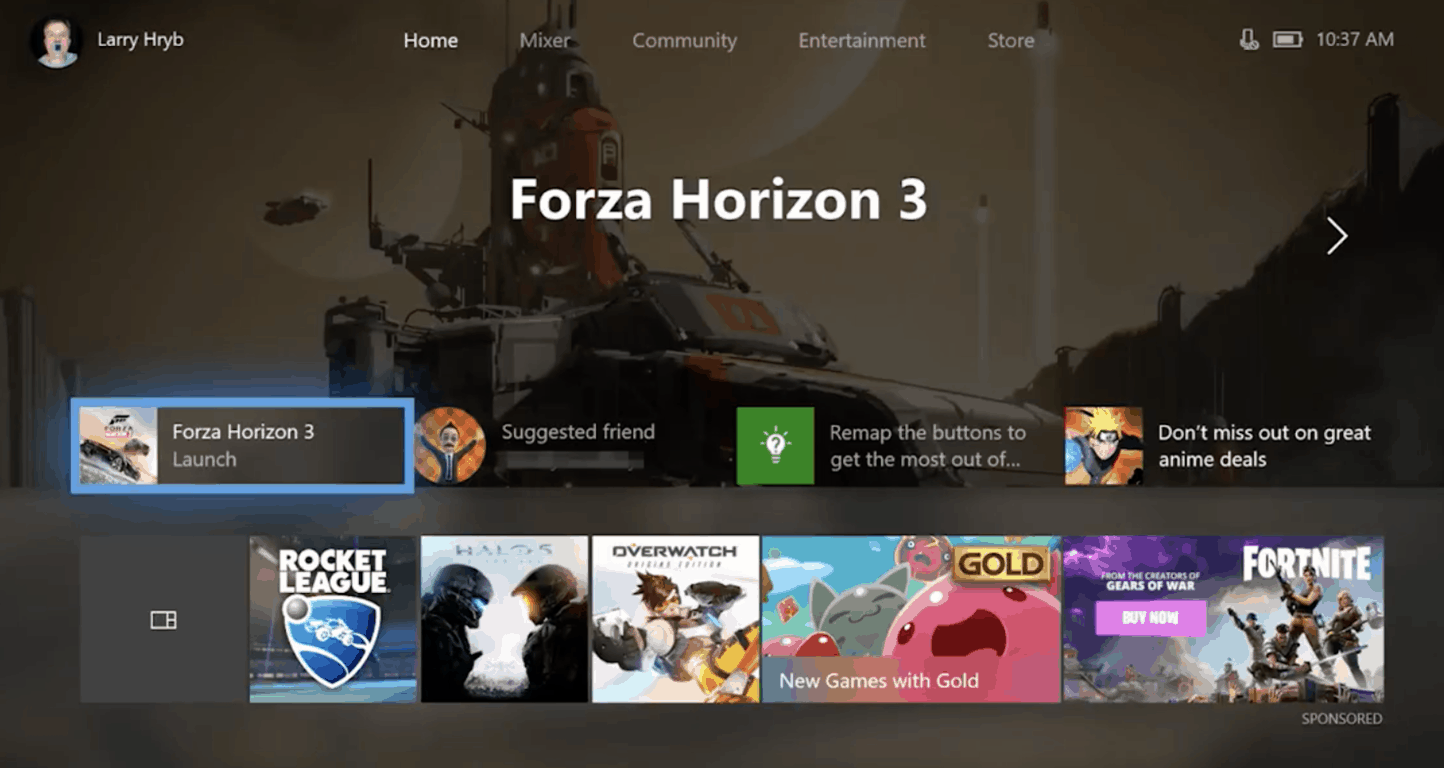
Late this afternoon, Microsoft released a new Xbox preview build to Preview Alpha and Skip Ahead Insiders. This new 1806 build comes with the usual fixes and bugs, but it also introduces a new Xbox Games Pass tab on the Xbox home screen in place of the Entertainment tab, which currently shows content from Microsoft Movies & TV, Netflix and other media apps.

It’s interesting to see Microsoft put Xbox Games Pass content front and center on the Xbox dashboard, right between the Community and Microsoft Store tabs. The experience is also subject to change, and Microsoft is calling on feedback from Insiders to “help evaluate and refine the experience” over time.

Today’s build also introduces fixes for apps failing to launch when the console is rebooted, and fixes for the Groups feature, localization, Store, Netflix, and video broadcasting. There are also some known issues with the online status of friends not updating correctly, the YouTube app signing users out on launch, and WiFi connectivity issues. You can check here for the full changelog and details on the changes.

Update: It looks as though that only US users will be seeing the tab for Game Pass. This is because of localization not being present for other countries.

Following the discontinuation of the Xbox Live Rewards program, Microsoft is also pushing their Microsoft Rewards program on Xbox too, and starting today the dedicated app should now be available for all Xbox Insiders in additional countries.

Windows 8, 10 App Check: Western Digital

Western Digital is one of the biggest names in the storage industry and no wonder many Windows 8 users were looking for a dedicated touch app to download from the Windows Store. The official Western Digital app has been available for quite a while in the Windows Store but only now do we give it a thorough look.
windows 8 western digital
Connecting an external hard drive to your Windows 8 device, be it a Windows 8 laptop or even a Windows 8 or Windows 8.1 tablet is really useful as you get to transfer all your files easily. At the moment, the official Western Digital app for Windows 8 users, dubbed simply “WD”, will work if you have one of the following hard drives – My Passport, My Passport Edge, WD Elements, My Book, My Book Live, My Book Live Duo, My Cloud or My Cloud EX4.

Read Also: Windows 8 App Craigslist Classifieds Launched

Accessing the digital media stored on your WD external hard drives directly from your Windows 8 Start screen is now easier than ever. With just one click of our new WD app, all your content is instantly displayed and organized so you can easily browse your photos, watch your videos, play your music and share it all with friends and family. It’s just one more way WD brings your media to your fingertips.

Official Western Digital app for Windows 8 looks after your digital files

The official Windows 8 Western Digital app comes with plenty of features that will let you, first of all, have an one-touch access to your media from the Start screen. You will be able to instantly discover your media files on the connected Western Digital external drives. When you will first start up the application, you will be asked to connect any external WD drives. The app will work with your desktop and touch Windows 8 device and even with Windows RT.

The files are neatly organized and there’s also the option of sharing your files via email or social media accounts. The app is completely optimized for Windows 8.1, so you can pin it to the start screen and choose to use whatever pin tile size you want. The app has also received frequent updates, which have added a good number of important features – support for My Cloud and My Cloud EX4, enhanced Windows 8 search integration and app rotation support. Also, you can use the app in snap mode and the flat view feature will let you browse photos, videos or music much easier. Follow the link from below to get the official WD app from the Windows 8 Store.

Download Western Digital for Windows 8

Western Digital in Windows 10: what you need to know

Wester Digital Cloud has encountered some issues on Windows 10 PCs. Many users have encountered problems while accessing their WD Cloud service after upgrading to Windows 10 Anniversary update. In case you have such problems, you will find a fix guide in this article.

In case you are interested in purchasing an external drive, here are 2 lists (including WD external HDDs) which will help you choose one:

The Spotlite App lets you install Spotify on Windows 10, 8

Everybody needs a little relaxation from time to time and music is one of the best ways to blow some steam off. You can play your favorite tracks on your Windows 10, 8 tablet or PC by using Spotify. This is by far the easiest way to get access to all the music you want wherever you are.
wind8apps-spotlite


UPDATE: Spotlite is no longer available in the Microsoft Store. Since the writing of this article, Microsoft added Spotify to the list of supported apps in the Store. Yes, this means that you can download and install the full fledged Spotify app on your Windows 10, 8.1 computer.

You can read the original report below.


Spotify is not officially supported on Windows 10, 8 and many people encountered issues when it comes to compatibility or playback. If you are looking for a different way to listen to music that allows you to skip the software troubleshooting, getting an app for your Windows 10, 8 tablet is surely the way to go. Unfortunately, an official app isn’t available in the Windows Store, so we had to resort to a third-party app called Spotlite.

Let Spotify bring you the right music for every mood and moment. The perfect songs for your workout, your night in, or your journey to work. Get Spotlite for free! Spotlite allows Spotify Premium and Unlimited users to listen to Spotify Music Service. Spotlite is not the official offering from Spotify but a third party client created by a Spotify fan for Spotify users using Windows 8 or 8.1

Access Spotify on Windows 10, 8 through Spotlite

If you don’t want to wait around for an official Spotify app for Windows 10, 8, you can go ahead and get Spotlite. The app itself looks and it feels just like the Spotify player and it has all the features you need for the ultimate playback experience. The interface looks almost identical to the Spotify client so you don’t need extra time to find what you are looking for or to shuffle the songs you want to listen to. Here are just some of the things you can do while using Spotlite:

  • Listen to any song on Spotify
  • Search the database for songs, playlists, artists or albums
  • Access your Spotify playlists
  • Modify your previously created playlists
  • Access Spotify radio stations
  • Customize the user interface

This is the easiest way to get access to music, without having to download a single track or album you can have all the music you want on all your Windows 8 devices by just logging into your account. All of your Spotify saved content is accessed through this app and you can just pick up where you left off. With Spotlite it is even possible to change the background picture of the app, making it exactly the way you want it.

The bad news about Spotlite for Windows 10, 8

Spotlite runs without any bugs or other issues and you can enjoy it on your Windows 10, 8 tablet or personal computer alike. That being said, not everything is great about this app and as soon as you run it you will get a warning that may be quite disturbing for many people. Although the app itself is free, it is recommended only for Premium or Unlimited Spotify accounts and using a free account could result in a suspension, this being really confusing for most people that use a standard Spotify account.

Download Spotlite for Windows 10, 8

RELATED STORIES TO CHECK OUT:


Microsoft Edge’s autoplay media setting is missing in Insider build 17692, team says it’s on the way

Microsoft today pushed out Windows 10 Build 17692 and a highlight feature in the release was the ability to control whether sites in Edge can autoplay media. We were actually excited to test this out, but quickly discovered that it was missing from this build. Well, it turns out that Microsoft apparently was a “tad early” and “jumped the gun” with announcing this autoplay control, and the feature is not yet officially present in the build.

Kyle Pflug from the Microsoft Edge team tells me that the feature is on the way but didn’t make it into this flight just yet. He further detailed to consider it a spoiler for an upcoming new build. In fact, Pflug even says that there’s a newer version of the feature on the way which will include broader work on settings.

In related Windows Insider news, Microsoft also says it is working on a fix for the issue where select Windows Insiders would hit error 0xD0000106. The company has narrowed down the root cause of the error and says that the fix will be tracked in a build soon.  Definitely a lot of action on the Windows Insider front today.

The Best Windows 8, 10 Craigslist App: Qwilo

In the past, we have shared with you what seemed to be the best Windows 8 third-party Craigslist app at the time – Craigslist+. Now, we have discovered a fresh one in the Windows Store that seems to come with even more features – Qwilo.
windows 8 craigslist app
In the absence of an official Craigslist app for Windows 8 users, Qwilo is being dubbed as an officially licensed Craigslist app for your Windows 8 tablets. And after using it for a couple of days, I can definitely confirm that this is the best Craigslist client to be installed on your Windows 8 tablet. It has a very impressive design and, what’s really cool is that, despite of the fact that it is free, there are no ads whatsoever!

Read Also: Windows 8 App Check: ProSnap, the Snapchat Client

Qwilo is the first and only Officially Licensed Craigslist App for Windows 8.1. Qwilo for Windows 8.1 is a whole new way to experience Craigslist. Completely redesigned and customized experience for Windows 8 to make it easy and simple for users to search, save and post (*coming soon*) on Craiglist.

Craigslist at its best on Windows 8

By using the Windows 8 app Qwilo, you will be able to easily search and browse 8 main categories and 122 subcategories from the Craigslist.org database. It will enlist over 715 Cities and countries, so there are plenty of classified ads to choose from. The app comes with the option of letting you quickly reply to postings with one click which will open your preferred mail client.

The fully rendered listings photos are beautifully coded and arranged and they look as if this was the official Windows 8 Craigslist app. The advanced search filters will let you sort by price, property type or job type. Also, there’s the option of saving your favorite listings and keeping track of recently viewed items. If you are a Craigslist user and also an owner of a Windows 8 tablet, go ahead and download it from the Windows Store.

Download Qwilo: An Officially Licensed Craigslist App for Windows 8

Craigslist apps for Windows 10

For Windows 10 users out there, we have great news: in case Qwilo doesn’t work after upgrading to Anniversary update from Windows 8, 8.1, there are other great Craigslist apps for your PC. One of them is Craigslist+. It is an amazing app with many features that will simplify your search process. You can find a great review here. Another app that you can use can be found in this article.

Windows 8, 10 App Check: Flight Simulator Game ‘F18 Carrier Landing’

When it comes to Windows 8 simulator games, there’s no shortage in the Windows Store. In the past, we have reviewed the Farming Simulator game and the fresh city building Windows 8 game, 2020: My Country. Now, we’re going shortly through a Windows 8 flight simular game app that we have discovered – F18 Carrier Landing.
windows 8 flight simulator appF18 Carrier Landing Lite is flight simulator app for Windows 8 tablets that is available for a free download in the Windows Store. The “lite” part in the title means that you won’t have access to all of its features, which makes sense, given the quality of the game and the effort that the developer has put into it. The pro version of F18 Carrier Landing is available for $3.49. At least, here you have the option of a free trial, unlike Microsoft’s recently released air combat Windows 8 game Cold Alley.

Read Also: Windows 8 World of Tanks: All You Need to Know

Landing on an air carrier is one of the toughest tasks that a fighter pilot has to undertake. The flight deck is only 150 meters long, just enough to stop your F/A-18 Hornet. Become a Top Gun pilot and have fun doing stunts and the toughest maneuvers.The F/A-18 SuperHornet is available as of today with a 3D virtual cockpit and mega-detailed graphics, too. You can control all the mobile surfaces, landing gears, flaps, slats, spoilers and you will also have the opportunity to review your actions through a fantastic multi-camera REPLAY and then instantly share the best images.

Windows 8 flight simulator game to learn to land

The description of the game says that it is aimed for “mobile phones”, which probably means that the game was previously available for Windows Phone users, as well, and now was ported to Windows 8 and made available for tablet users, also. Just like the name suggests, all you will do inside the game will be to “land” your carrier on a flight deck that is only 150 meters long. So, if you were hoping for a full flight simulator, this is not it, but if you are training your landing, go ahead and download it.

The game has nice graphics and music and many interesting fetures, such as the virtual 3D cockpit, in flight refuel, multi-camera replay with dynamic pan, flight school and free flight mode. There are two complete scenarios that you will play in the game and you will be able to land air carriers and land bases with weather and time conditions synchronized. There’s also the I.F.L.O.L.S. approach system, simulator mode and even radio communications.

Download F18 Carrier Landing Lite for Windows 8
Download F18 Carrier Landing for Windows 8

Other flight simulation games

Even if the game is working well on your PC, it may be very limited in terms of objectives. In this case, you might consider switching to another flight simulator, maybe some air combat games. We have prepared a list of articles about flight simulators which you can enjoy on your Windows 8 or Windows 10 PC. Here comes the list:

Windows 8, 10 Air Combat Game ‘Cold Alley’ Launched by Microsoft

There are plenty of air combat games available for the desktop version of Windows 8, and only a few reliable ones when it comes to the touch interface. Microsoft has just released the Cold Alley game for Windows 8 tablets, which promises to be an interesting air combat game to play
windows 8 air combat gameWho else if not Microsoft to publish and release as many games as possible in the Windows Store. Now, Microsoft Studios has released yet another game, after we have seen the Windows 8 Bingo game and the Little Mermaid game getting launched the previous week. Cold Alley is an air combat game that Microsoft promises to come with console gaming quality.

Read Also: 10 Best Windows 8 Apps and Games for Kids

THE NEXT GENERATION OF AIR COMBAT GAMING IS HERE! With an extensive single player campaign and a huge set of skirmish modes, the non-stop action will keep you on the edge of your seat! Travel back in time to experience the unwritten history of covert operations. Master over a dozen models of aircraft as you take part in the race for jet fighter domination.

Microsoft launches air combat game for Windows 8 tablets

The single player campaign is quite long but you don’t get bored playing the game. You can also choose to take part in the skirmish mode to play shorter and faster air combat games. Select from plenty of different aircraft units that will take you back in time to experience important air battles. As for the visuals of the game, Microsoft says it is near the quality you’d experience on the Xbox One, probably.

The audio is also described as being masterfully done and there are other special effects such as bump mapping, realistic atmospheric effects, volumetric clouds, sun glare, day & night transitions and other that you will discover by playing. Besides skirmish and single player mode, there are also Dogfight Missions, Survival, Free for All, Team Deathmatch, Capture the Flag, and Defend the Base game modes. Microsoft also said that future updates will bring even more game modes.

The biggest drawback of this air combat game for Windows 8, however, is the fact that it is not that cheap, at $6.99 and, what’s even worse, is that there’s no trial version available. But, if you are passionate about this type of games, then go ahead and download it.

Download Cold Alley for Windows 8

Cold Alley alternatives for Windows 10

In case you have some problems while playing this game or you have passed it, then we have a great list of other flight simulators and air combat games. You can try them and tell us in the comment section what have you chosen so we can make a review about it. Here’s the list with the links to the articles: