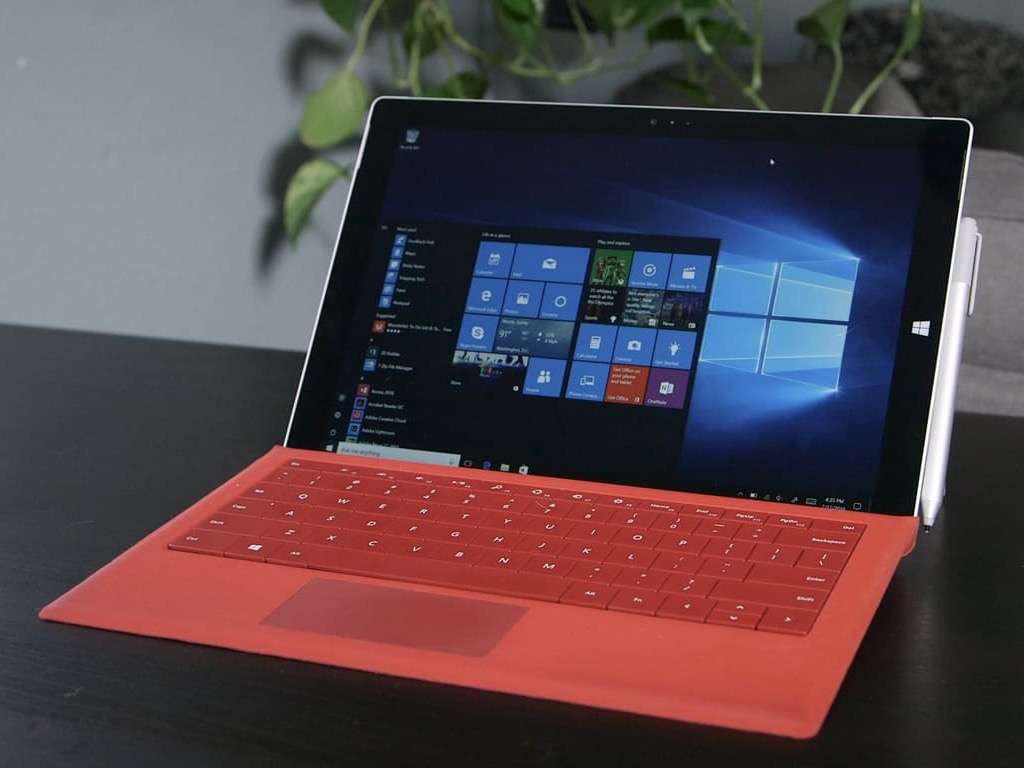
Microsoft tests its service pipeline with cumulative update build 21296.1010 in the Dev Channel

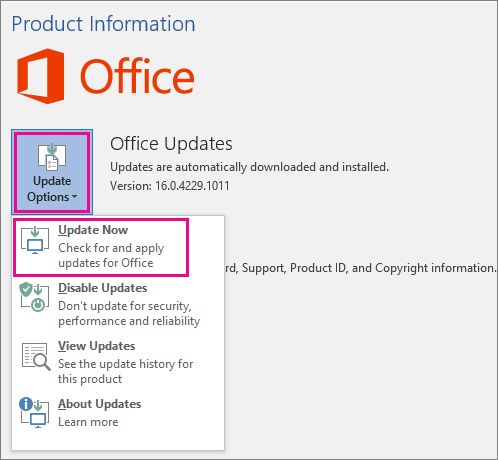
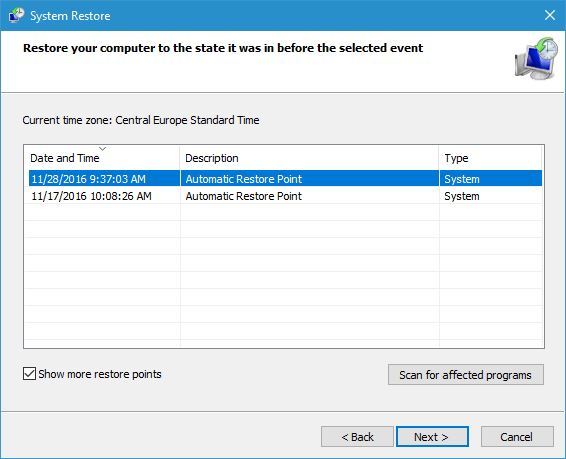
Late this afternoon Microsoft announced the release of cumulative update build 21296.1010 to the Dev Channel. Showing in Windows Update as KB4602812, this just a small release and doesn’t come with anything major. Rather, it is designed to test Microsoft’s servicing pipeline.

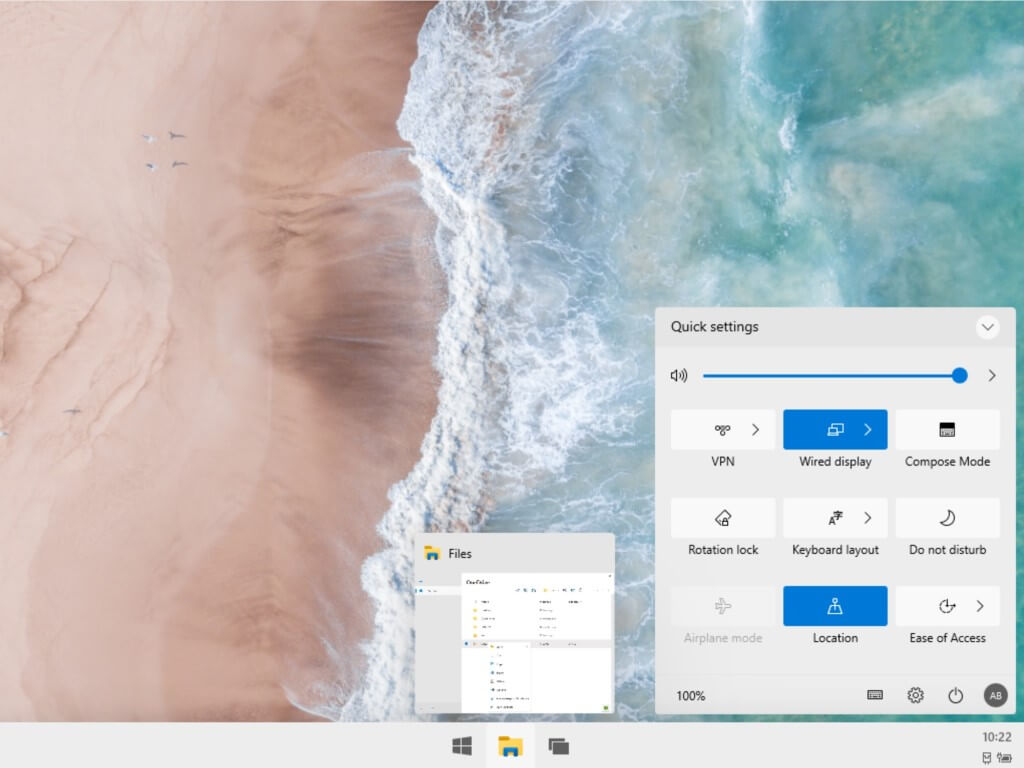
You should be seeing this update if you’ve installed build 21296 last week. As a reminder, that build rolls out an update to the converged clipboard history design (WIN + V) to support pinning, unpinning, deleting, and syncing individual entries. It also delivers the ability to manage and create Storage Spaces from within Settings for more Windows Insiders.

Now that Microsoft is testing its pipeline, we hope that it means that we’ll see another major build this week. These releases have been small, with the exception of build 21286 which brought the new news and interests section in the taskbar. We’re still awaiting the rumored Design overhauls said to be coming later this year with the “Sunvalley” update.

Best Motion Tracking Software: Top 3 of 2026

Motion tracking can bring videos to life and a free video editing software with motion tracking feature allows you to do the same without having to spend a fortune on a premium video editing software.

There are quite a few uses of motion tracking that are obvious, and then some are less obvious.

You can use motion tracking to play a superhero who shoots a laser from his eyes or track an athlete’s movement to improve his performance.

The technology can also be used to remove or blur unwanted objects from a picture or stabilize a video by consistently tracking the object on the editing table.

While there are a good number of free video editing software, only a few offer motion tracking for free.

In this article, we take a look at the best free video editing software with motion tracking to bring your videos to life.


What is the best motion tracking video editing app?

Adobe Premiere Pro (recommended)

premiere pro best subtitle editing software
  • Price – Free trial for 7 days

Pros

  • High-grade professional video editing software
  • Motion Tracking support
  • Excellent collection of online learning and training resources

Cons

  • Not for beginners

Adobe Premiere Pro is the best leading software in video editing and VR reality software equipped with all the powerful tools you need to create something cool.

It is available for both Windows and Mac users, the two platforms used by most of the content creators and video editors.

Adobe Premiere Pro is not your regular trim, cut, paste and produce kind of software. It is a full edit suite with all the features for moviemakers.

Advanced digital specialists can create some cool stuff by referring to the training mode materials on the official website that consists of masterclass tutorials to create their own interactive digital effects.

The user interface is not similar to other video editing tools, as it is a software for professionals in cinematography, but the easy-to-use timelines make it easier to create your video storytelling with the help of an intuitive workflow.

You also have interactive reframing of the video with optimized footage for Facebook, YouTube, Instagram and other social media as well as color grading features on offer.

For video editing, Adobe Premiere Pro offers animation tools that include transitions of series, motion graphics, or you can create your customized template form Essential Graphics tab.

You can further extend the functionality of the software using official apps that will allow you to share videos on social media, to create broadcasts, to create unique characters or to animate in real-time.

You will be able to have unlimited powers if you are a member of Creative Cloud, so you can benefit from the entire package of editing video app for free.

On the flip side, Adobe expresses being an advanced photo editing suite involving a steep learning curve. You can reach out to the online Adobe Community for any help, though.

Adobe Premiere Pro is an excellent video editor that can deliver some great results to the users who are willing to spend a considerable amount of time learning to use the software.

Adobe Premiere Pro

Adobe Premiere Pro

Adobe Premiere Pro lets you edit your videos like a pro thanks to its motion tracking feature, so don’t waste time and give it a try!
Free trialVisit website

DaVinci Resolve 15

davinci resolve 15
  • Price – Free

Pros

  • Advanced editing features
  • Support for RAW formats
  • Motion Tracking Support
  • Free to use

Cons

  • Steep Learning Curve

DaVinci Resolve currently in its 15th edition from Black Magic design is second to none when it comes to video editing capabilities.

It is a free video editing software with a complete set of basic and advanced editing features to cut your next blockbuster film or commercial.

DaVinci Resolve has a Studio version of the tool that offers everything in the free version plus some additional features including multi-user support and 3D tools.

The latest version of DaVinci Resolve has full visual effects, and motion graphic features built-in.

The workspace gives you access to a complete 3D workspace with over 250 tools for different tasks including text animation, tracking, stabilization, rotoscoping, vector painting and more.

Using the Blackmagic RAW codec, you can create stunning images by extracting maximum details from any RAW footage.

The Fusion Effects consist of advanced tools to assist visual effects artist and motion graphic animators with vector paint, rotoscoping, chroma keying, 3D particle system and tracking, and stabilization.

The motion tracking feature allows you to match camera movement with the camera tracker.

Other notable features in DaVinci Resolve include the professional grade color grading and correction tools with advanced curve editor, noise reduction and grain tools.

There is also Fairlight Audio support that offers a built-in DAW (Digital audio workstation) for professional mixing and sample-level editing.

DaVinci Resolve is an excellent piece of software and step above Hitfilm Express with all its advanced editing features.

However, the learning curve in DaVinci Resolve is also one notch higher than Hitfilm Express which is better suited for the novice users in comparison.

⇒ Get DaVinci Resolve 15 


Blender

Blender
  • Price – Free  /  Open Source

Pros

  • Motion Tracking Support
  • 3D modeling and animation support
  • Essential video editing tools
  • Free to use

Cons

  • Steep learning curve

Blender is a completely free, award-winning, open source video editing software that offers a basic yet very efficient set of tools for advanced users.

The software is primarily used for 3D modeling and animation, but the video editor offers enough punch to edit and render the video using the tool.

Blender is admittedly not the best video editing program for the beginners. The advanced users, however, can extend the functionality using third-party add-ons.

Features offered by Blender include live preview, chrome vectorscope, luma waveform, 32 to tracks to add audio, images and visual effects and the audio mixing and syncing capabilities.

Blender allows you to perform the basic video editing tasks but where it shines the most is its ability to carry out complex tasks such as video masking etc.

Blender is an excellent software for anyone looking for a multipurpose tool to edit videos with motion tracking support and also create 3D models and animations.

Or if you are looking for a video editor to use on multiple platforms including Windows, Linux, and macOS.

⇒ Get Blender 


Looking for the best slow motion video editing software? Here are the best options for you.


All the software listed in this article offers basic to advanced video editing tools along with motion tracking support.

While there are many free video editing programs available, these are the best programs you can download if motion tracking support is one of the priorities.

What’s your pick? Is it an advanced video editing software like Hitfilm Express and DaVinci Resolve or a multi-purpose and more 3D/animation focused Blender for you? Let us know in the comments.


FIX: Photoshop CC installation failed

Adobe Photoshop is one of the world’s most well-known raster-based image editors in existence, having basically coined the term for doctoring an image with special effects.

The program has been on the market for quite some time, and each year Adobe launches a new version of the program, further expanding its toolset with new and exciting features.

That being said, the latest version of Adobe Photoshop is Photoshop CC.

Unfortunately, some users have reported having issues with the new program, especially during the installation phase:

I am trying to download Photoshop on a Windows 7 computer. Every time I click to download the app on Creative Cloud, it says waiting, then “Installation Failed”.

Click on this and it says “Installation failed

Download error. Press retry to try again or contact Customer Support.(55)”

I have retried multiple times, restarted computer, turned computer on and off, emptied temp files.

Not working. Please help.

Since not being to install the program at all can be quite troublesome, we’ve decided to look over some steps that you can take in order to troubleshoot the problem.

What can I do if Photoshop installation failed?

1. Get the latest version of Photoshop

Before proceeding with any of the troubleshooting steps mentioned below, make sure that you have Adobe Photoshop downloaded from the official website.

Adobe does not officially support downloads from any third-party sources, so do this at your own risk.

In case you desire the official version of Photoshop, you can acquire it from the official website only, having qualitative photo editing services you can use exclusively from the provider.

Hence, it’s recommended to avoid pirated versions from unknown sources, considering the functionality and security matters. So be sure you install this popular editing tool carefully, plus you can get the free trial anytime you need.

Adobe Photoshop

Adobe Photoshop is perfectly capable of filling in all the tool requirements of any graphic designer, so try it out!
Free trial Visit website

2. Check if you have any browser security extensions installed

More often than naught, a lot of users have an issue with downloading the installation kit for Photoshop CC, and not actually installing it.

That being said, it is a well-known fact that some security extensions can interfere with the download process.

These include Adblockers, Mcafee site/web adviser, internet security toolbar, and more of the kind.

Thus, if you have any of these installed, either uninstall them or temporarily disable them before trying to download Photoshop CC again.

Note: You can also try opening incognito/private tabs in your browser and try downloading Photoshop CC since these tabs open without extension interference.

3. Disable your PC’s Firewall

  1. Press Start, and open the Control Panel.
  2. In the search box, type firewall, and then click Windows Firewall.
  3. In the left pane, click Turn Windows Firewall on or off.
  4. Click Turn off Windows Firewall under each network location that you want to help protect, and then click OK.

4. Uninstall the Creative Cloud Desktop Manager

  1. Download the ZIP file containing the executable uninstaller.
  2. Extract Creative Cloud Uninstaller.zip.
  3. Run the executable installer file, Creative Cloud Uninstaller.exe.
  4. The installer prompts you to confirm that you want to uninstall the Creative Cloud desktop app.
  5. Review the message and click Uninstall.

Once the Creative Cloud Desktop Manager is uninstalled, delete the following folders:

  • C:>Program Files (x86>Common Files>AdobeOOBE
  • C:>Program Files (x86)>Common Files>AdobeAdobe >Application Manager
  • C:>Program Files (x86)>AdobeCreative >Cloud Folders
  • C:>Users><user_name>>AppData>Local>Adobe >AAM UPDATER and OOBE

Go to C:>Program >DATA >Adobe, and rename the file SL-STORE as SL-STORE_OLD

Note: You will need to set your Windows Explorer to view hidden folders in order to access some of these folders.

Once the folders have been deleted and renamed, reboot your PC and perform a clean Creative Cloud Desktop Manager install as well as a clean Photoshop CC install.

By following these steps, you should be able to easily solve and Photoshop CC installation issues.

If you know of any other solution that we may have missed out on, check out this detailed article.

FIX: Microsoft Photos app has disappeared

Did Microsoft Photos app disappear on your Windows 10 computer? Don’t panic, we can help you fix this problem.

The famous Windows Photos application is a multipurpose image viewer available as a built-in program on Windows 8, Windows 10, and Xbox One.

This program allows you to view, organize, and edit your videos and images.

However, some Windows users reported that things go unusual and Microsoft Photos app disappeared on their PC.

Also, they get the error message Element not found whenever they try to open images on their PC.

What should I do if Microsoft Photos app has disappeared?

First off, try running the Windows Store Apps troubleshooter. Photos app is a Windows Store app and running the troubleshooter might help.

Alternatively, you can try downloading the Photos app by using PowerShell and Windows Store.

What can I do if the Windows 10 Photos app is missing?

  1. Run the app troubleshooter
  2. Download an alternative photo viewer
  3. Clear the Windows Store cache
  4. Download and Install Microsoft Photos
  5. Use PowerShell

1. Run the app troubleshooter

  1. Open the Start Menu, type in troubleshooting, and hit Enter.
  2. In the troubleshooting window, scroll down to locate Windows Store Apps.
  3. Click on it and then click on Run the troubleshooter.
  4. Follow the prompts to finish up the process.
  5. Restart PC.

If Microsoft Photos app has disappeared, you can fix the problem by using the application troubleshooter.

With the app troubleshooter, you can check for errors related to Microsoft Photos and then resolve them automatically.

Check to see if Microsoft Photos appears on your Windows PC after the restart. If not, you may proceed to the next step.

2. Download an alternative photo viewer

  1. Download Lightroom free.
  2. Make sure you register for a free 7-day trial.
  3. Install Adobe Lightroom on your PC.
  4. Press Start.
  5. Go to Settings.
  6. Choose Apps.
  7. Go to Default Apps.
  8. In the Photo viewer section choose Adobe Lightroom.

If Photo Viewer doesn’t work, then maybe it’s time you try out an alternative photo viewing tool, one good example being Adobe Lightroom.

Not only is this Adobe product an excellent photo viewer, but it comes with all the editing tools you will ever need to enhance and doctor photos.

In fact, this program can be considered a lightweight version of Adobe Photoshop, but without the complicated UI.

3. Clear the Windows Store cache

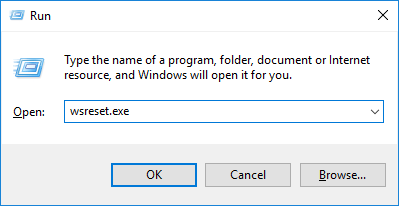
  1. Press the Windows + R keys to launch the Run program.
  2. In the Run dialog box, type wsreset.exe and hit the Enter key.wsreset microsoft photos app disappeared
  3. Restart your PC.

Clearing the Windows Store can effectively resolve the missing Microsoft Photos problem.

Check to see if the issue is resolved after restarting your computer. If not, you should try the next solution.

4. Download and Install Microsoft Photos

Microsoft Photos may have been accidentally or manually uninstalled on your Windows PC.

However, you can manually install Microsoft Photos on your Windows PC from the official Microsoft Photos website or from the Microsoft Store.

5. Use PowerShell

  1. Go to Start, and type PowerShell.
  2. Right-click it, and select Run as an administrator.
  3. Type the following commands in the PowerShell window and then hit the Enter key:

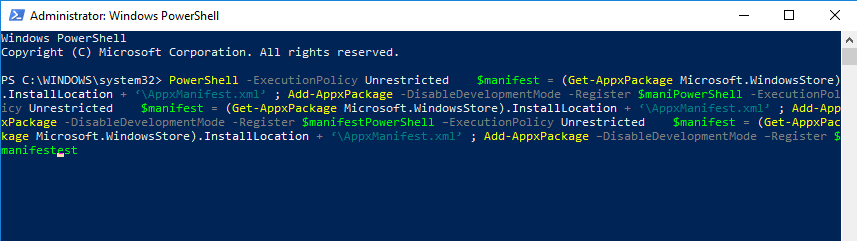
PowerShell –ExecutionPolicy Unrestricted $manifest = (Get-AppxPackage Microsoft.WindowsStore).InstallLocation + ‘AppxManifest.xml’ Add-AppxPackage –DisableDevelopmentMode –Register $manifestpowershell microsoft photos app disappeared

  1. Restart your PC, and launch the Microsoft Store.
  2. Search for Microsoft Photos to download and install it on your system.download microsoft photos microsoft photos app disappeared

PowerShell can also help if Microsoft Photos app has disappeared. 

There you go, these are just a couple of solutions that can help you if the Microsoft photos app has disappeared on your PC. Let us know in the comments section if you found our solutions helpful.

Lookbook Software: 6 Best to Use in 2026

We live in a world that is in a constant process of technological development, and that means new technologies are created every day across the globe.

Because of that, people generally prefer to read on their mobile devices and computers than using real physical papers, because it’s more convenient not to carry a stack of heavy papers around constantly.

For the reasons mentioned above, it is very important that publishers use the latest tech available. This is where software that can create professional PDF lookbooks come in.

PDF lookbooks are a useful and professional way of presenting your products to marketers and designers, in order to achieve greater market exposure and to attract the target clients.

The way you present your products, no matter if the product is related to fashion or hardware, makes a big difference in the way you are perceived by your customers, and also competitors.

You can create lookbooks for a variety of reasons. You can use them to present the latest line of clothing you created to the public,  modeling, product presentation for customers, artist portfolios, etc.

Lookbook software allows you to create digital magazines, books, coupons, brochures, etc. Doing this allows you to present your business more clearly, giving the reader the option to use the digital magazine.

In this article, we will explore some of the best lookbook software options available on the market that allow you to easily create professional-looking lookbooks and flipbooks.


What is the best lookbook software?

Adobe InDesign

InDesign - Best film lookbook software

The InDesign app from Adobe is our top pick for the best film lookbook software.  It offers you an incredibly useful set of features, and everything is packed in a beautiful and user-friendly interface.

InDesign not only has the capability to automatically adjust pages to the format that you’re using, but the way the new properties work gives you a more clear understanding of how your document is structured.

The smart automatic page adjustment feature simplifies the process very much, as it is done to pixel-level accuracy with just one click of your mouse.

The PDF context menu has also been revamped to allow more options and to be easier to use, even for inexperienced users.

Here are some other useful features found in InDesign:

  • Very large selections of fonts and formats
  • Automatic layout adjustment so you can focus on creating
  • Smart properties panels simplify the creation process considerably
  • Content-Aware Fit option that automatically adjusts the selection  size to contain the most important parts
  • Great PDF export and import options
Adobe InDesign

Adobe InDesign

Create professional and engaging digital lookbooks with the industry-leading software,
Check priceVisit website

FlipHTML5 Pro

FlipHTML5 - How to create lookbooks

FlipHTML5 is a great PDF lookbook creator that gives you the ability to apply different multimedia elements to your project.

This software allows you to transform a PDF file into a great-looking page-flipping lookbook that can be saved either digitally or printed out.

This software gives you all the tools you need in order to apply different multimedia content to your project, and then publish your lookbook either to a local storage, online, or as a plugin for your website.

FlipHTML5 Pro gives you access to 50GB of storage, allows you to upload an unlimited amount of projects, and also removes the pestering watermark, in order for you to represent your company entirely.

One of the best features of FlipHTML5 Pro is that no ads will ever pop up on your screen, this allows you to focus entirely on the job at hand.

You can export up to 5 lookbooks every month with the option of choosing from 10 great looking bookcases, of a maximum of 1000 pages/book.

In order to keep your files safe at all times, you can also upload files to and from Google Drive and Dropbox.

Here are some key features that are worth mentioning:

  • Slide mode – Can create slides or flipping effects for either a single page or a double plage slide effect
  • Google Analytics tracking – useful information relating to your content, conversion rate, social and advertising
  • Text version for SEO – allows users to search inside the PDF text as well, increasing your exposure
  • Custom logo/branding
  • Password protection
  • Custom templates – a great set of built-in templates and themes to help you customize your project easily
  • Can import table of contents from PDF
  • Customize the lookbook and its functionality
  • Keyword searching -you can search for specific pages by using keywords

 ⇒ Download FlipHTML5 Pro


Yumpu

Yumpu is a great software option that allows you to create professional-looking lookbooks from your PDF files, and allows you to publish projects directly from the dashboard.

One of the best features of this software, besides the fact that it can create digital flipbooks from PDFs, is that Yumpu has great integration with social media platforms, and also a powerful optimization engine.

This software operates as a tool that can be remotely accessed and allows you to modify every aspect of your project, no matter where you are on the planet.

It’s extremely simple to get started using Yumpu. All you need to do is create a free account, and then you can upload a pre-made PDF file to be converted into a digital lookbook, or start from scratch and build your own.

After you’ve finished your project and you published it, you will receive a short piece of code that allows you to embed your flipbook on your webpage, in a blog post, or on Facebook.

You can use this software for free, but if you want to get a bigger number of features and options, you can opt for one of the paid versions.

The paid versions offer a no-ad service, an unlimited number of magazine exports, SEO optimization, Google Analytics, drag, and drop features, etc.

⇒ Try Yumpu


AnyFlip

AnyFlip - lookbook creation

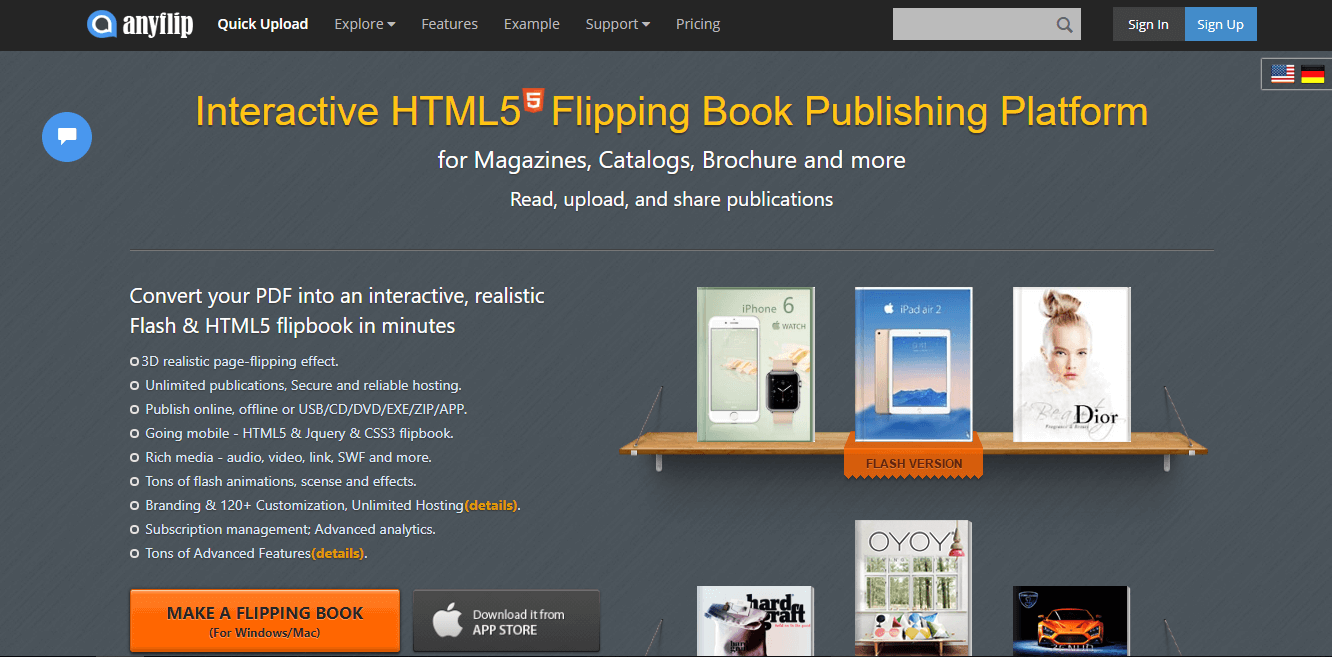
AnyFlip is another great software that allows you to create professional looking lookbooks. This software can be used both online, and as a downloadable software for Windows 10.

You can start using AnyFlip by working with an already existing PDF file from which you can extract the data and transfer it into an HTML5 lookbook document.

With the AnyFlip Free account, you can publish an unlimited number of projects, and host the completed project on their servers.

If you feel like you need a bit of inspiration to get started, you can check out the AnyFlip templates and themes library.

AnyFlip Free allows your clients to open a magazine up to 30.000 times every day, gives you 500 uploads/month, and 100GB storage. The downside of using the free version is that it has limited features.

With the paid versions of AnyFlip you can get up to half of a million daily opens for your clients, unlimited numbers of uploads/month, unlimited storage, and many other great features.

⇒ Try AnyFlip


LucidPress

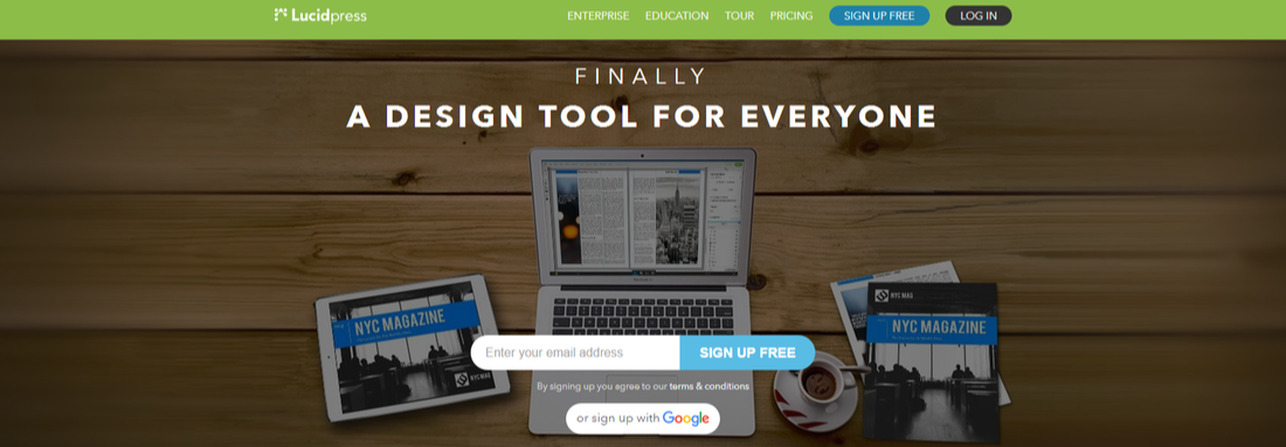
LucidPress is another great software option that allows you to easily create lookbooks/flipbooks by using drag and drop features for ease of access.

By using this software you also get access to a large amount of pre-designed templates, layouts, and customization tools, that can help you choose the best look for your project.

You can create a wide range of items with this app, including but not limited to letterheads, brochures, business cards, flipbooks, etc.

If you’re not sure how to start designing your lookbook or just need a bit of guidance, you can use one or more templates from la 350 options available, or, you can design everything starting from a white page.

One of the best features of this software is the fact that you can share the work on different projects with your team of designers.

Everybody that is added to this multi-people workspace gets access based on the administrator’s rules, and they can contribute to the design by changing the colors and fonts.

Because communication in this type of project is extremely important, LucidPress offers you the possibility to use chat and comment features. This way everybody that’s part of the team will understand what’s going on.

All the projects created in LucidPress are stored securely in an encrypted cloud environment. This feature allows you to access your projects from anywhere in the world, and not worry about ever losing your files.

⇒ Try LucidPress


PubHTML5

pubhtml5

PubHTML5, much like FlipHTML5, allows you to create professional looking lookbooks, and offer a great set of customization options.

You can access this software from anywhere in the world, and produce incredible digital publications of any printed files, or PDFs.

Customizing the way your lookbook looks is easy with the wide range of customization options and the possibility to simply drag and drop images, sounds, and video to your presentation.

PubHTML5 allows you to customize the book titles, keywords and descriptions about your products in order to increase your SEO score, get more visitors, and eventually more sales as well.

All the SEO customization you perform in this software allows you to make your project easy to search through and can be added easily to your website or blog to increase online visibility.

Another great feature of this software is the PubHTML5 Metrics option. This feature offers you real-time reports relating to the engagement of your clients, zoom patterns and the time they spend on each page.

With the free version of PubHTML5, you can create great looking lookbooks, administer the project, use the text version of SEO, and also publish your work on social media directly from the soft.

The Premium version of PubHTML5 has a few extra and very useful benefits. You can use MS Office files to create your lookbook, have access to animation editorial features, and insert audio files to digital catalogue.

⇒ Try PubHTML5


It is extremely useful to use professional lookbook creator software to achieve great looking results. Creating the perfect lookbook has never been easier with the tools we presented in this top 5 list.

You get an incredible amount of pre-designed templates on which you can build your project, or you can start from scratch and use all the customization options available to create your perfect flipbook.

We would love to know what option you chose from this list and how it performed for you. Please feel free to let us know what your experience was, in the comment section below.


Use Visio Online Preview to open Visio diagrams in browsers

If you don’t possess a Visio license, and you don’t feel like purchasing one, rest assured there are ways to view and even edit your diagrams.

Find out how to open Visio diagrams in browsers in the following article. We’ve found some quick solutions for you, so read on.

How can I use Visio Online Preview to open Visio diagrams?

Visio Online is a tool that lets users view and share Visio drawings on the web even if they don’t have Visio installed in their machines.

Microsoft already rolled out Visio Online Preview to Office 365 commercial customers in First Release.

All you need to do is upload a .vsdx file to the cloud, OneDrive for Business, or SharePoint Online. Then all users can access the file on their browsers without installing Visio on their computers.

If you’re curious to see what this tool can do, test it, and get an idea of what it’s like.

Other features include:

  • Navigate to other pages in the file by clicking the tabs in the lower left.
  • Zoom in and out of the drawing using the slider located in the lower-right corner.
  • You can share your drawing by sending a link instead of an email attachment. Click Share in the upper right and other users can then view it in a web browser.
  • You can also view shape data: click on a shape and then select Shape Info to see its data.
  • Hyperlink support is available.

Here’s what you need to know about the Visio:

  • The tool doesn’t allow users to edit drawings, but this feature will be supported in the future.
  • Visio Online Preview works with the current versions of Edge, Chrome, and Microsoft Internet Explorer.
  • The tool is expected to be generally available by the end of this year to all Office 365 subscription plans that include Office Online.

⇒ Get Visio

By opting for web access rather than purchasing the Vision software, you may quickly preview files. What was your experience with Visio, and did you run into any problems? Please use the dedicated area below to comment.

Abstract Art Software: 5 Best to Use in 2026

If you’re looking for a powerful software for abstract art, this article may help you. There are quite a lot of tools for creating abstract art on the market, and it’s difficult to pick the right one.

In this article, we’re going to list the best software for abstract art that you can use to unleash your creative genius. They are compatible with Mac and Windows 10 as well, so make a choice.

We used a series of criteria in the selection process, including user reviews, versatility, ease of use, PC compatibility, and more.


What are the best abstract art software?

Adobe Illustrator – Highly customizable professional tool

Adobe Illustrator comes as a highly-polished application for creating vector graphics for print or the web. If you happen to lack photography skills, and you’re more into abstract art, you can’t go wrong with Illustrator.

Firstly, if you’re familiar with other Adobe apps, keep in mind that the interface looks quite similar.

The tool panel is located to the left of the screen. Each time you select a tool, different options available for that tool appear at the top.

Use the Pen Tool to draw lines, then open the Gradient Panel to set your color markers and adjust the parameters to your liking.

To really get the most out of Adobe Illustrator, you’ll need to get accustomed to its drawing tools and all those presets that modify the workspace to better meet your needs.

Be sure that you’ll master creating logos, icons, or abstract art in no time.

Take a look at some of the most important key features included in the program:

  • The Pen tool is one of the most used tools to create all kinds of designs
  • A clean and fully customizable interface that enables you to capture the essence of abstract art
  • Intuitive troubleshooting when opening or saving files
  • Countless effects help you perfectly express your messages
  • Learning Illustrator is very easy as there are lots of tutorials to take a peek at

Adobe Illustrator

With Adobe Illustrator creating abstract line art should come as no challenge, so try it on.
Free trial Visit Website

Corel Painter 2023 – Optimized painting experience

Corel Painter 2023 is an impressive digital art software that will help you create stunning masterpieces. The tool is highly addictive, we spent more than 3 hours playing on the canvas after installing it.

Every stroke leads to the next as if the tool were able to push a magic button and let your inspiration run wild.

Corel Painter 2023 is a complete software and can satisfy even the most demanding artists. There are dozens of additional brushes that you can buy, each dedicated to particular drawing styles.

Long story short, Corel Painter lets you create fine abstract digital art that will make 18th-century painters envy you.

Some of the Main features of Corel Painter 2023:

  • Build and Sculpt brushes
  • Color Selection control for Selection brushes
  • Feather Selection up to 2000px
  • Overlay mode for selections

Corel Painter 2023

Create abstract art with brushstrokes worthy of great painters.
Check Price Visit Website

Synthetic Studio Artist – Powerful Creative AI Assistance

With Synthetic’s Studio Artist software, anyone can create great art. This is the place where art and science collide, allowing you to generate stunning pieces of visual art.

The tool relies on artificial intelligence to automatically paint and draw.

Here’s how to use the Synthetic Studio Artist software:

  1. Pick a source photo and then select the canvas type that you want to use.
  2. Select a preset (there are more than 1,000 presets available) and hit the Action button.
  3. The tool will start painting an impressive piece of art using the source image as a model.
  4. You can then add the finishing touches using a mouse or pen.

Most importantly, you can use Studio Artist to apply the same process to videos as well. You can try out Synthetic’s Studio Artist 5.0 software for free.

You can also buy Studio Artist 5.0 as is worth every cent.

Some of the key features of Synthetic’s Studio Artist:

  • Automatic, Assisted and Manual Paint and Drawing Mode
  • Dual Paint Mode
  • Paint Action Sequence
  • Extensive Photo and Video effects Suite

⇒ Get Synthetic Studio Artist

Abstract Curves Software – Standalone or plugin


Abstract Curves opens the gate to the world of digital abstract art. This software will help you generate beautiful abstract images with just a few mouse clicks.

The tool offers a bevy of interesting design features and presets that you can use to generate original, intricate images.

You can superimpose the images you generate on your own photos using the Transparent Background option.

You can then use your creations as backgrounds, wallpapers, icons, or simply add them to your artist portfolio.

Abstract Curves works both as a stand-alone tool, as well as a plug-in for PhotoShop.

Main features of Abstract Curves Software:

  • Works as a standalone application and as a plugin
  • Adding generated images to your photos
  • 30+ built-in color palettes with 7000+ colors
  • 130+ built-in presets in 10+ galleries

⇒ Get Abstract Curves 

Art Rage – Realistic painting tools

As its name suggests, Art Rage is not your regular art software. Abstract art has often been misunderstood as a manifestation of angry, sometimes crazy artists.

This tool seems to actually embrace this idea, allowing you to create unusual pieces of art.

Art Rage is a very versatile tool, being used for traditional style art, graphic design, picture book illustrations caricatures, abstracts, photo editing, special effects, and more.

The software comes with a very simple and user-intuitive interface, making it suitable both for beginners and advanced users.

As a matter of fact, if you haven’t used Art Rage before, there are plenty of tutorials that you can watch to get familiar with the tool.

Art Rage 5 is the latest version of the tool and comes equipped with basically all the features you need to create true masterpieces:

  • Customizable digital brushes, including custom brush blenders, stickers and sticker spray
  • Real color blending and an adjustable metallic level
  • BMP, GIF, JPG, PNG and TIFF support, and much, much more

⇒ Get Art Rage


The software tools listed above are all excellent tools for creating abstract images. Select the one that best suits your needs.

For example, if you’re a professional abstract art creator, we recommend Synthetic’s Studio Artist 5.0 or Corel Painter. If abstract painting is only a hobby for you, then download Art Rage or Abstract Curves.

How to highlight unselectable text

You can copy and paste selectable text in word processor documents and on website pages with the Ctrl + C and Ctrl + V hotkeys.

When the text is selectable, you can hold the left mouse button and drag cursor to highlight and then copy it.

However, there’s also lots of text within the Windows UI and other software packages that you can’t highlight and copy.

If you ever need to copy text that you can’t highlight by holding the left mouse button, check out the Capture2Text and Textify programs for Windows 10.

Capture2Text and Textify are two software packages that enable you to copy text which you can’t usually highlight.

They are both fairly tiny utilities with which you can highlight more specific software text by pressing their hotkeys.

However, we’ve got another option that may be far more tempting than these two ones. All three are handy programs, and this is how you can highlight text with them.


How do I highlight text that cannot be highlighted?

1. Highlighting text with Adobe Acrobat

try out Adobe Acrobat
  1. Open the official homepage, then click on the Download Now button.
  2. With the program installed, open up Acrobat’s Preferences.
  3. Go to the General category next.
  4. Here you can check the Make Hand tool select text&images.
  5. Up to this point, selecting text is possible without activating the selection tool in advance. Therefore, feel free to use the cursor to select the text you want to highlight.
  6. Finally, simply right-click within the selected area and choose Highlight Text.

Highlighting unselectable text is no challenge when using a reliable PDF solution like Adobe Acrobat. More than five million organizations worldwide rely on it and for a good reason.

Besides helping you get this job done, get ready for a smooth interface, the incredible ability to compare two documents in different formats, along with cloud-based commenting and sharing features.


2. Highlighting text with Capture2Text

  1. First, open this page and click Capture2Text_v3.9 to save its Zip file.
  2. Open the Capture2Text_v3.9 Zip in File Explorer, and then press the Extract all button to decompress it. Select a path to extract it to, and you can open the program from there.
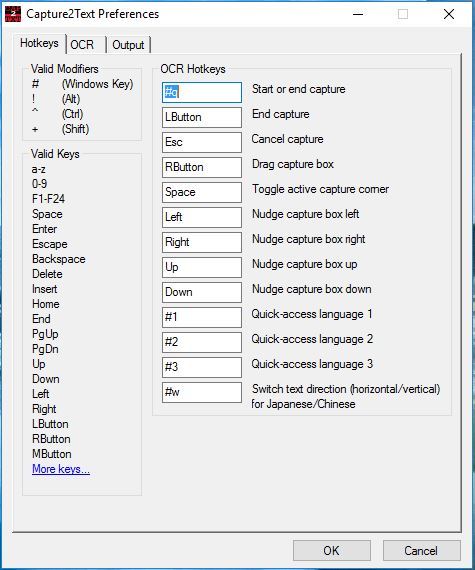
  3. When the software’s running, you’ll find a Capture2Text icon in the system tray. Right-click that and select Preferences to open the window shown in the snapshot directly below.capture2text
  4. Click Save to Clipboard on the Capture2Text context menu if it isn’t already selected.
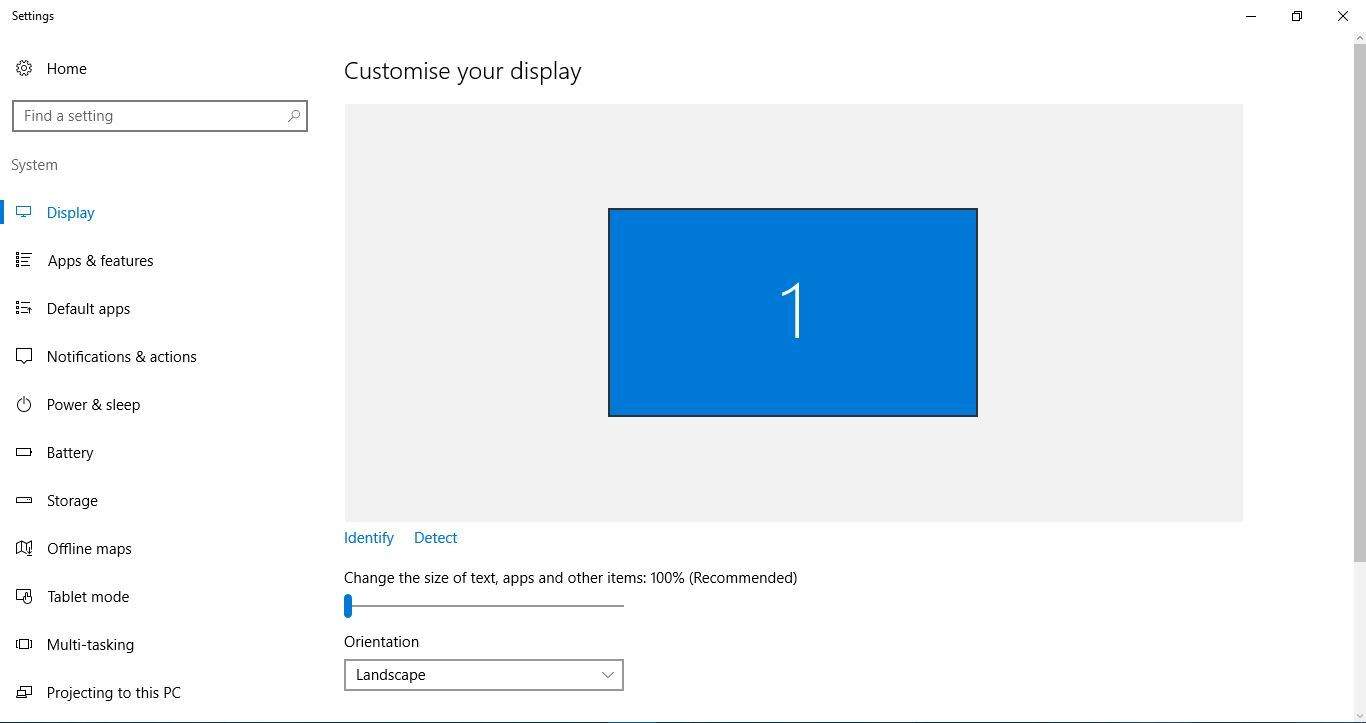
  5. Next, open a window with some text you need to copy. Alternatively, as an example, you can open the Display settings window as below.capture2text2
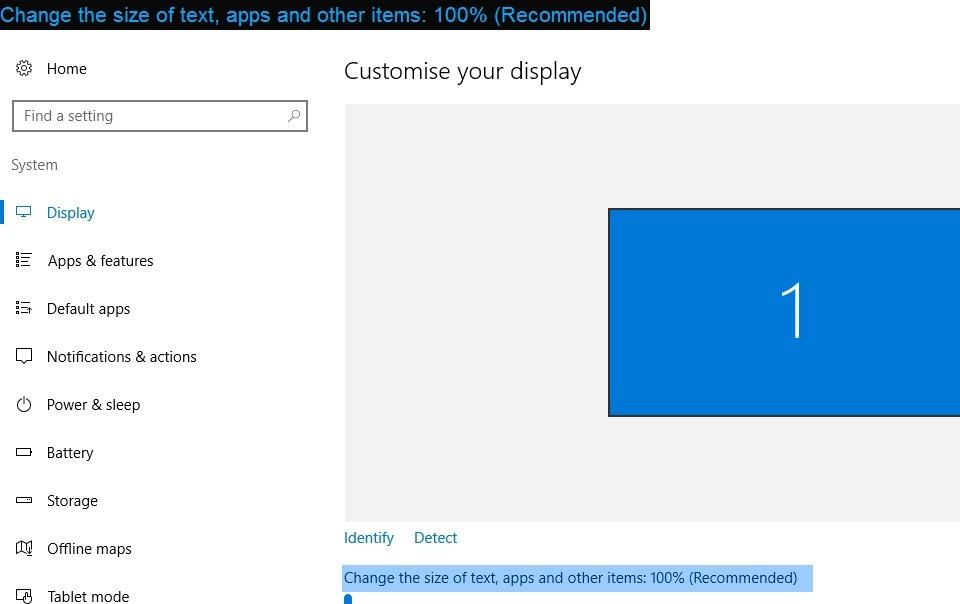
  6. Place the cursor near the text you need to copy. Then press the Windows key + Q and drag the cursor. You should see a blue box that you can now highlight the text by dragging the cursor.
  7. Drag the blue box around the text you need to copy. Then the copied text should appear at the top left of the window as in the snapshot directly below.capture2text4
  8. Now open Notepad and press Ctrl + V to paste the copied text. 

3. Highlighting text with Textify

  1. Save the Textify Zip by clicking the Download Now button on this Softpedia page.
  2. Open the program’s compressed folder, and click Textify to run it from the Zip.capture2text5
  3. When you’ve opened the Textify window above, find some text to copy in Windows 10. 
  4. Move the cursor over some text to copy and press the Shift key + middle mouse button, which is the default hotkey. That will open the box below which includes the text you selected to copy.capture2text6
  5. The text in the box is highlighted so that you can press the Ctrl + C and Ctrl + V hotkeys to copy and paste.
  6. You can copy Start menu text such as app and software shortcuts with Textify much the same. Note that the Textify text box opens behind the Start menu.

You can highlight a lot of software text with Capture2Text that you usually wouldn’t be able to copy. However, you still can’t copy the Start menu text with that utility.

Textify is an alternative program that enables you to highlight and copy a little more text on the Start menu and any other software window.


Textify and Capture2Text are both great utilities for highlighting and copying text.

Although you can copy the Start menu text with Textify, one advantage of Capture2Text is that you can highlight and copy image text on website pages.

It also has more extensive hotkey and output customization options. So, it’s worth adding any of these programs to your desktop or laptop.

Even better, you could go for Adobe Acrobat and enjoy a complete PDF solution with all the features you may have in mind.


Go to Home, select the arrow next to Text Highlight Color, then finally choose No Color.

  • How can I copy text from an image?

In order to copy text from an image, simply right-click it and choose Copy Text from Picture. Then, just click where you’d like to paste the text and press Ctrl+V.

FIX: Adobe Application Manager missing or damaged

It can be very annoying to run your Adobe applications on your PC and see an error message saying that the Adobe Application Manager is missing or damaged.

Here is what one user had to say about this issue on the Adobe help forums:

When I open any Adobe applications I get the message: Adobe Application Manager, required to verify your license, is missing or damaged. Please download a new copy of Adobe Application Manager. How can I get any of the applications running again? Any help is highly appreciated.

Because the message can include a wide range of possible issues, this error can cause a lot of frustration amongst users who encounter it.

In today’s guide, we will try to cover all the possible reasons for this error appearing, and we will give you step-by-step information about how to apply the specific methods one by one.

Please keep trying to run the Adobe Application Manager after trying out each of the methods presented in this list.

This will ensure that you won’t waste any time, and at the same time protect your system from any unneeded changes in its settings.

How do I fix the Adobe App Manager missing or damaged?

1. Uninstall and reinstall the Adobe Creative Cloud application

  • To uninstall:
  1. Press the keyboard shortcut Win+X.
  2. Choose Apps and features.
  3. Search for the Adobe Creative Cloud app in the application list, select it, then click Uninstall.
  4. Follow the on-screen instructions to complete the uninstallation process.

In order to completely remove the Adobe Creative Cloud application from your PC, you need to follow the steps above.

  • To reinstall:
  1. Visit the official Adobe website to download Adobe Creative Cloud.
  2. Sign in with your credentials.
  3. Click the Download button and follow the on-screen instruction to complete the setup.

Due to the latest security measures to protect your account from any third parties, installing the Creative Cloud without having administrator privileges can cause some files not to be installed properly.

In order to avoid encountering this issue, it is recommended that you reinstall the application after either logging into or creating a new administrator account.

2. Repair the Creative Cloud application

Even though it might seem like an obvious solution, some users have had great results by simply clicking the repair button inside the error message.

After trying out this option, please try to see if the issue is resolved, and if not, continue reading this list.

3.  Use the Creative Cloud Cleaner Tool from Adobe

  1. Download the Creative Cloud Cleaner Tool.
  2. Open the tool and choose the option Creative Cloud 2017, 2015, 2014, Creative Cloud & CS6 Products.
  3. Select Adobe Creative Cloud Desktop.
  4. Rename the following OOBE folders to OOBE.old:
    Program Files (x86)Common FilesAdobeOOBE UsersAppDataLocalAdobeOOBE
  5. Download and reinstall the Creative Cloud app by following the steps mentioned in solution number two.

In today’s fix article we explored some of the best troubleshooting methods to apply if you see the error about your Adobe application manager either missing or being damaged.

We would love to know if this guide has proven useful in your situation and if you managed to easily access your Adobe app manager.

Please feel free to share your thoughts with us on this matter by using the comments section found below this article.

Creative Cloud Page is Not Available: 5 Ways to Restore it

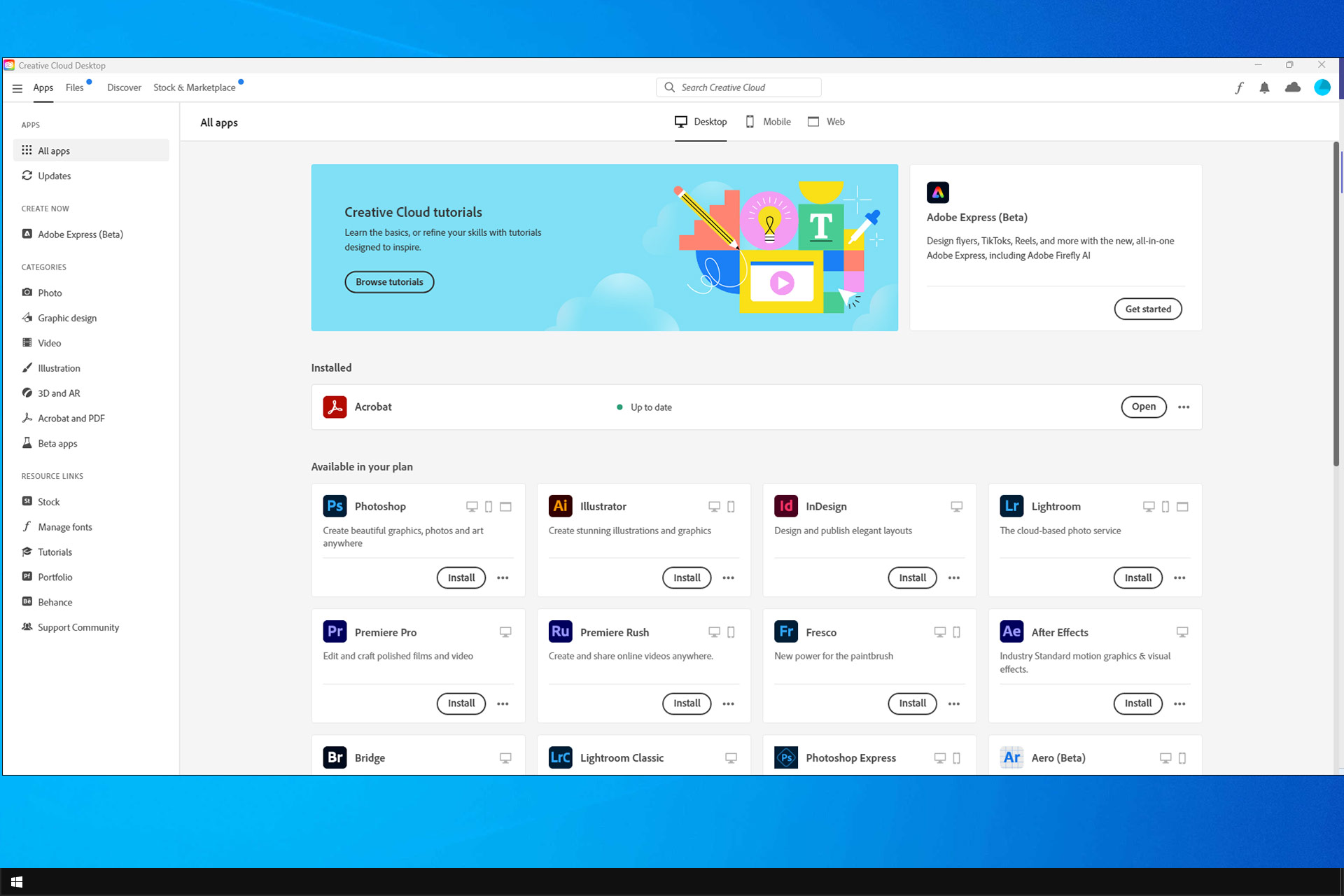
If the Creative Cloud page is unavailable, you won’t be able to use any of Adobe’s services, which can be a significant issue.

However, this can be fixed, and today, we will show you a couple of solutions that can help you with this issue.

Why is Creative Cloud blank?

  • The software might be out of date.
  • Its cache files or installation is corrupted.
  • You’re not using the correct GPU with the software.

How do I fix blank Creative Cloud desktop apps?

1. Check compatibility

  1. Now, all Windows platforms are compatible with Creative Cloud.
  2. Users can only utilize CC on 64-bit Windows 10 platform or macOS v10.12 and higher.
  3. Thus, users who don’t have compatible platforms will need to upgrade to 64-bit Windows 10 or newer.

2. Update the Creative Cloud app

  1. Check the current version of Adobe Creative Cloud app.
  2. If it’s not up to date, update it.
    Creative Cloud sign in creative cloud desktop app is blank
  3. After doing that, check if the problem is resolved.

With every update, Adobe adds new features and security patches and increases compatibility. As with every piece of software, ensure you are using an up-to-date version for the best experience.

⇒ Get the latest version of Adobe Creative Cloud

3. Clear the OOBE folder

  1. Press the Windows key + E hotkey, which opens File Explorer.
  2. Click the View tab.
  3. Select the Hidden items checkbox.
  4. Enter this path in File Explorer’s folder path bar: C:\Users\WindowsReport\AppData\Local\Adobe\OOBE
  5. Change the user folder in that path to the actual title of your user folder.
  6. Select all the contents of the OOBE folder by pressing the Ctrl key + A.
  7. Press the Delete button to erase selected files.

4. Reinstall the Creative Cloud app

  1. Download the Creative Cloud Uninstaller from this page.
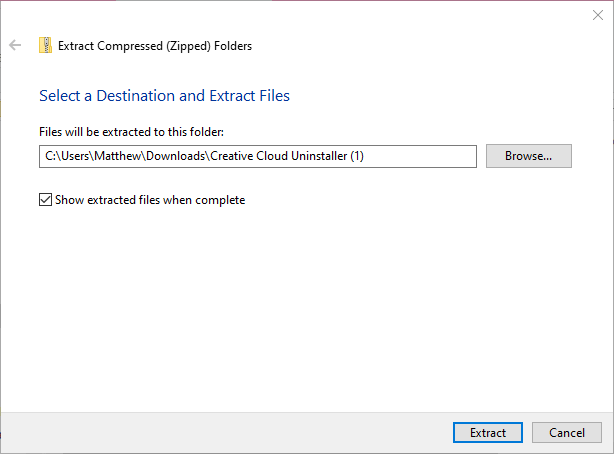
  2. Open the Creative Cloud Uninstaller ZIP in File Explorer.
  3. Click the Extract all button.Extract Compressed Folders window creative cloud desktop app is blank
  4. Press the Extract button.
  5. Then open the Creative Cloud Uninstaller from the extracted folder.
  6. Click the Uninstall button on the window that opens.

5. Select Power Saving Graphics for Creative Cloud

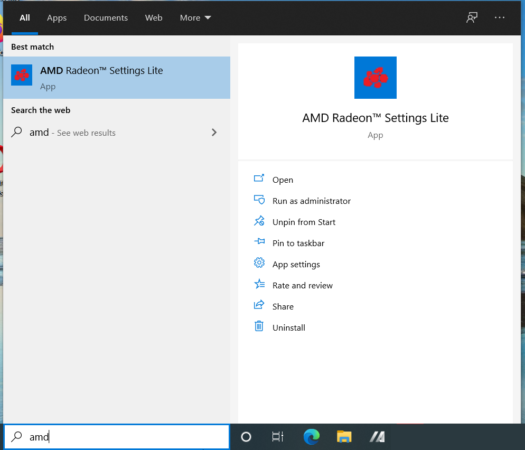
  1. Right-click the desktop and select AMD Radeon Settings.
  2. If you can’t find it there, type AMD Radeon Settings in the Windows search bar. 
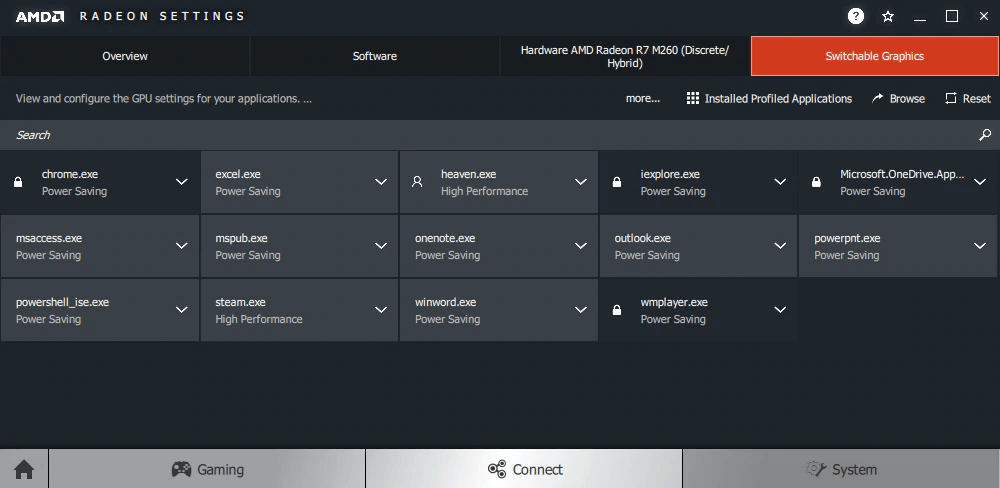
  3. Click the System tab on the Radeon Settings window.
  4. Then select the Switchable Graphics tab shown directly below.Switchable Graphics tab creative cloud desktop app is blank
  5. Enter Creative Cloud in the Search box.
  6. Click the Creative Cloud profile application to select the Power Saving option.

Some users with hybrid Intel/AMD graphics systems have said they’ve fixed the issue by switching Creative Cloud to Intel (power-saving) graphics. 

The above resolutions will probably fix the Creative Cloud app for most users. However, this isn’t the only issue; many reported high CPU usage in Creative Cloud Desktop. If that happens, you might have to stop Creative cloud from running in the background.

Many reported Adobe Creative Cloud download error, but we have a unique guide that addresses that. What method did you use to fix this issue? Let us know in the comments below!

Microsoft, Google, and more announce support for new Open Web Docs initiative

Microsoft has just announced its support for Open Web Docs, a new initiative aiming to support community-driven platforms for high-quality developer documentation. Instead of creating a brand new docs platform, Open Web docs will work closely with existing documentations platforms including Mozilla’s popular MDN Web Docs.

“The collective’s initial goals are focused on supporting MDN’s recent infrastructure transition and contributing to core web technology documentation, browser compatibility data, and JavaScript documentation on MDN Web Docs,” Microsoft said today. The Redmond giant will support Open Web Docs as a founding sponsor along with Google and Coil, with additional support and participation from W3C, Samsung, and Mozilla.

In the short term, Open Web Docs will employ a full staff of independent technical writers who will work with existing platforms and make contributions to MDN Web Docs. In the long term, Open Web Docs will work on “developing a community of contributors around core web technology documentation, browser compatibility data, and improving JavaScript documentation,” the announcement post reads.

While Open Web Docs already has some big backers, the collective is welcoming anyone who wants to contribute to the project and support long-term maintenance of web platform technology documentation. You can follow @OpenWebDocs on Twitter to get news about the project, which also has a GitHub page.

Microsoft Teams will soon queue your sent messages when you’re offline

Microsoft Teams is gaining a new feature that should help users be productive even without an active internet connection. The new Offline experience will be rolling out worldwide on the Teams desktop and web clients later this month (via Petri).

Currently, when a user tries to send or edit chat messages in offline mode, the app returns those messages with a failure message. In this scenario, Microsoft Teams prompts users to retry or delete the messages when the network connection is re-established. The Offline experience should automatically address this issue by automatically sending all unsent messages in a queued state for up to 24 hours.

“In phase one of this update, Teams messages that are sent while a user is offline will be queued on the local device. Teams will automatically send the messages when the device resolves connectivity issues within 24 hours. However, if the message remains in an unsent state for more than 24 hours, the message will fail and Teams will prompt the user to resend or delete the message,” the company explained in the Microsoft 365 Admin Center.

However, in phase two of this update, Microsoft Teams will add the ability to edit the messages lined up in the messaging queue. The company noted that the second phase will begin at the end of this month and should be complete mid-February.

The upcoming support for Offline mode is a welcome addition, and it should help ensure that your colleagues will receive important messages as soon as the device connects back to the internet.

Kurt DelBene is the latest Microsoft veteran to leave the company

As in all organizations, changes occur as executives move on to better opportunities (as in the cases of Brad Anderson and Julia White), or to retirement, as in the case of Executive Vice President Kurt DelBene, who will be leaving Microsoft at the end of the fiscal year in June.

DelBene is a long time Microsoft veteran, joining the company in 1992, where he rose to eventually lead engineering and marketing for Office. As Mary Jo Foley notes, he left the company in 2013, first to help fix the Affordable Care Act website as a Senior Advisor to the Secretary of Health and Human Services, and then spent some time with Madrona Ventures Group, a venture capital firm based in Seattle.

DelBene then came back to the company in 2015 in a new role leading Corporate Strategy and Core Services Engineering. Most recently, he’s been leading work Microsoft’s COVID-19 response, where he will stay until his retirement at the end of June.

In an email to employees today, CEO Satya Nadella explained that DelBene’s position will not be replaced, according to Foley:

According to Nadella, Core Services Engineering and Digital Security and Risk Engineering will transition to Executive Vice President Scott Guthrie’s Cloud and AI organization. Microsoft Business Operations is moving to Finance under Chief Financial Officer Amy Hood. And Corporate Strategy will become part of new Business Development Chief Chris Young’s organization.

Although changes are to be expected, it will be interesting to see how Microsoft Senior Leadership team evolves heading into the new fiscal year.

How to create a Flow in Microsoft Teams and why you might want to help you stay productive

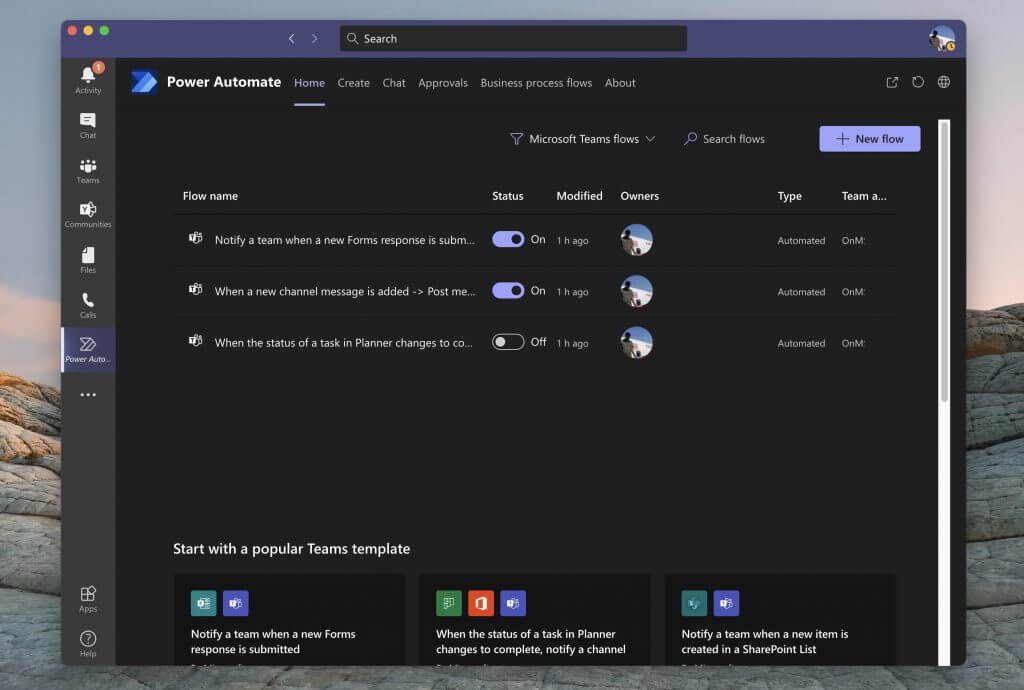
Have you ever wanted to get a notification on activities happening inside Teams relating to documents being uploaded, forms being signed, or even tasks being completed in Planner? Usually, you might have to check each of these Microsoft 365 apps individually to get up to speed on things. However, with Power Automate and Microsoft Flow, you can create certain “Flows” to help you keep track of your business, and help boost your productivity. Today, we’ll be showing you how you can do that.

Adding Power Automate to Teams

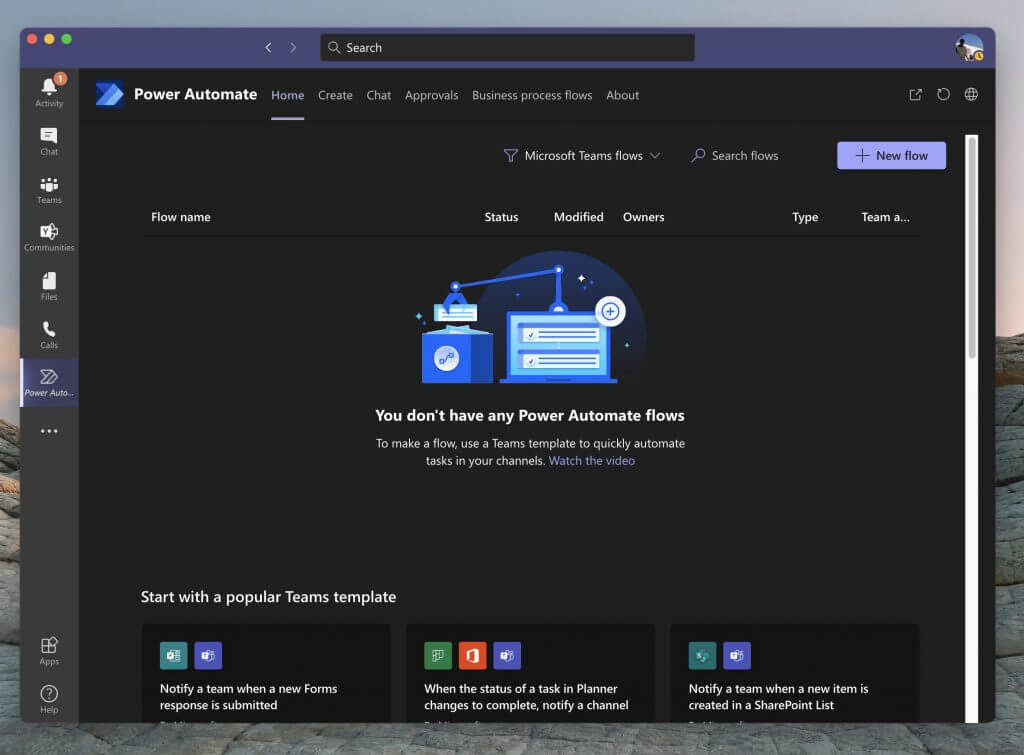
First things first, you’ll need to add Power Automate to Microsoft Teams to proceed. To do this, click the Apps section in the Teams sidebar. From there, search for Power Automate. Then, choose the Power Automate app that opens up and choose the purple add button. If you want flows in a specific channel or an entire team for all users, you also can choose the down arrow, and pick Add to team, if you have the privileges to add an Automation for everyone. Once done, you should see the Power Automate app open up in the sidebar in Teams.

Creating a premade, “popular” Flow in Teams

Power Automate Teams

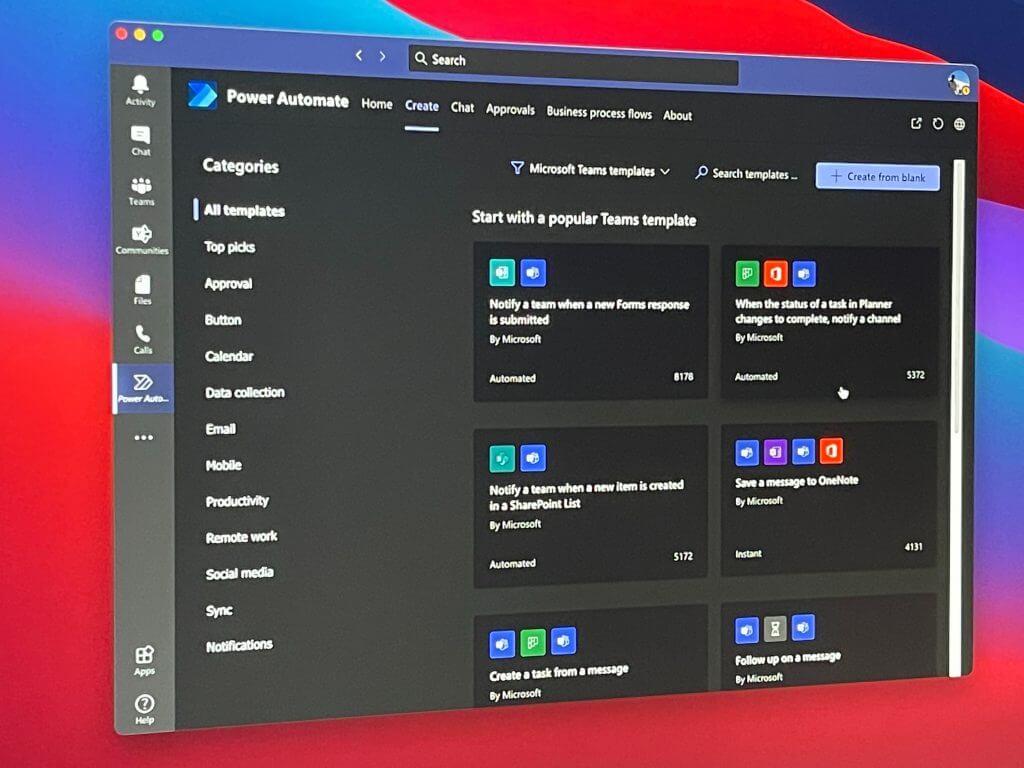
Next up, you should be taken to a filtered option showing you only Microsoft Teams Flows and Templates. You can filter to other Flows if you want to by clicking the filter button next to the Search Flows button (but more on that later.) Anyway, you also should notice some popular templates for Flows in Teams. These are pre-made templates by Microsoft, that you can enable with just a few clicks, no coding required!

We’ll focus on these first, as these are the most popular and help address some of the most common needs for notifications in Teams. Here’s a list below, but keep in mind you can see a list of all the Teams flows by choosing to See all Teams templates at the bottom of the Power Automate app. Generally speaking, any of the Flows in the Teams list will be straight forward to set up, needing just a few simple steps.

  • Notify a team when a new Forms response is submitted
  • When the status of a task in Planner changes to complete, notify a channel
  • Notify a team when a new item is created in a SharePoint List
  • Save a message to OneNote
  • Create a work item from a message
  • Notify a team when a new task is added to a Trello board
  • Notify a team when the status of a work item changes in Azure DevOps
  • Notify a team when an alert is triggered in PowerBI.

If the Flow you want is in this list, then click it. You’ll get a popup message, allowing you to configure it. We’re using the Flow for task changes in Planner, as an example. Usually, you should see a box letting you name the flow. Then, under that, will be a list of sign-ins (or connectors) that you’ll need. Make sure you sign in, to each one, and then click continue and follow the on-screen instructions. In our case, we’ll need to configure and choose the Planner group ID, the Plan ID, the Teams Team, and then the Channel to continue.

When done, you can choose Create Flow. And you should then see a popup message saying Your workflow has been created. It now appears in the list of Flows on the main Power Automate page! And it will run automatically from now on.

Creating other, and custom Flow in Teams

Custom Flow Teams

Thanks to Power Automate, you’re not just limited to Flows themed towards Teams. If you want, you also can create other Flows, too. You can toggle to these by clicking the Filter button at the top of the screen, next to the search box, and choosing All Templates.  Then, look to the left to choose a category. The steps will be the same, requiring you to sign in and connect accounts, as we did above.

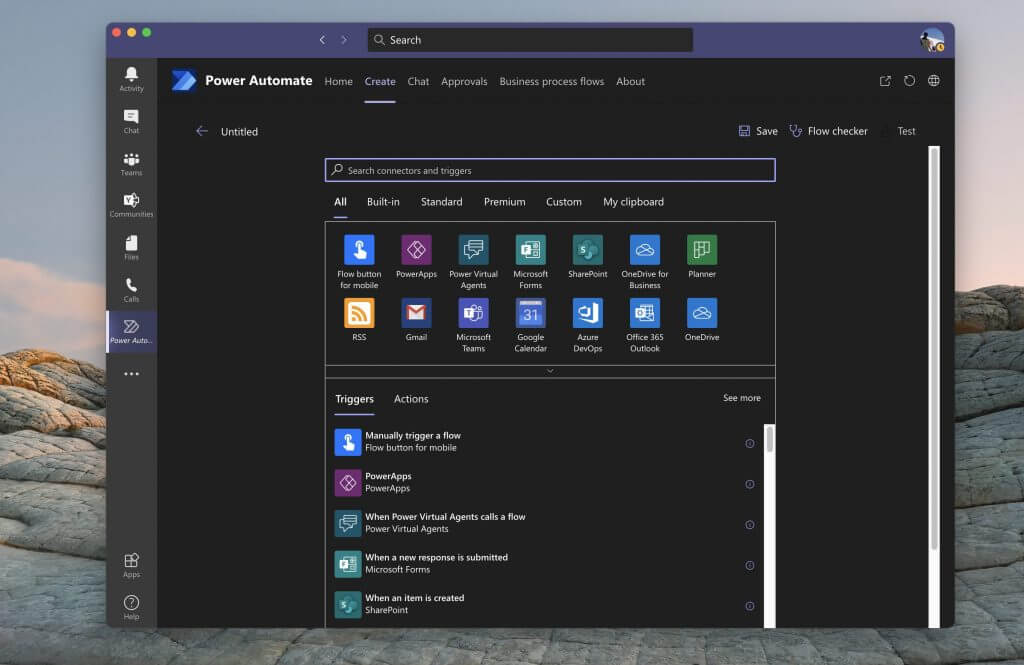
If you’re a more advanced user, you also can create a blank Flow, on your own, not following a template. Click the Create tab in Power Automate, and then choose to Create from blank. From there, you’ll see a list of triggers and actions. You’ll also see some themes, under All. Pick your theme, to filter the trigger and actions.

Then, choose a trigger, following the instructions on the screen. After the trigger is finished, set up the action by following the instructions and the wizard on the screen. Each Flow has a different set of instructions, but it’s pretty straight forward to understand. You can then Test the flow by clicking the Test button on the top. You also can check the flow for errors by choosing Flow Checker too. When ready, click Save and your Flow will be put into action.

Checking and deleting Flows

Editing Flow Teams

Now that you’ve created your Flows, you can easily delete them, or edit them, too. Simply open up the Power Automate app in Teams by clicking the ( . . .) in the Sidebar, and then clicking the Home tab. From there, you should see a list of your Flows. You can move your mouse to the far right, and click the three dots in the list and then choose Edit or Delete to delete the Flow. More importantly, you also can check the Run History to see how it’s running, of it has gone rogue.

Just the start of endless possibilities!

Creating Flow in Teams with power Automate is just the start of the possibilities. Microsoft has a platform known as PowerApps, which lets you create your own custom apps for your business using similar templates. You can learn more about that here. And remember, check our Microsoft 365 hub for more news and information.

5 Best Drawing Software For Mouse Users

Digital advancement has made many designers leave their pen and paper and use digital tools to create visual images.

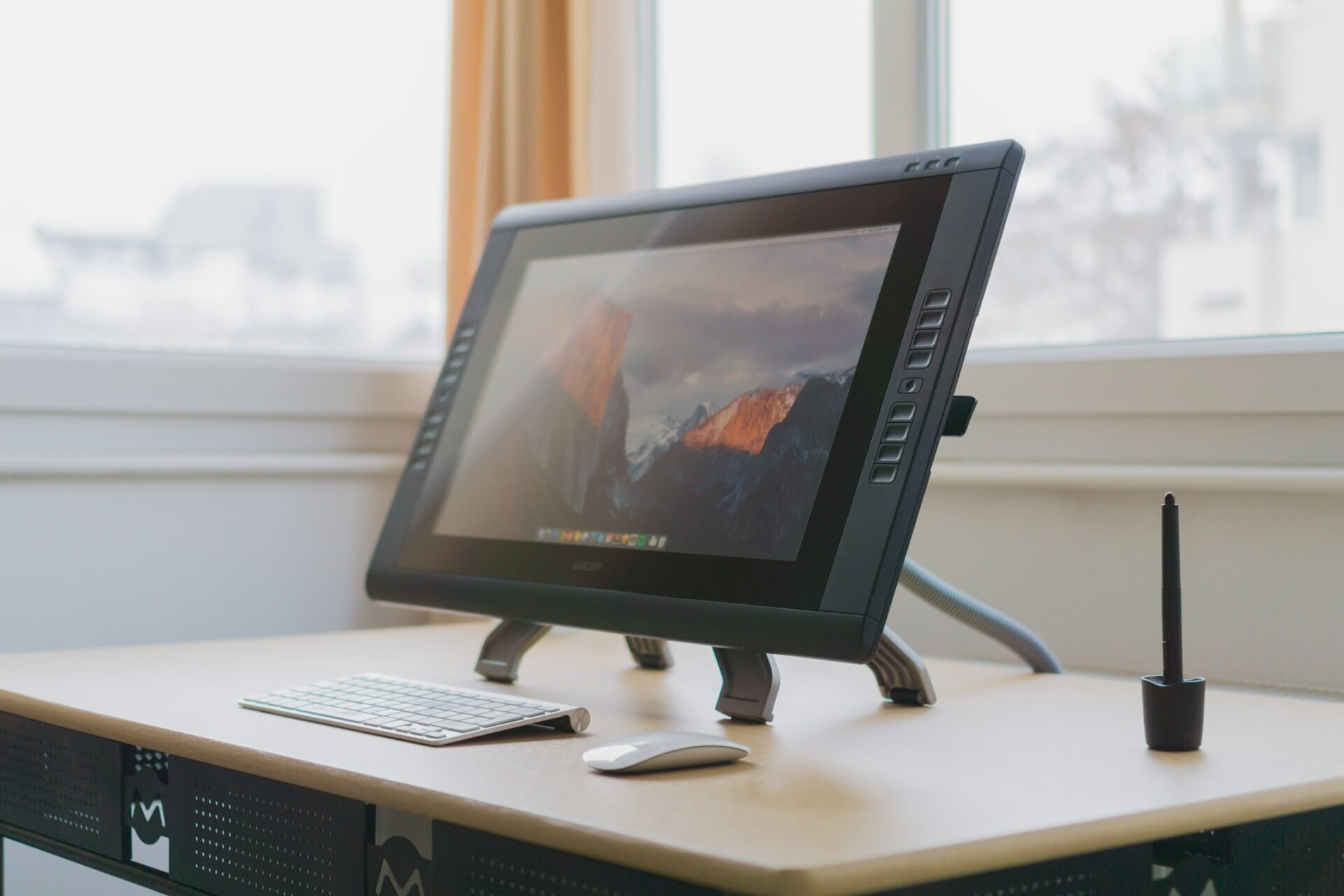
While many creative professionals embrace the drawing tablet trend, there are plenty of professionals still using their mice to create stunning artwork.

Whether you are just starting with your digital art journey or a professional looking for advanced drawing software to create your next masterpiece, there is drawing software for everyone.

That said, when looking for drawing software, it is important to understand your requirements as drawing programs are quite expensive. This is why we have compiled a list of the best drawing software for mouse users.

What are the best drawing software for mouse users?

Adobe Photoshop – Leading detailed designs

Adobe Photoshop - Best Painting Software

From photo editing and compositing to digital painting, animation, and graphic design, Adobe’s Photoshop can do it all and more. It is part of Adobe’s Creative Cloud suite; thus, it can be accessed across desktops and iPad.

The latest Photoshop version comes with improved performance while making it easier to use the tool for beginners.

With the enhanced object selection tool, you can swap out skies with a click and remove objects, and recolor with powerful editing tools.

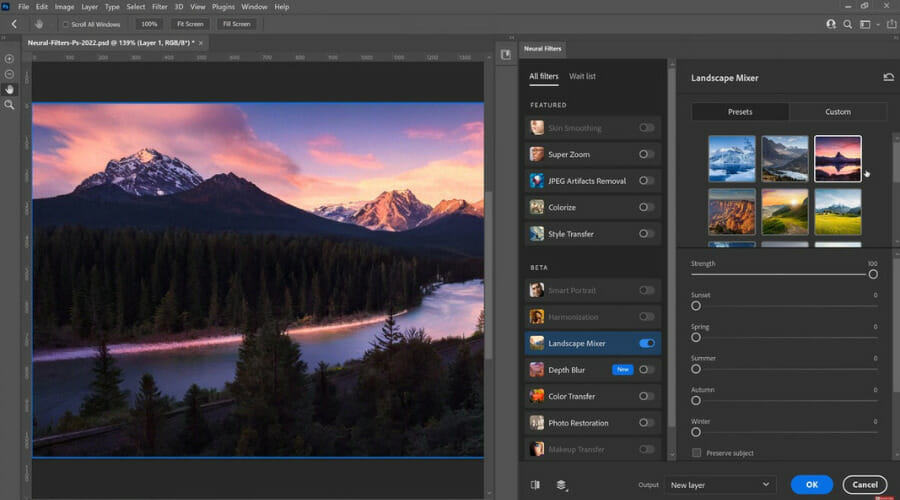
Use Neural filters to colorize scenes with AI technology, remove scratches, or change expression, pose or age in seconds. Adobe has also improved the learn and help menu to find tools and see feature demos.

Key features of Adobe Photoshop:

  • Plenty of editing tools
  • Easy to use and loads of help and tutorials
  • Excellent cloud and multi-device support
  • 3D design capabilities

Adobe Photoshop

Use your mouse to create astonishing drawings on your PC with the capabilities of this amazing software.
Free trial Visit website

Adobe Illustrator – AI-powered drawing

Popularly known for its vector graphics features, Adobe Illustrator, helps you create stunning graphics anywhere. Like Photoshop, Illustrator is also part of the Adobe Creative Cloud subscription model.

Illustrator is the industry standard for creating web and mobile graphics for logos, icons, product packing, and billboards.

The new Adobe Sensei AI automatically extracts colors from a photo, adds them to your design, auto-trace a hand-drawn sketch, and turns it into vector graphics.

Other new additions to the popular vector graphics program are cloud document management with offline access, type enhancement tools, and smart glyph snapping, making it easier to position text and other objects precisely.

Key features of Adobe Illustrator:

  • Excellent vector graphics design capabilities
  • Improved user interface and performance
  • Simplified Free Transform tool
  • Adobe Sensei AI automatically extracts colors from designs

Adobe Illustrator

Adobe Illustrator is going to make using your mouse to create amazing digital art a breeze, with access to thousands of features.
Free trial Visit website

Clip Studio Paint – Mouse artist’s drawing app

With its highly customizable paint brushes for drawing and painting, Clip Studio Paint is an excellent tool for creative professionals to try drawing software without breaking the bank.

Clip Studio Paint is compatible with Wacom drawing tablets and offers up to 8192 levels of pen pressure to create a design exactly as you imagine with the powerful brush engine.

Whether you want to create concept Art & painting, character art, illustration, comic and manga, or animation, Clip Studio Paint offers unlimited style for various paintings.

Key features of Clip Studio Paint:

  • Great value for money
  • Powerful software to support a variety of creative styles
  • Accurate and responsive workflow
  • Compatible with Photoshop

Clip Studio Paint

Clip Studio Paint offers you a variety of brushes and tools that can be easily used with your mouse to create great art.
Free trial Visit website

Krita– Freehand inking

Krita is an excellent alternative to commercial drawing software like PhotoShop and Illustrator. This multi-platform-supported app has focused its efforts on digital drawing and painting.

With a modern-looking user interface and a good layout, Krita feels much like Photoshop. It also supports different brushes with different brush presets to choose from. It is also fully compatible with Wacom tablets.

Other notable features offered by the app include stabilizers for freehand inking, assistants for constructing a complex scene, a distraction-free canvas-only mode for painting, and the usual layers, filters, and transform tools.

Key features of Krita:

  • Clean and responsive user interface
  • Resources manage to handle brushes and pattern collection
  • Supports PSD file to work with Photoshop files
  • Good set of editing tools for creative professionals

Krita

Krita can be easily used with your mouse to create amazing art on your PC.
Check price Visit website

Autodesk SketchBook – Paper drawing feel

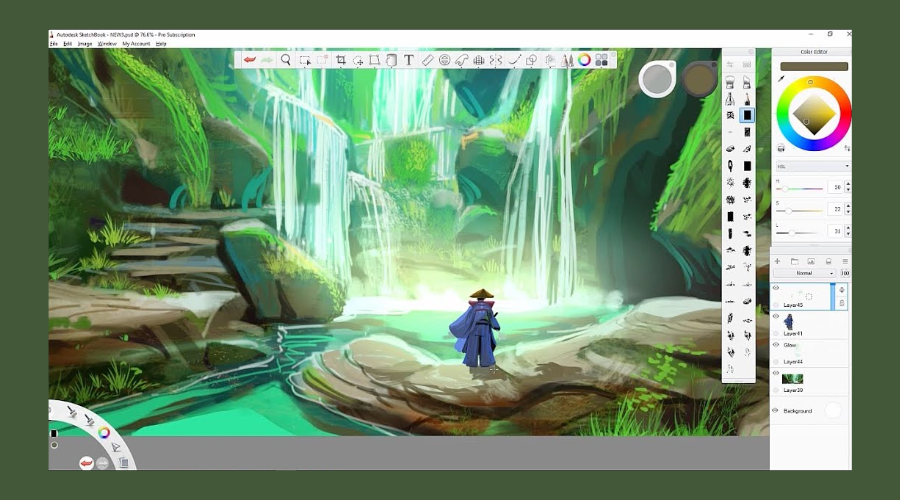
Autodesk SketchBook may not have the bells and whistles of other popular image manipulation tools like Photoshop and Illustrator, but it excels as pure drawing software for serious artists and technical illustrators.

The Pro version of the app offers over 100 highly customizable brushes that offer special effects such as synthetic, smudge, and glow. You can also create canvas up to 100 Mpx while maintaining the zoomed-in feeling of traditional drawing.

Other notable features of Autodesk SketchBook include paper to digital to scan sketch imports, multi-platform support, drawing tablets compatibility, and multiple media format support.

Key features of Autodesk SketchBook:

  • Pure drawing software for artists and illustrators
  • Greater compatibility
  • Easy to learn with plenty of tutorials
  • Clean distracting free user interface

Autodesk SketchBook

You can easily draw incredible pictures by simply using your mouse in Autodesk SketchBook.
Free trial Visit website

While drawing tablets are the go-to tools for digital artists, not having a tablet does not mean you cannot create stunning art.

All it takes is a good understanding of the drawing tools like Adobe Photoshop or Illustrator and some imagination.

All the software listed in this article supports mouse inputs and offers unlimited possibilities to creative professionals who are otherwise limited by resources.

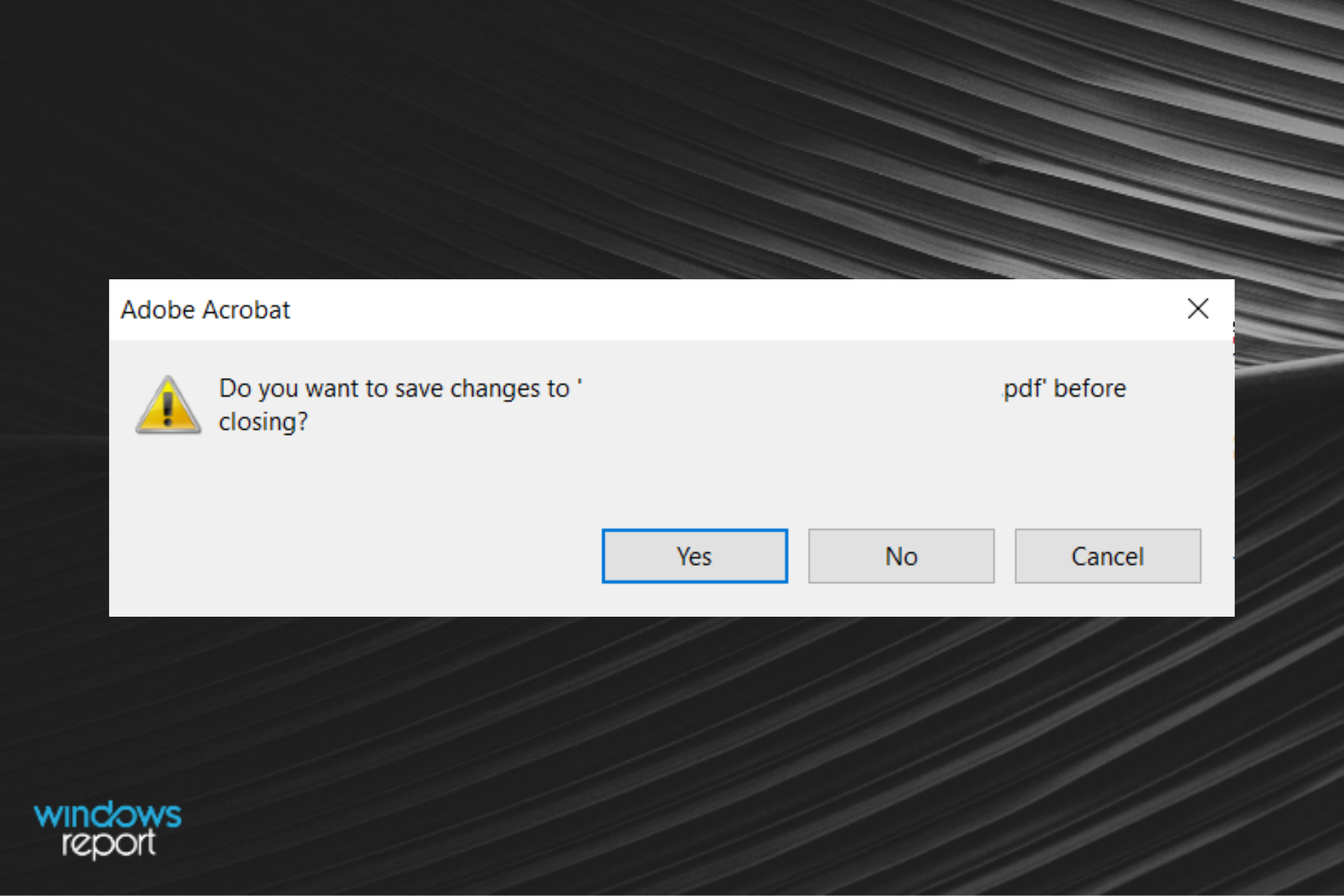
FIX: Do You Want to Save Changes to PDF Before Closing?

On some occasions, Adobe Reader is asking to save before closing repeatedly, yet without visible changes.

Well, there are two main reasons why Adobe Reader and Adobe Acrobat may prompt you to save changes to a PDF file after you’ve opened it:

  • The PDF file is corrupted and Adobe Reader or Acrobat automatically repaired it without displaying a warning message over the same, which explains why the Save button is enabled (an automatic repair was performed).
  • The PDF has form fields and the NeedAppearances entry in the interactive form dictionary is set to TRUE. What this means is the conforming PDF reader generates an appearance stream for form fields in the PDF where necessary, so this enables the Save button. If the entry is set to FALSE, the conforming PDF reader won’t generate new appearance streams.

If you want to stop getting the message error, try the solutions below right away.

How do I stop Adobe Acrobat from asking me to save changes?

1. Download the latest Adobe Acrobat software version

Getting the same annoying message every time you try to close your PDF document is clearly frustrating. Even so, you can disable the Adobe Save file prompt in a simple way.

The issue you’re experiencing is often related to an outdated Adobe Acrobat, so don’t postpone grabbing the latest version.

All you have to do is download the product from the manufacturer’s site. This simple action will save you a lot of time when going through countless troubleshooting steps.

Acrobat Pro DC

Use Adobe’s complete PDF solution for any device and manage your documents like a pro.
Free trial Visit Website

2. General troubleshooting

Generally, Adobe Acrobat won’t prompt you to save a PDF file if you just opened and closed it without making any modifications.

If this happens, then it means the file has been modified, either due to corrupt files, or automatic repair. To resolve this, open the document, close and save it, then open it again and close it.

If it doesn’t prompt you to save again, then Acrobat did an automatic repair on the PDF file in the first save operation.

If your PDF file is not bad or corrupted, then something within the PDF file is modifying it as we mentioned earlier.

You can check if this is causing the do you want to save the changes to pdf before closing issue by disabling Acrobat’s JavaScript in Preferences > JavaScript, then uncheck the Enable Acrobat JavaScript box.

Then, open and close the document.

3. Disable protected mode at startup

  1. Open Adobe Reader.
  2. Go to Edit.
  3. Select Preferences.Do you want to save changes to PDF before closing
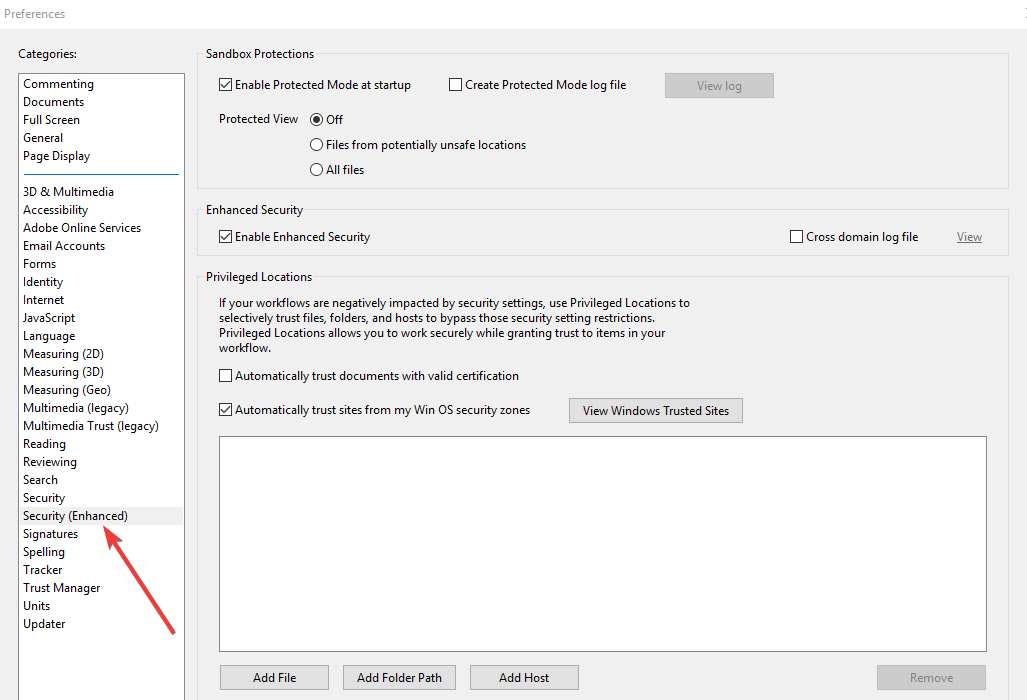
  4. Select Security (Enhanced).Do you want to save changes to PDF before closing
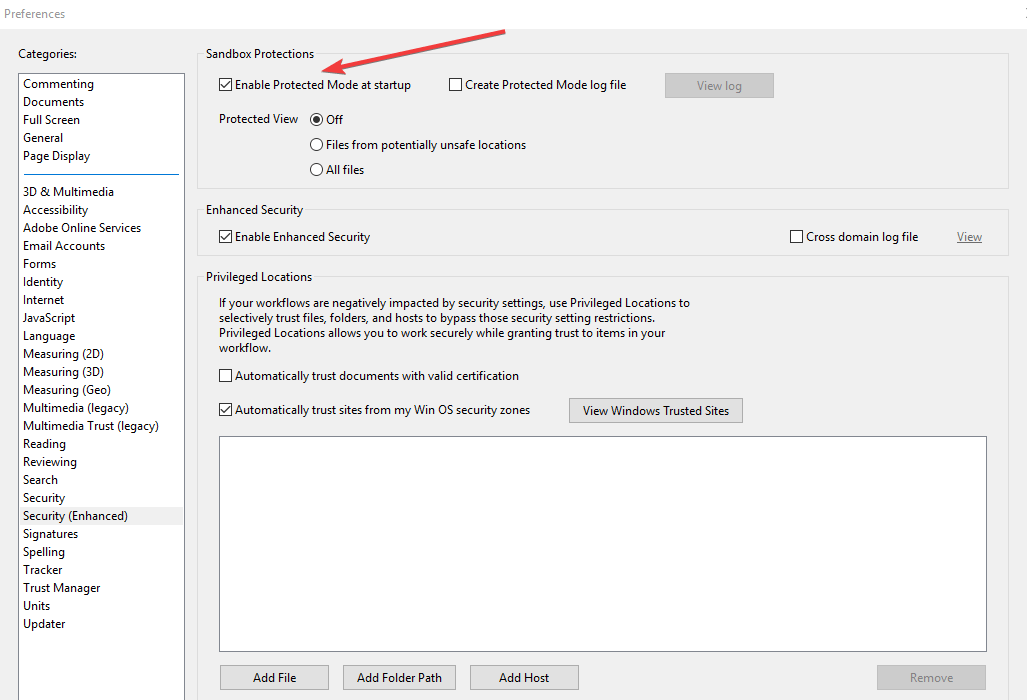
  5. Uncheck Enable protected mode at startup and press OK.Do you want to save changes to PDF before closing
  6. Open the PDF file again and save it as you do normally.

You can also respond to the Do you want to save the changes to PDF before closing dialog by selecting Yes, then save the PDF file on top of itself.

This should make the Save changes dialog box go away when closing the file.

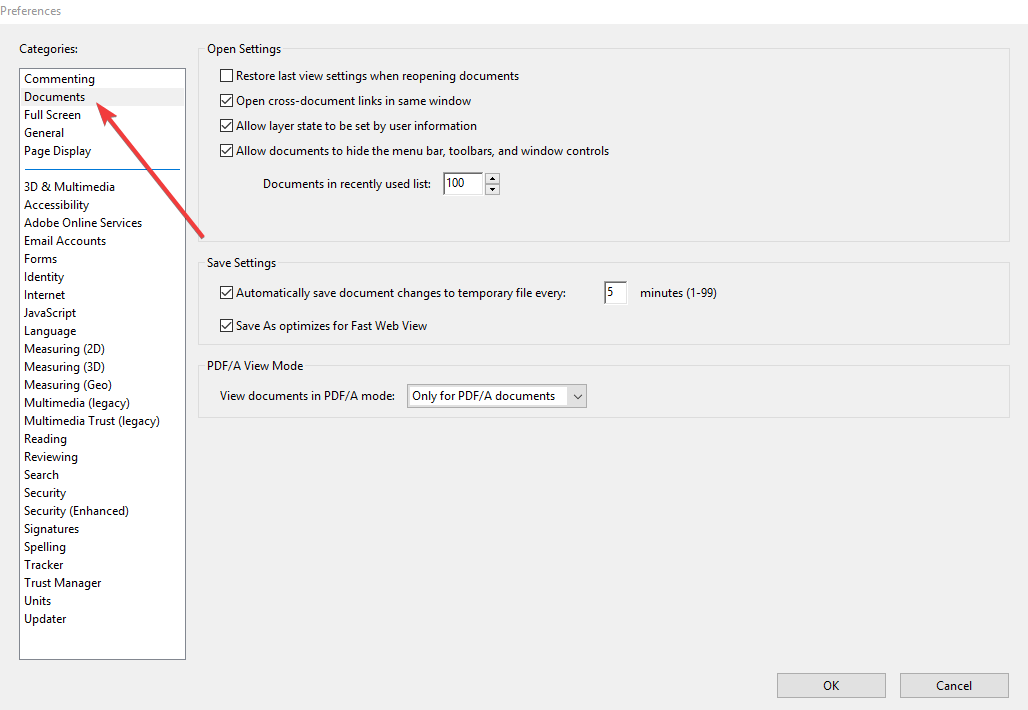
4. Change saving settings

  1. Open Adobe Acrobat.
  2. Go to Edit.
  3. Select Preferences.
  4. Select Documents.Do you want to save changes to PDF before closing
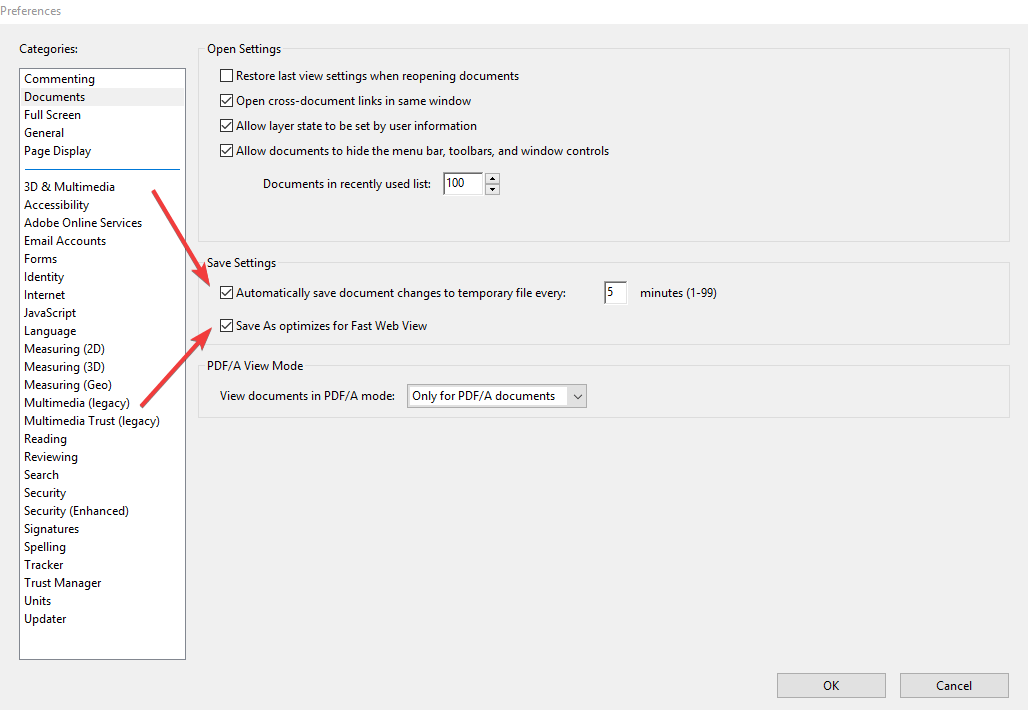
  5. Go to Save settings and uncheck both options.Do you want to save changes to PDF before closing

Have you managed to resolve the do you want to save the changes to pdf before closing the message prompt on your computer with our solutions? Let us know by dropping a comment in the section below.

Interior Design Apps for Windows: Best to Use in 2026

If you are an architect, a Feng-Shui lover or you just care about your interior design, then you need to try some of these Windows 8, Windows 10 apps.

We all experienced phases in our existence when we wanted to do something different with our living spaces.

That might have involved moving some furniture around and painting the walls in different colors, and sometimes that was really enough. But what happens when you want to reinvent your living space completely?

After all studies have shown that the environment you live in has a neurochemical impact on your overall well-being.

Thankfully, if you have a device that features Windows 8, Windows 10, and Windows RT you can get right to planning your dream bedroom.

Thankfully, you can find in the Windows App store some very useful little programs that can help you create the living space you always dreamt of.

All this without actually leaving the house and going to consult a home decorating expert or driving up to Ikea to use their interior design application. Here’s a list of the apps we found to be most of the help:


What are the best interior design apps for Windows 10?

Adobe Illustrator (recommended)

Adobe Illustrator official

Adobe Illustrator features interesting and atypical design ideas for all the spaces in your house like the living room, bedroom, or kitchen.

Illustrator can be a great inspiration for architectures who want to visualize their idea in order to improve the way elements from the interior are arranged.

The interactive and easy-to-use software interface will do things for you, so all you have to do is to put your creativity into your imagination.

You can easily illustrate all interior details and add more color and style to your creation for more of a Feng-Shui vibe.

In addition, you can create rendering 3D interior design by managing layers, using brushes, and pen, and building shapes and vectors.

In order to eliminate or improve features like eliminating unwanted background elements or improving the light, you can use Adobe Photoshop as well.

Moreover, Adobe Illustrator is included in the Creative Suite, so you can benefit from more drawing and designing applications that will help your work.

Adobe Illustrator

Adobe Illustrator

Design the interior of your house just the way you like by using the feature-rich Adobe Illustrator
Free trialVisit website

Adobe Dimension

Adobe Dimension interior design

Assuming that you have an idea of how you are going to renovate your living quarters. In order to get right to it, you will need to acquire a tool for creating spatial designs and design elements from the interior environment.

That’s when Adobe Dimension app comes in. This is a fully-fledged design portal that allows you to create the best 3D visualizations that allow you to personalize the space with customized texture, light, and material.

This powerful interior designing tool can rotate, scale, resize, move the interior elements in order to fit properly in the environment.

You can add your element using the drag-and-drop feature in order to ease your workflow. Moreover, with Adobe Dimension you can select the substance material in order to craft customized objects.

Adobe Dimension is part of Creative Suite, so you can use tools like Adobe XD, InDesign, or Adobe Aero to push the boundaries of your imagination to other vision and 3D perspective or augmented reality.

Adobe Dimension

Adobe Dimension

Renovate your living quarters and your house in the most creative ways with Adobe Dimension
Free trialVisit website

Live Interior 3D

windows 8 interior design app

This is a fresh app that has made its way into our top and it’s definitely a welcome entrance. With almost 400 megabytes, this app comes with so many objects and materials that can be used.

In other words, it’s a helpful tool not only for those looking to design their own house but even for professional interior design pundits.

Live Interior 3D

Live Interior 3D

Design the best rooms and rearrange your furniture the way you like digitally using Live Interior 3D

Architectural Digest

architectural digest windows 8 design app

Architectural Digest is one of the most famous publications covering Interior Design in our list, being very popular around the world.

Windows users have the opportunity to browse through issues and discover tips about home/office decoration, furniture shopping and even suitable travel destination for design apasionados.

The digital edition brings a little more than the old fashion magazine, as it features some videos and interactive sections.

Architectural Digest

Architectural Digest

Discover tips about home and office decoration, and try out different furniture with Architectural Digest
Check priceVisit website

Color Wheel: A Color Scheme Generator

Choosing the right colors for your living spaces might not be such an easy task for everybody. The Color Wheel app can help you decide which colors are best fitted together.

You can enter a specific color, for example, the color you want to paint your walls, and the app will automatically display Complementary, Split Complementary, Monochrome, Triadic and Analogous colors.

The program is great for those looking to get the right combination of colors into their lives and bring it to life through their home decorations.

Color Wheel: A Color Scheme Generator

Color Wheel: A Color Scheme Generator

Color Wheel allows you to choose from a plethora of colors such as cpmplementary, monochrome, and triadic colors.

Planner 5D

Planner 5D is one of the most popular home design apps in the Microsoft Store. This tool is perfect for a wide variety of tasks, including renovating and re-designing your home.

The app offers a catalog of over 3000 items that you can use to create detailed 2D and 3D plans easily with a simple and interactive interface.

If you haven’t used any interior design apps before, then Planner 5D is one of the best tools to use. It supports an unlimited number of projects and you can also use it without an Internet connection.

Planner 5D

Planner 5D

Get Planner 5D, one of the most popular and attractive home and interior designer software on the market
Check priceVisit website

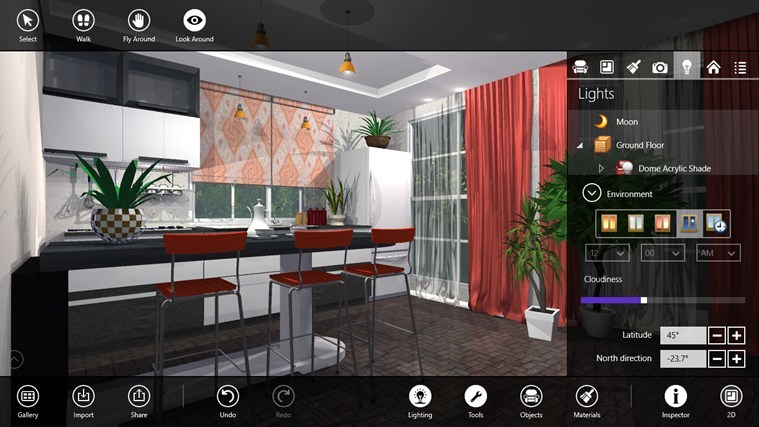
Live Home 3D

Live Home 3D is an intuitive home design app built upon the Live Interior 3D app. Using this app is very simple, all you need to do is draft detailed 2D floor plans and then the tool will automatically built-in 3D.

You can use this app to complete many design tasks, including interior design, furniture arrangement, color matching, and so on.

Once you’re happy with the end result, you can share your design ideas with your friends or co-workers.

Live Home 3D

Live Home 3D

Live Home 3D is one of the most intuitive, self-explainatory and easy to use home designer software on the market

This list consisted of awesome articles that are useful for home and interior decorations.

If you feel like we missed any important app or if you have any information regarding the subject please let us know in the comment section below.


5 Best Sunglass Design Software to Use in 2026

In order to create beautiful sunglasses design, you will need to use specialized CAD (computer-aided design) software that gives you all the tools you need in order to achieve this task.

You get access to a lot of specialized tools that enable you to perform exact measurements and design your frame in an unlimited number of ways.

You can also use different colors, change the way the hinges work, design the glasses arms in beautiful shapes, etc.

Using a design software before sending the project to be made either by 3D printing or normal manufacturing allows you to maintain full control over the specifications of your design.

It also helps you see a preview of the final product before finalizing the project. Let’s explore some of the best software tools for PC running Windows.


What are the best sunglass design software to get?

Adobe Illustrator

If you’re ready to find the best sunglass design software, there’s no better fit for the job. The development of Adobe Illustrator began in 1985.

However, it has turned into the most powerful vector graphics editor of the moment.

You need to know from the start that it enables rapid sunglass prototyping and creative collaboration if you want to focus on design exclusively.

This doesn’t mean that the process itself cannot be fun, especially with all the drawing tools that you may use.

One nice thing about working with Illustrator is that the Properties Panel gives context-sensitive info and options about the selected objects.

Feel free to use the software to browse Dropbox files without even downloading them and don’t forget the Creative Suite software integration across Illustrator, Photoshop, and other Adobe apps you enjoy using.

Adobe Illustrator tries to be different from the other tools found below and works on mathematical formulas instead of pixels. Therefore, you may change the size of all your projects according to the need.

These are some of the most interesting Adobe Illustrator key features that you may enjoy:

  • Intuitive Pen Tool that lets you match any curves
  • Multiple format options to never sacrifice quality in resolution
  • Useful keyboard shortcuts to undo, zoom in, zoom out, cut, and paste
  • Support for CSV and XML in the Variables Panel
  • Countless tutorials and help resources are found in the Home and Learn tab
Adobe Illustrator

Adobe Illustrator

Adobe Illustrator is the best vector graphics editor so it perform perfectly on sunglasses design.
Free trialVisit website

Autodesk 3DS Max

3DS Max is great design software that can be used in a variety of industries, covering everything from automotive designs, to custom 3D art, to designing custom apparel and accessories.

The features of 3DS Max allow you to create, customize, and also edit your sunglasses design in an unlimited number of ways. With this software, your imagination is truly the limit.

It needs to be mentioned that even though the capabilities of 3DS Max are very close to the other software options we presented above, it is a lot harder to learn if you’re a beginner when it comes to using design software.

Here are some of the best features of 3DS Max:

  • Can create a real-life rendering of your virtual model
  • Fully compatible with software like Inventor, Revit, Unity, etc.
  • MAXtoA integrated plug-in
  • Can create OSL maps from simple nodes with Open Shading Language (OSL)
  • Wide range of plug-ins and add-ons available in Autodesk store

⇒ Get Autodesk 3DS Max


Rhino 7

This software is one of the most used on the market in the field of designing apparel and accessories, and because it offers an incredibly wide range of tools.

Even though Rhino has a bit of a learning curve, especially for those of you who don’t have any experience in working with CAD software, the incredible performance this software has makes it one of the best design software options on the market.

This software allows you to customize the way your sunglasses look with unlimited customization power and also gives you exact measurements for every part of your design.

This simplifies the process of transforming your project into real sunglasses and gives you the power to avoid any measuring mistakes.

This process is done by using the revolutionary double-precision meshes.

After you’ve built your sunglasses design, you can render it in 3D and customize the way it is presented by changing lighting, shadows, and many other factors.

Testing your sunglasses design before sending it to be made reduces overall costs and allows you to have peace of mind knowing that the hinges and lenses will work as designed.

Here are some other useful Rhino features:

  • Compatible with all other CAD, CAM, and rendering software
  • Able to design complicated 3D shapes without needing too much computer power or skills
  • User-friendly interface that helps with the learning curve

⇒ Get Rhino 7


Autodesk Alias

Autodesk Alias is a close contender of the previous software we presented, Rhino. This software was created by Autodesk, and it is a very powerful design tool.

Even though it’s intended purpose is the automotive industry, the wide range of features found in this software allows you to create almost anything you can imagine.

Beyond this, Alias’s capabilities can be extended even more by accessing the Autodesk library. As in the case of Rhino, Alias allows you to create models both in 3D and in 2D panels.

Using the 3D design tools need for you to have some experience with using CAD software, but the user-friendly user interface helps you get through the process of learning fast.

You can access the wide range of tutorials Autodesk has available by clicking here.

Here are some of the best features found in Autodesk Alias:

  • Can use VR (virtual reality) to simulate the model you created in the real world
  • Unlimited editing capabilities – you can draw, edit, design shapes, add textured details, choose materials, etc.
  • Customizable keyboard controls – snapping, marking menus, etc.

⇒ Get Autodesk Alias


SolidWorks

SolidWorks is another great software that can help you a lot when designing a pair of sunglasses.

This software contains a wide range of features that allows you to customize every shape, color, and texture to fit your vision.

Because testing if your designed product is essential, SolidWorks allows you to create amazing real-life renderings of your models and also test it in real life conditions.

The Solidworks database contains an incredible amount of design elements that can be downloaded and easily customized, and it can also estimate the production costs of your product.

You can set up custom polygon geometry that allows you to cover every millimeter of your design perfectly, allows exact measurements of parts and elements.

You can also choose from a good range of material textures and colors.

In order for the rendering to be as exact as possible, you can also set custom material properties, and also custom relations between different elements of your design.

⇒ Get SolidWorks

In this article, we explored some of the best software options that give you all the tools you need in order to create a beautiful sunglasses design on your Windows PC.

We would love to know what software option you chose and how did it work for you. Please feel free to let us know in the comments section below.


How to Draw on Photos and Videos in Windows 10

If you are eager to draw on the Photos app in Windows 10, this seems to be your lucky day. Microsoft has released plenty of exciting new features for the very same app you intend to use.

This means that you have more options to spice up your creativity. You can quickly doodle over photos and videos using a touchscreen, stylus, or a computer mouse.

In addition, the Photos app lets you create an animation of your drawing process on images and allows you to share it as a video.

Over the years, new pen types and colors have been added to let you customize and share your best photos with others.

On top of that, Microsoft also streamlined everyday tasks and editing tools, including the cropping and rotation tools, through a constantly refreshed user interface. Besides, Windows offers an option to edit the EXIF data.

You will also find a horizontal navigation bar to help you sift through photos categorized by albums or folders, so what are you waiting for?

You should better act quickly when inspiration strikes.

How can I draw on photos and videos in Windows 10?

1. Effortlessly draw on photos and videos by using the Photos app

use Photos app
  1. Start by opening a video or a photo from your gallery.
  2. Then, select the Edit and Create option.
  3. Click on Draw next.
  4. Choose your preferred pen from the Windows Ink Toolbar that shows up next.
  5. Select the size and color of the fonts you’d like to use from various palettes.
  6. Start drawing on the images and videos. No one is hurrying you up!

If you ever wondered how to draw on videos on your PC, this is the simplest method that you can use.

2. Download Adobe Photoshop

If you want to have more options to edit photos and videos in Windows 10, what do you think about giving a try to Adobe Photoshop instead?

This is the go-to software for rendering an image in high resolution, altering the skin tone, playing with color options, and making everyday edits.

As for those of you looking to easily transform ordinary images into professional ones, Photoshop offers a plethora of tools in that regard, too.

Incredible brushes that may be easily controlled with a stylus or touch on an iPad and countless graphic design filters are within reach of anyone trying to make a statement regarding creativity.

No less important, it doesn’t matter if your schedule seems crazy. Start on your iPad while commuting, then finish on your desktop, as your work is always saved to the cloud.

Without a doubt, Adobe Photoshop is the best tool if you want to draw pictures on a laptop or any other device, so be sure to check it out.

Adobe Photoshop

Try this powerful image editing software to edit your photos or create professional photos from scratch.
Free Trial Visit Website

If you’ve got the above tools, what features do you like using? Share your thoughts in the comments section below.

Badge Making Software: 5 Best to Use in 2026

Badges are similar to identity cards, but with advanced security features. It’s like another emblem for the organization, worn by the employees.

As implied, the designing of security badges involves an intricate process keeping the company security in mind.

Moreover, they give access to different premises of the company and are hence, designed by security badge software programs.

Having said that, these badges are also useful for new hires and members for quick access.

Unlike a usual card printing tool, an id card design software is capable of adding security features like holography, etching, MicroText, and more.

Therefore, it’s important to choose the right ID card software that guides users step by step to design the desired security badge.

Here’s a list of some of the best security badge software programs that can do justice to security needs.


What are the best ID card design software to use?

Adobe Photoshop

Adobe Photoshop is an excellent tool that companies can use to design the security badges of their employees.

A security badge is not only a means to identify the holder and restrict employee access to the areas they are not allowed to enter. It’s also an emblem for the organization itself.

Photoshop puts a large collection of badge templates at users’ disposal. Of course, if you don’t like the design of the ready-made templates, you can create your own.

A security badge or identification card with a nice design will make employees feel proud when wearing it.

In other words, Photoshop will help companies foster belonging at the workplace through unique badge designs. Interested in seeing what Photoshop can do?

Adobe Photoshop

Adobe Photoshop

It’s a piece of cake to create ID badges with Adobe Photoshop, the best photo editing software on the market.
Free trialVisit website

AlphaCard

Badge making has witnessed a major upheaval in the past few years with the modern security badge software by AlphaCard.

The software is the brainpower behind the card-printing process that enables users to design their own badges.

It also helps them handle and save any details of the cardholder, make contact with databases, and insert features.

The software comes equipped with pre-set templates that can be used to design the badges. It includes features like text editing, and also conditional layers and objects to help design badges in layers.

The software allows users to import images in various formats. Moreover, users can add encoding in form of barcodes, proximity encoding, magnetic strips, etc. using the tool.

Among its major advantages is its security feature with password protection, accounts for individuals and groups, and more.

These features help prevent any unauthorized access to the design documents.

The attendance and time tracking feature of the software help smoothen the process of controlling employee data in a centralized spot.

⇒ Download AlphaCard


Asure ID Software by HID Global

HID Global comes with a complete range of Asure ID card design software. From plain, preliminary type software to enterprise-level software it has a lot to offer.

HID Assure ID Exchange is a product that focuses on more secure password-based applications with avant-garde smart card features. It also includes laser engraving for added security.

It includes robust integration along with modules for encoding and enrollment. This feature makes sure of fast and smooth access to other database sources.

Users can also personalize the badge both graphically and electronically in a single consistent method using iDirector management module.

Besides, it also features the laser configuration module for easy setup and upkeep of the engraver.

Best of all, it boasts an advanced user interface that’s perfect even for the beginners. Moreover, it allows users to sort, filter, and assemble data to create custom reports.

Compatibility with Fargo laser engraver and firm integration with more than 25 top id card systems, are some of its other major features.

⇒ Download Asure ID Software by HID Global


IDSecurityOnline

IDSecurityOnline prints professional security badges just like the other applications. It also helps manage employee data and syncing with the current database while inserting encoding features to the badges.

The range of software offered by the brand makes the entire ID designing process much easier with a professional outcome.

These are not just easy to upgrade but are also easy on the pocket with availability in different prices based on needs.

Pre-defined templates, edit view for text data, magnetic encoding option, creating and editing facility for the database table, or signature acquisition are some of the other significant features of the basic software.

Advanced features like Guru Peedy that provides a chance to communicate with the software, or signature capturing are available in pro versions.

Easy four click interfaces or Twain image acquiring are among the other notable features of the advanced versions.

⇒ Use IDSecurityOnline


Jolly ID Badge Software

Jolly ID Badge Software brings the ID creation solution for users that helps them track their employees, easily. It can create even the most intricate or simple layouts, based on the needs.

Whether users make templates using the designs or implement them to any preferred profile, it gets easy to print the desired number of cards with company emblem.

Users can also consider the advanced versions for employee tracking and visitor management. Moreover, the pro versions help integrate the new badges with the access control system.

This ID card printing software helps make photo IDs that are fully featured. Using this software, users can allocate security badges to employees, visitors, and even members, easily.

What’s more? It also blends with the existing software to print Badges straight from the current personal records of the user. In addition, it helps reprint replacement badges fast and effortlessly.

Best of all, it makes the ID cards more secure by adding barcodes, magnetic strips, and RFID encoding.

⇒ Get Jolly ID Badge Software


A company badge or an identity card is critical for the organization’s security and also for its employees.

Therefore, it’s important to get it printed using professional security badge software that ensures the complete security of the credentials.

So, choose from the best software programs from the above list and secure your employee’s data.


6 best vocoder software for Windows & Mac [really good]

Musicians are always looking for innovative ways to explore musical possibilities.

These include new techniques to improve the flexibility and fidelity of the music and add new effects. Among these new effects that one can use is a vocoder.

This is often confused with a talkbox, but it’s actually a device where you sing into the microphone and can translate the tone of your voice to an instrument which is usually a keyboard.

The primary options that you have available with vocoders are the keyboard, plug-ins used with midi controllers.

We picked up five of the best free standalone vocoder software on the market so make sure to check out their sets of features in order to make the best decision.


What are the best vocoder tools for Windows 10 and Mac?

Adobe Audition

Editing and playback tools, special effects like vocoder and many others, countless multitrack options, waveform, and spectral display – everything you could ask from a digital audio workstation is seamlessly incorporated in Adobe Audition.

Adobe Audition concentrates the best audio features into a single cross-platform package designed for creating, mixing, editing, and restoring audio content.

Its complex toolset is designed to accelerate video production workflows and audio finishing.

Let’s quickly go through its key features and latest enhancements as fresh as February 2020:

  • Export video clip range (set the export range to video clip while exporting using AME)
  • Improved effects support (custom layout of your effects which may be stored in a preset and used subsequently)
  • Overlapped clips support
  • Punch and roll recording (pre-roll, visual countdown, and Punch Again functionality to correct mistakes and continue recording without interruption)
  • Zoom to selected clip (in the Multitrack Editor, choose Zoom and Zoom To Selected Clips)
  • Auto-ducking ambience sound (in the Essential Sound panel, automatically generate a volume envelope to duck ambience sound behind dialogue and sound effects)
  • Nudge clip up and down
  • Manual keyframe entry (edit time and parameter values for a particular keyframe)
Adobe Audition

Adobe Audition

Adobe Audition is a very complex audio tool that also has a great vocoder tool to play with.
Free trialVisit website

Morphoder

Vocoders have gotten lots of attention lately, and even if most people talk about using autotune, vocoders have been doing similar effects.

With Morphoder from Waves, you can take the original Vocoder synthesizer to a new level.

Morphoder allows you to combine various audio signals in order to create unique wild sounds that have never been heard before. You will be able to obtain some really unmatched definition and clarity.

Let’s quickly go through its key features:

  • This is an eight-voice stereo synthesizer.
  • It comes with format control.
  • The Morphoder is a modulator with Linear Phase EQ.
  • You will also get to use MIDI controls.
  • This is an excellent vocoder that is easy to use even for musicians who are not extremely advanced.
  • Morphoder is the ideal tool for those who are interested in getting an in-depth vocoder plug-in.
  • It comes with lots of parameters that make sure that you will have complete control over your sound.
  • With Morphoder, it will be easy to get the pitches that you want.

You can check out more features and functionalities of this tool be heading over to Morphoder’s official website.

⇒ Download Morphocoder


Robotronic By Sugar Bytes

Robotronic By Sugar Bytes is an excellent sounding and effortless to use vocoder that is able to process both mono and stereo input signals.

It includes a sampler and a synthesizer, and it comes with a lot of useful features.

Let’s quickly go through its key features:

  • Among its features, there are two amazing ones called Frequency Focusing and Formant Shifting.
  • You will also be able to enjoy mono signals that can be vocoded with each other.
  • Robotronic By Sugar Bytes includes an integrated sampler that can be used as a modulator.
  • There is also an internal synthesizer that can be used as a mono carrier for mono and stereo inputs and sample player.
  • Both audio inputs come with a complete channel strip with Compressor, Gate, and gain stage.
  • It’s also important to note that on the outputs, you will be able to enjoy three-band EQ, Compressor, and a multi-effects unit with four signal-pimpers.

⇒ Download Robotronic By Sugar Bytes


Matrix 2 By Virsyn

This is a follow-up version to a previous variant of the tool that has been created by Virsyn. The new tool comes with a redesigned interface, and it’s now available for Windows as well.

Let’s quickly go through its key features:

  • In a unique filter bank, there is a spectral analysis that is performed, and signals are developed.
  • The output section of the vocoder consists of a stereophonic synthesis filter bank that assembles the brand new synthetic speech.
  • The Matrix 2 By Virsyn features a second Tone generator for enhanced speech intelligibility.
  • You will also be able to enjoy an LFO for vibrato generation with an optional mod wheel control.
  • There is an improved pitch follower from version 1 of this tool.
  • There are also two new filters included and additional presets.
  • The Matrix 2 By Virsyn comes with an internal noise generator for whisper effects.
  • Some present examples include the following: synth voice, ensemble, drums, stereo, gender, krass, and more.

⇒ Download Matrix 2 By Virsyn


Vocalizer By Sonivox

Vocalizer By Sonivox is both a processor and an instrument. It includes four spectral synthesis modules that can be routed into each other in various ways.

Let’s quickly go through its key features:

  • Vocalizer By Sonivox offers a revolutionary MIDI-controlled audio effect.
  • Using this tool, you will be able to enjoy unparalleled vocoding, signal processing, and re-synthesis.
  • The expanded controls include FFT audio processing suite.
  • Other exciting features include the following: formant, pitch shift, improved frequency control, and spreading.
  • There are two rows of performance pads that extend live performance control and playability.
  • Vocalizer By Sonivox also includes VST, AU, AAX Support, and RTAS.
  • This is a unique MIDI-controlled effect processor that is able to transform any audio track, audio source, or the output from any VI in your DAW host into a great musical instrument.
  • The advanced formant shifting will make things pop.
  • There are also over 16 filter configurations and 16 spectral synthesis types included in this tool.

Vocalizer By Sonivox is the ultimate instrument expansion tool that offers endless sound-sculpting possibilities. This tool is ready to harmonize, modify, enhance, fortify, and re-synthesize any instrument or sound.

⇒ Download Vocalizer By Sonivox


Vocodex by Image-Line

Vocodex by Image-Line is one of the most potent plug-ins in terms of features, and it also has an excellent reputation for the fantastic quality of sound that you can get out of it.

Let’s quickly go through its key features:

  • There is a speech enhancement contouring of noise or modulator pass-through.
  • The modulator noise reduction will reduce ambient noise bleeding through the carrier.
  • Vocodex by Image-Line also includes reverb and voice doubling capabilities.
  • The built-in soundgoodizer is excellent for limiting and warm output.
  • There are up to 100 bands that are individually locatable anywhere in the spectrum.
  • The built-in carrier synthesizer is powered by Sytrus.
  • The ban unison will create a fat sound.

This tool is also compatible with Windows, and you will need a DirectSound or ASIO compatible soundcard in order for it to work flawlessly.

You can check out more features and functionalities that are packed into this tool to see if it is suitable for your needs.

⇒ Download Vocodex by Image-Line


These are our five picks for the best vocoder software that you can currently find on the market. They all include unique sets of features and functionalities.

We recommend that you check out most of them before making the final decision just to be entirely sure that you pick the perfect tool for your needs and skills.

Ever thought of changing your voice on Skype? Here are 5 tools that can do just that.

Let us know which one convinced you in the comments section below.


FIX: Microsoft Publisher won’t save files as PDF

Microsoft Publisher is a desktop publishing application created by Microsoft. Given the nature of the program, it’s frequently used to make documents.

Because documents are usually meant to be read, it goes without saying that you’d usually want to save them in one format or another.

Users have been complaining for some time now that Microsoft Publisher has issues when trying to save their documents in PDF format.

When trying to save a Publisher file as a PDF or XPS, users may get this error: Microsoft Publisher cannot save the file.

It would seem that the issue can happen with different Publisher versions, but most commonly with Publisher 2016 under Windows 10.


Quick Tip:

If Microsoft Publisher gives you a hard time these days, let us assure you that there are a few great alternatives to choose from.

Downloading Adobe Illustrator is a matter of seconds, yet it definitely gives you the desired outcome. Saving files as PDF will no longer be an issue, not to mention the features of this professional vector graphics editor.

Adobe Illustrator provides a generous suite of drawing tools, countless effects, and unique fonts, so feel free to experiment away!

⇒ Download Adobe Illustrator


How can I save PDF files in Microsoft Publisher?

1. Make sure you have the latest Adobe Reader version installed

If Publisher not saving PDF files correctly, maybe it’s time to see things from a different perspective.

Instead of taking Microsoft Publisher as the culprit from the very beginning, grab the latest Adobe Reader version and install it into your PC.

Chances are you won’t even have to follow the troubleshooting steps below. Besides that, note that this tool is ideal to view and annotate PDF files, convert them to Word, or to enjoy online collaboration.

Adobe Acrobat Reader

Adobe Acrobat Reader

Adobe Acrobat Reader is a perfect choice for PDF viewing and management, so be sure to try it out.
Check priceVisit website

2. Save PDF files in Microsoft Publisher 2016 or newer

  1. Close Publisher.
  2. Click the Start button.
  3. Go to Settings.
  4. Go to Devices.
  5. Select Printers & Scanners.
  6. Deselect the Let Windows manage my default printer option if it’s selected.
  7. Choose a device under Printers & scanners other than your default printer. As an example, select either Fax or Microsoft Print to PDF.
  8. Click the Manage button.
  9. Click Set as default in the next page.
  10. Select your printer under Printers & scanners.
  11. Click Manage.
  12. Click Set as default.
  13. Start Publisher and try saving your file as a PDF or XPS.

This is a simple solution, but it can help you if you’re having Publisher to PDF converting problems.


3. Save PDF files in older versions of Microsoft Publisher

older publisher publisher won't save as pdf
  1. Compress the images in your document.
  2. Get rid of any page backgrounds or large images from your document.
  3. Remove transparent images from your document.
  4. Remove picture effects, such as recolors, brightness, or corrections from your document.
  5. Try installing the 64-bit version of Publisher as it’s not affected by the issue.

4. Update, repair or re-install your Microsoft Office installation

1. Update Microsoft Office

  1. Open any Office app, in this case, Publisher, and create a new document.
  2. Go to File.
  3. Navigate to Account ( Office Account in case you’ve opened Outlook).
  4. Choose Update Options.
  5. Click Update Now.
  6. For this to work, you have to click Enable Updates.

2. Repair Microsoft Office

  1. Open Control Panel > Go to Programs.
  2. Select Programs and Features.
  3. Locate Microsoft Office and click on Change.
  4. Select Quick Repair > and click the Repair button.
    Repair Office

3. Re-install Microsoft Office

  1. Press Windows Key + R.
  2. Type Control and press Enter to open Control Panel.
  3. Go to Programs.
  4. Select Programs and Features.
  5. Locate Microsoft Office and click on Uninstall.

  6. Get a fresh copy of Microsoft Office from the official website and install it again.

How was the procedure for you? Let us know by using the comments area below.

  • Why won’t my Publisher file save as a PDF?

In this case, consider that you are running an outdated Adobe Reader version. For more tips, take a look at this quick guide on how to fix Microsoft Publisher saving PDF issues.

  • How do I open a Microsoft Publisher document?

You basically need to click File > Open, and browse to the file in cause. This guide dedicated to solving Microsoft Publisher not opening issues can help you if you happen to experience such problems too.

Icon Maker Software for PC: 6 Best to Use in 2026

Adding new shortcut icons to the desktop is a great way to customize Windows. You can download myriad icon packs from various websites.

However, some prefer to design their own icons for Windows with third-party software. You can make use of infinite icon styles and templates from professional tools included in the list.

Although you can utilize some image editors to set up your own icons, there are also specialized icon creators for Windows 10.

We encourage you to test and compare a few tools and then choose the ideal one that meets all your design needs.

These are the best programs to design icons with on your Windows 10 computer.

What are the best icon maker software for PC?

Adobe Illustrator – Variety of icon designs

Adobe Illustrator is the go-to icon maker software for PC when planning to design your own Windows desktop icons easily and intuitively.

With Adobe Illustrator, you may start with a simple graphic and turn it into a memorable icon for your digital business or holiday projects.

The best thing about this icon maker tool is that it comes as vector-based design software.

This means that you can bring your designs into reality as it easily scales down for mobile screens and lets you go as far as billboard sizes.

The icons finally look crisp and beautiful, yet various effects, styles, and individual characters may be further selected when you plan to give the finishing touches to your icons.

Despite all these countless different options you may choose from, Adobe Illustrator is still incredibly easy to use and has a very intuitive interface.

Therefore, this tool is designed for professionals and newbies alike who need all the bells and whistles to level up their game.

Don’t hesitate to be one of them. You just need to let your imagination run wild and trust your design skills.

Adobe Illustrator

Adobe Illustrator is an excellent publishing tool but you can use it for a world of purposes, including icon making.
Free trial Visit website

Softorbits Icon Maker – PNG icon creator

Interface SoftOrbits Icon Maker

When talking about creating icons or other UI elements that are smaller in size, few programs come close to Softorbits Icon Maker.

As far as the toolset goes, it has everything you may ever need in order to create a new icon, a new cursor, and generate an icon from pictures in batch.

In fact, If you want to create multiple icons that follow the same style, you can make great use of the program’s bulk mode.

Additionally, Softorbits Icon Maker oversimplifies the icon creation process by introducing a tool that efficiently transforms pictures into icons by simply reducing their size.

The icons that you create will seem all the more original thanks to the variety of editing tools that you can use.

They include blurring, brightness, contrast, adding perspective, sharpening, adjusting colors, transparency, and much more.

However, the best part about this tool is not what it offers, but how it offers it. The UI is incredibly intuitive, and you don’t need experience with similar programs in order to get around it.

Softorbits Icon Maker

Design the most creative icons for your projects with this useful tool.
Check price Visit website

IcoFX – Import & export options

IcoFX is among the best all-in-one icon maker software for Windows platforms from XP to 10. This is an icon maker package that includes many of the tools and options you would expect to find in full image editors.

The software enables its users to extract and edit icons for both Windows and Macintosh OS X. IcoFX is not free but you can benefit from a 30-day trial of the software you can try out.

IcoFX has all the options you’ll probably need to design great icons from scratch.

It includes more than 30 tools to edit icons with, which include various brushes and pencil, selection, text, gradient, eraser, shape, and retouching options.

The software provides more than 40 effects, color correction tools, and layer-based editing for image processing.

IcoFX users can also apply icon customizations to Windows folders. In addition, you can convert various image formats directly to ICO files with resolutions up to 1024 x 1024 and extract icons with this software.

So this is a great program for designing icons, and you can also utilize it for more general photo editing.

IcoFX

Take advantage of this comprehensive icon creator and editing solution.
Check price Visit website

Junior Icon Editor – Free tool for Windows icons

Junior Icon Editor 4.37 enables users to create icons from scratch or existing images.

This might not have as many tools and options as IcoFX, but it’s a lightweight freeware alternative you can run on most Windows platforms.

Junior Icon Editor includes a brush, pen, airbrush, shape, line, flood fill, arc, text, color picker, and eraser drawing tools with which to set up new icons.

The software doesn’t come with much in the way of image-processing tools but does include options for flipping, rotating, zooming, and shifting images.

Junior Icon Editor enables you to set up 16 x 16, 32 x 32,, and 48 x 48 icons with a 32-bit color depth. You can also create icons for Windows Mobile, iOS, Linux, and Android platforms with this software.

⇒ Get Junior Icon Editor

Axialis IconWorkshop – A development industry standard

You can design and convert icons for the Windows, Android, iPhone OS, and Mac platforms with Axialis IconWorkshop.

This is also one of the few icon-maker programs with which developers can set up image strips for software toolbar icons.

Axialis IconWorkshop is compatible with 64-bit Windows 10, 8.1, 8, and 7 platforms.

Axialis IconWorkshop has an intuitive drag-and-drop UI design. The UI includes a Librarian file manager on the left, and a built-in folder browser at the bottom.

It also has the drawing and editing tools on the right of the software’s window and a multi-image UI that enables you to open and edit multiple icons within the same window.

For editing icons, Axialis IconWorkshop includes a range of brushes, pencils, color pickers, shapes, lines, flip and rotate, color fill, and text tools. This isn’t entirely a full-blown image editor, but it does include 13 effects.

It also provides color correction options for adjusting contrast, hue, saturation, etc.

Another good thing about Axialis IconWorkshop is its Adobe Photoshop and Illustrator compatibility.

Axialis IconWorkshop users can import PSD files directly from Photoshop and quickly transfer files between the applications with the IconWorkshop plug-ins.

This software also has 15 Photoshop templates that you can quickly set up icons with.

⇒ Get Axialis IconWorkshop

Greenfish Icon Editor Pro – Freeware image edits

Greenfish Icon Editor Pro is a highly rated open-source icon maker package for 32 and 64-bit Windows platforms.

You can utilize this software for designing 256 x 256 icons, editing animated cursors, extracting icons, and converting images to ICO formats. There’s also a portable version of the software for USB drives.

Greenfish Icon Editor Pro includes a drawing toolkit from which you can select pencil, line, shape, text editing, and advanced selection options.

There’s a Color Picker tool on the right of Icon Editor Pro’s window with which you can adjust colors. Greenfish Pro users can select a range of effects on the software’s Filters menu.

The software supports layer editing, and you can also select Create Windows icon from image and Create Mac icon from image options on its Icon menu.

So this program has most of the tools and options you’ll need for editing icons.

⇒ Get Greenfish Icon Editor Pro

Those are six noteworthy icon makers for Windows that include a wide selection of editing options and tools to design innovative shortcut icons and modify existing icon sets.

They are also graphics editors that you can utilize for designing custom cursors and other graphic content. Also, note that you can set up custom icons with web apps such as X-Icon Editor and Free Icon Maker.

30 Best USB Control Software For PC [2026 Guide]

We all use all sorts of USB devices on our PCs, but sometimes USB devices can be a security risk. USB flash drives and other storage devices can be infected with viruses, but you can easily protect your PC from USB threats.

There are tools that can help you manage your USB devices, and today we’re going to show you the best USB control software for Windows 10.

What is the best USB device control software?

Device Control Plus

Gaining control over what goes in and out of your attachable media and applying safeguards are the main way through which malware infections and other similar damage can be avoided.

That being said, a fully-equipped tool such as Driver Control Plus will prove to be everything you need to do just that, and more, offering better control and improved security over all your removable media.

More so, thanks to the zero-trust approach, even devices that were once considered safe will still be scanned and monitored each and every time so as to prevent any hijacking and unexpected infections.

  • Here’s what Device Control Plus provides you with:
  • Discovers and identifies the entry of all new devices
  • Authorizes the access of each device
  • Assign’s role-based access for each device
  • Protects from malware attacks
  • Monitors device and user behavior

Device Control Plus

Limit the access and get better control over the USB devices attached to your PC with the help of Device Control Plus!
Check price Visit website

Bitdefender

The next entry on our list is an antivirus tool that most of you are probably very familiar with.

Not only is Bitdefender the world’s best antivirus tool, but it also comes with some additional tools that indirectly increase protection as well.

These include the ability to scan USB flash drives so that no matter what you connect to your PC,  your risk of being infected is reduced to a minimum.

Couple that with the fact that Bitdefender is extremely low-maintenance when it comes to system resources and how it interferes with other functions, and you have a perfect alternative USB control tool.

Bitdefender Antivirus

Bitdefender Antivirus

Protect your PC from Internet threats and from malware that can come via USB ports with this amazing antivirus.
Check price Visit website

Panda Antivirus

Panda Antivirus is the last antivirus entry on our list, but that doesn’t mean that it is inferior to the previous two entries.

Panda Antivirus specializes in detecting potentially harmful executable files from USB devices, and once it scans them and deems them dangerous, it immediately blocks their ability to launch by themselves.

Of course, this is just one of the many tools included by Panda Antivirus, along with the typical ones you would expect, such as permanent Internet monitoring and protection, background system scans, and more.

More so, Panda Antivirus can be tried for free, so you know when you will be making the full purchase exactly what to expect afterward.

Panda Antivirus

Panda Antivirus

Panda offers reliable USB protection without slowing down your system. Ready to try it out?
Check price Visit website

Malwarebytes

Malwarebytes is a good antivirus tool for those that have a much more restrictive budget since a lot of its features are also available in the free version of the program.

Besides the file scanner, system scanner, Internet monitor, and malware blockers, Malwarebytes also comes with the ability to scan any external USB devices and hard drives that you connect to the PC.

This ensures that safety is put first before any type of data transfer so that you can rest assured that your data is safe from corruption and spyware.

More so, all of those protective features come with an almost unnoticeable resource footprint, as your PC will never slow down because of it, not even during scans.

Malwarebytes

Malwarebytes

An excellent antivirus tool that will keep your PC safe from all forms of malware that may be hidden in external USB devices.
Free trial Visit website

BullGuard Antivirus

Yet another antivirus tool makes it on our list, also because it has USB protective features.

BullGuard is just as known in the antivirus world for its incredible performance, but more users know it for being very resource-friendly, especially when running on older PCs.

Scan all USB devices that you connect to your PC easily, and get a briefing on whether the device is safe or not.

Only after you give your permission will BullGuard unlock the USB device and allow it to transfer data to and from the PC.

⇒ Get BullGuard

Gilisoft USB Lock

If you’re a home user and you’re looking for an application that can help you prevent data theft, you should consider this app. Using this tool you can prevent storage devices from running on your PC and prevent any chance of malware infection via USB.

In addition, you can prevent writing to removable storage and prevent file copying without your permission. It’s worth mentioning that this tool also works with multimedia devices such as Android and iOS devices.

Besides removable storage, you can also prevent the reading and burning of optical media right from this app.

The software allows you to create a list of trusted devices meaning you’ll be able to use the devices you trust without any restrictions. In addition to USB devices, the application also has a website lock feature.

If needed, you can also stop users from changing IP addresses or disable the network adapter completely. The tool also has a program lock feature and you can use it to prevent users from running certain applications.

You can block any third-party application or system applications such as Registry Editor and Task Manager.

The application can also block other devices such as printers, modems, COM & LPT devices, infrared and Bluetooth devices. USB Lock has password protection so users won’t be able to tamper with your security policies.

There’s also an email notification available, so you’ll know if someone tries to access the application with the wrong password.

This tool has a solid reporting feature so you can keep a close eye on all file operations. In addition, you can also see all removable storage that was connected to your PC along with the list of allowed and denied access attempts.

Gilisoft USB Lock has a simple-to-use interface but it offers advanced features. The application allows you to set a list of trusted devices, so you won’t have to worry about data loss or malware infection ever again.

The software is available for a trial, but you’ll need to get a license to continue using it.

Gilisoft USB Lock

Take better control of your USB ports and make sure no one gains unauthorized access to them with this amazing tool.
Check price Visit website

Note: If you find Gilisoft USB Encryptor, do not confuse it with a USB Lock. USB Encryptor is another powerful protection tool against any threats, but it uses different algorithms. However, it is up to you to choose the right tool in order to increase your USB protection.

Desktop Central

If you’re a computer administrator and you manage multiple PCs in your network, you might be interested in this application. Using this tool you can automatically install patches on all computers in your network.

This feature works with Adobe Acrobat, Firefox, Java and other third-party apps. If needed, you can also choose which applications you want to update. In case there’s a problematic patch available, you can choose not to install it.

In addition to patches, this application is perfect if you need to install certain software on all computers in your network. The installation doesn’t require any user interaction, and you can schedule the installation time, set the parameters and completely automate the process.

As for supported formats, you can easily install MSI and EXE applications using this feature.

Desktop Central also supports remote control allowing you to take control over any PC in your network. Remote control is web-based so you can use it from any PC. If needed, you can lock user’s keyboard and mouse in order to stop them from interfering.

If you’re working with sensitive information, you can also turn off the user’s screen so he can’t see the changes you’re performing. During the remote session, you can use Ctrl + Alt + Delete and Alt + Tab commands and transfer files remotely.

Of course, 128-bit Advanced Encryption Standard (AES) is available, so your remote sessions will be completely private.

The tool also supports power management so you can easily keep track of power consumption. The tool supports predefined power templates, but you can also remotely turn off screen savers, monitors, hard drives or completely turn off the computer.

Using this tool you can also control the USB devices connected to the computers in your network. The application offers granular control, but it also allows you to enable or disable specific devices.

You can also restrict USB usage for all users or all computers in the network to enhance your security. The application works with nine different types of USB devices, so you can easily control them remotely.

The application also has predefined configurations that you can apply to specific computers in your network. If you want to enhance computer performance in your network, you can use many built-in tools such as Disk Defragmenter, Check Disk and Clean Disk.

If needed, you can schedule these tools to run automatically ensuring maximum performance from all PCs in your network.

Desktop Central is a solid application if you need to configure all PCs in your network. In addition to computer configuration, you can also control USB devices and protect all network computers.

This is a great application, but it’s aimed towards network administrators and advanced users. If you’re just a basic user who wants to control USB devices, you might want to skip this software.

Desktop Central

Manage multiple computers and automate task with Desktop Central from ManageEngine.
Free Trial Visit Website

Endpoint Protector Device Control

Another application that can help you control USB devices and protect your PC from data theft or malware is Device Control. If you have sensitive information on your PC, you might want to protect them from unauthorized access with this application.

With this tool you can easily monitor, control or completely block USB storage devices. If needed, you can also block the actual USB port so it won’t work with any USB device.

After you define your device policy, you can easily monitor all ports and devices on your remote computers. If needed, you can block devices or enforce encryption in order to protect your files. In case any security policy is violated, you’ll get an instant report via email.

The application allows USB port monitoring and lockdown for all major desktop platforms. It’s important to mention that this service has a web-based interface so you can easily monitor USB ports from any device.

In addition, the service is simple to setup, and you can have it up and running in a matter of minutes.

The application offers precise control and you can specify which devices can or can’t be used. In addition, you can create device whitelist or define user rights for each user or group on the PC.

If needed, you can grant USB access remotely even if the computers are offline. Of course, you’ll get a detailed report about USB usage once you connect back to the network.

Device Control is a solid USB control application, and it’s perfect for network administrators. If you want to try this application out, feel free to request a demo from the developer’s website.

⇒ Get Endpoint Protector Device Control

Lumension Device Control

Another great tool for network administrators that can protect your PC from data theft is Lumension Device Control. Using this application you can set security policies for removable storage and optical discs.

The application allows you to see which user is using removable storage so you can easily monitor all endpoints in your network. In addition, you can easily see which endpoints have removable storage connected to them.

There’s also a detailed log so you can see all allowed or blocked events, policies by devices, machine or user, and all file metadata. Thanks to this feature you’ll be sure that nobody is installing any malicious applications or copying files without permission.

If needed, you can also change permissions for USB devices and allow users temporary access. Speaking of access control, you can also completely block all USB storage devices from running on endpoint computers.

To enhance security, you can prevent reading or writing from USB devices and set enforced encryption. Speaking of encryption, the application uses FIPS 140-2 technology to protect your data.

This is a rather useful feature because you can force all users to encrypt their data before transferring it to removable storage. As a result, all transferred data will remain protected even if the removable storage is lost or stolen.

If needed, you can set data limit for file transfer ensuring that users can’t copy large files to removable storage. As a result, you can minimize the damage caused by data theft.

Of course, you can see the list of all files that are written or read from the removable storage or optical drives. Thanks to this feature you’ll always know what type of files are your users copying or running from removable storage.

To protect your network from malware, you can also set a list of trusted devices in order to minimize the chance of malware infection. If needed, you can also set the type of files that can be transferred from and to the removable storage.

Lumension Device Control is a great application that allows you to have full control over all USB ports and devices in your network. This is a powerful tool for network and system administrators, and if you want to try it out you can download the free trial version.

⇒ Get Lumension Device Control

USB Lock RP

The next entry on our list is a software tool specifically designed to control USB devices’ access to computers in a network, and it is called USB Lock RP.

This tool is essentially a centralized USB management system, but the highlight of the product given our list is its ability to whitelist targeted USB devices by hardware ID and block the rest.

Besides Data loss prevention, this solution allows you to block malware from accessing your network via common USB media.

USB Lock RP operates on-premises and includes USB monitoring and encryption. That being said, if you think installing a specialized USB security tool to manage USB access is required then go ahead and use USB Lock RP without issues.

⇒ Get USB Lock RP

McAfee Device Control

USB storage devices are useful, but they can be a security risk in your network. If you own a business, it’s important to protect your data and prevent any chance for data theft. Using this tool you can easily monitor and control data transfers on all PCs in your network.

The application offers an enhanced control management system that allows you to prevent copying of classified data. You can control all USB devices based on their product and vendor ID, serial number, device class, and device name.

Using these parameters you can allow data transfer only for specific USB devices that you trust.

McAfee Device Control can completely block removable storage devices or force them to work in read-only mode. By doing so, you’ll eliminate the chance of data theft in your network.

The application also offers content-aware protection for removable devices, and there’s full integration with McAfee Endpoint Encryption available. In order to protect your files, the application offers file access protection for removable storage.

Thanks to this feature, your files will remain protected even if the removable storage is lost or stolen. If needed, you can also block the copying of specific files and eliminate the chance of data theft.

There’s also a Citrix device rule that can block access to local drives, removable storage, printers, optical drives, clipboard, etc. The application can also block read-only files and provide you with detailed information regarding user activity.

Speaking of user monitoring, the application works with McAfee ePolicy Orchestrator allowing you to keep track of events in real-time. With this tool, you can see information such as user data, sender, recipient, timestamp and data evidence.

Thanks to this feature you’ll be sure to find out about data theft as soon as it occurs.

McAfee Device Control is a great application and it will help you control all USB devices in your network. The application is designed for system and network administrators, so if you want to enhance the security in your network, you might want to consider using this tool.

⇒ Get McAfee Device Control

PA File Sight

Another great application that can help you monitor your files and control USB devices is PA File Sight. Using this tool you can keep a close eye on all your files and see who’s using them.

In addition, you can see when a specific file was created, renamed, moved or deleted. In fact, you can also find which user deleted a file and from which device.

Using this tool you can monitor all files or specific files and see even the slightest file changes. In fact, you can also see permission changes as well as both successful and failed actions.

To keep absolute control over the files in your network there’s a real-time monitoring feature that allows you to see changes as soon as they occur.

The application also supports different types of notifications, so you can receive an email or SMS message when a security violation occurs. In addition, there’s support for an SNPP pager, but you can also run any application once the security violation occurs.

Of course, all security violations will be recorded in a log file, so you can see detailed information about any infractions.

The application supports remote monitoring so you can easily monitor remote servers with ease. Speaking of which, there’s also a Remote Desktop feature available so you can take control over the remote server and fix any potential issues.

It’s worth mentioning that PA File Sight supports USB control so you can prevent USB devices such as flash drives from running on your PC. The application also works with optical drives, and you can automatically eject them once they are inserted.

Of course, you can also automatically disconnect storage devices as soon as they are added or disable AutoRun for drives and optical discs. There’s also support for trusted devices, and to register a trusted device you just have to add its serial number to the list of exceptions.

We also have to mention that this tool supports action URLs, so you can open a specific URL with desired parameters once an infraction occurs. There’s also a Desktop Notifier feature that will show you alerts in the system tray.

The application also offers additional types of actions so you’ll never miss an important alert.

PA File Sight is a great file monitoring tool, and it’s perfect for network and system administrators. There are two versions available, Lite and Ultra, and both of them offer different features. Both versions are available for a 30-day trial, so feel free to try them out.

⇒ Get PA File Sight

MyUSBOnly

If you’re looking for USB control software, you might be interested in MyUSBOnly. The application allows you to create a list of trusted USB storage devices so you can rest assured that nobody will be able to copy files from your PC.

MyUSBOnly logs all USB activity so you can easily see when removable storage was connected or disconnected from your PC. In addition, you can also see all copied, modified and deleted files.

You can also set up email notifications and receive an email if an unauthorized storage device is connected to your PC. The application is lightweight and almost invisible so users won’t even know that it’s running in the background.

MyUSBOnly is perfect for home users that want to protect their data, but it’s also suitable for business users. The application can keep track of your network PCs and workstations, so it’s perfect for network administrators.

It’s worth mentioning that this application requires a password, so users without the password can’t disable it or uninstall it. MyUSBOnly is rather simple to use, and with its friendly user interface, even the basic users will be able to protect their PC from data theft.

It’s worth mentioning that this device can block removable storage devices, but it can also disable optical drives and various smart devices. It can also prevent USB Wi-Fi adapters or Bluetooth devices from working.

As a result, the chance for data theft using USB devices is almost nonexistent. There’s also a cloud version that allows you to monitor all your computers remotely. In addition, you can also remotely authorize devices for all your computers.

MyUSBOnly is a decent application, and unlike previous entries on our list, it’s simple enough so even the home users can use it without any problems. If you need to protect multiple computers, there’s also a special version optimized for businesses.

The application is available for a free trial, but if you want to continue using it, you need to purchase a license or pay a yearly subscription.

⇒ Get MyUSBOnly

USB Manager

If you’re looking for a simple application to control USB devices on your home PC, you might want to check USB Manager. The application has a humble user interface and it allows you to block different types of USB devices.

For example, you can easily block storage devices, printers, audio devices or scanners. To do that, simply select the device you want to block and you’re good to go.

As you can see, the application is incredibly simple to use, and even the most basic users will be able to use it. Unfortunately, there’s no support for trusted devices, so you can’t configure which devices can be used on your PC.

As a result, if you choose to block removable storage, all removable storage devices will be blocked from running on your PC. This can be a problem especially if you want to block all storage devices except your own.

The application supports password protection so you can easily secure it with a password. By doing so you’ll prevent unauthorized users from changing your settings and unblocking USB devices.

USB Manager also supports hotkeys and you can start the application by using the predefined keyboard shortcut.

It’s worth mentioning that you can set this application to start automatically with Windows, but you can also hide it from other users. By doing so other users won’t even know that this tool is running in the background.

USB Manager is incredibly simple to use which makes it perfect for basic home users. As for flaws, some users might not like the humble user interface and the lack of support for trusted devices.

Despite some flaws, this is still a decent USB control software, and if you’re looking for a free and simple application you might want to try USB Manager.

⇒ Get USB Manager

Windows USB Blocker

Another USB control software for home users is Windows USB Blocker. This is a freeware and portable application, so you can run it on any PC without an installation. The application is incredibly simple to use, and it will block all removable storage on your PC.

To block all USB flash drives you just need to click a single button. After doing that, you won’t be able to access any removable storage from your PC. The application has a simple user interface so even the most basic users will be able to use it. Unfortunately, the application doesn’t offer any advanced options so you can’t set a list of trusted devices. As a result, you can only block or unblock all removable storage devices from running on your PC.

We also have to mention that this tool doesn’t support other types of USB devices, so printers, Bluetooth dongles and other USB devices won’t be blocked. The latest version also has support for command-line interface which can be useful for advanced users that want to automatically block USB devices.

Windows USB Blocker is incredibly simple to use, but it doesn’t offer any advanced features. If you’re a home user and you need a free and portable application to block USB devices, you might want to consider Windows USB Blocker.

⇒ Get Windows USB Blocker

USB Disabler

If you want to protect your home PC from data theft and malicious files, you might want to consider USB Disabler. This is a lightweight application that can prevent USB flash drives from running on your PC.

Using this tool you can set all USB flash drives to work in read-only mode. In this mode, users can run applications and files from the USB flash drives but they can’t copy any files to them.

Using this feature you can easily prevent data theft and be sure that nobody isn’t copying your files without your permission.

If you want more protection, you can completely disable USB drives from running on your PC. By doing so, users won’t be able to open any files or copy them to the removable storage.

In fact, they won’t be able to access removable storage at all. This option is perfect if you’re concerned that someone might infect your PC by connecting a malicious USB flash drive to it.

If you want to connect a trusted USB flash drive, you can do so by turning on the normal mode. This will allow you to access and copy files to your flash drive without any restrictions.

The application is incredibly simple to use and it can block and unblock USB flash drives simply by choosing the desired option from the dropdown menu.

We have to mention that this application requires administrator privileges in order to work, so be sure to run it as an administrator.

USB Disabler is simple to use, but it doesn’t offer any advanced features. Our only complaint is the lack of ability to set trusted devices, meaning that you can disable or enable all USB storage devices using this app.

On the other hand, the application is completely free and portable, so it’s perfect for any home user that wants to protect its PC.

⇒ Get Windows USB Blocker

USB Block

If you’re concerned that someone can steal your data or infect your PC by using a removable storage device, you should definitely consider using USB Block.

The application has a simple to use interface that allows you to easily block USB devices. Using this tool you can block removable storage as well as optical discs and floppy drives. In addition, you can also block network access and non-system drives with this tool.

The application allows you to set the list of authorized devices so you can block all devices except your own USB flash drive. To protect your data from unauthorized access, the application will ask you to set a password.

After doing that, if an unknown device is detected you’ll be asked to enter your password in order to authorize it. If you want, you can add the device to list of exceptions so you can connect it without any prompts. Since the application is protected by a password, unauthorized users won’t be able to open it and change their settings.

It’s worth mentioning that the application has a built-in log so you can see if anyone tries to access the application or authorize an unknown device. Another useful feature is the ability to run this tool in Stealth mode.

By doing so, the application will be hidden from Start Menu, Desktop and Control Panel. If needed, you can also set a keyboard shortcut to activate the Stealth mode with ease.

Another great feature is the ability to run this application in Safe Mode, so even the most persistent users won’t be able to bypass it.

USB Block is simple to use, so it’s perfect for home users that want extra security. The application allows you to set the list of trusted devices, which is also a major plus.

USB Block is available for a free trial, but if you want to continue using it you’ll need to purchase a license.

⇒ Get USB Block

USB Pratirodh

Another application that will allow you to protect your PC from data theft and malware is USB Pratirodh. Using this tool you can easily prevent removable storage from being used on your PC.

The application will block all USB storage devices, and if you want to use a specific device you need to register it beforehand.

You can configure each registered device and allow the removable storage to run only in read-only mode. By doing that, users won’t be able to copy any data to the USB drive.

If needed, you can also enable full access to the USB drive. This is useful if you want to connect your own flash drive and freely copy your files. According to the developer, the application also supports encryption and malware detection.

USB Pratirodh has a humble interface that some users might not like. The application is relatively simple to use, but not as simple as other entries on our list.

To add a trusted device, first you need to create your username, protect it with a password and assign a new device to it. This method offers extra protection, but the entire process might be a bit confusing to new users.

We also have to mention that the application has a master password that will prevent other users from changing your security settings.

Overall, USB Pratirodh is a decent tool that offers some advanced features. The application is completely free, and if you don’t mind the slightly outdated interface feel free to try it out.

⇒ Get USB Pratirodh

USB Flash Drives Control

Another lightweight application that can stop data theft and protect you from malware is USB Flash Drives Control. This is a freeware application and it will run from the system tray. Using this tool you can see the connected USB flash drives, and you can even explore them right from the application.

USB Flash Drives Control allows you to control all USB flash drives by unchecking certain privileges. There are three options available and by turning off the read mode you won’t be able to write any files on the USB flash drive as long as it’s connected to your PC.

In fact, you won’t be able to see or access your flash drive at all. This option is useful if you’re worried that someone might use an infected USB flash drive on your PC without your knowledge.

There’s also a write mode available, and by turning it off you won’t be able to write any files to your USB flash drive. Thanks to this feature, you’ll successfully prevent any chance for data theft.

Another option is Execute Mode, and by turning this option off users won’t be able to run executable files from USB flash drive. This feature is rather useful if you don’t want users to run unknown and potentially malicious applications from the flash drive.

Keep in mind that these options don’t apply to already connected devices.

USB Flash Drives Control is a lightweight and simplistic application and with minimalistic user interface even the basic users will be able to protect their PC.

As for the flaws, the application doesn’t allow you to set a list of trusted devices, and that’s our only complaint. Despite this flaw, this is still a solid application so feel free to try it out.

⇒ Get USB Flash Drives Control

AccessPatrol

If you want to protect your PC or multiple PCs in your network, you might want to consider using AccessPatrol. The application allows you to control various USB storage devices such as flash drives, multimedia devices, Bluetooth and WiFi adapters.

Using this tool you can set three different security levels, including full access, read-only access and no access at all. Thanks to these options, you can easily limit access or completely block certain devices from running on your PCs.

The application has a centralized web console, so you can enforce your security policies on all PCs in your network. Using this tool you can have detailed device reports, and you can also set the list of trusted devices.

By doing so you can set the list of authorized devices and give them the full access to PCs in your network. In fact, you can also authorize specific devices only for certain users and enhance your security even further.

Since this tool is designed for network administrators, you can remotely install it and secure your entire network in a matter of minutes.

AccessPatrol supports email reports so you can easily get a detailed report about device usage in your network. Thanks to this feature, you can easily find any security violation with ease.

Another useful feature is the ability to protect your devices and sensitive information even outside your network. There’s also a scheduling feature so you can allow unrestricted access to USB devices only during specific time of the day.

AccessPatrol is a great tool that can help you control USB devices in your network. The application offers a wide array of features, and with support for remote monitoring, it’s perfect for system administrators.

You can download the application for a 14-day trial, but if you want to continue using it you’ll need to purchase a license.

⇒ Get AccessPatrol

Wenovo USB Disks Access Manager

Another freeware application that can help you protect your PC from file theft and malware is Wenovo USB Disks Access Manager. This is an incredibly simple application, so even the most basic users will be able to use it.

The application has only three options and it allows you to enable all USB storage devices, run them in read-only mode, or completely block the detection of USB devices.

By using read-only mode you’ll prevent users from copying files to their removable storage and successfully prevent data theft.

If you’re worried that someone can connect an infected USB flash drive to your PC, you might want to consider disabling USB disk detection completely.

By doing so, your PC won’t recognize removable storage and it won’t be able to use it at all.

As previously mentioned, this application is incredibly simple to use, but it doesn’t allow you to set a list of trusted devices. With the lack of this feature, you can only block or unblock all USB storage devices from running on your PC.

Wenovo USB Disks Access Manager is a freeware and completely portable application, so it can run on almost any PC without issues.

The application is perfect for home users, so if you want to protect your personal PC, be sure to download and try this application.

⇒ Get AccessPatrol

DriveLock

Another application that can help you secure your data from data theft is DriveLock. This application allows you to take full control over all removable storage and prevent data theft. Using this tool you can control the data flow and monitor your files at all times.

There’s support for remote access, and it addition to removable storage you can also prevent optical discs from running or burning.

The tool also allows you to choose which applications are allowed to install. By doing so, you can prevent the installation of unwanted applications and be sure that your personal network is safe from malware.

You can set a list of trusted applications and prevent all other untrusted apps from running.

DriveLock offers a powerful reporting system that allows you to keep a close eye on all used storage devices. Thanks to this feature you can see all transferred data and be sure that no data theft occurs.

If needed, you can print your reports or export them to Excel, PDF, and HTML format. You can also get scheduled reports via email and be sure that no infractions occur.

There’s also support for encryption which means that you can protect all files that are stored on the removable storage. Thanks to this feature, all your files will remain protected even if the removable storage is lost.

DriveLock is a great application for USB control, and it’s perfect for system administrators that need to control multiple PCs in the network. The application is available for a free trial, but if you want to continue using it, you’ll need to obtain a license.

⇒ Get DriveLock

Ratool

Another free and portable application that can help you control USB devices is Ratool. The application has a simple user interface that allows you to block all removable storage from running. In addition, you can also force removable storage to run in read-only mode and prevent any chance of data loss.

The application also allows you to set a password and prevent unauthorized users from changing your security settings. In addition to USB removable storage, you can also block optical drives, floppy drives, tape devices and WPD devices from running.

Many infected USB devices will automatically run malware once you connect them to your PC, but this tool allows you to disable Autorun feature for removable devices.

By doing so, you can prevent most malware from infecting your PC. You can also force hidden files to be displayed on the flash drives. Thanks to this feature, you can easily detect any suspicious and potentially dangerous files.

The tool can also prevent the installation of new USB devices which is useful if you want to disable all unknown storage devices from working on your PC. Overall, Ratool is a solid application, and it offers all the basic features that a home user needs.

In addition, you can also prevent all unknown USB devices from running on your PC. The application is completely free and portable, so feel free to try it out.

⇒ Get Ratool

DeviceLock

Another great tool for system administrators that allows you to control USB devices is DeviceLock. The application comes with device access control feature so you can control which users have access to USB devices.

For example, you can control which users can access removable storage, FireWire, Infrared, COM, and LPT ports. In addition, you can restrict access to WiFi and Bluetooth adapters.

The application can also control MTP devices such as smartphones, tablets, and all sorts of media players. Lastly, you can restrict access to optical media and floppy drives as well. It’s worth mentioning that you can set devices to run in read-only mode so users in your network won’t be able to copy any files to them.

The application also offers network communications control, so you can easily monitor network protocols, web applications, and instant messaging apps.

The application can easily monitor network activity in your network, but you can set a list of trusted services, websites, and email addresses that you can access.

DeviceLock also has a Content Filtering feature so you can see all data that is copied to removable storage, clipboard or sent to the printer. Speaking of which, the application has character recognition feature available so you can easily inspect textual data from pictures and graphical files.

It’s worth mentioning that this tool has a Tamper Protection that prevents users from changing security policies. Even users that have system administrator privileges won’t be able to configure DeviceLock.

To make any changes to the security policies, users have to access DeviceLock console with a proper password.

The application supports centralized configuration and deployment meaning that you can deploy security policies to computers in your network with ease. There’s a file type control feature that supports over 5300 different file types.

The application will analyze the file’s binary content and determine its true type before enforcing the security policy. It’s worth mentioning that you can set up different file policies for users and groups in your network.

By doing so, you’ll be sure that users can’t copy or access specific file types in your network.

Another great feature is clipboard control, and thanks to it you’ll be sure that users in your network can’t transfer sensitive information. The application lets you have control over the type of files that users can access from clipboard.

In addition, you can easily monitor the content of the textual data copied to the clipboard at any time. The application can prevent users from creating screenshots, but it also allows you to see the list of created screenshots with ease.

There’s support for trusted devices, and you can easily add a specific device to the list of trusted devices. As for white listing, you can add the device to the list by using its serial number.

White list feature also works with optical media, so you can easily allow certain optical discs to run in your network.

There’s also support for temporary access by using access codes. In addition, the software also allows you to add specific protocols to the white list.

The application offers detailed reports, so you can easily view any security violations that occurred in your network. There’s also SNMP, SYSLOG and SMTP alerting so you’ll get a notification as soon as a security violation occurs.

There’s also support for file shadowing as well as forced encryption for all removable storage devices.

DeviceLock offers a wide array of features, so it’s perfect for network and system administrators. As for availability, you can download the trial version for free, but in order to continue using this tool you need to obtain a license.

⇒ Get DeviceLock

GFI EndPointSecurity

Another application for network and system administrators that can protect all PCs in your network is GFI EndPointSecurity. This application is perfect if you’re concerned about data theft in your network.

The software can force file encryption for all removable storage meaning that your files will remain protected at all times.

The application has automatic computer discovery feature that allows you to easily detect any new PCs in the network. Thanks to this feature, the administrator can see any new PC that is connected to the network and automatically apply security policies to it.

The application supports scheduling and you can set auto detection to run at predefined intervals ensuring that all new PCs are discovered as soon as possible.

GFI EndPointSecurity also has device reporting feature so you can see graphical reports about all devices in your network. In addition, you can also view information regarding user activity, copied files, etc.

There are multiple types of reports available, so you can easily see all the necessary information.

Application supports grouped protection so you can easily group computers and apply security policies to them. Each group can have different policies and different portable device access assigned to them.

The application supports real-time monitoring so you can easily see user statistics in real-time. In addition, you can receive alerts as email, SMS or network messages as soon as a specific device connects to your network.

The software also offers device-related user activity logs allowing you to see the list of files accessed on any device.

GFI EndPointSecurity also supports blacklists so you can allow or deny access to specific devices. In addition, you can set different access policies for different users and groups.

By doing so, you can grant specific users different access rights to certain devices and allow only company-approved devices to be used in your network.

GFI EndPointSecurity is a great tool that can protect your network from data loss or malware. This is an advanced application, so it’s perfect for system administrators and other advanced users.

The application is available for a free trial, but if you want to continue using it, you’ll need to purchase a license.

⇒ Get GFI EndPointSecurity

DigitalGuardian

Another application that can help you protect your data from data theft is DigitalGuardian. As for protection, the application protects your files by assigning certain tags to them.

If a user tries to send a tagged file, the file transmission process will be stopped. In addition to blocking, the application can also create detailed logs so you can see information about every policy violation in your network.

The application also supports file encryption and you can automatically block, justify or encrypt sensitive data. This feature works for email attachments, files moved to a removable drive or cloud storage.

In addition to encryption, you can also set the type of files that can be transferred to removable devices. If needed, you can also set a fixed amount of data that each user can transfer in a specified time period.

By doing so, users will be able to transfer only a limited amount of data. If you need extra security, you can easily create a blacklist of devices based on their serial number.

DigitalGuardian is a professional tool, so it’s perfect for system administrators and business environments. The tool is available for a free trial, but you need a license if you plan to continue using it.

⇒ Get DigitalGuardian

Solarwinds USB Analyzer

Data theft can be a big problem, but if you want to protect all computers in your network, you might want to consider using this tool. By using this tool you’ll prevent data leaks in your network along with malware infections. In addition, you can completely restrict access to USB ports and ensure that data doesn’t leave your network without your knowledge.

The application uses endpoint USB security technology that allows you to monitor usage of USB devices. This feature supports removable storage, phones, cameras and wireless network devices. The application allows you to set response rules so you can disable USB devices once a security breach occurs.

In addition, you can set a list of trusted devices and apply a specific set of rules if an unknown device is connected to your network. For example, you can automatically detach USB devices, terminate processes, block IP addresses or turn off your PC. The application also supports detailed reports, so you’ll be able to keep a close eye on all computers in your network.

Solarwinds USB Analyzer is a great tool and it offers an abundance of features. This application is designed for advanced users and system administrators, so it might be perfect for your business network. Free trial version is available, but in order to continue using this tool you need to purchase a license.

⇒ Get Solarwinds USB Analyzer

Safend

If you’re a system administrator and you’re looking for a USB control software, you might want to consider this tool. Safend Protector can protect you from data theft by monitoring all endpoint devices and data flow in your network.

The tool can restrict file access, but it can also encrypt media devices. The application offers detailed analysis and reporting features and it complies with the latest standards.

In addition to data theft, the tool can also protect you from malware. The application will automatically scan each USB device for viruses. If the device is clean, you can allow it to access your network.

If you want to enhance your security, you’ll be pleased to hear that this software offers device detection and restriction so you can easily block certain devices from accessing your network.

You can block devices by type, model or by their serial number. This tool also supports encryption so you can easily encrypt files on removable storage and optical discs. By doing so, your files will remain protected even if the removable storage is lost.

In addition to USB control, the application offers granular Wi-Fi control according to MAC address, SSID or network security level. If needed, you can also block hybrid network connections and enhance your security even further.

There’s support for 3rd party antivirus tools allowing you to use them to scan removable storage with ease.

The application also offers extensive reporting so you can easily find out every data leak. Speaking of which, you can receive periodic reports and keep up with user’s activity in your network.

The application will report all intentional and unintentional security events as well as suspicious activities. In addition, you can also see detailed reports about device usage in your network.

There’s also an auditing feature that allows you to keep a constant track of your endpoints. The tool will show you all information regarding USB, FireWire, PCMCIA, PCI, internal storage and Wi-Fi connections.

Safend suite is a powerful tool that will help you control USB devices and prevent any chance for data theft. The application is perfect for network and system administrators, and it’s available for a free trial.

⇒ Get Safend

Check Point Endpoint Media Encryption

Data leak can be a big problem, but you can easily protect all devices in your network by using this tool. The software allows you to encrypt data stored on removable devices, but you can also track and manage removable devices individually.

In addition to USB devices, the application offers encryption for optical discs as well.

The tool also has removable media enforcement that maximizes data security by assigning a digital signature on each encrypted device. By doing so, the user will be informed if any change to stored data occurs.

The tool also has device access control settings so you can easily control removable media, FireWire, Bluetooth, Wi-Fi and other devices.

The application offers advanced control and you can set different policies for devices by brand, type, size or ID for maximum security.

The tool also supports logging and alerts allowing administrators to keep a close eye on users. If needed, you can also receive email alerts as administrator as soon as a security violation occurs.

Check Point Endpoint Media Encryption is a great application that offers an abundance of features. This is an advanced tool so it will be perfect for system administrators in smaller or larger companies.

⇒ Check Point Endpoint Media Encryption

USB Security

Another tool that can help you protect your home PC from data loss or malware is USB Security. The application allows you to create a list of trusted devices and easily block all unauthorized devices.

Thanks to this feature, other users won’t be able to steal your files or install malware via USB.

According to developer, the application also offers centralized deployment and management so it can be used for smaller networks. In addition to blocking USB devices, this tool can also assign passwords to them, so you can access removable storage only with a correct password.

Thanks to this feature, you can increase the security even further. It’s also worth mentioning that this tool runs quietly in the background, so users won’t even know that it’s running.

USB Security has a built-in event log that will list all connected USB devices. The application offers password protection so nobody can make changes to its settings.

USB Security is a simple tool, so it’s perfect for home users. The application is available for a free 15-day trial, but it requires a license for continued use.

We have to mention that we got a warning while downloading USB Security, but after the antivirus scan it was determined that the file wasn’t malicious.

⇒ USB Security

Protecting your computer from data theft and malware is rather important, and we covered some of the best USB control software that can help you with that.

Many tools on our list are designed for business environments and professional users, but there are also couple of free tools that will be perfect for home users.

FIX: Windows Media Player won’t play AVI files

Windows Media Player supports most of the mainstream video formats, but it doesn’t play all media files.

AVI is one file format that Windows Media Player should play without any errors, but some WMP users still can’t play AVI videos with it. When WMP doesn’t play AVI videos, it will return an error message stating, Windows Media Player cannot play the file.

 This is how you can play AVI videos in WMP if it’s returning that playback error message.

What can I do if Windows 10 won’t play AVI files?

  1. Install the K-Lite Codec Pack
  2. Fix AVI files with DivFix++
  3. Convert the AVI file to another media format
  4. Use Adobe Premiere Pro
  5. Open the AVI with VLC
  6. Restore Windows to a restore point

1. Install the K-Lite Codec Pack

  1. First, open this website page and click Download Standard to save the K-Lite installer to your hard drive.
  2. Then open the K-Lite installer, and press the Next button.
  3. Select the Normal mode radio button, and then press the Next button.
  4. Select the default profile 1 from the drop-down menu and click Next.
  5. A customization board then opens from which you can select additional options for configuring components. Press the Next button to go to the next setup page.
  6. Select the Windows Media Player checkbox for file associations, and then click the Next button.
  7. Then you can select supported video and audio file formats. Press the Select All button to select them all.
  8. Press the Next button to finish the setup wizard.
  9. Thereafter, press the Finish button to close the K-Lite setup window.

K-Lite is one of the most comprehensive codec packs, and it will surely help if you can’t play AVI files on Windows 10.

2. Fix AVI Files With DivFix++

  1. First, press the Download button on this webpage to save DivFix’s Zip to a folder.
  2. Then extract the DivFix Zip by pressing the Extract All button in File Explorer and selecting a path to extract it to.
  3. Open DivFix’s window from the extracted folder.
  4. Click the Add Files button to select an AVI video.
  5. Press the Strip Index button.
  6. Next, select the folder icon to choose a path for the fixed AVI file.
  7. Press the Fix button to repair the AVI.
  8. Thereafter, open WMP to play the AVI.

If you still cannot play AVI files in Windows 10 with the K-Lite codec pack, it might be the case that the AVI file is corrupted.

Try playing numerous AVI video files in Windows Media Player. If it’s the case that one is corrupted, you can fix it with the DivFix++ software. This is how you can fix AVI videos with DivFix++.

3. Convert the AVI File to another media format

Alternatively, you could also convert the AVI file to another supported WMP format such as WMV.

This isn’t exactly a fix, but it’s a workaround that will probably help you if AVI files are not playing.

You can convert AVIs to WMV by opening this page, clicking the Choose file button to select AVI, and then pressing Convert file.

4. Open AVI files with Adobe Premiere Pro

Premiere Pro is an industry-leading video editor used by professionals from YouTube to Hollywood.

It is capable of handling any type of video format you thought at it with ease, and it gives you complete control over editing clips and creating your own quality content.

Take your work to the next level, by using the accompanying app, Premiere Rush, which allows you to continue your work uninterrupted on your mobile device.

Additionally, it perfectly integrates with the rest of the Creative Cloud apps to make life easier and your videos better. Moreover, you can try Adobe Premiere Pro completely free for 7 days.

With its array of powerful features, Adobe Premiere Pro is a great choice if AVI files are not playing on your PC.

Here are just some of the powerful features that Adobe Premiere Pro boasts:

  • Automated tools powered by Adobe Sensei
  • 8K support with ProRes HDR
  • VR editing
  • Work on-the-go with Adobe Rush
  • Audio mixing

⇒ Get Adobe Premiere Pro

5. Open the AVI with VLC

  1. First, press the Download VLC button on this page; and then open the software‘s installer to add it Windows.
  2. Open the VLC media software.
  3. Open an AVI video in VLC. If it’s an AVI with a broken index, a Broken or missing AVI dialog box window opens.
  4. Now select the Build index and then play option on the Broken or missing AVI dialog box window.
  5. You can also configure VLC to automatically fix the AVI files without any dialog box opening. To do so, click Tools > Preferences in VLC.
  6. Select the Input/Codecs tab and scroll to the Files section.
  7. Select Always Fix from the Damaged or incomplete AVI drop-down menu.

You can also fix broken AVI files with the VLC media software. If it’s more of a compatibility issue, VLC will certainly play the AVI as it’s almost a universal media player.

However, note that VLC only temporarily fixes the video, but it’s a decent workaround if you can’t play AVI files on Windows 10.

6. Restore Windows to a restore point

  1. Press the Win key + X hotkey to open the Win + X menu.
  2. Click Run to open its window as shown directly below.
  3. Enter rstrui in Run’s text box and click OK to open the window directly below.
  4. Press the Next button, and then select a restore point from those listed.
  5. Click Next and Finish to confirm your chosen restore point and restore Windows.

If Windows Media Player was playing AVI videos without any issues a few months back, restoring Windows to an earlier restore can be helpful if you cannot play AVI files in Windows 10.

As long as you’ve had System Restore enabled, you can utilize that tool to revert Windows to a time when AVI files were playing in WMP.

Those are a few resolutions that will fix AVI videos that aren’t playing in Windows 10’s Windows Media Player and other media software.

If you’re utilizing older versions of WMP in Vista or XP, update the software and check that the AVI format is selected on WMP‘s File Types tab. For further details on how to add an AVI codec to Windows Media Player, check out this post.

title: Video Recording Software for Windows 10: Best to Use in 2026

Windows 10 mobiles and laptops include webcams and cameras for you to record videos with. Webcams are not always ideal for recording videos, but almost all mobile phones have built-in cameras with video-recording options.

Some smartphones can record higher-quality video output. So there are quite a few video-recording apps for Windows 10 Mobile, although app support for that platform is still more limited than Android and iOS.

These are some of the best video-recording apps for Windows 10 mobiles and PCs you can install from the Windows Store.


What are the best video-recording apps for Windows 10?

Adobe Premiere Pro

When talking about Adobe Premiere Pro, those of you that never actually used it may only know it as a video editor and a video converter.

While you may not be wrong, you’d only be scratching the surface in regards to what exactly this program is capable of, since it has several components that also make it an excellent video recorder.

As long as you have a camera attached to your PC, you can record pretty much anything you like, and even do some live editing while you are at it.

More so, you can later doctor up the recordings and create great feature films using the program. Thus, you can consider Adobe Premiere one of the best video recording software for Windows 10.

Here are some of the main benefits of using Adobe Premiere Pro:

  • UI caters to both veteran and beginners alike
  • The timeline-based interface looks familiar
  • Great for combining videos seamlessly
  • Compatible with other video editors, especially adobe After Effects
  • Can be tested for free for 7 days
Adobe Premiere Pro

Adobe Premiere Pro

Record and edit your videos like a professional with the industry-leading software.
Free trialVisit website

GoPro app for Windows 10

windows gopro

GoPro is a Windows 10 Mobile app that enables you to operate cameras remotely from your phone. It gives you full remote control of camera options so that you can record videos with a secondary camera.

GoPro is great for sports recording and gear-mounted shots where your camera would usually be out of reach. It also includes HiLight Tag for you to highlight key moments in a recording and options to trim clips.

The app only works with a limited variety of camera and mobile models. It’s compatible with the wearable HERO4, HERO 3, HERO + LCD, and HD HERO 2 cameras.

⇒ Download GoPro


Movie Maker

moviemaker free

Movie Maker is a free app for Windows 10 Mobile that enables users to record short, fun video clips.

This app enables users to record brief movie clips complete with text, background audio, and perhaps some photos mixed in.

Plus it also includes some extra options for editing videos such as adding emoji over the recording, adding enhancing filters with special effects and transitions.

Moreover, this app will help you to easily share videos on social network platforms like Facebook or Instagram.

⇒ Download Movie Maker Free


Animotica

animotica

Animotica is a video editor app for Windows 10. It is an easy-to-use multi-purpose app.

With this, you can edit videos, make movies or use the app as a slideshow video maker. You can easily join, split, trim, combine video and photo, add music, add voiceover.

Furthermore, you can add transitions to your videos, scale, rotate, and reverse them. Alos, you can adjust color and image, apply Chroma Key effect.

With the add animated titles and captions, stickers, a custom logo with amazing animations, you can create marvelous videos. Also, you can share them on various social networking websites.

⇒ Download Movie Maker &Video Editor


ProShot

video-recording app

This highly-rated app, available for Windows 10 PCs and mobiles, adds DSLR options to your camera.

ProShot gives you shutter speed, ISO, flash, aspect ratio, alternative camera mode, focus, white balance options and more besides.

In addition, it includes eight alternative filters to apply to photos. This app also enables you to record 4K video at 60 frames per second to give your clips a boost.

With it you can record videos in P, M, Auto, C1, and C2 shooting modes and adjust the resolution and frame rate. So ProShot is great for both photography and video recording.

⇒ Download ProShot


Windows Camera

windows camera app

As Microsoft is now phasing out Lumia Camera, the Windows 10 Camera app is getting much more attention.

Microsoft has revamped the app and added many of the previously exclusive Lumia Camera options to it.

The Windows Camera app for phones now includes rich HDR, slow motion and panorama video-recording options. Its digital video stabilization enables smoother video recording.

Plus you can capture still photos from 4K recordings and add motion to static photographs with this app. The desktop version also includes a handy framing grid and photo timer camera options.


Overall, there aren’t that many video recorder apps for Windows 10 compared with Android.

Those are five of the best video recording app for windows 10 that will enhance your video recording and photography.


Hat Design Software: 5 Best to Use in 2026

Being able to design your own apparel is a great way to stand out from the crowd and represent your personality entirely.

But because not all of us have any clothing design skills, getting some help from CAD (Computer Aided Design) software is a must.

In order to create a virtual model of your preferred apparel item (t-shirts, blouses, hats) you can choose between 2D elements (panels), or create the full 3D object directly.

If you are planning on transferring the virtual project into reality, then it would be recommended that you create your project using the 2D option.

This allows for a faster transfer of your hat panels into printed guidelines, allowing you to start working faster.

In this article, we will explore some of the best software options that allow you to design your dream hat, no matter if you have experience with design or not.


What is the best design software to create custom hat designs?

Adobe Illustrator

Adobe Illustrator - Best hat design software

Adobe Illustrator is our top pick for the best hat design software available on the market because of its never-ending capability to create amazing designs.

This software enables you to create projects from scratch, edit older projects, or simply use one of the multiple design templates.

There is no software on the market that gives you such a great selection of templates and presets to choose from.

No matter if you are going to use the creation templates as they are, or edit them and make your own, this process is simplified considerably.

Here are some of the most important features of Adobe Illustrator:

  • Snap to Pixel feature that ensures your projects come out perfectly designed
  • The color synchronization option helps you choose the best option for the design with just a few clicks
  • Warp-tool that allows you to customize your design easier than ever
  • A fully customizable interface that enables you to create the layout you need
  • Toolsets are designed simply, and only show the detailed features once a specific tool is activated
  • Can handle a wide range of file formats giving you unlimited freedom to create
Adobe Illustrator

Adobe Illustrator

With Adobe Illustrator you can create new hat design projects, edit older projects, or simply use one of the multiple design templates. Try it now!
Free trialVisit website

SolidWorks

SolidWorks - design hats software

Solidworks is a great software option that can help you create professional-looking renderings and models of your preferred hat designs.

The wide range of features included in this software allows you full freedom when it comes to the way you can modify and edit your virtual model.

You can use this program to design your virtual hats, can simulate the use of the model to help you spot any issues with the structure, and can even estimate material costs depending on the choices you make.

This tool also gives you access to a wide range of elements for your design – pins, straps, etc., extending its customization capabilities even further.

Here are some of the best features found in SolidWorks:

  • Can set custom geometry and scene setup
  • Can add markups to material panels and other parts of your design
  • Customizable material appearances, textures, decals, etc.
  • Can set up custom material properties, notes on nodes, and even design content tables
  • Can set custom relationships between your project’s elements
  • An extremely exact measuring tool that assures your final template is as exact as possible

⇒ Get SolidWorks 3D


Optitex

Optitex - hats designer software

Optitex is another great software option that enables you to create your custom hat designs with ease. The features found in this software allow you to customize every aspect of your project, set custom stitches, etc.

Because of a user-friendly and easy to understand interface, Optitex is extremely useful for both moments in which you have a design in mind and need to transfer it before you lose the inspiration.

What makes this software stand out from the crowd is its ability to combine 2D and 3D elements into one project, without turning managing both types into a chore.

You also have access to a large library of elements, both 2D and 3D, to customize your designs no matter what vision of it you may have.

⇒ Get Optitex 


Rhino 6

Rhino 6 - design software for bags and backpacks/ for hats

Rhino 6 is another great design tool for your hats project that offers an incredible range of features.

As in the case of SolidWorks, Rhino is more of a CAD software than Optitex and requires a bit of a learning curve to be able to use it properly.

Once you move past the learning stage, this software offers you basically unlimited customization power and can create anything from car designs to clothing and hats.

The measurement done in this tool are extremely exact, to the level that you could even build car parts with it.

This feature comes in very handy if you’re trying to design a new model of a hat, and need to have exact panel templates in order for the final product to look as it was designed.

One of the best features found in this program is the fact that it uses double-precision meshes, making it easier than ever to get exact results.

You can also animate your project if you want to, see the way it performs in real-life environments.

In order to start creating a hat in Rhino, you will first need to create the individual panels of your project, then use the Unroll Surface command.

This transforms all the panels of your project into 2D flat surfaces that can be printed to scale. Having a printed to scale design makes it easy to cut out the materials and build your project.

⇒ Get Rhino 6


Modo

Modo - hats design software

Modo is another very useful tool to have downloaded on your PC.

This app is designed specifically to tackle 3D modeling, but it can also customize the textures you use in your project, and also gives you the ability to create beautiful renders.

Because of Modo’s simple user interface, anybody can understand how to use it easily, but that doesn’t mean that it lacks in other departments.

Here are some of its best features:

  • Great photorealistic rendering with customizable shading and lighting settings
  • WYSIWYG (What You See Is What You Get) type software
  • The wide range of available tools can be extended even more by creating your own
  • Shading system based on layers and nodal connections
  • A wide range of built-in materials that look real
  • Access to even more customization by downloading different plugins

⇒ Get Modo 


In this article, we explored some of the best software options on the market that can help you create beautiful looking hat designs.

After your design is complete you can simply use the built-in features to print out the designs to scale, and start creating your hat.

We would love to know how your experience was when trying out this software. Please feel free to let us know by using the comment section found below this article.


Windows 10X: an answer to ChromeOS, but a Chromebook killer? Not so much

This week, Tom Warren over at The Verge wrote that it looks like “Microsoft now has a true answer to Chrome OS.” He goes on to show off a number of features now out in the public thanks to a “leaked” version of Windows 10X, made available to adventurous users via a virtual machine image that anyone with Windows 10 Pro can install and play with.

Don’t get me wrong, Windows 10X looks to be a simple, clean and lightweight operating system, and could well be an effective “answer” to Chrome OS. The problem is that Chrome OS isn’t Microsoft’s big problem. Chromebooks, especially Chromebooks in education, are.

Let’s take a step back for a minute, and talk about the Education (Edu) market. Google introduced Chrome OS, and Acer and Samsung introduced the first Chromebooks, way back in 2011. While those first notebooks were notoriously underpowered, and didn’t do much more than connect to the internet, Chrome OS and Chromebooks have come a long way since then. While Chromebooks first took hold in business, the US education market is where they have really shined (Google has not fared so well for example in China, where Google services are blocked, making the Chromebook nearly useless, nor are Chromebooks much of a solution where internet connectivity is poor). In 2017, Chromebooks and other Google devices made up 58% of all devices purchased for US classrooms, and that number is almost certainly higher now.

Microsoft has not been quiet in Edu, pushing OneNote for Classroom, Teams, and low cost notebooks to schools to try to combat Google’s dominance. However, its attempts to create a true competitor to Chromebooks have fallen flat. Both Windows RT and Windows 10 in S Mode have done little to slow down Google’s dominance in schools. And while the education market may not be the most lucrative in terms of bottom line dollars, this is a battle for “hearts and minds.” Students of today are growing up not needing Microsoft, not needing Windows. If Google apps and services are good enough in school, they well could be good enough in the next generation of enterprise, too, and that cuts to the heart of Microsoft’s bread and butter.

So yay, Windows 10X! Well, not so fast. First, there’s the age old story, going back to the failings of Windows Phone: the lack of an app market. Windows 10X reportedly won’t ship with Win32 application support, meaning, and get this: the Electron-based Microsoft Teams app won’t run on Windows 10X (the web version, of course, does work).

Speaking of management, here’s another big (read BIG) problem for Microsoft and the classroom: Google has developed a robust, simple, and cheap solution for educators and other admins to manage Chromebooks. So in addition to cheap devices and cheap and easy to use software, Chromebooks offer a complete management solution for education at a very affordable price.

So far, Microsoft’s offerings are both more expensive and harder to use. This could change, of course, as could apps like Teams coming to Windows 10X, but we’ve heard nothing so far, with a rumored launch of Windows 10X almost upon us.

Mary Jo Foley reported on a job posting for “Cloud Powered Windows Devices,” and it’s possible that a cloud management feature could be a game changer.

“Windows 10X is the next generation Windows OS built to run on next generation form-factor devices from Microsoft and a host of other OEM partners! Our team, Cloud-Powered Windows Devices (CWD), builds innovative user experiences for category-creating hardware with mobile information workers and EDU opportunities in mind. The software we build brings life to next generation form-factor devices like the flagship Surface brand as well as competitive devices built by our close OEM partners.”

If Windows 10X is indeed the front end to a “cloud powered Windows,” able to compete with Google’s management suite and offer cloud powered software that could not only run, but be managed in the cloud, well then we might have something. That’s a big if, however.

Truthfully, most of what we know about Windows 10X and Microsoft’s plans for it have come from leaks and speculation, as the company has said little about it’s ambitions for the new clean and light OS. But if it’s slated to take on Chromebooks in education, Windows 10X looks to be in a similar position to where Windows Phone was even at its height: facing an uphill battle against already established competitors, with an ambitious but flawed operating system and an app problem.

So, while Windows 10X may be Microsoft’s “answer” to Chrome OS, in practice (and in edu), it doesn’t appear to be a Chromebook killer, and probably won’t be for some time to come.

Adobe InDesign missing plugins error [Guaranteed Fix]

A large number of users have reported having issues when trying to open a file created in Adobe InDesign or their PC.

They get an error message saying: Can not open file. Adobe InDesign missing plugins. Please upgrade your plug-ins to their latest versions.

This error occurs when a file was created in one version of the software (ex. CS 5), and you are trying to open it in CS  5.5. Even though the versions seem similar, this can’t be further from the truth.

The error message nuance depends on the specific plugins that were used in the creation of the file you’re trying to open. The variables for solving this problem are extremely high in number.

In this article, we will explore the best way to deal with InDesign plugins missing. Please follow the steps presented in this list in the order that they were written in to avoid any unnecessary complications.


How do I fix the InDesign plugin error?

1. Update your Adobe InDesign

adobe indesign

Firstly, update the software to the latest version. Usually, newer versions of a product, solve issues from the previous versions and add numerous other great features.

The latest InDesign version has a new enhanced review process with new set of review tools like highlight text, insert text, and, strikethrough text. 

Another great feature of this tool is the detection of damaged documents. After detecting that a document is damaged, a prompt appears and you can choose to repair them on Adobe servers.

Visit the official Adobe website and download the latest release of Adobe InDesign. Follow the on-screen instructions to complete the installation process.

⇒ Download AdobeInDesign


2. Remove the plugin information from your file

  1. Open up InDesign.
  2. Click on File then choose the Export option.InDesign File export option - Adobe InDesign missing plugins
  3. Export file to .idml format.Adobe InDesign missing plugins error
  4. The .idml file format can be opened in any previous version of Adobe InDesign.
  5. After opening it in your InDesign (ex. CS3), then you can easily save the file as .inx, and export it to ‘.indd’  file format in order to remove all plugin info stored inside that file.
  6. After this process is completed, try to see if the error message appears again.

Note: This method should help you when the software prompts the missing plugins (channels model.indesignplugin) error. The issue appears when you try to open an old .indd file.


3. Use InEXUtils for Adobe InDesign CC2017

  1. Download and install the InEXUtils plugin.Adobe InDesign missing plugins error download
  2. After the installation of the plug-in is completed, open your file in InDesign.
  3. Next to the Help button at the top of your screen, you will notice a new menu called InEXUtils.
  4. Select it and choose the Ignore missing plugins (All docs) option.inexutils plugin menu InDesign - InDesign missing plugins
  5. Save your InDesign files again.

In this article, we explored the best way to deal with the issue caused by missing plugins inside Adobe InDesign. Following these methods will surely solve your problem once and for all.

Please feel free to let us know if this guide helped you, by using the comment section found below.


5+ best Blue Snowball microphone software

The world of music has changed. Decades ago, if you were a musician and you wanted to record an album you had to constantly play your music in clubs and bars every night.

You would hope that some big-shot producer would be at that specific time in the bar for you to get even get a chance at recording an album.

Today, some of the best artists record their music in their home studios using some basic tools like a computer, a USB microphone, and a pair of headphones.

A microphone works by converting acoustical sound into an electrical signal. You can change the final sound quality by modifying the signal through amplification or mixing.

A USB mic is a microphone that is designed to easily connect to computers, and paired with recording software, enables you to record your voice or any other sounds you might want to add to your music track.

One of the best USB microphones on the market is Snowball from Blue.

Snowball features the industry-leading Blue condenser capture technology that delivers natural sound directly to your desktop or laptop running Windows 10.

In order for you to match Snowball to your own personality, it comes in a variety of colors – textured white, gloss black, electric blue, orange, and chrome. You can always read the manual for using Blue Snowball.

To use Snowball for recording purposes, you will need software installed on your operating system.

In this article, we will explore the best options to use in order to pair your Snowball mic to Windows 10 and produce professional recordings easily.

What is the best Blue Snowball microphone software?

Adobe Audition

Adobe Audition is the very best digital audio editing software that you can use to edit, mix, record, and restore audio or design sound effects for a perfectly layered, robust sound.

This powerful DAW provides a complex toolset that includes multitrack, waveform, and spectral display for creating, mixing, editing and restoring audio content.

Speaking about multitrack, you can easily manage multichannel audio content in Adobe Audition. Simply separate all channels, group them based on the track type, and reroute source file channels.

Just keep in mind that the order in which you select the channels determines the channel order in the multi-track session.

Needless to say, you can also edit single channels from the built-in Waveform Editor.

Let’s quickly go through its key features:

  • Robust audio toolkit including audio cleanup, restoration, and precision editing tools (spectral frequency display, Diagnostics panel, effects, and more)
  • Record, edit and integrate music clips
  • Step-by-step, interactive tutorial guides
  • Seamless integration with Adobe Premiere Pro and other third-party apps and devices (including the Blue mic)
  • Essential Sound panel (for professional-quality audio)
  • Pristine remix capacities (automatically rearrange any song to fit any duration)
  • Sound effects (hundreds of royalty-free sound effects and a library with over 12K free sound effects)
Adobe Audition

Adobe Audition

Adobe Audition is a great software that pairs seamlessly with your Blue microphone, so check it out.
Free trialVisit website

Wavepad by NCH

This audio editing software is a full-featured professional audio and music editor for Windows 10 that works perfectly with the Snowball microphone.

Wavepad Audio from NCH is free for non-commercial use and allows you to easily edit audio files – cut, copy and paste parts of recordings, add effects, amplification, and noise reduction.

It works as a wav or mp3 editor but also supports a wide range of file formats including vox, gsm, wma, real audio, au, aif, flac, ogg, and more.

The master’s edition of this program has other additional effects and features that offer serious mixing and post-processing features at a sound engineer level.

Let’s quickly go through its key features:

  • Easy to use interface
  • Sound editing tools – auto-trim, compression, pitch shifting, etc.
  • DirectX and Virtual Studio Technology DLL plugins
  • Ability to reduce vocals from a music track
  • Can record voiceovers for multimedia projects
  • Batch processing
  • Scrub, search and bookmark audio for precise editing
  • Advanced tools – spectral analysis (FFT), speech synthesis (text-to-speech)
  • Supports sample rates from 6 to 192kHz
  • Works directly with MixPad Multi-Track Audio Mixer
Wavepad

Wavepad

Check out this full-featured audio editing software to enjoy qualitative music, with tools like pitch-shifting, compression or noise reduction.  

Audacity

Audacity is another very good option to use with your Snowball microphone. It’s one of the most popular sound editing applications. It offers a wide array of features, and it’s free and open-source.

Let’s quickly go through its key features:

  • Four user-selectable themes
  • Four user-selectable colorways for waveform display in audio tracks
  • Scrubbing
  • Timer Record – enables you to schedule when a recording begins and ends to make an unattended recording
  • MIDI playback
  • Punch and Roll recording – for editing on-the-fly
  • A large array of digital effects and plug-ins – Built-in LADSPA, VST(32-bit) and Nyquist plug-in support
  • Multitrack mixing
  • Audio spectrum analysis using the Fourier transform algorithm

⇒ Get Audacity

If you’re interested in other microphone models, check out our wide collection of guides.

Ableton Live

Ableton Live is another powerful tool you want to have in your ‘tool belt’ that works perfectly with the Snowball microphone from Blue.

It is very popular among musicians, sound designers, and artists from across the world.

Ableton Live bolsters a wide range of virtual devices that give you the possibility of creating professional-sounding music from scratch, or mix and edit existing songs.

Some new virtual devices presented in Ableton Live are:

  • Wavetable – A new synthesizer built into Ableton that can shape, stretch, and morph sounds using wave tables derived from analog synths
  • Echo – combines the sound of classic analog and digital hardware in a single device
  • Drum Buss – This is a workstation for drums and other instruments, capable of adding warmth and distortion, control dynamics with compression and transient shaping and control bass decay with the dedicated low-end section
  • Pedal – This feature allows you to separately control models of overdrive, distortion and fuzz guitar pedals and is also capable of driving synth sounds and drums

Let’s quickly go through its pro key features:

  • Ability to capture MIDI
  • You can edit multiple MIDI clips at the same time
  • Offers the Arrangement View that can be optimized to quick editing and more efficient song creation
  • Browser collections – allows you to create color-coded collections of plug-ins, samples, and devices for easy access
  • Note chasing
  • Input/ Output renaming

⇒ Get Ableton Live

Voicemeeter

Voicemeeter is an application endowed with Virtual Audio I/O and can be used as a main audio device by your system. It works very well with the Snowball microphone offering professional audio recording.

It supports all audio interfaces – MME, DirectX, KS, WaveRT, WASAPI, and ASIO to connect DAW audio or musical instruments.

The Virtual Audio mixer enclosed in VoiceMeeter is able to mix different audio sources coming from audio devices and applications.

This software also allows you to mix sounds coming from the Snowball microphone and other inputs such as music, movies, Skype calls, etc. It can mix 3 inputs into 3 outputs through 2 buses.

By including various DSP algorithms from VB-Audio, the tool lets you control the sound as you want, without any limitations whatsoever.

Its powerful features can be used by VOIP users, broadcasters, podcasters, video gamers, musicians, DJs, etc.

This tool is free to use for casual users offering you the possibility to pay what you want.

⇒ Get Voicemeeter

Garageband [Bonus: How to run it on Windows 10]

Garageband is a popular music app created for iOS operating systems that work extremely well with the Snowball microphone.

This app is perfect for music professionals and is loaded with a plethora of innovative features that allow you to create the best music.

It is easy to use and is considered to be one of the best apps developed by Apple.

In this article, we will show you a way to make it work on any Windows 10 PC with just a few steps.

Key features include:

  • The option to use a virtual keyboard or an external keyboard
  • You can record, play, capture and share music easily
  • Offers multi-touch features as well as trigger options
  • Wide range of DJ style effects – filters, repeaters, vinyl scratching
  • Option to select from nice electronic or acoustic drummers
  • You can create over a million realistic grooves
  • Simple user-interface
  • Perfect for music professionals

In order to make Garageband work on Windows 10 PCs, you will need to use the iPadian Emulator. This emulator simulates the interface of an iPad on your Windows desktop.

You can easily set everything up by taking these steps:

  1. Download iPadian on your Windows PC.
  2. Once you have downloaded the file, install it on your Windows PC to run the iPadian Emulator.
  3. Once it has been installed, open the iPadian emulator and go to  the App Store.
  4. Search for GarageBand in the search bar and click on enter.
  5. Click on the GarageBand option and start downloading it.

Once you have downloaded the software, you can use GarageBand on Windows using the iPadian emulator.

In this article, we explored the best software options to use in Windows 10 to professionally record sound using Blue Snowball.

Whether you need software with an easy-to-understand user interface or want tools with professional recording capabilities and effects, this article covers it all.

We presented the best features of each software option and even gave you a solution to run iPad software on your Windows 10 PC.

Let us know what you think about the options presented here in the comment section below.
6 Best Photo Stamp Remover Software in 2026

Photo stamp remover software helps you eliminate watermarks and other kinds of stamps for photos effortlessly, resulting in clean photos that retain their original quality.

There are a lot of such editing tools for digital photos on the market, and that’s why we picked up some of the best options to make your choice much easier.

Take a look at their feature sets and decide which one is the best for your photo editing needs.

What is the best photo stamp-removing software?

inPixio Photo Studio Pro 12 – Remove objects and enhance photos easily

With inPixio Photo Studio Pro 12, removing obstructing objects or people in your pictures is easier than ever.

The photo editor has been recently revamped and now comes with a new interface, for easier use, as well as with social media integrations.

The powerful AI feature makes inPixio Photo Studio a great choice for any sort of photography manipulation. You can easily remove objects, add them, change lighting, and many more.

Here are some of its key features:

  • Removes unwanted objects, as well as text, watermarks, or logos
  • Corrects portraits (blemishes, overexposure, wrinkles)
  • Adjusts old photos
  • 3-step photomontage
  • Edge smoothing
  • Easy creation of cards, invitations, frames, effects
  • Share on Facebook and Twitter
Photo Studio Pro 12

Photo Studio Pro 12

Easily remove any photo stamps, logos, watermarks, or unwanted objects to have a clear, impactful image.
Check price Visit website

Adobe Photoshop – Professional-grade removal with extensive tutorial support

This raster-based image editor has all the tools you may ever need to manipulate a digital image in any way you want, like removing unwanted elements such as imperfections or stamps.

The best part about all this is that you don’t even need prior experience using these tools since the job can be done with minimum effort thanks to the intuitive UI.

Here are some of the perks of using Adobe Photoshop:

  • Flawless stamp removal from photos
  • File formats are compatible with many other image editors
  • Tutorials for using the program are everywhere
  • Great for both beginners and professionals
  • Can be tested for free for 7 days

Adobe Photoshop

Remove watermarks and stamps from your images without using quality.
Free trial Visit website

Photo Stamp Remover – Efficient batch processing with intuitive interface

Photo Stamp Remover can remove watermarks and stamps from your photos effortlessly, and it also provides batch processing support and a really easy to use interface.

Photo Stamp Remover uses low-to-moderate system memory, and it has a great response time, thus not being demanding for your system.

It will carry out the tasks quickly and without errors. Thanks to its intuitive and straightforward interface, Photo Stamp Remover can be used effortlessly by beginners as well.

Check out more important features that come with Photo Stamp Remover:

  • This straightforward software allows you to remove watermarks from digital photos
  • Simple and intuitive interface
  • You can also benefit from the batch processing as well
  • Zoom in and out of the pictures when you preview them in the main frame
  • Batch mode

⇒ Get Photo Stamp Remover

Inpaint Tool (Photo Objects Eraser) – Quickly erase objects with pixel-perfect restoration

Inpaint Tool (Photo Objects Eraser) is another excellent program for removing unwanted elements from your pictures including watermarks and more. This tool is intended for image retouching and for removing unwanted objects from the photos.

Take a look at the key features that are included in this program:

  • It removed watermarks and stamps
  • You can also eliminate other elements from your pictures to enhance their quality and message as well
  • The software processes BMP, PNG, JPEG files in greyscale and RGB
  • This program is also able to process TIFF files in Greyscale, RGB, CMYK, and RGBA and it saves TIFF files in input image’s color mode
  • Inpaint Tool (Photo Objects Eraser) does not support multilayered TIFF files

⇒ Get Inpaint Tool

Wondershare Fotophire – Precise removal with versatile file support

This is another photo eraser tool that will help you erase unwanted objects from your pictures including stamps. The program is not difficult to use, so that is can also be maneuvered by beginners as well.

You can clone parts of your photo and increase the Edge Blur to smooth the transition between your selection and the surrounding pixels.

Check out the best features that come packed in this software:

  • The program’s user interface is intuitive and user-friendly
  • In the Eraser module, you have to select an erase method, mark the watermark that you want to remove or any other unwanted object and click the Erase button
  • The objects or watermarks will be removed without damaging the background
  • You can use the Clone module where you have to select Source Point to adjust the brush size in a way to make it cover the whole object

⇒ Get Wondershare Fotophire

Artipic Photo Editor – Precise removal with versatile file support

Artipic Photo Editor is a multi-platform editing system that lets you to quickly and easily eliminate objects from your photos and edit the pictures with all kinds of functionalities.

Take a look at the essential features of Artipic Photo Editor:

  • You can edit, retouch, compose and distribute your photos
  • The program comes with a rich set of tools for painting and transformations
  • You can easily eliminate any watermarks from your photos
  • Artipic Photo Editor also includes filters and adjustments to enhance the quality of your photos
  • The Style Module allows managing presets of effects and applying them to your images without affecting the original photo
  • This tool also includes a batch processing option

⇒ Get Artipic Photo Editor 

These are the best stamp remover programs that you can currently find on the market for different prices.

Each of them comes with its own impressive set of features and what they all have in common is the fact that they will help you get rid of annoying watermarks and stamps from your photos.

Microsoft is increasing the price of Xbox Live Gold in select markets

Microsoft announced today that it was increasing the price of Xbox Live Gold in select markets. The subscription service is still required to play all multiplayer games on Xbox consoles, even free-to-play games like Fortnite.

Last year, Microsoft stopped selling 12 month Xbox Live Gold subscriptions on the Microsoft Store, though the company allowed existing subscribers to renew their existing subscriptions with the same pricing. In the US, 12 months of Xbox Live Gold used to cost $59.99, but going forward new subscribers will only get 6 months of Xbox Live Gold for that same price.

“In many markets, the price of Xbox Live Gold has not changed for years and in some markets, it hasn’t changed for over 10 years,” the Xbox Live Gold team said today. “Going forward, new pricing will be 1-month for $10.99, 3-months for $29.99, and 6-months for $59.99, or your local market equivalent.”

It seems a bit surprising to increase the price of Xbox Live Gold right in the middle of a pandemic when more people than ever have been playing games to cope with these difficult times, but here we are. Microsoft will notify all Xbox Live Gold subscribers affected by the new price changes, but here’s what you can expect:

  • If you’re an existing online 12-month or 6-month Xbox Live Gold member, there’s no price change. If you choose to renew your membership, it will renew at the current price.
  • The price of a 1-month Gold membership is increasing $1 USD and the price of a 3-month membership is increasing $5 USD or the equivalent amount in your local market.
  • If you’d like to upgrade your Gold membership to Xbox Game Pass Ultimate your remaining Gold time will also convert directly to Ultimate (up to 36 months). For example, if you have 11 months of Xbox Live Gold now, and you upgrade to Xbox Game Pass Ultimate, those 11 months convert to 11 months of Ultimate at no additional cost.

If you’re an Xbox Live Gold subscriber, you should probably took a look at upgrading your subscription to Xbox Game Pass Ultimate, which includes Xbox Live Gold as well as Xbox Game Pass for Console, access to EA Play on Console, Xbox Game Pass for PC, as well as access to over 100 Xbox Game Pass games on Android devices. Xbox Game Pass Ultimate is just $14.99/month  while one month of Xbox Live Gold is now $10.99, you definitely gain a lot by switching to Xbox Game Pass Ultimate.

If you’re scratching your head at these latest price increases for Xbox Live Gold, you’re probably not alone. Former Xbox exec Mike Ybarra suggested Microsoft “get rid of Gold, stop charging for multiplayer especially in F2P games.”

Do you think that Microsoft chose the worst timing for announcing these price changes, and do you think it’s time for Microsoft to finally get rid of Xbox Live Gold? Let us know what you think in the comments below.

YouTube app for Xbox consoles can now display videos in HDR

The YouTube app for Xbox consoles can finally display videos in High Dynamic Range (HDR), Engadget is reporting today. According to an official support page, all Xbox consoles since the 2016 Xbox One S support HDR playback on YouTube.

Microsoft was the first console maker to bring HDR to consoles with the Xbox One S, but it apparently took some time for YouTube to bring its Xbox app up to speed. YouTube probably isn’t the best place to find high-quality HDR content compared to Netflix or Amazon Prime Video, but you should be able to find HDR videos on YouTube pretty easily using search.

Most 4K TVs these days support HDR as well as Dolby Vision, two visual technologies that will display higher contrast with more colors than standard digital video. HDR can make a real difference for videos and games, and it’s good to see the YouTube app on Xbox finally supporting this format.

If you’ve enabled HDR in the TV & display options of your console’s setting, your TV should automatically switch to its HDR mode when watching videos or playing games in HDR. Microsoft’s new Xbox Series X and Series S also come with a new “Auto HDR” setting that uses an algorithm to apply an HDR treatment to SDR games, and the results can be pretty impressive.

5 best Adobe deals for creative minds

The software collection from Adobe Creative Cloud is paradise for all creative minds and artists, including graphic designers, animators, multimedia artists, art directors, web developers, and copywriters.

If you’ve been patiently waiting for the best possible deal on any Creative Cloud product, this is your chance. We’ve prepared excellent Adobe deals and all you have to do is pick.


What are the best Adobe software deals?

Adobe Photoshop

Adobe Photoshop is the prime suspect behind every image that was professionally manipulated. It needs no introduction since it’s the go-to photo editing software of experts and enthusiasts alike.

With this program, you can work with retouching tools, gradients, shapes, swatches, styles, patterns, and other modern presets. Elaborate selections can be automated using an intelligent object selection tool.

Besides creating and managing multiple layers, you can transform them proportionally and manipulate objects with an enhanced warp tool.

Put together impressive composites, mask images with a frame tool and synchronize your projects to the Adobe cloud.

If you’ve always wanted to get your hands on an original copy of Adobe Photoshop at a reasonable price, now’s the time.

Adobe Photoshop

Adobe Photoshop

Adobe Photoshop allows you to create and edit pictures using many great tools and features
Check priceVisit website

Adobe Illustrator

Who can’t say that Adobe Illustrator is, without a doubt, the best vector graphics editing software out there clearly doesn’t know what they’re talking about.

In addition, it is a feature-rich program for logo and hand-lettering design that you can use to create graphics of infinite scale.

When it comes to logo design, you can scan drawings and sketches using Adobe Capture to import them into Illustrator.

Moreover, you can use Pathfinder and Shapebuilder tools to seamlessly blend and transform shapes, or pick a predefined logo to help get your ideas flowing.

As far as hand-lettering design goes, Adobe Illustrator unlocks endless possibilities, whether you wish to create meticulous tattoos or innovative branding.

You can begin with freehand drawing and work your way up using the Image Trace tool to simplify your tasks, slowly learning.

It is possible to vectorize and scale the letters to any dimensions, use flexible brush settings to your advantage, and keep designs in check with rulers and grids.

Stunning graphics and illustrations can be created with Adobe Illustrator. Whether you’re a novice or pro, this app will open a door to your imagination.

Adobe Illustrator

Adobe Illustrator

Open the doorway to your imagination by using Adobe Illustrator and its plethora of creative features
Check priceView website

Adobe InDesign

Aimed at graphic designers and production artists, Adobe InDesign is tailor-made for print and digital media.

You can design and publish stylish layouts, like magazines, flyers, newspapers, posters, book covers, brochures, annual reports, and various presentations.

Using InDesign, it’s possible to create pages with multiple columns, beautiful graphics, tables, elegant typography and images, including the ones powered by Adobe Stock.

For instance, you can import SVG files to put together exquisite animations and interactive graphics, while also using flexible fonts.

In addition, your designs can be quickly and easily modified with Paragraph, Character, and Object Styles tools, thanks to the interactive interface.

Meanwhile, collaboration tools are available for teams so that you can effortlessly exchange feedback and decide on the final edits together. Assets can be shared with Adobe Experience Manager.

Adobe InDesign

Adobe InDesign

Adobe InDesign is the most feature rich and comprehensive tool for graphic designers, beginners and professionals alike
Check priceView website

Adobe Lightroom

Adobe Lightroom is the go-to software solution for managing your photos and applying quick edits using a cloud-based service.

Cloud storage starts at 1TB to make sure there’s plenty of room for all your precious memories and that you can access them from anywhere.

Editing tasks are simplified with the aid of sliders and presets, which take care of all the hard work on your behalf.

For example, you can fix the lighting by adjusting RGB curves, or correct colors and apply soft toning in photos with harsh lighting.

If you’re new to all of this, you shouldn’t be overwhelmed by the photo editing features of Adobe Lightroom. The software’s interface is interactive and easy to read.

The software allows you to explore a wide range of tutorials for color, light, composition, stylization, and touch-up, among others.

What makes it different than Photoshop is that Lightroom does not overwrite the original pictures but saves copies. It also doesn’t support the complex graphic manipulation features found in Photoshop.

Adobe Lightroom

Adobe Lightroom

Edit images in any possible way, including lighing, composition, color, and stylization with Adobe Lightroom
Check priceVisit website

Adobe After Effects

Adobe After Effects is an intricate program dedicated to producing motion graphics and visual effects. It can be used in television production and film making.

In fact, Adobe After Effects actually won an Academy Award in 2019 for scientific and technical achievements.

Using this software solution, you can design transitions, titles, intros and end credits for movies. It’s also possible to insert various effects like fire, rain or snowstorm.

What’s more, you can bring a static character to life with professional video animation features, as well as get rid of any unnecessary objects from a crowded scene with Content-Aware Fill.

For a truly immersive experience, you can create VR videos. Any part of your imagination can be shown to others by mixing images with videos to produce the results you have been waiting for.

It can’t be argued that the software programs included in Adobe Creative Cloud are bound to unleash your creativity and open the door to new experiences.

Moreover, you can share these experiences with others, whether you want to climb the career ladder or just impress your friends.

Therefore, you cannot leave this page without at least taking a look at the hottest deals we have prepared for all Adobe Creative Cloud tools.

Adobe After Effects

Adobe After Effects

Add awesome and unique effects to your videos with Adobe After Effects, the best post-processing software out there
Check priceVisit website

Knitting Design Software: 7 Best to Use in 2026

Knitting is yet another great way for us to express our creativity and craft beautiful things while we’re at it.

It’s familiar, it’s been around for ages and some may tend to associate this form of art with a retirement hobby.

But if you think that this sport is mostly reserved for elderly citizens, you’re in for a big surprise. With its retro vibe, knitting has made a spectacular comeback recently and it even entered the digital world.

That’s right, you can now use knitting software to create your patterns and come up with a spectacular design for your projects.

Since more and more people are taking up on this relaxing, yet highly satisfactory activity, there is no shortage of knitting design software.

If you’re just starting to decipher this skill, a knitting pattern maker software can prove quite useful.

So, without further ado, here are the best knitting design software options on the market.

Best knitting design software

Adobe Illustrator – Leading digital designs

When it comes to design software, a best-of guide would not be complete without mentioning Adobe Illustrator.

This amazing vector-graphics application gives you all the tools you need in order to create amazingly intricate knitted patterns and the freedom to modify them in any way you can imagine.

The tools contained in this handy app allows you to create your knitting patterns fast, and with pixel-perfect accuracy.

Here are some of the main features found in Adobe Illustrator:

  • A simplified version of the Warp tool that works perfectly for knitting patterns
  • Access to a wide range of patterns from AdobeStock
  • A wide range of templates and presets can simplify the creation process considerably
  • Color Synchronization
  • Snap to Pixel capability that ensures your knitting patterns will be extremely exact

Adobe Illustrator

Create amazing knitting patterns with the world’s most powerful vector-graphics software!
Free trial Visit website

Knit Design Studio – Free knitting solution

Knit Design Studio is a great bit of software for all keen knitters out there.

Like many of the knitting design software featured here, it can make graphs for many usual and not-so-usual knitting operations. However, it can also be used for graphing lace patterns and cables.

When you have finished, you will have a graph that includes all of the operations, plus you can also include any special instructions you may need to complete your project.

And, of course, you are able to save all your graphs for future use.

There is also a very nice set of help files to help you understand how to use the Knit Design Studio software, which are included in the downloaded program.

As a bonus, this is a free program, so you can download it knowing that if it turns out not to be a good fit for you, you have not wasted any money.

⇒ Get Knit Design Studio

Adobe Photoshop – Stunning kitting designs

best software for calligraphy

Another valuable solution for photo editing and designing is certainly Photoshop due to its leading services.

There are various professional tools that can be used to edit stunning patterns and designs for your knitting projects.

You can thus utilize helpful brushes, drawing tools, or content fillings to craft the best materials.

It’s possible to use automatic functionalities such as background remover, various colorizing tools, adjustment presents, and much more.

In addition, you can always rely on this market-leading editing and knitting tool for getting the best artwork in your output.

Adobe Photoshop

Obtain the most creative knitting textures using this top-notch software.
Check price Visit website

DesignaKnit – Complete hand knitting hub

DesignaKnit comes from Soft Byte LTD and helps you create perfect graphs without the annoyance of making mistakes when manually transferring your designs to the graph paper.

This tool even has an Interractive Knitting function. That means that you will see your knitting progression row by row whether you’re doing a manual or machine work.

Here are some of DesignaKnit’s best features:

  • Control the number of stitches and rows
  • 4 product levels for different levels from hand knitting to advanced machine work.
  • Pattern diagram conversion for printing on an actual piece of fabric
  • Make your marker lines to make diagrams easier to read

This is a paid-program. However, you can try it before you buy it.

⇒ Get DesignaKnit

KnitBird – Various symbold & knitting designs

knitting design software

The penultimate piece of software in this review comes from KnitBird.

Thanks to its infrastructure, it doesn’t matter if you have a Windows PC or Mac, the tool will work equally well on both.

The website is appealing and the instructions included in the program can really encourage people to download it.

⇒ Check out KnitBird

EnvisioKnit – Professional knitting tool

Finally, our last offering comes from EnvisioKnit and is, without a doubt, one of the most advanced software on this list.

Like KnitBird, it also has a very nice website with everything you need to use the knitting design software.

This program has a lot of options for you to play with, including a way to see which colors work best for your designs.

It also has a try before you buy option and dedicated support, which is a big bonus.

⇒ Check out EnvisioKnit

SweaterMake – Automatic knitting

knitting design software

First of all, SweaterMaker is a program for machine knitters, so if you are like my mum and do all your knitting by hand, this is not for you.

However, you may be able to use the graphs to knit your sweaters, although this is not guaranteed.

lus, this is a paid-program so if you are a hand-knitter, this is probably not for you.

Also, SweaterMaker works best when you print out the charts and use them while you are sat at your knitting machine.

If you don’t have a printer, you will need to think about buying one. Printers are not expensive anymore (although ink still is), but it is still something worth considering.

⇒ Check out SweaterMaker

That’s it for our list of best knitting design software programs. We chose them based not only on how good they are but also on their wide range of budgets.

If you are a knitting design software enthusiast and have some thoughts about any of the above, feel free to let us know in the comments below.

CD Label Maker Software: 7 Best Free to Use in 2026

Different occasions call for creativity when creating disc labels, such as birthdays, weddings, company events, or parties.
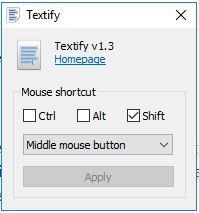
Whatever the case may be, you need the best CD label software for this task.
While many people still use marker pens to write on the CD face, CD labeling software is best for the job as it eliminates the hassle of writing on each CD by hand while saving time and reducing stress on your part.

CD label software has different features based on which brand you prefer.

However, the main features include pre-designed templates, customizable designs, image galleries, import abilities, simple or advanced photo editing tools, and other multimedia you can use.

It is advisable to pick the right CD label software, especially in commercial or industrial settings to avoid messing up your brand’s reputation.

However, we also understand those who are looking for free CD cover software. Here are our top picks for CD label maker software for Windows 10 you can get in the market.

Software nameLabel photo Importing Key feature
Adobe Photoshop✅Detailed photo editing
Adobe Illustrator✅Realistic artwork
Disketch✅Disc & cover designs
Label Factory Deluxe❌Numerous label templates
Acoustica✅Diverse labeling services
Label Maker Pro❌Coloring blends
SureThing Disc Labeler 7✅Image Library

What are the best CD label software for Windows PCs?

Adobe Photoshop – Generative AI designs

best software for calligraphy

It doesn’t matter if you are talking about creating labels, digital art, or doctoring photos, any process that has anything to do with image editing cannot be done without at least mentioning Adobe Photoshop.

This raster-based image editor comes together with the Adobe Creative Suite and acts as the go-to program for anyone that needs to add a little something extra to their photos.

Unlike many other similar tools, Photoshop is great because the toolset allows professionals and veteran users to do whatever they want.

But the simplistic UI prevents beginners from feeling overwhelmed from the get-go.

More so, you can customize the program for any given particular task thanks to its extensive plug-in support.

For example, if you plan on using the program exclusively for creating CD and DVD labels, then you can download a set of plug-ins and libraries that will turn it into a tool dedicated specifically to that task.

Therefore, such a complex editing tool represents the perfect environment to explore your creativity and build something in any form you need.

Here are some of the advantages of using Adobe Photoshop:

  • Popularity means that it works with formats that are supported by all other image editors
  • Can be used for any type of image editing, not just disk label creation
  • Can be customized and tweaked thanks to plug-in support
  • Very compatible with other programs from the Adobe Creative Suite
  • You can try it before you decide to buy it for 7 days

Adobe Photoshop

Adobe Photoshop is one of the best image editors out there so it will do wonders in label making.
Free trial Visit website

Adobe Illustrator – Winning web graphics

If Photoshop is not much your style, then your best bet is a program that is, for all intents and purposes, nearly identical but with a few key differences.

Adobe Illustrator is a world-leading vector-based image editor, and it is especially great for creating digital art and imagery, such as the one you would usually see on disk labels.

Of course, the fact that the program is vector-based has its own perks, such as the fact that the images can be zoomed in and expanded indefinitely without losing any quality.

This means that besides creating CD labels, you can use the same image files to create projects that are very large in size, such as banners and billboards.

Just like Photoshop, you can also test out Illustrator for free during a 7-day trial, along with all other programs included in the Adobe Creative Suite.

That being said, this superior software creates a different world of stunning graphics and colors, also providing support for practical tasks like discs labeling.

Here are some of the advantages of using Adobe Illustrator:

  • Give you access to a very extensive Cloud library
  • Very compatible with other programs from the Adobe Creative Suite
  • allows you to work on multiple projects at the same time
  • Features integration with the Illustrator family of mobile apps
  • You can try it before you decide to buy it for 7 days

Adobe Illustrator

Adobe Illustrator can be a great alternative to Photoshop and it’s a world-leading vector-based image editor.
Free trial Visit website

Disketch – Professional covers and CD labels

A very efficient program for creating and printing CD labels is Disketch Disc Label Software from NCH.

This tool allows you to create professional labels and covers with ease and speed. Choose from the provided templates and personalize labels with your own photos and artwork.

Important features:

  • Label images and text are easy to arrange and format
  • Place text and images on layers
  • A rich selection of text styles
  • Format, resize, and align your text with ease

Label printing also allows you to print on sticky labels, or directly onto printable discs. If you do not have a printer at hand, you can export files to send to a print shop nearby.

You can manually adjust the printing position on a page before printing which is pretty cool for last-minute retouch manipulations.

Moreover, you are able to create disc covers from scratch and personalize your CDs exactly how you like. Thus create significant memories with your loved ones or organize media content efficiently.

So if you need CD labeling software that can do much more, this is a match to create wonderful moments that everyone will enjoy.

Disketch

Make your best CD or DVD covers with label systemization software and try out Disketch Disc Label.
Check price Visit website

Label Factory Deluxe – Kit for creative labels

This CD label software comes with more than 1500 predesigned label formats and templates, 50.000+ clip art images, and over 600 fonts to help you create stunning labels in a jiffy.

With its boxed version, you get a free CD/DVD labeling kit and an applicator.

In three easy steps, you can create your custom labels, and enjoy the powerful, simple CD label application with the most sophisticated features in the industry.

Its wizards help you make simple or complex labels quickly, and you can import data from Excel, Access or Outlook, and create personalized labels using its built-in address book.

Consequently, this tool is all about making your job easier, providing great instruments to help you label discs in the blink of an eye.

Thereby you can forget about old-fashioned ways of labeling CDs or using too complicated software. Practically does the job for you in just a few minutes.

⇒ Get Label Factory Deluxe

Acoustica – Hundreds of label designs

This CD label software requires a 1GHz or faster processor, Windows XP/Vista/7/8/10 OS, 1GB RAM for 32-bit Windows or 2GB for 64-bit, a printer, and 100 MB free hard disk space on your computer in order to use it.

Features include tracking or data management, image or artwork importation, and exporting of label designs in either JPEG, PNG, BMP file formats.

You will also have access to hundreds of complete label designs and over a thousand background images for your use.

Other cool tools it comes with include image effects such as opacity, shadows, contrast and brightness control, plus you can edit and/or format text, typefaces, fonts, and other text properties.

You can also click and drag images, text, and shapes to your preferred position, use a variety of basic colored shape objects on your labels, add layers, and so much more.

One of the unique features is that I need to make a label but I’m in a big hurry wizard, which lets you create complete labels in a quick, short time.

Hence this flexible software offers all the support you need plus comes with such practical features so you only have to watch as it happens.

⇒ Get Acoustica

Label Maker Pro – Online label editing

Design and print labels with this CD label software, whose features include a mailing database, mail merging option, and barcode generator.

Label Maker Pro from Belltech Systems comes with a world of templates, on which you can add your creativity and create your own custom CD labels professionally. You can also link to your Excel or Access data, and do what you want with the labels.

Use it not just for making CD labels, but also labels for letterheads, postcards, envelopes, and other business items in full color.

Thus you can use this multifunctional software to create or print labels easily plus managing data using other desktop apps.

Then nothing stops you from trying this tool with ease, due to its simplistic platform yet great functions of labeling and managing information.

⇒ Get Label Maker Pro

SureThing Disc Labeler 7 – Free trial usage

If you want to create appealing, attention-catching CD labels that draw eyeballs, then Disc Labeler 7 is your go-to label printing software.

It is Windows 10-ready and features a scalable vector graphics capability (WYSIWYG), an image library with thousands of colorful images.

You can use them as backgrounds or clipart, plus symbols but the numbers vary with the edition you select.

You can also create and manage playlists for re-use in future label designs, and use its Circular Text tool to create a text that matches the contour of the CD or DVD edges with any font and size.

If you have your own images, you can insert/import or scan them directly to your label designs and use them as backgrounds, or even create collages and so much more.

It also has photo editing tools and seamless support for most major printer models without the need to change driver settings.

Use its built-in video tutorials to forget lessons, tips, and tricks to help with your labeling experience.

Note icon NOTE
System requirements include Windows 7/8.1/10, 2GB memory (4GB recommended), 400MB free hard disk space, a Windows-compatible printer, and access to the Internet for software activation.

If you’re on Windows XP, you can still get the Disc Labeler 6, otherwise, upgrade to 7 and enjoy the best labeling experience in label printing software.

⇒ Get SureThing Disc Labeler 7

Now that you know the best label printing software you can use, let us know your favorite, or what we may have left out that’s still good to use, in the comments section below.