Torrenting is a type of peer-to-peer file sharing based on the BitTorrent protocol. It enables the distribution of media content with torrent files users can download from websites.
Alas, torrenting has become ridden with copyright legal disputes in recent years.
Such disputes have led to the blocking of torrent websites in various countries, but you can still download torrents from blocked sources with VPN software installed.
To open torrented files, you’ll need BitTorrent client software. The uTorrent software is among the best BitTorrent client packages.
How can I remove ads from uTorrent?
As you already know, there’s a freeware uTorrent version that includes ads. There’s also an ad-free version of uTorrent that’s retailing at $4.95 per year.
However, there is also a way to remove the ads from the freeware uTorrent. And this is what we will explore in today’s guide.
We will show you how to download and install the app, then how to remove the ads from it using the settings. Here we go!
Click Download uTorrent Web to save the setup wizard.
Open uTorrent’s Install Wizard, and click the Next buttons.
Click the Agree button.
Select the Decline options to turn down additional software offers.
Select the Create Desktopicons and Start menu checkboxes to set up some shortcuts for uTorrent.
Press the Next button.
Additional configuration options will open. Select the Add an exception for uTorrent in Windows Firewall option.
Select all the File Types checkboxes.
Press the Next button to install.
Thereafter, click the Finish button.
2. Remove ads from uTorrent
There is a way to remove ads on uTorrent without having to pay for the ad-free premium version. What you have to do is manually modify Advanced options to configure the app to no longer show ads.
1. Open uTorrent.
2. Click theOptions button in the upper-left corner of the screen.
3. Select Preferences from the options.
4. Click Advanced to open a list of flag options for uTorrent.
5. Next, you’ll need to find each of the following flags by entering them separately in the Filter search box:
offers.left_rail_offer_enabled
offers.sponsored_torrent_offer_enabled
gui.show_plus_upsell
bt.enable_pulse
gui.show_notorrents_node
offers.content_offer_autoexec
6. Select theFalseoptions for each of the above flag settings.
7. Select theApplyoption.
8. Click theOKbutton to exit the Preferences window.
9. Click theXbutton at the top right of the uTorrent window to close it.
10. Right-click the system tray icon for uTorrent and selectExit.
11. Click theYesbutton to confirm.
12. Thereafter, restart theuTorrent app. Now uTorrent will no longer include any ads.
As you can see, you don’t need to upgrade to the paid version to remove uTorrent ads.
However, the premium version also comes with premium support and streamlined torrenting that you don’t get in the freeware alternative.
Overall, the premium version delivers just want it advertises, a premium experience and if that’s what you envision, you might want to reconsider your budget and go ahead and give it a try.
To upgrade to the ad-free version, click Options > Get uTorrent in uTorrent and select the Upgrade to Ad-free option.
Let us know if you found this guide helpful by using the comment section below.
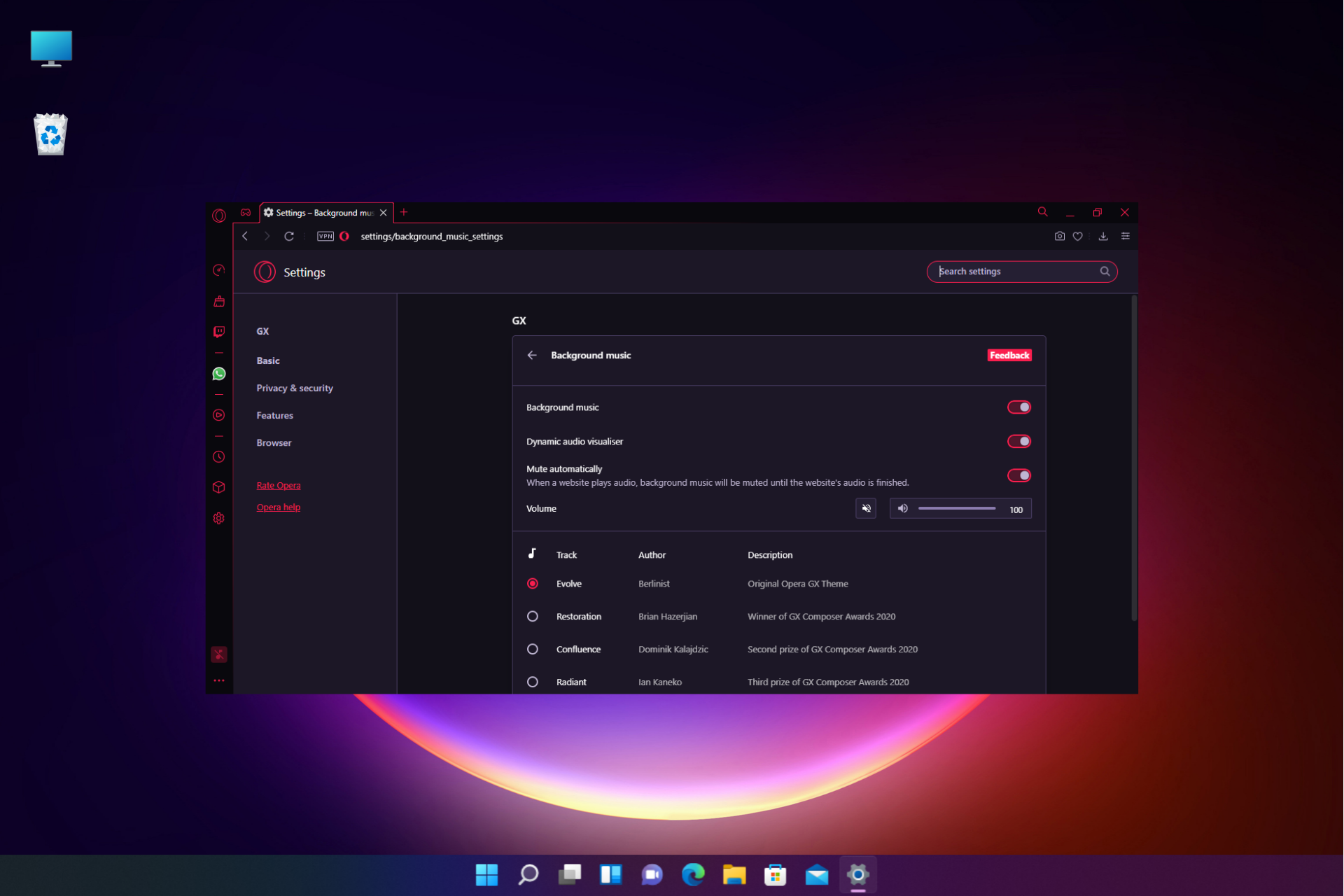
If background music not working in Opera GX, you won’t able to enjoy in full browser customization, but there are ways to fix this issue.
Issues with Opera configuration files can cause this problem, as well as hardware acceleration. Your audio and background music settings can also affect this feature.
How do I get background music to work on Opera GX?
Before we start, search your PC for Opera GX Installer folders and remove them. Disabling extensions, such as Bitwarden, can also fix the problem.
1. Remove Opera configuration files
Close Opera GX completely.
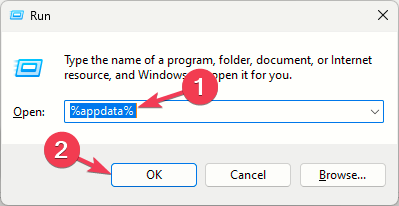
Press Windows key + R and type %appdata% and click OK.
Next, navigate to the following directories: Opera Software\Opera GX Stable
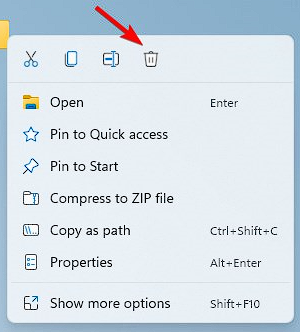
Locate and delete theme and theme backup folders.
Start Opera GX again.
2. Select the correct audio output device
Press the Win + R keys together on your PC to open the Run console.
In the search field, type mmsys.cpl and hit Enter.
In the Sound dialogue, under the Playback tab right-click on the correct output device and select Set as default.
Press Apply and then OK to save the changes and exit.
3. Turn off hardware acceleration
Click the Menu button and choose Settings.
Scroll all the way down and click on Advanced.
Next, locate Use graphics acceleration when available and disable it.
Restart your browser.
In some instances, you just need to disable this feature and enable it back again to fix the problem.
4. Enable background music in Opera settings
Open the Opera GXbrowser and click on Settings on the sidebar.
In the Opera settings window, type background music in the search bar.
Next, click on Background music below.
Now, go to Background music and turn it on.
Lastly, check for the volume slider and move it to the right to turn up the volume.
You must already be aware, but we have to remind everyone that Microsoft also releases security updates for some of the obsolete operating systems, during Patch Tuesday.
That means that not only Windows 10 and 11 users will receive new software. We’re also looking at Windows 7, Windows 8, and various Server versions as well.
Also, we’ve provided download links to the security updates that Adobe released for its suite of products during the same event.
However, now, let’s take a closer look at what Windows 7 and Windows 8 users were given to work with on the August 2022 Patch Tuesday.
What does the August 2022 Patch Tuesday bring?
The Redmond-based tech colossus has just released Patch Tuesday updates for Windows 8.1, in the form of KB5016681, and Windows 7, in the form of KB5016676.
Needless to say, they each come with a whole host of improvements and known issues with some pretty neat workarounds.
Addresses an issue in which Speech and Network troubleshooters will not start.
Addresses an issue that might cause the Local Security Authority Server Service (LSASS) to leak tokens. This issue affects devices that have installed Windows updates dated June 14, 2022 or later. This issue occurs when the device performs a specific form of service for user (S4U) in a non-Trusted Computing Base (TCB) Windows service that runs as Network Service.
Enforces a hardening change that requires printers and scanners that use smart cards for authentication to have firmware that complies with section 3.2.1 of RFC 4556. If they do not comply, Active Directory domain controllers will not authenticate them. Mitigations that allowed non-compliant devices to authenticate will not exist after August 9, 2022. For more information about this change, see KB5005408.
Known issues
After installing this update and restarting your device, you might receive the error, “Failure to configure Windows updates. Reverting Changes. Do not turn off your computer”, and the update might show as Failed in Update History.
Addresses an issue in which Speech and Network troubleshooters will not start.
Addresses an issue that might cause the Local Security Authority Server Service (LSASS) to leak tokens. This issue affects devices that have installed Windows updates dated June 14, 2022 or later. This issue occurs when the device performs a specific form of service for user (S4U) in a non-Trusted Computing Base (TCB) Windows service that runs as Network Service.
Enforces a hardening change that requires printers and scanners that use smart cards for authentication to have firmware that complies with section 3.2.1 of RFC 4556. If they do not comply, Active Directory domain controllers will not authenticate them. Mitigations that allowed non-compliant devices to authenticate will not exist after August 9, 2022. For more information about this change, see KB5005408.
Known issues
There are currently no known issues reported by Microsoft.
If you are feeling a tad uncomfortable, it’s because we’re already in August and the temperatures are starting to slowly build up in our offices.
Windows users, however, are looking towards Microsoft in hopes that some of the flaws they’ve been struggling with will finally get fixed.
We’ve already provided the direct download links for the cumulative updates released today for Windows 10 and 11, but now it’s time to talk about Critical Vulnerabilities and Exposures again.
This month, the Redmond tech giant released 121 new patches, which is a lot more than some people were expecting right after Easter.
These software updates address CVEs in:
Microsoft Windows and Windows Components
Azure Batch Node Agent
Real Time Operating System
Site Recovery, and Sphere
Microsoft Dynamics
Microsoft Edge (Chromium-based)
Exchange Server
Office and Office Components
PPTP
SSTP
Remote Access Service PPTP
Hyper-V
System Center Operations Manager
Windows Internet Information Services
Print Spooler Components
Windows Defender Credential Guard
All of this is beside the 17 CVEs patched in Edge (Chromium-based) and three patches related to secure boot from CERT/CC, which actually brings the total number of CVEs to 141
Microsoft provides fixes for 121 flaws in August 2022
It’s pretty much safe to say that this wasn’t either the busiest or the lightest month for Redmond-based security experts.
You might like to know that, out of the 121 new CVEs released, 17 are rated Critical, 102 are rated Important, one is rated Moderate, and one is rated Low in severity.
Please keep in mind that two of these bugs are listed as publicly known, and one is listed as under active attack at the time of release.
Chromium: CVE-2022-2624 Heap buffer overflow in PDF
Medium
N/A
No
No
RCE
You should know that the month of August brings no less than 34 updates just for the Azure Site Recovery component.
This brings the tally up to 66 updates for this component in July and August, which is a pretty big number even by Microsoft standards.
For August 2022, there are two RCE bugs, one DoS, and 31 EoP vulnerabilities being fixed, just to clarify the situation.
All of the above-mentioned bugs involve the VMWare-to-Azure scenario. That being said, if you use Azure Site Recovery, you will need to update to 9.50 to be protected.
Also, there are nine other code execution bugs fixed through this month’s Patch Tuesday rollout, including another bug in MSDT that is not under active attack for the time being.
We’re also looking at two bugs in the Windows Defender Credential Guard, both of which could allow an attacker to access Kerberos-protected data.
Before we conclude, let’s also state the fact that seven different Denial-of-Service (DoS) vulnerabilities received fixes this month, including the above-mentioned Outlook and Azure Site Recovery bugs.
You can track all of the CVEs addressed this month from the list above, and be aware of everything that is happening.
Looking forward, the next Patch Tuesday security update rollout will be on the 13th of September, which is a bit sooner than some expected it.
Have you found any other issues after installing this month’s security updates? Share your opinion in the comments section below.
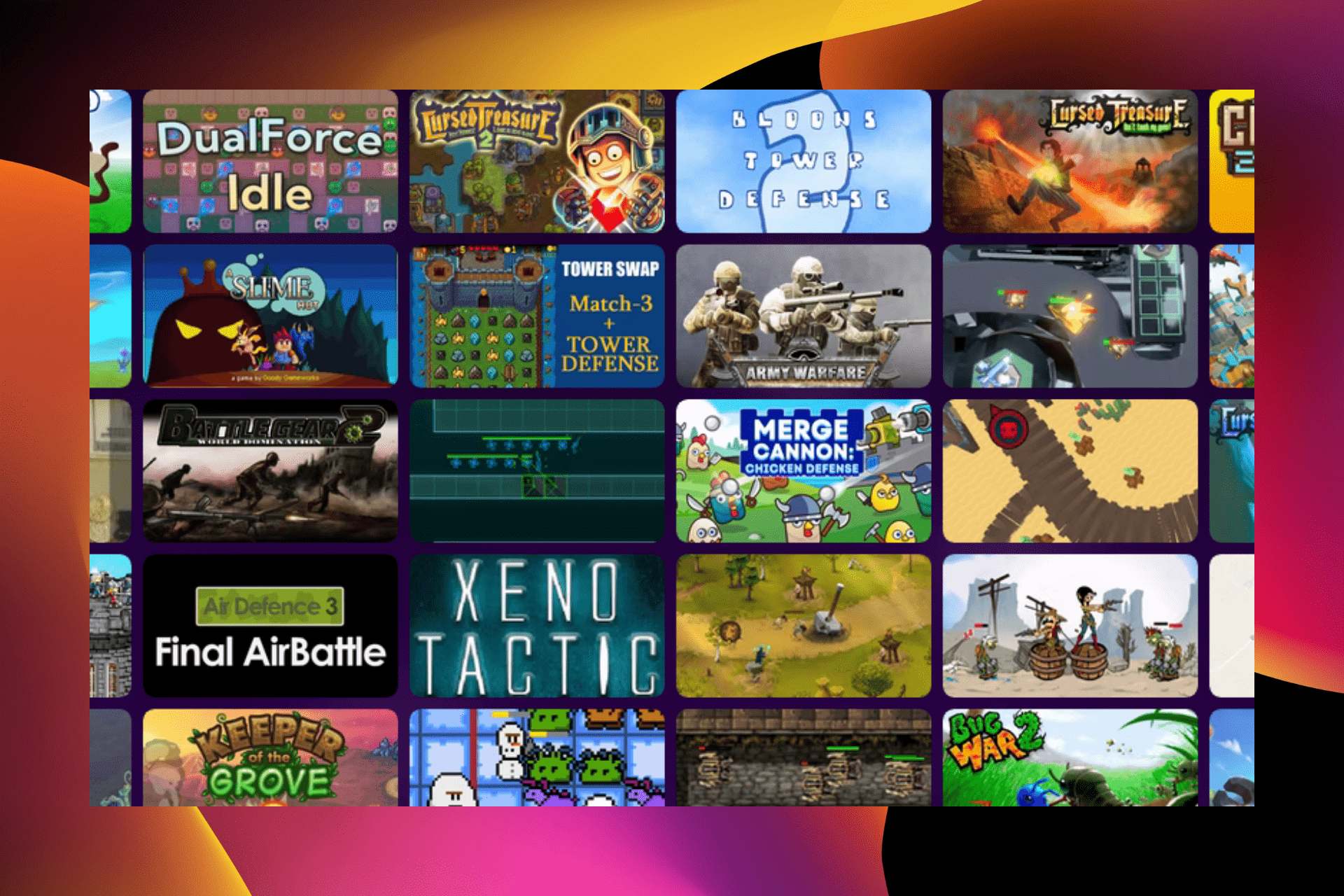
Tower defense browser games, unlike some other browser games, are pretty enjoyable and creative. They are built with stunning graphics and pack in impressive gameplay, usually found in sophisticating games.
What’s more, they do not require the best gaming laptops to get maximum value from them. They are online games designed to deliver a superb gaming experience.
However, not all tower defense browser games are worth your time. That’s why we have gathered a list of some of the best for you to choose from.
What is a TD game?
A TD or Tower Defense game is basically one where players have to defend their territory against opponents/enemies by setting up structures and obstructing the path, thereby making it harder for others to attack them.
These are a subgenre of strategy games where structures could be used to defend the territory, impede the attack, lower its impact, or attack the enemy forces. Tower Defense games have been extremely popular amongst the community and have a huge fanbase.
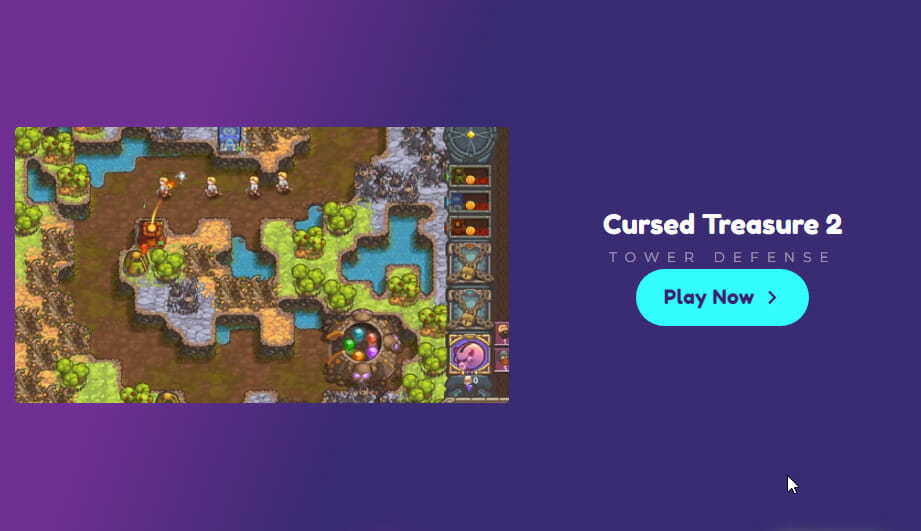
The Cursed Treasure 2, one of the best Tower Defense online HTML5 games, is the improved version of the already stunning Cursed Treasure game. It is a game for intelligent minds, as it requires you to build your towers strategically to defend against attacks from enemies and bosses.
The graphics are amazing, and it also boasts a whopping 24 levels that can get you addicted quickly. Lastly, you only need your trackpad and the left mouse to carry out all its activities.
This is an inverted tower-defense-style game where you have to command the snowman’s army and lead them to victory. Your work’s cut out, as the critters have already taken over the territory.
You need to plan carefully and place the troops strategically to regain the lost territories from the enemies. To make things more interesting, the game generates the levels randomly. Hence, if you fail, the elements will differ when you start again.
Clone 2048 is a game that takes you on a journey into the future. It is a merge game sprinkled with some action to keep it lively and interesting.
It is centered on a doctor investigating a planet infected by an unknown virus and littered with zombies in 2048. Your task is to aid this investigation and protect the world from zombies by strategically positioning the doctor’s clone soldiers.
Army Warfare – Ideal if you love fast-paced battles
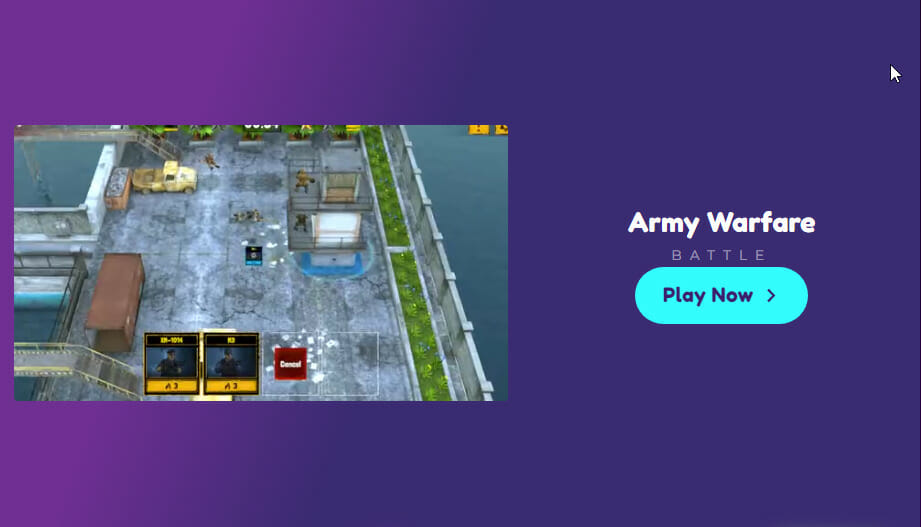
The Army Warfare game is for you if you love fast-paced battles. It is a superb battle arena game that provides you decks of cards to take down your enemy’s towers at pace.
Things get more interesting the deeper you go. You get to unlock new cards and skills to defend your tower and attack your enemy at the same time.
The controls are pretty easy to master. It requires just the mouse left-click, mouse scroll, and the arrow keys.
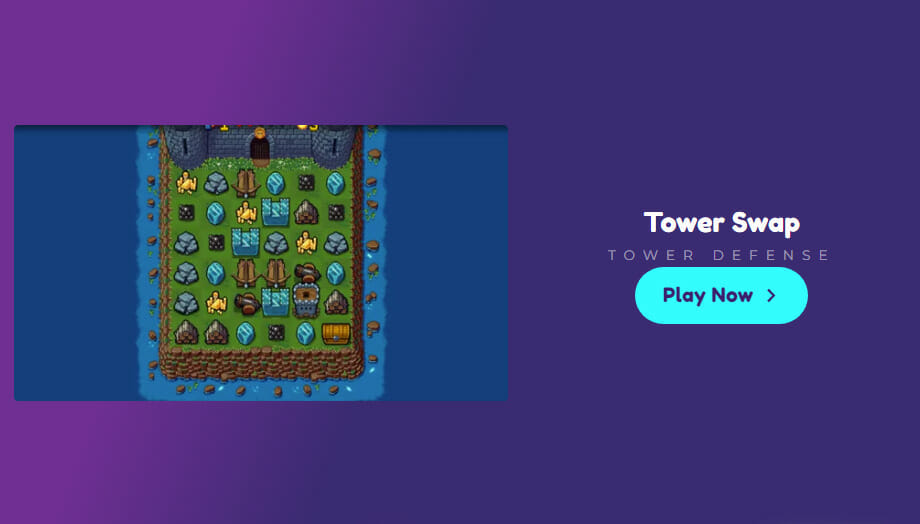
Tower Swap is a tactical game that combines match-3 mechanics with clever tower defense. Your task is to protect your castle against dragons by building towers through creative tile machines.
Aside from defending, you also get to build attacking weapons by combining three pieces of the same resources. The controls are pretty straightforward as you only need to click and drag your mouse.
Battle Gear 2 – Plan each mission in different formats
If you have ever-watched war movies and felt fully immersed in them, this is a game for you. It simply puts you in the role of a Commander in a great war of nations. Your task will be to develop strategies to lead your troops to victory.
Battle Gear 2 offers so much flexibility, as you can plan each mission in different formats. Your success and failure solely depend on how strategic you are.
If you were looking for free Tower Defense games for PC, this is a relentless game that requires you to defend your castle nonstop. The enemies here are waves of aggressive chickens that mount a continuous assault against your home.
To progress, you need to protect the wall and, at the same time, upgrade your weapons through merging. However, you don’t have time to sort things, as the waves of chickens keep coming.
Thankfully, the control is pretty easy as you only need your mouse to play the game.
If you are an action game lover, you would surely find this game enticing. It is built around two characters (Pedro and Juana) surrounded by zombies. You need to ensure you kill waves of zombies in each level to have the chance of continuing.
You can use different weapons such as pistols and shotguns for your defense. To make things more interesting, you can unlock some sophisticated weapons as you progress.
Bug War 2 – Improves your logic and planning skills
Bug War 2 is a multi-faceted desktop Tower Defense game where you need to occupy as many enemies’ towers as possible. Your task is to destroy your enemies’ colony.
You lead your insects into battle to attack and capture the enemy’s castle while also defending yours. With this game, you can effectively improve your logic and planning skills, as any mistake results in defeat.
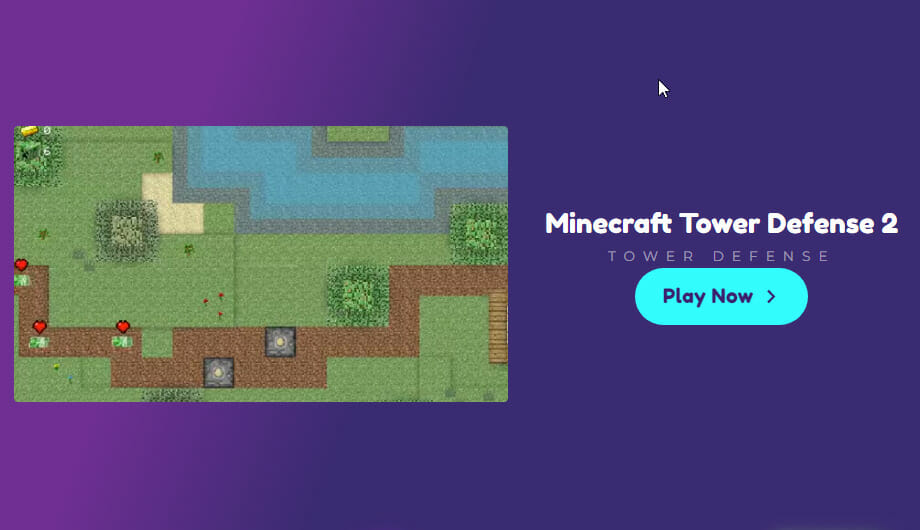
This game is a tower defense game created on the template of the well-known Minecraft. It features a tactical game that takes you through multiple stages to stay alive.
Foremost, you need to make your path to your desired destination and create a home there. This same path will lead dangerous creatures such as zombies and wolves to you. Your task is to ensure these creatures never reach your home.
There are several excellent gaming platforms to play online games for free. These offer both single-player and multi-player options to users. Miniclip is, by far, the most popular platform, but there’s no dearth of these for game lovers.
Check out the best gaming platforms offering free titles, and choose the one where the gameplay and user interface suit you.
While there are a series of games you can play on your browser, the tower defense games sharpen your creativity. The above list contains some juicy options that are hard to overlook
As you already know, the seventh round of the monthly Patch Tuesday updates of 2022 have arrived, and they bring an entire array of changes for both Windows 10 and Windows 11, regardless of whether it is a newer or an older version.
The August 2022 Patch Tuesday updates are expected to fix some of the issues that were still pending, and in the article below we will be looking to see exactly what we get.
We’ve included detailed changelogs for each cumulative update, and we will also be providing you with direct download links from Microsoft’s Windows Update Catalog, so you know that they are secure.
Alternatively, you can always use other methods to get the latest updates, including:
The Windows Update menu on your OS
The WSUS (Windows Server Update Service)
Group Policies set up by your admins if you’re part of a larger network.
Changes included in the May Patch Tuesday Updates
Windows 11
As most of you know by now, Microsoft released its latest operating system, Windows 11, on the 5th of October, 2021.
Five months after the general rollout, the new OS seems to become increasingly stable and far less buggy than we’ve gotten used to.
You might also like to know that the 22H2 version of Windows 11, the operating system’s first major update, has already been declared feature complete.
It will, most likely, come in the first half of the year, so we might just get it until the summer. Of course, there is a possibility that the Redmond tech giant could postpone to the third, or fourth quarter.
Addresses an issue in UIAutomation() that causes an application to stop working.
Addresses an issue that prevents the Startup Task API from working as expected for certain apps.
Improves the reliability of a push-button reset after an OS upgrade.
Addresses an issue that makes the tenant restrictions event logging channel inaccessible if you remove the EN-US language pack.
Addresses an issue that causes certificate-based machine account authentication to fail in some circumstances after you install the May 10, 2022 security updates on domain controllers.
Addresses an issue that affects the Arm64EC code you build using the Windows 11 software development kit (SDK).
Updates the Remove-Item cmdlet to properly interact with Microsoft OneDrive folders.
Addresses an issue that prevents certain troubleshooting tools from opening.
Addresses an issue that causes port mapping conflicts for containers.
Addresses an issue that causes Code Integrity to continue trusting a file after the file has been modified.
Addresses an issue that might cause Windows to stop working when you enable Windows Defender Application Control with the Intelligent Security Graph feature turned on.
Deploys search highlights to devices. To access the policy for search highlights (on a device that has installed the June 2022 Cumulative Update Preview or July 2022 monthly quality update), go to C:\Windows\PolicyDefinitions and locate Search.admx. For your convenience, we will be publishing an updated version of the Administrative Templates (.admx) for Windows 11, version 21H2 to the Microsoft Download Center soon.
Addresses an issue that causes explorer.exe to stop working when you use the play and pause keyboard buttons on certain devices.
Addresses an issue that causes explorer.exe to stop working when you use the Start menu’s context menu (Win+X) and an external monitor is connected to your device.
Addresses an issue that displays a blank window that you cannot close when you hover over the search icon on the taskbar.
Reduces the overhead of resource contention in high input/output operations per second (IOPS) scenarios that have many threads contending on a single file.
Addresses an issue that causes the Windows profile service to fail sporadically. The failure might occur when signing in. The error message is, gpsvc service failed to sign in. Access denied.
Addresses a known issue that might prevent some of you from opening the Start menu. On the affected devices, clicking or tapping the Start button or using the Windows keyboard shortcut might have no effect.
Known issues
After installing this update, IE mode tabs in Microsoft Edge might stop responding when a site displays a modal dialog box. A modal dialog box is a form or dialog box that requires the user to respond before continuing or interacting with other portions of the webpage or app.
After installing this update, XPS Viewer might be unable to open XML Paper Specification (XPS) documents in some non-English languages, including some Japanese and Chinese character encodings. This issue affects both XML Paper Specification (XPS) and Open XML Paper Specification (OXPS) files. When encountering this issue, you may receive an error, “This page cannot be displayed” within XPS Viewer or it might stop responding and have high CPU usage with continually increasing memory usage. When the error is encountered, if XPS Viewer is not closed it might reach up to 2.5GB of memory usage before closing unexpectedly.
Windows 10 v21H2 is the latest major version of Windows 10, and as such has the most experimental features on it.
Fortunately, most bugs that were first present when it was first made available have been weeded out, and this version of Windows 10 is far more stable.
Addresses an issue that might cause the Local Security Authority Server Service (LSASS) to leak tokens. This issue affects devices that have installed Windows updates dated June 14, 2022 or later. This issue occurs when the device performs a specific form of service for user (S4U) in a non-Trusted Computing Base (TCB) Windows service that runs as Network Service.
Addresses an issue that creates a duplicate print queue. This causes the original print queue to lose functionality.
Addresses a known issue that might prevent the Input Indicator and Language Bar from displaying in the notification area. This issue affects devices that have more than one language installed.
Known issues
Devices with Windows installations created from custom offline media or custom ISO image might have Microsoft Edge Legacy removed by this update, but not automatically replaced by the new Microsoft Edge. This issue is only encountered when custom offline media or ISO images are created by slipstreaming this update into the image without having first installed the standalone servicing stack update (SSU) released March 29, 2021 or later.
After installing this update, IE mode tabs in Microsoft Edge might stop responding when a site displays a modal dialog box. A modal dialog box is a form or dialog box that requires the user to respond before continuing or interacting with other portions of the webpage or app.
Microsoft has received reports of issues affecting some printing devices following installation of this update. Symptoms observed may include duplicate copies of printers installed on a device (commonly with a similar name and the suffix “Copy1”), and applications which refer to the printer by a specific name cannot print.
After installing this update, XPS Viewer might be unable to open XML Paper Specification (XPS) documents in some non-English languages, including some Japanese and Chinese character encodings. This issue affects both XML Paper Specification (XPS) and Open XML Paper Specification (OXPS) files. When encountering this issue, you may receive an error, “This page cannot be displayed” within XPS Viewer or it might stop responding and have high CPU usage with continually increasing memory usage. When the error is encountered, if XPS Viewer is not closed it might reach up to 2.5GB of memory usage before closing unexpectedly.
This version of the OS is outdated and will no longer receive any updates from the tech company. Users that are still running this old version on their devices are strongly advised to choose a more recent one to update to.
If you still want to use Windows 10 and are not willing to upgrade to 11, you don’t have to do so right away. After all, Microsoft announced that the support for Windows 10 will go on until 2025.
Addresses an issue that might cause the Local Security Authority Server Service (LSASS) to leak tokens. This issue affects devices that have installed Windows updates dated June 14, 2022 or later. This issue occurs when the device performs a specific form of service for user (S4U) in a non-Trusted Computing Base (TCB) Windows service that runs as Network Service.
Known Issues:
After installing KB4493509, devices with some Asian language packs installed may receive the error, “0x800f0982 – PSFX_E_MATCHING_COMPONENT_NOT_FOUND.”
After installing KB5001342 or later, the Cluster Service might fail to start because a Cluster Network Driver is not found.
Windows 10, version 1607 has reached the end of service for all of its available editions. Update to the latest version of Windows 10 in order to keep your system protected.
Addresses an issue that causes searchindexer.exe to stop responding during a dismount operation in the Remote Desktop setup environment.
Addresses an issue that redirects the PowerShell command output so that transcript logs do not contain any content. Transcript logs might contain decrypted passwords if you turn PowerShell logging on. Consequently, the transcript logs lose the decrypted passwords.
Addresses a known issue that might prevent you from using the Wi-Fi hotspot feature. When attempting to use the hotspot feature, the host device might lose the connection to the internet after a client device connects.
Addresses an issue that prevents the use of Encrypted File System (EFS) files over a Web-based Distributed Authoring and Versioning (WebDAV) connection.
Addresses an issue that causes Microsoft NTLM authentication using an external trust to fail. This issue occurs when a domain controller that contains the January 11, 2022 or later Windows update services the authentication request, is not in a root domain, and does not hold the Global Catalog role. The affected operations might log the following errors:
The security database has not been started.
The domain was in the wrong state to perform the security operation.
0xc00000dd (STATUS_INVALID_DOMAIN_STATE).
Addresses an issue that causes the primary domain controller (PDC) of the root domain to generate warning and error events in the System log. This issue occurs when the PDC incorrectly tries to scan outgoing-only trusts.
Addresses an issue that might damage BitLocker virtual machine-based (VM) system files if you expand the BitLocker partition while the VM is offline.
Addresses a known issue that prevents Windows servers that use the Routing and Remote Access Service (RRAS) from correctly directing internet traffic. Devices that connect to the server might not connect to the internet, and servers might lose connection to the internet after a client device connects to them.
Have you noticed any issues after downloading and installing these security updates for your version of the Windows operating system? Let us know in the comments section below.
Mozilla Firefox has a ton of built-in features, including developer tools like the console. However, users have reported that their console.log is not showing anything when they run it. Keep reading to find a solution to fix console.log if it’s not working in Firefox.
What does the console do?
The console in a browser is a sandbox that allows users to test code in JavaScript. The purpose of the log is to display and keep track of any code. Typically for browsers, the console is used for debugging things. If users want to write messages to the console, the prefix is console.log.
Most if not all browsers provide users access to the console. The workings of the console may vary from browser to browser but it’s typically very similar. If you encounter issues with Chrome and need to enable JavaScript, we have solutions for that as well.
Quick Tip:
If you have frequent problems with Firefox, try Opera GX instead. It offers quick and easy developer tools, including a built-in feature that lets you check your page’s script.
On top of that, the browser is very light and you can actually manage how much RAM, CPU and bandwidth goes into each tab to avoid any errors or freezes while working.
Opera GX
Use Opera GX’s built-in console and benefit from secure and fast browsing!
How do I fix console.log if not working in Firefox?
1. Enable logging
Enter the full console by right-clicking the page and selecting Inspect (or press Ctrl + Shift + K).
Click on the Console tab.
Ensure that Logs is highlighted in grey to make sure it’s enabled.
Click on the gear in the top right corner.
Check Persist logs.
If the console isn’t showing anything, it may be because the logs are disabled. Try enabling them and then checking persist logs to remember that setting for each page load. This will keep your console content including logs.
You can also inspect how your scripts load by generating a HAR file, which captures page activity and helps you diagnose errors that do not appear in the console.
Open the Firefox menu by clicking on the three lines in the top left corner and selecting Add-ons and themes.
Under Manage Your Extensions, disable each add-on by clicking on the switch.
Restart Firefox.
Users have reported encountering issues with the console and the lead cause being a faulty add-on. Try disabling all your extensions and then running console.log again to see if the problem persists.
If it doesn’t, you can determine which add-on is the faulty one by enabling each one individually and seeing which causes issues. Many users reported encountering this issue with the Firebug extension.
We hope one of the solutions on the guide helped you fix console.logs if it’s not working Firefox. If you’re having issues with the border radius not working in Firefox, we have a guide for that as well.
If you want to disable Edge on Windows 11, this article is for you.
Microsoft Edge is the default browser on Windows 11, but many users don’t like it. Even though it went through a major overhaul, some are still determined not to switch to it. If that’s you, keep reading.
How can I disable Microsoft Edge in Windows 11?
1. Change file associations
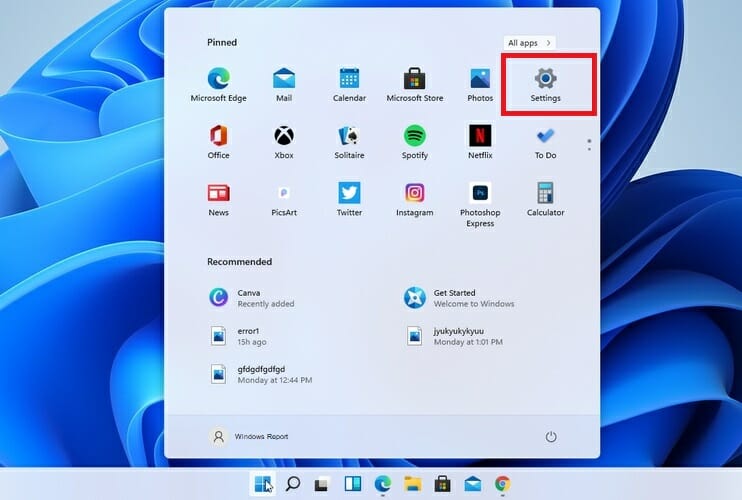
Click Start and select Settings from the menu.
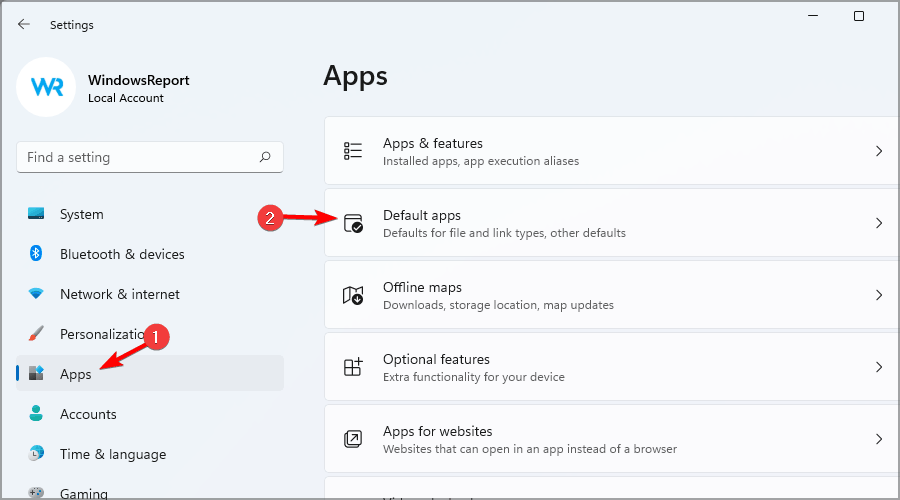
Navigate to Apps in the left pane. In the right pane, select Default apps.
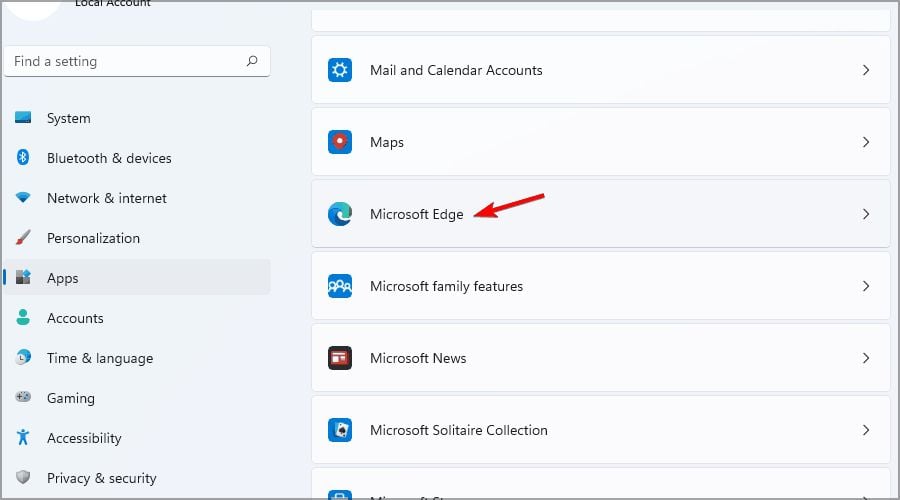
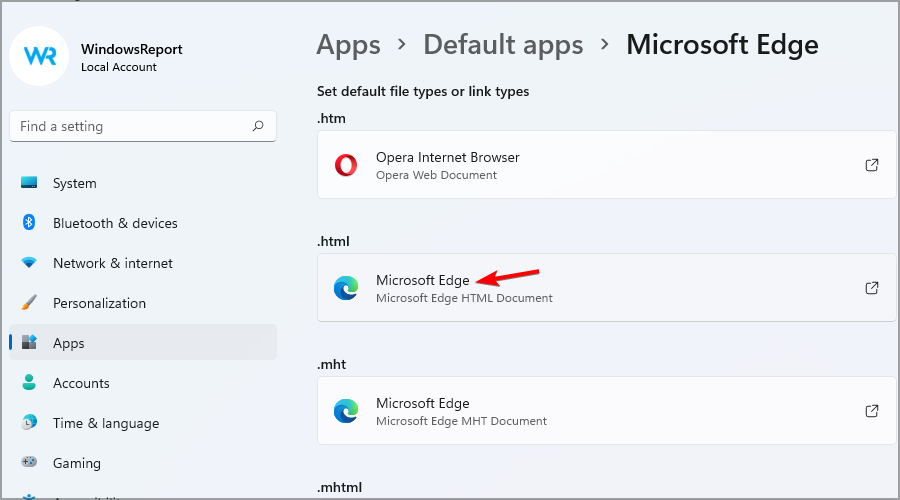
Select Microsoft Edge from the list of apps.
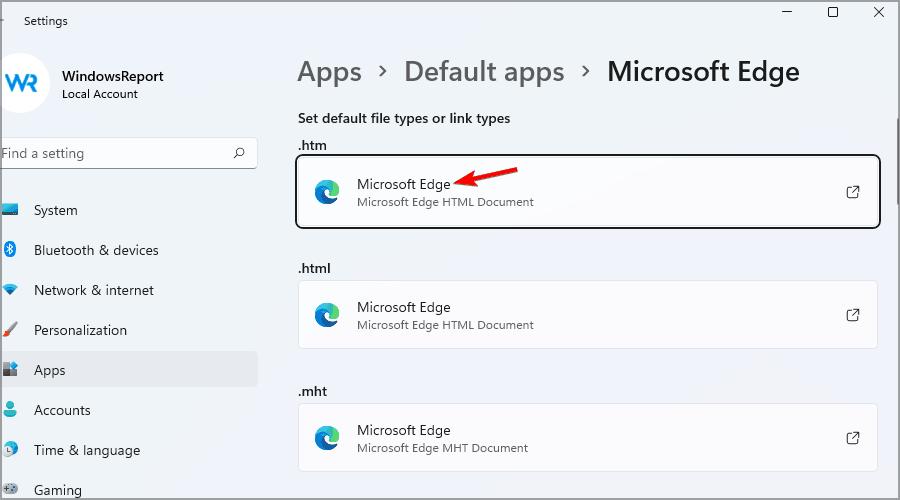
Select the first file type.
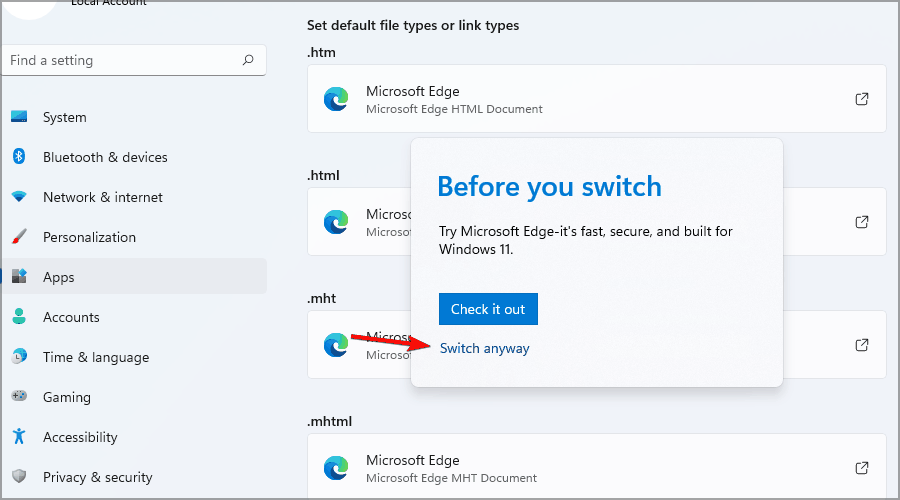
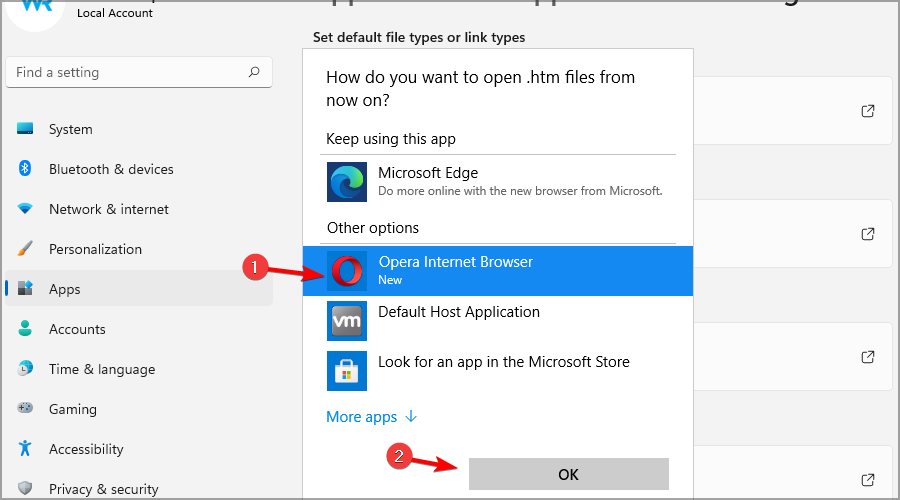
You’ll get a message asking you not to switch. Choose Switch anyway.
Select the desired browser and click OK.
Now select the next file type on the list, and choose your desired browser.
Repeat this step until you’ve replaced all instances of Microsoft Edge.
Wait for the process to complete and restart your PC.
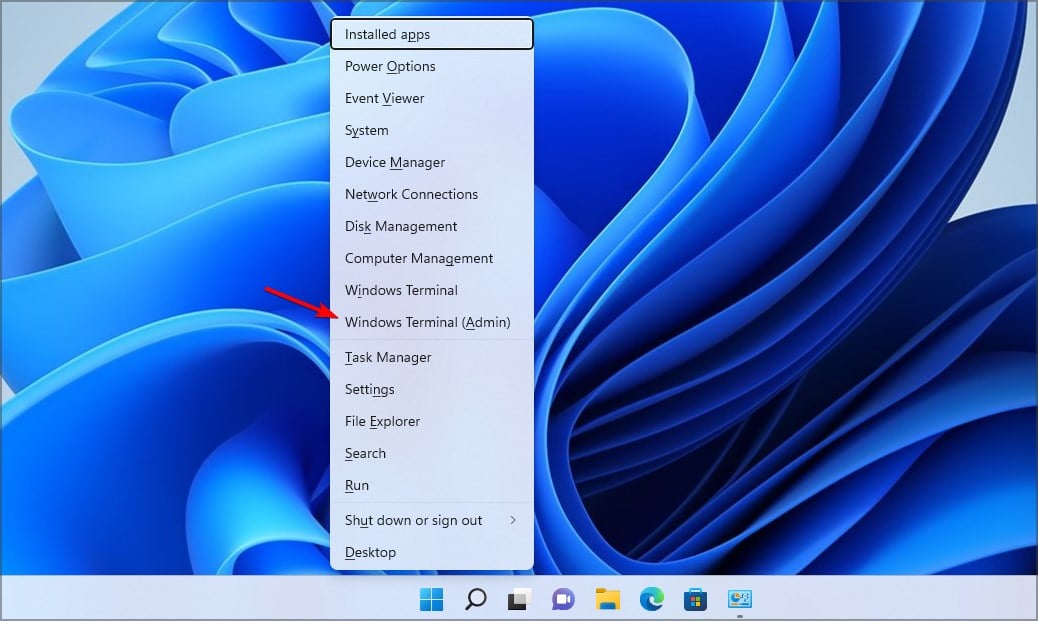
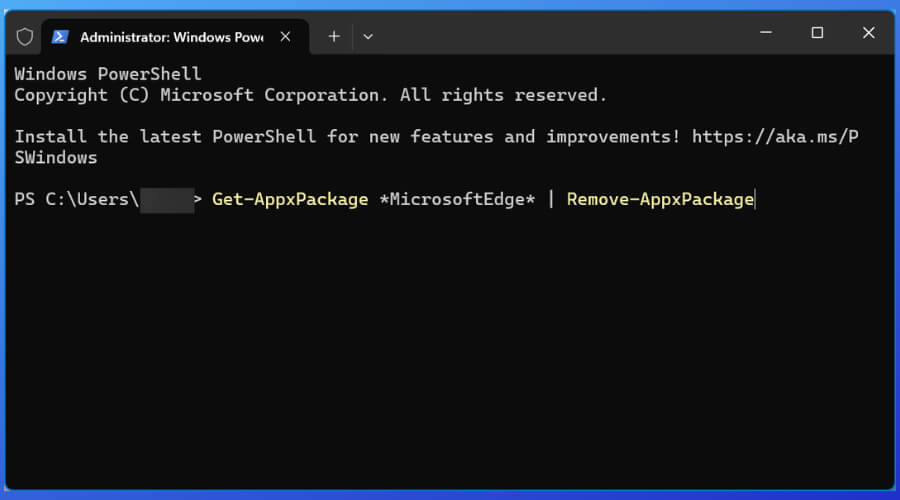
Using Powershell will completely remove the app from your computer. However, you might have to keep it in check.
Since Edge is a Microsoft application, Windows updates or other system processes might reinstall it.
Why does Edge make it hard to change your default browser?
Microsoft made changing the default applications in Windows 11 a bit different. When you start a new browser, you’ll have an option to make it a default one.
If you ignore this message, you’ll have to manually assign each file type to work with the desired browser. This is a lengthy process, and it can take a couple of minutes to complete.
In previous versions of Windows, you just had to change the default web browser, and the file associations would be changed automatically.
This isn’t the case anymore, and we don’t know why did Microsoft make this change, but we feel that this is a step in the wrong direction.
Can Microsoft Edge work with Chrome extensions?
Microsoft Edge is built on a Chromium engine, and it fully supports most Chrome extensions. This feature isn’t enabled by default, but you can enable it by doing as described below and keep using this browser if this was your main concern:
Open Microsoft Edge.
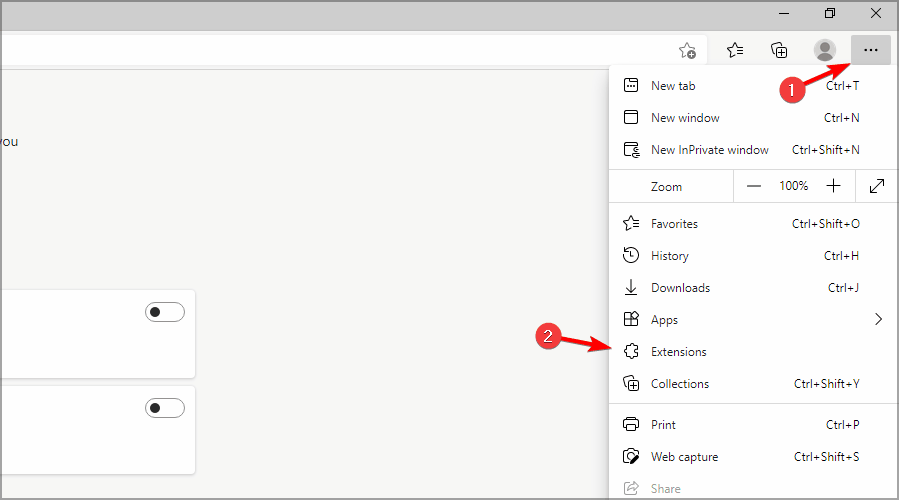
Click the Menu icon in the top right corner and choose Extensions.
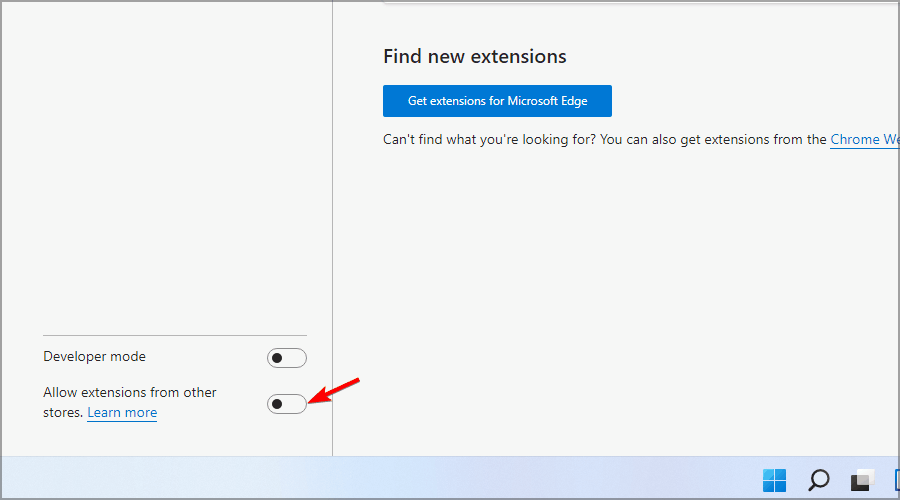
Now select Allow extensions from other stores.
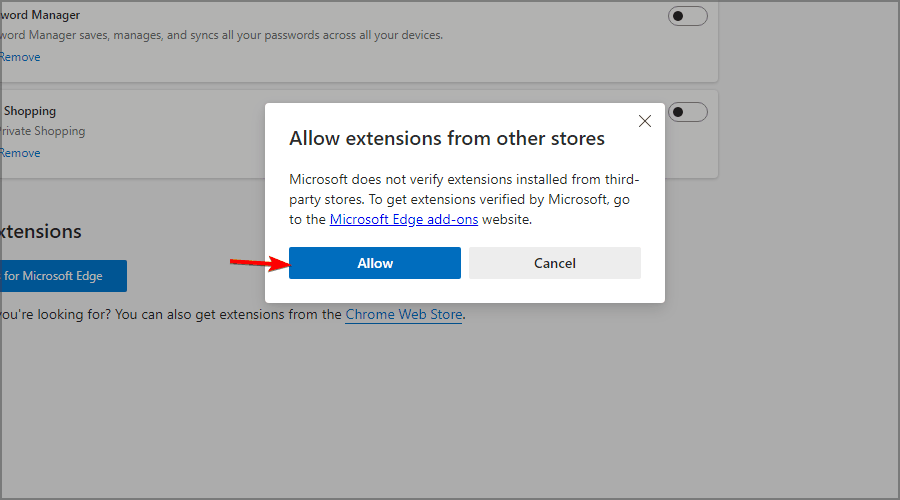
A confirmation dialog will appear. Click on Allow.
Microsoft Edge can sometimes be persistent, but we hope that you managed to disable it by following the instructions above.
How to disable the Microsoft Edge update?
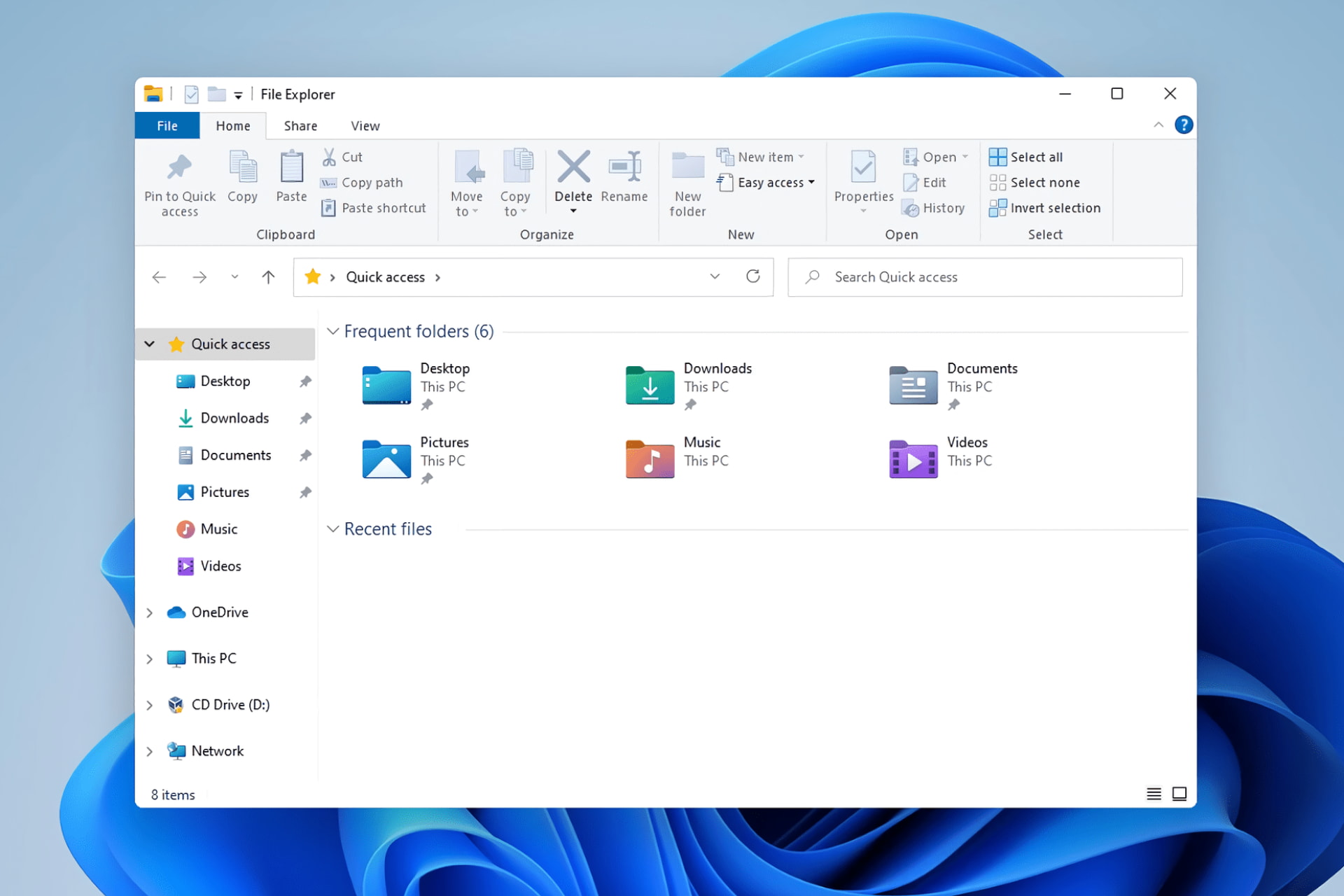
Press Win + E to open File Explorer.
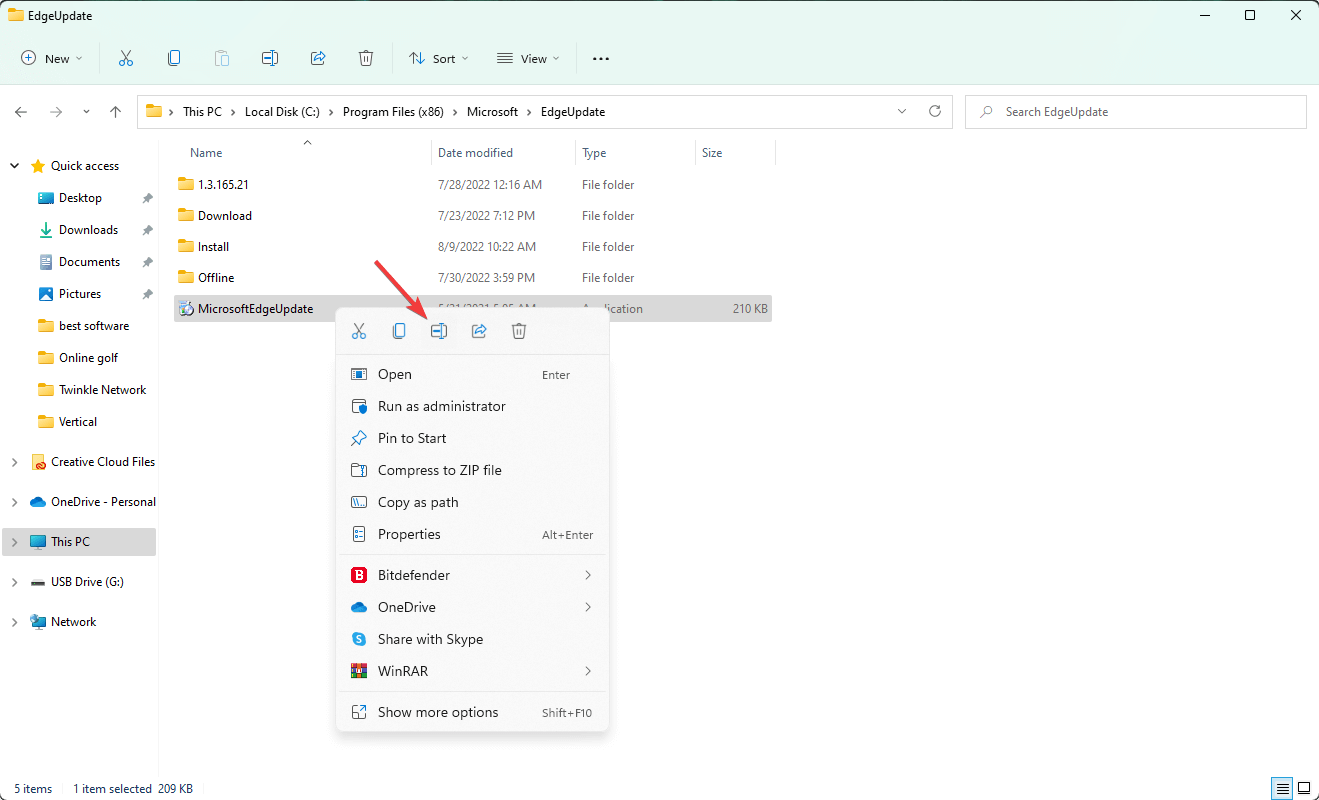
Go to the following location: C:\Program Files (x86)\Microsoft\EdgeUpdate
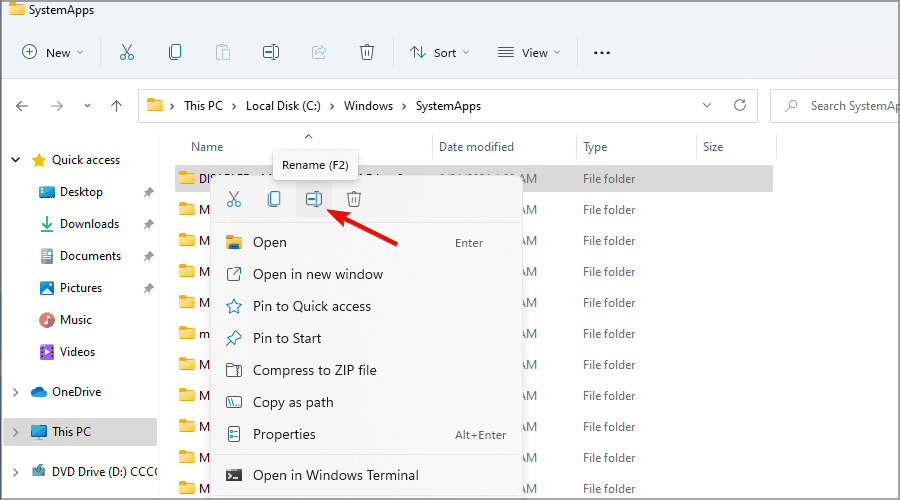
Right-click on MicrosoftEdgeUpdate and click on Rename icon.
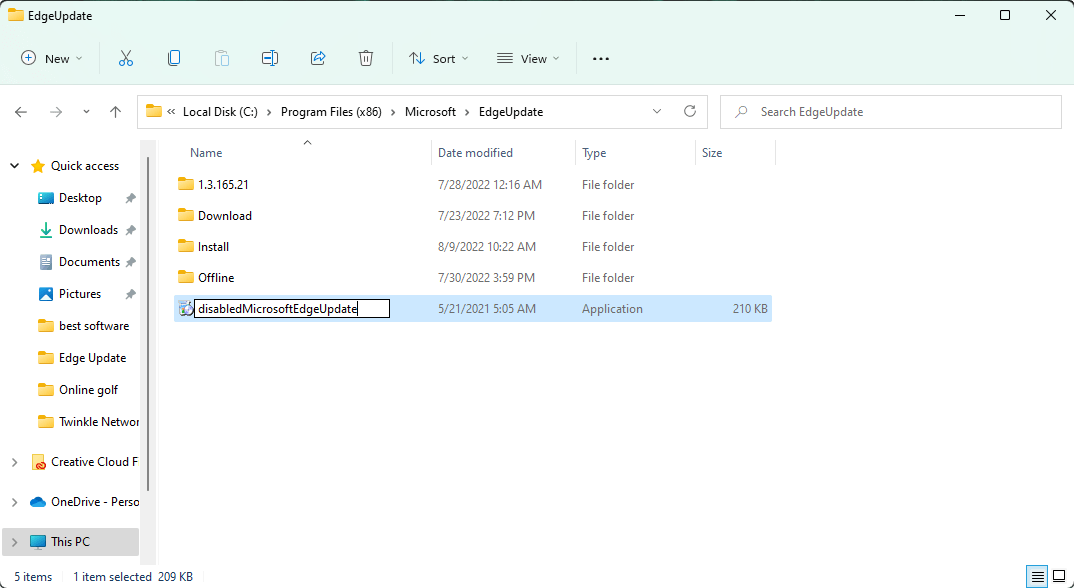
Give it a name something like disabledMicrosoftEdgeUpdate or something else.
In this way, you can disable auto-update for Microsoft Edge. Now, even if you open Edge and go to its update section, it will not work. To get back the auto-update feature, undo the changes.
However, if you aren’t sure that this should be your next move, also check out our guide on how to fix Microsoft Edge problems on Windows 11. Maybe you’ll find it suitable for you after all.
Windows Sandbox is available since the release of Windows 10 v1903 update and allows you to test untrusted applications without affecting your device. In a very short time, Sandbox became one of the most popular Windows tools. The reason for that is pretty simple: it is a lightweight virtual environment where you can safely run applications.
For example, if you want to open an untrustworthy executable file and you don’t want to infect your PC, you can run it risk-free in Sandbox.
Many users are asking how to install Sandbox on Windows 10 Home Edition. In this guide, you will find out that the installation process is quite easy.
What are the system requirements to run Sandbox on Windows 10?
The system requirements for running Windows Sandbox are somewhat accessible. The feature needs an AMD64 architecture (64-bit), at least 4GB of RAM, at least 1 GB of free disk space (SSD recommended), at least 2 CPU cores, and virtualization capabilities enabled in BIOS.
How to enable Sandbox in Windows 10
If you checked your system requirements and can run Sandbox on your device, you can turn it on from Windows Features. You can toggle the Sandbox mode on and off with just a click.
1. Go to Start and type turn windows features on or off.
2. Select the first result to open the Turn Windows features on or off menu.
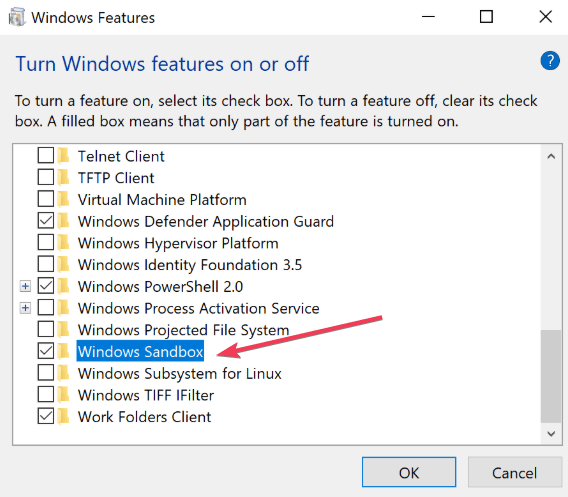
3. Now, locate the Windows Sandbox option.
4. Check the Windows Sandbox box to enable the feature.
5. Hit OK and restart your computer to apply the changes.
6. After the computer restarts, you can launch Windows Sandbox from the Start Menu.
Related articles
Have you tried the new Sandbox feature for Windows 10 Home Edition? Let us know in the comment section below.
Click on the 日本語 symbol that means Japanese and select English from the drop-down menu.
The page will reload and you will be able to hit the New Game button to play.
What is the best browser for Granblue Fantasy?
If you want to play Granblue Fantasy and enjoy it to the maximum, Opera GX is the way to go, as it is a dedicated browser for gaming.
The browser has a GX Control feature that lets you allocate your resources. By using it, you’ll make sure that your browser and other applications are running smoothly.
It supports Chrome extensions, and it also has a built-in ad blocker. For extra privacy, there’s a free VPN with unlimited bandwidth available.
So trust us when we say that a combination of Granblue Fantasy and Opera GX is what you want.
Opera GX
Get the best gaming browser focused on speed, control, and personalization!
What can I do if Granblue Fantasy is not loading in Chrome?
As the game creators specified on Twitter, this might have to do with the fact that the Chrome App for Granblue Fantasy was shut down because Google removed support from Chrome Apps for every platform except ChromeOS.
We hope we answered all your questions about playing Granblue Fantasy on PC, and you can try your luck with other browser games like Granblue Fantasy.
Granblue is a great RPG, and if you want to play it in your browser, be sure to follow the instructions from this guide.
If you are a person who wants to make sure that nothing bad will happen while being connected to an unsecured network, then you’ve most likely heard of VPN.
VPN stands for virtual private network and can help protect your Internet connection by tunneling the connection between the two endpoints and encrypting all sent or received data.
Also, an additional layer of security is included as you will need to authenticate in order to access data.
There are many companies offering VPN servers, but one of the most secure and popular is Cisco.
How can I install and enable the Cisco VPN client on Windows 10?
Here are the requirements for running the Cisco VPN client:
Requirements:
A PC that runs on Windows 10
Cisco VPN Client v5.0.07.0440 (check with your network administrator)
Without further ado, let’s see how to go about the process and deploy the Cisco VPN client easily.
How to install Cisco VPN client on Windows 10 using Registry Editor
Should you meet the requirements for the Cisco VPN client (see the list above), you can easily install it on your Windows 10 PC using the Registry Editor.
If you have a previously installed version of Cisco VPN client, you will need to uninstall it before installing the new one to ensure a clean installation.
1. Uninstall the previous version of Cisco VPN that you have on your PC, then reboot the node.
2. After that, install theCitrix DNE Update software. Choose the version that matches your computer’s architecture (32-bit or 64-bit).
Keep in mind that from time to time, you might notice that Windows 10 is flagging the application as unsupported and disabling the service.
We also have a speedy solution for these situations. So make sure you don’t miss out!
You can fix this by launching the Services.msc.
Now, find the service entry named Cisco Systems, Inc. VPN Service.
Right-click on it and select Start.
If the latest Windows updates prevent the app from working as it should, Cisco recommends using their AnyConnect Mobility client, which offers a VPN client and other solutions in one package.
Let us know in the comments section if you have any questions about this subject. We hope that our solution helped you install and configure the Cisco VPN client without too much hassle.
Firefox is one of the best cross-platform browsers used on most modern devices. One of its endearing features is the availability of many extensions to extend its functionality further.
Among the safe extensions to use on Firefox is FoxyProxy. This extension simplifies the process of configuring your browser to access proxy servers.
However, users are starting to complain that FoxyProxy is not working on Firefox, especially the Nightly version. This guide will show you to fix the issue easily without breaking a sweat.
Why is FoxyProxy not working?
The major reason FoxyProxy is not working on Firefox is incompatibility with your browser. The earlier versions of the extension were not compatible with some Firefox releases like Nightly.
This leads to all forms of issues while using the extension.
Quick Tip:
If you keep having problems, try another browser. We recommend Opera One browser because it has a free, built-in VPN that can help you hide your IP and change virtual location. It gives you access to several locations around the world, and the traffic data is unlimited.
The Opera One browser has a lot to offer in unique features. In Opera One you’ll find, already built-in, features like Ad blocker, Ai, social media and messaging apps.
Opera One
Use Opera’s VPN as an up-to-date and unlimited alternative to FoxyProxy!
The compatibility issues that are the chief cause of the FoxyProxy not working on Firefox have been fixed in the latest version of the extension. So, updating it should solve the problem.
How do I fix the proxy server error in Firefox?
Click the menu button on Firefox and select Settings.
Select General in the left pane.
Click the Settings… button under the Network Settings section.
Select the No proxy option.
Click on the OK button and restart Firefox.
If you want to configure your proxy, select the Manual proxy configuration option instead to set it up.
With the steps above, you should be able to reset your proxy on Firefox and fix all related issues.
The FoxyProxy not working on the Firefox issue takes away the ease of use with the extension. But with the solution in this guide, you should be able to solve the problem easily.
Don’t know what to play on Game Pass? With literally hundreds of titles available on the service spanning just about every genre out there, it can be tough to know where to start. Thankfully, we’ve got you covered with these Game Pass recommendations for those seeking games that have the perfect blend of action, adventure and roleplaying elements.
That is no ordinary feat, but here we have gathered a few of those special games that manage to pull it off. The best thing about the following games is that they each have something that should appeal to just about any gamer.
This highly acclaimed roguelike is arguably the perfection of procedural narrative storytelling, something developer Supergiant has explored in past titles such as Pyre and Bastion.
Hades has been universally lauded for its story, characters, art, music, and gameplay. It was the winner of several game of the year awards and was the first-ever video game to win a Hugo award. It also won a Nebula Award for its writing. Hades is a commercial success as well with over 1 million copies sold. It is considered a modern classic, and one Game Pass subscribers would be remiss to overlook.
Lost in Random
An action-adventure game with light roleplaying elements and a gorgeous “dark storybook” visual style, Lost in Random also features semi-tactical combat that takes place on game board-like arenas. The game was developed by Zoink, the studio behind another Game Pass adventure game, Fe.
Lost in Random is set in the Kingdom of Random, where the fate of all individuals is decided by a cursed black die when they reach the age of 12.
Selected by GameSpot, Joystiq, and GiantBomb as their 2014 Game of the Year, Middle-Earth: Shadow of Mordor is based on a story from Tolkien’s legendarium.
The game features its touted Nemesis System in which the game tracks enemy AI when an Uruk manages to kill the player or survive an encounter with the player. That Uruk will be promoted to a captain in Sauron’s army, and when the player encounters them again, they will drop a rune upon defeat which the player can equip to a weapon for a special new buff.
It makes for something new, and sets this game apart. Fans of the Lord of the Rings franchise with Game Pass should definitely check it out.
The dungeon-crawling spinoff to the best-selling video game of all time, Minecraft Dungeons benefitted from a stellar development pedigree with British developer Double Eleven working alongside Mojang Studios on this one. Double Eleven’s resume includes Rust, Crackdown 3, Goat Simulator, PixelJunk Shooter, Little Big Planet, and Limbo.
That’s a pretty impressive roster, and it’s no surprise that Minecraft Dungeons turned out to be the great procedurally-generated hack and slash game that it is. Unlike Minecraft, this game eschews the open world and crafting/building aspects in favor of a more focused experience that emphasizes combat and loot collecting, and exploring the dungeons either alone or with up to four players locally or online.
Record of Lodoss War: Deedlit in Wonder Labyrinth
That title is quite a mouthful. A quintessential Metroidvania, Record of Lodoss War: Deedlit in Wonder Labyrinth may initially draw comparisons to Symphony of the Night, and that is quite a compliment if anything.
The game is based on the series of fantasy novels dating back to the late 1980s by Ryo Mizuno, which have also been adapted into manga and anime. You don’t need to be familiar with the source material to enjoy the game, though: it covers the origin story of the protagonist, the high elf Deedlit.
Game creator Andrew Shouldice spent years designing, programming, developing and writing a game about secrets. The result is Tunic, an Xbox console exclusive till later this year and a day one Game Pass title.
An isometric action-RPG featuring a tiny fox in a big world, Tunic borrows a bit from the Legend of Zelda franchise, with a touch of Souls thrown in for good measure. Hey, if you’re going to borrow, borrow from the best. The game has been well-received, with one reviewer declaring it a “celebration of long-forgotten design practices,” hearkening back to the classic games of the past.
Wrap up
So were there any personal favorites of yours featured on this list? Let us know about your experiences with these games in the comments section. Games like these prove that Game Pass is the best gaming service out there right now.
If you don’t already have a subscription, you can sign up here, and right now you can get your first month for only $1. Learn more about Game Pass over on its FAQ page. And don’t forget to check out our other “What to play on Game Pass” posts for other Game Pass recommendations.
Google Docs is a popular word processor and is one of the preferred choices for many. But frequently, users found that they are unable to load a file in Google Docs, a problem that has been present for quite a while now.
After users report the problem, a new prompt reads, This error has been reported to Google, and we’ll look into it as soon as possible. Please reload this page to continue, but the issue doesn’t disappear. So, let’s find out all about it.
Why is Google Docs unable to load files?
Here are a few reasons Google Docs or Google Drive was unable to load your view:
A third-party extension is causing a problem: Frequently, an extension can conflict with the effective functioning of the browser and trigger the error.
Corrupted browser cache and cookies: Sometimes, you may get the Google Apps Script Unable to load file. Try to load it again or send an error report message due to corrupt browsing data.
What can I do if I’m unable to load a file in Google Docs?
Before we start with the slightly complex solutions, here are a few quick ones:
Switch to a different browser and check if you can now load the Google Docs.
Go to the Google Workspace Status Dashboard and check whether the services are down especially Google Docs. If they are, wait for a few hours, and things will automatically be up and running.
Use the browser’s Incognito or Private mode. In Chrome, you can open an Incognito window by pressing Ctrl + Shift + N.
Sign out of your Google account and then sign back in.
If none work, head to the solutions listed next.
1. Disable extensions
Open Chrome (non-incognito).
In the address bar, type: chrome://extensions
Disable all extensions by clicking the switch icon next to them.
Now try to open Docs again and check if the problem is still there.
Paste the following path in Chrome’s address bar and hit Enter:chrome://settings/reset
Next, click on Restore settings to their original defaults.
Click Reset settings to confirm.
5. Reinstall the browser
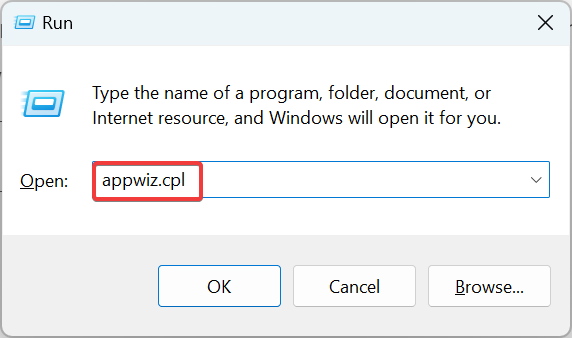
Press Windows + R to open Run, type appwiz.cpl in the text field, and hit Enter.
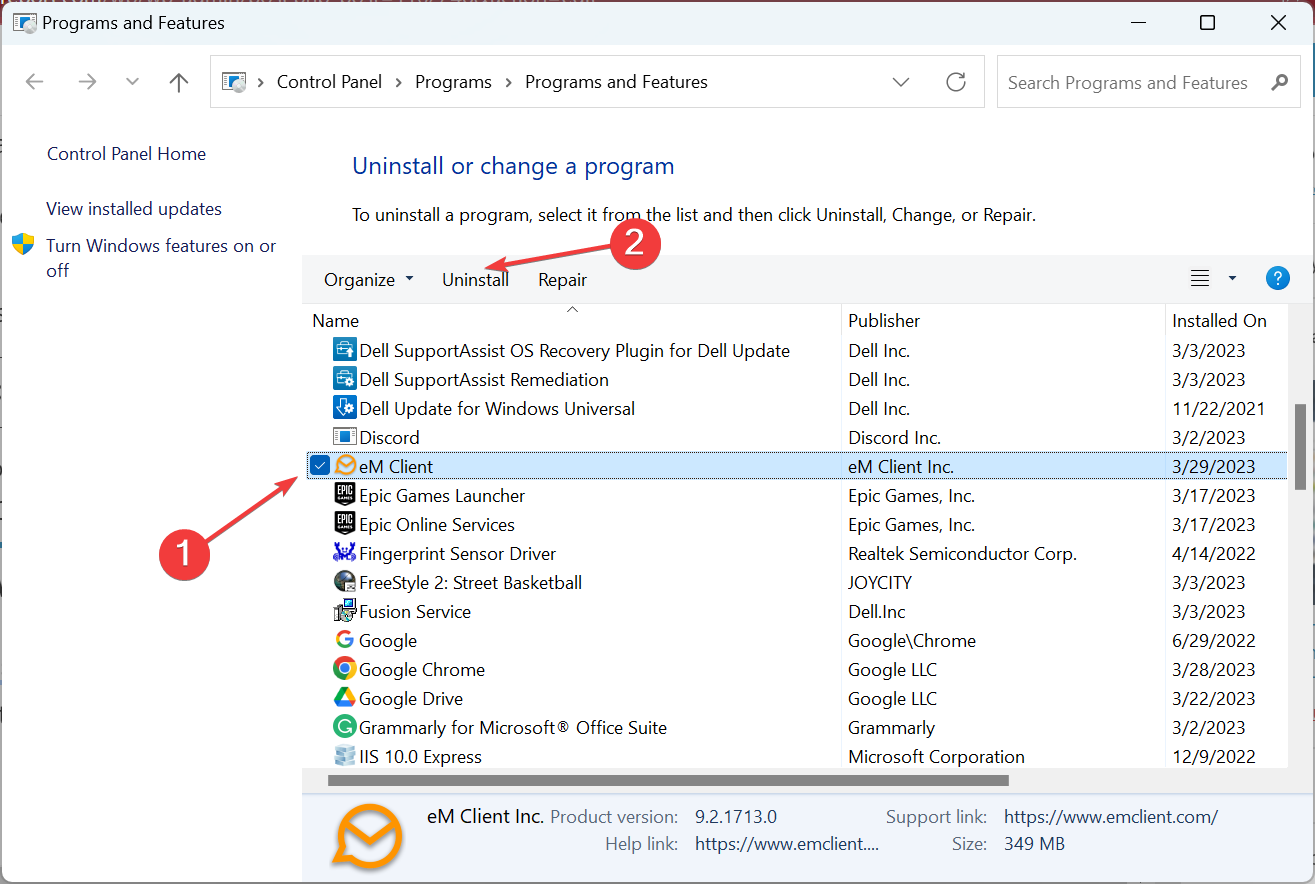
Select your browser from the list, and click Uninstall.
Follow the on-screen instructions to complete the process.
Now, head to the official website, download the setup, and reinstall the browser.
That’s it! If the previous solutions didn’t help when you were unable to load a file in Google Docs, reinstalling the browser would have got things running.
According to a report by Business Insider, Microsoft is apparently laying off team members from Modern Life Experiences. The report indicates that approximately 200 employees will be affected by this move, however, they have the option of seeking other open positions within the company or taking a severance pay settlement. (via The Verge)
Back in 2018, Microsoft formed the Modern Life Experiences team to lay more emphasis on professional consumers. Specifically focusing on coming up with products and services that resonate with the clients.
A LinkedIn post by Erynn Hesler who serves as a Microsoft senior designer sort of confirmed that there was indeed a shake-up taking place within the Modern Life Experience team and termed it as “hard news” though Microsoft is yet to make an official statement regarding the matter. “To all my colleagues who faced hard news today, please let me know if there’s anything I can do. The culture we created inside a giant company on our small Modern Life Experiences team was so special. Thinking of you all today,” Erynn explained.
We will be sure to keep an eye out and keep you posted as this story unfolds. Remember, Microsoft recently broke its own hiring record, adding 40,000 employees over the year bringing the total number of employees at the company as of June 30, 2022 to 221,000. Microsoft also indicated that it was slowing down the hiring process across Windows, Teams, and Office teams back in May.
Let’s discuss PC golf games for windows 10 and 11. Here is what you must know.
In the gaming arena, nearly all racing games, tank games, and action-survival games get all the digital attention while some of the best gaming experiences – like golf, for example barely get a pinch of the media pie.
Well, we are not going to let this happen anymore. Some excellent golf titles have ultra-realistic graphics on PC, Android, iOS, Nintendo 3D’s, and even on PS Vita.
You don’t need to go to a golf field to play the actual game itself. All you need is to grab a couple of these golf games and immerse yourself in the evergreen world of golf gaming.
In this article, we bring you 5 of the best golf games for Windows 10 that you should consider playing.
What is the best online golf game for PC?
There is so much to pick from in this genre, but we like to recommend Shot Online. It is a golf MMO you can play on your browser with an RPG twist.
You will find it very exciting. You can learn about it and other online golf games in our online golf game guide; these are free golf games for PC with no download needed.
What is the most realistic golf game?
Jack Nicklaus Perfect Golf is the most realistic game we have seen on the market. We talk more about it in this article.
We like to suggest PGA Tour 2K21 in this category. It has been praised as one of the greatest golf games, and a big reason is its realistic nature. It is a game worth playing since it has impressive visuals, complex and realistic gameplay, and adjustable difficulty.
Quick Tip:
If you want the freedom to tweak your in-browser gaming setup in order to get the best performance, even on lower-end PCs, use Opera GX, a dedicated gaming browser.
Opera GX
Boost speed with CPU and RAM limiters and get access to restricted gaming servers using the free VPN feature!
Described as the most realistic golf game the market has ever seen, Jack Nicklaus’s new golf game provides a truly immersive experience geared to replicate a life-like scenario.
The game offers 20 different modes, including match, stroke, and skins, and also has some team-based variants like Foursome, Greensome, scramble, and better ball.
Perfect Golf has a lineup of 12 courses with varying difficulty levels, and all the courses are geo-referenced to the real world.
Full controller support ensures that almost everything you do with a mouse in the game, from aiming to moving the ball on the tee, can also be done using the game controller. The game also has an integrated multiplayer lobby, making it easier to find online players to play against.
Mini Golf Mundo is an exciting golf game with four challenging courses suitable for rookies and experienced gamers. Your goal is to putt the ball to each of the 18 holes available in each level (72 holes to complete the four strenuous courses with varying difficulty levels).
Unending obstacles such as warp holes, jumping fish, and bouncing pads add to the difficulties while making the game fun. This is why we recommend it as one of the best PC golf games for windows 10 and 11.
Rookies may start in Woodland Falls, where they learn the basics, and later progress to Meadowland Plains and the Highland Hills to pursue the challenging courses. Being a multi-player game, you can choose to play alone or invite up to 4 friends in a turn-based tournament.
Initially released in 2002, Sid Meir’s Sim Golf has captured the minds of many golf lovers due to its strategic moves and resort management features.
While playing through premade or self-designed courses, you will enjoy a good combination of management, course play, and colorful graphics that will keep you engaged for hours.
You can be the CEO, course designer, or resident of your golf resorts around the globe. Get the rare opportunity to grow your golf empire from a small public entity to a magnificent network of 5-star resorts.
Dangerous Golf is a game of angles, velocity, and leisure, all mixed to create a deeply satisfying game. However, this is not your traditional golf game; it is played indoors, and to score big, you will have to put long shots to cause massive destruction to property.
The game aims to impact maximum damage to objects, over 100 holes. You must mess up the kitchen, smash toilets, destroy expensive antiques, and more.
The more expensive the objects you destroy, the higher the score. Once you have done enough destruction, you earn a SmashBreaker. After that, your ball becomes like a fireball capable of causing more chaos and destruction. Visually the game is beautiful with a lot of explosions.
Super Golf Land is an exciting game that combines engaging gameplay with good presentation and lasting value to create a fun golfing experience. You get to golf across eight beautifully designed yet tricky courses, develop skills, and collect all the eight unique power-ups.
The aiming system is well designed, and you control the angle and velocity of your shots. The levels are pretty challenging, but with precise shots, navigation becomes fun. Plus, the leading game lasts over 2 hours; after that, you can play the mini-games, which open up new challenges.
There you have it, our top recommendations of PC golf games for Windows 10 and 11.
Today, we’ve so many golf games that are exciting and fun to play, and some of these apps replicate the actual game experience. However, only a few of them are compatible with Windows.
In this article, we have highlighted 5 of the best golf games for Windows. Our list has included incredible Microsoft golf games for windows 10 and 11; however, you may opt for golf games for PC that are free to download and have a full version.
I hope you will find these games fun to play. Feel free to comment and share.
Game of Thrones is a popular series, and with the popularity of the show, it’s no wonder to see many Game of Thrones video games.
In today’s article, we’ll show you how to play Game of Thrones in your web browser, so without further ado, let’s get started.
Is the Game of Thrones browser game free?
If you want to pursue the road to becoming the next ruler of Westeros, know that fame and glory await you in Game of Thrones: Winter Is Coming.
And, to answer your question, this officially licensed browser game based on the epic fantasy series by George R.R. Martin is free-to-play.
Quick Tip:
For the best gaming experience, it’s advised to use a specialized browser like Opera GX. This browser has low hardware requirements, so it should be able to handle multimedia and games with ease.
The network limiter feature is also available, allowing you to limit your bandwidth in a web browser. It’s also worth mentioning that the browser has Twitch integration, so you can easily follow your favorite streamers.
Opera GX
Fight the battles of Westeros in the official GOT game using the best gaming web browser as your gateway to that fantasy world
How do I play Game of Thrones, the browser game version?
Go to Game of Thrones: Winter is Coming website.
Click the Join Battle button.
Choose the sign-in option or create a new account. We chose to use a Google account in this instance.
After entering your login credentials, the game will start loading. If you’ve returned to the main screen, just click the Join Battle button again.
Wait for the game to load. This can take a while, especially if you’re playing the game for the first time.
After a while, the game will load completely and you should be able to play it.
Game of Thrones: Winter is coming is a browser game, and it should work on all browsers. However, not all web browsers are optimized for gaming, which may cause your gaming performance to vary.
Is Game of Thrones game safe?
If you are a parent and want to let your kids play this game, you need to know that Game of Thrones frequently depicts brutal battles and graphic, detailed acts of violence, clearly including those against children and women, as well as lots of nudity and no-holds-barred sexuality.
But, from the device safety point of view, you have nothing to worry about. The only things getting infected are the people traveling through old Valyria, not your PC.
That is pretty much all you need to know about Game of Thrones Winter is Coming online, in case you wanted to pick up this game.
Know that the Game of Thrones game on PC can be played either through your browser or on Steam, where it can be downloaded.
If you want to play Game of Thrones in your web browser, this is the best way to do it. If you found this article helpful, let us know in the comments below.
Gamescom 2022 is just a few weeks away, running from Wednesday, August 24 through Sunday, August 28. The event will be held once again in Cologne, Germany. And once again, Xbox will have a presence there…only this time it will be a live one.
That’s right: Gamescom 2022 will be live and in-person (as well as online for those who can’t attend)! For the first time since 2019, Xbox will be able to have live booth at the event—in Hall 8 of the Koelnmesse Exhibition Centre, to be precise. The booth will include 36 stations offering hands-on time with some of the most anticipated games coming to Xbox in the next 12 months.
Playable titles will include Pentiment, Age of Empires IV, Microsoft Flight Simulator, Sea of Thieves, and Grounded from Xbox Game Studios. And from third-party publishers the following,
A Plague Tale: Requiem (Asobo Studio/Focus Entertainment)
Disney Dreamlight Valley (Gameloft)
Gunfire Reborn (Duoyi Games/505 Games)
Inkulinati (Yaza Games/Daedalic Entertainment)
Last Case of Benedict Fox (Plot Twist Games/Rogue Games)
Lies of P (Neowiz)
Lightyear Frontier (Frame Break)
Planet of Lana (Wishfully/Thunderful)
You Suck at Parking (Happy Volcano)
Visitors to the Xbox booth will also be able to get hands-on with the new Xbox App for 2022 Samsung Smart TVs. And if all this isn’t enough to get you on a flight to Cologne, well then…you’ll still be able to attend digitally. Xbox will host a live stream event starting on Thursday, August 25. Follow all the Xbox social media channels to get more info on viewing details as they become available.
And for those who can attend, there will be a special after hours booth event as part of Xbox FanFest@Gamescom. Held on Wednesday, August 24, the event will include a meet & greet with game creators. And on Friday there will be a virtual meet & greet with Sea of Thieves and Park Beyond via Microsoft Teams, which anyone can join in.
Gamescom 2022 promises to be an exciting celebration of gaming, and one you don’t want to miss whether in person or online.
However, like other browsers, it is not free from occasional errors. As reported by users, one of the most problematic issues is the SafarI randomly closes tabs problem.
This issue can be frustrating, as you need to open a tab multiple times to get the info you need from it. Thankfully, we have provided surefire fixes to the problem in this guide to help you get your browser working normally again.
Why do my Safari tabs keep closing?
The well-known cause of the Safari randomly closes tabs issue, especially on Mac, is iCloud syncing. This is because the automatic sync sometimes interacts with the tab groups on your browser.
Another reason the auto tab closing issue occurs is outdated Mac OS. This denies you many upgrades to your system and could mess with your browser.
Quick Tip:
While Safari is the built-in browser for Mac and other Apple devices, there are alternatives, and a great options is Opera One. Like Safari, Opera One is optimized for speed and excellent all-around performance.
It includes many built-in features and integrations, such as a native AI. Also, Opera One is one of the most secure and private browsers you can ever use thanks to its VPN and adblocker.
Opera One
Use this performance oriented and light browser to open as many tabs you want!
Click the Apple icon in the top right corner and select the System Preferences option.
Select Apple ID.
Unmark Safari.
If Safari closes your tabs randomly, the fastest fix is to disable the iCloud syncing for Safari. With this, the poor connection between the sync and your tab groups should be eliminated.
Remember to enable the sync again when you finish browsing to save your changes.
2. Update Mac
Select the System Preferences option from the Apple menu.
Choose the Software Update option.
Click the Update Now or Upgrade Nowbutton.
An outdated Mac OS causes all sorts of issues, including Safari randomly closes tabs. The update now option on the software update page helps to install the latest updates for your currently installed OS version.
On the other hand, the upgrade now option installs another version entirely to the one you have.
If your tabs keep disappearing on your Safari browser, it might be caused by the auto close tabs feature. This is especially true on iPhone devices.
Also, it might be down to a bug that makes the tabs disappear without a trace.
The Safari closes tabs randomly issue can be frustrating, making you lose vital information. Thankfully, it is not the most difficult problem to fix, as shown in this guide.
Some Google Chrome users have encountered Rats! WebGL hit a snag error message when opening certain website pages. That’s an error message that usually appears on JavaScript-heavy websites.
A yellow bar with Reload and Ignore buttons usually includes the error message. Then reloading the page doesn’t always fix the issue.
As the error message suggests, this is primarily a WebGL issue. WebGL, otherwise Web Graphics Library, is a JavaScript API that helps the Chrome browser render 3D and 2D graphics.
However, when WebGL has an error or is not supported, you’ll get a WebGL snag error message.
What causes WebGL to crash?
To tell you the truth, there are two possible reasons why your browser may not support WebGL. The first one is because your current GPU might not be powerful enough to run WebGL without some performance loss.
The second scenario involves your current browser, with Chrome being the most likely culprit, which has blocked your graphics card to avoid possible crashes and freezing.
What is a snag error?
There’s no secret that, occasionally, you might come across this error message that reads while using your Google Chrome browser.
Keep in mind that you will get this error if your WebGL content is not compatible with the browser or if it contains an error.
So, get ready to find out how to deal with the Rats, WebGL hit a snag for Chrome. Get all the information you need right here, in this article, including WebGL game examples.
Quick Tip:
Before proceeding with the troubleshooting steps below, we would like to present a web browser that you can use as an alternative to Opera One.
It is extremely lightweight and has no problem running WebGL. You just go on the browser settings, access Show advanced settings to check the Use hardware acceleration when available checkbox.
Opera One
Run WebGL without any more issues with the help of this extremely stable and reliable web browser.
First, input chrome://flags in the browser’s URL bar to open the flags page below.
To find the setting, press the Ctrl + F hotkey. That will open a search box where you can enter WebGL 2 as below.
Now click the WebGL 2 drop-down menu and select Disabled from there.
Press Relaunch Now to restart Google Chrome.
Chrome includes a WebGL 2.0 setting that you can configure via the chrome://flags page.
3. Reset the flag settings
Resetting Chrome’s flag settings to default can potentially resolve the WebGL hit a snag error. You can do that by pressing the Reset all defaults button at the top right of the chrome://flags page.
Then restart the browser by pressing the Relaunch Now button.
How do I know if WebGL is enabled?
You don’t need to go through some lengthy process to find out the answer to this question, as you are about to discover in a second.
All you need to do if you want to find out if WebGL is enabled in your browser is open the software and go to:
https://get.webgl.org/
If you want to enable WebGL on your Chrome browser, just type about: flags in the address bar, then search for WebGL and activate the option.
Now that you have the WebGL hit a snag meaning, you will be more prepared to deal with this annoying error code.
WebGL hit a snag can be ignored or reloaded, but you should just rather get to the bottom of it. This article covers all you need to know about the Rats, WebGL hit a snag error.
Those are a few remedies for the WebGL snag error in Google Chrome. The Chrome://GPU page, which you can open by entering chrome://gpu in the URL bar, highlights GPU-related errors for Chrome and might also help fix the WebGL error.
Many users have issues with Windows 10 because some of the best browsers do not support output device selection. This means that all your open software will use the same default output device to play sounds.
Having the option to choose which output device will be used for a specific software would be an incredibly useful feature. This option is extremely handy, especially for allowing multiple people to use the same computer simultaneously.
For these reasons, in this article, we will discuss the best way to solve the browser does not support output device selection error on Windows 10. Read on to find out more.
What does a browser not support output device selection mean?
The browser does not support output device selection issue, as the name implies, which means your browser will not allow you to change the audio output to play sound.
With this, you have to use the same default output device used by all your devices for your browser.
How do I change the audio output on my browser?
Press the Windows key + I to open the Settings app.
Select the System option.
Choose Sound on the left pane.
Click on App volume and devices preferences under Advanced sound options.
Click the dropdown before your browser and select the output device to use.
Note that your browser must be currently playing sound to use the above steps to change the audio output.
Quick Tip:
If you’re having this problem with your current browser, consider switching to a different browser, such as Opera One.
This browser is based on the Chromium engine and includes helpful features like workspaces, tab islands, search-in tabs, integration with messaging apps, VPN and a native AI.
Opera One
Choose a modern browser in the market focused on speed, privacy, and productivity.
What do I do if my browser doesn’t support device selection?
1. Make sure to update your version of Windows 10
Click on the Cortana search box, type in Update,and select Windows Update Settings.
Inside the Update window, select Check for updates.
Wait until Windows 10 searches and installs any updates.
Follow the on-screen instructions and restart your PC.
2. Change Windows output settings for individual apps
Right-click on the Soundicon found near your Windows clock and select Open Sound Settings.
Inside the Sound settings window, scroll down to the section named Other Sound Options and selectApp Volume and Device Preferences.
At the top of the page, you can choose the default Master volume, Output,and Input settings.
Below you can find a list of all the applications installed on your PC.
Scroll down and select volume, output, and input devices for the browsing application that you use.
Changing the Windows output settings for individual apps is one of the quick ways to fix the browser that does not support output devices selection issues. Relaunch your browser after applying this fix and check if the problem is solved.
Chrome has audio settings within the browser. Though not a full-fledged audio setting, it is used to grant and restrict sound access to sites.
This is available under the Site settings section on your browser.
In this article, we explored a quick and easy method to avoid encountering issues when changing the output device for specific browser software or any other Windows 10 applications
First, you need to make sure that your version of Windows 10 is updated, and then you can use the newly added options to change the output settings.
It’s important to fix this problem since it can lead to other issues, such as no sound in Opera, or any other browser.
Please feel free to let us know if this guide helped you solve your issue by using the comment section found below.
Spectrum is a well-known US-based ISP that provides its customers with a variety of communication services.
When you get the Spectrum error RGE-1001 or DGE-1001, the first thing you should do is check the Internet connection. Restarting also fixes these problems.
However, you can’t always solve these with a mere restart. Read this guide to the end for the recommended fixes for the Spectrum errors RGE-1001 and DGE-1001.
How do I fix RGE 1001 and DGE 1001 Spectrum errors?
1. Reinstall the Spectrum app
Click the Start button and select Settings.
Choose Apps.
Find the Spectrum app in the list, click on it, and hit the Uninstall button.
Next, restart your device after uninstalling the Spectrum app. You may also need to delete cached files, depending on your device.
When your device comes back on following the restart, reinstall the Spectrum app.
Like the uninstallation process, the installation steps vary based on your device and operating system. You could get it off an application store or download the installation file and execute it.
Either way, reinstalling the Spectrum app is a standard first step in troubleshooting the Spectrum error RGE-1001.
2. Get support to reset your Spectrum account
Navigate to the Spectrum website, click the Contact Us tab, and select one of the contact options to get in touch with the technical support representative of Spectrum. There is also a Chat With Us button below to get live support.
Let them know that you are facing the Spectrum error RGE-1001 or Spectrum error DGE-1001. Make sure you tell them what you tried to do before getting the error and the steps you have taken already.
The support staff would likely delete your Spectrum account and recreate it from scratch.
It may seem extreme to go all the way to reset your account. While it may take some time and be inconveniencing, resetting your Spectrum account would most likely fix the Spectrum error RGE-1001 and DGE-1001 issues.
3. Wait it out
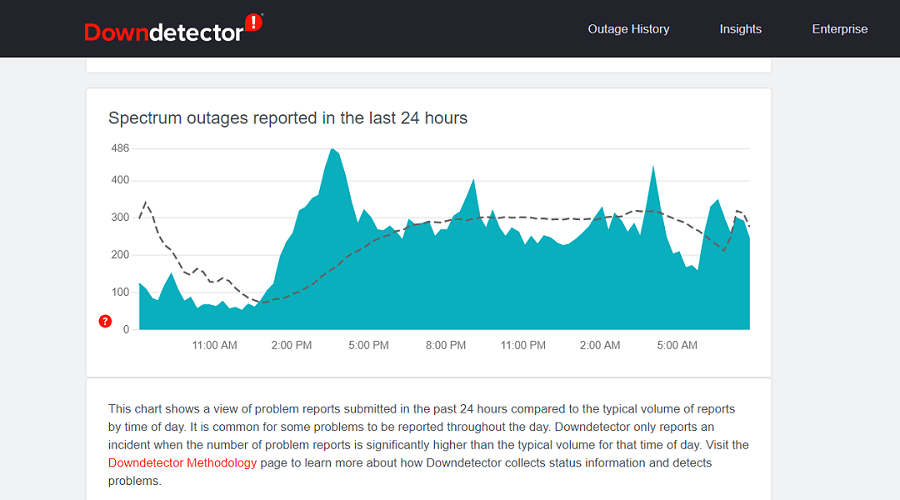
At times, the issue of Spectrum error RGE-1001 could be a fault from the server-side. If this is what happened in your case, then there’s nothing you can do to resolve it.
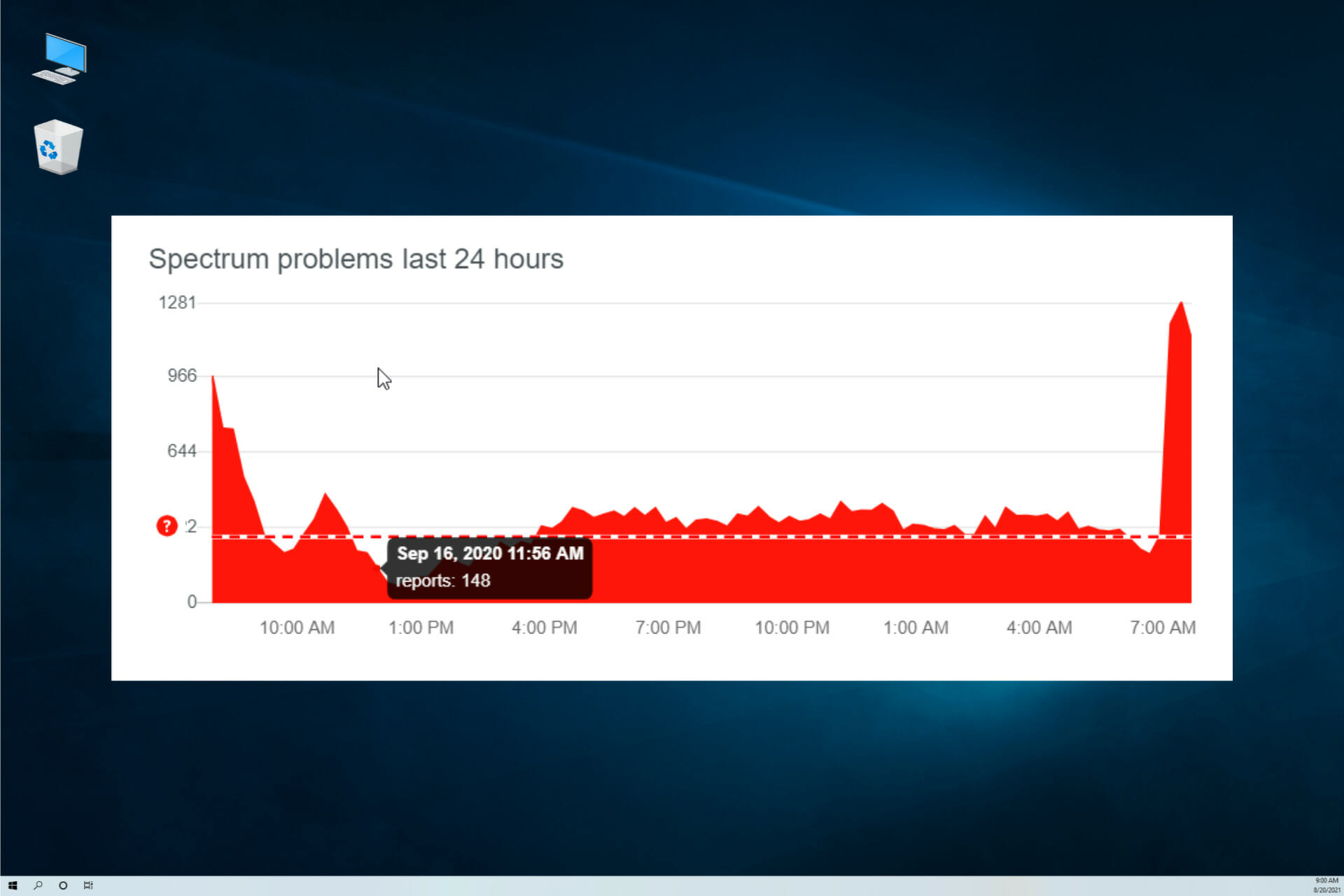
Spectrum on the Downdetector website
Usually, the company will know about this issue, and in no time, they will get it fixed. For example, if the connection was not from your network but probably down from the server end.
In this instance, you have to simply exercise patience until they restore the server connection.
4. Contact customer service
For many Roku users, this problem will persist after you have followed all of these solutions. Spectrum’s customer support is quite helpful and responsive, so you can go ahead and get in touch with them.
Support links on Spectrum website
You can either call or email Spectrum’s customer support. Make sure you indicate the error you are receiving. Specify the Spectrum error RGE-1001 or DGE-1001.
Spectrum also has a guide on how to reach out to a dedicated customer support representative.
The Spectrum error RGE-1001 and DGE-1001 indicate that you have an issue with your network connectivity. We have gone through the methods for repairing the issue.
In many cases, the problem is from the server-side, so you can wait it out or even talk to Spectrum’s customer support.
Even more, if you see the Spectrum error code RLC-1000 on Roku, a corrupt DNS cache and an outdated Channel app are often the culprits. Don’t hesitate to take action and correct the problem right away.
We hope you’ve managed to fix the issue by using one of our solutions. Tell us what worked in your case in the comments section below.
Prince of Persia was one of the most popular Ubisoft games available on the Windows platform, which was then replaced by the Assassins Creed series.
However, as Windows modernizes to match new-gen games’ demands, backward compatibility has never been the priority for Microsoft. That said, with a few workarounds, you can still play old games on Windows 10.
This leaves many DOS gamers questioning whether they can play Prince of Persia on a Windows 10 PC. Yes. An Independent developer has made available the classic Prince of Persia and Prince of Persia 2 on Windows 10 platform.
You can download and play the game without figuring out all the workarounds required to play old games on Windows 10.
Alternatively, you can also run the Prince of Persia game using the DOS emulator. We have discussed all these methods in the article below.
Is Prince of Persia available on PC?
Prince of Persia is very much available on PC despite being an old game. There are different ways of downloading and installing the game.
We will explore all the possible methods in the subsequent sections of this article.
How do I install Prince of Persia on Windows 10?
1. Download Price of Persia from the Microsoft Store
Click the Get button followed by Install. The game will download and install on your computer.
Once installed, launch it from the Recently Installed section by clicking the start button.
This game runs in a sandbox and consists of Prince of Persia Classic, Prince of Persia 2, and some popular fan-made game modifications.
The default gameplay controls are set to the keyboard. However, you can download and use a third-party app to play the game using your Xbox controllers.
2. Run PoP using DOSBox
Download the DOSBox emulator from the official website. Run the installer to proceed with the installation.
Once installed, create a shortcut to the DOSBox executable. Right-click on the DOSBox.exe and select Create a Shortcut.
Move the new shortcut to where you want to open your game.
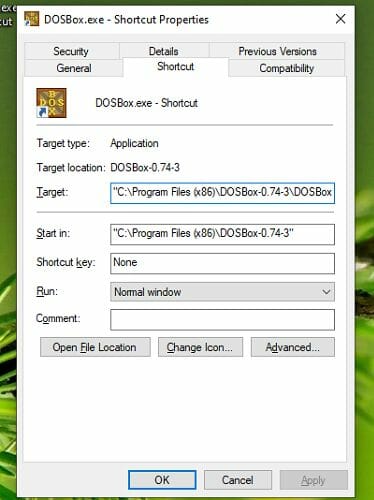
Next, right-click on the shortcut and select Properties.
Open the Shortcut tab, and in the Target box (leave a space after the existing text), type the full directory path of your game’s executable files in the quote.
It will look something like this: C:Program Files (x86)DOSBox-0.74DOSBox.exe" -userconf "C:UsersTashreefDownloadsprince-of-persiaPrince.exe
Click OK to save the changes.
Rename the DOSBox shortcut to the name of your game.
You can also change the game icon in the properties window if you want. Double-click on the newly created shortcut to run the game. You should have the classic Prince of Persia DOS game running your Windows 10 system.
If you don’t have the Prince of Persia executable file, you can legally find it using the old games forum and websites.
Note that you can access the original Prince of Persia controls from the game’s menu. For the first method, launch the Prince of Persia PC app, click the Menu icon, and select Controls.
Extract the Zip file and copy the files to a folder of your choice.
Next, navigate to the folder where you have extracted the Zip file contents.
Double-click on Prince.exe to start the game.
If you don’t want to install the original Prince of Persia video game using DOSBox, you can directly play using SDLPoP.
SDLPoP is an open-source port of Prince of Persia that runs natively on Windows and Linux systems. It is based on a disassembly of the DOS version and uses SDL.
If you want to play the newer gen Prince of Persia games, such as Prince of Persia Warrior Within, Sands of Time, and the Forgotten Sand, check out GoG (Good Old Games).
GoG offers an excellent collection of classic Windows games at a discounted price. However, GoG does not feature the original Prince of Persia and Prince of Persia 2 in their collection.
Can I run Prince of Persia Warrior Within on Windows 10?
Windows 10 is one of the supported operating systems for Prince of Persia Warrior Within. The minimum OS requirement for the game on PC is Windows 2000/XP.
So, you can easily play the game on your Windows 10 PC.
Prince of Persia is one of the first games we played on a PC. Many of us have fond memories, often in monochrome colors.
We have listed three methods to play the classic PoP games on your Windows 10 PC.
Once you have installed the game, don’t forget to tell us your favorite PoP game in the comments below.
Website creation can be a complicated process that requires a certain level of programming knowledge. In most cases, developers tend to use HTML editors or even text editors to create websites.
However, these tools can be a bit complicated to use for average users, so many of them tend to use web authoring software.
How can a web authoring tool help me?
HTML editors usually don’t have a live preview, so you can’t see how your web page looks without opening it in a browser.
In addition, web authoring programs allow you to create a website by simply adding elements to a visual interface.
This makes the website creation similar to editing a Word document since you can add all the necessary elements without writing any code.
Of course, you can always switch to HTML view and make the necessary adjustments using HTML code.
Web authoring software is relatively simple to use and if you’re interested in such tools, be sure to check some of the following software.
What is the best web authoring software for Windows 10?
Adobe Dreamweaver is a very powerful and easy-to-use website creator that provides the full range of features needed in order to make the creation process user-friendly and efficient.
This software’s best features include a wide range of site templates, fast coding options, and the capability to showcase your creation in different formats, depending on the devices you choose to preview your work in.
Here are some other notable features found in DreamWeaver:
Live view editing with instant preview features that allow you to observe how your website looks with just a few clicks
Multi-monitor support for Windows
Redesigned user interface for easy access to all the tools and options
Full Git support
Bootstrap 4.4.1 integration
Adobe Dreamweaver
The best website creator is easier to work with than you have imagined – why not give it a go?
Website creation may be tricky and tedious but if you have a smart cloud-based tool like Slickplan on your side, things couldn’t be easier.
With this tool, producing a website is like playing with Legos thanks to its easy-to-use editor that uses dynamic blocks.
You will be able to create and upload any type of content keeping everything organized no matter the size of the library.
Not only that, but you can also organize your whole team by assigning pages, setting due dates, and overseeing the workflow.
All that is possible because the single dashboard allows multiple accounts and comes with advanced collaboration features.
You will find plenty of pre-built templates in Slickplan’s library but you may create custom ones by dragging and dropping new content blocks.
The built-in SEO planner will help you define rich meta descriptions, titles, URLs, and keywords.
Not only that, but it will additionally optimize all that to be displayed properly on all the important search engine result pages.
With Slickplan, you can export your projects into formats such as HTML or DOCX and use an existing CMS plugin to connect it to WordPress, Drupal, Joomla, and more.
You can test the tool because it’s available as a free trial and there is no need for a credit card to do so.
Take a look at its best features:
Single cloud-based dashboard for easy access and collaboration
Dynamic blocks, easy-to-use editor
Built-in SEO planner
Simultaneously construct website structure and page content
Export content directly to a supported CMS platform
Slickplan
Build your website fast with an easy-to-use authoring tool that connects directly to your CSM platform.
If you want to create websites without writing a single line of code, you might want to consider Corel Website Creator.
This application allows you to create interactive and modern websites simply by dragging and dropping the desired elements.
There are also various templates that you can customize any way you want.
The application supports HTML5 video and audio, and you can even add YouTube or Vimeo videos to your website.
In order to speed up website creation, the application relies on CSS3 grid system. There’s also support for various effects and gradients so you can create eye-catching designs quickly and with ease.
Corel Website Creator offers support for web fonts, but it also has a SiteStyles feature. Thanks to this feature you can add typographical and graphic elements to your page in a matter of seconds.
If needed, you can also create your own styles and add them to future projects.
There’s also a Site Safe feature that creates an automatic backup of your files. Using this feature, you can back up your projects to an external hard drive, network drive, or a web host.
The application supports a wide range of web development technologies thus allowing you to create interactive websites with ease.
Thanks to the WYSIWYG editor you can see changes in real-time, but you can also inspect your HTML and CSS code if needed.
We have to mention that the application has a simple graphics editor so you can perform image adjustments right from this application.
Let’s review some of its key features:
Supports HTML5 video and audio
Drag-and-drop functionality
Creates an automatic backup of your files
WYSIWYG editor
Excellent customer support
Corel Website Creator
Excellent website authoring tool with WYSIWYG based editor and plenty of integrations.
Creating websites from scratch isn’t a simple task, but you can make this task a lot simpler and faster by using Xara Web Designer.
This web authoring program allows you to create visually appealing websites without any coding skills.
Creating a website with Xara Web Designer is as simple as creating a text document.
This web authoring tool gives you the option to create your own designs from scratch or to use the templates included.
There are over 250 website themes and many hundreds of templates for individual elements like buttons and NavBars. It also offers photo editing features, so you won’t have to rely on third-party tools.
To create a website you just need to drag and drop elements to the page and the application will generate the code.
Xara Web Designer is a WYSIWYG application, and your website will look identical in both editor and browser.
Xara Web Designer follows the latest standards, and all your websites will be compatible with all major browsers.
In addition to cross-browser compatibility, your websites are also mobile-friendly, so they will work perfectly on any iOS and Android device.
This application supports cloud storage so you can easily collaborate with your coworkers.
Xara Web Designer is a powerful tool that you can use to create modern websites without writing a single line of code.
The application has some great features:
Advanced text options such as hyphenation and full Open Type support
Easily add HTML elements to your website
Ultra-editable smart elements including tables, text and photo panels, arrows, and charts
Support for the latest animation effects such as parallax scrolling
Create thumbnails and mouseover effects
Support for various widgets
Drag and drop MP4, FLV, MP3, or PDF files to your project
Another web authoring software that we want to show you is WebSite X5 Evolution.
This application lets you create your website without writing a single line of code. Instead of writing code, you can create your website simply by dragging and dropping the desired elements.
Recently, the company released a brand new update of the software.
With the new version, they’ve made the user interface friendlier and placed great emphasis on revising the templates included within the program.
You can create an online store website that supports credit card payments using this tool. Of course, you can also create a static website, blog, or even a guestbook.
All websites are mobile-friendly, so they will work perfectly on any tablet or mobile device.
This tool creates SEO-friendly code so your website will be indexed quickly and without any issues.
You get to see the statistics of your website in the application. This allows you to see the number of visitors, orders, or comments with ease.
WebSite X5 Evolution supports Parallax and other various effects that you can use to enhance the look of your website.
In addition to effects, you can easily import photo and video galleries and the application will automatically generate the required code.
If needed, you can also view the code at any time and make the necessary changes.
The application also has a built-in graphics editor thus allowing you to edit images and customize templates without using third-party solutions.
Lastly, there’s also a built-in FTP client so you can easily upload your website online.
Here are some of its best features:
Extensive library of templates
Drag-and-drop functionality
See the statistics of your website in the application
Built-in graphics editor
Built-in FTP client
WebSite X5 Evolution
Create your modern website fast, with a tool that even provides an FTP client for upload.
This is a web authoring tool that allows you to create websites by writing your own code.
To make the creation process faster, you can use various toolbar icons to add elements to your page.
The application also offers code helpers and generators that simplify the creation process.
There’s also support for revisions, and you can revert to older versions of your web page without configuring the server.
Another extremely useful feature is the ability to preview your page in its editor. Preview supports two modes: a full-screen or split-screen preview.
In addition, you can preview your page in another window or on a different monitor.
HTML-Kit also supports preview on multiple browsers and external devices such as smartphones and tablets.
The application comes with a built-in HTML Tidy feature you can use to find and replace invalid markups with ease.
In addition, there’s full support for HTML and CSS validators. HTML-Kit also has simple features that can make the development process simpler. For example, you can see the color below each color code with ease.
This tool also supports highlighting matching blocks simply by clicking them. If you want to enhance the functionality of this tool, you can do that by using a wide range of available plugins.
Let’s go through some of its key features:
Find and replace invalid markups with ease
Full support for HTML and CSS validators
Preview your page in another window or on a different monitor
Use various toolbar icons to add elements to your page
Another web authoring software that we have to mention is the First Page. The application has a simple user interface with which you can see a live preview of your page as well as your code.
If needed, you can switch to preview mode to better examine your page. In addition, you can use Design mode if you’re not familiar with HTML.
In Design mode, you can edit your page as a standard document without code. To do that, you can just insert all the necessary elements right from the toolbar menu.
The application has a SmartHistory feature that will help you during coding, remembering all the values and attributes you used so you can easily add them later.
There’s a CSS insight feature to help you with CSS code, allowing you to easily position any element or change its properties.
First Page remembers CSS classes, so you can easily assign the desired class to any object. Of course, there’s also a syntax highlighting feature that helps you organize your code.
In order to make changes to your page, the application offers a tag selection tool. With it, you can easily view element hierarchy and modify any element with ease.
If you’re a webmaster, you’ll be happy to hear that this application supports a wide range of webmaster tools.
As a result, you can easily add your website to search engines, check accessibility, validate documents, check the number of links, etc.
The application offers a tag inspection feature that allows you to modify tags with ease.
First Page auto-completes tags as well, a feature that will help you write code while ensuring all your tags are properly closed.
If you’re a novice user, we’re happy to inform you that this application has a reference guide so you can easily learn more about any tag.
To speed up website creation, the application offers an asset management feature allowing you to manage and reuse your snippets and templates.
To ensure your website follows certain standards and practices, the application offers Tidy HTML Power Tools.
Using these tools, you can perform various actions to ensure your code follows certain standards. The application supports color themes, and you can change the color of your website in a matter of seconds.
First Page comes with its own Popup maker, and there’s also an Image Mapper that allows you to create clickable regions on images.
Another useful feature is the ability to check the validity of your links. The application offers file management tools and allows you to view and add multiple images simply by clicking their thumbnail.
Speaking of images, you can create rollover images with ease, too. It’s worth mentioning that the application has a built-in photo album gallery generator.
Thanks to this feature, you can easily create and customize your own photo album.
Take a look at its most important features:
Edit your page as a standard document without code
If you’re looking for a free web authoring tool, you might be interested in KompoZer. The application is simple to use, so even basic users will be able to create websites using this app.
KompoZer is based on the Gecko layout engine, so it offers a high performance to its users. The application offers a simple interface with which you can easily see your code at any time.
In addition, the application supports page previews, and the ability to add new elements to the page without writing any code. Thanks to this feature, website creation is as simple as editing a text document.
The application supports FTP, so you can easily publish your website online. There’s also an extended color picker that allows you to adjust the amount of red, green, and blue with ease.
You can set hue, saturation, or brightness right from the color picker.
This tool works with CSS stylesheets, and you can see changes from these stylesheets instantly in the preview window.
As for styles, you can easily assign a style to any element simply by right-clicking it from the hierarchical toolbar at the bottom.
KompoZer also has a built-in code cleaner that can remove unnecessary code and validate your page.
By validating your page, you’ll ensure that your code is following the latest standards and practices.
We also have to mention that this tool has a built-in spellchecker that will automatically highlight misspelled words.
Another great web authoring software that we want to highlight is openElement.
Offering a great user interface, you can easily create a website from scratch along with support for layers and reusable styles and elements.
The application offers cross-browser support, support for HTML5 and CSS3 technologies, and support for multi-language responsive websites.
You can also easily integrate your own scripts using this application. There’s support for databases and you can even run local web servers on your PC for PHP and database projects.
In order to optimize your code and website for the web, openElement offers support for both image and code optimization.
The application allows you to add any element simply by choosing it from the menu on the right.
There’s also a live preview that allows you to freely move your elements on the page and organize them any way you want.
If you’re familiar with programming, you can view the source code of your page and edit it as you like.
You will benefit from the following key features:
Support for layers and reusable styles and elements
Built-in live preview feature
View and edit the page source code directly
Freely move your elements on the page with your mouse
If you’re looking for web authoring software with a sleek user interface, you might want to consider Coffeecup HTML Editor.
Besides its visually appealing user interface, the application allows you to create both HTML and CSS files from scratch. If you prefer, you can also use various designs and templates.
This application can work with files stored locally on your PC as well as open and edit files from your web server.
Thanks to the Open from Web feature, you can even open any website from the web and use it as a template.
The Coffeecup HTML Editor also has a useful Components Library feature that you can use to save different elements, allowing you to reuse the same elements on different pages or projects to speed up your work.
In fact, simply by updating the element in the Components Library, you’ll update it throughout your project.
The application has a Tag Reference feature and thanks to the Code Completion, you’ll automatically get code suggestions as you type.
In order to ensure your code is completely valid, there’s a built-in Validation Tool that can check your code.
There’s a split-screen preview mode so you can view live preview alongside your code. If needed, you can also display the preview on a different page or even on a different monitor.
The preview is updated in real-time, so you can see even the slightest changes.
Let’s see some of its most important features:
Built-in Validation Tool to check your code
Split-screen preview mode for live preview
Reuse the same elements on different pages
Allows you to create both HTML and CSS files from scratch
If you’re looking for a tool that will allow you to create websites with ease, you might want to consider the Free Website Builder.
This application requires no coding knowledge and can be used to create modern-looking websites with ease, offering a minimalistic and simple user interface so that even the most basic users can use it.
This application can create mobile-friendly websites, so your websites should work on any screen size when complete.
It comes with a set of building blocks; you just need to drag and drop those blocks to your page in order to create a website.
After adding a specific element, you can change its properties like in any text document.
Each element comes with a wide range of options so you can customize your blocks any way you like.
As previously mentioned, the application creates mobile-friendly websites so they should look perfect on any screen.
In addition, you can switch between tablet, mobile, and desktop views to see how your website will look on different screen sizes.
This Free Website Builder has more than 400 blocks available. You can easily add sliders, galleries, articles, accordions, videos, contact forms, lightboxes, and other elements.
All templates are based on Bootstrap 3 and Bootstrap 4 technology, ensuring your website looks perfect on any browser or device.
The application supports FTP, but you can also host your website on Amazon S3, Google Cloud, and Github Pages.
Another free web authoring application you need to check out is Amaya. The application works as a web browser, but you can also create your own websites with this tool.
Unlike most applications on our list, you can edit any online website with this tool.
In order to create a website, you just have to choose elements from the right pane and add them to your project.
Amaya fully supports CSS and Math ML with the ability to customize all the elements by adding various styles to them.
There’s also support for SVG and many SVG-related functions such as transformation, transparency, and animation.
Amaya is a simple web authoring software that offers limited features. The project hasn’t been updated in a while, which is why Amaya lacks modern features and interface.
Despite this flaw, it’s a decent tool and is available for macOS, Linux, and Windows. In addition, the application is completely free, so you can use it without any restrictions.
Another free and powerful web authoring software that we would like to mention is Bluefish. This application is released under the GNU GPL license and it’s available for most major computer platforms.
The application is lightweight and fast, and it should work without issues on any PC.
Like many other tools on our web authoring software list, this one has a project manager so you can easily switch between different projects.
Bluefish has multi-threaded support for remote files, and it also supports FTP, SFTP, HTTP, HTTPS, WebDAV, and CIFS.
The application has a powerful search and replaces feature that supports regular expressions. In addition, you can perform sub-pattern replacing and even replace files on your hard drive.
It’s worth mentioning that you can open multiple files that match a specific pattern using this tool.
Bluefish also has a snippets sidebar thus allowing you to quickly reuse parts of your code. In order to write your code faster, you can assign shortcut key combinations to your snippets.
The application offers in-line reference information for functions and tags as well as code block folding.
In order to organize your code, Bluefish will highlight the start and the end of a selected code block. Of course, there’s also an autocomplete feature that will offer coding suggestions and close open tags.
It’s worth mentioning that you can fully customize each element’s attributes right from the wizard. In addition, there’s also image insert dialog and the ability to create thumbnails.
Another web authoring software that we want to show you is EditPlus. The application has a simple user interface and it can work as a Notepad replacement or a web authoring tool.
We have to mention that this tool supports syntax highlighting for HTML, CSS, PHP, ASP, Perl, C/C++, Java, JavaScript, and VBScript.
The application works as a seamless web browser, and you can preview your web page right from this tool. In addition to local files, you can also view any website right from this tool.
EditPlus also has a built-in FTP feature so you can easily upload files over FTP.
In addition, you can also edit remote files directly which can be rather useful. In order to keep your code organized, the application supports code folding and you can easily hide certain lines of code based online indention.
The application has an auto-completion feature, and you can use it to transform abbreviations into a string with ease.
This feature supports Perl and C++ by default, but you can also create your own auto-completion file for other programming languages.
EditPlus also has a Cliptext window thus allowing you to easily access your text clips.
We have to mention that this tool also has a powerful search and replace feature, support for multiple undo and redo steps, and hex viewer.
Another application that can help you create websites is PSPad. The application works with various programming languages and also offers syntax highlighting.
In addition to coding, you can use this application to write plain or rich text. PSPad allows you to work on multiple projects and documents at the same time, and you can also save desktop sessions for later use.
There’s also a built-in FTP client so you can upload and download your files with ease. In addition, you can also edit files directly from the web.
Since website creation can be tedious at times, you can speed up the process by using macros.
The tool also offers a search and replace feature as well as the ability to see text differences between two files. In addition, the application also has an internal preview so you can see all changes with ease.
In order to ensure that your code is properly formatted, there’s a TiDy library available that will check and optimize your code.
Speaking of additional features, the tool also has a TopStyle Lite CSS editor available. The application also has a code explorer for many languages such as C++, HTML, and PHP.
If you’re looking for a powerful web authoring software, you might want to consider UltraEdit.
The application has a modern and sleek user interface and you can choose between several available themes. If needed, you can also create unique themes from scratch.
UltraEdit supports multiple selections so you can edit your document in several different locations simultaneously.
The application offers an extensive search feature and you can search multiple files with ease.
In addition, you can even use regular expressions in order to customize your search. The application also supports column mode and you can select text along Y-axis which can be rather useful in some cases.
UltraEdit has a built-in FTP feature so you can upload or download your projects or even edit them on the server. There’s also support for SSH and Telnet.
The application is perfect for web developers because it supports syntax highlighting for any coding language.
Another useful feature is a file comparison tool that allows you to compare two or three files and see the differences between them.
Organizing multiple projects in UltraEdit is also simple so you can easily manage your files and projects.
The tool also has a function listing feature, and you can easily locate any function, variable, class, or macro right from the list.
If you’re not familiar with HTML, you can easily insert HTML elements right from the menu.
Another great web authoring software that we want to show you is Pinegrow Web Editor.
The application offers a sleek user interface so you should be able to create websites with ease.
All elements are available in the right pane, and you can easily move, delete, copy, or edit them. In this regard, the application feels more like Photoshop than a web authoring software.
The application supports live editing so you’ll see your changes in real-time. There’s no preview option and you can test and edit your page at any time. As a result, website creation feels more natural and streamlined.
It’s worth mentioning that this application supports Bootstrap, Foundation, AngularJS, and plain HTML. It’s also worth mentioning that all elements will be optimized for mobile devices, so your website should work on any display.
Since many users tend to use tools such as WordPress, Pinegrow Web Editor also allows you to create WordPress themes. Simply add WordPress actions to HTML elements and set the required parameters.
Pinegrow Web Editor lets you create websites by combining different blocks, thus making website creation simple and straightforward. Of course, you can customize every block that you add to the website.
If you’re a developer, you can also view the code of your website and adjust it at any time.
As for CSS, you can edit it visually or use code. It’s worth mentioning that you can add variables and expressions in order to create custom themes with ease.
Thanks to the Stylesheet manager you can easily clone, attach, and organize your stylesheets. The application also has a Media query helper tool so you can add custom breakpoints with ease.
Another great feature of Pinegrow Web Editor is the ability to edit any online website. Simply enter the website URL and you’ll be able to change any element.
This is rather useful if you want to update your website and save changes locally.
If you’re a beginner, NetObjects Website Design software will be perfect for you. The application uses the drag and drop method thus allowing users to create websites in a matter of minutes.
Thanks to an intuitive user interface and built-in wizards you can upload your website online with ease.
It’s worth mentioning that this application supports E-Commerce and popular payment processors.
To make website creation easier, the application offers access to an online library of free templates, photos, and styles.
Creating a website is rather simple, just need to drag and drop elements into your page and the application will generate the code automatically.
This means that you can create a website without writing a single line of code.
If you’re an advanced user, you can view the HTML code at any time and make the required adjustments.
NetObjects Website Design supports HTML5 audio and video, and you can add videos to your website by using drag and drop method.
Speaking of videos, you can also embed YouTube and Vimeo videos with ease.
The application has a custom CSS Framework and Grid System thus allowing you to create a multi-column website easily.
There are even visual aids in the Page View that can help you align your content. The application supports image carousels so you can easily highlight specific pages.
Another web authoring software that we want to show you is WebEasy Professional. The application offers thousands of professional templates, so you can create a website without any programming knowledge.
There’s a template gallery available and you can easily browse through the available templates.
In addition to templates, there’s also a style gallery so you can add various fonts, colors, links, and backgrounds to your website with ease.
The application also supports Google Maps and you can add a map to your website in a matter of seconds.
The application supports drag and drop method, so you can easily organize all your elements and create unique layouts.
It’s worth mentioning that WebEasy Professional supports e-commerce and you can easily add PayPal Shopping Cart to your website.
In addition to an e-commerce website, you can also create a personal blog or create podcasts right from this tool.
WebEasy Professional can create cross-browser and mobile-friendly websites that will work on any device and platform without issues.
There’s also support for YouTube videos and social media websites. The application supports online photo albums, but you can also generate a photo album from your own pictures.
Creating a website isn’t hard if you have the proper tool for it. We covered some of the best web authoring software on our list, so you should be able to find the proper tool for you.
If you reset Windows 10 to factory settings or if you perform a clean install, all your files and applications will be removed. This means that you have to install all your applications all over again.
Choosing the most suitable applications isn’t always easy, and today we’re going to show you some of the best freesoftware for a new Windows 10.
Can I download Windows 10 for free?
Funny you should ask that, as we were just about to touch on this very subject. Now that you did, know that Microsoft actually allows users to download Windows 10 for free and install it even without a product key as it usually works.
And rest assured that this will definitely keep working for the foreseeable future, with only a few small cosmetic restrictions.
Furthermore, you can also even pay to upgrade to a licensed copy of Windows 10 after you install it, if you choose to do so.
What is the best must-have free software for a new Windows 10 PC?
A web browser is unquestionably one of the first software that should be installed on a Windows 10 computer. Opera One is a redesigned and secure browser with built-in VPN and AI language tools.
Opera One is lightning-fast with the Turbo function and dependable with a tracker-blocker when it comes to features that improve navigation and protect your data. If you want to ensure that your privacy is protected, the Incognito mode is a great option.
It instantly builds a search engine with the website’s name using the built-in Chromium engine for safe navigation and a malware-free experience.
These are the key features of Opera One:
Licensed for use in set-top boxes, the Wii and DS, and on smart TVs
Integration with AI tools like Chat GPT or ChatSonic
Syncs with your mobile devices through Opera Mini
Data compression technology to avoid crashes and freezes when the Internet connection is slow
Integrated ad blocker
Embedded email client and newsreader
Modular design – tab islands for saving RAM space
When you pick Opera One, you chose high-speed performance with few data resources for uploading and downloading traffic.
Opera One
VPN and built-in ad-blocker will provide quick and safe browsing, plus fluid navigation on the web.
If you are looking for a free web browser for Windows 10 that has a built-in Chromium engine and offers you different levels of privacy when navigating, UR Browser is your call.
UR Browser is dedicated to keeping your personal information and search history secret. When you visit dangerous websites, the built-in virus scanner notifies you and sends you to a secure zone.
Besides, after installation, with the Import feature, you can add your Chrome extensions to it. If you want to change your search engine, there is UR Secure Search so you can have all the privacy you need.
Here are the most notable features of this browser:
2048-bit RSA encryption for extra security
Automatic blocking of third-party cookies and trackers
Uses privacy-based search engines by default
Built-in adblocker
Built-in VPN for enhanced privacy
Faster download thanks to the parallel downloading technology
Furthermore, whenever you visit a website, UR Browser scrambles your digital fingerprint to ensure that you are not identified in the eyes of unwanted trackers.
UR Browser
With the integrated Chromium engine, you get faster browsing and the best privacy and security.
When it comes to security, TotalAV is one of the finest software for a Windows 10 laptop or desktop.
TotalAV provides everything you need for cybersecurity, whether you need it for your personal PC or for your business.
This antivirus works in the background to improve the performance of your PC as you browse, work, download, or play games, thanks to its advanced technology. It requires much less power, so you may use the battery-saving mode to keep your laptop unplugged for longer.
Here are the key features of the software:
Spyware, worms and ransomware protection
Safeguards attacks from web browsers and third-party apps
Scans while downloading, even when the PC is in sleep mode
Advanced machine learning to detect any malware
Blocks any copying to an external device without permission
Scans for corrupted files
Automatically runs scripts to constantly prevent any damage
All in all, TotalAV is a perfect match for a new Windows 10 PC, and the AI-enabled technology ensures that you have antivirus protection 24 hours a day, seven days a week.
TotalAV
No more slowdowns during gaming, presentations, or movie viewing, thanks to security that has been fine-tuned to preserve resources for your most pressing demands.
It is critical to have a VPN installed on your new Windows 10 PC when browsing and spending time on the internet.
The VPN software protects your data and uses a random IP generator to keep you anonymous as you browse the web secretly.
Furthermore, be assured that your financial information is safe with PIA while you shop.
These are the key characteristics of Private Internet Access VPN:
Open-source transparency for PIA client code
OpenVPN and WireGuard encryption protocols
Split tunneling and kill switch to avoid unwanted traffic to access your PC
Email branch scanner to keep your email safe
Browser extensions to block unwanted trackers and advertisers
24/7 customer support
30-day money-back guarantee
With all of this protection provided by Private Internet Access VPN, you are one step closer to protecting your privacy and navigation. But don’t just take our word for it; try it for yourself!
Private Internet Access
Discover PIA’s cutting-edge features for extra security, uncompromising anonymity, and breach of internet restrictions.
A password manager such as LastPass is a must-have software for Windows 10 since your accounts can be easily hacked if you’re using a weak password.
To avoid keystrokes theft or payment information leaks, save and manage your passwords together in one safe place.
Here are a few notable features of LastPass:
Ability to generate strong, hard-to-hack passwords
Stores all your passwords in a single place
An auto-fill feature that makes signing up for services faster
Ability to store secure notes
Available on all major platforms
Multi-factor authentication
AES-256 encryption
All data is encrypted on your device
Available browser extensions
Because there are numerous threats on the internet, LastPass applies a range of techniques to protect your private information in a secure location that you can trust.
Your PC will get filled with various junk files over time, and this is why CCleaner is one of the best apps to download on the computer. This software will remove unwanted files from your PC and speed it up.
Regarding the features, here are a few notable ones:
Ability to clean temporary files, cookies, and history from all your web browsers
Can clean Recycle Bin, temporary files, log files, clipboard, DNS cache, and more
Built-in registry cleaner feature that removes old or unsaved registry entries
Ability to remove temporary and recent files for many third-party applications
When the PC starts, CCleaner will operate in the background and monitor the computer without user intervention.
CCleaner
Using this effective cleaning program, you can eliminate all unnecessary temporary files and keep your PC healthy.
HWMonitor is a free hardware monitoring program for Windows 10 that allows you to easily read your computer’s health. CPUID’s system utility application notifies you about your computer’s voltages, temperatures, and fan speed.
It is backward compatible with the vast majority of common sensor chips and modern CPUs on the market.
This application, on the other hand, is simply for monitoring PC data and cannot solve any problems, such as if a component is overheating.
These are the key features of HWMonitor:
Hardware crash prevention
Readouts for temperature, voltage, fan speed, and power
Shows information about CPU, battery, hard drive, monitor, and video card
Easy UI and simple navigation
Compatible with ITE® IT87 series and Winbond® ICs
HWMonitor also has a portable version, which means you don’t have to install it and can simply run it from the executable.
Leave your work at the office and prepare to leave the dusty, loud metropolis. On a beautiful summer day, Lake Tree 3D Screensaver will allow you to experience the wind blowing and the sun beaming on the sparkling lake surface.
Is there anything better than a trip to the beach in the summer? A journey that will transport you back in time to the ancient and small alleys that will bring you to the patio right by the seaside where you will be able to appreciate the breathtaking sea view in front of your eyes.
VLC is another must-have software for Windows 10, especially if you play multimedia files frequently. Regarding the features, here’s what VLC has to offer:
Ability to play multimedia from sources such as files, webcams, devices, streams, etc.
Plays almost all file formats without the need to install additional codecs
Available on all major desktop and mobile platforms
Advanced control for video, subtitle synchronization, audio, and video filters
Windows 10 comes with a Photos app that works as a default image viewer. Even though the Photos app is decent, some users prefer applications that provide more features.
Many third-party apps allow you to edit your images and organize them by assigning tags to them.
In addition, some third-party applications are faster than the Photos apps, so be sure to try them out.
With the world’s number 1 zip tool, you can compress, protect, share, and manage all of your files quickly and effortlessly. All main file types must be unzipped.
These are the main features of WinZip:
Zip files are used to decrease the size of email attachments.
Encrypt your data using banking-level encryption.
Access and manage files on your computer, network, and on the cloud.
Connect to Dropbox, Google Drive, OneDrive, and other storage services
Overall, WinZIP is your assistant for compressing all types of files and even applications.
The free Adobe Acrobat Reader DC software for Windows 10 is the industry standard for viewing, printing, signing, sharing, and annotating PDF documents.
It’s the only PDF reader that can open and interact with any PDF file, including forms and multimedia.
It’s now it’s linked to Adobe Document Cloud services, allowing you to work with PDFs from any device, anywhere.
Download manager is a useful tool especially if you don’t have a fast or reliable Internet connection. Sometimes it can occur that your Internet connection drops, and that can make your downloaded file corrupted.
To prevent these types of problems, many people use download managers. These tools will often speed up your download, and they will allow you to resume it at any time.
Another useful feature of download managers is the ability to limit download speed.
By using this feature, you can ensure that you have enough bandwidth for other needs such as music or video streaming.
Microsoft Office is the most used office suite in the world, but it’s not available for free. If you don’t want to purchase Microsoft Office, you might want to consider a free alternative such as LibreOffice.
Both suites come with basic apps such as Writer, Calc, Impress, Draw, Base, and Math that should replace popular Microsoft applications such as Word, Excel, PowerPoint, etc.
Both suites are completely free and they can be installed on different computers without any limitations.
The last entry on our list is clipboard managers. We use copy and paste functions on a daily basis, but by default, you can only copy and paste one entry. By using Clipboard Manager you can see all your copied data.
This data includes text, images, or even files.
By using clipboard manager you can quickly search for any copied data and paste it again with just a few clicks.
If you copy data frequently and you need to keep it organized and easily accessible, these types of programs are irreplaceable.
Steam is a gaming platform with a large library of popular games such as Counter-Strike, so it is highly recommendable to have it installed on your new Windows 10 PC to have access to all new games on the market.
Steam is the finest online platform for discovering new games that you could come across.
The Steam Library can store any Steam game and give you all of your game stats as well as connections to the game’s community hub, shop page, manual, and support page.
You may also build custom game categories and switch between detail, game list, and tile views. You may also create a shortcut to any non-Steam game/program and display it in your library, however, you won’t be able to view Steam-related information such as hours played or links.
Discord, a free social network and communication software, allows you to interact with your peers while playing online video games. In a nutshell, it’s the game chat equivalent of Skype or Slack and fits perfectly with Windows 10.
The software is a joy for all gamers since the dependable voice chat function is absolutely free and has strict restrictions on the number of users in a group chat.
Discord allows you to join themed servers that may be created by anybody who is logged in to the program. You can join the same servers as long as you are granted an invite or a participation link.
The admin of the group can host text, voice, or video channels that members can utilize to talk about a certain topic related to the game.
Discord is a messaging software designed for the ease of 21st-century gamers. It combines all of the functions into a single program and includes various customization options to fit your preferences, and it goes very well with the Steam gaming platform.
You are, of course, going to find various software developer websites out there, where you can download your choice of Windows 10-specific apps.
With that being said, however, we strongly recommend that you get all these software solutions from the Microsoft Store, or on the official Microsoft website.
These are some of the best free applications that you should install on a fresh installation of Windows 10. Keep in mind that it’s not necessary to install all of these applications.
In our opinion, the most important applications are antivirus tools, web browsers, and multimedia players, so be sure to install them as soon as you can.
On the other hand, if you need a specific software solution, simply use the search bar available on WindowsReport.
We reviewed hundreds of products and we’re sure you’ll find useful information on this website.
On the other hand, if you need more information about a specific tool, let us know in the comments below. We’ll do the heavy lifting for you and do in-depth research.
Just remember that, when dealing with this operating system, you will need free antivirus software for Windows 10.
Free backup software for windows 10 is also something we recommend, so keep that in mind as well.
Windows 10 is a secured OS thanks to its built-in features that can help you detect and remove malware.
Additionally, the browsers you use are also pre-loaded with certain security settings that are there to secure your web browsing activity.
So, when you receive a security alert, such as This website does not supply identity information, you need to make the best decisions in order to keep everything safe and secure.
What does This website does not supply ownership information mean?
This message represents a security alert that is usually displayed on Mozilla Firefox. The alert is displayed in the form of a yellow exclamation mark located near the address bar.
If you select it, you receive the message mentioned above which is trying to let you know one thing: the webpage that you try to access is not entirely secured.
Shortly, even if there is a valid SSL certificate, some files and data from the website are still not properly protected.
In fact, the site still includes HTTP resources – usually, it’s about images or videos which are directed to the same HTTP address even if the site itself received the SSL certificate.
Therefore, this alert should not scare you. It is there only to tell you that the webpage still has HTTP resources.
So, if you are not asked to provide authentication details, you can safely resume the navigation process. Anyway, you can try to remove the alert using the solutions listed below.
Quick Tip:
As This website does not supply identity information is a typical problem for Firefox, a reasonable step would be to change your browser. Opera One is faster than any other alternative.
It’s more secure, and it comes with a lot of extra features that other browsers are missing. For instance, native VPN support is included for free and unlimited use and the same goes for the built-in AI.
Opera One
Ditch any navigation errors that appear in other browsers using Opera One.
If you own the webpage that causes This website does not supply identity information alert, you should consider buying and setting up the EV SSL certificate.
This is an extended validation certificate that can be added to HTTPS websites.
This is a business solution and the certification process will be more complex than the one required by the regular SSL operation.
However, this extended protection should resolve the problems related to the identity information alert.
Moreover, this certificate will add a plus of protection for all the pages included on your website.
2. Manually redirect HTTP resources
As already explained, the reason why you receive this security alert is because of the HTTP resources that are still left on your website. So, the solution is to fix these URLs manually through dedicated redirects.
After you redirect each HTTP to the associated HTTPS address you will see how the identity problem is resolved.
Of course, depending on how many HTTP resources are left on your webpage, this operation might take a while.
3. Add the website to the trusted list
Open the Firefox browser.
Click on the three horizontal lines located in the upper right corner and display the Menu list.
Click on Options.
Go to Security from the left side of the Settings window.
Click on Exceptions and enter the URLs that you want to include in the trusted list.
Since this website does not supply identity information the error is related to the SSL certificate, you need to turn off HTTPS Scanning or the HTTPS protection feature within your antivirus programs.
So, let’s see how to do that for the most common antivirus software currently used on Windows 10.
BitDefender:
Access BitDefenderSettings and find the Privacy Control.
From there, go to the Antiphishing tab.
Just set Scan SLL to Off.
Hint: these settings might be different from one version of BitDefender to another.
AVAST:
Open Settings and pick Active Protection.
Select Web Shield and go to Customize.
Just uncheck the Unable HTTPS Scanning option.
Kaspersky:
Access the Settings menu.
From Settings select Extend and navigate towards Network Settings.
The SSL scan settings will be displayed.
Choose the one that lets you navigate on all browsers.
5. Disable SSL check on Firefox
Run Firefox on your computer.
In the address bar, enter about:config.
Confirm the alert message in case you get one.
Try to find the security.ssl.enable_ocsp_stapling entry.
Double click it and set its value to false.
The steps from above should help you better understand This website does not supply identity information security alert and how to fix it, depending on your own particular situation.
Don’t forget to double-check any security changes you make, as it’s more than recommended to use an encrypted connection all the time
How to view certificate ownership information
Open Firefox.
Visit the website for which you want to check certificate ownership information.
Click on the tiny padlock icon, then on the arrow from the dropdown.
Now, press the More information button.
Here is all the information you need.
That’s the only way in which you can protect your data and your Windows 10 system.
This guide can also fix the following issues:
This website does not supply ownership information, lets encrypt
SSL info this website does not supply ownership information.
This website does not supply ownership information Firefox
Throughout time, many users have complained about receiving such errors, and we’re about to share with you some of the most popular searches made in this regard.
Keep in mind that this error code can show up for a multitude of sites, so remember that when you come across it:
This website does not supply ownership information on Nginx
This website does not supply ownership information on Apache
This website does not supply ownership information on OpenSSL
This website does not supply ownership information on IIS
This website does not supply ownership information on GoDaddy
This website does not supply ownership information on WordPress
Cloudflare This website does not supply ownership information
We hope this article was of help to you and that all your problems are now in the past. Share your opinions with us in the comments section below.
Do you want to know which are the best must-have software and tools for Windows 10? This article will cure your curiosity.
A computer is a mere hardware till you put it to smart use with some useful Windows 10 software.
Whether it’s about setting up a new PC or resetting Windows, there are certain types of software that are simply a great idea to be added.
As easy as it may sound, it can be challenging to choose from the wide number of such software available online.
What is the most important software the computer must have?
If you ask which one is the most important software for your computer, the answer always will be the operating system (OS). It is because, without a proper OS, you cannot enjoy a computer. All other software, programs, and tools are also installed on an OS.
If the main operating system is problematic, no other software will work perfectly. Right now, Windows is the most popular and usable operating system, without any doubt. Windows 10 and 11 are the most modern editions of this OS.
Thus, we have curated a list of some of the must-have software that brings new life to Windows 10.
Which is the best software for PC?
Fortect – Very easy-to-use Windows repair software
Fortect is a helpful PC health solution and cleanup tool designed to help the user first by repairing Windows 10 issues.
So, because we regularly download content, copy, transfer, and delete data, our computers get crowded, fragmented, and cluttered with time. Luckily, this standalone solution has your back.
This third-party tool is secure in the sense that it won’t corrupt your Windows PC, and we have not heard of any reports of it damaging a system in any manner.
Plus, Fortect will check your Windows 10 device for every imaginable system issue, including corrupted system files, large-size junk files Registry troubles, or malware-related programs.
However, you should know that throughout our testing, there are different limitations such as pop-up ads in case you’re choosing the free version. That is the single disadvantage in terms of user experience and safety.
Therefore, the software positions as an all-in-one PC damage repair solution and optimization tool for complex and particular Windows errors and OS troubleshooting support.
Fortect
Repair any corrupted entries, system files, and data that clutters and defrags on your Windows PC.
Outbyte Driver Updater is an Windows application that you may use to resolve any driver difficulties if your PC’s drivers are outdated and no longer work.
It works just as well when certain drivers are added to your PC; so you may use this tool to maintain the usable drivers on your PC.
If you have correctly updated drivers but they are not working, you may resolve these issues using the software if you wish to replace drivers. Then, you will not need to go to another site, but you can also discover the drivers that you want from this site and install them in a matter of seconds.
The benefits of using Outbyte Driver Updater as your sidekick for drivers:
Intuitive user interface
Multilanguage support
System Tweak functionality
Health check for drivers
Large library of backed-up drivers
Keeping your drivers patched and up to date for maximum performance does not need you to scan your system. To reduce over-scanning, it is advised that you plan your scans using a scheduling option inside Outbyte Driver Updater’s interface.
Outbyte Driver Updater
Keep your drivers up-to-date and back them up with this intuitive easy-to-use software!
Most Windows 10 users don’t really agree with Microsoft when the company says Edge is the best browser for the OS.
Granted, Edge has been optimized for the Windows 10 architecture and consumes less battery compared to other browsers – but it still remains a limited browser in terms of features and speed.
What’s the alternative, you may ask? It’s Opera One. This is perhaps the best browser you can install on your Windows 10 PC. It’s fast, versatile, packs a plethora of features, and protects your privacy. Let’s see what exactly makes it such an amazing browser.
Opera One loads webpages faster thanks to its built-in ad blocker, which automatically blocks ad scripts. Less stuff to load equals more speed.
Also, the browser’s processing architecture is perfectly optimized so that it does not strain your CPU or RAM.
There’s also a free built-in VPN that you can use to further protect your user data, hide your IP, and access geo-restricted content. If you considerOpera One, you’ll no longer need to use additional VPN software to get the job done.
Opera One knows just how important social media and sharing content with your friends and colleague is.
The built-in messengers allow users to stay in touch with their contacts without switching between various apps.
Opera One
Ready to test brand-new browsing and see what it can do? Try it now, you will not be disappointed.
TotalAV is a security suite that covers the basics well without asking much of you. Real-time protection stops malware, ransomware and spyware as they arrive, WebShield blocks phishing and malicious sites before they open, and downloads and attachments are scanned automatically.
What makes it a good fit for a must-have list is the extras: a junk cleaner, a startup manager and a browser cleanup tool keep a Windows 10 machine running smoothly, and the higher plans add a VPN, an ad blocker and a password vault. The dashboard is clear enough that you rarely need to open the settings.
Real-time protection against malware, ransomware and spyware
WebShield for phishing and malicious websites
Junk cleaner, startup manager and browser cleanup
VPN, ad blocker and password vault in the higher plans
Covers Windows, Mac, iOS and Android
TotalAV
Having this powerful AI in your Windows PC prevents zero-day attacks.
Private Internet Access (PIA) is the most popular VPN service on the market today. It was founded in August 2010 by London Trust Media, INC. Is it good enough for serious usage despite being one of the cheapest VPNs and having thousands of users? We’ll find out right now.
PIA server network speed, the usability of their VPN client, and the technology underlying their VPN service (OpenVPN + 128-bit encryption) have all been evaluated by our software specialists over the years.
The download speed of a VPN is one of its most crucial features. If you sign up for a sluggish VPN, you’ll wind up with terribly poor speeds, making it kind of pointless to utilize it. We ran the speed test and it’s suited for streaming, and downloading large files thanks to its vast number of stable servers you can connect to.
Here is what you’ll benefit from PIA VPN:
Premium Security and Safety
Military AES 256-bit encryption
Split Tunneling
Support for Torrenting
Unblocks streaming content
This service’s exceptional flexibility pairs nicely with its low cost. This fact is enhanced by how well it worked in certain instances such as torrenting. If you want something really functional and well worth the money, PIA is now one of our top suggestions.
Private Internet Access
Trusted VPN service of millions of users, recommended by our software experts.
Optimizing a Windows 10 PC time and again is a healthy practice. Hence, having a PC optimizer software for Windows 10, like IOBit, will keep the PC clean and run faster than a new one.
What’s more? It also protects the PC from malicious attacks and maintains the online privacy of the user.
Among its major advantages are:
Keeps driver updated and the PC in balanced performance
Improves the speed of the PC considerably and deletes any junk files or confidential data
Provides enhanced game experience with more popular elements
A huge driver list helps to find and update more drivers in a single click
Enhances the speed of the internet while keeping it secure from any virus or malware
Protects PC from over 2,000,000 malware, virus, spyware, ransomware, or other online dangers ensuring secure browsing and safe PC
As an extra – IOBit captures an image of any unauthorized person trying to spy on a PC using the PC camera
Advanced System Care
Caring for your PC without being intrusive and heavy on resources.
Paragon is a Windows 10 software that deals in providing security to data and storage management solutions for computers, networks, and servers.
While it offers solutions for both home and business, it is especially helpful for IT professionals by keeping their sensitive data safe and confidential.
For home users, the software offers a hard disk manager for Windows that assists both beginners and professionals with the same efficiency.
Among its major features are:
Helps users manage their disks and systems, secure their data, making sure that the PC is running properly
Users can also read or write files on HDD, SSSD, or flash drive in APFS format
Offers professional-level backup and recovery options that help protect the Windows system and data
Allows users to shift data or home OS from one device to another
Improves Windows performance using the native file system link. Allows users to read or write macOS HFS+ files, Linux Ext2/3/4, and read Btrfs/XFS on Windows
Allows users to shift their Windows OS to the new disk in a jiffy
Manages partitions on internal and external disks and media, safely
For business users:
Support for Windows server and saves time by changing and automating the usual backup jobs
Users can also read or write files on HDD, SSSD, or flash drive in APFS format
Automated backup and restore facility using VDI
Allows users to shift data or home OS from one device to another
Deployment manager for the recovering system, disk wiper to clean storage devices, access to extFS storage systems to read, copy, or modify, and the option of cross-platform high-speed data exchange are some other major features
Backup & Recovery
Always have this at hand, you’ll never know when those documents need backup.
AID6A4 is a hardware monitoring software that caters to home users, corporate engineers, and businesses.
This Windows 10 software currently offers four products catering to the specific users mentioned above, such as AIDA64 Extreme (for home users), AIDA64 (for engineers), and AIDA64 Network Audit (for business users), and AIDA64 Business (for business users).
From diagnosing hardware, auditing network, or benchmarking to offering remote control or change management capabilities, this software offers simplified diagnostic and network management solutions.
Some of its major features include:
External display support for the power users that allows them to customize each of the details in both the layouts and the group of visible values
It helps you keep a watch on the hardware details at all times, even when you are watching a movie on the full screen or playing a game
Offers detailed information for over 1,85,000 hardware devices
Helps detect new drivers and BIOS updates
Keeps a check on the voltages, temperatures, and thermal capabilities of the system while the stress test is still on;
It helps measure your system’s performance with various calculations that compare it to the other systems accurately or to defeat their (user’s) own scores during overlocking
Allows users to manage business remotely, gather big-scale network audits, and monitor any changes in the software and the hardware
Helps users measure and compare the overall performance of the servers of the dual and quad processors and also of the workstations
AIDA64 Extreme
Advanced PC rendering for hardware and performance monitoring.
Recuva is a powerful file recovery software for Windows 10 that helps users recover files from external drives, hard drives, CDs or DVDs, and memory cards.
The software is especially known for retrieving files from hard drives and recovering photos by looking up unreferenced information.
It can also recover lost directory structure while it renames two files with the same name as it carries out the data recovery process.
Some of its major features are:
High-grade file recovery
Superior deep scan mode
Safe overwrite option that utilizes industry and military level removal methods
Option to retrieve files from impaired files or from those that have been freshly formatted
user-friendly interface
Option to preview before the final retrieval
Compatible with both FAT and NTFS formats
Recuva
Worried about those files that you lost? No need to hassle, Recuva is here.
Essential software is a piece of a computer program that is extremely necessary for your personal or professional needs. Usually, all of the software mentioned above are essential for most users. In addition to that list, any office software like Microsoft Office is a must-have for Windows 10 and 11 users.
However, it varies from person to person. A student may have a different demand for must-have software for Windows 10 and 11. A business person may have different requirements.
This thing also may depend on the device type. Must have software for Windows 10/11 laptop, desktop, gaming PC are not same as these may be used for different things. In most cases, it totally depends on one’s personal needs and requirements.
While there are hundreds of other software that enhance your experience with Windows 10, these seven types of software boost the overall performance of your system while keeping it secure from any vulnerabilities.
These are some basic yet, essential software that is a must to be loaded on your Windows 10 and 11. So, load your PC with the must-have software today for a super Windows experience.
Earlier today, Twitter user Knoebel spotted Xbox Cloud Gaming pages for Elden Ring, GTA V, and Soul Hackers 2.
While these games didn’t appear to be playable via Microsoft’s cloud gaming platform at the time, their listings, which have since been taken offline, are notable as these titles aren’t currently available to play as part of the Xbox Game Pass subscription service. Currently only Xbox Game Pass games are playable via Xbox Cloud Gaming.
Seems like #Xbox is ramping up their plans to bring Games that are not a part of #XboxGamePass to Xcloud.
The addition of player-owned, non-Game Pass, games to Xbox Cloud Gaming isn’t news, as plans for this kind of support was confirmed by Microsoft a couple of months back, but the sighting of these listings does seem to suggest that this evolution of Xbox Cloud Gaming is set to finally happen sometime in the near future.
Either that or GTA V, Soul Hackers 2, and Elden Ring are coming to Xbox Game Pass soon.
Also today, another Twitter user, Jadson, was shown an ad for Game Pass Ultimate featuring Elden Ring. However, it’s unclear if this ad is just for Xbox Cloud Gaming support being added to Elden Ring for those that already own the game or if Elden Ring will also be added to the Xbox Game Pass library.
The latest update for the Halo Infinite video game is now available on Xbox consoles and Windows PCs. This latest update, named the August Drop Pod, makes visor cosmetics available for all Armor Cores, expands support for Mark VII helmet attachments with more Mark VII helmets, and adds Challenge progress to the Pause menu.
In addition to the above changes, a variety of fixes and adjustments were also made. Here’s the official list of changes made with the Halo Infinite August Drop Pod Update:
RESOLVED ISSUES
The following changes were made in the August 9, 2022 Drop Pod.
MULTIPLAYER
The volume of a nearby player’s shield recharging has been lowered, especially when the recharging player is out of the line of sight.
Choppers will no longer continue boosting after being disabled by a Dynamo Grenade’s EMP effect.
The M41 SPNKR’s damage radius has been improved and now more consistently damages enemies.
A fully charged shot from the Plasma Pistol will now correctly deplete all Shields, including active Overshields.
Mark Assists and medals related to the Mark system will now appear correctly when the Superintendent AI is equipped.
Players can no longer mark enemies who are obscured behind waist high cover.
Headshots more consistently register on enemies without shields when using precision weapons such as the Mk50 Sidekick or the Stalker Rifle.
In Custom Games, King of the Hill now goes to Overtime when both teams have the same score as time runs out.
In Free-For-All King of the Hill matches, the mini scoreboard near the bottom of the screen no longer shows unused meters and the full scoreboard shows the following stats:
Points
Score
Kills
Deaths
In Custom Games, Attrition rounds now consistently end when a team is fully eliminated.
While spectating a player in Observer Mode on PC, player weapons will no longer shake when the camera moves up or down.
Resolved an issue where dropped Equipment could not be picked up near the lower light bridge on Catalyst.
Observers will no longer be counted as a member of the enemy team in Attrition Custom Games.
The outline of the Danger Zone’s final circle will no longer appear early in Last Spartan Standing Custom Games.
Dropped weapons will no longer accumulate during Tactical Slayer matches.
MENUS
The fourth Challenge slot will now always be enabled when a Premium Battle Pass is equipped.
Visor colors will now appear correctly when using the following helmet and attachment combinations:
Cambion helmet with the UA/Februus attachment
AKIS II-GRD helmet with the TAS/Lantifrid attachment
Land Grab and Last Spartan Standing now have unique Game Mode icons in various menus.
In the Ranked Arena playlist menu, changing the Ranked Queue type now correctly updates the Estimated Wait tooltip.
Error messages now consistently appear in matchmaking playlist menus.
BALANCE CHANGES
GRAPPLESHOT
To maintain multiplayer balance, players will no longer be able to exit a vehicle to cancel an enemy’s Grapplejack.
LIGHT AND MEDIUM VEHICLES
Non-tank vehicles, such as the Ghost or Warthog, are now more resistant to small arms fire. All of these changes apply to Multiplayer and a few apply to Campaign as well. See the Developer Notes for a full breakdown of the changes in each mode.
WARTHOG
The Warthog can now be knocked around more easily by players using weapons such as the M41 SPNKR or the Repulsor Equipment.
KNOWN ISSUES
With this update, the team has added one new issue to our Known Issues list. Visit the Known Issues & Workarounds section for more information.
In Last Spartan Standing Custom Games, bots do not level up after gaining enough score to improve their loadout.
The Xbox app or Microsoft Store app version of Halo Infinite may download extra data upon launching the game.
Sorry, this video is not available in this region due to license errors is an error message that many Internet users receive when they try to watch specific clips, movies, or TV shows on the web.
Any video-sharing service, including Netflix, Prime Video, and YouTube, can display this error message or its variations. There’s nothing wrong with your computer or Internet connection. It’s just an error caused by geo-restrictions and copyright laws.
If you want to get rid of Sorry, this video is not available in this region due to license errors to watch any clip in your area, you can use a VPN. Stumbling upon a video unavailable in your country notification is not uncommon either, but this solution is also available in this case.
It also hides your IP address and geo-location, making it seem like you’re connecting from another part of the world. The best part is that you can decide your new IP by connecting to a VPN server from another country.
How do I bypass geographical licensing restrictions?
We suggested using ExpressVPN in our example above because, out of all the VPNs we tested and reviewed, this is the best one for unblocking videos from any country by eliminating licensing restrictions.
This VPN can circumvent geoblocks, bypass firewalls, and load videos from any region, thanks to supporting thousands of servers in 160 cities and 94 countries.
What’s more, ExpressVPN has exclusive DNS servers to protect your DNS requests. It supports OpenVPN, dynamic IP addresses, port forwarding, a kill switch, and a split-tunneling feature.
ExpressVPN
Get this fast and secure VPN service to easily unblock videos and eliminate licensing restrictions.
In conclusion, if you want to watch videos from any country and get rid of the Sorry, this video is not available in this region due to license error messages. Use a reliable VPN like ExpressVPN.
Besides, a VPN can protect your network traffic from hackers, especially when connecting to public, unprotected Wi-Fi hotspots. You can also watch Netflix libraries from all over the world, reduce your ping while gaming, and find cheaper flights online.
According to specialized publications, the licensing restrictions mean that any website with copyrighted products can’t be copied or displayed on the Internet without the publisher’s permission.
In addition, users complain about being unable to access Paramount Plus due to licensing restrictions with Paramount Plus fatal errors 5408, 5402, and so on.
Not only that, it’s possible to encounter licensing restrictions on multiple web platforms or services as follows:
CBS, Amazon Prime, and Crunchyroll licensing limitations
Due to licensing restrictions, this song cannot be skipped
Due to licensing restrictions, this video cannot be played over wifi
Sorry, this video is not found or is no longer available due to date or rights restrictions
Due to licensing restrictions, we cannot serve players from your country. If you’re using a VPN, please deactivate it and try again.
All being said, you can also join our VPN Troubleshooting Hub if you’re experiencing any VPN-related errors.
Otherwise, return to our Unblocking section to find out what kind of videos you can unblock.
Factorio is a construction and management simulation game where you must build factories and infrastructure, harvest resources, and research technologies, automate production, and fight various enemies.
It’s available on Windows, macOS, and Linux (Steam and GOG). Unfortunately, many users report Factorio multiplayer lag when trying to enjoy the game with their friends in co-op mode.
If you’re looking for a fast and easy way to take care of this issue, you can reduce your ping with a VPN. So if you have Factorio multiplayer lag, it’s best to consider a market-leading VPN.
A VPN service is not only useful for spoofing your IP address and encrypting your Internet traffic. You can also use a VPN to improve packet loss and optimize your network connection for gaming.
But this requires a powerful VPN app with high-speed servers and top-notch security features.
Why is Factorio Multiplayer so laggy?
The main causes of experiencing lag on Factorio are high background activity and network congestion.
More exactly, if you run other processes in the background or use the same ISP as your friends, you’ll get a laggy performance.
Additionally, other players reported different lag issues on Factorio Multiplayer as it follows:
Factoriolan LAN lag
Factorio Multiplayer input lag
Factorio space exploration multiplayer lag
Factorio Multiplayer lag spikes
Factorio lag when shooting
Factorio Multiplayer latency
Furthermore, you can employ effective VPN software that is capable to reduce high lag on your gameplay.
What are the best VPNs to fix Factorio multiplayer lag?
NordVPN offers a fast and easy solution to reduce Factorio server lag so that you can go back to enjoying the game with your friends.
Made by Tefincom & Co., this VPN service can fix Xbox packet loss. Plus, it has something the others don’t: obfuscation mode.
If your VPN connection is refused by the remote host, you can get around this problem by connecting to NordVPN’s obfuscated servers to make it look like a regular HTTPS connection.
It’s the preferred solution to turning off your VPN and having to deal with Factorio multiplayer lag.
So, if you need to play Factorio multiplayer with a VPN that doesn’t get blocked, you can trust NordVPN.
It has many servers worldwide, uses the OpenVPN protocol to redirect your network traffic, and optimizes your connection for gaming.
More about NordVPN:
+5,400 VPN servers (59 locations)
Can be installed on Windows, macOS, Linux
Strict no-logs privacy policy
An ideal Factorio VPN for fixing lag and high ping
30-day money-back guarantee (no free trial)
NordVPN
Play Factorio with no interruptions by connecting to the best server for your configuration.
Surfshark is another good option for users that want to reduce lag and ping issues. It is also compatible with all major platforms, so it is suitable for various types of games.
This VPN service has over 3,000 servers worldwide which means that it allows you to connect to the best server configuration for your game.
Latency issues can significantly decrease if you connect to a location that’s closer to the servers you play on.
Plus, this VPN lets you hide your IP address so if you have an internet service provider that checks your traffic and places limitations on it, when your IP is hidden, this is not possible.
None of your online activity will be visible. Surfshark has a strict no-logs policy so no information about your identity or traffic will be stored nor by them, or by any third parties.
On top of that, this VPN has a split-tunneling feature that you can easily access from the UI. It is called Bypasser and it lets you prioritize traffic towards the app of your choice.
This can increase speed rates even more and allow you to connect your game through VPN servers and get traffic through your actual IP at the same time.
Other key features of Surfshark include:
OpenVPN
Anti-tracking
Adblocker
Anti-malware
Powerful AES-256-GCM encryption
Surfshark VPN is a subscription-based service. You can try it for free in the 7-day trial and see if it caters to your needs.
Surfshark VPN
Connect to an optimal VPN server and enjoy seamless gaming regardless of where you are located.
An alternative solution for dealing with Factorio multiplayer lag is by using CyberGhost VPN (by Kape Technologies).
It’s a secure virtual private network solution that can fix network congestion for gaming.
CyberGhost VPN gives you the possibility to connect to numerous VPN servers worldwide. You can use its split tunneling mode to set up whitelists or blacklists, protect your device from DDoS attacks, and defend your router from hackers.
Moreover, you can use CyberGhost VPN to minimize Wi-Fi packet loss, which is a huge help to handle Factorio lag spikes through a wireless network connection. Besides, it’s the only free VPN on this list.
More about CyberGhost VPN:
+6,400 VPN servers (89 locations)
Compatible with Windows, macOS, Linux
Zero logs
Handles Factorio multiplayer lag without any issues
45-day money-back guarantee (1-day free trial)
CyberGhost VPN
Use this Factorio VPN tool to quickly reduce high ping, lag spikes, and latency problems.
Another great option to eliminate lag and ping and fully enjoy Factorio is ExpressVPN.
It has 160 servers in 94 countries and it ensures that you are always connected with the best possible configuration. The software automatically scans and connects you to the fastest server location for your network.
Safety is one of the biggest concerns for Internet users of all kinds. ExpressVPN ensures that your browsing is secure at all times.
It uses advanced AES-256 encryption which is recommended by most security experts.
Moreover, it doesn’t keep any logs of your browsing activity, users of ExpressVPN are guaranteed complete anonymity.
You can simply display the Factorio check ping by pressing the F5 button and see the level of your ping in the game.
According to different other players, you should have a 150 ping score for the same continent as the game server.
To summarize, if you can no longer enjoy the Factorio multiplayer due to lag spikes, high ping, and latency problems, use a fast VPN to resolve all these issues without any stress.
A VPN can help you fix packet loss and speed up your Internet connection for gaming.
eM Client is one of the most popular email clients and the first choice for many. Despite the great features that eM Client offers its users, some reported that eM Client is not sending emails.
The problem has been present for long but has been reported extensively in the last few months. So, if you recently started having issues sending emails on eM Client, many others are in the same boat. So, let’s find out how they managed to get things up and running.
Why is eM Client not sending emails?
Here are a few reasons you are unable to send emails through eM Client:
A buggy update: The eM Client SMTP error could appear after updating either the OS or the email client itself if there’s a bug in the current version.
Misconfigured settings: Sometimes, the ISP or the email service provider can change the critical settings, which, unless appropriately modified on eM Client, would trigger errors.
Services are down: In some cases, there’s also the likelihood that the services are down, though it doesn’t last more than a few hours.
Conflicting third-party software: For many users, it was the antivirus or firewall blocking the program, and adding an exception fixed things.
What can I do if eM Client is not sending emails?
Before we start with the major changes, here are a few quick things you can try:
Restart the computer.
Make sure you can access the email provider’s website. If that’s down, you now know why eM Client is not sending emails.
Use a different network, say switch to a wired network if you are currently on Wi-Fi. Or you could try the mobile data pack by enabling the hotspot.
Try eM Client on another device.
Disable any installed VPN software. A user reported that Norton Secure VPN was responsible when eM Client was not sending emails.
Check with your email service provider or the ISP about any network or security settings changes.
If none work, move to the solutions listed next.
1. Use a different email client
If eM Client still isn’t receiving emails, you might want to try using a different email client. There are some other just as reliable email clients with built-in productivity features that may not cause as many issues as eM Client.
Most worthwhile email clients on the market allow you to log in to an unlimited number of email accounts and easily access them from one main window.
A good replacement for this eM Client is Mailbird, which includes similar contact management features. These features will allow you to sync all contacts from all your email accounts in one decentralized platform.
You will be happy to find that Mailbird includes email templates, signatures, translation, and spellchecker features, as well as integrations with popular productivity apps and social media.
Mailbird
Try this email app as an alternative to eM Client, it’s a good choice to get back on track.
The values listed here work best with Gmail. In case you are using a different email service provider, check the values for them.
Launch eM Client, click on the Menu option near the top left, and select Accounts from the list.
Head to the SMTP tab and use the following values, and click on Save and Close:
Port: 587
Security policy: Force usage of SSL/TLS
According to users, eM Client might not be sending emails if your email configuration isn’t correct. So, check that and make the necessary corrections. This will also help in case the eM Client Cannot send message (Email recipient not accepted by the server) error.
3. Update eM Client
Launch eM Client, select the Menu option, and click on Check for updates.
If any updates are available, wait for them to install, and then relaunch eM Client.
Oftentimes, when eM Client is not sending emails, it’s a problem with the software itself, and the developers soon release a patch for it, which can be installed in the subsequent updates.
4. Use the Registry workaround
Tip
EM Client shared this workaround after the recent changes by Microsoft, which affected all its email services, for instance, Outlook and Hotmail. The registry entry will configure your account with a previous version of the OAuth login method.
The steps listed here are for Windows Defender Firewall. If you use a third-party firewall, check the official website for the exact process.
Press Windows + S to open Search, type Allow an app through Windows Firewall, and click the relevant search result.
Click on Change settings.
Click on Allow another app at the bottom.
Now, click the Browse button.
Navigate to eM Client’s install location, select the launcher, and click Open.
Click on Add.
Finally, make sure both the Private and Public checkboxes are ticked for eM Client, and click OK to save the changes.
A few users found out that it was the firewall that led to eM Client not sending emails, and either disabling it or adding an exception for the client worked. We recommend the latter since the firewall is critical from the security point of view, and disabling it puts the PC at risk.
6. Reinstall eM Client
Press Windows + R to open Run, type appwiz.cpl in the text field, and hit Enter.
Select eM Client from the list, and click Uninstall.
Click Yes in the confirmation prompt.
Once the uninstall is complete, restart the computer for the changes to come into effect.
Now, go to the official website, and download eM Client again.
Run the setup, follow the on-screen instructions to complete the installation, and then set up your account.
If nothing previously worked, reinstalling eM Client should work when it’s not sending emails. Though if it’s a bug in the latest version or an issue with the network or service provider, reinstalling the client won’t help, but we have already covered the fixes for these earlier.
There are all sorts of browsers on the market, and while Chrome and Firefox dominate the western market, QQ Browser has gained massive popularity in China.
So, what is the QQ Browser, how does it work, and what features does it have? So, today we’re going to try to answer all these questions.
Is QQ spyware?
It is known that Tencent has been caught spying on users’ web browsing history with QQ Messenger.
Yes, you heard correctly, QQ Messenger, a popular Chinese instant messaging app by Tencent, was caught scraping web browser history with their desktop client.
So, you can say it is spyware if you want to put it like that. However, facts speak for themselves, and many have stopped using the QQ browser immediately.
What is QQ Browser, and should I use it?
1. What is QQ Browser?
QQ Browser was first released in November 2000 by Tencent and was called Tencent Explorer. What makes this browser unique is the fact that it uses two engines, WebKit and Trident.
QQ Browser is available on all major platforms, including macOS, iOS, Android, Windows, and Linux.
The browser is available for download from the official website, but you might have minor difficulties navigating it since it is in Chinese.
According to users, both Windows and Android versions of QQ Browser seem to transmit your data to the QQ without encryption or by using weak encryption.
The Android version sends the user’s IMEI, IMSI, nearby Wi-Fi access points, visited URLs, Android ID, and search queries.
The Windows version sends the list of visited websites, hard drive serial number, MAC address, and machine hostname to QQ servers.
In addition, the software updating process has vulnerabilities on Android and Windows versions that can be exploited easily.
QQ Browser has privacy issues, and if you want a good alternative, we recommend Opera One.
The browser is available on all desktop and mobile platforms and allows you to sync your data across platforms easily.
As for privacy, tracking protection will block tracking scripts and cookies and make your web pages load faster. Opera One also has a free VPN with unlimited bandwidth for an extra layer of privacy
In addition, there’s a built-in ad blocker, so you won’t have to deal with ads anymore.
Opera One comes with a built-in AI and a modular AI-ready design for other AI technologies intergration. The browser is based on Chromium, and it should work with Chrome extensions without problems.
Overall, Opera One is a great browser that protects your privacy, so consider it.
Opera One
If you’re sick of data leaks and want to go to the opposite end of the spectrum, then Opera One is your most secure option.
To answer this, we’re going to say that the popular QQ web browser has significant security flaws that could leak personal user data.
This can include web and search history and other personal data you might want to hold on to. Again, it’s your decision, but we’d recommend you choose another browser.
There are different browser versions, so you can get a QQ Browser for PC if you are a Windows user.
People that rely on mobile devices can find QQ Browser for Android, and other versions of QQ Browser mobile, so keep that in mind.
QQ Browser offers decent features, but you might want to consider using a different web browser due to various privacy concerns.
Opera VPN Pro adds some handy features to the already-amazing built-in VPN that this browser includes by default.
This VPN service, coupled with all the fantastic features that Opera and Opera GX offer, will improve your online experience considerably, whether you’re a regular user or an avid gaming fan.
The creators of this powerful VPN version for Opera that works on any device had this to say about it:
Recently, we were spotting the increasing interest in trusted entire-device protection based on our users’ requests. That’s why launching a trusted VPN Pro solution was a logical further step for Opera.
Stefan Stjernelund – Product Manager at Opera
In today’s guide, we will dive deep into analyzing this new Opera VPN release, find out what makes it tick and if it’s worth your time.
Read on to find out!
What is Opera VPN Pro?
Opera VPN Pro is a new version of the Opera VPN we’ve all grown to love, but with a twist: More privacy and online security!
Opera VPN Pro
Different from the free built-in VPN with more security and enhanced privacy.
Opera VPN Pro offers a better-quality service than the free option, ensuring you access over 3000 private network servers and more than 30 virtual locations across the globe.
Accessing all these servers will ensure that your Opera VPN Pro will ensure that it happens no matter what content you want to watch online.
The new premium VPN offer from Opera offers a service that will cover your entire device, not only the browser activity, making it far more capable and secure than before.
As a bonus, you can also run the service in data-saving mode, ensuring that your mobile phone internet plan is not too affected.
Is Opera VPN Pro free?
No, Opera VPN Prois not a free service, but you can try it out freely for 30 days if you subscribe. Depending on the exact duration of your subscription, the prices will vary.
What are the features of Opera VPN Pro?
➡ Unique features
– Enhanced security on multiple devices
Whether you’re using an Android device or PC, your online traffic will be secured by the powerful Opera VPN Pro.
The same principle applies no matter what application you’re using; the VPN service will ensure that it’s private.
– Privacy boost as there is a no-log policy
As in the case of the regular version, the service shield used by Opera VPN Pro has a no-log policy, meaning that absolutely no activity (both local and online) will not be logged into the Opera servers.
This not only ensures that your personal information will remain private, but no third party will be able to collect or share your data.
– Amazing browsing speeds
The 3000+ VPN servers provided by theOpera VPN Prowill allow you to stream high-quality content online, no matter where you are in the world, what content you want access to, and what kind of security level it has.
Additionally, the large number of servers improves privacy and security features and allows fast browsing speeds with unlimited bandwidth.
➡ Other features
– Protects up to 6 devices at once
With Opera VPN Pro, you can have up to 6 different devices connected to the same subscription, allowing you to ensure your protection and privacy online and your family’s.
– Live VPN support
Access to 24/7 chat support can be handy, especially if you encounter any issues during setup. The experts behind the help chat will help you resolve any problems quickly.
Opera VPN Pro – Pros & Cons
Pros
More than 3000 private network servers
30 virtual locations situated across the globe
Privacy protection for the entire device, not just the browser
Built-in data-saving mode
Cons
Not free
Final Score: 5/5
How does Opera VPN Pro compare with other VPN options?
Now that we covered all the aspects of the powerful Opera VPN Pro, let’s have a look at how it compares with other VPN options on the market:
Opera VPN Pro
ExpressVPN
CyberGhost
Private Internet Access
3000+ servers
3000+ servers
7,700 servers
35.000+
30 virtual locations
160 locations
91+ countries
78+ countries
Device-wide protection
Device-wide protection
Device-wide protection
Device-wide protection
Up to 6 devices/subscription
5 simultaneous connections
7 simultaneous connections
10 simultaneous connections
Live VPN chat support 24/7
Live VPN chat support 24/7
Live VPN chat support 24/7
Live VPN chat support 24/7
As you can see from the table presented above, Opera VPN Pro is in line with all the biggest VPN providers on the market and is the only one that comes packed with a handy and versatile browser: the Opera browser.
Combining these two elements will ensure you will never have to worry about your online privacy again.
Opera VPN Pro price
When it comes to the price you need to pay to get all the benefits of Opera VPN Pro, the price will depend on the subscription choice and the device you’re using.
You can try out Opera VPN Pro for 30 days free by subscribing to the service for a limited time. However, as you can see from the image above, the price of a yearly subscription paid per month is impressive, especially considering what the subscription brings to the table.
Yes. Opera VPN Pro is a service offered by the Opera Limited software company, located in Norway and founded in 1995.
Why do I need Opera VPN Pro?
Opera VPN Pro was created for people who want to take their VPN security and privacy levels to the next threshold, as this service now covers the entirety of all network transfers performed on that device.
This ensures that any third parties cannot affect your privacy, no matter what kind of attack they use.
What do you think about the new Opera VPN Pro? Will you try it out? Please inform us of your decision and reasoning using the comment below.
Waterfox is one of the best alternative browsers to Firefox that you can use today. It’s a browser that’s very fast and light on resources, and it doesn’t track your activity.
Sometimes, however, Waterfox won’t open or work properly, and this can be frustrating if it happens to you.
In most cases, you can restart your PC and solve the issue but sometimes, your PC won’t open any browser. If you encounter such an issue, refer to our expert guide on how to resolve it.
Why is Waterfox not working?
If you are trying to access Waterfox but it is not launching, it could be due to one or more of the reasons listed below:
Corrupt extensions – If the problem with Waterfox not opening has started after installing an extension, you need to examine your extensions closely and check whether they are causing the problem. This is because some extensions don’t play nicely with Waterfox and may cause it to crash or not load properly.
Viruses or malware – If you have not updated your anti-virus software to its latest version in a while, your system may have been compromised. Update your antivirus and scan your system.
Incompatible OS – Waterfox may not be compatible with your operating system or other programs running on your computer. You can check on the official Waterfox website whether your device meets the requirements to run the program.
Insufficient RAM – You may not have enough memory (RAM) available on your computer to run multiple programs at once; RAM usage depends on how many tabs are open in each browser window, so if you’re using too many tabs at once it can cause problems when switching between them.
Should any of the above be causing Waterfox not to load pages, try one of the below solutions to resolve the problem?
Quick Tip:
If you want the quickest approach, switch to the Opera One browser, which is more versatile. You may always return to Waterfox if you picked it as a temporary solution.
Besides, you’ll be impressed at how extensions function in Opera One. Moreover, there are built-in Ad blocker, VPN and AI. It even comes with modular AI-ready design which let’s you integrate other AI’s
Opera One
Its functions are balanced, and its options and customization are quite fun and enjoyable.
Click on the gear icon in the top-right corner of your screen and select Help from the dropdown menu.
Select About Waterfox.
If your browser is up-to-date, you will get the following dialog box.
2. Scan for viruses
Press the Windows key, search Windows Security and click Open.
Select Virus & threat protection.
Next, press Quick scan under Current threats.
Wait for the process to finish and restart your system.
3. Free hard disk space
There are many ways you can free up space in your device. You can choose to uninstall unnecessary apps and programs from your system or use a third-party uninstaller.
A disk cleanup can also do the job or you can use Storage Sense. Storage Sense is great at automatically detecting temporary files and suggesting to you to remove them to create space.
The first thing you’ll notice about Waterfox is that it looks just like Firefox so it is expected that the security level will also be similar.
Security is a major concern for most users so it makes sense why this question would suffice. As with any browser, you’ll want to keep your personal data safe.
While Waterfox does a good job at not tracking your activity across websites or spying on you, it is still lagging behind in terms of security.
The biggest concern about Waterfox is that it doesn’t receive as frequent updates as Firefox. Security patches are important because they can fix vulnerabilities in your software before hackers can exploit them.
Browsers are constantly being targeted by hackers and other malicious actors who want access to your data. This can be extremely dangerous if you’re using an outdated browser that hasn’t been updated in months or years.
Still, the browser does a great job if your internet activities are not as heavy and you are using another antivirus program for browsing.
However, if security is a priority for you, and you’re looking for a browser with enhanced privacy protection features, Waterfox may not be worth checking out. You may benefit from browsers with the best virus protection features.
Do not hesitate to let us know which solution worked for you in the comments section.
This is a security feature; as such, it’s not something that most users will ever use on their PC. By enabling it, you may reduce the security of your device, so this is why this option is hidden.
Should Developer Mode be on or off?
As previously mentioned, this option is hidden for a reason. You should only enable it if you’re developing or debugging a Windows Store application.
If you still have some questions or even suggestions for us, do not hesitate to let us know by using the comments section below, and we’ll get back to you as soon as possible.