4 Best Football Coaching Software In 2026

A football analysis software is built with footballing intelligence and is an essential tool in the arsenal of every observer, analyst, and coach. That’s because they come with scintillating features to help record and dissect every bamboozling move, jaw-dropping trick, wonder goal, and every other action during matchdays/practice. The software then uses their sophisticated algorithms to deliver detailed reports, precise predictions, and smart suggestions on how to develop an indomitable strategy and improve performances. And with so much at stake, pundits, fans, and football gurus are better off throwing in their lot with the very best programs if they’re to embark on an unbeaten run. Here are some of the best football analysis software.

Improve your football strategy with these tools

Nacsport (recommended)


Nacsport football coaching software

Nacsport has been part of the greatest success stories in global sports ranging from baseball to golf.

Since its launch, the software has far helped over 5,000 coaches and sports analysts in football to achieve tremendous success.

Some of its innovations like the exclusive ability to flag key moments when watching a game (to get an incisive analysis) have particularly been irresistible to its hordes of fans.

Furthermore, the football analysis software provides an intuitive timeline so analysts can better organize their clips for later review and editing.

Nacsports has other abilities such as letting users add drawings and notes, compare match clips and generate smart reports.

Trainers have the freedom to share a selection of training drills with their teams in group video sessions or export tailored session video clips to each player.

Alternatively, coaches can make professional presentations and animations to clearly demonstrate the targeted areas of improvements for each player and share.

The system flows smoothly and should produce amazing results in the long run.

And who knows? Perhaps the performance will send fans scrambling to buy attendance tickets to watch their revitalized stars in action.

Nacsport is available in several packages (prices depend on the selected payment method) including the nBasic, nBasic+, nScout+, and so on.

All are downloadable from the official website.

The best choice
nacsport black logo official
  • Flag key moments for your analysis work
  • Intuitive timeline for organizing clips 
  • Share stand-alone video files 

LongoMatch
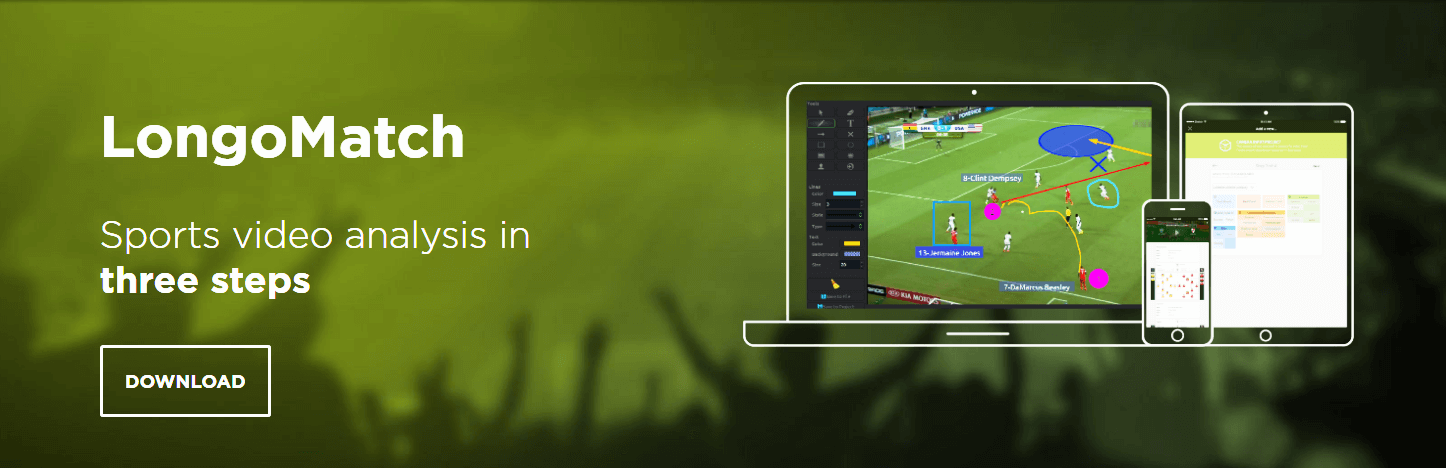
LONGOMATCH

LongoMatch is a powerful video analysis tool for analysts and coaches and produces very personalized information about every player.

The statistics include movements across all areas of the pitch including, possession percentage, assists, penalties, goals, number of fouls, and all other crucial details.

LongoMatch has creativity features that help users to drill into data and filter precise performance reports on a second-by-second account.

There are even additional possibilities to customize the system’s analysis dashboards to relay captured team information in favored formats or even to export it as a XLS CVS, or XML file.

Coaches and fans have an opportunity to further sort the data they generate during the brilliant video analysis of games using Microsoft Excel or renowned cloud platforms including Coach Logic and Videobserver.

Further, LongoMatch allows analysts to create custom playlists (and presentations) from the captured video footage and filter it by event types or players.

In short, in LongoMatch, passionate coaches, and observers have a platform to deliver the dedicated analysis they’ve always sought.

There is both a free and paid version.

Download LongoMatch software

Dartfish

Dartfish Football Analysis Tool

Dartfish is another wonder software and easily translates all football matches into figures that are easy to crunch and scan for ideas.

Indeed, Dartfish integrates seamlessly with a host of hotshot analytical tools including Opta, SportsCode, and InStat data to create special insights into what’s happening on the pitch.

Ultimately, the detailed stats –available in one place- make it easier to craft the perfect game plan and consistently upset the form book.

Casual observers, sports presenters, players, and coaches alike have praised the program’s 3D rendering of recordings and the enhanced interactivity during strategy sessions.

Additionally, the unusual and creative 3D analysis harnesses the interpretative powers of (AI) artificial intelligence to produce compelling highlights, post-game debriefs, and form analysis.

Earning the program more points are the sizzling video replays. They help analyst grasp the facts better and support sober decisions during matches.

Whether for official training, fans engagement (on TV), or pre-match preparations, this affordable software deserves a starting spot in all winning teams.

Users can download the Dartfish football analysis App (Android & iOS) and enjoy a free 15-days trial or use the cloud solution.

Hudl


hudl football analysis

Hudl is yet another online platform results with a big name among top performance analysts.

The system is quite a talent and will analyze uploaded videos, track primary stats, generate comprehensive feedback, and deliver customized highlights.

Users love its ease of use, slow-motion playbacks, expansive drawing tools, blow-by-blow comparisons, and individualized performance reports.

What’s more?

One can get an independent expert opinion by sending their game video to Hudl’s professional analysts who respond with useful pointers within 24-hours!

Then, it doesn’t need special tools and coaches can simply record with their existing cameras, iPads, or an iPhone for quick stats.

Trainers and players can utilize its summarised information to inculcate a winning mentality on any underwhelming team.

After all, the only way to fans can feel proud of their team’s jersey is by cultivating a triumphant culture.

Teams and their managers can request Hudl’s demo to start off.

Conclusion

Sports analysis and coaching software can help unlock the potential in both upcoming and established football stars. That’s because the analytics they provide are so much detailed that a player will literary struggle to get excuses as to why they’re not upping their game.

To coaches, observers, trainers, and managers, the best football analysis software is a godsend.

They make their work easier, enable them to learn each player, opponents, and games, and eventually come up with a championship winning master plan.

What else can one ask for?

RELATED STORIES YOU NEED TO CHECK OUT:

5 Best Network Card For Desktop

No matter how capable your desktop computer is, not having a good network card installed in it will surely give you different problems when it comes to online gaming, streaming online videos, and also maximum download speeds. Because we live in an era that involves the need for very high Internet speeds, in today’s article we will explore some of the best options found on the market, and we will have a quick look over the specs. This list will contain network cards for all price-ranges, to make sure that you will find one that fits your needs perfectly, both money-wise, and specification-wise. Note: Deals are subject to change. Keep in mind that the price tag often varies. We recommend going on the vendor’s website to check the price. Some of the products may be out of stock by the time you’ve made your purchasing decision. So, hurry up and hit the buy button.

Best deals on network cards for desktop PCs

ASUS PCE-AC68 AC1900

ASUS PCE-AC68 AC1900 - Best network cards for dektop

The ASUS PCE-AC68 AC1900 network card is a dual-band PCIe adapter that offers you good connection speeds for your desktop, at a very affordable price.

Even though the price of this card is low, it was designed for efficiency, both in the field of temperature dissipation and also connection speed and range.

Pros:

  • Supports all Windows versions
  • Efficient dissipation of heat
  • 5th generation 802.11ac chipset
  • Affordable

Cons:

  • The latest drivers available for this card are from 2017

Check price

TP-Link Archer Archer T9E

TP-Link Archer Archer T9E - Best network card for desktop

The TP-Link Archer Archer T9E network card is a very good piece of hardware that allows you to easily play online games, stream 4K-resolution videos online, and download with lighting speeds.

This device features an 802.11ac chipset that uses dual-band technology that offers a 5GHz (1300Mbps) and 2.4GHz (600Mbps) band.

Pros:

  • Heat Sink technology is used to cool down the network card even after long periods of use
  • The antennas are very efficient
  • Easy setup process

Cons:

  • Some users have encountered problems with the signal

Check price

TP-LINK TL-WDN4800

TP-LINK TL-WDN4800 - Network cards for desktop

The TP-LINK TL-WDN4800 network card is a very good option for those of you who require high internet speeds on your desktop PC.

This compact and yet powerful network card can be easily mounted in your PC’s motherboard, offering a dual-band 2.4GHz/5GHz setup and can offer speeds of up to 450 Mbps.

Pros:

  • Has a WPA/WPA2 encryption to protect your data from any third parties
  • Easy and fast setup
  • Compatible with all versions of Windows

Cons:

  • A bit expensive

Check price

Rosewill Rnx-AC1900

Rosewill Rnx-AC1900 - Network cards for desktop

The Rosewill Rnx-AC1900 network card model uses dual-band connectivity (2.4GHz or 5GHz) and can reach speeds of up to 1300 Mbps.

This hardware uses an advanced aluminum heat sink that allows the components to never heat up, even in the case of long usage.

Pros:

  • Supports advanced security features
  • 3×3 dual-band modulation
  • Efficient wi-fi signal
  • Compact design

Cons:

  • Some Windows 10 users have encountered problems when setting the drivers up

Check price

Asus PCE-AC88 AC3100

Asus PCE-AC88 - Network cards for desktop

The Asus PCE-AC88 network card offers very good internet speeds, that offers you the capability to play online games in high definition quality, and also stream high-speed internet videos without issues.

The AC88 network card from Asus 150 Mbps 802.11n Wireless data rate, and is compatible with Mac, Linux, and Windows platforms.

Pros:

  • Very fast speeds by the use of the NitroQAM technology
  • Great compatibility with a variety of systems
  • 4 antennas for greater connection stability and speeds

Cons:

  • No problems have been found with this product

Check price

Conclusion on desktop network cards

In order to ensure that your desktop PC will not cause any issues when trying to stream high-definition videos online, playing games, or listening to music, a good network card is required.

This list contains an array of options that cover all your needs in the price department, but also when it comes to speeds and other capabilities.

Please feel free to share your opinion with us about these options, and tell us which device you bought by using the comment section below.

Microsoft confirms Windows 10 2004 is the next OS version

Microsoft has recently rolled out a 19033 preview build for the Windows 10 20H1 Update. That update is available for both Slow and Fast ring Windows Insiders. The most interesting thing about the 19033 preview build, however, is that it shows users the next version will be Windows 10 2004.

It was previously expected that the upcoming Windows 10 version would be version 2003 as previous spring releases ended with the 03 marker. However, the 19033 preview build shows that the 20H1 Update will be for Windows 10 2004. Microsoft confirmed that on the update’s blog post by stating, We have chosen to use 2004 as the version to eliminate confusion with any past product names (such as Windows Server 2003).

Microsoft also appears to be a little ahead of schedule with the 20H1 Update. It has already been leaked that the big M has finalized features for Windows 10 2004. Thus, Microsoft has now released the 19033 preview build for Slow ring users as well as those in the Fast ring. It has been speculated that the big M might move the 20H1 Update to the RTM stage during December.

The 19033 preview build includes nothing new in the way in features. Instead, it provides a series of fixes. Furthermore, it does not include any watermark on the desktop’s bottom right corner. The absence of a watermark further highlights that Microsoft is very nearly finished with the 20H1 Update.

All this means that Microsoft might release the 20H1 Update a little earlier than usual during the first half of 2020. The big M rolled out Windows 10’s 2019 spring update from May, which was a little later than the more typical April release month. However, with the 20H1 Update seemingly ahead of schedule, Windows 10 2004 might feasibly become available in March or early April 2020 at least.

What Is New in Windows 10 2004?

Windows 10 2004 incorporates some interesting new features. Automatic Bluetooth pairing will come in handy for users who utilize Bluetooth devices with their laptops and desktops. Windows 10 2004 will be able to automatically detect Bluetooth devices and initiate the pairing process without any user intervention required.

Windows 10 2004 will include a new Cloud download option for resetting the platform. The Reset this PC window includes the Cloud download option shown directly below. That enables users to download an image copy of the OS directly from Microsoft cloud servers when reinstalling Windows.

The Windows Update tab in Settings will also include a new View optional updates option. Clicking View optional updates opens a list of optional updates for things like drivers. Then users can update Windows 10 by selecting some of the optional updates.

Chromium Edge is also nearing completion. Microsoft will probably release its revamped flagship browser before the 20H1 Update. Thus, Windows 10 2004 might also include Chromium Edge.

Users can now try out Windows 10 2004 in the Slow ring by joining the Windows Insider Program. It looks like that version will at least include more new features than Win 10 1909 that Microsoft released in November 2019.

RELATED ARTICLES TO CHECK OUT: 

Top 5 application launchers for Windows 10/11

As you already know, and application is basically a computer program that helps you locate and start other computer programs. While their use may sound simplistic enough, there is usually more going on beneath the surface. For example, application launcher can come in handy when trying to better organize multiple programs that belong to a certain category. There are plenty of application launchers out there, each with their own set of tools. That’s why we’ve decided to pick the best of the bestand rank them based on several criteria.

What are the top application launchers that I can use?

Winstep Nexus Dock (recommended)

Winstep Nexus DockWinstep Nexus Dock is an interesting program as far as application launchers go. Not only is it cross-platforms, but it is also very easy to manage.

You can add as many programs as you want to it, and the only thing you need to worry about is memorizing the key-binding to each of them.

Of course, if you do forget them, you could always just click the program’s respective icon.

Pros:

  • Cross-platform program
  • Comes with a short tutorial
  • Clean interface

Cons:

  • Comes with moderate-to-high memory requirements

Download now

Listary

ListaryIf you’re looking for simplicity and not something flashy, then Listary is just the right app launcher that you need on your PC.

probably the most professional-oriented app launcher on our list, this will triple the speed of your work as long as you know how to make use of all of its tools.

Pros:

  • Search the entire disk drive from any window or folder
  • Quickly find any file you need with a few short keystrokes
  • Instantly find & launch programs with a quick keyboard command

Cons:

  • Not very stylish

Download now

RocketDock

Rocket Dock Few app launchers have been on the market for as long as RocketDock, and this is all thanks to one simple thing: it does a simple job in a stylish manner.

Basically it provides your Windows 10 PC with a dock similar to that of a Mac PC, without affecting your functionality at all.

The visuals are pleasant to look at, adding, launching and removing programs to it is simple, and the animations that are coupled with it will make you want to play with it for the first couple of minutes.

Pros:

  • Makes your Windows 10 look like a Mac
  • Stylish
  • Great animations

Cons:

  • Default icons aren’t all that pretty

Download now

Executor

WIndows 10 ExecutorExecutor is an app launcher with a spotlight alternative for Windows 10. Once you install it, the app will start to index the apps and programs on your system, including recently used apps and files.

Once indexing is done, you can already start launching apps from it, as it basically works like an intuitive search bar that is always at hand and also looks good.

Pros:

  • Looks good
  • Adding programs is done automatically
  • Low resource consumption

Cons:

  • Worth having only if you have a lot of programs installed

Download now

Circle Dock

Circle DockCircle Dock is not necessarily an application launcher that you would use when you need to be efficient at work. Instead, it is more like the type of program you would install when you want your PC to look a certain way.

Programs can be pinned easily to it, and the design, shape, and pattern of the Circle Dock interface can be changed at will into a variety of neat shapes.

More so, it makes your desktop seem less cluttered since it disappears when not in use, which is nice.

Pros:

  • Plenty of customization features
  • Purely for the visuals
  • Disappears when not in use

Cons:

  • May be too stylish for some

Download now

Closing thoughts on application launchers for Windows 10

Application launchers are great for those that love to stay organized or people who love to have a visual improvement brought to their desktop.

However, if you barely have any programs installed, and you also don’t have too many system resources to spare, then getting a program launcher isn’t all that worth it.

Best Asus Monitors Under $200 [Budget-Friendly]

Looking for the ideal ASUS display isn’t easy, especially if you are on a tight budget. There are simply too many things to consider when buying a new monitor such as features, image quality, resolution, ports, and of course price.

So, to help you find the ideal ASUS monitor, I’ve compiled this list of the 5 best and cheapest ASUS monitors currently on the market. For the sake of convenience, I’ve also split the monitors in this list into unique categories.

Best cheapest ASUS monitors 

  1. ASUS VC279H Slim Bezel Black 27″
  2. ASUS 24-inch Full HD FreeSync Gaming Monitor VG245H
  3. ASUS Designo MX239H 23″
  4. ASUS VS229H-P 21.5″  IPS Full HD
  5. ASUS VS207D-P 19.5″

1. Overall best cheapest ASUS monitor: ASUS VC279H Slim Bezel Black 27″ [recommended]


If you are looking for a cheap Led backlit, LCD ASUS monitor that overall has some of the best specs and features on this list, then you will want to try the ASUS VC279H.

It is also one of the largest monitors on this list measuring at 27 inches. But it is still quite light in weight, weighing only 9.7 pounds.

You also have a 5 millisecond response time and 1920 x 1080 pixel resolution. These features combined with the GamePlus function makes the monitor a decent one for gaming.

As for other entertainment uses, the monitor features a 178/178 IPS and 80,000,000: 1 ASCR. This basically means that users can view the monitor from any angle without any reduction in quality or enjoyment. There is also a feature called EyeCare, which as the name suggests helps prevents your eyes from becoming strained and damaged.

There is an integrated technology called VividPixel, which basically makes viewing and editing photos a whole lot better. Amateur and semi-professional photo editors will especially find this technology to be useful.

All in all, this ASUS display offers quite a lot for such an affordable price. However, if you are still looking for more affordable options, then the models below will suit your taste.

   –  More: The Best Cheap Wireless Keyboard and Mouse to Use


2. Best Cheapest gaming ASUS monitor: ASUS 24-inch Full HD FreeSync Gaming Monitor VG245H


With a refresh rate of 75Hz, a stunning 1ms response time, and 1080p resolution, the ASUS VG256H monitor is undisputedly a great monitor built specifically for gaming.

The 75Hz refresh rate means that your monitor is capable of displaying over 60 FPS. The 1ms response time, on the other hand, means that you will have literally almost no input lag.

Any gamer, especially competitive gamers, know that every split second counts. In fact, superior reaction times can mean the difference between winning or losing a match.

Having dual HDMI also makes this ASUS 24 inch monitor ideal for gaming, as you can connect both a gaming console as well as your personal computer simultaneously. This allows you to conveniently switch between the two gaming devices with ease.

Another important feature on this monitor is the AMD FreeSync technology, which basically has the same affect as G-sync. For those who do not know what this technology does, it basically helps eliminate choppy FPS and screen tearing. This is, of course, essential for an optimal gaming experience. Not to mention that it can also give you an advantage on online games.

The monitor also utilizes GamePlus technology, EyeCare, and flicker-free technology.

Overall, if you are looking for a monster gaming monitor that is under the $200 price range, then this display is the one to go for.

    –  More: How to use multiple monitors like a single monitor on Windows 10

Editor’s Note: If you’re interested in other types of monitors, check out our wide collection of guides.


3. Best looking cheapest ASUS monitor: ASUS Designo MX239H 23″


If you are looking for a frameless ASUS monitor that is aesthetically very pleasing, then you will want to check out the MX 238H. The design of this display is minimalist and highly attractive. It is only 0.8mm thick and it has a silver color, which gives it a sophisticated look.

While the monitor is certainly a stunner, it isn’t so bad on the features either. There are HQ built-in speakers as well as numerous ports including 2 HDMI, headphone jack, DVI, and D-SUb.

In addition, the monitor has the standard 60Hz refresh rate, 1080p resolution, and a 16:9 aspect ratio. It has a 5ms response time and is capable of displaying p to 7 million colors. That combined with the IPS panel makes this ASUS monitor one of the best there is to buy in 2018.

The MX239H is both functional and good-looking, so it isn’t a surprise that many consider it as a favorite. If you don’t mind a 23-inch monitor, then I highly recommend this monitor.

    –  Read also: 5 best and cheapest portable speakers


4. Most Bang for the Buck Monitor: ASUS VS229H-P 21.5″  IPS Full HD


This is your basic monitor that has all the standard essentials. While there isn’t anything exactly outstanding about this monitor, it is extremely cheap. You will certainly get the most out of your money by buying this monitor.

As for the specifications, the LED monitor features HD 1080p resolution, 21.5 inches, IPS, and HDMI ports.

The monitor utilizes a technology called Splendid Video Intelligence. This feature helps enhance color, contrast, brightness, and sharpness. There are also preset viewing modes that can be used to optimize your viewing experience. These are the 6 modes: sRGB, Night View, Scenery, Theater, Game, and standard.

All in all, this ASUS monitor is very cheap, but still incredibly impressive. I recommend this monitor for people who are looking for a standard monitor at an affordable price.

    –  ALSO READ  Dell Venue 11 Pro vs Asus Transformer Book T100


5. Cheapest ASUS monitor: ASUS VS207D-P 19.5″


If you are looking for a ridiculously cheap monitor, but still offers decent specs and features then you may want to try the ASUS VS207D-P.

The monitor is 19.5 inches wide, LED, and has a 1600 x 900 resolution. It has a rapid response time of 5ms, which makes it great for both entertainment and work.

While the resolution (1600 x 900) isn’t up to my personal standards (1080p), this monitor is still incredibly impressive when considering how cheap it is.

Therefore I strongly recommend this monitor to buyers who are looking for one of the cheapest monitors.

Closing Thoughts

So there you have it, the best of the cheapest ASUS monitors to buy. All of the monitors are around or below $200. Despite their low price range, they will certainly still impress.

This specific list is part of our bigger selection of the best monitor deals you can find. You might also want to check out our dedicated Black Friday hub for tech deals.


Check out these amazing offers you don’t want to miss:

6 Best Content Curation Software For Windows

Are you worried about the next content for your blog/website? We’ve got you covered. In this post, Windows Report team has compiled a list of the best content curation software for Windows PC in order to make content creation easier. One of the most important aspects of online marketing is content creation.

Recent studies have revealed that marketers are creating more content now than they ever did before. The main goal of a content curation tool is to save time during the content creation process, it is therefore important to choose a content curation tool that is very useful and beneficial.

The content curation software’s on our list are reliable and accurate. Our content curation software includes organizational tools, news aggregators, bookmarking tools, clipping tools, etc.

Best content curation tools suitable for Windows PC

Pocket

content curator software

This is a content curation tool that enables you to save something you would want to read, watch, or share later. Pocket software works on any device at any time.

It is a leading save-for-later service which is integrated into more than 1,500 apps and is available for most major devices.

Key Features:

  • Saves documents, videos, or any other web content.
  • It enables you to save content from your browser or apps like Clipboard, Twitter, Pulse, and Zite.
  • Once the content is in Pocket, it’s available on your tablet, phone or computer, even when you are offline.

Cost: FREE

Curata

content curator software

Curata is content marketing software solution and curation software. Content marketers who desire to scale content to grow leads and increase revenue always choose the Curata Curation.

Key Features:

  • Discover the best content using its self-learning engine.
  • It can easily annotate, organize and contextualize your content.
  • Fast publishing and promoting content from anywhere at any time.
  • The most important contents are delivered automatically from thousands of different sources.
  • Brilliantly pre-populates the curated post.

Cost: Contact curata for a quote

Storify

content curator software

Storify is a content curation software that enables content marketers use the web in telling stories. This web based software can be used to find, collect, and share content on the web. After getting your content, you can leverage social media to share your curated content.

Key Features:

  • Connects to countless web sources and social media sites for an all-in-one search experience
  • Utilize Storify tools such as the Chrome extension and bookmarklet tool to capture content on the web.
  • It can drag and drop anything into Storify’s story editor in order to embed it immediately.
  • Collaborates with Storify’s enterprise plan for an advanced, multi-editor experience.
  • Streamlines content curation and creation.
  • Use Built-in features which help to put your story in front of an audience in order to increase the chances of it going viral.

Cost: FREE

Enterprise Plan: Contact for a quote.

ContentGems

content curator software

One of the best content curation software for professional content marketers. With ContentGems, Content can be easily found and shared. In addition, it is an easy-to-use platform.

Key Features:

  • Monitors the best online sources, blogs, and social media accounts.
  • Filters results based on your social signals, keywords and more.
  • Share commentary and curated content to your website or social media.
  • Frequent posting to Facebook, Twitter, LinkedIn, Google+, and your WordPress site making use of tools such as HootSuite and Buffer

Cost:

  • FREE – Two interests, monitor one Twitter account, twenty custom RSS sources and daily content suggestions.
  • Personal: $9/month – Ten interests, monitor two Twitter accounts, hundred custom RSS sources, automated RSS feed, real-time content suggestions and share to RSS.
  • Pro: $19/month – $9/month – twenty-five interests, monitor forty-two Twitter accounts, five hundred custom RSS sources, automated RSS feed, real-time content suggestions and share to RSS.
  • Business: $49/month – hundred interests, monitor ten Twitter accounts, five thousand custom RSS sources, automated RSS feed, real-time content suggestions, and share to RSS.
  • Personal Annual: $99/year – Twelve interests, monitor three Twitter accounts, hundred custom RSS sources, automated RSS feed, real-time content suggestions and share to RSS.

Juxtapost

content curator software

Content curator software which enables you to keep track of web content. It has easy-to-use tools to “bookmark” content into categorized pasteboards and then curate them easily.

Juxtapost’s social discovery is used by content marketers to browse other members’ streams in order to identify popular content

Key Features:

  • It is a postboard collaboration tool.
  • More Like This” button instantly go over to similar posts without leaving the page you are viewing
  • Export all your posts including descriptions and original links to an Excel spreadsheet for easy content planning.
  • It utilizes the preview zoom to see content in detail without having to leave the browser.
  • Share content directly to email addresses and Facebook.

Cost: FREE

Kuratur

content curator softwareKuratur is a Word Press plug-in that helps content marketers to have new relevant content on their blogs and websites. You can easily acquire contents by using this software.

Key Features:

  • Publish several magazines in few minutes.
  • It supports Facebook, Twitter, and any blog that shares an RSS feed

Cost: FREE

We’ll end our list here. If you’ve used other content curation tools that you think we should add to this list, let us know in the comment section below.

5 Best Tennis Ladder Software [Popular Picks]

For those who live and breathe tennis, a tennis ladder software is perfect to live their dreams. There are tennis ladder leagues organized where players get to meet new players. The league is a ranking system for a group of tennis players where players are lined up like the steps of a ladder.

Wondering what a tennis ladder software does? The best tennis ladder software allows the players to meet new players and challenge each other. The players move up or down the ladder based on whether they win or lose. The winner is the one who earns the most points.

While there are many tennis ladder program available these days, the best software offers a lot more features. From multiple ranking systems to fully customizable calendars or event management, each tennis software has something more to offer. Here’s a quick list of some of the best tennis ladder software for the tennis buffs.

5 tennis ladder tools to manage your tennis rankings

TennisRungs

Tennis Ladder ProgramTennis Rungs is a straightforward tennis ladder application where you can organize and manage your tennis rankings. It’s a user-friendly ladder system that makes it super easy for the players to view the ladders.

They can then make challenges and also view their progress using the software. Users are informed when any player or team cannot be challenged.

Additionally, it comes with an easy to use dashboard where the players can view how their challenges and recent activity on the ladder develop.

Among its other significant features are:

  • Entirely customizable calendars
  • Event management
  • Member Portal
  • Integration with PayPal
  • Different tiers of membership
  • Tracking of ball machine
  • Merged on your own site
  • Completely web-based
  • Mobile App to be launched soon…

Price: 30-days free trial available; upgrade starts from $10/month.

Tennis Ladder

Best Tennis Ladder Software

You can either join the local tennis ladder or make your own for free using the Tennis Ladder program. This software helps users find players in their locality and compete with them to claim the top spot of the ladder.

The best part is, it allows users to play on different ladders at the same time. For instance, they can play singles or doubles, or in different skill levels or locations.

Players can also acquire monthly match-ups, challenge other players, and accordingly, earn points with every match they play and win. The software runs tennis ladders in the majority of the big cities in the United States. They run tournaments in other countries too.

This software helps you meet new partners in the nearest locations and matching their skill levels.

It offers you around one week to complete each round of the tournament. This helps you schedule a time and location that suits the player and their competitor. Tournament matches are also included in the ladder matches.

It offers a Quick Challenge feature that helps the players find the next ladder match easily. Moreover, using this feature it’s convenient to send an invitation to the opponent.

Price: free.

Global Tennis network

Best Tennis Ladder Software

Global Tennis Network offers a community of more than 79,000 players in it where people can participate and play Tennis. From players to organizers, this tennis app offers all the tools that you need to search and organize a tennis match.

It uses the player’s history of tennis tournaments, leagues, and practice matches to estimate the singles and doubles levels with the help of complex mathematical algorithms.

The tennis ladder program helps players to create an online tennis community using a network and also self-operating tennis ladder leagues. It also helps them run a scheduled tennis team league, and make and operate self-Tennis tournaments. Best of all, players can also find Tennis partners across the world and also look for tennis courts near them.

Price: free for the first month; upgrade starts from $9.99 from 1 to 5 members

iTennisLadder

Best Tennis Ladder Software

iTennisLadder generates the timetable for the season court or the doubles groups almost instantly. It supports even the complex doubles round varieties such as interchanging, or mixed-interchanging.

Best of all, users can share the rotation schedules in just a few clicks of the mouse. While users can run multiple round robins at the same time, users can also create singles and doubles rotations.

It can be accessed online as well as from mobile phone devices. Moreover, it also offers an option to customize the round robins. Users can also access rankings and match entries from mobile phone devices as well.

In addition, there are no ads and so, there is no hassle while using the software. From the option to substitute players easily to exclusion of holidays from the schedule, or adding match results to the system, there are many features to look out for.

Price: starts from $49/yr.

Open Tennis World

Best Tennis Ladder Software

For those looking for a free Tennis ladder software, Open Tennis World can be a great option. It not just helps players to set up and manage their own tennis ladder but also helps them play tennis club or tournaments conveniently. From creating a round-robin league, or a playoff tournament to a challenge ladder, it allows users to create all.

The players are analyzed with the help of the same ranking system, so everyone can view their level including the ladders and clubs across the world.

Among its significant features are:

  • The option to set up and manage the challenge ladders, clubs and tournaments.
  • Users can save match results, a head-to-head record.
  • Automatically assesses the player’s skill level and rankings.
  • Provides support for match’s videos.
  • Fast and convenient methods to communicate between members.
  • Lets players bet with friends and have fun.

Points are calculated using the Elo rating system and this is the most precise system for ranking player’s skills.

Price: free.

Tennis ladder is a great system for playing tennis when there are many players. But it should also have a strong administrator to help promote the smooth running of matches between the players. These are some of the best Tennis ladder software where players can challenge opponents, manage tennis rankings, and more, effortlessly. So, choose the one that suits you the best and keep up with your passion for tennis.

RELATED POSTS:

4 Live Announcement Software In 2026

From schools and banks to shopping malls and railway stations, announcement software are used for communication as well as multimedia purposes like playing music and advertisements at public and private spaces.

Announcements software are also used to announce workings and closing hours, playing background music as well as promotional offers in shopping malls. Casinos and Hotels use the software to make announcements to different areas within the building including emergency evacuation announcement.

Other businesses that use announcement software are banks for announcing ticket number, Supermarkets for promotional messages and paging as well as large retail stores use it for particular zoning department to summon employees and customers and as an effective way of communication.

The announcement system is not only made of an announcement software but also requires (depending on the business type) LED displays to show information related to promotional media and audio system for the verbal announcement as well as text to speech to make the multi-lingual announcement.

However, today, in this article, we will be focusing on the best announcement software that allows you to automatically mix music, add promotional audio along with live announcement capabilities.

What to expect from an effective announcement software?

Depending on the type of business, an announcement software should offer the following features:

  • An intuitive user interface which less tech-savvy users can understand
  • Automated and live announcement features
  • Support for third-party apps like cloud-based music services with continues playback
  • Text-to-speech with multi-lingual support
  • Announcement schedule feature
  • Multiple zone/area support

Best announcement software for PC

BMS Music and Announcement Player

BMS Music and announcement software

  • Price – starts at $249

BMS Music and Announcement Player is an announcement software from NCH Software that allows you to play background music, advertisements and make live announcements.

The software comes with a simple user interface that can be learned to use in a single session. All the essential controls are provided on the main page. You can load music and announcement audio files to the player and tweak the settings for announcement and music from their respective control tabs.

The music control settings allow you to schedule playing date and expiry date. You can also tweak settings for Cue in and Out. The same settings are also available for the Announcement control panel.

The General options tab allows you to enable the automatic-run player, set password lock for settings, ability to reset sound card with the schedule, restart the computer with schedule and auto delete BMS item based on expiry date and added date.

You can further manage master volume control, convert audio files to MP3, tweak settings for Digital Signal Processor that includes Dynamic Range compressor and Multiband Active EQ for adjusting Bass and Treble.

The Music and Announcement tab allow you to autoplay announcement at random interval, set microphone paging and also autoplay random music tracks. Moving on to Zone options, you will be able to select a pair of zones (up to 16 zones) for the live announcement along with the sound device for the selected zone.

For live announcements, you need to download the IAPremote software offered by NCH software. Other features supported by the BMS Music and Announcement software include an audio compressor, support for online music subscriptions, automatic fade between tracks, text-to-speech Voice Synthesis and the ability to network with other computers.

BMS Music and Announcement software is a professional tool that is loaded with feature yet simple to use. You can download the trial version of the software from the link below.

Download MS Music and Announcement

— RELATED: 12 best music production software for PC users

storePlay

StorePlay - background music software

  • Price – Starts at $35

StorePlay is not your traditional announcement software but targeted at businesses like retail stores, saloons, and cafe that needs background music solution that can play promotional advertisement at regular interval. It can also be used at shopping malls.

StorePlay plans start at $35 per month and offer identical features across all the plan except for the availability of songs that differs from plan to plan.

StorePlay allows you to play top music tracks legally in retail stores and other business and covers all the royalties on music tracks on behalf of the customer.

The music can be customized based on the business type and mode. You can manage your music remotely via the storePlay website. As of now, the scheduling is future is unavailable but said to be coming soon.

Apart from downloading music, you can also upload your own messages like announcements and promotional messages.

storePlay updates music library every week offering fresh tracks all the time. There is a storePlay app if you want to control music from your smartphone as well.

Owners can manage all the settings from the centralized device dashboard which includes sound leveling and crossfading settings as well as the option to add promotions and messages.

storePlay makes it easy for store owners and businesses to play background music legally without having to purchase the music for commercial use.

Get StorePlay

— Editor’s Note: If you’re interested in other audio software, check out our wide collection of guides.

Sound Mill

Sound Mill announcement software

  • Price – Free 30 days complete trial / Basic edition $29.95 / Ultimate Edition $89.95

Sound Mill is a feature-rich music play and announcement software that can be used in business and public venues, for stand-up performances like magic shows and in art theaters.

The software allows you to play multiple audio files simultaneously for theater production with precise control over which track plays at which time.

For retailer stores and shopping malls, the software can be used to play music playlist in the pipe with a recorded announcement like sales promotion and upcoming events at a regular interval. You can schedule pre-recorded message like store closing time announcement, and Sound Mill will play the message at a scheduled time.

For malls that have multiple stores, Sound Mill offers Zone option which allows you to program audio playlist for each zone from a single computer.

Sound Mills supports all the major audio formats including MIDI, WMA, AU, AIFF, MP4, AVI and more. You can add support for more formats by installing a third-party codec to play popular formats like OGG, AAC, FLAC, etc.

Sound Mill works with touch-enabled devices, Wireless Bluetooth speakers and offers smartphone-based wireless control. Other features Sound Mill software offers include Eight band equalizer, DSP effect, IPC integration, business announcement feature, and scheduler.

The user interface is simple, but the software comes with so many features that it would take a couple of days to learn nuts and bolts of using Sound Mill.

Download Sound Mill

StationPlaylist Creator

StationPlaylist Creator

  • Price – Starts at $65

Creator is a music and sports scheduling software that allows you to schedule music and announcement for any hour of the day. Creator comes with far more music control features than any other music and announcement software in the segment.

One of the interesting features is that the Creator can prevent the user from scheduling multiple songs of the same tempo unless intentionally done. You can schedule different genres of music for a whole day.

The Creator program does not work on its own but requires an external music player to play the music. While the developers recommend Studio tool ( from the same developers) which is expensive and needs to be bought separately, Creator works smoothly with free players such as Winamp and Windows Media Player.

Creator software comes in multiple version. The base version Creator Lite costs $65 with some features disabled, and the Pro version costs $259 with all the features enabled.

Download StationPlaylist Creator

Good Music in a retail store is said to be one of the key factors influencing the customers to make purchases, recommend the store to their friends and family and spend more time shopping. It is also one of the cool ways to differentiate your brand from others.

Playing music in stores creates the right atmosphere by masking unwanted noise, which gives a sense of private space and results in less annoyed customers because the customer won’t pay much attention to the time. It can also help your employees and keep them in a good mood despite working for hours in the store.

With our recommendations of the best software for an automated announcement in store and private spaces, you can positively impact your customer and staff.

Do let us know your favorite software in the comments below. As for this year’s CES, it was full of surprises from Microsoft, Samsung, Intel, HP, Dell, Lenovo, and not only. Just take a closer look at our dedicated article. 

7 Best Router for Comcast to get Fast and Reliable Internet

Regarding high-speed internet, the choice of a router is vital. Getting routers that work well with Comcast should be a top priority for any internet user. A non-compatible Comcast router can lead to many frustrating experiences when surfing the internet.

Also, keeping personal computer systems’ information free from unauthorized access or safe from attacks would require a great router. A Comcast device should easily be activated via an effective router.

Connection to the internet does not necessarily have to require drivers before being operational on any Comcast or windows applications. High-tech routers should connect directly via network cables.

So, hHere are some routers that should make any internet surfing experience smooth, easy, and enjoyable. These routers work well with Comcast.

Is it better to rent or buy router Xfinity?

The decision to rent or buy a router from Xfinity ultimately depends on your circumstances and needs. However, here are some reasons why buying a router may be a better option:

  • Cost savings – Renting a router from Xfinity can add up over time. Buying a router upfront can be a cost-effective option, especially if you plan on using Xfinity services for an extended period.
  • Better performance – Xfinity offers rental routers that can meet most users’ needs, but they may offer a different level of performance than routers you can purchase on your own. By buying a router, you can select one that meets your specific needs and offers better performance and capabilities.
  • More control – Owning your router gives you more control over its settings and customization options. You can optimize the router’s settings to enhance performance and protect your network.
  • Flexibility – If you own your router, you can easily switch to a different internet provider if you move or decide to switch providers. You won’t have to worry about returning a rented router or facing additional fees.
  • Security – By owning your router, you have more control over your network security. You can install firmware updates and security patches as soon as they become available, which can help protect your network from potential threats.

Do I need a modem and router for Xfinity?

You will need a modem and a router to use Xfinity internet service.

The modem connects your home to the internet by converting the data signal from your cable line into an internet signal that your devices can use. On the other hand, the router creates a Wi-Fi network in your home that allows you to connect multiple devices wirelessly.

Xfinity offers a few options for obtaining a modem and router. You can rent a modem/router combo from Xfinity for a monthly fee, or you can purchase your compatible modem and router from a retailer.

Let us now explore the best routers for Comcast.

Routers that work well with Comcast

ARRIS SURFboard – Excellent download speeds

This ARRIS SURFboard stylish 8×4 modem/AC1600 Wi-Fi router has a maximum download speed of 343 Mbps. The Arris surfboard is carefully constructed to support a broad spectrum of devices for Comcast. It works with US Cable Internet Service Providers except for Verizon, Centurylink, and AT&T.

The device contains 4 upload channels and 8 download channels that give 131 upload speed and 343 Mbps download. Therefore, if a user needs up to 100 Mbps, the Arris surfboard should provide ample internet support.

It has an easy setup with a quick start guide and a video on installation. Works well with IPv4 and IPv6 Internet standards. Lastly, it uses Gigabit Ethernet ports for connectivity to PC or Routers without the VOIP telephone adaptor or Wi-Fi router.

Some important features of ARRIS SURFboard include:

  • High speed
  • Compatibility with many service providers
  • Wide Wi-Fi coverage
  • Ease of use

⇒ Get it now on Amazon

— RELATED: SOLVED: VPN won’t work with Comcast and XFINITY

Netgear Nighthawk C7000 – Great for gamers

Selecting the best router for Comcast has never been so easy.  The Netgear Nighthawk offers users up to a 24x faster speed for download in DOCSIS 3.0. It is fast, reliable, stylish, and best for game lovers and compatible with Windows 8 and lower versions.

It also works well with multiple operating systems. The modem’s Dual Band functionality of 2.4 GHz and 5 GHz, Wi-Fi provides efficient speed at up to 960 Mbps. The 24×8 channel bonding works with certified plans as much as 500

Having a dedicated 1.6GHz processor is an added spice to the package not located in other models. This makes it the best choice for 4K HD video streaming, online gaming, and faster downloads. It works with Comcast and many other popular providers. Netgear router is easy to set up and connect with ×4 Ethernet ports.

Some important features of NETGEAR Nighthawk C7000 include:

  • DOCSIS 3.0 Cable Modem
  • AC1900 Wi-Fi Router
  • 24×8 Channel Bonding
  • Compatible with Major Cable Providers

⇒ Get Netgear Nighthawk C7000

Motorola MB7420 Cable modem – Great for wider coverage

When seeking a powerful router with a strong Wi-Fi connection, the Motorola MG7420 offers the best routers that work well with Comcast. It is an exceptional device for connecting tablets and smartphones to enjoy at least 686 Mbps of manipulating data.

Users can enjoy fast and reliable gaming and live streaming speed without worrying about cyber-attacks or denial of service.

Motorola MG7420 comes with 4 Ethernet ports (for a wider coverage range) and a 16 x 4 DOCSIS 3.0 cable modem to help enjoy faster speed.

However, the downside to the MG7550 would be the lack of built-in routers, phone jacks, or connectors for telephones. But with the exceptional full-band tuners, one can seamlessly connect to HDTV, computer systems, wireless routers, etc. Its ergonomics and more help for sturdiness for office or home use.

Some of the features of Motorola MB7420 Cable modem include:

  • DOCSIS 3.0 Cable Modem
  • 16×4 Channel Bonding
  • 686 Mbps Max Download Speed
  • Compact Design

⇒ Get Motorola MB7420 Cable modem

Next-generation ARRIS Surfboard – Perfect multi-gigabit ethernet

Get rid of all internet hassles and frustrating experiences with the Next generation Surfboard. The Next Generation Arris uses the more recent technologies DOCSIS 3.1 to be compatible with most cable internet providers.

All engineering and technologies used in the Next Generation surfboard conform to IPv4 and IPv6 standards for internet browsers.

The Arris Surfboard Next Generation for Comcast and Cox Cable gets approval across multiple devices. It, however, does not work with AT&T, Century Link, or Verizon.

Additionally, with a DOCSIS 3.1 version and a 32×8 modem, users can access as much as 10 Gb speed for faster downloads. It can accommodate up to two networks with Gigabit Ethernet ports. It is about the best router for Comcast.

Some important features of the Next Generation ARRIS include:

  • DOCSIS 3.1 Cable Modem
  • 32×8 Channel Bonding
  • Multi-Gigabit Ethernet
  • Compatible with Major Cable Providers

⇒ Get Next-generation ARRIS Surfboard

TP-Link AC1900 Smart Wireless Router – Great security features

best router for comcast

TP-Link AC1900 Smart Wireless Router possesses high-speed internet capabilities plus and reliable network.

Also, the TP-Link wireless router technology has 4 Gigabit LAN ports and covers a long range with 3 external antennas. It is a smart device that can detect the area the Wi-Fi is devices can receive better signal anytime.

The TP-Link can easily share media, printers, and files across the network. TP-Link routers work well with Comcast devices for faster internet speed with maximum security. And is a compatible 802.11ac router that works well even with older devices.

Some important features of the TP-Link AC1900 include:

  • Dual-band Wi-Fi with speeds up to 1900 Mbps
  • Three external antennas
  • USB ports for easy file sharing
  • Guest Wi-Fi network and parental controls

⇒ Get TP-Link AC1900 Smart Wireless Router

Asus Gaming Router – Favorite option for gamers

best router for comcast

Gamers and live streamers now have a whole new reason to smile in the Asus router, enjoying 4K streaming and virtual reality.

This Tri-band technology gives wide and maximum coverage of up to 5,000sq feet. Asus Gaming Router has the latest 802.11ac, single 2.4GHz, dual 5 GHz, AC5300 wireless router, 5334Mbps, 8 ports, and dual USB 3.0.

The ROG game dashboard for exclusive games uses a fast Gamers Private Network (GPN). It makes for a great, flexible home-based Wi-Fi network as the best routers that work well with Comcast.

Lastly, the Artificial Intelligence protection plus Mesh systems help ensure a fast, reliable, and secure network with VPN plus normal internet fusion.

Some important features of Asus Gaming Router include:

  • Dual-band Wi-Fi speeds up to 11000 Mbps
  • Optimized with low latency and fast performance
  • Advanced security features
  • Easy setup and management

⇒ Get Asus Gaming Router

Linksys AC1900 Dual band router – Extensive parental control features

best router for comcast

With the Linksys Wireless AC1900 dual-band router, media-intensive applications users can enjoy 4.3 times faster internet speed.

It gives users access to priories websites, uses parental control over the content, and monitors internet activities. Linksys AC1900AC is packaged with 4 dual-band antennas that can be easily detached.

Multiple activities, such as 4k streaming, gaming, and file transfer, can go on with much latency and without lagging.

Also, it helps enhance performance for Data transfer, delivering via USB 3.0 better than USB 2.0. As part of the combo package, it comes with a quick start guide, power adapter, and documented CD-ROM and power cord.

Linksys AC1900 dual-band router is one of the best routers that work well with Comcast devices.

Some of the important features of Linksys AC1900 Dual band router are:

  • Dual-band technology (2.4GHz and 5GHz)
  • Speeds up to 1900Mbps
  • 4 gigabit Ethernet ports
  • USB 3.0 port for file sharing

⇒ Get Linksys AC1900 Dual band router

One must be selective when picking the best routers for Comcast.

The above list should be a guide on the best Comcast favorite routers for faster, more secure, and reliable speed.

Lastly, we are curious to know what your choice will be. So, leave us a comment below.

Best Psychology Software For Experiments In 2026

Since the days of Greek philosophers Plato and Aristotle, psychology applied to the inner workings of our society was observed to be of a paramount importance. Psychologists study the workings of the human mind and their work is a vital aspect of human health. They treat people with different mental health issues by using techniques that evolved since the ancient times.

Because of the sheer amount of data a psychologist has to deal with on a daily basis, using a specialized software can make things a lot easier and more practical than the alternative – holding paper files, test results, etc.

In this article, we will explore some of the best software options that allow you to create tests, maintain your client information databases, test results and even entire psychological sessions in one place.

5 psychology software for beginners & professionals

Testable

Testable - Psych Software

Testable is a great software option for psychologists that want to carry out behavioral experiments and surveys simply. All you need to do to get started is fill in a spreadsheet with information on the trials and questions, and then upload them. Testable will take all the information provided, and creates an up and running study.

Because of it’s great storage capabilities, Testable keeps all your surveys and experiments in cloud storage. This allows you to not worry about ever losing any important files from your studies, and also access from any PC that has a web browser installed.

Key features include:

  • Wide range of experiments with included templates
  • All major video and audio files supported
  • Multiple response options
  • Various presentation modes – full control over presentation times, sequential stimuli presentation, etc.
  • Automatic randomization within and between blocks
  • Feedback for incorrect trials
  • Ability to generate random code at the end of session

Testable comes in 3 different versions, each designed to suit specific needs :

1. Testable Basic:

  • One license
  • Unlimited experiments and surveys
  • Unlimited data collection from Testable Minds – subject pool
  • Can collect up to 10 participants outside Testable Minds
  • 100 MB storing for your stimuli
  • Free to use

2. Testable Plus – includes all the features of the Basic version and adds :

  • Guaranteed email support within 24h
  • Collect up to 500 participants outside Testable Minds
  • 1 GB for storing data

3. Testable Premium – this is a special license for labs that provides all Plus benefits but allows you share the license with 6 people. You can also expand the storage space to 5GB for each user.

If you feel like you need to see a manual about using Testable, check out this guide.

Try Testable

E-Prime 3

E-prime - Psych software

E-prime is another great tool for psychologists that want to create their own experiments. This tool has a easy-to-use interface that can help you start designing and collecting data fast.

Key features include :

  • Drag and drop objects
  • Complete experiments without programming
  • Can design with text, images, movies, sounds, etc.
  • Present performance feedback without script
  • Pre-built experiments and templates
  • Can present experiments on multiple monitors
  • Choose the amount of data logging
  • Run in floating window with real-time debugging
  • Extensive timig data reports available online
  • Export data in SPSS, R, and Excel

Try E-Prime 3

— RELATED: 4 best student management software that passed the test

PsychToolBox-3

Psychtoolbox 3 - Psych software

Psychtoolbox is a free software that works with Matlab and GNU Octave. PTB offers you a great array of features for psychological research. This program makes it easy to control and show auditory and visual stimuli to your patient.

The PTB offers you access to display frame buffer, color lookup and many other features. You can easily synchronize your tests and can also expose raw OpenGL commands.

If you want to see a tutorial on how to use PsychToolBox, go to the tool’s official webpage.

Download PsychToolBox 3

PsychoPy

PsychoPy - Psych software

PsychoPy is another great free software option for psychologists that is written in Python. This program allows you to run a wide range of experiments in psychology but also in neuroscience and psycho physics.

You can use the Builder interface to build complete experiments with ease, or the Coder interface that allows you to write incredibly powerful experiments using the Python programming language.

Download PsychoPy

Affect 4.0

Affect 4.0 - Psych software

Affect is a software package developed to give you the power to create and conduct psychological experiments. This program has been designed specifically so it can be used by people with no programming experience.

Affect 4.0 has a simple user-interface that makes it easier for you to define randomization, timings, and output of experiments.

You can use Affect to easily present visual, acoustic, and/or tactile stimuli in complex sequences. This feature also has a feedback loop that registers response latency of your patient.

You can find a tutorial on how to start using Affect 4.0 on the tool’s official website.

Complete the required form and download Affect 4.0

Conclusion

In this article, we explored some of the best software options that can be used in psychology.

In this list, we covered both complex programs and easy to use software. The more complex software presented in this list requires you to know programming. The easy to use options have the same test-creation capabilities and do not require any kind of programming.

Let us know which software you chose from the list in the comment section below.

RELATED STORIES YOU NEED TO CHECK OUT:

Alumni Management Software: 5 Best to Use in 2026

Alumni is a term that is used to represent people who are graduates of a college or university. Because the number of people who finished their studies is enormous and it grows exponentially, keeping updated alumni lists is a hard task.

Because of this reason, it is recommended to use specialized alumni software that was designed for managing and sorting of alumni databases. Having this information at your disposal in one all-compassing software helps you reduce the time of searching through profiles, in this way, making the entire process of organizing a meet-up, a far easier task.

In this article, we will explore some of the best software options that enable you to stream-line your alumni database with ease.

5 alumni tools to better manage your alumni databases

Vaave

Vaave - Alumni software

Vaave is a great SaaS (software as service) option that was designed specifically for alumni management. This software can be used both by educational institutions or in the corporate environment.

Vaave helps you to easily build your alumni network, organize successful reunions, raise funds, etc. You can easily keep in touch with former staff, customize development of the program, and can even be used to re-hire staff and as a referral platform.

Alumni management features include:

  • Events module — plan, publicize and organize meetings between your alumni
  • Funds module — you can manage fundraising with simple online payments
  • Jobs board — allows alumni to interact efficiently and share opportunities
  • Mailing list management — user intuitive mailing lists
  • Member accounts – manage all the accounts of your members
  • Member communities — allows users to organize in communities
  • Member portal — users can share information, video and photo on a main portal that everybody has access to
  • Database management system — can help you build, manage, sort and use data efficiently
  • Website management

Try Vaave

Enterprise Alumni

Enterprise Alumni - alumni software

Enterprise Alumni is an entirely customizable alumni platform that enables you to manage both alumni and former staff with ease . This software is fully integrated in the cloud. Because of that, it a easily accessible solution from anywhere in the world, and offers you a protected online environment for your data to be stored in.

Enterprise Alumni is fully integrated into HR applications like SAP, Success Factors, Oracle Taleo, etc. This feature of the program enables you to seamlessly transfer information from one software to the other without any loss of data or hard complicated maneuvers.

This software is used by a good number of great organizations of our world. Some of these corporations are : HSBC, Nestle, Lufthansa, P&G, and Aviva.

Other features worth noting are:

  • Event management — you can create events with hundreds of Alumni with ease and manage every aspect
  • Fundraising management – allows you to manage any fundraising
  • Jobs board — offers alumni members the possibility to find a new job in the domain of their interest
  • Member portal — wall-like online member portal with main chat and interactive options
  • Membership management
  • Member accounts access
  • Website management

Try Enterprise Alumni

Graduway

Graduway - alumni software

Graduway offers you an entire online package of features that give you the power to manage and mentor your alumni. You can easily schedule appointments, track the progress of your alumni, and manage the programs they are exposed to. This software can be used by schools, corporations and nonprofits.

With the use of its customizable registration forms, you can use Graduway to create custom alumni groups based on users credentials, demographics, interests, etc.

Graduway can be used with different CRM’s (customer relationship software) like Edge NXT, Blackbaud CRM, Salesforce, etc., because it’s fully compatible with the file formats needed. This allows you to migrate information from your preferred CRM application to Graduway and also input data directly from the CRM software.

You can use this software to match your profile with mentors. This feature gives you the power to select your mentors from the student groups based on their skill set, age, etc.

Key features include:

  • Create events with hundreds of Alumni with ease and manage every aspect of the process
  • Powerful and yet simple user interface
  • Willing Network – allows your alumni and students to interract
  • Easily manage your mailist lists and create customized emails
  • Manage membership
  • Users can post job offers
  • Visibility features that allow you to choose which information is private or shared
  • Website management features

Try Graduway

Hivebrite

Hivebrite - alumni software

Hivebrite is another great software option that can help you manage your alumni database. This software is easy to set up and use, and it can be personalised to suit your brand, offering opportunities to your alumni community.

With Hivebrite you can define the way your users can sing-in to your platform -email, social network or SSO., if it’s an open or an invite-only community.

Because of it’s online features, Hiverbite can be accessed from anywhere in the world. You can now easily keep in touch or even engage your users with networking tools specifically designed for them.

Hivebrite can be used in a variety of ways, depending on your institution’s needs. Some of the most notable features include:

  • CRM & alumni member management — event and fundraising management, jobs board, mailing list, member accounts, etc.
  • Association management — you can manage chapters, membership, the website, etc.
  • Community — membership, social media and content management, etc.
  • Membership management — club, gym, association and nonprofit membership, and email marketing and magement
  • Social networking — news feed, blogs, data security, group management, social media tagging, etc.
  • Online payments — optimize engagement and simplify your workflows with easy online payments for paid events and memberships
  • Event management — manage complex events for your community with different types of tickets and external participants
  • Analytics & reporting — gain insights into the activity of your members and boost engagement.

Try Hivebrite

Alumni Channel

Alumni Channel - alumni software

Alumni Channel is one of the most complete alumni managing software presented in this article. This software is an online suite designed for schools, school alumni and other membership-based institutions.

The important data gathered about and from your alumni is stored in cloud and can only be accessed by channel administrators. This offers a great way to secure the data and also eliminates the need of keeping papers, recording management, etc. , and also allow you to send mass emails to groups of alumni easily.

Members of Alumni Channel can interact and communicate using the built-in messaging and chat service. This feature can be used to create marketing campaigns, plan RSVP events, and also share photos.

You can easily upload images, PDF’s and forms to the database or export your project to community members or a selected group. One of the best features of Alumni Channel is the power it has to generate complex reports based on user interaction data and also other information like website traffic, registrations per day, frequent visitors, etc.

When it comes to managing your alumni database, Alumni Channel offers a good set of features like a quick member search, member organizer – class, directories, etc., member profiles access, job postings, etc.

In the communications department, this software is very useful because of features like – event listings, photo slideshow, news listings, bulk emails, etc.

Try Alumni Channel

Conclusion

In this article, we explored some of the best software options available, that can simplify and streamline the process of alumni management no matter the number of applications.

The features contained by the software found in the above list will surely cover all your data managing needs no matter if you’re using them for a small business or a large multi-national corporation.

Let us know which software you chose from this list.

RELATED STORIES YOU NEED TO CHECK OUT:

Personal Training Software: 6 Best Online Apps in 2026

In the last decade, we have observed an increased interest in people to live healthier and more productive lives. Besides having a healthy diet, one of the most important aspects of health is the level of physical activity we engage ourselves in.

Because not all of us are experienced enough when it comes to fitness, we will need the help of a training professional. They can create personalized training programs based on your measurements and goals, and guide you through every step of the training process.

Because keeping in touch with your personal trainer is crucial for guidance and sharing of information, in this article we will explore some of the best options that allow you to do just that, connect with your PT online for easy access.

The software presented in this list can help both fitness beginners but also professional fitness instructors that need a simple way to schedule, organize and plan for their client’s training sessions.

Best software for online personal training

Podia – Best platform to engage your clients

Podia is a platform that provides all personal trainers with a place to manage and interact with all their clients and their personal training sessions.

This software takes care of every process that seems repetitive. It takes care of payments, saves account details of clients and keeps them updated with news from you.

If you have many clients you know how tricky it is to manage all individual payments and assign details to them. Podia takes care of all of this and makes every payment approval take less than 10 seconds.

Take your personal training to the next level by making passive income from old training sessions as well as active income from new videos or future appointments with clients.

Podia come with two integrations, Zoom and Youtube, so you already know the drill.

When you already know how to use software, you save tons of time adapting to some new features. That’s exactly what Podia does. It brings new features and options to the software you already use.

Some of the main key features of Podia are:

  • Schedule and sell in advance
  • Earn a passive income from replays
  • Create bundles with other products
  • Upsell options for more training sessions
  • Email and affiliate marketing included
  • On-page chats with clients
  • Possibility to sell or offer for free
  • Zoom and Youtube integrations

Podia creates a user-friendly environment for clients and personal trainers that brings them together for enhanced communication and interaction.

Podia

Keep in touch with your clients and stay above expectations with this amazing software.
Free Trial Visit Website

PT Distinct – Great for managing all your client’s needs

PTDistinction - PT software

PT Distinct is a cloud-based personal trainer software option that gives you the possibility to manage your clients, design specific meal plans and track fitness data with ease.

This app can be used either by individual trainers or by fitness centers. Trainers can easily manage all the personalized information required for customizing the training plan, and users can create fitness goals. Because of the features in this app, trainers can see statistics, goals, and lifestyle habits of his/her clients and access other information on the client’s profile.

Besides the fact that PT Distinct can give you all the information required to create a professional training schedule for your clients, you can also use it to create training programs at a fitness-center level. These fitness-center training programs allow you to expose creative classes to the clients.

After the completion of the PT Distinct profile by the user, trainers can create suitable meal plans based on the client’s weight, sex, age and proficiency level. This program also allows you to set up email scheduling, automated alerts, client dashboards, etc. These features allow you peace of mind regarding the managing of training hours and resting times for each client, while also reminding your clients of different tasks.

This app perfectly integrates with trackers and wearable devices like My Fitness Pal, Fitbit, etc., for a more in-depth view of overall training statistics.

⇒ Get PT Distinct

Trainerize – Great for keeping clients hooked

Trainerize - PT software

Trainerize is another great software option that allows you to manage, sort and create important training information for your fitness clients. With this app, you can easily track meal plans, customize training schedules and edit them at will while keeping in contact with your clients.

This software sends automatic alerts to your clients, tracks your client’s workouts, and can even be aware of your top-range customers with badges based on their performances. This feature can increase the productivity of your client base, because of the competition aspect. Clients will be motivated to do their best and will see greater results.

You can use this app to train your clients in-person or online or even combine the two and share your live session with many online clients. The ability to track the vitals and performances of online training sessions is incredibly useful in order for you to adapt and overcome any issue your client might have.

Some of its best features include:

  • Training templates
  • Create personalized workouts – conditioning, group training, cardio, etc.
  • Can create interval workouts – with a built-in timer, rest periods, and voice-over audio
  • Easily add notes to exercises
  • You can use the hundreds of professional instructional videos or create your own
  • Upload your own exercise videos or import YouTube videos
  • You can print workouts in PDF format
  • Monitor your clients – exercises, before-and-after photos, etc
  • Notifications about clients finishing workouts and notes added
  • Meal plans – ability to track macronutrients

⇒ Get Trainerize

TrueCoach – Great for gym clients management

TrueCoach - PT software

This app is another great software option that allows you to manage your client database, and client personalized training schedule and also connect with your clients online, with ease.

Some of the best features of TrueCoach include – attendance tracking, a large video exercise library, fitness assessments, nutrition, and payment processing.

With TrueCoach you can design and build personalized workouts for your clients, and then automatize the process of mail delivery. This will allow you to focus on the important aspects of your client’s fitness goals.

Other features of TrueCoach that are worth mentioning include:

  • Free-form workout builder with templates
  • Over 850 exercise videos
  • Real-time messaging
  • Client management – centralized into one place
  • Track the progress of your clients by using exercise history
  • Nutrition tracking – macro goals and measures progress

TrueCoach comes in 4 versions – The Starter Plan allows you to train up to 5 clients at once. The Standard Plan allows up to 20 active clients and also has the capability to be custom themed with your own brand. The Pro version allows up to 50 active clients, adds customer branding, and also allows TrueCoach payments.

⇒ Get TrueCoach

Nudge Coach – Great for managing nutrition

NudgeCoach - PT software

This app is another great tool to use for your personally trained clients. You can manage clients, create fitness plans, manage nutrition and create reports regarding the evolution of your clients, all in the cloud. This makes Nudge Coach a very useful app because it eliminates the risks of losing client data, training performances, etc.

Nudge Coach can be used with fitness apps like Fitbit, Moves, etc. This feature allows you to have detailed information about the level of training, the intensity, and the duration of your client’s workout. This app also has a feature called ”Nudge Factor” that gives your clients scores based on their activity level.

This scoring system gives your clients the feeling of achieving something when finishing a workout. This, in turn, gives your clients more confidence to continue improving their performances but also provides you with a simple overview of the level of training you’re providing.

Nudge Coach gives you all the tools you need to adapt to your client’s needs with ease. You can also use this app to calculate macronutrient levels for each customer and see how much they consume with live feedback.

By using the integrated messaging tool provided, you can contact your clients easily and change or improve the way they perform the exercises, nutrition plans, rest times, etc.

⇒ Get Nudge Coach

Halo Fitness Cloud – Good plan options

Halo Fitness Cloud - PT software

As the name suggests, Halo Fitness Cloud is a web-based software that give you all the tools required in order to professionally manage and create specialized training schedules for your fitness clients. This tool can be used by both big fitness clubs, and individual personal trainers.

One of the best features of this app is the compatibility with gym equipment that can give you feedback on how much the specific machine is used, structural issues, etc.

Halo Fitness Cloud comes in 4 versions with specific features, tailored to the needs of different users.

1. Halo Standard Plan :

  • Ability to customize and control product settings
  • Software updates
  • Usage statistics
  • Ability to add and edit staff
  • You can add, edit or rename your gym equipment

2. Halo Core Plan – includes all the features of Standard version and adds :

  • Membership and product promotion
  • Ability to add and edit the profiles of members
  • Set goals and track progress
  • Create and find workouts
  • Can be synced with Life Fitness and Cybex fitness equipment – real-time feedback from the fitness machine
  • Ability to customize your branding

3. Halo Train Plan – includes all the features of Standard and Core versions and adds :

  • Ability to add your own workouts
  • You can send personalized workouts directly to clients
  • Create and add exercisers to the workout library
  • Two-way trainer-to-client interaction through the app
  • Create and manage class schedules
  • Promote small group training classes
  • Members can request workout plans from their trainers

4. Halo Engage Plan – includes all the features found on the Standard and Core versions and also adds :

  • Send members personalized mass emails
  • Campaign analytics
  • Easy-to-build email templates with flexible designs
  • Create and manage exerciser challenges
  • Assign tasks to your staff for customer interaction
  • Branded email campaigns
  • Send messages to exercisers during their workouts on connected compatible fitness equipment
  • Real-time challenge leaderboard

⇒ Get Halo Fitness Cloud

Conclusion

In this article we explored some of the best software options that allow personal trainers to manage, coordinate and schedule the training programs, eating habits, water consumption, etc. , for every customer.

The apps presented in this list also allow you to create new training programs and share the information with other clients when needed, while third-party tracking devices can give you information about the client’s vitals.

Let us know what software you chose from this list.

RELATED STORIES YOU NEED TO CHECK OUT:

5 Best Business Plan Software For Nonprofits

Before we get into the nitty-gritty of this post, let’s talk a bit about what we mean by a business plan.

A business plan is the most important first step in the success of a nonprofit. Whether you are looking to change the world or change your neighborhood, you need a business plan to get started.

If you are a nonprofit, or planning to start one, you may be asking yourself why you even need a business plan. Well, you do. You need to think about your nonprofit as a business, if for no other reason than the taxman will.

Having said all that, this article is not about the pros and cons of having a business plan. It’s about what is the best software to use once you’ve decided you need one.

What is business plan software?

Generally, a business plan software is a developed application that integrates useful technologies to help business owners scale their business through processes like automatization or workflow tracking.

So, here is our input on a few of the best business plan software for nonprofits on the market today.

Build your NGO with these business plan tools

Monday.com – Successful non-profit business

Monday is a renowned work OS that revolutionizes the way people manage their business for any market. Plus, you have the NGO version to streamline your workload.

The first thing to know is the efficient workflow and task management that can improve and centralize your non-profit business in one place. So, you can add projects, see the tasks’ progress, and keep track of all the processes in one dashboard.

Also, this platform is used by millions of owners or entrepreneurs to organize their activities and enhance the collaboration between employees and clients. Especially for NGOs, there are fundraising campaigns and donor monitoring that help you with grant applications.

In addition to that, you’re able to monitor all the projects for every team that thrives to accomplish the final goals. Not only that, you can recruit and manage volunteer jobs recruitment processes and availability forms.

As a conclusion, this workflow and business plan solution is what everybody needs when starting a new professional challenge.

Monday.com

Plan your non-profit business with this original work productivity and planning solution
Free trial Visit website

IdeaBuddy – Unbeatable business ideas

If all you need is a business model, there isn’t a better solution than IdeaBuddy for coming up with an unbeatable NGO business.

From the beginning, this product comes with an all-in-one service for creating or testing business ideas and bringing them to life. You can use editable templates to establish the market, your solutions, or measurable goals.

Besides this, you can use handy features like the Whiteboard, business guides, or even financial planning for your fundraising or donor funds. Hence, your business plan will become a reality as we speak.

There’s even more to offer with this unique business solution. You can simply collaborate or have brainstorming sessions with your team using sharing and instant access to your pitch.

In addition, IdeaBuddy software can help the owner score their business ideas and test the waters before launching. You have metrics such as feasibility scores or areas for improvement.

IdeaBuddy

Secure your business plan with the most suitable solution for NGO implementation tool.
Free trial Visit website

Smartsheet – Most effective for NGO plans

This software is an automation and workflow resolution and is overly used by NGO owners to run and reach the mission of their cause.

First of all, you can use this business plan and workstation to organize donor applications or fundraising projects by monitoring everything in one view.

At the same time, there are strategic planning features that can serve as business models at the beginning of your journey. You can thus use charts and timeline tools for more work productivity.

In addition, it’s likely to initiate meaningful campaigns and plan all the logistics and marketing needs using this technology.

Wrapping up, this application is a great resource for every business owner who needs to track and multiply the results of their funds or donation campaigns.

➡️ Get Smartsheet

Jira Software – Cloud business manager

Jira Software

Jira Software is one of the most popular business planning software around, and it’s not just popular because it’s good at what it does.

It’s also remarkably flexible, which can be seen by its many and varied customers, including Dominoes Pizzas, Indeed.com, Quantas, Spotify, etc.

Although Jira has a cloud-based option, what makes it particularly popular for many nonprofits is the ability to download the software and host it on a local server. This means the software can be customised to the exact needs of the nonprofit.

➡️ Get Jira Software 

LivePlan – Confident non-profit models

LivePlan business planner

You may have seen a pattern in this post that all the products I have talked about so far have the option to download software onto your local machine.

This is not because I’m anti cloud-based solutions; it’s just that many people don’t want to pay monthly subscriptions. Most downloadable business plan software for nonprofits can be purchased with a one-off payment.

However, I wanted to include one cloud-based program in this list, even though it breaks my unofficial rule, not just for what it offers but also for its pricing structure.

LivePlan is the cloud-based version of Business Plan Pro, so if you don’t want to pay the monthly fee for LivePlan but like what it does, then Business Plan Pro is the way to go. If you don’t mind paying a subscription, then LivePlan is one of the best business planning software available.

➡️ Get LivePlan

And there you have it. Obviously, this is far from an extensive list, but it gives you a fair idea of what types of downloadable business plan software for nonprofits is out there.

If you have a downloadable business plan software for nonprofits that you think is a good alternative to the software mentioned above, let us know in the comments section below.

Here’s how to use the Office Clipboard to make copying and pasting easy and powerful in Office 365

One of the benefits of Office 365 is that it has an in-built clipboard. If you copy and paste items while writing documents, creating spreadsheets, or presentations, the software remembers what you last did, and will keep the item across any of the other Office apps you have or decide to open.

This makes life much easier if you’re looking to go back in time and copy something you might have forgotten about when you started a document. In our latest Office 365 guide, we’ll show you how you can do this and use this clipboard to your advantage.

How to cut and paste items from the Clipboard

To make cutting and pasting items from the Clipboard easier you’ll first need to find it from the Home tab in Word, Excel, or PowerPoint. You’ll notice a launcher icon in the lower right corner of the paste box, so be sure to click this to pop out the clipboard. You can then select the text or graphics from within your document you want to copy and press Ctrl+C.

Your selections will appear in a list on the left side of the screen over time and you can paste an item by selecting it. When you’re finished you can click the (X) button in the list to close it out. You’ll even notice a little preview of photos or charts that you might have copied.

How to delete items from the Clipboard

If your clipboard is getting too full, you can easily delete items from it. To do this, all you need to do is head back into the Clipboard following the steps above. You can then click the arrow next to an item and choose Delete. If you want, you can also click Clear All to clear out the items.

There are many other options too

Once you finish exploring the Clipboard, there are some other options that you can check out. You may look to the bottom of the screen and press the Options button. From here, you’ll be able to control some of the following items:

  • Show Office Clipboard Automatically
  • Show Office Clipboard When CTRL+C Pressed Twice
  • Collect Without Showing Office Clipboard
  • Show Office Clipboard Icon on Taskbar
  • Show Status Near Taskbar When Copying

Keep in mind that after you open the Clipboard, it will also store content that you’ve copied or cut from anywhere. You also can set the clipboard to store content but remain closed, as long as you have an office program running. However, once you close out an Office 365 program, all clipboard content will disappear and it will be emptied.

Try out the Windows 10 Clipboard History as an alternative

Now that you’ve mastered the Office 365 clipboard, there’s also an alternative that you may consider using. If you’re up and running with the Windows 10 October 2018 Update, you can view your clipboard history. This needs to be enabled from the System Settings by searching for Clipboard and enabling the feature. Once you do, you can hit the Windows Key and V together on your keyboard to see your keyboard history, regardless of which app you’ve copied content from.

How to enable Insecure Content Blocking on Chromium Edge

The Chromium-based Edge browser, which Microsoft announced in 2018, is still not finished. However, it is getting close to a final product as the big M has recently unveiled a Chromium Edge release candidate. Furthermore, Microsoft has also added a new insecure content blocking feature to the latest Canary version of the browser.

Insecure content blocking is essentially a type of site permission. With content blocking enabled, Edge will block potentially insecure content stored on website pages. Thus, it will ensure that only secure HTTPS content is permitted on pages users open in Chromium Edge.

The new content blocking feature is included within the latest Canary Edge version only. Users can get that by clicking the Download button for the Canary Channel on the MS Edge Insider Channels page.

Steps to turn on Insecure Content Blocking on Edge

After adding that Edge version to Windows 10, users will also need to enable the feature via the browser’s flags page as follows.

  1. Enter ‘edge://flags’ in the browsers URL bar, and press the Return button.
  2. Then scroll to the Blockable mixed content switch as site setting on the flags tab.
  3. Select the Enabled option for the Blockable mixed content switch as site setting.
  4. Restart Edge to save the new settings.

Thereafter, content blocking will be enabled in Edge. Users can further configure that to block content on a per page basis. To do so, click the padlock icon on the left of the browser’s URL bar. Then click Site permissions, and select an Insecure content setting.

Microsoft will launch Chromium Edge early next year for Windows 10, 8.1, 8, and 7 along with the macOS platform. The software giant has confirmed a January 15, 2020 release date for its revamped flagship browser. Thereafter, Chromium Edge will be included with the 20H1Update that Microsoft will roll out during spring 2020.

RELATED GUIDES TO CHECK OUT:

5 Best NAS Drive For Media Streaming

Because the size of all high-quality files has become increasingly bigger nowadays, investing in a good NAS (network-attached storage) drive for media streaming is very important. Choosing a good one is a bit of a challenge, and for this reason we took the time to select some of the best deals on the market on NAS drives for you. We covered all price-ranges, and we’ll also discuss shortly some of the features of each one. More than this, you will find a quick pros and cons list that will offer you a good overview of the product. Note: Deals are subject to change. Keep in mind that the price tag often varies. We recommend going on the vendor’s website to check the price. Some of the products may be out of stock by the time you’ve made your purchasing decision. So, hurry up and hit the buy button.

Best deals on NAS drives for media streaming

Zyxel Personal Cloud Storage

Zyxel Personal Cloud Storage - NAS drive for media streaming

The Zyxel Personal Cloud Storage is a very useful NAS drive to own, offering a very compact size that fits in every office or home, and good streaming speeds at an affordable price.

This NAS drive is very easy to set up, manage, and maintain, requiring very little help to keep all your files safe and secure.

Pros:

  • Very affordable
  • Two 2.5 or 3.5-inches SATA II hard disk with a 32TB maximum support
  • Supports JBOD, RAID0, and RAID1

Cons:

  • Some connection problems have been encountered

Check price

WD My Cloud EX2

WD Diskless My Cloud EX2 - NAS drive for media streaming

The My Cloud EX2 from WD is a very good option if you’re interested in a good NAS drive with an ok price tag.

This machine allows you to easily store your data on it and offers you the possibility of choosing between a Diskless, 4TB, 8TB, 12TB, 16TB, 20TB option.

Pros:

  • Marvel ARMADA 385 1.3 GHz dual-core processor used
  • 1 GB RAM memory
  • 2 USB 3.0 ports on the back
  • 1 Gigabit Ethernet connection port

Cons:

  • No Internet connection detected error has been reported by some customers

Check price

Asustor AS1002T v2

Asustor AS1002T v2 - NAS drive for media streaming

The Asustor AS1002T v2 NAS drive is a very powerful and good looking device that enables you to easily stream your favorite media from it.

This compact NAS drive has a 1.6GHz Dual-Core processor and 512MB DDR3 RAM and features some very cool features – Asustor Backup Plan, Asustor EZ-Connect, and EZ-Sync.

Pros:

  • Great features that enable easy backup of your files, a simple way to connect, and a fast syncing process
  • Access to over 200+ free apps
  • Asustor offers 4 free IP camera licenses

Cons:

  • RAM memory size could be better

Check price

ZyXEL NAS520

ZyXEL NAS520 - NAS drive for media streaming

The ZyXEL NAS520 drive offers a 6TB storage, great streaming speeds, and also a 1GB RAM memory that allows it fast processing speeds as well.

This great NAS drive also features 3 USB 3.0 ports, and a card reader, allowing you easy access to the storage capacity.

Pros:

  • Compatible with JBOD, RAID 0/1
  • Supports both iOS and Android apps
  • 2-year warranty
  • myZyxelCloud website offers easy access to all settings

Cons:

  • Drives are somewhat noisy

Check price

WD Pro Series PR4100

WD Pro Series PR4100 - NAS drive for media streaming

The WD Pro Series PR4100 is an incredibly powerful and versatile NAS drive that you can easily use at home, at the office, or anywhere else.

This beast features an Intel Pentium N3710 quad-core 1.6GHz processor with 4GB DDR3L memory, to allow you to easily process data without any lag.

Pros:

  • Uses two Plex Gigabit Ethernet ports for lighting-speed connection
  • Password protection and AES 256 bit volume encryption
  • Full support for RAID 0, 1, 5, 10, JBOD
  • Automatic backup software for PC is included, and also provides full Apple Time Machine support 
  • Multiple backup options – local data storage, cloud backup, or another My Cloud device

Cons:

  • Expensive, but worth every cent

Check price

Conclusion on NAS drives for media streaming

Owning a good NAS drive can allow you to stream your favorite high-definition movies and TV shows, music, and other media fast and efficiently.

We covered all price ranges in this list in order for you to easily get an overview of the best offers, and choose the right one for your circumstances.

Please don’t forget to let us know what hardware you chose and why. You can do so by using the comment section found below this article.

Shipping Container Home Design Software: Best to use in 2026

It’s quite a complex process to retain the strengths of the primary shipping container’s characteristics and also adapt them to both an attractive and livable shipping container home plan. This cannot be done via a simple YouTube video or in a video tutorial.

When it comes to the design and construction work that is involved in building a shipping container home, details are crucial. There are hundreds of details that are included in this process to successfully make a shipping container livable. Here are three of the best shipping container design programs along with their sets of features.

Design your shipping container home with these tools

Live Home 3D Pro (recommended)

live-home-3d-pro-shipping container home

Live Home 3D Pro is an excellent home design app that will help you design and build the house of your dreams. Yes, you can use it to design your shipping container home as well.

Whether you’re a homeowner who wants to completely revamp his/her home or a professional designer, this app is for both of you.

Live Home 3D Pro offers advanced design tools and Elevation View mode so that you can view absolutely all the details of your project.

The app features a rich Object Library with thousands of 3D models of pieces of furniture, fireplaces, and even animals and people.

    –  Get now Live Home 3D Pro

In-app purchases are also available. For example, you can purchase over 150 additional plans and more than 600 additional materials to make sure that the end results looks exactly like the digital design.

Here are some key features of the app:

  • 2D floor plans and real-time 3D rendering are supported
  • There is no limit as to the number of stories that you can design
  • You can use photos to create custom materials so that you can fully personalize the design
  • You can automatically adjust natural light by setting the time and geographic location
  • You can export the design of your house to 3DS, FBX, OBJ, Collada, VRML, and X3D formats.

Live Home 3D Pro receives regular updates that add new features to the table and improve the app’s stability and performance.

Users absolutely love this app and this review sums it all up:

This program is extremely effective for visualizing ideas before you plan build them. FIRST, this product is great for trying out ideas for your own before going to the expense of building. SECOND Anyone with CAD intuition of any level or just an interest in acquiring some CAD experience will love this product.

packVol


packVol is an optimization software for load planning, and it’s designed to plan the best space utilization inside trucks and containers. This is an innovative software that is compatible with Windows, and it comes with a bunch of unique features that are really hard to find in other container loading programs.

These will allow you to manage complex load planning effortlessly:

  • packVol is able to help companies reduce freight costs and time wastes in setting up cost-effective load plan proposals.
  • This program can easily adapt to various load planning needs such as racks, trucks, pallets, railroad cars and containers.
  • Using this tool, you will be able to improve space utilization.
  • You can reduce transportation costs by 5 to 20%.
  • You can also reduce the time spent on planning and drafting of orders.
  • This tool improves efficiency by enforcing a strict policy on loading procedures.
  • You can simplify the exchange of information and improve the readability of load planning documentation as well.

Get a free trial of packVol from the official website and give this software a go to see how it works on your system running Windows.

Shipping Container House Plans 1.1

Using Shipping Container House Plans 1.1, you can draw your home plan easily and quickly. You will be able to bring your ideas to life in a fully interactive 3D model of your Home Design Ideas. You will also get the chance to obtain expert advice.

Take a look at more features that are included in this tool:

  • Using Shipping Container House Plans 1.1, you can speed up the design process.
  • This is a freeware from the CAD subcategory, and it’s part of the Graphic Apps.
  • You can currently find this program available in English.
  • The program is compatible with systems running Windows.
  • To run Shipping Container House Plans 1.1, you must have a separate style plug-in mouse, and it’s important to note that the mouse pad that is built into laptops will not work for 3D.
  • To run the software, you must have a 3D graphics card installed on your PC.

You can download Shipping Container House Plans 1.1 from the official website. The download file has a size of 48.01 MB, and you just have to push the green button to download it.

3D ISBU Shipping Container Home Design Software

The interest in constructing homes and commercial building using 3D ISBU Shipping Container Home Design Software is, fortunately, growing all over the world and now it’s your turn to check out how this tool works. The program is designed to help enthusiasts who have a high interest in visualizing their design ideas.

Take a look at the most important features that are included in this program:

  • The software’s user interface is easy to navigate.
  • The details and accuracy of the 3D container models are enhanced compared to other software and also with the previous versions of this one.
  • Using this tool, you will be able to enjoy an increased visual realism of the 3D models that you can build.

If you want a free copy of the 3D ISBU Shipping Container Home Design Software, you can download it in the Members Area, and you will find this on the program’s official website.

These are three of the best programs for shipping container design and no matter which one you pick, you’ll be able to get things done effortlessly. Good luck!

YOU MIGHT ALSO LIKE:

Best voice controlled home automation software

A professionally installed home automation system is quite a serious investment to make, but on the other hand, it will definitely add value to your home. You should think about installing a home automation system with voice control features as a similar and complex thing as remodeling your home. This is why it’s extremely important what kind of software you end up purchasing.

We picked up five of the most excellent voice-controlled home automation tools that you can currently find out there to give you the opportunity to have a look at their most important features and decide which one is the best for your needs.

Best voice-controlled home automation programs

Home Automated Living


Just imagine the possibility to monitor and control all kinds of devices in your home by simply using the sound of your voice and other various interfaces. With Home Automated Living’s HAL system, you will be able to do just this.

Check out the best features that you can enjoy if you decide to use this software:

  • HAL allows you to use a web browser in order to log on to your home and control lights, audio, appliances, video, security, your thermostat settings and more.
  • If you ask HAL to tell you the latest stock quotes, sports scores or weather reports, it will also be able to do that.
  • This software features voice recognition, thermostat control, and home theater control as well.
  • You will also be able to turn the lights on and off and to schedule devices to go on and off whenever you want to.
  • You can interface HAL with your existing security system, and you can also install one of the dozens of industry-leading systems that are supported by the software.
  • The software comes with a full-featured phone system with Caller-ID announcing, voice dialing, custom greetings and more.
  • The Digital Video Center offers capture and playback from lots of types of video sources such as USB cameras, IP cameras and more.

You can check out more of the extended features that are included in Home Automated Living on the official website.

Crestron


Crestron is the most significant home automation company in the world, and most of its work revolves around commercial automation in both schools and businesses, but it also provides an extensive array of residential automation products.

Check out the best features of Crestron Pyng:

  • You will be able to customize the Crestron system with security features including smoke detectors and cameras.
  • The software also offers features that let you take control of your home’s scheduling, entertainment, and energy use.
  • If you want to use your smartphone to control the home management system, you will be able to use Crestron Mobile.
  • If you want to have a Crestron Pyng system, then you can use Crestron Pyng.

This system is quite complex and expensive to install, but it also provides a robust home control system that will be able to work in any home. It also has more hardware partners than any other home automation system.

You can check out more features that are included in Crestron on its official website.

HomeSeer


HomeSeer believes that at the heart of every great smart home system there is a significant software. The HS3 smart home automation software represents the result of almost two decades of dedicated home automation experience. HS3 is embedded in all HomeSeer Smart Hubs, and it is also available for using it on any Windows PC, Linux or Mac.

Check out the best features that come with this software:

  • This is a flexible and powerful home automation software.
  • It comes with a wide selection of plug-ins that is available for use with scores of home automation technologies and products.
  • It works with hundreds smart devices, and it supports unlimited events.
  • The interface is straightforward, and even beginners can deal with it.
  • HomeSeer offers reliable and fast locally processed automation.
  • HS3 will store all your sensitive information on your computer at home and not in the cloud to prevent hackers from seeing or stealing your personal data.
  • This software is Internet-Independent, and it simplifies the process of controlling your home remotely.

With the program, you will be able to make a secure home investment. The systems are locally managed, and they do not depend on a company-managed web platform, so you can rest assured about your future.

Check out more features included in this software on the HomeSeer official website.

OpenHAB

The full name of this software is Open Home Automation Bus. This program caters to the needs and desires of home automation explorers who prefer the open source.

Check out the best features that are included:

  • It comes with voice controlling functions so that you will be able to control your smart home from anywhere with your voice.
  • The software is able to run on any device, and it allows you to integrate lots of different home automation technologies into a single place.
  • It has a powerful rule engine that will fulfill all of your automation needs.
  • OpenHAB is an open source software that is maintained by a passionate and growing community.

Despite the software’s massive compatibility list, this tool does not really strive to cater any particular device because it does not want to take sides, so to speak. In other words, developers will have much more freedom to add their own technology into the mix and their own plugins.

With OpenHAB, you will be able to make your smart home system really your, and things can’t get more customizable. Check out more features of this handy software on the official website.

CastleOS

CastleOS is an advanced program offers you an intuitive and easy device management running locally in your home.

Check out the best features that are included in this software below:

  • CastleOS works with more smart devices than any other home system, according to the official website of this software.
  • You can choose any device with confidence, and it will work flawlessly with CastleOS.
  • Any mobile is compatible with CastleOS apps.
  • You will be able to tell CastleOS what it is that you want and you will obtain it instantly.
  • CastleOS uses the fantastic Microsoft Kinect mic system to turn your smart home into a tech marvel of voice controlled features.

This software will complement the lifestyles of users who appreciate the latest technology from a home. It will also assist many users who need technology in order to live independently. The program can help you open doors, control lights, set the room temperature and even adjust the bed position.

You can get CastleOS from the official website.

When you decide to purchase a voice-controlled home automation software you should focus on the features that interest you the most, security, control, utilities, entertainment, certifications, setup, monitoring systems, and other elements.

These five programs that we presented above are really some of the best ones that you will be able to find these days online. We genuinely recommend that you head over to their official websites to check out their complete set of features and prices in order to make the most informed decision for your personal needs regarding the control of your smart home using your voice and more.

RELATED STORIES TO CHECK OUT:

6 Best Wi-Fi Quota Software In 2026

Your network can have all kinds of problems such as high Internet usage or costs, inappropriate use of the network, and so on. For all these problems the best solution is a Wi-Fi quota software that keeps track on your Internet usage. There are a lot of tools on the market, and we picked five of the best Wi-Fi quota programs to show you their set of features.

Wi-Fi quota tools to keep bandwidth consumption in check

Paessler WiFi bandwidth monitoring

One of the best in the niche, Paessler Wifi Bandwidth Monitoring is the software you are looking for.

This tool comes with sensors for WiFi bandwidth management that leads to powerful monitoring. Packet Sniffer Sensor uses the data collected by this sensor to perform a detailed analysis of your traffic, SNMP Traffic Sensor measures bandwidth consumption, and you can use it to control the rate at which data flows through your network. Also, there are sensors that also allow filtering according to IP addresses, protocols, programs, and data types.

There are three steps of having more control over your WiFi network:

  • Step 1 – bandwidth monitoring. With bandwidth monitoring, you won’t be actively managing your bandwidth. Instead, you’ll simply observe the amount of WiFi bandwidth that is consumed by your devices and applications. Bandwidth monitoring tools expose real-time data such as download and upload speeds which will help reduce bandwidth usage.
  • Step 2 – the proper management of the WiFi bandwidth. You can manage your bandwidth with the help of a variety of Wifi bandwidth management software. Additionally, you can adjust the individual bandwidth consumption of routers or switches by going into their settings
  • Step 3 – bandwidth controlling. You can always check, measure, limit, and customize the distribution of your bandwidth and data rates.

Easy to deploy and to use, Wifi Bandwidth Monitoring is a must-have network monitoring solution for high Internet usage, inappropriate usage of the network, and many more.

Wifi Bandwidth Monitoring

Wifi Bandwidth Monitoring

Enjoy a powerful WiFi bandwidth management!
Free trialVisit website

Antamedia Bandwidth Manager

Using Antamedia’s Bandwidth Manager and DNS Web Filter, you will be able to set up download and upload limits and speeds for all the users in your network. You can save on Internet costs, and protect your business by preventing access to various blacklisted websites.

Take a look at the best features that come with Bandwidth Manager and DNS Web Filter:

  • You can use any Windows PC with two network cards in order to install your Bandwidth Management gateway.
  • You will be able to control wired and wireless computers, phones and other devices without having to install any client software.
  • Using Bandwidth Manager and DNS Web Filter, you can block adult websites and more prohibited sites in order to increase your productivity.
  • There are over 100 categories that will help you fine-tune filter.
  • You can redirect blocked websites to IP, URL and a customizable restricted-access page.
  • After registering Bandwidth Manager and DNS Web Filter, you will be able to configure various simultaneous connections.
  • The demo version of this software allows three devices along with restart time restrictions.
  • You can define the upload and download rates for the whole bandwidth or individual users.
  • You can also allow new users to access the network with default speeds.
  • You will also be able to effortlessly configure upload and download speeds for the whole system, and user accounts only.
Bandwidth Manager

Bandwidth Manager

Control and limit Internet usage and, data traffic for every computer in your network. 
Check priceVisit website

NetFlow Analyzer

NetFlow Analyzer is a network traffic monitoring software for in-depth traffic analysis. This is a complete full-featured tool that is able to leverage flow technologies in order to provide users real-time visibility into their network bandwidth performance. This bandwidth monitoring tool has been optimizing thousands of networks all over the world.

Check out its best features below:

  • NetFlow Analyzer v12.3 is a unified solution that is able to collect, analyze, and report data regarding your bandwidth.
  • You can find out what your network is being used for and also by whom.
  • Using NetFlow Analyzer v12.3, you will be able to monitor your network bandwidth and traffic patterns at an interface-specific level.
  • You will get real-time insight into your network bandwidth with just one-minute granularity reports.
  • NetFlow Analyzer v12.3 also provides network forensics and security analysis.
  • The tool is able to track network anomalies that surpass your network firewall.
  • You will be able to recognize and classify the apps that are hogging your network bandwidth.
  • You can make informed decisions about your bandwidth growth using capacity planning reports.
  • NetFlow Analyzer v12.3 helps you measure your bandwidth growth over a specific period.
  • You can analyze IP service levels for network-based apps and services using the NetFlow Analyzer v12.3 IP SLA monitor.
  • This software allows you to reconfigure policies with traffic shaping technologies via ACL to gain control over bandwidth-hungry apps.

Find out the rest of the impressive features of NetFlow Analyzer v12.3 on its official website and give it a try.

NetFlow Analyzer

A complete traffic analytics tool that provides real-time updates on your network bandwidth performance.
Free Trial Visit Website

SoftPerfect Bandwidth Manager

SoftPerfect Bandwidth Manager is a cost-effective solution for all kinds of network-related issues. This tool monitors your network traffic, and it limits bandwidth in a manner that is specified by the user. This will result in an immediate increase in the efficiency of your network together with a reduction of overall bandwidth requirements.

Check out more great features that are included in this program:

  • This tool for Windows provides effective bandwidth control based on its built-in prioritized rules.
  • The program comes with a centralized configuration from a single network location.
  • It includes prioritized, flexible, bi-directional rules for specifying maximum usage allowances and data rates.
  • SoftPerfect Bandwidth Manager provides transparency for users, and there is no client software installation required.
  • The software also offers a scheduler, quotas, email notifications and comprehensive usage reports.

SoftPerfect Bandwidth Manager is known as a bandwidth limiter or traffic shaper. With the help of this tool, you will be able to apply speed-throttling rules to specified IPs, ports and network interfaces without any changes made to your existing network infrastructure. Check out more features and screenshots of SoftPerfect Bandwidth Manager on its official website.

⇒ Get SoftPerfect Bandwidth Manager

Hotspot software

Hotspotsystem’s Hotspot software provides various solutions for managing your network. Check out the best features that are included in this tool:

  • It offers cloud-based hotspot management.
  • You will be able to manage unlimited hotspot locations from the Control Center.
  • All the changes that you will do are available in remote locations in real time, and these include changing HTML codes, access packages, replacing logos and more.
  • The Router Alter feature will alert you if a device goes down.
  • You can use your hardware and network if you put a hotspot gateway device behind your network.
  • Hotspot Software is using an ecosystem in order to collect and store any activity that happens in your hotspots.

You will also benefit from excellent customer support and reliable response times. Check out more great features of Hotspot Software and see how it works by getting this tool from its official website.

⇒ Get Hotspot software

Active Prism Technologies – Net4Guest

Active Prism Technologies has been an expert in Wi-Fi solutions for network management for over ten years now, and it’s also a pioneer in Wi-Fi networking, Wi-Fi Technical implementation and end-to-end Software Design & Development.

Net4Guest is designed with Hospitality in mind, and it’s a hotel guest software that offers business owners complete control over their Wi-Fi billing strategies.

Check out the best features that are included in this software:

  • This Wi-Fi hotspot software provides business owners control over Internet access durations, download quota, bandwidth speed and every other aspect of the authentication process.
  • This tool uses a web-based interface, and it supports wireless and wired networking as well.
  • The software is designed to run on a dedicated PC, and it’s available as an ISO.
  • It’s effortless to deploy Wi-Fi networks, and there is no server knowledge required for this.
  • The software provides you a straightforward interface to create and manage your hotspots.
  • You will also be able to set up your payment plans and print the prepaid tickets.
  • Using Net4Guest, you will be able to concentrate on your business.

Active Prism includes Wi-Fi billing software and the solutions offered by the company are really easy for you to use and maintain.

⇒ Get Active Prism

These are five of the best Wi-Fi quota programs that you can currently find out there, and they all come with their unique and complex sets of features. Make sure to head over to their official websites to check out more details on their functionalities and this way you will be able to make an informed decision and pick the best software for your network needs.

RELATED STORIES TO CHECK OUT:

Dietitian Software: 5 Best For Great Nutrition Plans [2026]

Adopting the best possible nutrition strategy is not an easy task — sticking to it is even more challenging. Fortunately, there is a lot of dietitian software out there that you can use to make your task easier.

Nutrition software helps you develop personalized nutrition plans, keep in touch with your patients, track their progress, and more.

Without further ado, here is the best dietitian software to install on Windows PCs.

What tools do dietitians use?

Nutrium

Nutrium aims at simplifying the tasks of nutrition professionals and motivating patients to achieve their goals.

The software helps you create personalized meal plans for your clients and automatically calculate caloric intake as well as nutritional values.

You can always check on how your patients are progressing to make sure they stay motivated. Moreover, you can send them notifications during meal time to help them follow their meal plan and avoid eating food that is not appropriate for their goals.

Patients can use Nutrium to record their meals, as well as their flaws and abuses, which allows them to be completely open with their nutritionists. Patients can also integrate data from Nutrium into fitness apps, allowing dietitians to understand how exactly they can help patients achieve their goals. Based on this combined data, nutritionists can adapt meal plans according to their patients’ lifestyles.

What else is there for you? Besides helping with your nutrition business this software also helps you with your nutrition marketing with a website and blog creator and Instagram strategies.

Nutrium is a very useful tool that health professionals can use to change their patients’ eating habits.

⇒ Get Nutrium

TiqDiet

TiqDiet nutrition software

TiqDiet is very popular among nutritionists, diet coaches, and dietitians. You can use it to create personalized nutrition plans, track your clients’ progress and results, and communicate with them.

You can create as many nutrition plans as you like; there is no limit to the number of plans that you can add, or the number of clients.

The software features a built-in chat that you can use to stay in touch with your clients and answer their questions in real-time.

TiqDiet allows you to motivate your clients better and help them stay on track. You can send full shopping lists on their mobile phone, observe their progress, and react in real-time to keep them motivated.

tiqdiet software

Creating meal and nutrition plans has never been easier. The tool features a series of nutrition plan templates that help you create meal plans faster and save time. You can then send them to your clients’ phones or print them.

TiqDiet is available for $29/ month or $24/ month is you choose an annual subscription, but you can also try it for free for a limited time.

⇒ Get TiqDiet

NutriAdmin

As its name suggests, NutriAdmin is a tool that makes the job of nutrition health professionals much easier. It basically takes most of the paperwork off your shoulders, allowing you to focus on the patients.

This software is above all a powerful customer relationship management tool. It features electronic medical records for your clients, fully customizable client profiles, pre-built data fields for nutritionists & dietitians, and more.

At the same time, NutriAdmin allows users to create professional meal plans, and search over 70,000+ food items in the database. To make things even easier, the tool auto-generate a personalized plans (including recipes) in 60 seconds. You can also generate nutritional analysis and shopping lists to guide your clients.

NutriAdmin also allows you to get to know your clients through online customizable questionnaires that they can fill in before the consultation. You can use pre-built forms or create your own, and add your logo and signature in emails.

This software can also process bills and payments. You can bill your clients online and accept online payments via Stripe. There you have it, you have all the features in one place.

⇒ Get NutriAdmin 

Nutrition Maker

Nutrition Maker nutrition software

Nutrition Maker is a powerful nutrition software designed for health professionals, including dietitians, nutritionists, wellness programs and personal trainers. You can use it to assess calorie requirements, create detailed meal plans, and analyze your clients’ progress.

The software creates custom shopping lists based on your client’s goals so that they can implement the meal plan into their daily routines.

The tool also acts as a nutritional education tool for the client as it regularly displays nutritional information that provides an improved understanding of nutrition concepts.

Nutrition Maker key features:

  • Save time creating meal plans: Various meal plans are available at various calorie ranges.
  • The tool helps you maintain client motivation and optimize weight control.
  • Unlimited number of clients.
  • Client before and after photos.
  • Create custom questionnaires.
  • Calorie assessment calculator.
  • 4 different BMR equations using client age, gender and activity level.
  • Establish weight goals.
  • The food database has over 25,000 foods, and you can also add your foods.

The tool is licensed for a single computer and single user. You can get it from BioExSystems.

DietMaster Pro

diet master pro nutrition software

DietMaster Pro is a professional nutrition software suitable for health club owners, personal trainers or medical practitioners.

This software is fast and can produce meal plans, grocery lists, and nutritional assessments within minutes.

You can also run a nutrition analysis of an individual’s current eating habits to identify where the problems are coming from in terms of shortfalls, over-consumption, vitamin deficiencies, etc.

You can create meal plans from scratch according to your client’s needs to help them achieve their fitness and nutrition goals. You can use the software’s food database or create your own.

The meal plan is copied into the clients’ folders and can be modified depending on their needs. The tools also allow you to do follow-up every 2-3 weeks and update the client profiles to record their progress and see if it’s consistent with the goals set.

⇒ Get DietMaster Pro

These are 5 of the best nutrition or dietitian software you can use on your Windows PC. As you can see, these tools can be used by various nutrition specialists.

Go to their official web pages, download the free trial, test them for a while, and choose the software that best suits your needs. And to improve your healthy lifestyle, you may benefit from the iFit fitness app.

Best Hockey Video-Analysis Software [2026 Guide]

Hockey is a really interesting and demanding game. This term may refer to two different games: field hockey or ice hockey. The game has constantly evolved, and with the development of video cameras, hockey has been developed into a strategic sport by using video analysis software. The level of detailed data that can be obtained by using software to analyze a hockey game is incredibly useful. Coaches can get actionable information that allow them to improve their players’ techiques, solve movement problems, and more and improve the skills of the athletes. In this article, we will explore some of the best software options for hockey video analysis.

Top 5 best hockey analysis tools

MotionPro!

MotionPro! - Hockey analysis software

MotionPro! is a video analysis software product that will help you improve your game, or the game of your players, if you’re a coach.

This program turns your PC into a video tool complete with analysis tools and side-by-side comparison features. All you need to do is connect a camera to MotionPro! and let it capture all the details of the hockey game.

MotionPro! comes in different versions tailored to your specific needs.

MotionPro! Coach Edition features:

  • Ability to export video – save your marked up video sessions as new movie files
  • You can create compressed JPGs or BMPs from your marked up video
  • 60 frames per second de-interlacing
  • Video frame blender – blends multiple video frames together, merging each frame into the preceding frames
  • Video Overlay – allows you to take two videos and put them on top of each other

MotionPro! Instructional Edition features:

  • Create Video Lessons “On the Fly” – Capture everything you do and say while operating MotionPro!
  • Live recording preview and automatic post recording review
  • Multiple comparison video output options – You can choose from Side-by-Side orientation ( each video takes 1/2 of the screen) or as a 1/3 overlay (one video is full screen and the other in the 1/3 of the far right side)
  • Integrated “one click” CD/DVD burner software
  • Free custom video lesson player CDs – allow your students to watch lessons at their own convenience

MotionPro! Advanced Edition features :

  • Dual Camera Support
  • Magic Mirror Mode – allows you to use all of the drawing tools on top of Live Video
  • Auto-Zoom Mode – automatically zooms the video image to fill the window
  • Auto-Record Mode – it automatically starts recording once you click the “Capture New Video” panel
  • Auto-Coach Mode – automatically cycle between recording sessions and slow motion playback sessions
  • Auto-Seek Mode – select the final 3 seconds of the video for playback
  • Video mixing – Take any two videos and mix them together to form a single video.

If you need a step-by-step guide on how to use MotionPro! you can find a wide range of tutorials on the official site.

Download MotionPro!

Dartfish

Dartfish - Hockey analysis

Dartfish is another great option for hockey coaches, scouts and even players. With the features this program has to offer coaches can easily observe every detail of the player’s motion, scouts can identify the best plays of the players and players can study their own movements, for increased efficiency and faster speeds.

This program includes a capture mode and a share mode that allows you to share your analysis with anybody from your team.

Dartfish comes in 3 versions, each tailored to specific needs.

  • Dartfish Mobile: This is a mobile solution for video performance analysis. You can use it to work offline, reate slowmotion videos, add still shots and more.
  • Dartfish 360: This version offers all the features of Dartfish Mobile and some more, such as: 4k video support, fast-forward and fast-rewind options, edit and filter events, create movie from events and more.
  • Dartfish 360 S – This version includes all the features from the previous versions and adds:
    • Statisticsand graphs
    • Upload to Smart Cloud
    • Unlimited number of local collections/folders
    • Export events to CSV and as video clips
    • Compile reports

Download Dartfish

Coach Logic

CoachLogic - hockey

This coaching software improves the use of video in performance analysis, brings the hockey teams closer by offering engagement capabilities and combines the best coaching practice by making players central to the analysis process for optimum results.

Key features include:

  • Streamlined video analysis – easily accessible tools
  • Upload, view, analyse, discuss and share limitless match and training videos
  • User-friendly interface
  • Powerful platform features
  • Saves time by completing match analysis collaboratively
  • Upload, move and learn anywhere features by using cloud based phone and web apps
  • Allows players to access the information at any time and respond with comments
  • Ability to easily create playlists
  • Notifications that keep coaches and players up to date with any information needed
  • Video tagging, match review
  • Video filters
  • Offline analysis integration

Download CoachLogic

— RELATED: 4 football analysis software for PC to help you win all the matches

Hockey Analysis

hockey analysis

Hockey Analysis provides you with tactical and technical situations feedback for coaches, teams or players. Theory and practice of ice hockey are at this time not able to do without the latest technology for match processing and analysis.

Analyzing of the video recording with your PC provides the information about phisical performances of the player, opponent, laboratory data or the potential of the team.

Coaches can use Hockey Analysis to prepare for the match by studying rival team organization, to identify threatening situations, determine habits and patterns, and more.

This program can also be used for training of your own team, as it allows you to identify details of kinesiology and progressions, clarify errors and provide feedback for optimum performance.

Key features include:

  • Quick availability of video analysis only few minutes after the game
  • Access to archived games or game situations
  • Allows tracking variable game situations (user defined)
  • Easy presentation step by step control
  • Quick action selection, categorization of marks
  • Coaches notes
  • Offline analysis, work with DVD or any video file
  • Possibility of drawing directly to video, whiteboard replacement
  • Export actions to short videos for future use
  • Create complex playlists and prepare for presentations

Download Hockey Analysis

The Hockey Pro

TheHockeyPro - Video analysis

The Hockey Pro is another great option for hockey coaches, scouts and players. This software allows you to save time and coach your team more effectively by using it’s video analysis & stats features.

The Hockey Pro comes in two versions :

  1. Stats – this version gives you access to all stat-related features
  2. Video + Stats – gives you full access all of TheHockeyPro’s features: video analysis, data collection, statistical visualization, & more

Key features include:

  • Precise video filtering
  • Playlist sharing
  • Unlimited storage
  • Watch from anywhere
  • Offline functionality
  • Time-on-ice
  • Live scoring
  • Custom season, player, & game reports
  • Advanced stats and automatic stat calculation
  • Heatmaps & scoring zones

Download TheHockeyPro 

Conclusion

In this article, we covered the best software options on the market that allow you to manage your hockey team better, create new strategies, compare data and movement patterns. By using this type of software you can also study the opponent’s mistakes in order to have an advantage on the ice.

Let us know what you chose from the list in the comment section below.

RELATED STORIES YOU NEED TO CHECK OUT:

5 Best Tennis Analysis Software to Improve the Game

Analyzing a game is equally important for coaches as it’s important for the players to improve their game. Measuring a game performance offers an in-depth look at the player’s performance. Similarly, in tennis, a tennis analysis software broadens the intensity and volume of the player’s performance using post analyzing features.

From real-time analysis or multiple camera angles to editing, or video analysis, there are several ways to analyze the game. This helps improve an individual player’s or team’s performance where it needs. Recording and importing matches or practices are also major features that help diagnose the match.

Here is a quick list of some of the best Tennis analysis software for accurate evaluation.

5 tennis analysis tools for PC

Dartfish

Best Sports Analysis Software

Dartfish allows users to highlight what’s important and lets them prepare their analysis, effortlessly. It allows users to record and import the tennis matches or even the practices. Moreover, players can also use the myDartfish Note to analyze key actions while the match is on.

The match recording can also be blended in Dartfish 360 S to begin effective video analysis. It also helps users get ready for the next tennis match.

It allows tennis coaches to analyze the player and accordingly build their post-match review. Coaches can help their team to find out exactly where there’s a scope for improvement. This is achieved by highlighting what the action unveils using dynamic tools like drawings, instant replay and so on.

Users can also analyze and quickly categorize the underlines and filter the most revealing portions of the games.

This software can also filter the practice matches to earn the most effective feedback. What’s more? The app also allows users to share feedback with the tennis player, instantly.

The match recordings can be stored in the secure Smartcloud and then accessed by the players, from any location. The app lets coaches take their team to the next level, effortlessly.

Price: free trial available. Upgrade starts from $5/mo.

Tennis Analytics

Best Sports Video Analysis Software

Tennis Analytics allows coaches to measure performance in two areas. Match Analysis, that charts together with related video, and Skill Analysis, that focuses on technique.

The app charts the matching film and creates an online match index (searchable). It provides the complete “ball in play” based on the score, with all the KPIs (key performance indicators) in place.

The software allows users to look for specific match-defining instants using keywords and then share the results with the players. Users can get comprehensive match reports offering a snapshot of the player’s inclinations.

While this sports video analysis software is easy to use, it also provides in-depth details and fast turnaround time. It records important data from any competitive tennis match.

Moreover, the software allows users to watch 2 hours match in 15 minutes, while the elaborate details help users plan what to be worked upon with each player.

Price: package starts from $99.

Performasports

Best Sports Video Analysis Software

Performasports is another great tennis analysis software that helps users understand what’s happening in the match. Users can setup their tennis KPIs that they want to estimate and assess while the match is on.

It allows users to increase the depth and volume of their performance evaluation using multi-analyst combination and endless KPIs through video analysis once the game is over.

Live game tagging is another feature that allows users to tag a tennis match easily on iPad. Users can track performance, get insights, and more with this feature.

Users can also customize event templates that suit their tennis lingo and strategic focus. It also allows users to sync live game data with video to create video analysis with immediate effect.

Users can also import game videos and use endless KPIs to tag the post-game evaluation. Moreover, users can also edit and notate video analysis immediately, select the tagged event to go to the scene directly, and more.

Best of all, users can also sync their real-time statistical analysis using the game video. Multiple camera angles and drawing tools are among the other major features of this software.

Price: 21-Day free trial available. Upgrade starts from $299/Year.

Kinovea

Best Sports Video Analysis Software

Kinovea, as they claim works as a microscope for videos. This free and open source tennis analysis software is a video player that analysis sports, that includes tennis. It comes equipped with a set of tools that records, slow down, conduct a study, compares, annotate, and evaluates technical performances.

It’s a simple yet powerful program that can be easily used in classrooms as well as for Olympic training. Coaches can enhance the sports video by including arrows, descriptions, and other matters to key areas. In addition, users can view two videos alongside and even sync them on a common event.

The software also allows users to manually measure angles, distances, and times. Alternatively, they can also use semi-automated monitoring to follow the directions of the video points.

What’s more? Users can also export their analysis to spreadsheets that are useful for scientific researches and further handling.

Price: free.

Game Smart Tennis

Best Sports Video Analysis Software

For those looking for an easy to use tennis analysis software, Game Smart Tennis is a great software. It offers match statistics and video analysis that saves time and takes the game to the next level.

Moreover, users can share their captured matches on the software and it offers detailed statistics along with a video report that’s edited and searchable.

The match analysis feature offers statistical and video report of the match. It boasts advanced video editing technology blended with immense knowledge. The analysis results help users view and identify the strengths and weaknesses along with patterns.

It also identifies the habits and inclinations in the game that are otherwise not picked up while just watching the game.

Best of all, the software provides a professional, and detailed overview of what is seen in the game, to the coaches and the analysts. The expert diagnostics report includes all the game plans, executions, key points, and inclinations.

Price: starts from $70.

Tracking the game performance is extremely important, especially for the coaches. This helps them take team performance to the next level with advanced evaluation. The list of the best Tennis analysis software above offers the best among many. So, select the one that suits you the best and start analyzing game performance today!

RELATED POSTS:

Marine Navigation Software: 4 Best to Use in 2026

Taking your boat out to sea used to consist of months of preparation and research, and also hundreds of printed cruising guides that were outdated from the moment they were printed. In the last two decades, chart plotters and electronic navigation replaced the inefficient way of using printed charts to navigate.

The navigational skills of sailors and other boaters are essential in order for them to successfully complete their journey, avoid underwater collisions, and other possible issues that could occur while on the sea. Using computer software to guide you while sailing is an incredibly useful tool, but it is worth mentioning that without the proper training, going out to sea shouldn’t be done by beginners.

Today, the above-mentioned paper charts were replaced by specialized software connected to the Internet, that offers exact measurements of latitude and longitude, and updated information regarding all aspects of sailing – storms approaching, close-by marinas and anchorage points, etc.

Using specialized software to navigate at sea allows you to always know where you are on the map, and what maneuvers to perform in order to reach your destination as soon as possible. If your destination is far away from you and the route is complicated, you can use this type of software to generate waypoints by using the chart plotter or app, and build a route.

Because of the fact that sometimes electronics fail, it is recommended that you always carry a set of paper charts with you, in order to be safe in any possible situation.

Let’s explore some of the best software options for marine navigation.

Don’t get lost at sea by using these navigation tools

OpenCPN

OpenCPN - marine navigation software

OpenCPN is a great marine navigation software that has a wide range of features that will surely make sailing easier for you.

All you need in order to get started is this software installed on a PC and a GPS receiver connected to the computer. You can start navigating easily by downloading the free charts from NOAA (Nation Oceanic and Atmospheric Administration).

This software was designed by sailors for sailors, so it contains a wide range of useful features:

  • Can connect laptop to GPS receiver and see your boat in real time on the chart
  • Customizable ship-tracking display options
  • Click on chart to create waypoints and routes
  • Automatic chart quilting – can join separate charts with the same scale
  • Chart zoom in/zoom out, scroll and pan, etc.
  • Built-in offline tide levels and currents information
  • Instant man-overboard marker with the ability to automatically return course, distance, etc.
  • Daylight/nighttime color schemes for the dashboard – allows you to easily see the information presented no matter how much light is around you
  • Detailed and written offline instruction manual and help screens

This software works with raster charts or ENC vector Charts from NOAA, and also provides you with 3 modes of displaying your chart – north-up, course-up, look-ahead.

In order to prevent any serious damage to your boat, OpenCPN has a built-in anchor and boat alarm. This alarm starts ringing if the software detects that your anchor is dangerously close to the shore or any other obstructions.

This software also allows you to measure distances on the chart by simply dragging and dropping a virtual line. Having this feature at your disposal makes sure that you keep your distance from other large ships, by requiring them to send out an identification signal.

⇒ Get OpenCPN

— RELATED: 14 best weather apps to use on Windows 10

ActiveCaptain

ActiveCaptain - marine navigation software

ActiveCaptain is another great software option that allows you to navigate your boat to any destination. The features included in this software show you information about anchorages, marinas, and other important local data.

The information you store regarding your route and also data about the weather and currents is easily searchable, offering you fast results. This software integrates perfectly with NOAA charts, and can also use street maps and satellite views. The data is continuously refreshed by over 100k boaters and sailors that input data around the clock, offering you more accurate information than ever.

Its user-friendly design is incredibly useful for sailors. Because of its easily understandable menu, maps, and options, you can complete usually complicated calculations with ease, and concentrate more on the actual sailing.

One of the best features found in ActiveCaptain is the Interactive Cruising Guidebook. This feature is the engine that runs this software. You can set up the desired location by either using base charts and maps, or by typing in a name in the search box.

The software then takes that information and shows you data that’s available in that area, coding different elements – marinas, anchorages, and hazards, by color. If you feel like you need more detailed information regarding a marina, anchorage point, or hazard, you can just click on the element, and a pop-up window will appear that presents you with other sailors’ comments, recommendations, and other important data.

This allows you to easily track your route or any possible issues you might encounter on your way, and deal with them accordingly.

You can find a good range of marine maps on the ActiveCaptain official website.

⇒ Get ActiveCaptain

— RELATED: 12 best travel adapters for your laptop

TimeZero

TimeZero - marine navigation software

TimeZero is another powerful marine navigation application that allows you to manage all aspects of crusing on your boat from one user-friendly dashboard designed by sailors – for sailors.

This software was released in 2 different versions, each covering the needs of different types of users. TimeZero also contains other important tools like :

  • TZ Charts – contains an entire calatog of up to date charts, click here  if you want to explore the chart options
  • TZ Coastal Monitoring – contains all features needed to make the system suitable for use on oil and gas platforms

TimeZero Navigator

  • Can connect to different instruments in order to collect navigation data – NMEA0183, NMEA2000 or Furono NavNet Network
  • Autopilot output connection
  • Can be installed on 2 computers
  • Chart engine with seeamless chart redraw options and 2D and 3D views
  • Touch screen compatible user interface
  • Day, Dusk and Night Mode – allows you to see your data correctly no matter how much light there is outside
  • Worldwide planning charts and 3D database
  • Raster or vector chart compatibility
  • PhotoFusion – automatically mixes satellite photos with nautical charts

Because of the large number of features found in this software, it is hard to choose which of them should be presented, here are some more important features that can help you reach your destination safely and in time:

  • Worldwide tide database
  • Anti-grounding cone – alarm that is triggered when you are dangerously close to hitting ground
  • Print route feature
  • Unlimited number of marks, waypoints and routes
  • Unlimited boundaries, circles, lines and annotations
  • Weather data service – rain, air temperature, winds, clouds, waves, oceanic currents, atmospheric pressure, etc.
  • Weather forecast, tides and currents data with animation

TimeZero Professional – contains all the features found in the Navigator, and adds:

  • NavData allows you to configure any actions to a custom button
  • Can import S57 Charts (NOAA)
  • Custom depth shading 
  • Custom contour lines
  • Track line coloring – line tracking based on SST, speed, depth, etc.
  • Search & Rescue (SAR) route patterns
  • Advanced events management
  • Loran C & Decca grid
  • Ocean data service – measures the temperature of the sea surface, plankton, altimetry, etc.
  • AIS MKD – allows you to set voyage data and navigational status
  • FLIR thermal camera integration – M-Series control and tracking
  • Fuel Management – fuel range ring, route warning, distance to empty, etc

⇒ Get TimeZero

PolarView NS

Polar Navy - marine navigation software

Polar Navy can not be compared with the previously presented software in this article because of the limited amount of featured contained. This tool was designed to be a lightweight and easy-to-use application that will help you navigate charts and reach your destination as soon as possible.

Even though this software doesn’t have the same amount of features that other software have, PolarView offers you access to a good range of tools. With this software, you can plan passages and charts, observe weather patterns, and tides.

It supports GPS navigation and offers a good range of powerful electronic charts with live GPS data, all in one all-encompassing dashboard that offers an overview of all collected data.

Here are some of the most notable features:

  • S57/S63 vector chart and BSB raster chart support
  • Visual route and waypoint control
  • Built-in GRIB weather download service
  • Built-in tides and currents on-screen information
  • Works with both digital and analog instruments
  • Great number of worldwide charts available

⇒ Get PolarView NS

Conclusion

The software options presented in this article will surely help you navigate the sea easily.

The features found in this list offer you peace of mind regarding keeping your ship on course offers great up-to-date information from other sailors, can show you weather patterns, tide information, and places that you can dock in.

This navigation software also gives you detailed information about how much fuel you need, how fast you would reach your destination, and the best way to reach it.

We would love to know what your experience was when trying the software we presented in this article. Please feel free to let us know in the comment section below.

RELATED GUIDES YOU NEED TO CHECK OUT:

5 Best Automated AI Essay Grader Software in 2026

In the past, the only way to grade a paper or an essay was to take every sheet of paper and analyze it from top to bottom while making notes and correcting mistakes.

This is a highly inefficient way to deal with this task, but as computer intelligence is rapidly evolving, we now have a great range of AI essay graders with an ever-greater range of features.

AI essay grading makes it easier for teachers to focus on other essential tutoring aspects and provides them with an efficient way to grade essays.

Is there an AI that can grade essays?

Artificial Intelligence can read essays and offer a grade based on a system with a predetermined grading scale.

This engine is present within automated essay grading software and can successfully analyze fluency, diction, grammar, construction, and other important aspects and make calculations to obtain valid results.

So, the answer is yes. There are many AIs for grading papers, and they are improving. Here are some great choices.

What are the best AI essay graders?

Project Essay Grade (PEG) – Natural language processing

Project Essay Grade by Measurement Incorporated (MI), is a great automated grading software that uses AI technology to read, understand, process and give you results.

By the use of the advanced statistical techniques found in this software, PEG can analyze written prose, make calculations based on more than 300 measurements (fluency, diction, grammar, construction, etc.), and obtain results that look very similar to what a human analyzer would get – reliability and validity.

PEG also incorporates some of the latest leading technologies in areas like natural language processing, and semantic and syntactic analysis to offer you fully automated grading without seeming that a computer does it.

As in the case of most automated grading software, PEG uses a set of essays that humans corrected as a base of information. Starting from this base of information, PEG can use its artificial intelligence and assess how the essay was written automatically.

After the process of analysis is completed, PEG uses the data obtained to create statistical and linguistic models. The models obtained will be used by the AI, to understand better the text written in the paper.

Project Essay Grade released different versions of this software to better suit specific situations :

PEG Writing is an online learning environment that also allows students to improve their essay-writing skills by the use of practice and guided support, and can also be used to grade your own papers before actually sending them to your teacher.

Key features:

  • Can submit responses 24/7 to different prompts at school or home
  • After checking your paper, you get instant feedback with recommended activities
  • Graphic organizers
  • Interactive tutorials
  • Student portfolios – allows you to keep tabs on your own progress
  • Can exchange feedback with classmates by using peer review
  • Customization options – accessibility, font size, background color, etc.
  • Provides students feedback on the Six Traits of Writing

Teachers can also use PEG Writing to track each student’s progress, allowing them to focus on students’ individual needs. There is a good range of features offered by PEG Writing for teachers.

Here are some of them:

  • Wide range of built-in writing prompts
  • Create new writing prompts – custom prompts with or without stimulus
  • Easily assign tutorial exercises based on the needs of each student or classroom type
  • Personalized feedback – virtual sticky notes, text/chat
  • Peer editing tool – students can give and receive feedback
  • Can grade essays and offer text evident
  • Easy to track the progress of your students
  • Student enrollment manager
  • Built-in writing prompts

PEG Writing Scholar 

This version of PEG was designed for higher education and it allows students to submit their essays and get instant feedback.

One of the best features of this version of PEG is the fact that students can get feedback based on the Six traits of Writing, and is also available anywhere and anytime because it uses the incorporated artificial intelligence technology. This app helps adult learners develop their writing skills.

Some key features:

  • Peer review – improves student collaboration
  • Graphic organizers
  • Automatic and manual feedback features
  • Built-in custom prompts – can be used as benchmarks to evaluate your student’s writing skills
  • Revision tools – allows students to verify their essay drafts independently

⇒ Get Project Essay Grade

Essay Marking Software – Custom marking rules

Essay Marking Software is a high-quality automated grading program with custom rubrics and scoring guidelines, and other advanced features.

You can establish custom marking rules, such as anonymity and adjudication, manage significant teams of markers, and obtain results.

This tool simplifies the grading procedure by allowing its users to log in and simply score the student essays on various rubrics, driving quality assessment, and feedback as well.

Moreover, with Essay Marking Software, you can configure the scoring rules to be seen by a specific part of students or have the whole team anonymized and randomized.

Other key features include:

  • Tag rubrics to items
  • Manage users
  • Intuitive usage
  • Interesting design

⇒ Get Essay Marking Software

ETS e-Rater Scoring Engine – Preposition selection

This application is an automated writing evaluation engine that can easily automate the evaluation of your essays.

This software uses a combination between human raters and Artificial Intelligence capabilities to offer fast and clear results.

This tool can also be used in a variety of learning contexts, such as in classrooms and presentations. It can be used to generate individualized feedback or can be used to batch process the essays your students presented.

Key features of e-Rater include:

  • Can find grammar errors
  • Preposition selection
  • Mechanics automated capitalization
  • Can analyze the style of text based on how many times a word is repeated
  • Can analyze the discourse structure – thesis statement, main points, etc.
  • Vocabulary usage features – analyzes the sophistication of the writers’ vocabulary
  • Can analyze the sentence variety and source use
  • Automatic detection of off-topic responses
  • Different writing tasks with lab reports

⇒ Get ETS e-Rater Scoring Engine

IntelliMetric – Virtually instantaneous scoring

IntelliMetric is another great AI-based essay-grading tool with written prompts scoring capabilities regardless of the writing degree.

You can drastically reduce the time needed to evaluate student and professional writing without compromising accuracy.

Moreover, IntelliMetric helps you improve time management by authorizing numerous writing prompt submissions with exhaustive adaptive feedback.

Another worth-mentioning detail is the software’s Legitimacy feature that detects, flags, and dismisses submissions if they are irrelevant, inappropriate, or contain harmful notes.

Other key features include:

  • Immediate feedback
  • Multi-purpose
  • Complete details
  • Professional-looking design

⇒ Get IntelliMetric

Knowledge Analysis Technologies (KAT) – Speech analyzer

Pearson Knwoledge Analysis Technologies - essay grading

KAT is another great automated essay-grading software that is based on decades of research. This application can produce consistent and accurate automated results and easily integrate with a wide range of third-party services.

Inside KAT, you will find the Latent Semantic Analysis (LSA) feature, which allows you to compare semantic similarities between words, passages, or even larger texts.

Another great feature of the KAT system is the Intelligent Essay Assessor (IEA). This is an internet-based tool that uses the KAT’s powerful engine to automatically evaluate the meaning of the text, grammar, style, and also the mechanics of your text structure.

IEA can also be used in tests with many constructed responses, offering results at the level of professional human scorers.

The powerful KAT engine analyzes your essay using a combination of both LSA and IEA features. LSA can be used in automatic speech recognition, and computational linguistics, and IEA can be used to evaluate essays and other mechanical aspects of writing.

Some other key features that can be found in the Knowledge Analysis Technologies engine from Pearson include:

  • RMM (Reading Maturity Metric) – automatically evaluates the reading level of your essay
  • Versant Technology – can analyze speech in order to differentiate between native and non-native speakers

⇒ Get Knowledge Analysis Technologies

In this article, we explored some of the best-automated essay-grading software on the market in 2023. This list covers a wide range of needs and can be very helpful for both teachers and students.

Students can use this type of software to correct any mistakes before sending the essays to their teachers, and the teachers can focus on more important tasks like student engagement.

Onto more tools that can help students, SciSpace Copilot helps you unpack complex research papers into simpler terms, so be sure to check that out too.

With the help of this type of automated software, it is easier than ever to correct a large number of papers, check for any possible plagiarism issues, and offer a good overview of all the completed tasks.

What software option did you choose from this list and why? Please let us know in the comment section below.

Microsoft’s first Holiday 2019 Ad highlights Surface Pro 7 and kid-to-reindeer voice translation

Between now and the first week of January there are three major US holidays that traditionally foster notions of togetherness and family and in the spirit of those holidays, Microsoft has released its first holiday-themed marketing spot.

More specifically, Microsoft looks to be targeting its Christmas going crowd in this latest advertisement as it focuses less on invoking warm and gushy “holiday” feelings but rather the versatility of its Surface Pro 7.

The new spot dubbed Holiday Magic: Lucy & the Reindeer, is the presumably the first of a series of holiday marketing spots for Microsoft which will vary in message and tone as they have done in the past.

Older holiday efforts from Microsoft have done an arguably excellent job of marketing its devices while also offering sentimental context arguments for its software and services such as last year’s spot.

Or this completely out of nowhere competitor collaboration from three years ago.

While it’s never been an outright competition between companies, it’s always interesting to see how each tech company speaks to its audience how those messages are received across overlapping consumers.

KB4531955 is now available for Slow Ring Insiders

Microsoft rolled out its Windows 10 version 1909 in November 2019. Now the big M is already starting to gets its next big feature update together for the first half of 2020. Microsoft has announced a KB4531955 cumulative update for the 19025.1052 preview build, which is the latest preview for Windows 10’s 20H1 Update.

The KB4531955 update does not make any notable changes. Microsoft has released that update primarily to test servicing for 20H1 builds. Thus, it is a very lightweight update that helps Microsoft check the reliability of its update servicing system. That update changes the build number to 19025.1052 for Windows Insiders.

Improved high disk usage detection

The 19025.1052 preview build the KB4531955 update is for does not introduce any notable new features. However, Microsoft’s 19025.1052 blog post, from Mr. LeBlanc, has said that the big M has been striving to enhance the Windows Search for the 20H1 Update based on user feedback. Mr. LeBlanc stated:

In 19H1, we asked Insiders why they were turning off the search indexer. Your feedback helped us make improvements then and helped us focus on three key areas of improvement in 20H1: excessive disk and CPU usage, general performance issues, and low perceived value of the indexer.

Therefore, Mr. LeBlanc has confirmed Microsoft is introducing a new algorithm for 20H1 that will detect high disk usage. Microsoft’s changes will enable developers to further enhance disk usage by preventing searches of certain folders and repositories. He also added that the 20H1 Update will integrate Windows Search with File Explorer.

The 19025.1052 preview build provides general fixes more than anything else. Therefore, it irons out numerous issues. However, it does not provide any fresh insight on new features the 20H1 Update will introduce.

The 20H1 build update will be for Windows 10 version 2003. Microsoft will roll out the 20H1 Update in the spring of 2020, which will probably be from the months of May or April. Users who cannot wait till then can register on Windows Insider to receive 20H1 preview build updates, such as 19025.1052.

Best DVD Copy Protection Software In 2026

DVD copy protection is a broad term that covers various methods of copy protection for DVDs. These methods include DRM, CD/DVD-checks, Dummy Files, over-sizing and over-burning the DVDs, illegal table of contents, physical errors or bad sectors.

If you search for DVD copy protection software online, you’ll get millions of results.

Bluntly speaking, though DVD copy protection software is developing at a fast pace, there are lots of tools that are poorly designed and that are doing badly.

To help you avoid getting caught in such a tool’s web, we gathered five great programs for DVD copy protection that really work as advertised.

What are the best DVD copy protection tools?

  1. CD/DVD Copy Protection from Trust Cont
  2. Webtoolmaster
  3. DVD Copy Protect 3.0.6
  4. ProtectBURN Video
  5. CD/DVD Copy Protection by StarForce

1. CD/DVD Copy Protection from Trust Cont


TrustCont DVD Copy Protection offers complete resistance to 1:1 duplication and cloning, virtual drives and emulators, bit-2-bit copying and more known hacking, copying and cracking methods used these days.

Its unprecedented performance and efficiency make this software fully transparent for end users.

Check out the most important features included in this TrustCont DVD Copy Protection software below:

  • The vast range of security features provides access control, limit use time, limit number of hosts and more.
  • You can apply strong anti-copy, anti-debug, code obfuscation and encryption for native code EXE, .NET programs, and WPF apps.
  • The silent protection is transparent to users.
  • To use this software, you don’t require any programming skills.
  • You can copy protect almost any data type including PDF docs, video, images, audio, HTML pages web pages and more.
  • The outstanding protection technology locks the data efficiently.
  • It provides 100% copy protection.
  • You have the ability to limit the use of a disc to a pre-defined number of computers.

TrustCont DVD Copy Protection allows you to protect your files on standard DVDs and CDs using the alternative activation feature. Your customers will be able to make copies of the files or discs but they will only be usable on the pre-defined computers.

Download TrustCont DVD Copy Protection from its official website.


2. Webtoolmaster


Webtoolmaster helps you protect your DVDs against illegal copy, and you will be able to make more profit with less illegal copies. The program allows you to create your own copy protection for your music, images, videos, photos or data DVDs.

The copy protection system is easy to use, and it provides reliable copyright protection.

Take a look at the most important features included in this program below:

  • The software makes sure that the data from your DVD or CD cannot be copied onto another.
  • It provides effective protection to leverage your business and increase your profits.
  • It also includes a USB Flash Drive Copy Protection tool that offers one of the best USB security solutions that will help users have complete control over copy protection.
  • The tool is updated to meet the changing needs of the market.
  • This software protects the integrity of your digital content, and it also maintains compatibility.

Webtoolmaste software is a tool that includes lots of protection features to make sure that your data stays safe. You will get more anti-virus protection with the program, and this makes it a sort of an anti-virus complement.

Download Webtoolmaster from its official website.


3. DVD Copy Protect 3.0.6


DVD Copy Protect is a really useful program that allows you to protect your DVD media. This is done via the form of a copy protection app that enables users to have professional grade protection applied to their media files.

Check out the most important features that are packed in the DVD Copy Protect 3.0.6 software:

  • The program is quick and easy to install.
  • It features a wide range of menu navigation options appropriate for all types of users.
  • Both novice and professional users will benefit from the application.
  • It allows you to also clone existing DVDs without any loss in video and sound quality.
  • This software is intended to be used to protect your DVDs from being copied by pirates.
  • No one will be able to use the data that is stored on your DVD without permission.

This program supports both PAL and NTSC DVD movie formats, and you will be able to use it will all form of DVD and CD burners. The entire DVD is able to be copy protected, and this includes language options, subtitles, special features, and all the menus as well.

Download the software from its official website.


4. ProtectBURN Video


Protect Software develops leading copy protection and also license control solutions for programs, videos and virtually any content since 1996. The company has been securing the valuable properties of its large and small clients as well.

With ProtectBURN Video you can copy protect your video DVDs against illegal copies and sharing, to increase your sales.

Just take a look at the program’s most useful features below:

  • It is easy to apply and very efficient.
  • The program is compatible with virtually all DVD-players.
  • ProtectBURN Video protects against 1:1 sector copies.
  • You can create protected DVDs without authoring changes.
  • You will be able to burn/write DVDs using most standard software and burners including robotics system/duplicators such as Epson, Primera or Rimage.

ProtectBURN Video is extremely easy to use, and you also have the ability to check out the free trial. This software is used by fours of the leading Hollywood studios, and ProtectBURN Video protects Oscar-nominated titles and screener distribution of pre-release movies, so you should definitely give this one a try as well.

PretectBURN Video can be downloaded from its official website.


5. CD/DVD Copy Protection by StarForce


Adding copy protection technologies to optical discs is the only active measure against piracy. StarForce provides a reliable disc protection solution that is invisible to end-users but also becomes an unbreakable barrier for potential hackers.

User experience is really important, and it’s great that the end user doesn’t know about the built-in StarForce protection as long as this user will use the disc in a legit way.

Anyway, here are the best features of this software:

  • StarForce protects the files by specially encrypting them.
  • There’s a key for decryption located on a DVD.
  • The protected files can be opened only if the original disc with the key is inserted into the computer.
  • The protection system matches the disc key entered by the user to the physical parameters of the protected disc.
  • After the disc is activated, the protection system authenticates the disc automatically, and the user doesn’t need to do anything else.

The costs include a license for 12 months and a fee for DVD quantity. StarForce protection is based on binding to an optical disc which features unique characteristics that cannot be falsified.

The software is available to download from its official website.

Despite the widespread use of digital sales online, DVDs are still popular these days because a DVD is one of the cheapest ways to distribute electronic information in some regions where Internet has poor penetration for instance.

It’s also useful if you want to have a binding to the media instead of the user’s device. So, DVDs and CDs won’t go out of fashion too quickly.

On a DVD, you can record anything, any type of data but DVDs can also be bought anywhere, and it’s easy for anyone to copy info from one disc and spread it without the copyright holder’s knowledge.

That’s why copy protection software is so necessary these days. Check out all the five tools that we have detailed above, and pick the one that seems to fit your needs best.

RELATED STORIES TO CHECK OUT:

File Server Software for Windows: 4 Best to Use in 2026

File servers are increasingly becoming the norm as it gives a location for shared disk access whereby various files such as media documents, databases folders, and files. You need a file server so as to store your files.

Sometimes, file servers help to reduce the stress of copying folders or documents from one computer to another as a network of computers can access shared information in the file server simultaneously.

The file server can be run through several programs but in this post, the Windows Report team has compiled this list.

Best file server software to install

Amahi

file server software

This server has the best user interface which is ideal for small businesses it also comes with an app store that has a host of Extension which users can access with one click.

Amahi server also gives users to stream and share media files on all devices connected to the server. It also gives users the ability to create servers from a simplified context template. Users can also get various plugins from the app store such as SickBeard, SabNZBD, or Plex Media Server

Amahi server also enables cloud synchronization, VPN and it also comes with an app store while the base system and some plugins are free, users will have to pay extra for premium plugins.

⇒ Get Amahi

Free NAS server

file server software

Free NAS is one of the best server software available and comes with a wide range of features such as data encryption, data snapshots, with file sharing replication and protection.

This ideal file server software has a wonderful and simple web interface that simplifies the complex tasks for faster and easier handling by users. This software also comes with customizable features with the ability of users to add various plugins such as CouchPotato, bit torrent, Maraschino, HTPC Manager, and Plex server

In addition, Free NAS also comes with advanced security features such as the snapshot and file replication feature. The software also allows sharing support such as SMB/CIFS (for Windows), NFS, AFP, FTP, iSCS. However, Free NAS comes with one of the largest app stores.

⇒ Get Free NAS server

Ubuntu server

file server software

Ubuntu server is one of the oldest and most popular file servers used in the world with its use of automated installation which makes it easy for beginners to use. You can integrate other file storage systems with Ubuntu Server. In addition, you can enjoy their friendly support courtesy of the Ubuntu customer service program.

Ubuntu also gives regular updates to their servers and supports various computer languages such as python, PHP 5, Perl, and others. It also supports databases such as MySQL, DB2 (supported by IBM), and Oracle Database Express.

⇒ Get Ubuntu

ClearOS home server software

ClearOS home server software

ClearOS is an open-source platform to give a nice interface that users find easy to use. Its open-source technologies users to access the ClearOS home server experience, users can also decide to only pay for products and services they need.

You can expand this file server software with plugins. In addition, it has a user-friendly intuitive web-based graphical user interface.

Furthermore, ClearOS also has a nice app store with over 200 apps and plugins. Also, ClearOS is available in over 80 languages.

⇒ Get ClearOS

In conclusion, the software we mentioned above is ideal for file server applications in your network settings. Ubuntu is my top pick although others such as free NAS and Amahi come close.

However, the Windows Home Server is good, but it is outdated; hence, your choice depends on the functionality and features desired.

RELATED STORIES TO CHECK OUT:

Intel partners with MediaTek to bring 5G to Dell, HP PCs

Apparently, Intel and MediaTek are becoming partners to bring 5G technology to new Dell and HP PCs. As noted in a post by Windows Central, new Windows 10 PCs will be introduced with built-in 5G support that should be available starting in 2021. Intel executive vice president and general manager of the Client Computing Group, Gregory Bryant explains why the move to 5G is important.

“5G is poised to unleash a new level of computing and connectivity that will transform the way we interact with the world. Intel’s partnership with MediaTek brings together industry leaders with deep engineering, system integration, and connectivity expertise to deliver 5G experiences on the next generation of the world’s best PCs.”

Currently, MediaTek has existing technology that uses 5G technology in the automotive industry, including on mobile devices. MediaTek’s partnership with Intel will inject MediaTek’s 5G mobile technology into Intel’s firm grasp on the consumer and enterprise PC market. For now, we will have to wait until 2021 before we see if internet service providers can expand upon 5G’s current coverage footprint.

Best dot matrix printer for small businesses

In these times of ever-evolving technology, to meet up with high-quality demands, small businesses are looking for the best options for printing documents and fliers. These options are ranked on speed, efficiency, and quality of output. Dot printers are the most recent advancement in the field of high-quality printers, being able to meet up with the required speed and efficiency criteria, while also providing high-quality output. A dot matrix printer can be defined as a printer that makes use of a dot matrix to store and print data from computers. A dot matrix printer can operate as an impact dot matrix printer or a non-impact dot matrix printer. Dot matrix printers have revolutionized the world of printing, and offer much more than older model printers, which is why we have picked the top 5 printers we think will work best for your small businesses.

What are the best dot matrix printers that I can buy?

Oki Microline 320 Turbo

Oki MICROLINE 320

The Oki Microline 320 printer is an eco-friendly printer that utilizes the impact dot matrix mechanism. It is equipped with power management technology that allows users to experience an excellent all-around printing performance from an affordable product.

This printer is a great option as it’s reliable, efficient and fast with an impressive print rate of 435 characters per second.

Pros:

  • Budget-friendly
  • Highly rated by buyers
  • Capable of printing 5 papers at the same time
  • This printer is engineered and built for a challenging office environment
  • 5” per second feed rate
  • Uses SuperSpeed Draft of 435 cps print speed
  • Utilizes auto-park technology and zero-tear technology

Cons:

  • Manual paper adjustment of weight

Check price

Oki 62418701 MICROLINE 420

 Oki 62418701 MICROLINE 420

The Oki Microline 420 is a reliable printer, which is very efficient at printing on heavy papers. It utilizes a sturdy impact dot matrix print-head which is engineered to strike strong and hard in order to create clear prints.

The printer is equipped with an optical sensor that ensures alignment accuracy in the loaded papers exceptional. It is noted for its efficiency and speed especially when dealing with heavy papers and comes at a fair price.

Pros:

  • Versatile application
  • Can handle high volume documents
  • User-friendly interface
  • Offers continuous printing method
  • Operates on a “rack-and-pinion” structure
  • Proficient motor to reduce the risk of heat damage

Cons:

  • Issues with the mainboard failing

Check price

Lexmark Forms Printer 2500

LexmarkThe Lexmark Forms Printer 2500+ offers exceptional high-speed printing. It has many features that include monitoring of printed character and page, support for multi-part form, and excellent-yield ribbons.

This printer is capable of handling papers smoothly and it is fairly easy to use with high-quality print-heads that can cater to a maximum of 300 characters.

Pros:

  • Easy transitions between feeds (push and pull)
  • User-friendly operator panel
  • Reliable and offers high-speed printing performance
  • Sturdy and durable printer build
  • Prints at a rate of 618 characters per second at 12 cpi

Cons:

  • Rebooting takes longer than usual

Check price

Epson LQ-2090

Epson LQ-2090

The Epson LQ-2090 Wide-Format Dot Matrix Printer utilizes state-of-the-art 24-pin technology. This incredible printer offers is extremely reliable and offers optimum accuracy with an incredible print rate of up to 529 characters per second, as well as high-quality results.

This printer is designed to help make office work as seamless as possible, improving productivity.

Pros:

  • Compatible with all systems
  • Superior performance
  • Low operational printing cost
  • Capable of heavy-duty printing
  • Robust and long-lasting ribbons
  • Excellent Epson customer service support
  • Three years warranty

Cons:

  • Expensive for a small business office printer

Check price

Epson FX-880+ Impact

Epson FX-880+ Impact Dot Matrix PrinterThe Epson FX-880+ Dot Matrix Printer is perfect for office use, particularly when it comes to printing high volume documents and papers.

This high-quality printer works at a speed of 680 characters per second, while also providing high-quality results. It is sturdy and durable, capable of lasting you a long time.

Pros:

  • The printing speed is 680 cps
  • It offers seamless integration
  • Easy to install
  • Provides high-quality printing
  • Flexible paper handling
  • User-friendly interface panel
  • Easy setting adjustment

Cons:

  • Expensive

Check price

Closing thoughts on dot matrix printers for small businesses

As an owner of a business, deciding the right equipment capable of producing the best output, as well as reliability and efficiency is very key to the success and survival of your business.

So, if you’re looking to go the budget-friendly route, or choose one of the higher-priced options, you can rest assured knowing you chose the right option for your business.

While there are thousands of dot matrix printers listed on Amazon, we’re confident you can find just what you need from these five which are highly efficient, reliable, and durable.

3 best architecture software deals

Architecture software solutions are indispensable for helping professionals deal with designing buildings and constructions. Instead of the traditional pen and paper, architects can rely on the precision, flexibility, and palette of features provided by digital tools.

Whether you have your own business or have just started learning architecture in school, it’s impossible to overlook the architecture software deals we have prepared for Black Friday 2019. But first, let’s see which are our 3 favorite tools for the job.

Here are our top 3 picks for architecture software

AutoCAD

AutoCAD is a VIP member of the architecture software club. Created by Autodesk, this computer-aided design program is one of the all-time greats when it comes to CAD software.

With AutoCAD, architects can invent anything they put their minds to, whether we are talking about 2D or 3D designs. For instance, it can be used to create blueprints of civil, landscape, and utility plans.

One of the best things about AutoCAD is that it can be installed on multiple devices, including desktop, mobile, and web. If you are connected to the cloud, you can access your files from anywhere.

It can be daunting to enumerate all features integrated with this CAD giant. For example, you can use the blocks palette to insert some predefined objects, like floor plans or apartment towers.

As far as 3D modeling and visualization are concerned, you can create realistic solid, surface or mesh models, navigate by walking, flying, or orbiting, and attach point clouds acquired from 3D laser scanners to get started with your designs.

In fact, the entire package of AutoCAD is so vast that it contains multiple toolsets for each industry. When it comes to architecture software, you can use AutoCAD Architecture to optimize your architectural design tasks while taking advantage of over 8,000 smart objects and styles.

Needless to say, you cannot let Black Friday slip away without checking out the architecture software deals we have for AutoCAD.

AutoCAD

AutoCAD

This solution combines production and design drafting, allowing modifications to be made to any component of the design at any point throughout the project.
Free trialVisit website

3ds Max

Needing no introduction, 3ds Max is the top choice of many businesses. Made by Autodesk, it’s a 3D modeling and rendering software solution that arms you with rich utilities to design anything you can imagine, including architectural elements.

Using 3ds Max, you can breathe life into your architecture projects using 3D modeling, texturing, and effect.

For example, you can use the Chamfer modifier to procedurally place edges on certain sides of a model, turn elaborate modeling operations into automated tasks with the Data Channel modifier, as well as personalize blended projected textures with the Blended Box Map tool.

In addition, 3D animation and dynamics features are also put at your disposal, enabling you to design convincing liquid motions, use typical animation tools like keyframes, generate refined particle effects like fire or snow, and edit scene layouts in VR using 3ds Max Interactive.

Those, along with many other features, can help you create astonishing designs for buildings and models. As such, you can’t miss out on our architecture software deals for 3ds Max.

3ds MAX

3ds MAX

3ds Max provides a comprehensive and versatile toolset for creating quality designs with complete artistic freedom.
Free trialVisit website

Revit

Also owned by Autodesk, Revit attempts to push the envelope in architecture software design. Aimed with tools for Building Information Modeling (BIM), it can be used to design and construct the most complex buildings and meticulous infrastructure.

Revit features a graphical system that can be used for designing shapes, a system that serves as the foundation of all modeling components. It makes it possible to seamlessly collaborate with other colleagues by saving everything to a centralized file.

What’s more, Revit gives you the possibility to generate a tabular display of model properties, import, export, and link data in various formats, take note of your ideas with annotation tools, as well as boost the BIM workflow by installing Dynamo for Revit, an open-source utility. The functionality of the program can be extended with diverse add-ins.

Considering the distinguished features of Revit, you can’t ignore the architecture software deals that we have prepared for you.

Revit

Revit

Revit allows for the quick creation of houses and buildings as 3D models, and subsequently the rapid production of full sheet-sets of drawings.
Free trialVisit website

Conclusion

Premium architecture software solutions are incredibly vast and frightfully expensive. But you can save some money this Black Friday by taking a look at our architecture software deals.

New Windows 10 (20H1) Insider Preview 19030 brings anniversary badges and Cortana tweaks to Fast Ring Insiders

Today’s Windows 10 Insider Preview build release may be as close to an official release as Insiders are gonna get to a Fall Update.

Preview build 19030 (20H1) is being rolled out to Fast Ring Insiders as we speak and as many release builds before it, today’s release appears to be more about general fixes than feature add or even known issues.

Perhaps the three stand out items from the release include updates to Cortana (beta), new feedback badges honoring the anniversary of the Insider program and that this preview has removed its traditional Insider watermark, seemingly signifying that the Windows team could be putting the wraps on the 20H1 development branch.


Other updates for Insiders

Cortana on Windows (Beta)–Now with more productivity!

Earlier this week, we rolled out some changes to Cortana on Windows for Insiders in the Fast ring. As part of evolving Cortana from a general digital assistant to a personal productivity assistant that helps you in the Microsoft 365 apps, we’ve made several changes that will give you a glimpse into how your assistant will help you manage tasks and time and connect with people. Read more about these changes.

General changes, improvements, and fixes for PC

  • The build watermark at the lower right-hand corner of the desktop is no longer present in this build. This doesn’t mean we’re done…
  • We fixed an issue where if you started to reset your MSA pin from the sign-in screen and left it without interacting with it for some time, it would result in a black screen, requiring a reboot to recover.
  • We fixed an issue that could result in night light settings getting lost on the primary monitor when the system is connected/disconnected from a secondary monitor.
  • We fixed an issue that could result in an out of memory message when watching a long HEVC video.
  • We fixed an issue resulting in certain apps not fully filling the screen when maximized in recent builds.

Known issues

  • BattlEye and Microsoft have found incompatibility issues due to changes in the operating system between some Insider Preview builds and certain versions of BattlEye anti-cheat software. To safeguard Insiders who might have these versions installed on their PC, we have applied a compatibility hold on these devices from being offered affected builds of Windows Insider Preview. See this article for details.
  • We’re looking into reports of the update process hanging for extended periods of time when attempting to install a new build.
  • We’ve heard that Settings still isn’t available outside of launching via the URI (ms-settings:) for some Insiders and are investigating.
  • Some Insiders are reporting that after successfully installing printer drivers from the Optional Updates section, the same driver is still showing as available for install. We’re looking into the issue.
  • We’re looking into reports of certain external USB 3.0 drives not responding with Start Code 10 or 38 after they’re attached.

Anniversary badges are here!

As a small way to show our appreciation for your participation in the program over the years, we’ve released new fifth anniversary badges for our active Insiders in all rings. Learn more about the criteria we used to award these badges.

You can view new badges by visiting Feedback Hub > Profile > Achievements. We would also love to see you share these new badges on social with the hashtag #WIPTurns5.

Aside from the watermark removal, it can also be inferred of the Windows team’s confidence in the development process as this build comes right before a major US holiday weekend where much of the team will be out of the office if the release were to hit any snags during rollout.

3 best tax software deals for no stress

Nobody likes to pay taxes, but everyone has to do it. That doesn’t mean you can’t make everything simpler and more enjoyable, though.

Take a look at the tax software deals we have lined up for you on Black Friday 2019. They can help you put your business finances in order, keep track of income and expenses, and ultimately have a successful relationship with your employees and clients.

Here are our top 3 picks for tax software deals

TurboTax

The TurboTax tax preparation software

From developer Intuit, TurboTax is one of the most popular tax preparation software solutions in the US. Available both as an online and offline product, it gives American citizens the possibility to effortlessly file taxes, as well as print and email them.

TurboTax comes in four flavors for Black Friday 2019: Basic, Deluxe, Premier, and Home & Business. Each one comes with more features than the last.

For instance, TurboTax Basic ensures a maximum tax refund and a user-friendly graphical interface for preparing, printing and emailing your taxes.

It assists you every step of the way and makes sure there are no errors on your side. Tax data from the previous year can be imported from TurboTax or other tax software.

The Deluxe version allows you to download 1 state and get help with over 350 tax deductions and credits. If you have donated any objects, you can track them for the entire year, get a clear idea of their value, and import them into TurboTax with the help of ItsDeductible (for iOS).

Meanwhile, TurboTax Premier offers a service that evaluates your tax return after filing it. Plus, it gives you personalized advice for the following year.

More professional assistance is readily available with employee stock plans, bonds, mutual funds, royalties, refinancing, income for rental property, general expenses, and retirement tax using an IRA tool.

Lastly, the Home & Business edition of TurboTax is specially created for small businesses and self-employed individuals, like freelancers or consultants.

In this edition, you receive extra guidance for successfully managing your tax deductions, including office supplies and home bills, as well as for finding out tax deductions for startups.

FreshBooks

The FreshBooks interface

FreshBooks is a cloud-based accounting and invoice software solution oriented toward small businesses, both entrepreneurs and teams.

It’s wrapped in an incredibly intuitive interface, making it possible to manage your company’s financial affairs with minimal effort. And, by inviting team members, such as employees, contractors and accountants, you can efficiently work together.

With the help of FreshBooks, it’s possible to organize clients and billings, retainers and other income, keep track of your expenses, connect with your bank, and rebill clients. Further, you can set up estimates and turn them into invoices with one click, as well as create proposals for clients.

Projects can be tracked, shared and billed in a single place, thanks to collaboration tools. Plus, you can generate a wide range of reports, such as accounts aging, collected payments, bank reconciliation summary, or item sales.

When it comes to Black Friday 2019, you can check out tax software details for FreshBooks in four models: Lite (5 billable clients), Plus (50 billable clients), Premium (500 billable clients) and Select (over 500 billable clients). Each model unlocks more features than the last.

QuickBooks

The QuickBooks interface

QuickBooks is another accounting software solution designed for small and medium-sized businesses. It can be accessed from a web browser or downloaded to your computer, whether you are the business owner, a simple employee, an accountant,the bookkeeper, or have another role.

Using this program, you can send and track invoices and bills, monitor your sales tax and retail sales, organize your inventory and expenses, as well as oversee your working hours with time-tracking tools.

It is possible to create automated tasks for income and expense tracking, define rules for each transaction, add and use receipts, monitor your contractors easily, or pay your employees and file taxes.

QuickBooks can also generate various reports, log your trips to set up mileage deductions, show your chart of accounts, and put a real-life accountant at your disposal.

There are multiple five subscription plans available for the QuickBooks tax software, which you can check out on Black Friday 2019: Self-Employed, Simple Start, Essentials, Plus, and Advanced. Each edition comes with more tools than the previous one.

Conclusion

Managing your taxes shouldn’t be overwhelming, not with the right software solution at hand. Don’t hesitate to get a tax software deal at a reasonable price on Black Friday 2019 and put your mind at ease.

Best Multibody Dynamics Software [Top Picks]

Multibody dynamics simulation software is an incredibly useful software tool to have. It allows you to render extremely complex interconnected systems for both rigid and flexible bodies.

You can use this type of software in human body research, robotics, and other mechanical systems. You can use each of these elements in the research process, and you can assign specific and exact characteristics.

This software allows you to observe any stress points in the structure. Beyond this, you can test its range of capability, and project it into a 3D model for a closer and more detailed inspection.

As you will see, you can use this type of software in a wide range of industries – from human research and rehabilitation centers to complex biomechanical analysis of robots, to writing and coding RNA and DNA.

The common theme found in these industries is a large number of different types of joints used. This tool gives you the power to change and affect every aspect of your project, no matter how complex the structures you’re working with are.

In this article, we will explore some of the best software options available on the market in 2019. Likewise, we will also discuss about some free multi-body dynamics simulation software options for Windows 10. Read on to find out more.

What’s the best multi-body dynamics simulation software?

MSC Adams

MSC Adams - best multibody dynamics simulation software

Adams from MSC is great multibody dynamics simulation software that is used in the study of the dynamics of moving parts, how forces affect and are distributed across the virtual model, and other aspects of mechanical systems.

Here are some of the most notable features found in Adams:

  • Reduces the costs of product development by using system-level design validation – motion, structures, controls, etc.
  • Optimized to identify problems in large-scale projects
  • Ability to run the nonlinear dynamics process fast
  • Reduces the time spent on designing and testing projects

Try MSC Adams

OpenSim

OpenSim - best multibody dynamics simulation software

OpenSim is a great multibody-dynamics simulation software that is used in the research and rehabilitation science domain.

This software allows for musculoskeletal (muscular and skeletal) research and is the top of the range advancement in the way we understand and treat the issues found in the human body. This type of research can easily detect abnormalities in the way bodies move, and that allows for more exact and improved treatment.

This software is completely free to use, and it is already used by a large number of research and rehabilitation centers across the globe.

Download OpenSim


Want to create ER diagrams on your PC? Do it easily with these tools!

Open Dynamics Engine

Open Dynamics Engine - Best multibody dynamics simulation software

Open Dynamics Engine is another very powerful and useful tool that allows you to create, test, and execute high-performance rigid body dynamics.

This software is used for simulating virtual creatures, custom objects in virtual environments, and even vehicles. Here are some other great features:

  • Fast and flexible platform
  • Completely free to use and distribute
  • Allows use of advanced joints
  • Built-in collision detection
  • Contact with friction features

Try Open Dynamics Engine

MBDyn

MBDyn - best multibody dynamics simulation software

MBDyn is another free and also powerful multibody dynamics simulation software that was created by the Department of Science and Aero-Spatial Technology in Milan.

This software is extremely versatile, as its features can easily be applied in a variety of fields:

  • Nonlinear mechanics for both rigid and flexible bodies
  • Multibody simulation
  • Smart materials
  • Electrical networks
  • Hydraulic networks
  • Fixed-wing and rotorcraft aerodynamics

This software allows you to simulate the chosen virtual environment by calculating all variations of all the forces included and create real-life and applicable renditions of the results.

Download MBDyn

FreeDyn

FreeDyn - Best multibody dynamics simulation software

FreeDyn is another greatly useful multibody dynamics simulation software that is used to resolve scientific and industrial problems in this field, using both flexible and rigid bodies.

The geometry of your project can easily be imported from your preferred CAD software, or you can design your entire project inside this software.

Here are some of its best features:

  • Can identify parameters and optimize the control problems of different systems
  • Contains a generic force and torque feature that allows users to write mathematical expressions
  • Can create complex data objects – splines and parameters

Download FreeDyn


Conclusion

In this article, we explored some of the best multibody dynamics simulation software available on the market. These software options will surely cover all your multibody simulation needs.

Please feel free to let us know what software option you chose and why, by using the comment section below.

READ ALSO:

Best Printer Software for Windows [2026 Updated List]

Printing is one of the key operations of any business. Its significance stems from the fact that, certain documents, data and information are relatively easy to read in hard copy format, and it is especially important for reference purposes. As a result of this, there are now digital solutions, specially designed to optimize the performance of printers and provide you with the best of printed information.

On the other hand, printer management software is an application that manages printing tasks, by providing an enabling coordination between computers and printers, towards optimizing printing output. The software is typically deployed on a centralized server, which connects printers to computers within a network. This enables you to have better control over your printing process, thereby making your workflow more cost-effective and faster.

Over the past 20 years, printer management tools (software) have witnessed a steady rise in usage. Today, virtually all businesses adopt it in their core business operations on a daily basis. A typical printer comes with printer management software, which is designed to serve only such printer’s needs. This would not be ideal in a big or medium scale enterprise that uses different brands of printers.

Nevertheless, there are now varieties of versatile print management solutions, which are designed to support and coordinate different brands of printers, and optimize their workflow. Let us take a look at some of these software.

Printer management software for Windows 10

Equitrac Office

printer management softwareEquitrac is one of the leading print management software that helps reduce costs, while also facilitating the effective management of printing workflow. The software, which was developed by Nuance, is the recommended choice of top printer manufacturers like Konica Minolta, Fuji Xerox, Ricoh and others. Aside these manufacturers, Equitrac is also compatible with prominent printer brands like Canon, HP and Sharp.

In addition, Equitrac hosts a print tracking system, which utilizes a set of automated features to track and monitor every printing task. Also, the software minimizes “Toner” consumption to as low as reasonably practicable during printing process. You can also set commands like “restricting the amount of coloured printing” or “printing in black and white only”.

Furthermore, the software can also manage your overall printing process. For instance, it automates printing functions and direct/redirect prints, on the basis of available printers, as well as their respective capacities. This, without doubt, saves time and cost.

Nevertheless, Equitrac is an effective print management software, which, if properly implemented, would efficiently manage your print workflow, and save you valuable time and money. To get the software, simply contact their customer service to get a quote for your business.

Download Equitrac Office

PaperCut

printer management softwarePaperCut is one of the most reputable printer management software, with diverse clientele across the globe. One of the unique functionality of this software is its detailed analyses, which are executed on your team or employees’ usage of the software. PaperCut supports leading printer brands like Samsung, Dell, Epson, Konica Minolta, Fuji Xerox and more.

This printer management software is also the recommended choice of prominent printer brands such as Oki, Ricoh and Toshiba. This makes it one of most versatile print management software in the market, in terms of vendor compatibility. Hence, PaperCut is ideal for different types of businesses, ranging from education to finance to construction.

Furthermore, PaperCut tracks printers’ usage and promptly alerts you when a printing protocol/policy is violated. For instance, you, as a team leader, are afforded the opportunity of allocating print quotas to your team members, so as to expedite workflow and save cost.

In this case, once a team or an employee’s quota is met, he/she would be unable to make further printing, until you allocate another quota to him/her. With this, you are able to stay on top of every printing process within your business unit.

PaperCut offers a free version (with basic features) for up to 5 users, which is ideal for small businesses. For medium scale and large businesses, the software is available at the rate of $10 per user ($250 for 25 users).

Download PaperCut

UniFLOW

printer management softwareUniFLOW is a product of Canon (a leading printer brand), and it is designed to organize the workflow of multiple printers. The Canon-developed software’s primary aim is to reduce printing costs, and it is equipped with every relevant tool, needed to achieve this aim.

This printer management software can be customized, in line with your business’ operational model. Business managers can monetize the use of their printers, and the usage of each printer is presented in a well-detailed graphical report.

Also, UniFlow’s functionality is not applicable to printers alone, it also works perfectly with fax machines, Scanners and Photocopiers. It also offers cloud-based solutions, as well as on-premise base solutions.

The wide range of office devices supported by UniFLOW makes it stand out among its peers. Profiles can be opened for different users, with a specific printing quota for each user. When the quota is exhausted, printing automatically stops.

UniFLOW also saves users money by routing different prints to different printers, with respect to each printer’s capacity. Typically, small and sensitive print jobs are sent to laser printers, while large print jobs are sent to the central printer. In the same vein, you can configure your printing formats; as coloured prints, black & white prints or both.

Lastly, UniFLOW is a top quality printer management software that focuses more on optimizing printing workflow, with the primary aim of reducing printing cost to as low as possible.

Download UniFLOW

SafeCom

printer management softwareSafeCom is a printer management software from the stable of Nuance, and it is designed to simplify workflow and manage document printing. The software streamlines and control all the printing activities of a firm from a central location. As claimed by Nuance, the software reduces printing cost by about 30% on each printer.

Furthermore, certain third-party security features can be integrated with the software. With this, features like user authentication system, which notifies users to provide details before printing, can easily be incorporated into the software. While SafeCom may not be as comprehensive as the likes of PaperCut and Equitrac, it provides a more streamlined approach to print management.

Nevertheless, SafeCom works perfectly well with different brands of printers, and it is an ideal print management solution for variety of businesses (size and type), ranging from small to medium to large firms.

Download SafeCom

PrintFleet

printer management softwarePrintFleet is a data-driven printer management software developed by ECI Software Solutions, and it has been in the market for over 10 years now. Drawing from its wealth of experience, Print Fleet assists firms in managing their printing functions and workflow.

The software can be deployed via on-premise or cloud-hosted. This affords you the opportunity of controlling your printing process from any location.

In addition, this printer management software analyzes the frequency of printing activities by individual employees and teams. Hence, you are able to determine the cost incurred by each team and employee on printing.

Also, PrintFleet stands out as one of the most durable print management software, in terms of prominence and reputation. It has won several awards, in recognition of its quality of service delivery and clients’ satisfaction.

Besides that, PrintFleet is a versatile printer management solution, which can be adopted to optimize printing process and improve overall workflow. You can access more information about the software on their official site.

Download PrintFleet

OM Plus FM

printer management softwareOM Plus FM hosts an extensive platform, which assists various scales of businesses in organizing and managing their printing workflow. It is designed to analyze important parameters like device usage, uptime, printing cost and so on, in order to provide you with an optimized printer management solution.

Besides that, this printer management software features an intuitive display interface, which facilitates navigation across the software’s extensive platform. Customizable options are also offered, and you can restrict the number of prints allowed on a connected printer.

Furthermore, OM Plus FM can be deployed on-site or as a cloud-hosted solution. It also generates reports on data gotten from the printers. As such, data sets on toner levels, device error and others are aptly analyzed and generated in comprehensive reports.

Lastly, the software offers reliable customer support to its client. Their technical support team typically replies all queries and enquiries within minutes. You can get more information about the software (including its pricing) on OM Plus FM official website.

Download OM Plus FM

Do you know of any printer management software which we did not mention in this post? Let us know by commenting below.

RELATED STORIES YOU NEED TO CHECK OUT:

Best Whiteboard For Coding & Programming In 2026

Your first introduction to whiteboard may have been in the classroom. However, it has many advantages outside the school as well. For instance, whiteboards for programmers can be a practicing tool. You can write down your piece of code and explain it to your peers or practice for the interview.

Whiteboards work with dry-erase markers. When you are done, you can wipe-off the code to start fresh. Whiteboards come in all sizes, however, for this article, we will be looking at the best whiteboards for programming and coding so that you can make unlimited changes to your ideas without wasting any paper.

Note: Deals are subject to change. Keep in mind that the price tag often varies. We recommend going on the vendor’s website to check the price. Some of the products may be out of stock by the time you’ve made your purchasing decision. So, hurry up and hit the buy button.

Top deals on best whiteboards for coding and programming

DexBoard Dry Erase Whiteboard

whiteboard for programmers and coding

DexBoard comes with a magnetic surface allowing you to use magnetics to pin notes, messages, pictures, memos, etc. It comes in various sizes and the one listed here is of 48 x 36” form factor.

You can place the marker tray on any of the four sides of the board as it comes with a detachable mechanism. The board can be mounted on the wall using the fixing kits. It has a full aluminum frame with ABS plastic on the corner offering sturdy design.

Pros:

  • Large size magnetic dry erase whiteboard with pen tray
  • Aluminum frame with ABS plastic on corners for durability
  • Detachable pen trey

Cons:

  • None

Check price

Maxtek Dry Erase Board

whiteboard for programmers and coding

If you are looking for a portable board that can be moved around with ease, the Maxtek Dry Erase Board offers a sturdy base with 5 wheels with wheel locks. It comes with a flipchart paper pad of 25 sheets that can be hung on the top of the plastic hooks.

The magnetic writing surface has 3-layers paint coating making it durable and smooth. It is easy to dry wipe it with any dry-wipe eraser. You can pin notes to the board using magnets as well.

Pros:

  • Ergonomic magnet whiteboard with base and wheels
  • Smooth and durable board with 3 layers of paint
  • Height adjustable stand

Cons:

  • Nothing noticeable

Check price

VIZ-PRO

whiteboard for programmers and coding

With a silver aluminum frame, VIZ-PRO offers an excellent magnetic dry erase board for a reasonable price. This board is available in multiple sizes ranging from 36”  x 24” to 96” x 48”.

VIZ-PRO whiteboard features a smooth and durable magnetic writing surface that can be easily dry wipe with all dry-erase markers.  You can pin notes and reminders on the whiteboard using a magnet. For installation, it comes with fixing kits and a pen tray.

Pros:

  • Value for money whiteboard
  • Smooth and durable magnetic surface
  • Available in multiple sizes

Cons:

  • Nothing noticeable

Check price

OCDbyDesign Mobile Magnetic Board

whiteboard for programmers and coding

If you are looking for a  large size mobile magnetic whiteboard, the OCDbyDesign offers a massive 48 x 32 sized dry-erase board for a premium.

OCDbyDesign whiteboard is fully mobile and portable that can be used for multiple purposes.  The board can be tilted upwards and up to 360-degree to use it as a base for your large sheets and map-related work.

Pros:

  • Premium large size magnetic whiteboard
  • Fully mobile base with 360-degree rotation
  • Easy assembly with instructions

Cons:

  • Comparatively expensive

Check price

U Brands Glass Dry Erase Board

whiteboard for programmers and coding

With a glass surface, the U Brands Glass Dry Erase Board is one of the best whiteboards for those who don’t want stains and ghosts on their whiteboard.

U Brands Glass Dry Erase Board is made for working professionals for daily use at home or office workspace. The frameless design of the board allows you to add multiple glass whiteboards side by side to increase the real-estate.

Pros:

  • Premium tempered glass whiteboard for professionals
  • Mounts vertically or horizontally
  • Value for money

Cons:

  • Nothing noticeable

Check price

Final thoughts on whiteboards for coding and programming

Whiteboards are used in every profession to convey ideas and information. Programmers tend to use the whiteboards to solve problems by writing out pseudo-code or actual code in their preferred language. Go through the list and pick the whiteboard as per your preference.